reset VAUXHALL MOVANO_B 2016 Infotainment system
[x] Cancel search | Manufacturer: VAUXHALL, Model Year: 2016, Model line: MOVANO_B, Model: VAUXHALL MOVANO_B 2016Pages: 147
Page 45 of 147

Radio45RadioUsage.......................................... 45
Station search .............................. 47
Autostore lists .............................. 50
Radio data system (RDS) ............51
Digital audio broadcasting ...........54Usage
Radio reception Radio reception may be disrupted by
static, noise, distortion or loss of
reception due to:
● changes in distance from the transmitter
● multi-path reception due to reflection
● shadowing
R15 BT USB, R16 BT USB,
CD16 BT USB, CD18 BT USB -
Controls
The most important buttons for
control of the radio are:
● RADIO : Activate radio, change
waveband
● 2 3 : Station search
● OK: Change frequency
● Station buttons 1...6: Preset station buttons●SETUP : System settings,
automatic station storing
● TEXT : Display radio text
information
Activating the radio
Press RADIO to switch the audio
source to radio.
The station previously selected will be
received.
Selecting the waveband
Press RADIO repeatedly to switch
between the available wavebands (e.g. FM1, FM2, AM).
The station previously selected in that waveband will be received.
CD35 BT USB - Controls
The most important buttons for
control of the radio are:
● RADIO : Activate radio, change
waveband
● 2 3 : Change frequency,
station search
● Central rotary knob: Access stored radio station list
Page 46 of 147

46Radio● Station buttons 1...6: Presetstation buttons
● SETUP / TEXT : System settings
Activating the radio
Press RADIO to switch the audio
source to radio.
The station previously selected will be
received.
Selecting the waveband
Press RADIO repeatedly to switch
between the available wavebands
(e.g. FM1, FM2, MW, LW).
The station previously selected in that
waveband will be received.
NAVI 50 - Controls Use the touchscreen to operate the
radio.The main controls are:
● FM/AM /DAB (depending on
version): Press S and switch
between FM and AM wavebands.
● l/m : Press to start automatic
search for next/previous radio
station.
● k/l : Press to change to next/
previous frequency in increments of 0.5.
Activating the radio
To activate the radio at any time,
press 7 followed by è/ñ Radio on
the display screen. The station
previously selected will be received.
The following submenus are
displayed:
● Main : Radio station/frequency is
displayed.
● List: Displays an alphabetical list
of available radio stations
(maximum 50 stations).
Notice
Radio stations without RDS: Only
the frequency is displayed. These
stations appear at the end of the list.● Preset : Displays stored favourite
radio stations.
● Options :
The following settings can be
changed, depending on selected
waveband:
● RDS (On/Off)
● TA (On/Off)
● Region (On/Off)
● News (On/Off)
● AM (On/Off)
● Update list (On/Off)
For further information, refer to
(NAVI 50) "Radio data system (RDS)" 3 51.
Selecting the waveband
Press S alongside FM/AM /DAB (if
available) in the top left corner of the display and select FM, AM or DAB
waveband.
The station previously selected in that waveband will be received.
Page 47 of 147

Radio47Notice
AM waveband can be switched off
via the Options menu.
Refer to "Digital audio broadcasting"
3 54.
NAVI 80 - Controls Use the touchscreen to operate the
radio.
The main controls are: ● FM/AM : Press tab in top left
corner of the display and switch
between FM and AM wavebands.
● Y/Z : Press to start automatic
search for next/previous radio
station.
● : Press to change to next/
previous frequency in increments of 0.1 MHz.
● 4/1 : Press to scroll through a list
of stations.
Activating the radio
To access the Radio from the Home
page, press MENU then Multimedia ,
followed by Radio on the display
screen.The following modes are available:
● Preset :
Displays stored favourite radio
stations.
● List:
Displays an alphabetical list of
available radio stations
(maximum 50 stations).
Notice
Radio stations without RDS: Only
the frequency is displayed. These
stations appear at the end of the list.
● Frequency :
Search manually or automatically by scanning the selected range
of frequencies.
Selecting the waveband
Press FM/AM tab in top left corner of
the display and switch between
wavebands.
The station previously selected in that waveband will be received.Station search
Automatic station search
R15 BT USB, R16 BT USB,
CD16 BT USB, CD18 BT USB -
Automatic station search
Briefly press 2 or 3 to search for
the next receivable station in the
current waveband.
If no station is found, automatic
searching continues until 2 or 3 is
pressed again.
CD35 BT USB - Automatic station
search
Press 2 or 3 for approx.
2 seconds to search for the next
receivable station in the current
waveband.
If no station is found, automatic
searching continues until 2 or 3 is
pressed again.
NAVI 50 - Automatic station search
Press l or m in the display to
search for the next receivable station
in the current waveband.
Page 49 of 147

Radio49Search radio station name (FM only)
Select the FM waveband and open
the FM radio station list by turning the
central rotary knob.
Turn the knob to manually search for
the required station name and press
the knob to select.
The alphabetical list contains up to
50 FM radio stations with the best
reception. This list can be updated at
any time. Autostore lists 3 50.
NAVI 50 - Manual station search Select the desired waveband then
press k or l to change to next/
previous frequency in increments of
0.5.Stored station search
This allows you to recall radio stations that you have previously stored.
To store a station, select the desired
waveband and station then press
Preset to display the stored
favourites.
Press and hold on the desired
location. The frequency or name of
the radio station appears on thefavourite location, confirming that the
station has been stored ( i indicates
the currently received station).
Notice
12 stations per waveband can be
stored.Recalling a stored station
To recall a station, select the desired
waveband then press Preset to
display the stored favourites. Briefly
press the desired favourite radio
station.
Press k/l to move to the previous/
next page of favourites.Search radio station name (FM and
DAB only)
Select waveband FM or DAB (if
available) then press List to display
an alphabetical list of available radio
stations.
Press S or R to manually search for
the required station name. The
frequency may be displayed instead
if the station name is unavailable.
Press a list item to receive the
selected station ( i indicates the
currently received station).The alphabetical list contains up to 50 radio stations with the best reception.
This list can be updated at any time,
refer to "Autostore lists" 3 50.
NAVI 80 - Manual station search
Select the desired waveband then press < or > to change to next/
previous frequency in increments of
0.1 MHz.Stored station search
This allows you to recall radio stations that you have previously stored.
To store a station, select the desired
waveband and station then press
Preset to display the stored
favourites.
Press and hold on the desired
location until a beep is heard. The
frequency or name of the radio station appears on the favourite location,
confirming that the station has been
stored. 6 stations per waveband can
be stored.
Alternatively, select the desired
waveband and station then press
Frequency or List . Press < to open a
pop-up menu, then select Save as
preset .
Page 50 of 147

50RadioRecalling a stored station
To recall a station, select the desired
waveband then press Preset to
display the stored favourites. Briefly
press the desired favourite radio
station.Search radio station name (FM only)
Select the FM waveband then press
List to display an alphabetical list of
available radio stations.
Press 4 or 1 to manually search for
the required station name. The
frequency may be displayed instead
if the station name is unavailable.
The alphabetical list contains up to
50 radio stations with the best
reception. This list can be updated at
any time, refer to "Autostore lists"
3 50.
Autostore lists
The stations with the best reception in
a waveband can be searched for and
stored automatically via the autostore
function.
Automatic station storing
R15 BT USB, R16 BT USB,
CD16 BT USB, CD18 BT USB -
Automatic station storing
The FM waveband has an autostore
list (AST ), on which 6 stations can be
stored.
While listening to the radio, press and hold SETUP : The 6 stations with the
strongest reception will be
automatically stored on AST.
Notice
Due to signal strength, it is possible that less than 6 stations will be
stored.
CD35 BT USB - Automatic station
storing
Depending on vehicle, up to 50 radio
stations are continually updated and
stored automatically by the system.Recalling a station
R15 BT USB, R16 BT USB,
CD16 BT USB, CD18 BT USB -
Recalling a station
Select the desired waveband, then briefly press station button 1...6 to
recall a stored station.
To recall a station on the autostore list
(AST), while listening to the radio
briefly press SETUP to activate AST
mode. The station previously
selected will be received. Briefly
press station button 1...6 to recall
another stored station on the
autostore list.
CD35 BT USB - Recalling a station
Select the desired waveband, then
briefly press station button 1...6 to
recall a stored station.
Alternatively, select the FM
waveband and open the FM radio
station list by turning the central rotary
knob. Turn the knob to manually
search for the required station name
and press the knob to select.
Page 51 of 147

Radio51Updating stations list manuallyStations can also be stored manually
in the autostore list.
Notice
Only available with CD35 BT USB,
NAVI 50, NAVI 80.
To update the list of stations and
obtain the most recent ones, activate
the system update manually.
Depending on Infotainment system,
the sound may be muted during a
manual update.
CD35 BT USB - Updating stations list
manually
Press SETUP / TEXT and turn the
central rotary knob to access Radio
functions .
Turn the rotary knob to select Update
FM list and press to confirm update.
NAVI 50 - Updating stations list
manually
Press Options , scroll down to
Update List then select Start;
Updating ... appears on the display
until the update is complete.Notice
If DAB is available, it is
recommended to update the DAB
stations list manually when the
system is switched on.
NAVI 80 - Updating stations list
manually
From the Home page, press MENU
then Multimedia , followed by Radio
on the display screen.
Select any the following modes: ● Preset
● List
● Frequency
Press < to open a pop-up menu, then
select Update radio list .
Radio data system (RDS) RDS is an FM station service that
helps you find the desired station and ensures its fault-free reception.Advantages of RDS
● The programme name of the chosen station appears on the
display screen instead of its
frequency.
● During an automatic station search, the Infotainment system
tunes into RDS stations only.
● The Infotainment system always tunes into the best receivable
broadcasting frequency of the
chosen station, by means of AF
(Alternative Frequency).
R15 BT USB, R16 BT USB,
CD16 BT USB, CD18 BT USB -
RDS functions
Configuring RDS
Press SETUP and turn OK to access
the RDS menu. Press knob to select.
Turn the rotary knob to select RDS
SETUP .
Switching RDS on and off
Press Options on the display screen.
The following settings can be
changed:
Page 54 of 147

54RadioI-Traffic (Traffic information)
Radio traffic service stations are FM
RDS stations that broadcast traffic
news.
Switch on I-Traffic to automatically
receive traffic bulletins when they are
broadcast.Programme type search (PtY)
Switch on PtY to display the type of
programme (e.g. news, sport)
currently being broadcastUpdate radio list
Refer to (NAVI 80) "Autostore lists" 3 50.
Text information (Radio text)
Certain FM radio stations issue text information relating to the broadcast
program (e.g. song name).
To check for text information, from
any radio mode (e.g. Preset, List ,
Frequency ) press < to open a pop-up
menu, and access the text
information option.
Digital audio broadcasting
Digital audio broadcasting (DAB) is
an innovative and universal
broadcast system.
General information ● DAB stations are indicated by the
programme name instead of thebroadcasting frequency.
● With DAB, several radio programmes (services) can be
broadcast on a single frequency(ensemble).
● Besides high-quality digital audio
services, DAB is also able to
transmit programme-associated data and a multitude of other data services including travel andtraffic information.
● As long as a given DAB receiver can pick up the signal sent out bya broadcasting station (even if
the signal is very weak), sound
reproduction is ensured.
● There is no fading (weakening of
the sound) that is typical of AM or
FM reception. The DAB signal is
reproduced at a constant volume.● Interference caused by stations that are on nearby frequencies (aphenomenon that is typical of AMand FM reception) does not
occur with DAB.
If the DAB signal is too weak to
be picked up by the receiver, the
system switches over to the
same programme on another
DAB or FM station.
● If the DAB signal is reflected by natural obstacles or buildings,
the reception quality of DAB is
improved, whereas AM or FM
reception is considerably
impaired in such cases.
● When DAB reception is enabled, the FM tuner of the Infotainmentsystem remains active in the
background and continually
searches for the best receivable
FM stations.
Page 81 of 147
Navigation81Switching between Navigation
system and Infotainment system
menusCD35 BT USB NAVI
With the Infotainment and Navigation
systems on, press NAVI (on the
steering column controls) to switch between the Navigation system and
Infotainment system screens.
When the Infotainment controls are
used to change, for example, the
audio source, the Infotainment
system screen pops-up temporarily
over the Navigation system screen.
The display switches back after a
delay.
Notice
The clock is displayed when
switched to the Infotainment system screen.NAVI 50
With the Navigation system active,
press 7 or press and hold q/r on
the display screen to return to the
Infotainment system Home menu.NAVI 80
With the Navigation system active,
press r on the display screen (one
or more times) to return to the
Infotainment system Home page.
Information on the display
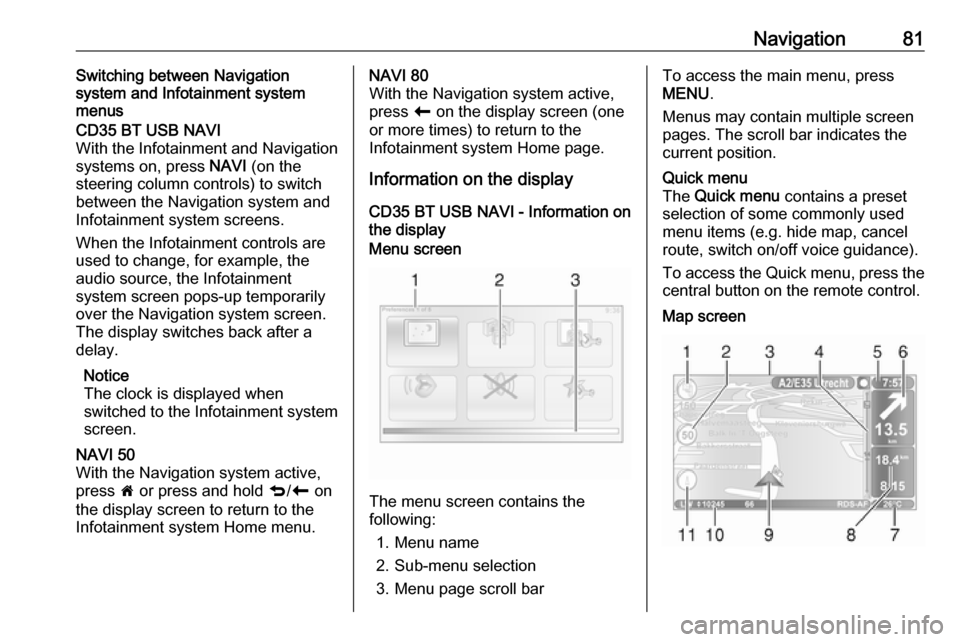
CD35 BT USB NAVI - Information on
the displayMenu screen
The menu screen contains the
following:
1. Menu name
2. Sub-menu selection
3. Menu page scroll bar
To access the main menu, press
MENU .
Menus may contain multiple screen pages. The scroll bar indicates the
current position.Quick menu
The Quick menu contains a preset
selection of some commonly used
menu items (e.g. hide map, cancel
route, switch on/off voice guidance).
To access the Quick menu, press the
central button on the remote control.Map screen
Page 93 of 147

Navigation93Name preferences
To display street and house numbers
on the map.Use day/night colours
In the default automatic mode, the
system will automatically switch
between day and night modes.
If manual mode is preferred,
automatic mode can be deactivated by selecting Use day colours or Use
night colours .
Automatic switching can be
reactivated using the Brightness
preferences menu.Change map colours
New colours can also be
downloaded. To select a downloaded colour, select an additional colour
scheme, then the colour required.Brightness preferences
Adjust the screen brightness to suit
the external lighting conditions.Set clock
When the clocks change in summer
or winter, or when travelling abroad,
the time on the system will need
adjusting. Select Set clock; the
system offers three display modes.Select the desired mode, then Done
using the soft button. Set the clock,
then select Done.
Clock synchronisation: The
synchronisation option allows the time to be set directly using GPS
information. Select the Sync option
with the left soft button ⌞.Start-up preferences
Used to change the system start-up
settings and also the start-up page by
customising it with a chosen photo.Show fewer menu options
Allows simplification of the menu to
facilitate better use. To reactivate all
options, select this icon again.Change language
To change language, select
Language: , the required language
can then be selected from the list.Reset factory settings
To reset all system parameters and delete all personal data.
Select Reset factory settings in the
main menu, then follow the on-screen instructions using the soft buttons.Partial reset: allows the deletion of allpersonal data (favourites, recent
destinations, etc.).
After resetting, the system will restart
in English.
NAVI 50 - Setting up the navigation
system
Press 7 followed by yNAVI / ýNav
then Options . This menu screen
allows you to check and update the
following map and navigation
settings:
● Warnings
● Route settings
● Map settings
● Voice settings
● Coordinate format
● GPS
● Map update
● Traffic (depending on version)
Page 94 of 147

94NavigationWarnings
Select Warnings to access the
following settings (switch off if not
required):
● Warn when speeding (On/Off)
● Speed limit always visible (On/
Off)
● Alert point warnings (On/Off)
● Pre-alert distance (0 m/200 m/
500 m)
Available depending on version.
Warn when speeding : The digital map
contains speed limits for certain
roads. Audio and/or visual warnings
are given when the vehicle exceeds
the speed limit.
Speed limit always visible : The speed
limit for certain roads is always visible on the screen.
Alert point warnings : When the
vehicle passes an alert point
(permanent or temporary) - i.e. when
entering a potentially hazardous area
requiring extra caution - audio and
visual warnings are given.Pre-alert distance : Select a distance
from which notifications of alert point warnings should be given.
Notice
Warnings may not be available for
some roads and regions.Route settings
Select Route settings to update the
following settings for route
calculation:
● Route planning method (Fast/
Short/ECO)
● Motorways (On/Off)
● Period charge (On/Off)
● Per-use toll (On/Off)
● Ferries (On/Off)
● Carpool/HOV (On/Off)
● Unpaved roads (On/Off)
If necessary, press Options then
Reset to defaults to set each of these
options back to the factory default
settings.
Alternatively, when the map is
displayed (no route guidance is
active), the Route settings menu can
be accessed by pressing Options.Refer to (NAVI 50) "Information on the
display", "Map screen" above for
further information.
Route planning method : Select Fast
to set the fastest route to the
destination entered. This method
assumes the vehicle travels at or near
the speed limit on all roads.
Select Short to set the shortest route
and minimise the total distance to
travel to the destination entered.
Select Eco to set a compromise
between the fastest and the shortest
route planning methods. The route
provided may be shorter than the
fastest method, but not significantly
slower.
Motorways : To include or exclude
motorways from the route plan.
Turn off, e.g. when towing a vehicle, or when motorway driving is not
permitted.
Notice
Follow the regulations of the country
in which you are driving.
Period charge : To include or exclude
roads which require a special license
to be purchased for certain periods.