instrument cluster VAUXHALL MOVANO_B 2016 Owner's Manual
[x] Cancel search | Manufacturer: VAUXHALL, Model Year: 2016, Model line: MOVANO_B, Model: VAUXHALL MOVANO_B 2016Pages: 233
Page 19 of 233
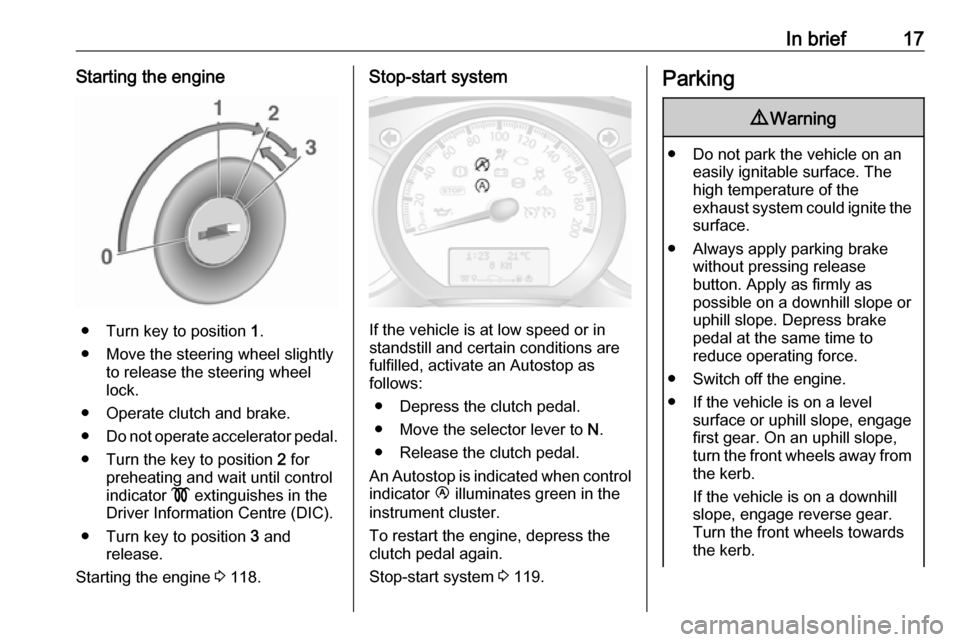
In brief17Starting the engine
● Turn key to position 1.
● Move the steering wheel slightly to release the steering wheel
lock.
● Operate clutch and brake.
● Do not operate accelerator pedal.
● Turn the key to position 2 for
preheating and wait until control
indicator ! extinguishes in the
Driver Information Centre (DIC).
● Turn key to position 3 and
release.
Starting the engine 3 118.
Stop-start system
If the vehicle is at low speed or in
standstill and certain conditions are
fulfilled, activate an Autostop as
follows:
● Depress the clutch pedal.
● Move the selector lever to N.
● Release the clutch pedal.
An Autostop is indicated when control indicator Ï illuminates green in the
instrument cluster.
To restart the engine, depress the
clutch pedal again.
Stop-start system 3 119.
Parking9 Warning
● Do not park the vehicle on an
easily ignitable surface. The
high temperature of the
exhaust system could ignite the
surface.
● Always apply parking brake without pressing release
button. Apply as firmly as
possible on a downhill slope or
uphill slope. Depress brake
pedal at the same time to
reduce operating force.
● Switch off the engine.
● If the vehicle is on a level surface or uphill slope, engage
first gear. On an uphill slope,
turn the front wheels away from
the kerb.
If the vehicle is on a downhill
slope, engage reverse gear.
Turn the front wheels towards the kerb.
Page 74 of 233

72Instruments and controlsInstruments and
controlsControls ....................................... 73
Steering wheel adjustment ........73
Steering wheel controls .............73
Horn ........................................... 73
Steering column controls ...........73
Windscreen wiper/washer .........74
Outside temperature ..................75
Clock ......................................... 75
Power outlets ............................. 76
Cigarette lighter ......................... 77
Ashtrays .................................... 77
Warning lights, gauges and indi‐ cators ........................................... 77
Instrument cluster ......................77
Speedometer ............................. 77
Odometer .................................. 78
Trip odometer ............................ 78
Tachometer ............................... 78
Fuel gauge ................................ 79
Engine coolant temperature gauge ....................................... 79
Engine oil level monitor .............80
Service display .......................... 80
Transmission display .................81Control indicators ......................81
Turn signal ................................. 83
Seat belt reminder .....................84
Airbag and belt tensioners .........84
Airbag deactivation ....................84
Charging system .......................84
Malfunction indicator light ..........84
Service vehicle soon .................85
Stop engine ............................... 85
Brake system ............................. 85
Antilock brake system (ABS) .....86
Upshift ....................................... 86
Lane departure warning ............86
Electronic Stability Program ......86
Electronic Stability Program off ............................................. 86
Engine coolant temperature ......87
Preheating ................................. 87
AdBlue ....................................... 87
Tyre pressure monitoring system ...................................... 87
Engine oil pressure ....................87
Low fuel ..................................... 88
Stop-start system ......................88
Exterior light .............................. 88
High beam ................................. 88
High beam assist .......................89
Fog light ..................................... 89
Rear fog light ............................. 89
Cruise control ............................ 89Tachograph............................... 89
Door open .................................. 89
Information displays .....................89
Driver Information Centre ..........89
Triple-Info-Display .....................90
Vehicle messages ........................90
Warning chimes .........................91
Trip computer ............................... 92
Tachograph .................................. 94
Page 79 of 233
Instruments and controls77Caution
Do not connect any current-delivering accessories, e.g.
electrical charging devices or
batteries.
Do not damage the outlets by
using unsuitable plugs.
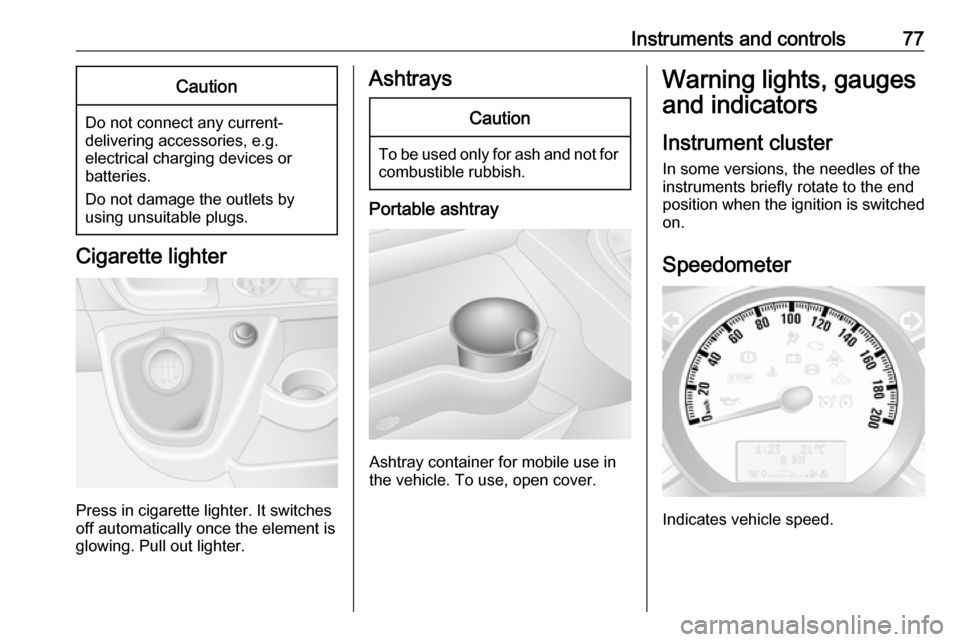
Cigarette lighter
Press in cigarette lighter. It switches
off automatically once the element is
glowing. Pull out lighter.
AshtraysCaution
To be used only for ash and not for combustible rubbish.
Portable ashtray
Ashtray container for mobile use in
the vehicle. To use, open cover.
Warning lights, gauges
and indicators
Instrument cluster
In some versions, the needles of the
instruments briefly rotate to the end
position when the ignition is switched
on.
Speedometer
Indicates vehicle speed.
Page 82 of 233

80Instruments and controlsCaution
If engine coolant temperature is
too high, stop vehicle, switch off
engine. Danger to engine. Check
coolant level.
For physical reasons, the coolant temperature gauge shows the coolant temperature only if the coolant level is adequate.
Engine oil level monitor
The engine oil level monitor is correct
only if the vehicle is parked on a level
surface with a cold engine.
If the engine oil level is correct when
the ignition is switched on OIL LEVEL
CORRECT appears briefly in the
Driver Information Centre (DIC).
If the engine oil is above the minimum level, press the trip computer button
on the end of the wiper lever within
30 seconds of switching on the
ignition. The message OIL LEVEL is
displayed in combination with the
squares that correspond to the oil
level.
As the oil level diminishes, the
squares in the display are replaced
with dashes.▢▢▢▢▢▢:maximum level▢▢▢- - -:intermediate level- - - - - -:minimum level
If the minimum engine oil level is
reached TOP-UP OIL LEVEL is
displayed in combination with control
indicator A after the ignition is
switched on for 30 seconds. Check
and top up engine oil 3 156.
To exit the oil level monitor display,
press either trip computer button.
Trip computer 3 92.
Service display When the ignition is switched on, the
remaining distance before the next
service is due may be shown briefly in the Driver Information Centre (DIC).
Based on driving conditions, the
interval at which a service will be
indicated can vary considerably.
When the remaining distance before
the next service is less than
1800 miles or 2 months, SERVICE
IN appears in the DIC.
When the distance reaches 0 miles or
the service date is due, control
indicators o and A illuminate in the
instrument cluster and SERVICE
DUE appears in the DIC.
The vehicle needs a service. Seek the assistance of a workshop.
Resetting the service display After a service, the service display
must be reset: if available, select the
distance before service display in the
DIC, then press and hold button on
end of wiper lever for approx.
10 seconds until the distance before
service is displayed continuously.
Trip computer 3 92.
Driver Information Centre (DIC)
3 89.
Service information 3 195.
Page 84 of 233
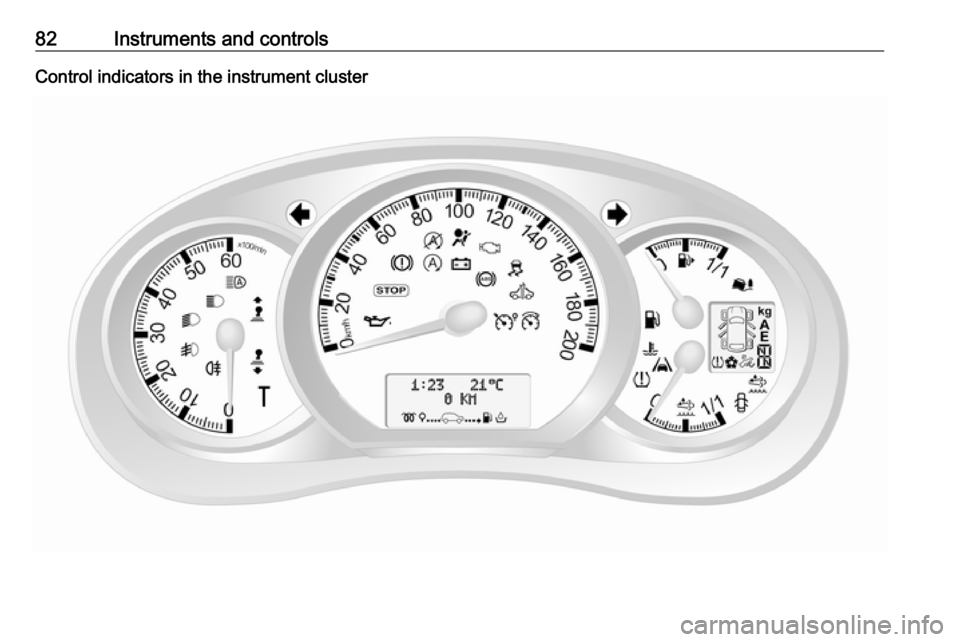
82Instruments and controlsControl indicators in the instrument cluster
Page 91 of 233

Instruments and controls89High beam assistí illuminates when the high beam
assist is activated 3 96.
Fog light > illuminates green.
Illuminated when the front fog lights are on 3 98.
Rear fog light r illuminates yellow.
Illuminated when the rear fog light is
on 3 99.
Cruise control m , U illuminates green or yellow.
m illuminates green when a certain
speed is stored.
U illuminates green when the system
is on.
Speed limiter U illuminates yellow.
U illuminates yellow when the
system is on.Cruise control, Speed limiter 3 139.
Tachograph
& illuminates when there is a fault
3 94.
Door open y illuminates yellow.
Illuminates with the ignition switched
on when a door or the load
compartment is open.
Depending on version, control
indicator also illuminates in
transmission display, indicating
relevant open door.Information displays
Driver Information Centre The Driver Information Centre (DIC)
is located in the instrument cluster
below the speedometer.
Depending on vehicle configuration,
the following items appear in the
display:
● outside temperature 3 75
● clock 3 75
● odometer, trip odometer 3 78
● engine oil level monitor 3 80
● service display 3 80
Page 94 of 233

92Instruments and controlsTrip computerThe trip computer provides
information on driving data, which is
continually recorded and evaluated electronically.
Depending on vehicle, the following
functions can be selected by pressing button repeatedly on end of wiper
lever:
● fuel used
● average consumption
● instantaneous consumption
● range
● distance travelled
● average speed
● distance before service 3 80
● clock 3 75
● odometer 3 78, trip odometer
3 78
● cruise control and speed limiter stored speed 3 139
● tyre pressures 3 177
● fault and information messages
Fuel used Displays the amount of fuel
consumed since the last reset.
The measurement can be restarted at any time by pressing and holding the
button on the end of the wiper lever.
Average consumption
The value is displayed after driving a distance of 0.25 miles.
Average consumption is displayed,
taking into consideration the distance
travelled and the fuel used since the
last reset.
The measurement can be restarted at
any time.Instantaneous consumption
The value is displayed after reaching
a speed of 20 mph.
Range
The value is displayed after driving a distance of 0.25 miles.
The range is calculated from the
current contents of the fuel tank and
the average consumption since the
last reset.
The range will not display if control
indicator Y is illuminated in the
instrument cluster 3 88.
The measurement can be restarted at
any time.
Distance travelled
Displays the distance driven since the
last reset.
The measurement can be restarted at
any time.
Average speedThe value is displayed after driving a
distance of 0.25 miles.
Page 96 of 233
94Instruments and controlsTachograph
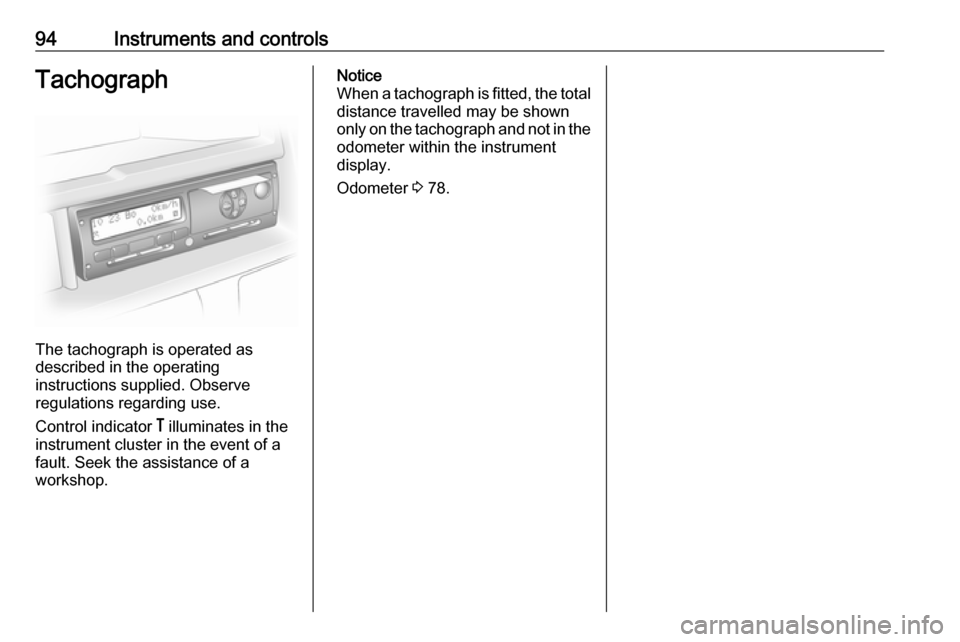
The tachograph is operated as
described in the operating
instructions supplied. Observe
regulations regarding use.
Control indicator & illuminates in the
instrument cluster in the event of a
fault. Seek the assistance of a
workshop.
Notice
When a tachograph is fitted, the total distance travelled may be shown
only on the tachograph and not in the
odometer within the instrument
display.
Odometer 3 78.
Page 98 of 233
96LightingDaytime running lights 3 97.
Automatic headlight activation
During poor lighting conditions the
headlights are switched on.
High beam
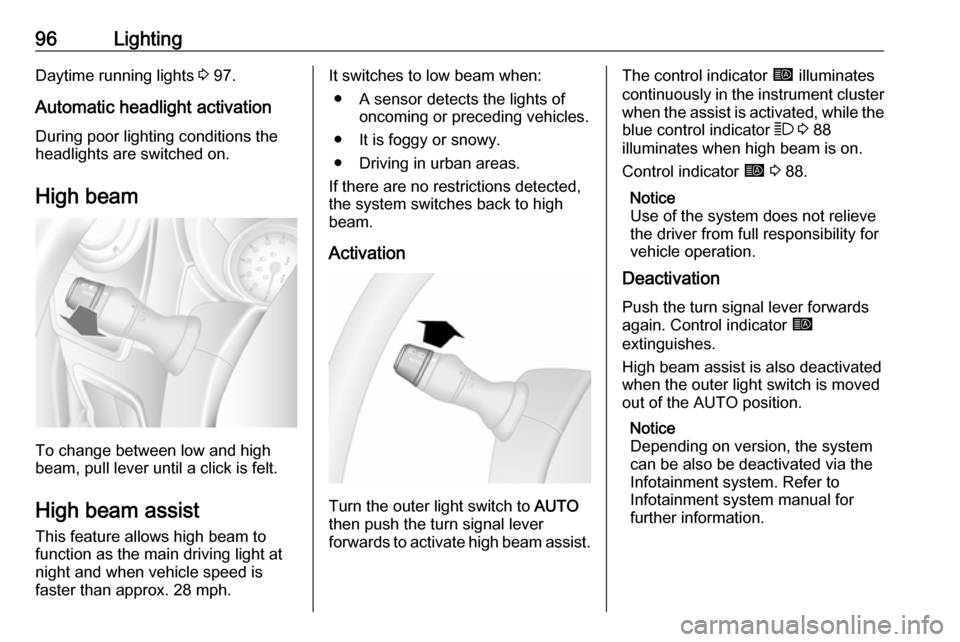
To change between low and high
beam, pull lever until a click is felt.
High beam assist This feature allows high beam to
function as the main driving light at
night and when vehicle speed is
faster than approx. 28 mph.
It switches to low beam when:
● A sensor detects the lights of oncoming or preceding vehicles.
● It is foggy or snowy.
● Driving in urban areas.
If there are no restrictions detected, the system switches back to high
beam.
Activation
Turn the outer light switch to AUTO
then push the turn signal lever
forwards to activate high beam assist.
The control indicator í illuminates
continuously in the instrument cluster when the assist is activated, while the
blue control indicator 7 3 88
illuminates when high beam is on.
Control indicator í 3 88.
Notice
Use of the system does not relieve
the driver from full responsibility for
vehicle operation.
Deactivation
Push the turn signal lever forwards
again. Control indicator í
extinguishes.
High beam assist is also deactivated when the outer light switch is moved
out of the AUTO position.
Notice
Depending on version, the system
can be also be deactivated via the
Infotainment system. Refer to
Infotainment system manual for
further information.
Page 120 of 233
118Driving and operatingStarting the engine
Manual transmission: operate clutch.
Manual transmission automated:
operate brake; transmission
automatically shifts to N.
Do not accelerate.
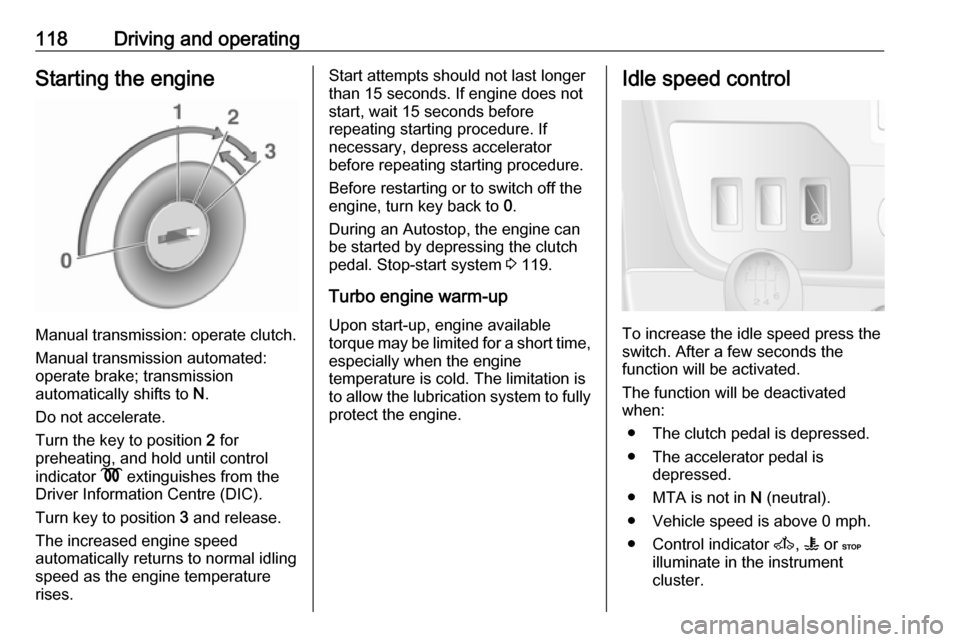
Turn the key to position 2 for
preheating, and hold until control
indicator N extinguishes from the
Driver Information Centre (DIC).
Turn key to position 3 and release.
The increased engine speed
automatically returns to normal idling
speed as the engine temperature
rises.
Start attempts should not last longer
than 15 seconds. If engine does not
start, wait 15 seconds before
repeating starting procedure. If
necessary, depress accelerator
before repeating starting procedure.
Before restarting or to switch off the
engine, turn key back to 0.
During an Autostop, the engine can
be started by depressing the clutch
pedal. Stop-start system 3 119.
Turbo engine warm-up Upon start-up, engine available
torque may be limited for a short time,
especially when the engine
temperature is cold. The limitation is
to allow the lubrication system to fully protect the engine.Idle speed control
To increase the idle speed press the
switch. After a few seconds the
function will be activated.
The function will be deactivated
when:
● The clutch pedal is depressed.
● The accelerator pedal is depressed.
● MTA is not in N (neutral).
● Vehicle speed is above 0 mph. ● Control indicator A, W or C
illuminate in the instrument
cluster.