steering VAUXHALL MOVANO_B 2020 User Guide
[x] Cancel search | Manufacturer: VAUXHALL, Model Year: 2020, Model line: MOVANO_B, Model: VAUXHALL MOVANO_B 2020Pages: 351, PDF Size: 9.32 MB
Page 98 of 351
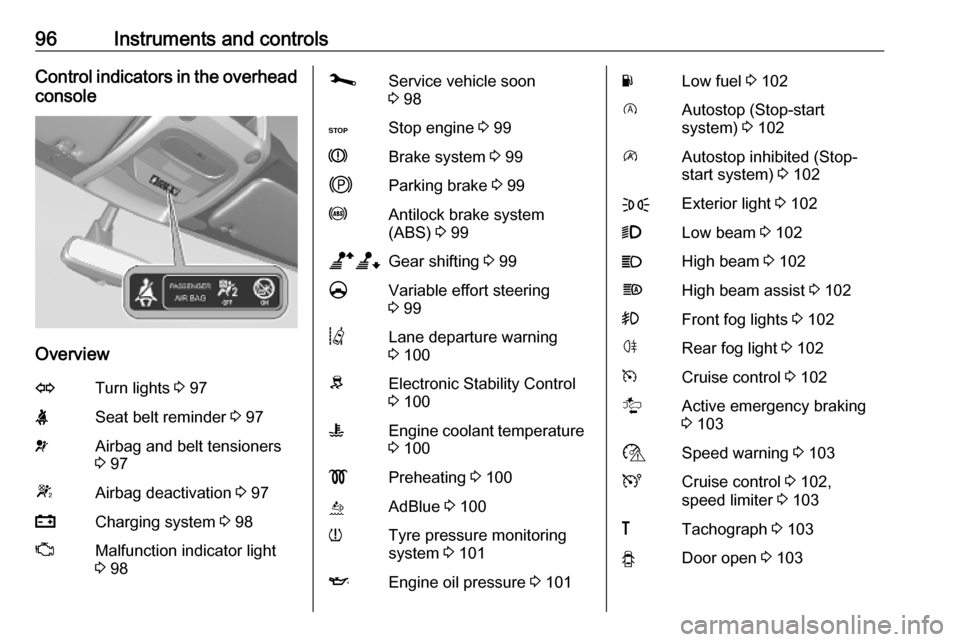
96Instruments and controlsControl indicators in the overhead
console
Overview
OTurn lights 3 97XSeat belt reminder 3 97vAirbag and belt tensioners
3 97WAirbag deactivation 3 97pCharging system 3 98ZMalfunction indicator light
3 98jService vehicle soon
3 98CStop engine 3 99RBrake system 3 99jParking brake 3 99uAntilock brake system
(ABS) 3 99baGear shifting 3 99§Variable effort steering
3 99QLane departure warning
3 100RElectronic Stability Control
3 100WEngine coolant temperature
3 100!Preheating 3 100úAdBlue 3 100wTyre pressure monitoring
system 3 101IEngine oil pressure 3 101YLow fuel 3 102DAutostop (Stop-start
system) 3 102\Autostop inhibited (Stop-
start system) 3 102FExterior light 3 1029Low beam 3 102CHigh beam 3 102fHigh beam assist 3 102>Front fog lights 3 102øRear fog light 3 102mCruise control 3 102lActive emergency braking
3 103$Speed warning 3 103UCruise control 3 102,
speed limiter 3 103&Tachograph 3 103yDoor open 3 103
Page 101 of 351
Instruments and controls999Warning
Have the cause of the fault
remedied immediately by a
workshop.
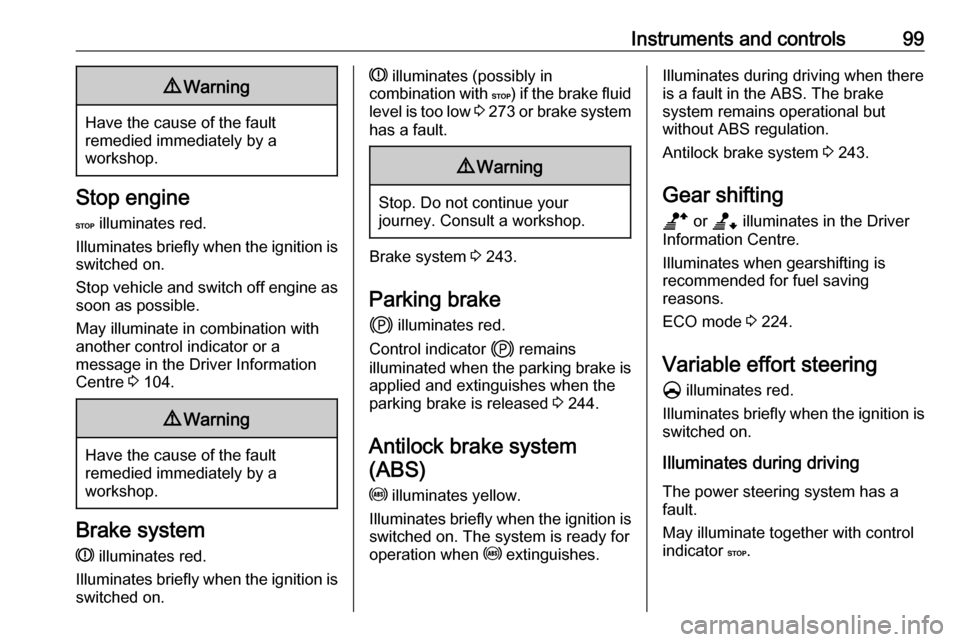
Stop engine
C illuminates red.
Illuminates briefly when the ignition is
switched on.
Stop vehicle and switch off engine as soon as possible.
May illuminate in combination with
another control indicator or a
message in the Driver Information
Centre 3 104.
9 Warning
Have the cause of the fault
remedied immediately by a
workshop.
Brake system
R illuminates red.
Illuminates briefly when the ignition is
switched on.
R illuminates (possibly in
combination with C) if the brake fluid
level is too low 3 273 or brake system
has a fault.9 Warning
Stop. Do not continue your
journey. Consult a workshop.
Brake system 3 243.
Parking brake j illuminates red.
Control indicator j remains
illuminated when the parking brake is
applied and extinguishes when the
parking brake is released 3 244.
Antilock brake system (ABS)
u illuminates yellow.
Illuminates briefly when the ignition is switched on. The system is ready for
operation when u extinguishes.
Illuminates during driving when there
is a fault in the ABS. The brake
system remains operational but
without ABS regulation.
Antilock brake system 3 243.
Gear shifting
b or a illuminates in the Driver
Information Centre.
Illuminates when gearshifting is
recommended for fuel saving
reasons.
ECO mode 3 224.
Variable effort steering § illuminates red.
Illuminates briefly when the ignition is
switched on.
Illuminates during driving
The power steering system has a
fault.
May illuminate together with control
indicator C.
Page 104 of 351

102Instruments and controls9Warning
When the engine is off,
considerably more force is needed
to brake and steer. During an
Autostop the brake servo unit will still be operational.
Do not remove key until vehicle is stationary, otherwise the steeringwheel lock could engage
unexpectedly.
Check engine oil level 3 270.
Keep engine turned off and let the
vehicle be towed to a workshop.
Low fuel Y illuminates yellow.
Illuminates when the ignition is
switched on and extinguishes shortly
after the engine starts.
Illuminates when the engine is
running
Fuel level in the tank is too low. Refuel
immediately.
Never run the tank dry.
Refuelling 3 262.
Catalytic converter 3 233.
Bleeding the diesel fuel system
3 275.
Stop-start system \ illuminates when an Autostop is
inhibited when certain conditions are
not fulfilled.
Ï illuminates during an Autostop.
Ï flashes if the clutch is not released
sufficiently.
Stop-start system 3 227.
Exterior light
F illuminates green.
Illuminated when the side lights are
on 3 109.
Low beam
9 illuminates or flashes green.
Illuminates
Illuminated when the headlights are on 3 109.Flashes
Fault in the lighting.
High beam P illuminates blue.
Illuminated when high beam is on and during headlight flash 3 110.
High beam assist f illuminates when the high beam
assist is activated 3 110.
Front fog lights
> illuminates green.
Illuminated when the front fog lights
are on 3 112.
Rear fog light ø illuminates yellow.
Illuminated when the rear fog light is on 3 113.
Cruise control
U , m illuminate green.
Page 106 of 351
104Instruments and controlsDisplaysDriver Information Centre
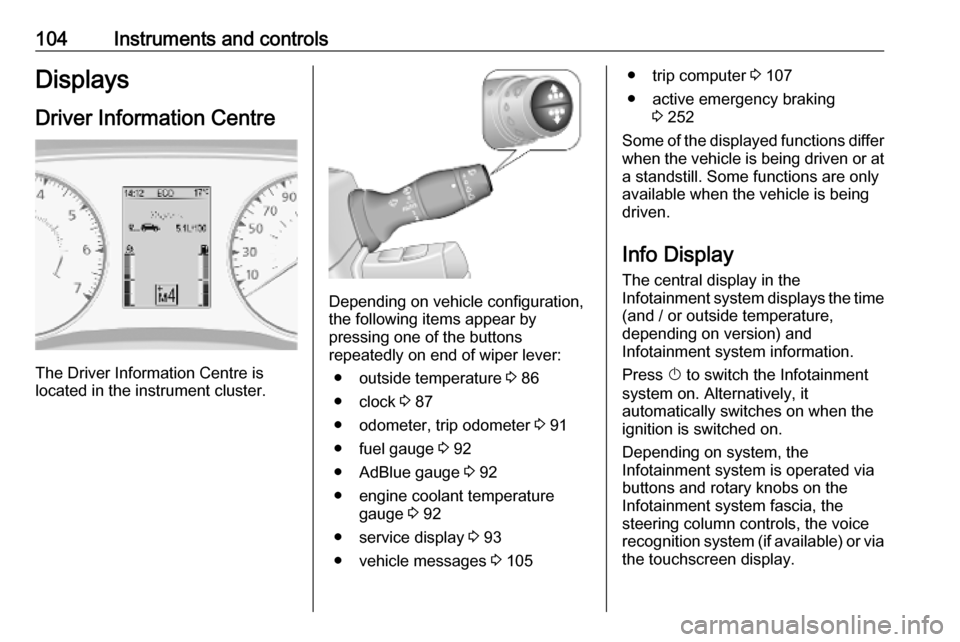
The Driver Information Centre is
located in the instrument cluster.
Depending on vehicle configuration,
the following items appear by
pressing one of the buttons
repeatedly on end of wiper lever:
● outside temperature 3 86
● clock 3 87
● odometer, trip odometer 3 91
● fuel gauge 3 92
● AdBlue gauge 3 92
● engine coolant temperature gauge 3 92
● service display 3 93
● vehicle messages 3 105
● trip computer 3 107
● active emergency braking 3 252
Some of the displayed functions differ
when the vehicle is being driven or at a standstill. Some functions are only
available when the vehicle is being
driven.
Info Display The central display in the
Infotainment system displays the time
(and / or outside temperature,
depending on version) and
Infotainment system information.
Press X to switch the Infotainment
system on. Alternatively, it automatically switches on when the
ignition is switched on.
Depending on system, the
Infotainment system is operated via buttons and rotary knobs on the
Infotainment system fascia, the
steering column controls, the voice
recognition system (if available) or via the touchscreen display.
Page 114 of 351
112LightingDaytime running lights
Daytime running lights increase
visibility of the vehicle during daylight.
The lights operate automatically
when the ignition is switched on.
If the vehicle is equipped with the
automatic light control function, the
system switches between daytime running lights and headlights
automatically depending on the
lighting conditions.
Automatic light control 3 109.
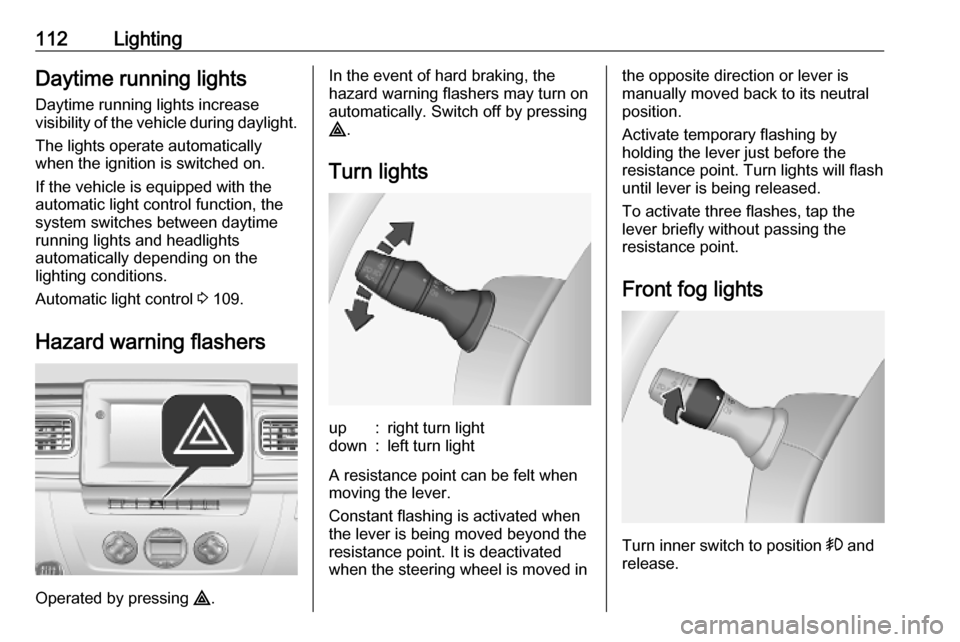
Hazard warning flashers
Operated by pressing ¨.
In the event of hard braking, the
hazard warning flashers may turn on automatically. Switch off by pressing
¨ .
Turn lightsup:right turn lightdown:left turn light
A resistance point can be felt when
moving the lever.
Constant flashing is activated when
the lever is being moved beyond the
resistance point. It is deactivated
when the steering wheel is moved in
the opposite direction or lever is
manually moved back to its neutral
position.
Activate temporary flashing by
holding the lever just before the
resistance point. Turn lights will flash
until lever is being released.
To activate three flashes, tap the
lever briefly without passing the
resistance point.
Front fog lights
Turn inner switch to position > and
release.
Page 117 of 351
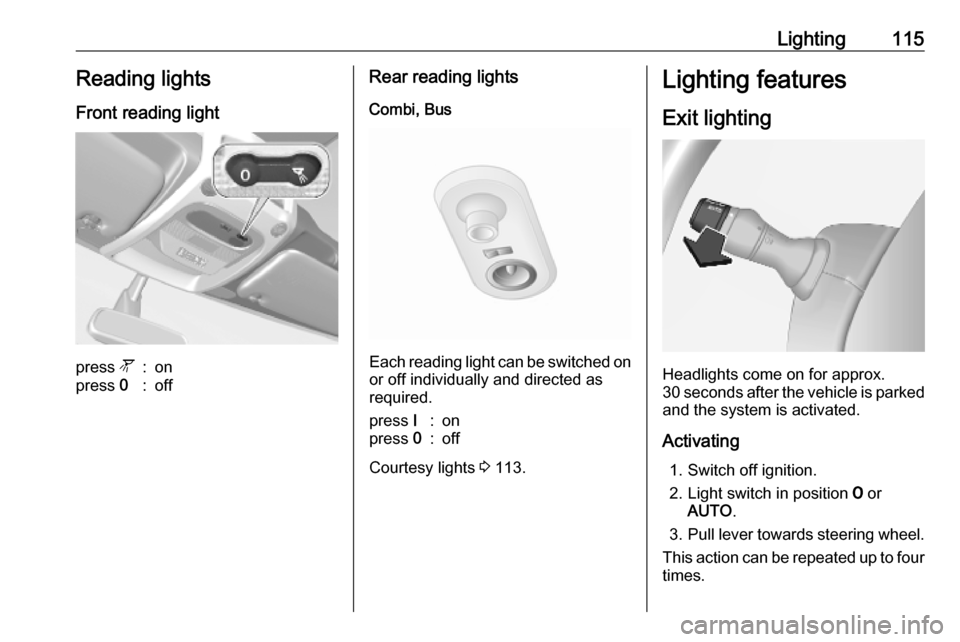
Lighting115Reading lightsFront reading lightpress l:onpress 0:offRear reading lights
Combi, Bus
Each reading light can be switched on
or off individually and directed as
required.
press I:onpress 0:off
Courtesy lights 3 113.
Lighting features
Exit lighting
Headlights come on for approx.
30 seconds after the vehicle is parked
and the system is activated.
Activating 1. Switch off ignition.
2. Light switch in position 7 or
AUTO .
3. Pull lever towards steering wheel.
This action can be repeated up to four
times.
Page 119 of 351

Infotainment system117Infotainment systemIntroduction................................ 117
General information .................117
Theft-deterrent feature ............119
Control elements overview ......121
Usage ...................................... 128
Touch operation overview .......135
Tone settings ........................... 136
Volume settings .......................137
System settings .......................138
Radio ......................................... 143
Usage ...................................... 143
Station search ......................... 144
Autostore lists .......................... 146
Radio data system (RDS) ........147
Digital audio broadcasting .......150
AUX input ................................... 150
General information .................150
Usage ...................................... 151
USB port .................................... 152
General information .................152
Playing saved audio files .........153
Bluetooth music .........................155
General information .................155
Operation ................................. 155External devices........................160
Displaying pictures ..................160
Playing movies ........................ 161
Using smartphone applications ............................ 162
Navigation .................................. 163
General information .................163
Usage ...................................... 165
Destination input ......................176
Guidance ................................. 182
Symbols overview ...................189
Voice recognition .......................190
General information .................190
Navigation control ....................191
Phone control .......................... 192
Phone ........................................ 192
General information .................192
Connection .............................. 194
Bluetooth connection ...............196
Emergency call ........................199
Operation ................................. 200
Mobile phones and CB radio equipment ............................... 206Introduction
General information
The Infotainment system provides
state-of-the-art in-car information and
entertainment.
The radio is equipped with assignable channel presets for FM, AM and also
DAB wavebands (depending on
version).
External data storage devices, e.g.
iPod, MP3 player or USB stick, or a
portable player can be connected to
the Infotainment system. External
audio sources can also be connected
via Bluetooth.
The digital sound processor provides
several preset equalizer modes for
sound optimisation.
The navigation system's dynamic
route planning will reliably guide to
the chosen destination and can help
avoid traffic jams and other traffic
problems.
Optionally, the Infotainment system
can be operated using controls on the steering column or via the voice
recognition system.
Page 120 of 351

118Infotainment systemIn addition, the Infotainment systemcan be equipped with a handsfree
phone system.
The well-thought-out design of the
controls and the clear displays enable
to control the system easily and
intuitively.
Notice
This manual describes all options
and features available for the
various Infotainment systems.
Certain descriptions, including those for display and menu functions, may
not apply to your vehicle due to
model variant, country
specifications, special equipment or
accessories.
Important information on
operation and traffic safety9 Warning
Drive safely at all times when
using the Infotainment system.
If in doubt, stop the vehicle before operating the Infotainment
system.
Radio reception
Radio reception may be disrupted by static, noise, distortion or loss of
reception due to:
● changes in distance from the transmitter
● multi-path reception due to reflection
● shadowing
In case of poor radio reception the
volume will automatically drop as to
minimize the disturbance effect.
Using this manual ● This manual describes features that may or may not be on your
specific vehicle, either because
they are optional or due to
changes subsequent to the
printing of this manual. Please
refer to the purchase
documentation to confirm each of the features found on the vehicle.
● Certain controls and descriptions, including symbols,
displays and menu functions may not apply to your vehicle due tomodel variant, country
specifications, special equipment or accessories.
● The table of contents at the beginning of this manual and
within each section shows where
the information is located.
● The index will enable to search for specific information.
● The vehicle display screens may not support your specific
language.
● Display messages and interior labelling are written in bold
letters.
● The operations given within this manual refer to Infotainment
system controls. For equivalent
steering column controls, refer to the control elements overview
3 121.
Page 128 of 351
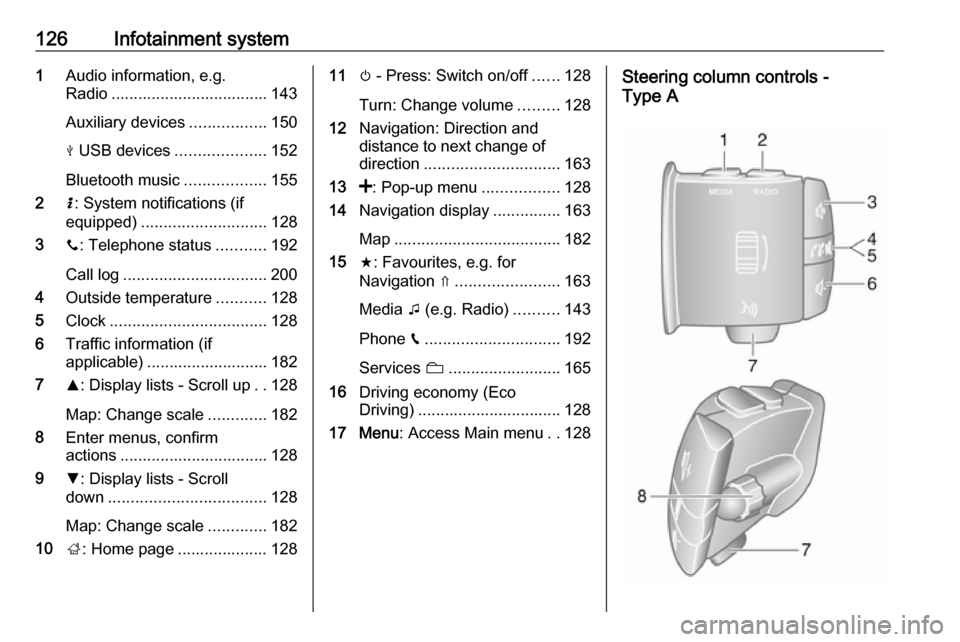
126Infotainment system1Audio information, e.g.
Radio ................................... 143
Auxiliary devices .................150
M USB devices ....................152
Bluetooth music ..................155
2 H: System notifications (if
equipped) ............................ 128
3 y: Telephone status ...........192
Call log ................................ 200
4 Outside temperature ...........128
5 Clock ................................... 128
6 Traffic information (if
applicable) ........................... 182
7 R: Display lists - Scroll up ..128
Map: Change scale .............182
8 Enter menus, confirm
actions ................................. 128
9 S: Display lists - Scroll
down ................................... 128
Map: Change scale .............182
10 ;: Home page .................... 12811 m - Press: Switch on/off ......128
Turn: Change volume .........128
12 Navigation: Direction and
distance to next change of
direction .............................. 163
13 <: Pop-up menu .................128
14 Navigation display ...............163
Map ..................................... 182
15 f: Favourites, e.g. for
Navigation ⇑ ....................... 163
Media t (e.g. Radio) ..........143
Phone g.............................. 192
Services N......................... 165
16 Driving economy (Eco
Driving) ................................ 128
17 Menu : Access Main menu ..128Steering column controls -
Type A
Page 129 of 351
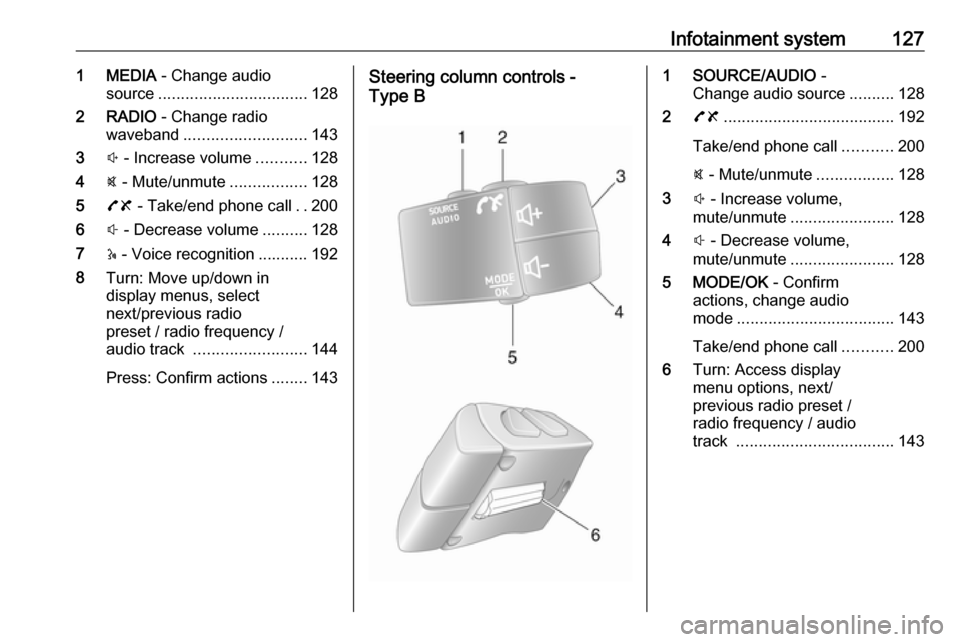
Infotainment system1271 MEDIA - Change audio
source ................................. 128
2 RADIO - Change radio
waveband ........................... 143
3 ! - Increase volume ...........128
4 @ - Mute/unmute .................128
5 78 - Take/end phone call ..200
6 # - Decrease volume ..........128
7 5 - Voice recognition ........... 192
8 Turn: Move up/down in
display menus, select
next/previous radio
preset / radio frequency /
audio track ......................... 144
Press: Confirm actions ........143Steering column controls -
Type B1 SOURCE/AUDIO -
Change audio source ..........128
2 78 ...................................... 192
Take/end phone call ...........200
@ - Mute/unmute .................128
3 ! - Increase volume,
mute/unmute ....................... 128
4 # - Decrease volume,
mute/unmute ....................... 128
5 MODE/OK - Confirm
actions, change audio
mode ................................... 143
Take/end phone call ...........200
6 Turn: Access display
menu options, next/
previous radio preset /
radio frequency / audio
track ................................... 143