steering VAUXHALL MOVANO_B 2020 Service Manual
[x] Cancel search | Manufacturer: VAUXHALL, Model Year: 2020, Model line: MOVANO_B, Model: VAUXHALL MOVANO_B 2020Pages: 351, PDF Size: 9.32 MB
Page 274 of 351
272Vehicle careEngine coolantThe factory filled coolant provides
freeze protection down to approx.
-28 °C.Caution
Only use approved antifreeze.
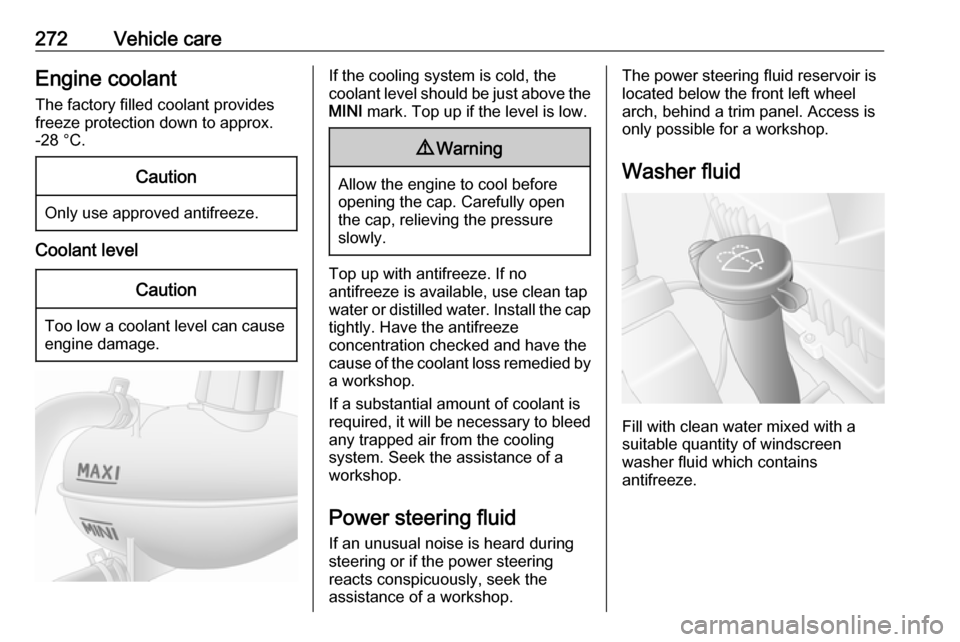
Coolant level
Caution
Too low a coolant level can cause engine damage.
If the cooling system is cold, the
coolant level should be just above the
MINI mark. Top up if the level is low.9Warning
Allow the engine to cool before
opening the cap. Carefully open
the cap, relieving the pressure
slowly.
Top up with antifreeze. If no
antifreeze is available, use clean tap
water or distilled water. Install the cap
tightly. Have the antifreeze
concentration checked and have the
cause of the coolant loss remedied by a workshop.
If a substantial amount of coolant is
required, it will be necessary to bleed
any trapped air from the cooling
system. Seek the assistance of a
workshop.
Power steering fluid If an unusual noise is heard during
steering or if the power steering
reacts conspicuously, seek the
assistance of a workshop.
The power steering fluid reservoir is
located below the front left wheel
arch, behind a trim panel. Access is
only possible for a workshop.
Washer fluid
Fill with clean water mixed with a
suitable quantity of windscreen
washer fluid which contains
antifreeze.
Page 297 of 351
Vehicle care295On vehicles with twin rear wheels,
tyre chains are only permitted on the
outer wheels.
Always use fine mesh chains that add
no more than 15 mm to the tyre tread
and the inboard sides (including chain
lock).9 Warning
Damage may lead to tyre blowout.
Wheel covers on steel wheels may
come into contact with parts of the
chains. In such cases, remove the
wheel covers.
Tyre chains may only be used at
speeds up to 30 mph and, when
travelling on roads that are free of
snow, they may only be used for brief
periods since they are subject to rapid wear on a hard road and may snap.
The use of tyre chains is not permitted on the temporary spare wheel or on
wheels of a different size than those
fitted at the factory.
Tyre repair kit
Minor damage to the tyre tread can be
repaired with the tyre repair kit.
Do not remove foreign bodies from
the tyres.
Tyre damage exceeding 4 mm or that
is at the tyre's sidewall near the rim
cannot be repaired with the tyre repair kit.9 Warning
Do not drive faster than 50 mph.
Do not use for a lengthy period.
Steering and handling may be
affected.
If the vehicle has a flat tyre:
Apply the parking brake and engage
neutral (manual transmission) or N
(manual transmission automated).
The tyre repair kit is located under the
front seat. Slide seat forwards fully
and fold backrest down to access kit.
1. Take the tyre repair kit out from under the front seat.
2. Remove the compressor.
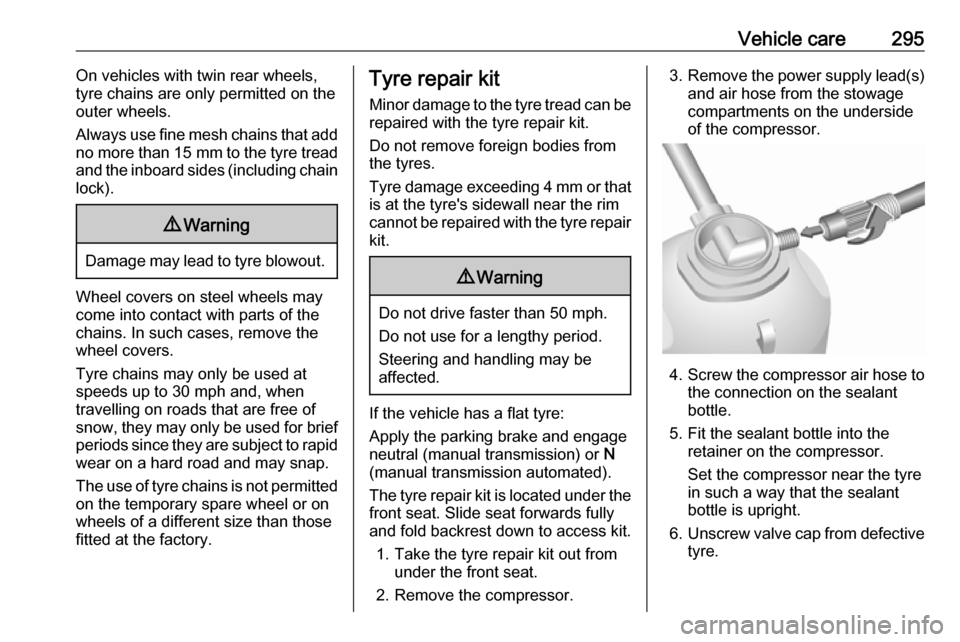
3. Remove the power supply lead(s)
and air hose from the stowage
compartments on the underside
of the compressor.
4. Screw the compressor air hose to
the connection on the sealant
bottle.
5. Fit the sealant bottle into the retainer on the compressor.
Set the compressor near the tyre
in such a way that the sealant
bottle is upright.
6. Unscrew valve cap from defective
tyre.
Page 308 of 351
306Vehicle careCaution
Do not tow the vehicle from the
rear. The front towing eye must
only be used for towing and not
recovering a vehicle.
Switch on ignition to permit operation
of brake lights, horn and windscreen
wipers, and move the steering wheel
slightly to release the steering wheel
lock.
Switch off the air suspension system 3 230.
Caution
Deactivate the driver assistance
systems like active emergency
braking 3 252, otherwise the
vehicle may automatically brake during towing.
Move the selector lever to neutral.
Release the parking brake.
Caution
Vehicles with manual
transmission automated: If neutral cannot be selected, the vehiclemust only be towed with the drive
wheels raised off the ground.
The vehicle should always be
towed with the ignition switched
off.
Manual transmission automated
3 240.
Caution
Drive slowly. Do not drive jerkily.
Excessive tractive force can
damage the vehicle.
When the engine is not running,
considerably more force is needed to
brake and steer.
To prevent the entry of exhaust fumes
from the towing vehicle, switch on the air recirculation system 3 208 and
close the windows.
Seek the assistance of a workshop.
After towing, unscrew the towing eye
and refit the cover.
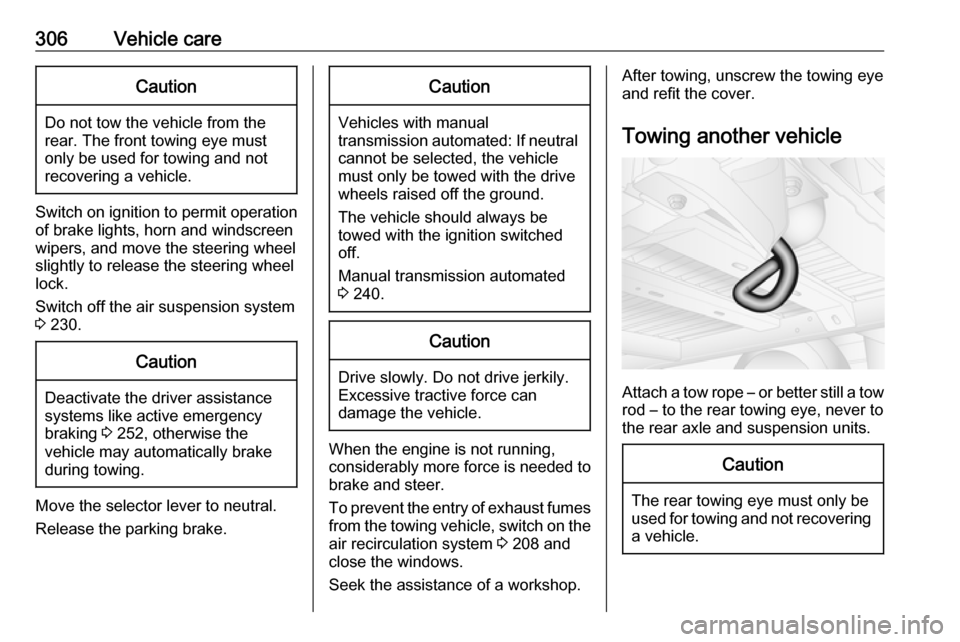
Towing another vehicle
Attach a tow rope – or better still a tow
rod – to the rear towing eye, never to
the rear axle and suspension units.
Caution
The rear towing eye must only be
used for towing and not recovering a vehicle.
Page 325 of 351

Customer information323Comfort and infotainment
functions
Comfort settings and custom settings
can be stored in the vehicle and
changed or reset at any time.
Depending on the equipment level in
question, these include
● seat and steering wheel position settings
● chassis and air conditioning settings
● custom settings such as interior lighting
You can input your own data in the
infotainment functions for your
vehicle as part of the selected
features.
Depending on the equipment level in
question, these include
● multimedia data such as music, videos or photos for playback in
an integrated multimedia system
● address book data for use with an
integrated hands-free system or an integrated navigation system● input destinations
● data on the use of online services
This data for comfort and
infotainment functions can be stored
locally in the vehicle or be kept on a
device that you have connected to the
vehicle ( e.g. a smartphone, USB stick
or MP3 player). Data that you have input yourself can be deleted at any
time.
This data can only be transmitted out
of the vehicle at your request,
particularly when using online
services in accordance with the
settings selected by you.
Smartphone integration, e.g.
Android Auto or Apple CarPlay
If your vehicle is equipped
accordingly, you can connect your
smartphone or another mobile device
to the vehicle so that you can control
it via the controls integrated in the
vehicle. The smartphone image and
sound can be output via the
multimedia system in this case. At the same time, specific information is
transmitted to your smartphone.
Depending on the type of integration,this includes data such as position
data, day / night mode and other
general vehicle information. For more
information, please see the operating
instructions for the vehicle /
infotainment system.
Integration allows selected
smartphone apps to be used, such as navigation or music playback. No
further integration is possible
between smartphone and vehicle, in
particular active access to vehicle
data. The nature of further data
processing is determined by the
provider of the app used. Whether
you can define settings, and if so
which ones, is dependent on the app
in question and your smartphone's
operating system.
Page 347 of 351

345Oil pressure................................ 101
Onboard computer...................... 128
Operation ............................ 155, 200
Outside temperature ....................86
Overcab storage ..................75, 336
Overhead console .......................74
Overrun cut-off ........................... 227
P Pairing a mobile phone ...............196
Pairing an audio device ..............155
Park Assist.................................. 128
Parking ................................ 18, 230
Parking assist ............................ 254
Parking brake ....................... 99, 244
Parking distance control .............254
Parking ticket holder .....................43
Particulate filter ........................... 232
Pedals......................................... 224
Performing work ........................269
Phone ......................................... 192
Phonebook ................................. 200
Phone connection .......................194
Phone control ............................. 192
Phone controls............................ 192
Phone installation instructions ....206
Phone menu ............................... 200
Phone operating guidelines ........206
Phone projection ........................162
Phone settings ............................ 200Photos........................................ 160
Pictures....................................... 160 Planning preferences .................165
Playing movies ........................... 161
Playing music via Bluetooth .......155
Playing saved audio files ............153
POI categories ............................ 176
Points of interest .........................128
Points of Interest (POI) ...............176
POIs.................................... 128, 176
Portable CD players ...................151
Power door locks ..........................28
Power outlets ............................... 87
Power side step ............................ 29
Power sliding door ........................29
Power steering fluid ....................272
Power take-off ............................ 265
Power windows ............................ 41
Preheating ......................... 100, 226
Prepare route in advance ...........176
PTY (Program type).................... 147
Puncture ............................. 295, 298
Q Quick menu ................................ 165
R Radio .......................................... 143
DAB ......................................... 150
Digital Audio Broadcasting ......150
Radio controls............................. 143Radio data system (RDS) ..........147
Radio Frequency Identification (RFID) ..................................... 324
Radio functions ...................146, 147
Radio reception .......................... 143
Radio remote control ...................20
Radio station name search .........144
Radio text ................................... 147
Rain sensor .................................. 85
RDS ............................................ 147
REACH ....................................... 321
Reading lights ............................ 115
Rear air conditioning system .....214
Rear bench seat storage ..............74
Rear camera ............................... 128
Rear camera view settings .........128
Rear courtesy light...................... 113
Rear doors ................................... 33
Rear fog light .............102, 113, 279
Rear heating system .................. 212
Rear OFF.................................... 136
Rear reading light .......................115
Rear reversing lens ......................41
Rear seats ................................... 51
Bus ............................................ 51
Installing .................................... 51
Rear seat access ......................51
Removing .................................. 51
Rear storage ................................. 75
Rear view camera ...................... 258
Page 348 of 351

346Rear view display.........................40
Rear windows .............................. 41
Rear window wiper setting.......... 128
Recalling a station ......................146
Recalling a stored station ...........144
Receiving calls............................ 200
Recent destinations ....................176
Recommended fluids and lubricants ........................ 311, 315
Refuelling ................................... 262 Region ........................................ 147
Registered trademarks ...............321
Remote control ............................. 20
Restore default settings ..............128
Restore factory settings ..............138
Retractable parking brake ..........244
Reversing lights .........................113
Ride control systems ..........246, 248
Ride height ................................. 230
Roller shutter .............................. 335
Roof .............................................. 43
Glass panel ............................... 43
Roof load ...................................... 81
Roof rack ..................................... 81
Route .......................................... 165
Route information .......................182
Route planning method ..............165
Route settings............................. 165S
Safety alerts................................ 165
Safety belts ................................... 54
Safety net .................................... 79
Safety prop ................................. 330
Save a favourite destination .......176
Saved locations .......................... 176
SD card............................... 163, 165
Search for Bluetooth device .......196
Search radio station name .........144
Seat adjustment ....................... 7, 46 Seat belt ........................................ 8
Seat belt reminder .......................97
Seat belts ..................................... 54
Seat heating ................................. 51
Seat position ................................ 45
Security code .............................. 119
Select a destination ....................176
Selecting the waveband .............143
Selective catalytic reduction .......233
Selector lever ............................. 241
Service ............................... 222, 310
Service display ......................93, 98
Service information ....................310
Services ...................................... 128
Service vehicle soon .................... 98
Settings....................................... 128
Setting the time........................... 128
Setting the volume ......................128
Setting up the navigation system 165Side airbag system ......................62
Side blind spot alert ....................256
Sideboards ................................. 327
Sidelights .................................... 109
Side turn lights ........................... 281
Side wind assist .......................... 247
Side windows................................ 41
Simulcast .................................... 147
Slideshow ................................... 165
Sliding door .................................. 29
Sliding side door ........................... 29
Smartphone Phone projection .....................162
Software version .........................200
Sound optimisation .....................136
Spare wheel ............................... 300
Speed cameras .......................... 165
Speed dependent volume ..........137
Speed limiter....................... 103, 250
Speedometer ............................... 90
Speed warning ........................... 103
Starting and operating ................225
Starting off ................................... 17
Starting the engine .......17, 226, 241
Station search............................. 144
Station storing............................. 146
Steering ...................................... 224
Steering column controls ......84, 121
Steering wheel adjustment ....10, 84
Steering wheel controls ...............84
Page 349 of 351

347Step............................................ 335
Stop engine .................................. 99
Stop-start system.......... 17, 102, 227
Storage ................................. 72, 337
Storage compartments .................72
Storage net ............................. 73, 74
Stored stations............................ 144
Sun visors .................................... 43
Suspension height ......................230
Suspension seat ........................... 46
Switching on/off .......................... 128
Swivelling shelf ............................. 73
Symbols ......................................... 4
Symbols overview ...................... 189
System settings .......................... 138
T
Tachograph ........................ 103, 108
Tachometer ................................. 91
Tailboard..................................... 326
Tail lights ................................... 279
Technical data ............................ 333
Text information (Radio text) ......147
Theft-deterrent feature ..............119
Three-point seat belt .................... 55 Thumbnails ................................. 160
Time............................................ 128
Tipper operation ......................... 328
Tone settings .............................. 136
Toolbox ....................................... 332Tools .......................................... 289
Top-Tether .................................... 64
Touch operation overview ..........135
Touchscreen ............................... 104
Tow bar....................................... 264 Towing ........................................ 264
Towing another vehicle .............306
Towing a trailer ........................... 264
Towing equipment .....................265
Towing eye ................................. 305
Towing the vehicle .....................305
Traction Control system ............. 246
Traffic announcements (TA) .......147
Traffic announcement volume ....137
Traffic information .......................182
Traffic info service ......................163
Traffic safety ....................... 117, 192
Trailer coupling ........................... 264
Trailer stability assist .................265
Trailer towing ............................. 264
Transmission ............................... 16
Transmission display ...........93, 240
Tread depth ............................... 293
Treble ......................................... 136
Trip computer ....................107, 128
Trip odometer .............................. 91
Trip report ................................... 128
Turbo engine warm-up ...............226
Turn lights ............................ 97, 112
Tyre chains ................................ 294Tyre changing............................. 298
Tyre designations ......................290
Tyre pressure ............................ 290
Tyre pressure monitoring system ............................. 101, 291
Tyre pressures ........................... 316
Tyre repair kit ............................. 295
Tyres .......................................... 290
Tyres and wheel size, changing. 294
U Underseat storage .......................74
Unpairing a mobile phone ..........196
Update FM list ............................ 146
Updating stations list ..................146
Upholstery .................................. 309
Usage ................. 128, 143, 151, 165
USB drive ................................... 152
USB drives.................................. 153
USB memory stick ..............163, 165
USB port ..................................... 152
USB socket ........................... 87, 153
Using smartphone applications ..162
Using the display screen ............128
Using the Infotainment system ...128
Using this manual ..................3, 117
V
Variable effort steering .................99
Vehicle battery ...................273, 303
Vehicle checks ...................269, 332