USB VAUXHALL MOVANO_B 2020 Owner's Manual
[x] Cancel search | Manufacturer: VAUXHALL, Model Year: 2020, Model line: MOVANO_B, Model: VAUXHALL MOVANO_B 2020Pages: 351, PDF Size: 9.32 MB
Page 14 of 351

12In brief1Side air vents ...................... 220
2 Light switch ........................ 109
Turn lights ........................... 112
Front / rear fog lights ..........112
Headlight flash ....................111
High beam ........................... 110
High beam assist ...............110
Exit lighting ......................... 115
3 Horn ..................................... 84
Driver airbag ......................... 61
4 Instruments .......................... 90
Driver Information Centre .... 104
5 Windscreen wiper and
washer, rear wiper and
washer ................................. 85
Buttons for Driver
Information Centre ..............104
6 Air vents ............................. 220
7 Info Display ........................ 104
8 USB socket, AUX socket,
SD card slot .......................... 87
9 Storage ................................. 7210Cupholder ............................. 73
11 Tray ....................................... 72
12 Glovebox .............................. 73
13 Parking assist ...................... 254
Lane departure warning ......260
Electronic Stability Control
and Traction Control ...........246
Hazard warning flashers ....112
Central locking system ..........23
Stop-start system ................227
Side blind spot alert ............256
ECO mode .......................... 224
14 Inductive charging .................89
15 Climate control system ........ 207
16 Power outlet .......................... 87
17 Cruise control .....................248
Speed limiter ....................... 250
18 Manual transmission ..........240
Manual transmission
automated .......................... 240
19 Ignition switch .....................22520Infotainment controls
21 Steering wheel adjustment ..84
22 Bonnet release lever ..........269
23 Fuse box ............................ 286
24 Headlight range
adjustment ......................... 111
25 Power take-off .....................265
Idle speed control ...............227
Laden mode kg ...................242
Page 90 of 351
88Instruments and controls
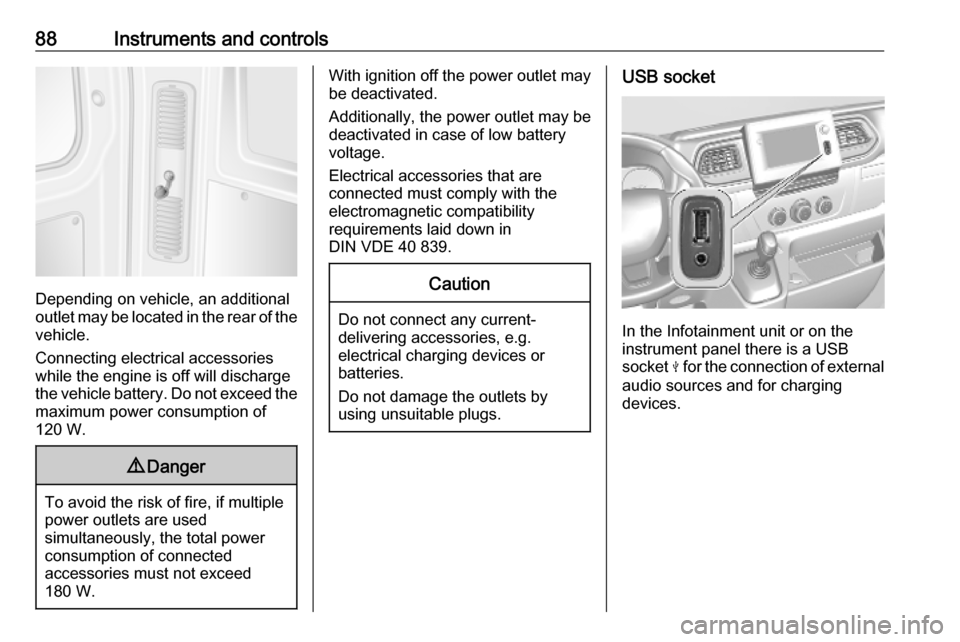
Depending on vehicle, an additional
outlet may be located in the rear of the
vehicle.
Connecting electrical accessories
while the engine is off will discharge
the vehicle battery. Do not exceed the
maximum power consumption of
120 W.
9 Danger
To avoid the risk of fire, if multiple
power outlets are used
simultaneously, the total power
consumption of connected
accessories must not exceed
180 W.
With ignition off the power outlet may
be deactivated.
Additionally, the power outlet may be
deactivated in case of low battery
voltage.
Electrical accessories that are
connected must comply with the
electromagnetic compatibility
requirements laid down in
DIN VDE 40 839.Caution
Do not connect any current- delivering accessories, e.g.
electrical charging devices or
batteries.
Do not damage the outlets by
using unsuitable plugs.
USB socket
In the Infotainment unit or on the
instrument panel there is a USB
socket M for the connection of external
audio sources and for charging
devices.
Page 119 of 351

Infotainment system117Infotainment systemIntroduction................................ 117
General information .................117
Theft-deterrent feature ............119
Control elements overview ......121
Usage ...................................... 128
Touch operation overview .......135
Tone settings ........................... 136
Volume settings .......................137
System settings .......................138
Radio ......................................... 143
Usage ...................................... 143
Station search ......................... 144
Autostore lists .......................... 146
Radio data system (RDS) ........147
Digital audio broadcasting .......150
AUX input ................................... 150
General information .................150
Usage ...................................... 151
USB port .................................... 152
General information .................152
Playing saved audio files .........153
Bluetooth music .........................155
General information .................155
Operation ................................. 155External devices........................160
Displaying pictures ..................160
Playing movies ........................ 161
Using smartphone applications ............................ 162
Navigation .................................. 163
General information .................163
Usage ...................................... 165
Destination input ......................176
Guidance ................................. 182
Symbols overview ...................189
Voice recognition .......................190
General information .................190
Navigation control ....................191
Phone control .......................... 192
Phone ........................................ 192
General information .................192
Connection .............................. 194
Bluetooth connection ...............196
Emergency call ........................199
Operation ................................. 200
Mobile phones and CB radio equipment ............................... 206Introduction
General information
The Infotainment system provides
state-of-the-art in-car information and
entertainment.
The radio is equipped with assignable channel presets for FM, AM and also
DAB wavebands (depending on
version).
External data storage devices, e.g.
iPod, MP3 player or USB stick, or a
portable player can be connected to
the Infotainment system. External
audio sources can also be connected
via Bluetooth.
The digital sound processor provides
several preset equalizer modes for
sound optimisation.
The navigation system's dynamic
route planning will reliably guide to
the chosen destination and can help
avoid traffic jams and other traffic
problems.
Optionally, the Infotainment system
can be operated using controls on the steering column or via the voice
recognition system.
Page 123 of 351
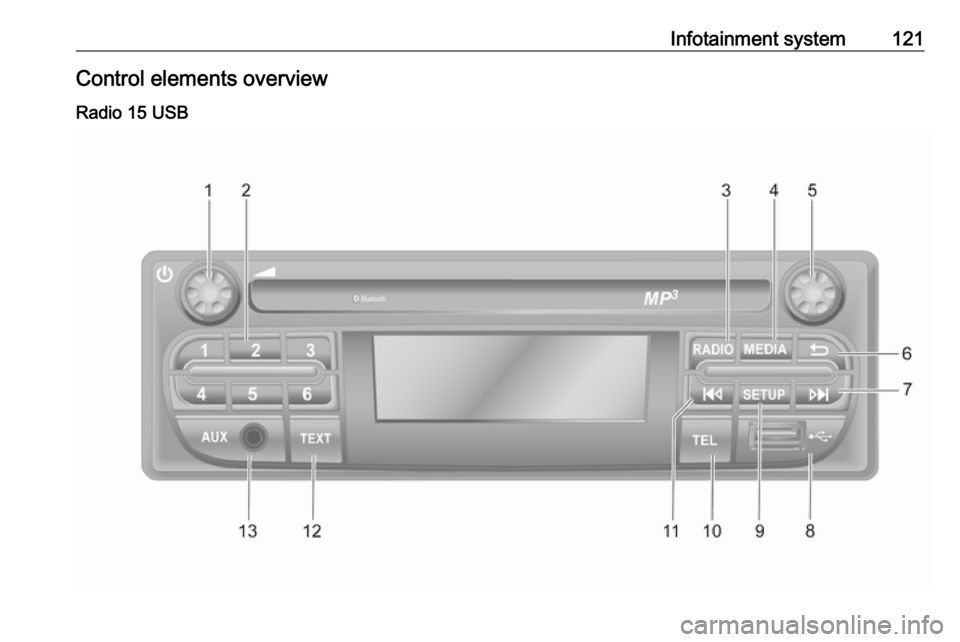
Infotainment system121Control elements overviewRadio 15 USB
Page 124 of 351

122Infotainment system1m - Press: Switch on/off ......128
Turn: Adjust volume ............128
2 Station buttons 1...6 ............144
Short press: Select station ..144
Long press: Save station ....144
3 RADIO - Change audio
source, waveband ...............143
4 MEDIA - Change audio
source ................................. 152
5 Rotary knob ......................... 128
Short press: Confirm an
action .................................. 128
Turn: Access display
menu options ...................... 128
6 / - Return to previous
menu, cancel an action .......128
7 3 - Radio, Short press:
Search for next radio
frequency ............................ 144
Long press: Automatic
station search ...................... 144
8 M USB port .......................... 152
9 SETUP - Short press:
Settings menu .....................12810 TEL - Telephone menu .......192
11 2 - Radio, Short press:
Search for previous radio
frequency ............................ 144
Long press: Automatic
station search ...................... 144
12 TEXT - Display radio text
information .......................... 147
13 AUX input ............................ 150
Page 126 of 351

124Infotainment system1æ: Darken screen (only
clock and audio system
information are displayed) ..128
2 ñRadio : Change audio
source to radio ....................143
3 üMedia : Change audio
source - USB, iPod .............152
BT (Bluetooth) .....................155
AUX ..................................... 150
4 Outside temperature
(depending on version) .......128
5 yPhone : Telephone menu . 192
6 Clock ................................... 128
7 X: Switch on/off ..................128
Increase / decrease volume 128
8 M USB port .......................... 152
9 AUX input ............................ 150
10 ÿSettings : Audio settings,
e.g. Tone settings ...............136
Volume settings ..................137
Connectivity settings ...........128
Display settings ...................128
System settings ................... 13811 ýNav : Navigation menu ......163
12 _Map : Display the map ....163
Page 128 of 351
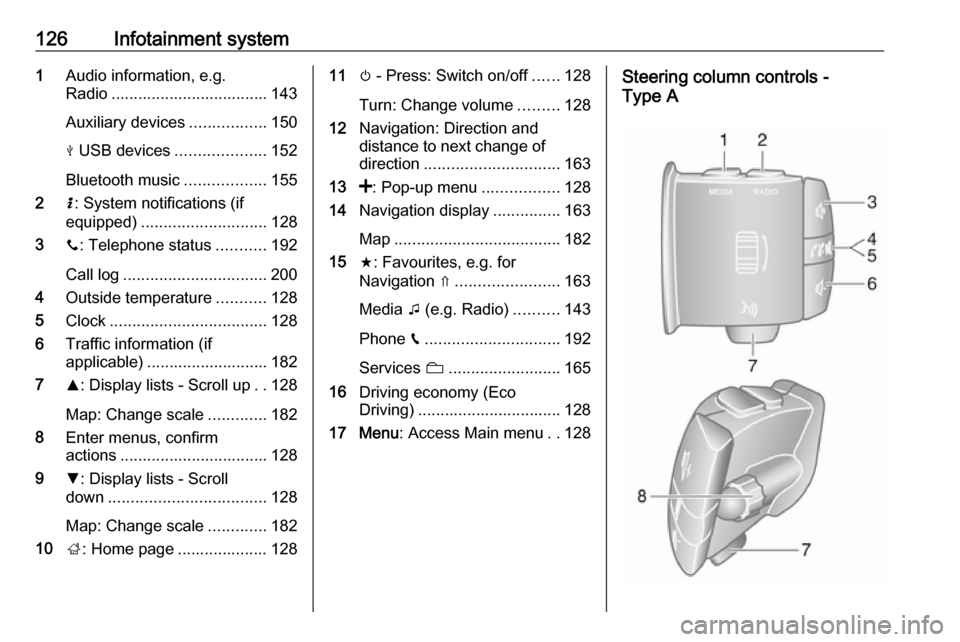
126Infotainment system1Audio information, e.g.
Radio ................................... 143
Auxiliary devices .................150
M USB devices ....................152
Bluetooth music ..................155
2 H: System notifications (if
equipped) ............................ 128
3 y: Telephone status ...........192
Call log ................................ 200
4 Outside temperature ...........128
5 Clock ................................... 128
6 Traffic information (if
applicable) ........................... 182
7 R: Display lists - Scroll up ..128
Map: Change scale .............182
8 Enter menus, confirm
actions ................................. 128
9 S: Display lists - Scroll
down ................................... 128
Map: Change scale .............182
10 ;: Home page .................... 12811 m - Press: Switch on/off ......128
Turn: Change volume .........128
12 Navigation: Direction and
distance to next change of
direction .............................. 163
13 <: Pop-up menu .................128
14 Navigation display ...............163
Map ..................................... 182
15 f: Favourites, e.g. for
Navigation ⇑ ....................... 163
Media t (e.g. Radio) ..........143
Phone g.............................. 192
Services N......................... 165
16 Driving economy (Eco
Driving) ................................ 128
17 Menu : Access Main menu ..128Steering column controls -
Type A
Page 131 of 351

Infotainment system129a short period after the last user input.
Depending on Infotainment system,
automatic switch-off occurs after
approx. 5 to 20 minutes.
Pressing X again will allow the
Infotainment system to remain on for a further 5 to 20 minutes, depending
on Infotainment system.
Setting the volumeTurn X / volume rotary knob.
Alternatively (with the steering
column controls), press ! or #.NAVI 50 IntelliLink:
Depending on version, it is possible to
set various volume levels individually (including audio players, traffic
announcements, navigation
instructions, phone calls and
ringtone).
From the Home page, touch
ÿ Settings then Audio followed by
Sound .
Refer to (NAVI 50 IntelliLink) "Volume
settings" 3 137.NAVI 80 IntelliLink:
To set various volume levels
individually (e.g. navigation
instructions, traffic announcements, phone calls) from the Home page,
touch MENU then System followed by
Sound .
Refer to (NAVI 80 IntelliLink) "System settings" 3 138.
Stored volume
When the Infotainment system is
switched off, the current volume is
stored.
Speed dependent volume
When speed dependent volume
( 3 138) is activated, the volume is
adapted automatically to compensate
for road and wind noise.
Mute
To mute the current audio source
(depending on Infotainment system),
press X briefly or turn knob fully
anticlockwise.
Alternatively (with the steering
column controls), press @ or 8 or
press ! and # simultaneously.Unmute
To unmute (depending on
Infotainment system), briefly press
X again or turn clockwise.
Alternatively (with the steering
column controls): Press @ again or
press ! and # simultaneously again.
Notice
When a traffic announcement is
broadcast, the system is
automatically unmuted.
For further information, refer to
"Radio data system" 3 147.
Display screen operation
Radio 15 USB ● To move up/down in the display: Turn OK.
● To confirm actions: Press OK.
● To cancel actions (and return to previous menu): Press /.
Page 132 of 351
130Infotainment systemNAVI 50 IntelliLink
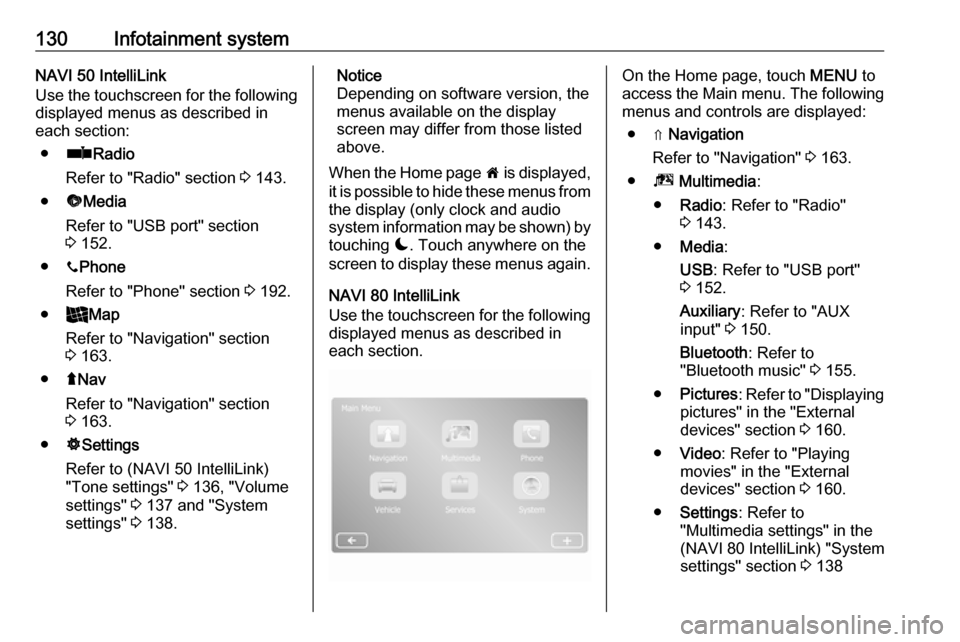
Use the touchscreen for the following
displayed menus as described in
each section:
● ñ Radio
Refer to "Radio" section 3 143.
● üMedia
Refer to "USB port" section
3 152.
● yPhone
Refer to "Phone" section 3 192.
● _Map
Refer to "Navigation" section
3 163.
● ýNav
Refer to "Navigation" section 3 163.
● ÿSettings
Refer to (NAVI 50 IntelliLink)
"Tone settings" 3 136, "Volume
settings" 3 137 and "System
settings" 3 138.Notice
Depending on software version, the menus available on the display
screen may differ from those listed
above.
When the Home page 7 is displayed,
it is possible to hide these menus from the display (only clock and audio
system information may be shown) by
touching æ. Touch anywhere on the
screen to display these menus again.
NAVI 80 IntelliLink
Use the touchscreen for the following displayed menus as described in
each section.On the Home page, touch MENU to
access the Main menu. The following menus and controls are displayed:
● ⇑ Navigation
Refer to "Navigation" 3 163.
● ª Multimedia :
● Radio : Refer to "Radio"
3 143.
● Media :
USB : Refer to "USB port"
3 152.
Auxiliary : Refer to "AUX
input" 3 150.
Bluetooth : Refer to
"Bluetooth music" 3 155.
● Pictures : Refer to "Displaying
pictures" in the "External
devices" section 3 160.
● Video : Refer to "Playing
movies" in the "External
devices" section 3 160.
● Settings : Refer to
"Multimedia settings" in the
(NAVI 80 IntelliLink) "System
settings" section 3 138
Page 133 of 351

Infotainment system131●g Phone
Refer to "Phone" 3 192.
● J Vehicle
Touch to open Eco Driving, Onboard computer and Settings
menus.
Refer to (NAVI 80 IntelliLink)
"Modes of operation" below.
● ¯ Services
Touch to open Navigation
services and Settings menus.
Refer to (NAVI 80 IntelliLink)
"Modes of operation" below.
● ± System
Refer to (NAVI 80 IntelliLink)
"System settings" 3 138.
Notice
Depending on software version, the menus on the display screen may
differ from the illustrations shown.
● I/←: Move to previous page
● j/→: Move to next page
● ↑: Display lists; Scroll up
● ↓: Display lists; Scroll down● <: Open pop-up menu
● r: Return to previous menu
The display screen can also be
operated using the controls on the
Infotainment system fascia.
Notice
Depending on version, some
controls available on the
Infotainment system fascia do not
operate the features on the display
screen.
Notice
Depending on vehicle, operation of
the touchscreen may be restricted
during driving.
Modes of operation
Radio 15 USB:
To change the audio source to radio,
press RADIO .NAVI 50 IntelliLink:
To access the radio menu at any time, touch 7 followed by ñRadio .NAVI 80 IntelliLink:
To access the radio menu from the
Home page, touch MENU then
Multimedia followed by Radio.Detailed description of the radio
functions 3 143.
Audio players
To change the audio source to USB,
AUX , Bluetooth or iPod (where
applicable), touch MEDIA.
NAVI 50 IntelliLink : To access the
menu for connected auxiliary devices
( USB , iPod , BT (Bluetooth), Video or
AUX ) at any time, touch 7 followed
by üMedia . Touch = in top left
corner and select auxiliary source.
NAVI 80 IntelliLink : To access the
menu for auxiliary devices (e.g. USB,
AUX input, Bluetooth) from the Home page, touch MENU then Multimedia
followed by Media. Select auxiliary
source from the display list.Radio 15 USB
Detailed descriptions of:
● AUX input functions 3 151
● USB port functions 3 152
● Bluetooth music operation 3 155