key VAUXHALL VIVA 2015.75 Owner's Guide
[x] Cancel search | Manufacturer: VAUXHALL, Model Year: 2015.75, Model line: VIVA, Model: VAUXHALL VIVA 2015.75Pages: 222, PDF Size: 4.12 MB
Page 91 of 222
Vauxhall Viva Owner Manual (GMK-Localizing-EU RHD-9231169) - 2016 -
CRC - 5/7/15
90 Lighting
Lighting Features
Centre Console Lighting
Spotlight incorporated in the interior
lighting comes on when the dipped
beam is switched on.
Entry Lighting
Welcome lighting
The exterior lights, instrument panel
light and interior lights are switched
on for a short time by pressing the
unlocking button
Kon the radio
remote control twice. This function
works only in the dark and facilitates
locating the vehicle.
The lighting switches off
immediately when the ignition key is
turned to position 1
0Ignition
Positions 0139.
Activation or deactivation of this
function can be changed in the
menu Settings in the Info-Display.
Vehicle personalisation
0Vehicle
Personalisation 082. The settings can be saved for the
key being used
0Memorised
Settings 020.
The following lights will additionally
switch on when the driver's door is
opened :
. all switches
. driver Information Centre
Exit Lighting
The following lights illuminate if the
key is removed from the ignition
switch :
.
Interior lights
. Instrument panel light (only
when it is dark)
They will switch off automatically
after a delay. Both lights will be
activated again if the driver's door is
opened.
The exterior lights illuminate the
surrounding area for an adjustable
time after leaving the vehicle.
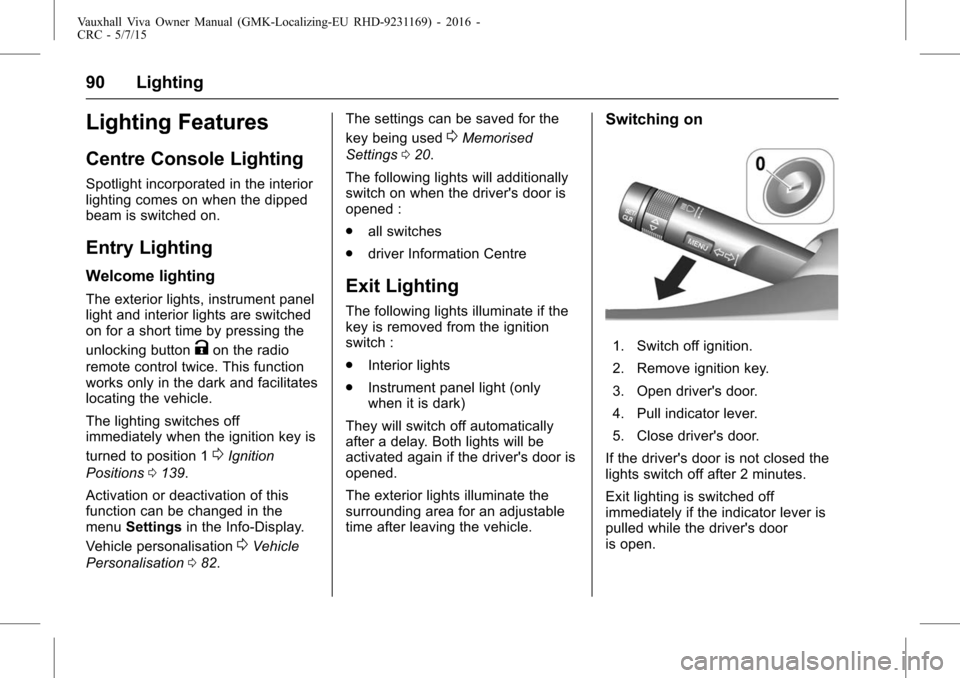
Switching on
1. Switch off ignition.
2. Remove ignition key.
3. Open driver's door.
4. Pull indicator lever.
5. Close driver's door.
If the driver's door is not closed the
lights switch off after 2 minutes.
Exit lighting is switched off
immediately if the indicator lever is
pulled while the driver's door
is open.
Page 92 of 222
Vauxhall Viva Owner Manual (GMK-Localizing-EU RHD-9231169) - 2016 -
CRC - 5/7/15
Lighting 91
Activation, deactivation and duration
of this function can be changed in
the menu Settings in the
Info-Display. Vehicle personalisation
0Vehicle Personalisation082.
The settings can be saved for the
key being used
0Memorised
Settings 020.
Battery Power Protection
Switching off electric lights
To prevent discharge of the vehicle
battery when the ignition is switched
off, some interior lights are switched
off automatically after some time.
Page 124 of 222
Vauxhall Viva Owner Manual (GMK-Localizing-EU RHD-9231169) - 2016 -
CRC - 5/7/15
Infotainment System 123
.If the phone call on the active
phone source is handled in
handset mode, the label
changes to hands-free.
. Pressing the button now returns
the phone conversation to
hands-free mode.
. The hands-free mode is default
when a call is initiated.
. If there is an issue and the call is
not transferred to hands-free or
handset as the user requested,
a message is displayed notifying
the user that the transfer could
not be carried out. Please retry.
Keypad : Enter the Keypad screen.
Ending a call
If a call is ended while the system is
displaying any other screen than the
Active Call screen, the Call Ended
message is displayed.
. The call may be ended by the
person on the other end of the
line, from the Bluetooth
handheld device or by pressing
con the steering wheel audio
remote control. .
After 5 seconds, the display
returns to the previous screen.
Re-dialling a call
If the phone call was dropped, you
can re-dial the number before the
time out by pressing - directly below
the display labelled Redial.
Calling a number in the call log
Press PHONE to enter the Phone
List menu > turn the TUNE dial to
select the Recent Calls > press
ENTER > turn the TUNE dial to
select Missed Calls, Received Calls
or Sent Calls, then press ENTER.
The recent calls list displays an
intermediate menu containing
missed calls, received calls, and
sent calls.
Turn the TUNE dial to select a
name or phone number, and press
ENTER to make a call.
Calling a number in the
phone book
Press PHONE to enter the Phone
List menu > turn the TUNE dial to
select Contacts > press ENTER > turn the TUNE dial to select a name
or phone number, and press ENTER
to make a call.
The last outgoing phone source is
retained at the next ignition cycle,
if that phone device is connected,
and it is the outgoing phone source.
Downloading the phone book
If the Bluetooth device supports a
phone book synchronization
function, the phonebook is
downloaded automatically after the
connection has been established.
.
The call history lists can be
downloaded from the connected
Bluetooth device.
. Sorting call histories by time is
not supported.
. It is possible to download the
call history even when
proceeding another action.
. It is not possible to start the
download process when the call
history download feature is
turned off within the Bluetooth
device.
Page 125 of 222
Vauxhall Viva Owner Manual (GMK-Localizing-EU RHD-9231169) - 2016 -
CRC - 5/7/15
124 Infotainment System
.After Pairing is completed, a
contacts download request is
sent to your mobile phone.
Some phones require additional
confirmation. Please check your
phone and accept the download
request if necessary.
. If a paired phone is deleted, its
call history lists will also be
deleted from the system.
. The system only uses
information coded in UTF-8
format.
Dial a number by keypad
Press PHONE to enter the Phone
List menu > turn the TUNE dial to
select the Keypad and press
ENTER to enter the Keypad screen.
. When users select Keypad from
the Phone Home Screen, a
phone dialler keypad is
displayed.
. Users rotate the knob to
highlight the desired digit to dial
and press the knob to select it. Turn the TUNE dial to highlight the
desired digit to dial and press
ENTER to select it.
You can enter max 24 digits.
.
If the user continues to turn the
knob when the end of the
keypad is reached, it jumps to
the other side of the keypad.
. Digits are displayed in the digit
screen as they are entered.
. The Call button is not active until
the user has input a digit.
. Once the user has entered the
desired phone number, press -
to begin calling that number.
. While the connection is
established, the system displays
the Active Call screen.
. If the user made a mistake while
entering a phone number, turn
the TUNE dial to highlight Delete
and press the knob to delete the
last digit entered.
. Pressing and holding the knob
for the standard time while
Delete is highlighted clears the
entire digit field. Bluetooth devices view
Press PHONE to enter the Phone
menu > turn the TUNE dial to select
the Bluetooth Devices > press
ENTER to enter the Phone
List menu.
.
The list contains the device
names of all Bluetooth devices
that have been paired with the
system.
. If the device name received is
blank, Unknown is displayed.
. From the Bluetooth Device List
menu, the user may add (pair) a
device, delete a device, and
connect a device.
Page 126 of 222
Vauxhall Viva Owner Manual (GMK-Localizing-EU RHD-9231169) - 2016 -
CRC - 5/7/15
Infotainment System 125
Text messages
When a Text Message is received
by the connected Bluetooth mobile
phone, the playing track will be cut
off and the phone will display the
relevant information.
.If the sender is registered in the
phone book, the first and last
name are displayed.
. If the number is not stored in the
phone book, the phone number
is displayed.
. The Text Message alert is
displayed as soon as all
information is available.
To display the entire message,
press - directly below the display
labelled “View”. The detail
message screen is now displayed.OnStar System
OnStar Overview
If equipped, this vehicle has a
comprehensive, in-vehicle system
that can connect to a live Advisor
for Emergency, Security, Navigation,
Connection, and Diagnostic
Services.
For safety, some features are
disabled while the vehicle is in
motion.
Control Panel Overview OnStar
Light
The OnStar system status light is
next to the OnStar buttons. If the
status light is :
. Solid Green : The OnStar
system is ready to make calls
. Flashing Green : On a call
. Red : Indicates a problem
. No Light : OnStar subscription
is not active or has expired and
is not functional OnStar Buttons
X(Hands-free calling) button
:
Press to speak to an Advisor
. Make a call, end a call,
or answer an incoming call.
. Give OnStar Hands-Free Calling
voice commands.
. Give OnStar Turn-by-Turn
Direction voice commands.
Requires the available Directions
and Connections service plan.
Q(OnStar) button : Press to
connect to an Advisor
. Verify account information or
update contact information.
. Get driving directions. Requires
the available Directions and
Connections service plan.
. Receive On-Demand
Diagnostics for a check on the
vehicle's key operating systems.
. Receive Roadside Assistance.
](Emergency) button : Press to
connect to an Emergency Advisor
. Get help for an emergency.
Page 141 of 222
Vauxhall Viva Owner Manual (GMK-Localizing-EU RHD-9231169) - 2016 -
CRC - 5/7/15
140 Driving and Operating
Starting the Engine
Manual gearbox: Operate clutch
Automatic transmission : Operate
brake and move the selector lever
to P or N
Do not operate accelerator pedal.
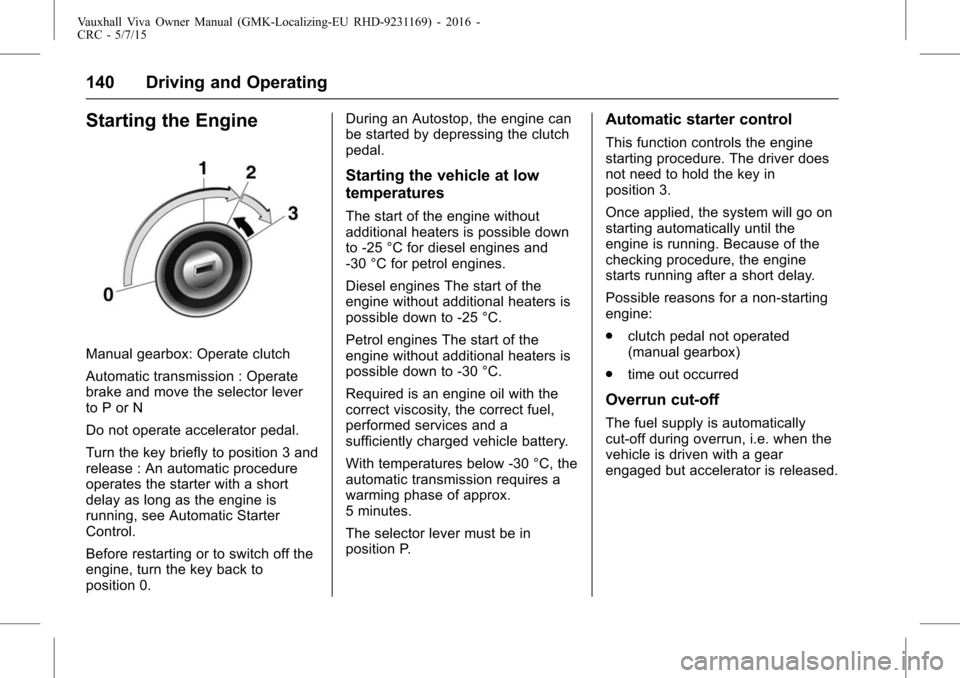
Turn the key briefly to position 3 and
release : An automatic procedure
operates the starter with a short
delay as long as the engine is
running, see Automatic Starter
Control.
Before restarting or to switch off the
engine, turn the key back to
position 0.During an Autostop, the engine can
be started by depressing the clutch
pedal.
Starting the vehicle at low
temperatures
The start of the engine without
additional heaters is possible down
to -25 °C for diesel engines and
-30 °C for petrol engines.
Diesel engines The start of the
engine without additional heaters is
possible down to -25 °C.
Petrol engines The start of the
engine without additional heaters is
possible down to -30 °C.
Required is an engine oil with the
correct viscosity, the correct fuel,
performed services and a
sufficiently charged vehicle battery.
With temperatures below -30 °C, the
automatic transmission requires a
warming phase of approx.
5 minutes.
The selector lever must be in
position P.
Automatic starter control
This function controls the engine
starting procedure. The driver does
not need to hold the key in
position 3.
Once applied, the system will go on
starting automatically until the
engine is running. Because of the
checking procedure, the engine
starts running after a short delay.
Possible reasons for a non-starting
engine:
.
clutch pedal not operated
(manual gearbox)
. time out occurred
Overrun cut-off
The fuel supply is automatically
cut-off during overrun, i.e. when the
vehicle is driven with a gear
engaged but accelerator is released.
Page 142 of 222
Vauxhall Viva Owner Manual (GMK-Localizing-EU RHD-9231169) - 2016 -
CRC - 5/7/15
Driving and Operating 141
Retained Accessory
Power (RAP)
Retained power off
The following electronic systems
can work until the driver's door is
opened or at the latest for
10 minutes after the ignition is
switched off :
.power windows
. power outlets
Power to the Infotainment system
will continue to operate for
30 minutes or until the key is
removed from the ignition,
regardless of whether any door will
be opened.
Automatic Engine Start/
Stop Feature
The stop-start system helps to save
fuel. When conditions allow, it
switches off the engine as soon as
the vehicle is at a low speed or at a
standstill, e.g. at a traffic light or in a
traffic jam. It starts the engine
automatically as soon as the clutch
is depressed. A vehicle battery sensor ensures that an Autostop is
only performed if the vehicle battery
is sufficiently charged for a restart.
Activation
The stop-start system is available
as soon as the engine is started, the
vehicle starts-off and the conditions
as stated below in this section are
fulfilled.
Deactivation
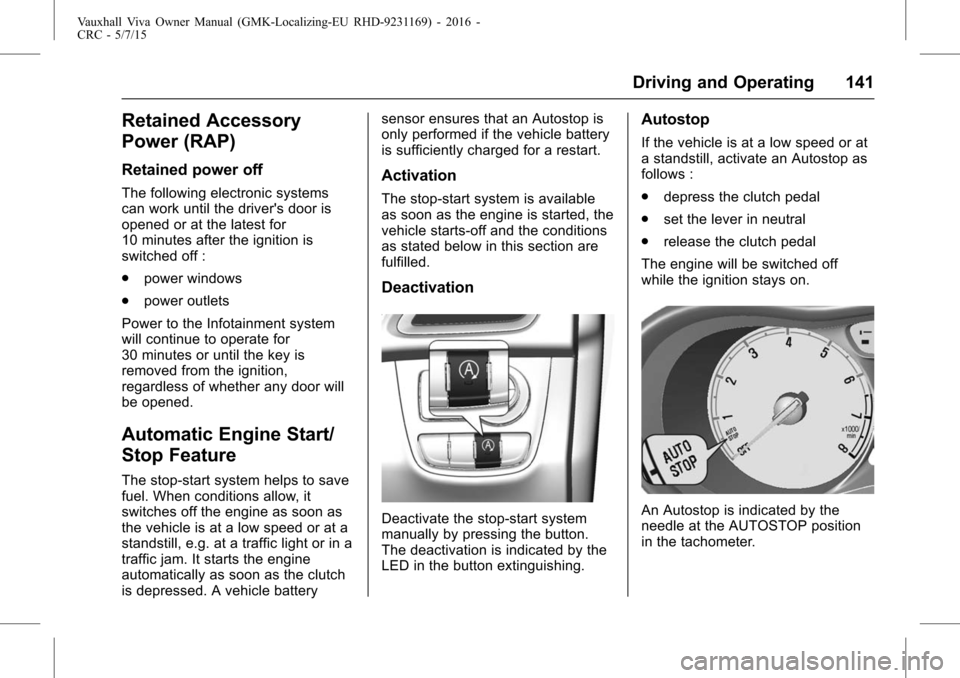
Deactivate the stop-start system
manually by pressing the button.
The deactivation is indicated by the
LED in the button extinguishing.
Autostop
If the vehicle is at a low speed or at
a standstill, activate an Autostop as
follows :
.
depress the clutch pedal
. set the lever in neutral
. release the clutch pedal
The engine will be switched off
while the ignition stays on.
An Autostop is indicated by the
needle at the AUTOSTOP position
in the tachometer.
Page 217 of 222

Vauxhall Viva Owner Manual (GMK-Localizing-EU RHD-9231169) - 2016 -
CRC - 5/7/15
216 Index
Fuel (cont'd)Consumption - CO2 -
Emissions . . . . . . . . . . . . . . . . . . . 158
Filling the Tank . . . . . . . . . . . . . . . 156
Gauge . . . . . . . . . . . . . . . . . . . . . . . . . . 65
Low Fuel Warning Light . . . . . . . . . 74
Fuses . . . . . . . . . . . . . . . . . . . . . . . . . . 173 Engine Compartment FuseBlock . . . . . . . . . . . . . . . . . . . . . . . . 174
Instrument Panel Fuse Block . . . . . . . . . . . . . . . . . . . . . . . . 176
G
GaugesEngine Coolant Temperature . . . 68
Fuel . . . . . . . . . . . . . . . . . . . . . . . . . . . . 65
Indicator . . . . . . . . . . . . . . . . . . . . . . . . 69
Mileometer . . . . . . . . . . . . . . . . . . . . . 64
Rev Counter . . . . . . . . . . . . . . . . . . . . 65
Service Display . . . . . . . . . . . . . . . . . 68
Speedometer . . . . . . . . . . . . . . . . . . . 64
Trip Odometer . . . . . . . . . . . . . . . . . . 64
Gear Shifting Light . . . . . . . . . . . . . . . 71
Glove Box . . . . . . . . . . . . . . . . . . . . . . . 52
H
Hazard Lights . . . . . . . . . . . . . . . . . . . . 86
Head Restraints . . . . . . . . . . . . . . . . . 31
Headlamp Range Adjustment . . . . 86
Headlamps Bulb Replacement . . . . . . . . . . . . 167
Daytime RunningLamps (DRL) . . . . . . . . . . . . . . . . . . 86
Main-Beam On Light . . . . . . . . . . . . 74
Main/Dipped Beam Changer . . . . 85
Parking Lamps . . . . . . . . . . . . . . . 167
Position Lamps . . . . . . . . . . . . . . . . . 88
Range Adjustment . . . . . . . . . . . . . . 86
Heated
Rear Window . . . . . . . . . . . . . . . . . . . 29
Steering Wheel . . . . . . . . . . . . . . . . . 60
Heated Front Seats . . . . . . . . . . . . . . 35
Heated Mirrors . . . . . . . . . . . . . . . . . . . 26
Heating . . . . . . . . . . . . . . . . . . . . . . . . . 129
Heating and Ventilation System . . . . . . . . . . . . . . . . . . . . . . . . 129
Hill Start Assist (HSA) . . . . . . . . . . 147
Horn . . . . . . . . . . . . . . . . . . . . . . . . . 12, 61
I
Identification Plate . . . . . . . . . . . . . . 206
Ignition Positions . . . . . . . . . . . . . . . 139
Immobiliser . . . . . . . . . . . . . . . . . . . . . . 25 Light . . . . . . . . . . . . . . . . . . . . . . . . . . . . 74
Indicator . . . . . . . . . . . . . . . . . . . . . . . . . 69
Indicators Control . . . . . . . . . . . . . . . . . . . . . . . . . 66
Information Service . . . . . . . . . . . . . . . . . . . . . . . 198
Information on Loading the Vehicle . . . . . . . . . . . . . . . . . . . . . . . . . 57
Instrument Panel Overview . . . . . . . . . . . . . . . . . . . . . . . . 9
Storage Area . . . . . . . . . . . . . . . . . . . 52
Instrument Panel Illumination . . . 172
Interior Lamps . . . . . . . . . . . . . . . . . . . 89
Introduction . . . . . . . . . . . . . . . . . . . .2, 92
ISOFIX Child Restraint Systems . . . . . . . . . . . . . . . . . . . . . . . 49
J
Jump Starting . . . . . . . . . . . . . . . . . . . 192
K
Keys . . . . . . . . . . . . . . . . . . . . . . . . . . . . . 18