ECU VAUXHALL VIVA 2016.5 User Guide
[x] Cancel search | Manufacturer: VAUXHALL, Model Year: 2016.5, Model line: VIVA, Model: VAUXHALL VIVA 2016.5Pages: 197, PDF Size: 5.27 MB
Page 115 of 197

Driving and operating113Manual mode
To utilise the engine braking effect, select a lower gear in good time when
driving downhill. Changing into
manual mode is only possible while the engine is running.
Rocking the vehicle Rocking the vehicle is only
permissible if the vehicle is stuck in
sand, mud or snow. Move the selector
lever between R and D in a repeat
pattern. Do not race the engine and
avoid sudden acceleration.
Parking
The most recently engaged gear (see transmission display) remains
engaged when switching off ignition. With N, no gear is engaged.
Therefore always apply the parking
brake when switching off ignition. If
parking brake is not applied, P flashes
in the transmission display and the
key cannot be removed from the
ignition switch. P stops flashing in the
transmission display as soon as the
parking brake is slightly applied.When the ignition is switched off, the
transmission no longer responds to
movement of the selector lever.
Tyre pressure monitoring system
To start the sensor matching process of the tyre pressure monitoring
system, the selector lever must be
moved and held in position N for
five seconds. P illuminates in the
transmission display to indicate that
the sensor matching process can be
started.
Tyre pressure monitoring system
3 151.
Manual mode If a higher gear is selected when the
engine speed is too low, or a lower
gear when the speed is too high, the
shift is not executed. This prevents
the engine from running at too low or too high an engine speed. M and the
number of the selected gear will be
flashed, then the current gear is
displayed again..If engine speed is too low, the
transmission automatically shifts to a
lower gear.
When + or - is selected in automatic
mode, the transmission switches to
manual mode and shifts accordingly.
Gear shift indication
The symbol R with a number
alongside it, is indicated when
gearshifting is recommended for fuel saving reasons.
Shift indication appears only in
manual mode.
Electronic driving programmes
The adaptive programme tailors
gearshifting to the driving conditions, e.g. greater load or gradients.
Fault
To prevent damage to the manual
transmission automated, the clutch is engaged automatically at high clutch
temperatures.
Page 131 of 197
Driving and operating129Press the button at the liquid gas
supply point. The filling system stops
or begins to run slowly when 80% of
the tank volume is reached
(maximum fill level).
Release button on filling system and
the filling process stops. Release the
locking lever and remove the filler nozzle. A small quantity of liquid gas
may escape.
Remove adapter and stow securely in
vehicle.
Fit protective cap to prevent the
penetration of foreign bodies into the
filler opening and the system.9 Warning
Due to the system design, an
escape of liquid gas after
releasing the locking lever is
unavoidable. Avoid inhaling.
9 Warning
The liquid gas tank should only be
filled to 80% capacity, for safety
reasons.
The multivalve on the liquid gas tank
automatically limits the fill quantity. If
a larger quantity is added, we
recommend not exposing the vehicle
to the sun until the excess amount
has been used up.
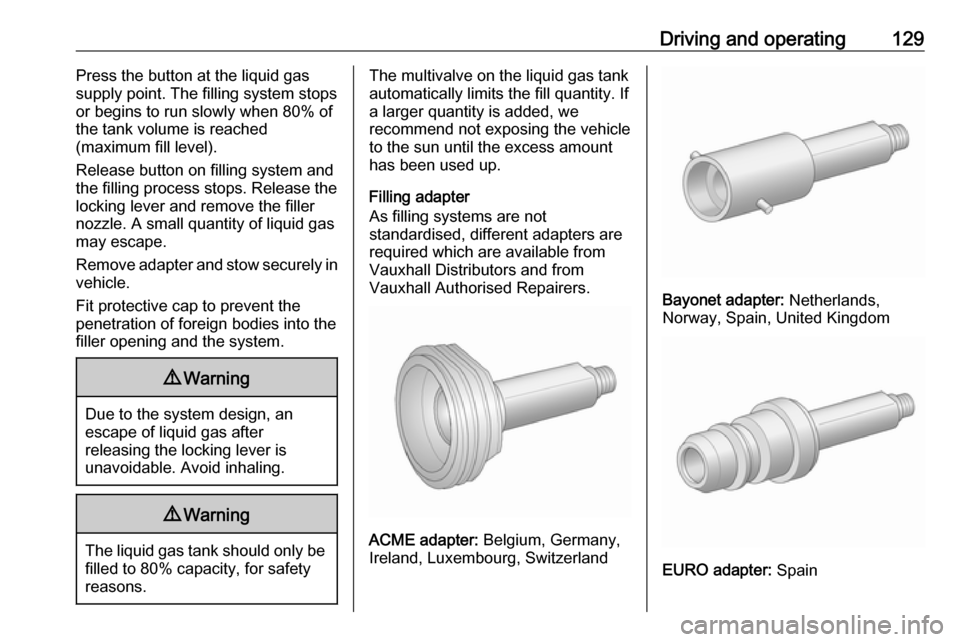
Filling adapter
As filling systems are not
standardised, different adapters are
required which are available from
Vauxhall Distributors and from
Vauxhall Authorised Repairers.
ACME adapter: Belgium, Germany,
Ireland, Luxembourg, Switzerland
Bayonet adapter: Netherlands,
Norway, Spain, United Kingdom
EURO adapter: Spain
Page 135 of 197

Vehicle care133Vehicle checks
Performing work9 Warning
Only perform engine compartment
checks when the ignition is off.
The cooling fan may start
operating even if the ignition is off.
9 Danger
The ignition system uses
extremely high voltage. Do not
touch.
Bonnet
Opening
Pull the release lever and return it to
its original position.
Push the safety catch upwards and open the bonnet.
Secure the bonnet support.
Page 145 of 197

Vehicle care143
2. Turn bulb holder anticlockwiseand remove from housing.
3. Pull bulb from bulb holder andreplace it.
4. Insert bulb holder and turnclockwise.
5. Insert front end into front wing, slide forward and insert rear end.
Centre high-mounted brake light
Have LEDs replaced by a workshop.
Number plate light
1. Unscrew both screws.
2. Remove bulb housing downwards, taking care not to pull
on the cable.
Rotate bulb holder anticlockwise
to disengage.
3. Remove bulb from bulb holder and replace it.
4. Insert bulb holder into bulb housing and turn clockwise.
5. Insert bulb housing and secure using a screwdriver.
Page 162 of 197

160Vehicle care●Do not start the vehicle when it is
raised on the jack.
● Clean wheel nuts and thread with
a clean cloth before mounting the
wheel.9 Warning
Do not grease wheel bolt, wheel
nut and wheel nut cone.
1. Steel wheels:
Pull off the wheel cover.
Alloy wheels with bolt caps
Disengage wheel bolt caps with a
screwdriver and remove. To
protect the wheel, place a soft
cloth between the screwdriver
and the alloy wheel.
Alloy wheels with centre cap
Insert extractor in the open slot of
the centre cap and remove the
cap from the wheel. Vehicle tools 3 149.
2. Install the wheel wrench ensuring
that it locates securely and looseneach wheel bolt by half a turn.
The wheels might be protected by
locking wheel bolts. To loosen
these specific bolts, first attach
the adapter for the locking wheel
bolts onto the head of the bolt
before installing the wheel
wrench. The adapter is located in
the glovebox.3. Ensure the jack is correctly positioned under the relevant
vehicle jacking point.
4. Set the jack to the necessary height. Position it directly below
Page 163 of 197

Vehicle care161the jacking point in a manner thatprevents it from slipping.
Attach jack handle and with the
jack correctly aligned rotate
handle until wheel is clear of the
ground.
5. Unscrew the wheel bolts.
6. Change the wheel.
7. Screw on the wheel bolts.
8. Lower vehicle.
9. Install the wheel wrench ensuring that it locates securely and tighten
each bolt in a crosswise
sequence. Tightening torque is
140 Nm.
10. Align the valve hole in the wheel cover of the steel wheel with the
tyre valve before installing.
Install wheel bolt caps or centre
cap on alloy wheel.
11. Stow and secure the replaced wheel, the vehicle tools 3 149 and
the adapter for the locking wheel
bolts 3 49.
12. Check the tyre pressure of the installed tyre and the wheel bolt
torque as soon as possible.Have the defective tyre renewed or
repaired as soon as possible.
Jacking position for lifting platform
Rear arm position of the lifting
platform, located centrally under the
recess of the sill.
Front arm position of the lifting platform at the underbody.
Spare wheel Some vehicles are equipped with a
tyre repair kit instead of a spare
wheel.
If mounting a spare wheel, which is
different from the other wheels, this
wheel might be classified as a
temporary spare wheel and the
corresponding speed limits apply,
even though no label indicates this.
Seek the assistance of a workshop to
check the applicable speed limit.
The spare wheel has a steel rim.
Page 164 of 197
162Vehicle careCaution
The use of a spare wheel that issmaller than the other wheels or in combination with winter tyres
could affect driveability. Have the defective tyre replaced as soon as
possible.
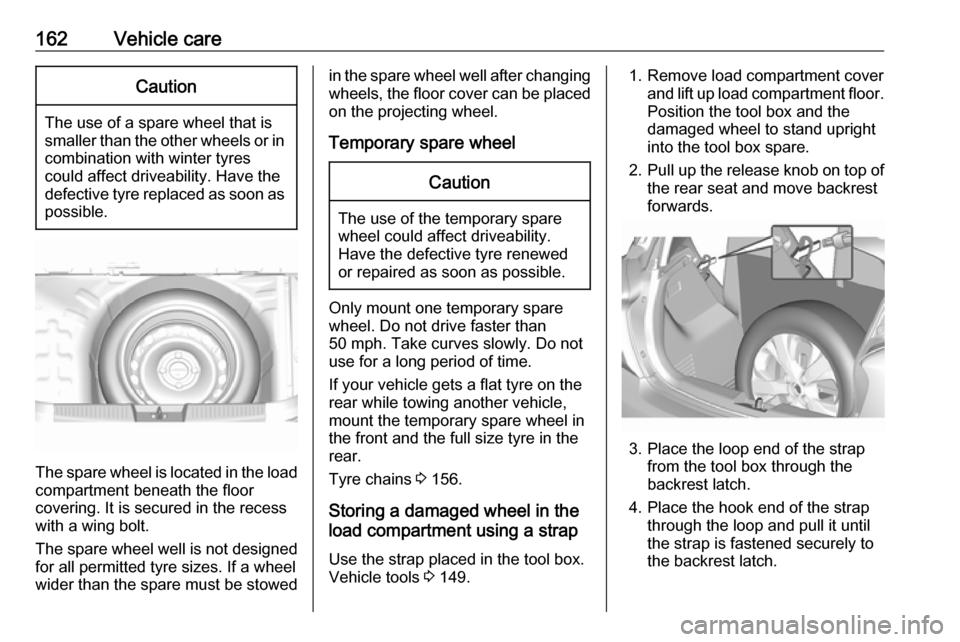
The spare wheel is located in the load
compartment beneath the floor
covering. It is secured in the recess
with a wing bolt.
The spare wheel well is not designed for all permitted tyre sizes. If a wheel
wider than the spare must be stowed
in the spare wheel well after changing
wheels, the floor cover can be placed on the projecting wheel.
Temporary spare wheelCaution
The use of the temporary spare
wheel could affect driveability.
Have the defective tyre renewed
or repaired as soon as possible.
Only mount one temporary spare
wheel. Do not drive faster than
50 mph. Take curves slowly. Do not
use for a long period of time.
If your vehicle gets a flat tyre on the
rear while towing another vehicle,
mount the temporary spare wheel in
the front and the full size tyre in the
rear.
Tyre chains 3 156.
Storing a damaged wheel in the
load compartment using a strap
Use the strap placed in the tool box.
Vehicle tools 3 149.
1. Remove load compartment cover
and lift up load compartment floor.
Position the tool box and the
damaged wheel to stand upright
into the tool box spare.
2. Pull up the release knob on top of
the rear seat and move backrest
forwards.
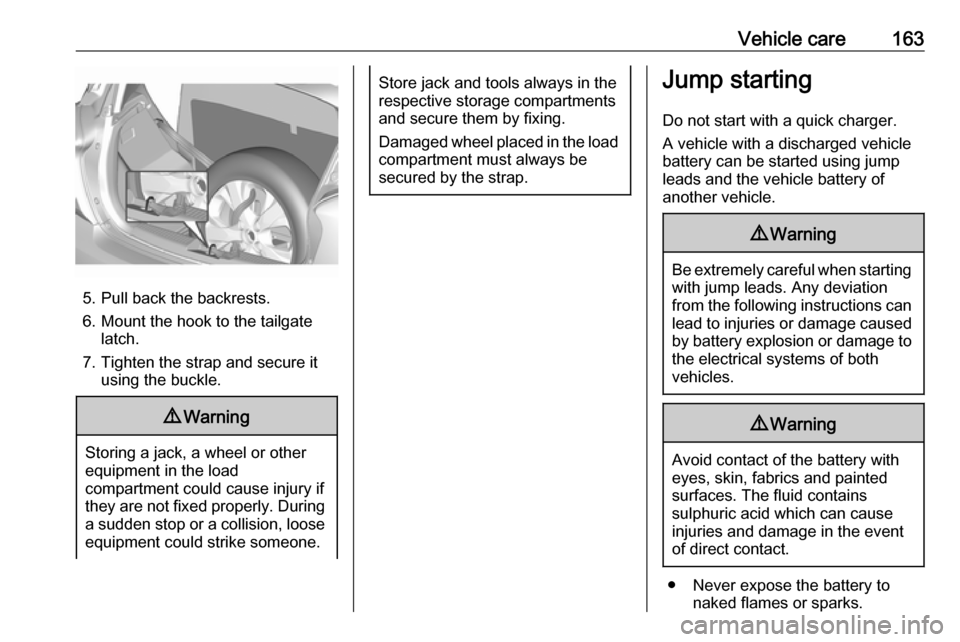
3. Place the loop end of the strap from the tool box through the
backrest latch.
4. Place the hook end of the strap through the loop and pull it until
the strap is fastened securely to
the backrest latch.
Page 165 of 197
Vehicle care163
5. Pull back the backrests.
6. Mount the hook to the tailgate latch.
7. Tighten the strap and secure it using the buckle.
9 Warning
Storing a jack, a wheel or other
equipment in the load
compartment could cause injury if they are not fixed properly. During a sudden stop or a collision, loose
equipment could strike someone.
Store jack and tools always in the
respective storage compartments
and secure them by fixing.
Damaged wheel placed in the load
compartment must always be
secured by the strap.Jump starting
Do not start with a quick charger.
A vehicle with a discharged vehicle
battery can be started using jump
leads and the vehicle battery of
another vehicle.9 Warning
Be extremely careful when starting
with jump leads. Any deviation
from the following instructions can
lead to injuries or damage caused
by battery explosion or damage to the electrical systems of both
vehicles.
9 Warning
Avoid contact of the battery with
eyes, skin, fabrics and painted
surfaces. The fluid contains
sulphuric acid which can cause
injuries and damage in the event
of direct contact.
● Never expose the battery to naked flames or sparks.
Page 188 of 197

186Customer informationcopyright holders be liable for any
claim, damages or other liability,
whether in an action of contract, tort
or otherwise, arising from, out of or in connection with the software or the
use or other dealings in the software.
Except as contained in this notice, the name of a copyright holder shall not
be used in advertising or otherwise to
promote the sale, use or other
dealings in this Software without prior
written authorization of the copyright
holder.
unzip This is version 2005-Feb-10 of theInfo-ZIP copyright and license. The
definitive version of this document
should be available at ftp://ftp.info-
zip.org/pub/infozip/license.html
indefinitely.
Copyright (c) 1990-2005 Info-ZIP. All
rights reserved.
For the purposes of this copyright and
license, “Info-ZIP” is defined as the
following set of individuals:
Mark Adler, John Bush, Karl Davis,
Harald Denker, Jean-Michel Dubois,
Jean-loup Gailly, Hunter Goatley, EdGordon, Ian Gorman, Chris Herborth, Dirk Haase, Greg Hartwig, Robert
Heath, Jonathan Hudson, Paul
Kienitz, David Kirschbaum, Johnny
Lee, Onno van der Linden, Igor
Mandrichenko, Steve P. Miller, Sergio Monesi, Keith Owens, George
Petrov, Greg Roelofs, Kai Uwe
Rommel, Steve Salisbury, Dave
Smith, Steven M. Schweda, Christian
Spieler, Cosmin Truta, Antoine
Verheijen, Paul von Behren, Rich Wales, Mike White.
This software is provided “as is,” without warranty of any kind, express or implied. In no event shall Info-ZIP
or its contributors be held liable for
any direct, indirect, incidental, special
or consequential damages arising out
of the use of or inability to use this
software.
Permission is granted to anyone to
use this software for any purpose,
including commercial applications,
and to alter it and redistribute it freely,
subject to the following restrictions:1. Redistributions of source code must retain the above copyright
notice, definition, disclaimer, and
this list of conditions.
2. Redistributions in binary form (compiled executables) must
reproduce the above copyright
notice, definition, disclaimer, and
this list of conditions in
documentation and/or other
materials provided with the
distribution. The sole exception to this condition is redistribution of a
standard UnZipSFX binary
(including SFXWiz) as part of a
self-extracting archive; that is
permitted without inclusion of this
license, as long as the normal
SFX banner has not been
removed from the binary or
disabled.
3. Altered versions--including, but not limited to, ports to new
operating systems, existing ports
with new graphical interfaces, and
dynamic, shared, or static library
versions--must be plainly marked
as such and must not be
misrepresented as being the
Page 190 of 197

188Customer informationWhen using the vehicle, situations
may occur in which these technical
data related to other information
(accident report, damages on the
vehicle, witness statements etc.) may be associated with a specific person -
possibly, with the assistance of an
expert.
Additional functions contractually
agreed upon with the client (e.g.
vehicle location in emergency cases)
allow the transmission of particular vehicle data from the vehicle.
Radio Frequency
Identification (RFID)
RFID technology is used in some
vehicles for functions such as tyre
pressure monitoring and ignition
system security. It is also used in
connection with conveniences such
as radio remote controls for door
locking/unlocking and starting, and in-
vehicle transmitters for garage door
openers. RFID technology in
Vauxhall vehicles does not use or
record personal information or link
with any other Vauxhall system
containing personal information.