remote control VAUXHALL VIVA 2018.5 User Guide
[x] Cancel search | Manufacturer: VAUXHALL, Model Year: 2018.5, Model line: VIVA, Model: VAUXHALL VIVA 2018.5Pages: 201, PDF Size: 5.36 MB
Page 90 of 201
88Instruments and controlsDepending on the equipment of the
vehicle, the following services are
available:
● Emergency services and support
in the case of a vehicle
breakdown
● Wi-Fi hotspot
● Smartphone application
● Remote control, e.g. location of the vehicle, activation of horn and
lights, control of central locking
system
● Stolen vehicle assistance
● Vehicle diagnostics
● Destination download
Notice
The OnStar module of the vehicle is
deactivated after ten days without an
ignition cycle. Functions requiring a
data connection will be available
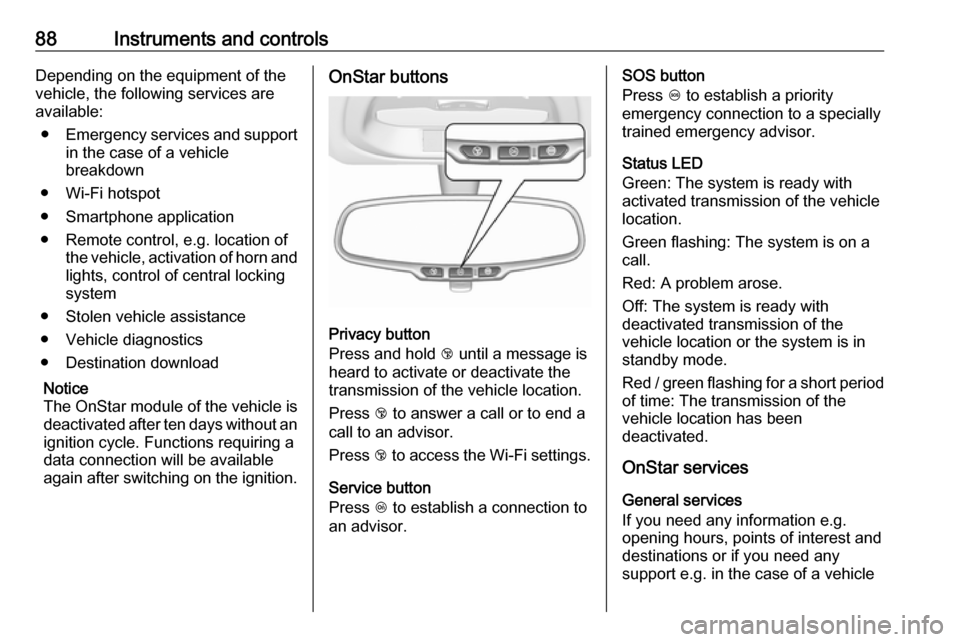
again after switching on the ignition.OnStar buttons
Privacy button
Press and hold j until a message is
heard to activate or deactivate the
transmission of the vehicle location.
Press j to answer a call or to end a
call to an advisor.
Press j to access the Wi-Fi settings.
Service button
Press Z to establish a connection to
an advisor.
SOS button
Press [ to establish a priority
emergency connection to a specially
trained emergency advisor.
Status LED
Green: The system is ready with
activated transmission of the vehicle
location.
Green flashing: The system is on a
call.
Red: A problem arose.
Off: The system is ready with
deactivated transmission of the
vehicle location or the system is in
standby mode.
Red / green flashing for a short period of time: The transmission of the
vehicle location has been
deactivated.
OnStar services
General services
If you need any information e.g.
opening hours, points of interest and
destinations or if you need any
support e.g. in the case of a vehicle
Page 91 of 201

Instruments and controls89breakdown, a flat tyre and empty fuel
tank, press Z to establish a
connection to an advisor.
Emergency services
In the case of an emergency situation,
press [ and talk to an advisor. The
advisor then contacts emergency or
assistance service providers and
directs them to your vehicle.
In the case of an accident with
activation of airbags or belt
tensioners, an automatic emergency
call is established. The advisor is
immediately connected to your
vehicle to see whether help is
needed.
Wi-Fi hotspot
The Wi-Fi hotspot of the vehicle
provides internet connectivity with a
maximum speed of 4G/LTE.
Notice
The Wi-Fi hotspot functionality is not
available for all markets.
Notice
Some mobile devices connect to Wi- Fi hotspots automatically and use
mobile data capacity in thebackground, even if they are not in use. This includes automatic
updates, downloads, as well as
programme or app synchronisation
traffic. The data volume purchased
via OnStar might be consumed
rapidly. Turn off automatic
synchronisations in the settings of
your device.
Up to seven devices may be
connected.
To connect a mobile device with the
Wi-Fi hotspot:
1. Press j and then select Wi-Fi
settings on the Info Display. The
settings displayed include the Wi-
Fi hotspot name (SSID),
password and connection type.
2. Start a Wi-Fi network search on your mobile device.
3. Select your vehicle hotspot (SSID) when listed.
4. When prompted, enter the password on your mobile device.
Notice
To change the SSID or password,
press Z and talk to an advisor or log
in to your account.To switch off the Wi-Fi hotspot
functionality, press Z to call an
advisor.
Smartphone app
With the My Vauxhall smartphone
app, some vehicle functions can be
operated remotely.
The following functions are available: ● Lock or unlock vehicle.
● Honk horn or flash lights.
● Check fuel level, engine oil life and tyre pressure (only with tyre
pressure monitoring system).
● Send navigation destination to the vehicle, if equipped with a
built-in navigation system.
● Locate vehicle on a map.
● Manage Wi-Fi settings.
To operate these functions, download the app from App Store ®
or
Google Play™ Store.
Page 92 of 201

90Instruments and controlsRemote control
If desired, use any phone to call an
advisor, who can remotely operate
specific vehicle functions. Find the
respective OnStar phone number on
our country-specific website.
The following functions are available: ● Lock or unlock vehicle.
● Provide information on the vehicle location.
● Honk horn or flash lights.
Stolen vehicle assistance
If the vehicle is stolen, report the theft to the authorities and request OnStar
stolen vehicle assistance. Use any
phone to call an advisor. Find the
respective OnStar phone number on
our country-specific website.
OnStar can provide support in
locating and recovering the vehicle.Theft alert
When the anti-theft alarm system is
triggered, a notification is sent to
OnStar. You are then informed about
this event by text message or email.Restart prevention
By sending remote signals, OnStar
can prevent the vehicle from
restarting once it has been turned off.
On-demand diagnostics
At any time e.g. if the vehicle displays a vehicle message, press Z to
contact an advisor and ask to
complete a real-time diagnostic check
to directly determine the issue.
Depending on the results, the advisor
will provide further support.
Diagnostic report
The vehicle automatically transmits
diagnostic data to OnStar which
sends a monthly email report to you
and your preferred workshop.
Notice
The workshop notification function
can be disabled in your account.
The report contains the status of key
operating systems of the vehicle like
engine, transmission, airbags, ABS,
and other major systems. It also
provides information on possiblemaintenance items and tyre pressure (only with tyre pressure monitoring
system).
To look at the information in greater
detail, select the link within the email
and log in to your account.
Destination download
A desired destination can be directly
downloaded to the navigation system.
Press Z to call an advisor and
describe the destination or point of
interest.
The advisor can look up any address
or point of interest and directly send
the destination to the built-in
navigation system.
OnStar settings
OnStar PIN
To have full access to all OnStar
services, a four-digit PIN is required. The PIN has to be personalised when first talking to an advisor.
To change the PIN, press Z to call an
advisor.
Page 93 of 201

Instruments and controls91Account data
An OnStar subscriber has an account
where all the data is stored. To
request a change of the account
information, press Z and talk to an
advisor or log in to your account.
If the OnStar service is used on
another vehicle, press Z and request
that the account be transferred to the new vehicle.
Notice
In any case, if the vehicle is disposed
of, sold or otherwise transferred,
immediately inform OnStar about
the changes and terminate the
OnStar service on this vehicle.
Vehicle location
The vehicle location is transmitted to OnStar when service is requested or triggered. A message on the InfoDisplay informs about this
transmission.
To activate or deactivate the
transmission of the vehicle location,
press and hold j until an audio
message is heard.The deactivation is indicated by the
status light flashing red and green for a short period of time and each time
the vehicle is started.
Notice
If the transmission of the vehicle
location is deactivated, some
services are no longer available.
Notice
The vehicle location always remains
accessible to OnStar in the case of
an emergency.
Find the privacy policy in your
account.
Software updates
OnStar may remotely carry out software updates without further
notice or consent. These updates are to enhance or maintain safety and
security or the operation of the
vehicle.
These updates may concern privacy
issues. Find the privacy policy in your
account.
Page 188 of 201

186Customer informationInfotainment system R300 BT
Humax Automotive Co. Ltd.
2, Yeongmun-ro, Cheoin-gu, Yong-
in-si, Gyeonggi-do, Korea
Operation frequency:
2402 - 2480 MHz
Maximum output: 4 dBm EIRP
OnStar module
LG Electronics
Electronics European Shared Service
Center B.V., Krijgsman 1, 1186 DM
Amstelveen, The NetherlandsOperation
frequency (MHz)Maximum output
(dBm)2402 - 248042412 - 246218880 - 915331710 - 1785241850 - 1910241920 - 1980242500 - 257023Radio remote control transmitter
Continental Automotive GmbH
Siemensstraße 12, 93055
Regensburg, Germany
Operation frequency: 433.92 MHz
Maximum output: -5.7 dbm
Robert Bosch GmbH
Robert Bosch Platz 1, 70839
Gerlingen, Germany
Operation frequency: 433.92 MHz
Maximum output: -4 dbm
Radio remote control receiver
Robert Bosch GmbH
Robert Bosch Platz 1, 70839
Gerlingen, Germany
Operation frequency: N/A
Maximum output: N/A
Tyre pressure sensors
Schrader Electronics Ltd.
11 Technology Park, Belfast Road,
Antrim BT41 1QS, Northern Ireland,
United Kingdom
Operation frequency: 433.92 MHz
Maximum output: 10 dBm
Page 195 of 201

Customer information193processing and use of personal data
for the purposes of preparation of services take place solely on the
basis of legal permission, e.g. in the
case of the eCall emergency
communication system or a
contractual agreement, or by virtue of
consent.
You can activate or deactivate the
services and functions (which are
subject to charges to some extent)
and, in some cases, the vehicle's
entire radio network connection. In
particular, this does not include
statutory functions and services such
as eCall.
Third party services
If you make use of online services
from other providers (third parties),
these services are subject to the
liability and data protection and usage conditions of the provider in question.
The manufacturer frequently has no
influence over the content exchanged
in this regard.Therefore, please note the nature,
scope and purpose of the collection
and use of personal data within the
scope of third party services provided by the service provider in question.
Radio Frequency Identification (RFID)
RFID technology is used in somevehicles for functions such as tyre
pressure monitoring and immobiliser. It is also used in connection with
conveniences such as radio remote
controls for door locking / unlocking and starting. RFID technology in
Vauxhall vehicles does not use or
record personal information or link
with any other Vauxhall system
containing personal information.
Page 198 of 201

196Instrument cluster ........................63
Instrument panel fuse box .........150
Instrument panel illumination .....146
Instrument panel illumination control ...................................... 95
Instrument panel overview ........... 10
Interior care ............................... 170
Interior lighting .............................. 95
Interior lights ........................ 96, 146
Interior mirrors .............................. 28
Introduction .................................... 3
J
Jump starting ............................. 166
K Key, memorised settings ..............21
Keys ............................................. 19
Keys, locks ................................... 19
L
Lane departure warning .......73, 126
Light switch .................................. 92
Load compartment ................24, 52
Load compartment cover .............54
Loading information .....................57
Low fuel ....................................... 75
LPG ...................................... 65, 129M
Malfunction indicator light ............72
Manual adjustment ......................27
Manual anti-dazzle ......................28
Manual mode ............................. 116
Manual transmission .................. 113
Manual transmission automated 114
Manual windows ..........................29
Memorised settings ......................21
Mirror adjustment ........................... 8
Mirrors ......................................... 27
Misted light covers .......................95
N New vehicle running-in ..............107
Number plate light .....................146
O Object detection systems ...........125
Odometer ..................................... 64
Oil, engine .......................... 173, 177
OnStar .......................................... 87
Operate pedal ............................... 72
Outside temperature ....................61
Overrun cut-off ........................... 109
P Parking ................................ 18, 112
Parking assist ............................ 125
Parking brake ............................ 118
Parking lights ............................... 95Performance .............................. 181
Performing work ........................135
Power outlets ............................... 63
Power steering.............................. 73
Power windows ............................ 29
Puncture ..................................... 161
R Radio Frequency Identification (RFID) ..................................... 193
Radio remote control ...................20
REACH ....................................... 188
Reading lights .............................. 96
Rear doors ................................... 24
Rear floor storage cover ..............55
Rear fog light ......................... 75, 94
Rear window wiper and washer ..61
Recommended fluids and lubricants ........................ 173, 177
Reduced engine power ................75
Refuelling ................................... 129 Registered trademarks ...............189
Retained power off .....................108
Reversing lights ........................... 95
Ride control systems ..................119
Roof .............................................. 31
Roof load ...................................... 57
Roof rack ..................................... 56