ad blue VAUXHALL VIVARO 2014.5 Owner's Manual
[x] Cancel search | Manufacturer: VAUXHALL, Model Year: 2014.5, Model line: VIVARO, Model: VAUXHALL VIVARO 2014.5Pages: 189, PDF Size: 4.16 MB
Page 81 of 189

Instruments and controls79
Driver Information Centre 3 86.
Service information 3 165.
Control indicators The control indicators described are
not present in all vehicles. The
description applies to all instrument
versions.
Depending on the equipment the
position of the control indicators may
vary.
When the ignition is switched on,
most control indicators will illuminate
briefly as a functionality test.
The control indicator colours mean:red=danger, important
reminderyellow=warning, information, faultgreen=confirmation of activationblue=confirmation of activationwhite=confirmation of activation
Page 86 of 189

84Instruments and controlsEngine coolant
temperature
W illuminates blue or red.
Illuminates red briefly when the
ignition is switched on, then turns blue.
Illuminates red when the engine is running
Stop, switch off engine.Caution
Coolant temperature too high.
Check coolant level 3 135.
If there is sufficient coolant, consult a workshop.
The control indicator must be blue
before continuing driving.
Preheating
! illuminates yellow.
Preheating is activated. Only
activates when outside temperature
is low.
Tyre pressure monitoring
system
w illuminates or flashes.
Illuminates Tyre pressure loss. Stop immediately
and check tyre pressure.
Flashes Fault in system or tyre without
pressure sensor mounted ( e.g. spare
wheel). After a delay the control
indicator illuminates continuously.
Consult a workshop.
Tyre pressure monitoring system 3 150.
Engine oil pressure
I illuminates red.
Illuminates briefly when the ignition is
switched on.Illuminates when the engine is
running
If control indicator I illuminates
when the engine is running
(accompanied by a warning chime):
Stop, switch off engine.Caution
Engine lubrication may be
interrupted. This may result in
damage to the engine and/or
locking of the drive wheels.
1. Depress clutch.
2. Select neutral gear (or move selector lever to N).
3. Move out of the flow of traffic as quickly as possible without
impeding other vehicles.
4. Switch off ignition.
Page 87 of 189

Instruments and controls859Warning
When the engine is off,
considerably more force is needed
to brake and steer.
Do not remove key until vehicle is stationary, otherwise the steeringwheel lock could engage
unexpectedly.
Check oil level before seeking
assistance of a workshop 3 133.
Fuel economy mode
ECO illuminates green when ECO
mode is engaged to reduce fuel
consumption.
ECO mode, driving economically
3 108.
Low fuel Y illuminates yellow.
Illuminates when level in fuel tank is
too low; refuel immediately 3 127.
Catalytic converter 3 115.
Bleeding the diesel fuel system
3 138.
Autostop
D illuminates when engine is in an
Autostop.
Stop-start system 3 113.
Exterior light 9 illuminates green.
Illuminated when the headlights are on.
8 illuminates green.
Illuminated when the sidelights are
on.
Lighting 3 91.
High beam P illuminates blue.
Illuminated when high beam is on and
during headlight flash 3 92.
Fog light
> illuminates green.Illuminated when the front fog lights
are on 3 93.
Rear fog light
r illuminates green.
Illuminated when the rear fog light is
on 3 93.
Cruise control
m , U illuminates green or yellow.
m illuminates green when a certain
speed is stored.
U illuminates green when the system
is on.
Speed limiter U illuminates yellow.
U illuminates yellow when the
system is on.
Cruise control and speed limiter
3 120.
Door open
U illuminates red.
Page 99 of 189
Climate control97Climate controlClimate control systems ............... 97
Air vents ..................................... 106
Maintenance .............................. 107Climate control systems
Heating and ventilation
system
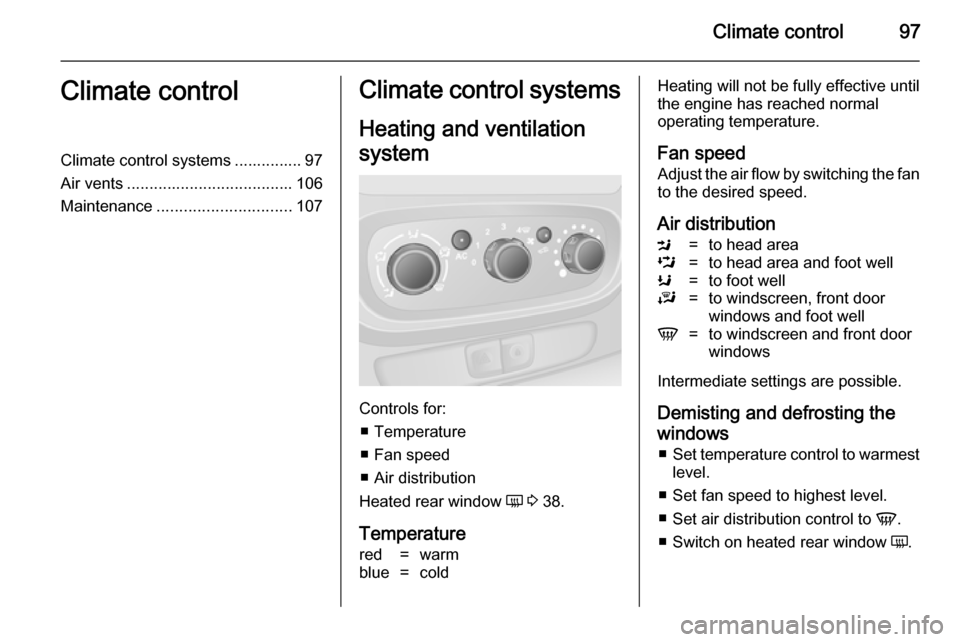
Controls for: ■ Temperature
■ Fan speed
■ Air distribution
Heated rear window Ü 3 38.
Temperature
red=warmblue=coldHeating will not be fully effective until
the engine has reached normal
operating temperature.
Fan speed Adjust the air flow by switching the fan
to the desired speed.
Air distributionM=to head areaL=to head area and foot wellK=to foot wellJ=to windscreen, front door
windows and foot wellV=to windscreen and front door
windows
Intermediate settings are possible.
Demisting and defrosting thewindows ■ Set temperature control to warmest
level.
■ Set fan speed to highest level.
■ Set air distribution control to V.
■ Switch on heated rear window Ü.
Page 128 of 189

126Driving and operating
ActivationRear view camera is automatically
activated when reverse gear is
engaged.
Functionality
The camera is mounted above the
rear doors/tailgate.
The area displayed by the camera is
limited. The distance of the image that
appears on the display differs from
the actual distance.
Trajectory lane display (1)
Depending on version, the trajectory
lane (1) of the vehicle is shown in blue
on the Info-Display. It shows the path of the vehicle in accordance with the
steering angle.
Fixed lane display (2)
The fixed lane display (2) shows the
path of the vehicle if the wheels are
kept straight.
Guiding lines (A, B, C) are used together with the fixed lane
display (2) and indicate the distance
behind the vehicle.
The guiding line intervals are as
follows:A (red)=30 cmB (yellow)=70 cmC (green)=150 cm
Settings
Settings, e.g. brightness, can be set
via the Infotainment system. Refer to
Infotainment system manual for
further information.
Deactivation
The camera is deactivated after a
delay if reverse gear is not engaged.
Fault The rear view camera may notoperate properly when:
■ the surrounding is dark,
■ the sun or the beam of headlights is
shining directly into the camera
lens,
■ ice, snow, mud, or anything else covers the camera lens. Clean the
lens, rinse it with water, and wipe it
with a soft cloth,