engine VAUXHALL VIVARO 2016.5 User Guide
[x] Cancel search | Manufacturer: VAUXHALL, Model Year: 2016.5, Model line: VIVARO, Model: VAUXHALL VIVARO 2016.5Pages: 211, PDF Size: 5 MB
Page 40 of 211

38Keys, doors and windowsFolding mirrors
For pedestrian safety, the exterior
mirrors will swing out of their normal
mounting position if they are struck
with sufficient force. Reposition the mirror by applying slight pressure tothe mirror housing.
Parking position
The exterior mirrors can be folded in
by pressing gently on the outer edge
of the housing, e.g. when in a
confined parking situation.
Depending on version, exterior
mirrors can be automatically folded to the parking position upon locking the
vehicle. For further information, refer
to the Infotainment system manual.
Heated mirrors
Operated by pressing Ü
. Activation is
indicated by the LED in the button.
Heating functions with the engine running. It is switched off
automatically after a short time.
Climate control system 3 103.
Interior mirrors
Manual anti-dazzle
To reduce dazzle, adjust the lever on the underside of the mirror housing.
Page 43 of 211

Keys, doors and windows41To open or close, raise the handle
and slide window.
Sun blind
Depending on vehicle, a sunblind is
integrated into the window cover.
To close, pull handle downwards and engage the locks at the bottom.
To open, disengage the locks by
pulling sunblind towards you slightly
and guide it upwards.
Heated rear window
Operated by pressing the Ü button.
Activation is indicated by the LED in
the button.
Heating functions with the engine
running and is switched off
automatically after a short time.
Climate control system 3 103.
Sun visors
The sun visors can be folded down or swivelled to the side to prevent
dazzling.
Sun visors have vanity mirrors and a
ticket holder on the rear.
The mirror covers should be closed when driving.
Wide view mirror 3 38.
Page 48 of 211
46Seats, restraintsTo restore, pull release lever, raise
backrest then release the lever. Allow the backrest to engage audibly.9 Warning
When the front passenger seat is
in the folded position, the front
passenger airbag system must be deactivated.
Airbag deactivation 3 57.
Armrest
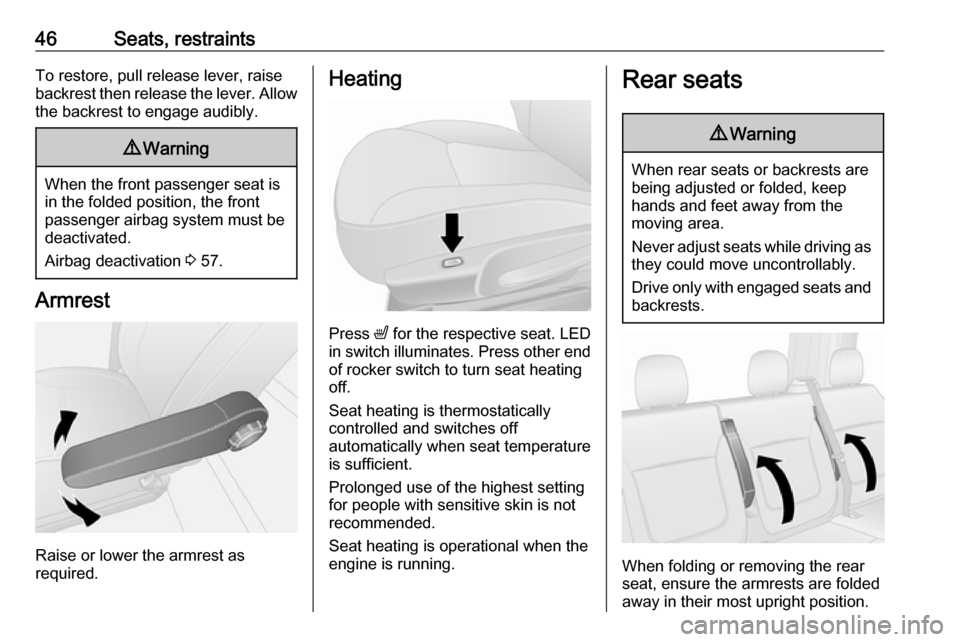
Raise or lower the armrest as
required.
Heating
Press ß for the respective seat. LED
in switch illuminates. Press other end of rocker switch to turn seat heating
off.
Seat heating is thermostatically
controlled and switches off
automatically when seat temperature
is sufficient.
Prolonged use of the highest setting
for people with sensitive skin is not
recommended.
Seat heating is operational when the
engine is running.
Rear seats9 Warning
When rear seats or backrests are
being adjusted or folded, keep
hands and feet away from the
moving area.
Never adjust seats while driving as they could move uncontrollably.
Drive only with engaged seats and
backrests.
When folding or removing the rear
seat, ensure the armrests are folded
away in their most upright position.
Page 76 of 211

74Instruments and controlsInstruments and
controlsControls ....................................... 75
Steering wheel adjustment ........75
Steering wheel controls .............75
Horn ........................................... 75
Steering column controls ...........75
Windscreen wiper/washer .........76
Rear window wiper/washer .......77
Outside temperature ..................77
Clock ......................................... 77
Power outlets ............................. 78
Cigarette lighter ......................... 79
Ashtrays .................................... 79
Warning lights, gauges and indi‐ cators ........................................... 79
Instrument cluster ......................79
Speedometer ............................. 79
Odometer .................................. 80
Trip odometer ............................ 80
Tachometer ............................... 80
Fuel gauge ................................ 81
Fuel economy gauge .................81
Service display .......................... 81
Control indicators ......................82
Turn signal ................................. 84Seat belt reminder.....................85
Airbag and belt tensioners .........85
Airbag deactivation ....................85
Charging system .......................86
Malfunction indicator light ..........86
Service vehicle soon .................86
Stop engine ............................... 86
Brake system ............................. 86
Antilock brake system (ABS) .....87
Upshift ....................................... 87
Electronic Stability Program ......87
Electronic Stability Program off ............................................. 87
Engine coolant temperature ......87
Preheating ................................. 88
AdBlue ....................................... 88
Tyre pressure monitoring system ...................................... 88
Engine oil pressure ....................88
Fuel economy mode ..................89
Low fuel ..................................... 89
Autostop .................................... 89
Exterior light .............................. 89
High beam ................................. 89
Fog light ..................................... 90
Rear fog light ............................. 90
Cruise control ............................ 90
Tachograph ............................... 90
Door open .................................. 90Information displays.....................90
Driver Information Centre ..........90
Vehicle messages ........................91
Warning chimes .........................92
Engine oil level .......................... 92
Trip computer ............................... 93
Tachograph .................................. 95
Page 80 of 211

78Instruments and controlsHours and minutes can be adjusted
by pressing the appropriate buttons
by the display or with the Infotainment
system controls.
For further information, refer to the
Infotainment system manual.
DIC:
Display the clock setting function by
pressing the button repeatedly on the end of the wiper lever.
Press and hold the button for approx.
5 seconds:
● hours flash
● press button repeatedly to change hours
● wait for approx. 5 seconds to set hours
● minutes flash
● press button repeatedly to change minutes
● wait for approx. 5 seconds to set minutes
Driver Information Centre (DIC)
3 90.
Power outlets
12 V power outlets are located on the
instrument panel and in the rear of the vehicle. Fold the cover upwards.
Depending on vehicle, additional
outlets may be located at the outer
edge of the bench seat.
Connecting electrical accessories
while the engine is off will discharge
the vehicle battery. Do not exceed the
maximum power consumption of
120 Watts. Do not connect any
current-delivering accessories, e.g.
electrical charging devices or
batteries.
Electrical accessories that are
connected must comply with the
electromagnetic compatibility
requirements laid down in
DIN VDE 40 839.Caution
Do not connect any current- delivering accessories, e.g.
electrical charging devices or
batteries.
Do not damage the outlets by
using unsuitable plugs.
Page 82 of 211
80Instruments and controlsSpeed limiterMaximum speed may be restricted by
a speed limiter. As a visible indication
of this, a warning label is located on
the instrument panel.
A warning buzzer will sound for
10 seconds every 40 seconds if the vehicle briefly exceeds the set limit.
Notice
Under certain conditions (e.g. steep
inclines), the vehicle speed may
exceed the set limit.
Speed limiter 3 136, cruise control
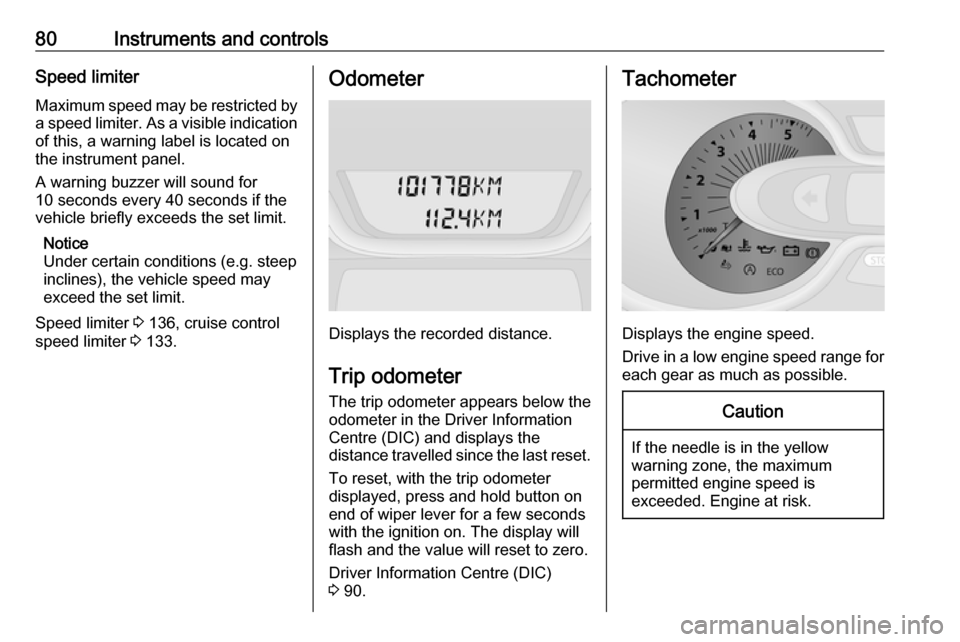
speed limiter 3 133.Odometer
Displays the recorded distance.
Trip odometer The trip odometer appears below the
odometer in the Driver Information
Centre (DIC) and displays the
distance travelled since the last reset.
To reset, with the trip odometer
displayed, press and hold button on
end of wiper lever for a few seconds
with the ignition on. The display will
flash and the value will reset to zero.
Driver Information Centre (DIC)
3 90.
Tachometer
Displays the engine speed.
Drive in a low engine speed range for each gear as much as possible.
Caution
If the needle is in the yellow
warning zone, the maximum
permitted engine speed is
exceeded. Engine at risk.
Page 86 of 211
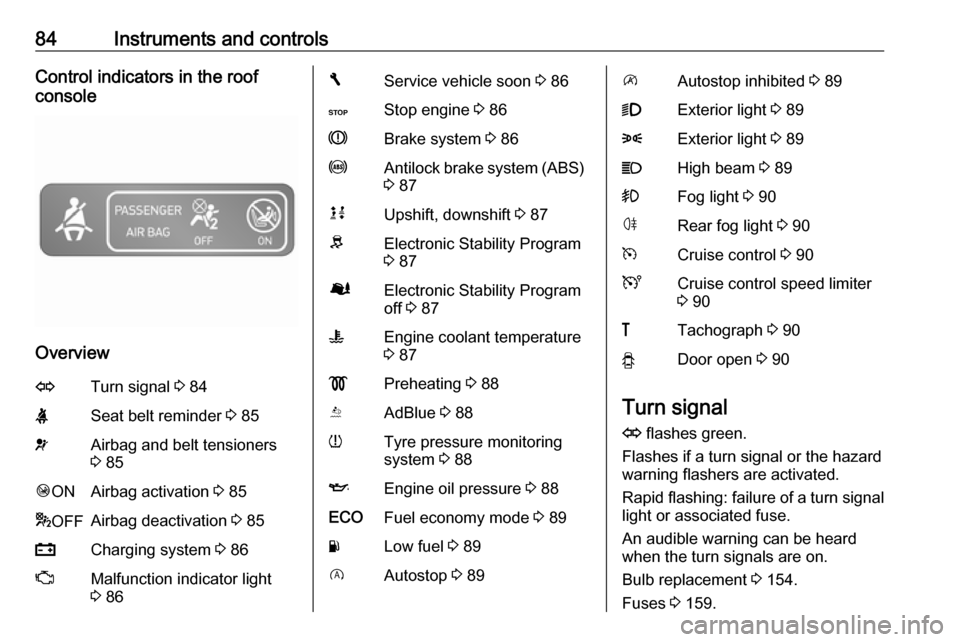
84Instruments and controlsControl indicators in the roof
console
Overview
OTurn signal 3 84XSeat belt reminder 3 85vAirbag and belt tensioners
3 85Ó ONAirbag activation 3 85* OFFAirbag deactivation 3 85pCharging system 3 86ZMalfunction indicator light
3 86FService vehicle soon 3 86CStop engine 3 86RBrake system 3 86uAntilock brake system (ABS)
3 87kjUpshift, downshift 3 87RElectronic Stability Program
3 87ØElectronic Stability Program
off 3 87WEngine coolant temperature
3 87!Preheating 3 88YAdBlue 3 88wTyre pressure monitoring
system 3 88IEngine oil pressure 3 88ECOFuel economy mode 3 89YLow fuel 3 89DAutostop 3 89\Autostop inhibited 3 899Exterior light 3 898Exterior light 3 89CHigh beam 3 89>Fog light 3 90øRear fog light 3 90mCruise control 3 90UCruise control speed limiter
3 90&Tachograph 3 90yDoor open 3 90
Turn signal
O flashes green.
Flashes if a turn signal or the hazard
warning flashers are activated.
Rapid flashing: failure of a turn signal
light or associated fuse.
An audible warning can be heard
when the turn signals are on.
Bulb replacement 3 154.
Fuses 3 159.
Page 88 of 211
86Instruments and controlsCharging systemp illuminates red.
Illuminates briefly when the ignition is
switched on.
Illuminates when the engine is
running
If control indicator p illuminates
when the engine is running (together
with control indicator C and a
warning chime): Stop, switch off
engine.
Vehicle battery is not charging.
Engine cooling may be interrupted.
Power to the brake servo unit may be cut. Seek the assistance of a
workshop.
Malfunction indicator light
Z illuminates or flashes yellow.
Illuminates briefly when the ignition is switched on.Illuminates when the engine is
running
Fault in the emission control system.The permitted emission limits may be
exceeded. Seek the assistance of a
workshop immediately.
Flashes when the engine is
running
Fault that could lead to catalytic
converter damage. Ease up on the
accelerator until the flashing stops.
Seek the immediate assistance of a
workshop.
Service vehicle soon
F illuminates yellow.
Illuminates briefly when the ignition is switched on.
May illuminate together with other
control indicators and a
corresponding message in the Driver
Information Centre (DIC) 3 90.
Seek the assistance of a workshop
immediately.Stop engine
C illuminates red.
Illuminates briefly when the ignition is
switched on.
Illuminates together with other control indicators (e.g., p, I and R),
accompanied by a warning chime and a corresponding message in theDriver Information Centre (DIC)
3 90: stop engine immediately and
seek the assistance of a workshop.
Brake system R illuminates red.
Illuminates after the ignition is
switched on if the parking brake is
applied 3 129 and extinguishes
when the parking brake is released.
Illuminates when the parking brake is
released if the brake fluid level is too
low 3 150.9 Warning
Stop. Do not continue your
journey. Consult a workshop.
Page 89 of 211

Instruments and controls87If R illuminates together with control
indicator C and a warning chime,
there is a fault in the braking system.
A corresponding message also
appears in the Driver Information
Centre (DIC) 3 90. Seek the
assistance of a workshop
immediately.
Brake system 3 128.
Antilock brake system (ABS)
u illuminates yellow.
Illuminates briefly after the ignition is
switched on. The system is ready for
operation when u extinguishes.
If control indicator u does not go out
after a few seconds, or if it illuminates while driving, there is a fault in the
ABS. Control indicator F may also
illuminate in the instrument cluster
together a corresponding message in the Driver Information Centre (DIC)3 90. The brake system remains
operational but without ABS
regulation.If control indicators u, F , R and C
illuminate, there is a fault in the
braking system. A corresponding
message appears in the DIC. Seek
the assistance of a workshop
immediately.
Antilock brake system (ABS) 3 129.
Upshift k or j illuminates.
It is recommended to shift gear when
illuminated to improve fuel economy.
Electronic Stability Program
R flashes or illuminates yellow.
Illuminates briefly when the ignition is
switched on.
Flashing during driving The system is actively engaged.
Engine output may be reduced and
the vehicle may be braked
automatically to a small degree.Illuminates while driving
The system is not available. A
corresponding message also
appears in the Driver Information
Centre (DIC) 3 90.
ESP® Plus
3 131, Traction Control
system 3 130.
Electronic Stability Program
off
Ø illuminates green.
If ESP ®Plus
has been deactivated with
Ø on the instrument panel, control
indicator Ø illuminates and a
corresponding message appears in
the Driver Information Centre (DIC)
3 90.
ESP® Plus
3 131, Traction Control
system 3 130.
Engine coolant temperature
W illuminates blue or red.
Illuminates red briefly when the
ignition is switched on, then turns
blue.
Page 90 of 211
88Instruments and controlsIlluminates red when the engine is
running
Stop, switch off engine.Caution
Coolant temperature too high.
Check coolant level 3 148.
If there is sufficient coolant, consult a workshop.
The control indicator must be blue
before continuing driving.
Preheating
! illuminates yellow.
Preheating is activated. Only
activates when outside temperature
is low.
AdBlue Y illuminates yellow.
AdBlue level is low. Refill AdBlue as
soon as possible, to avoid prevention
of engine starts.
Illuminates together with control
indicator F to indicate a system
failure or as a warning that engine starting may not be possible after a
certain distance. Seek the assistance
of a workshop immediately.
A corresponding message appears in the Driver Information Centre (DIC)
3 90.
Adblue percentage remaining can
also be checked by pressing button
repeatedly on end of wiper lever. Trip
computer 3 93.
AdBlue 3 123.
Tyre pressure monitoring
system
w illuminates or flashes yellow.
Illuminates briefly when the ignition is
switched on.
Illuminates
Tyre pressure loss. Stop immediately
and check tyre pressure.
Control indicator w illuminates
together with C 3 86 and a
corresponding message appears inthe Driver Information Centre (DIC)
when a puncture or severely under- inflated tyre is detected.
Flashes
Fault in system. After a delay the
control indicator illuminates
continuously. Consult a workshop.
Control indicator w illuminates
together with A 3 86 and a
corresponding message appears in
the DIC when a tyre without a
pressure sensor is mounted (e.g.
spare wheel).
Tyre pressure monitoring system (TPMS) 3 166.
Engine oil pressure
I illuminates red.
Illuminates briefly when the ignition is
switched on.