lights VAUXHALL VIVARO 2016 User Guide
[x] Cancel search | Manufacturer: VAUXHALL, Model Year: 2016, Model line: VIVARO, Model: VAUXHALL VIVARO 2016Pages: 209, PDF Size: 4.86 MB
Page 90 of 209

88Instruments and controls9Warning
When the engine is off,
considerably more force is needed
to brake and steer.
Do not remove key until vehicle is stationary, otherwise the steeringwheel lock could engage
unexpectedly.
Check oil level before seeking
assistance of a workshop 3 145.
Fuel economy mode
ECO illuminates green when ECO
mode is engaged to reduce fuel
consumption.
ECO mode, driving economically
3 112.
Low fuel Y illuminates yellow.
Illuminates briefly when the ignition is
switched on.
Illuminates when level in fuel tank is
low (range of approx. 30 miles); refuel immediately 3 138.
Catalytic converter 3 121.
Bleeding the diesel fuel system
3 151.
Autostop D illuminates when engine is in an
Autostop.
\ illuminates when an Autostop is
inhibited when certain conditions are
not fulfilled.
Stop-start system 3 117.
Exterior light
9 illuminates green.
Illuminated when the headlights are
on.
8 illuminates green.
Illuminated when the sidelights are
on.
Lighting 3 95.
High beam
P illuminates blue.
Illuminated when high beam is on and during headlight flash 3 96.Fog light
> illuminates green.
Illuminated when the front fog lights
are on 3 98.
Rear fog light r illuminates green.
Illuminated when the rear fog light is
on 3 98.
Cruise control
m , U illuminates green or yellow.
m illuminates green when a certain
speed is stored.
U illuminates green when the system
is on.
Speed limiter U illuminates yellow.
U illuminates yellow when the
system is on.
Cruise control and speed limiter
3 131.
Page 93 of 209
Instruments and controls91● If the vehicle battery is notcharging 3 84.
● If engine lubrication is interrupted
3 87.
● If AdBlue needs to be refilled or a
fault is present 3 121.
● If the electronic key is outside of the detection range.
Electronic key system 3 22,
Power button 3 114.
When the vehicle is parked and/or
the driver's door is opened:
● If the key has been left in the ignition.
● If the electronic key has been left
in the card reader.
Electronic key system 3 22,
Power button 3 114.
● If the vehicle is in an Autostop. Stop-start system 3 117.
● If the exterior lights are on.Engine oil level
If the minimum engine oil level is
reached, a message is displayed in
the Driver Information Centre (DIC)
3 89 for 30 seconds after the engine
is started.
Check oil level 3 145.Trip computer
The trip computer provides
information on driving data, which is
continually recorded and evaluated electronically.
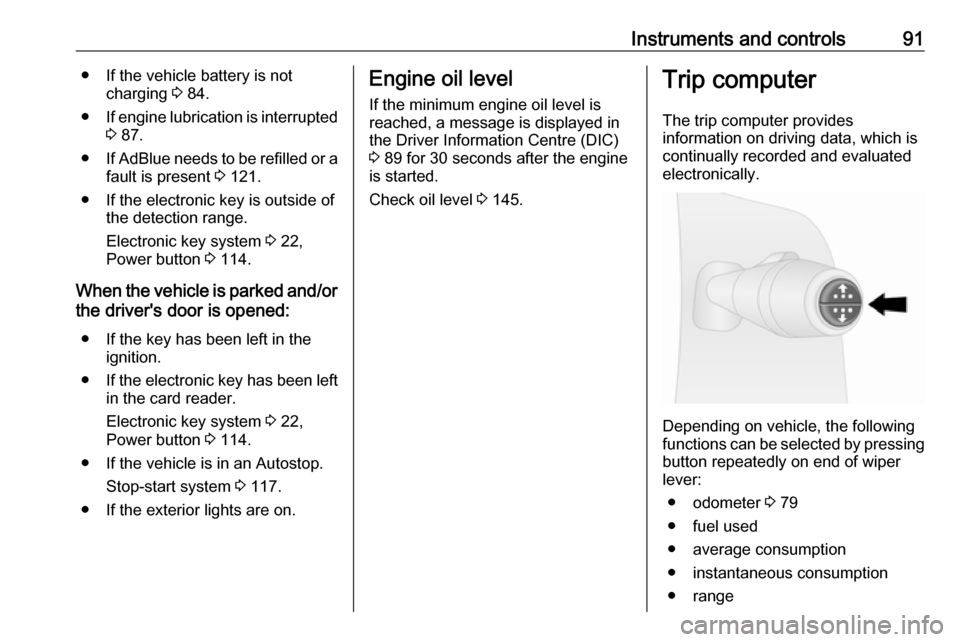
Depending on vehicle, the following
functions can be selected by pressing button repeatedly on end of wiper
lever:
● odometer 3 79
● fuel used
● average consumption
● instantaneous consumption
● range
Page 97 of 209
Lighting95LightingExterior lighting............................ 95
Light switch ................................ 95
Automatic light control ...............95
High beam ................................. 96
Headlight flash ........................... 96
Headlight range adjustment ......96
Headlights when driving abroad ...................................... 96
Daytime running lights ...............97
Adaptive forward lighting ...........97
Hazard warning flashers ............97
Turn and lane-change signals ...97
Front fog lights ........................... 98
Rear fog lights ........................... 98
Reversing lights .........................98
Misted light covers .....................98
Interior lighting ............................. 98
Instrument panel illumination control ....................................... 98
Interior lights .............................. 99
Load compartment lighting ........99
Glove box lighting ......................99
Lighting features ........................100
Entry lighting ............................ 100
Exit lighting .............................. 100Exterior lighting
Light switch
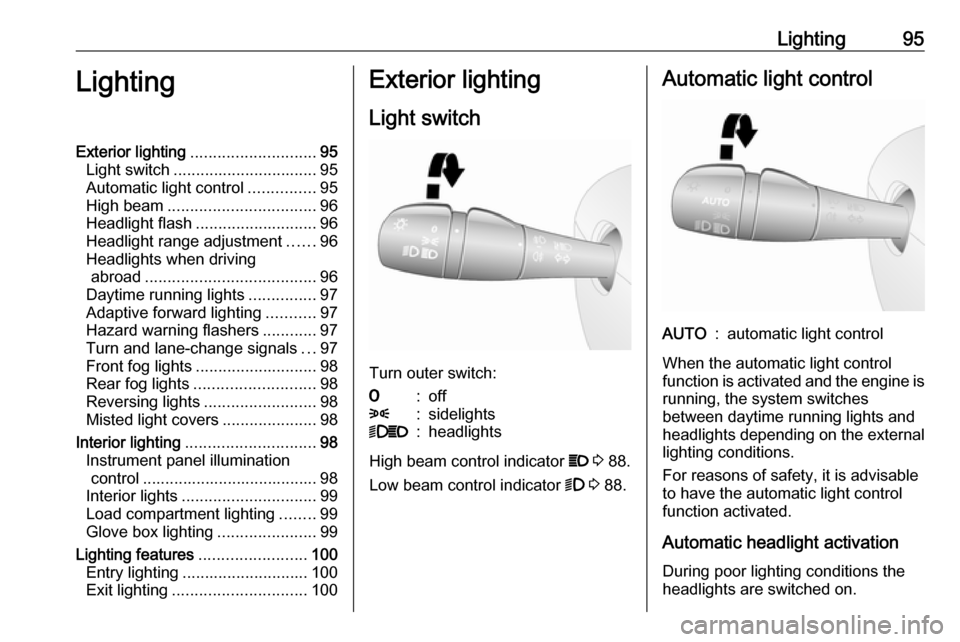
Turn outer switch:
7:off8:sidelights9P:headlights
High beam control indicator P 3 88.
Low beam control indicator 9 3 88.
Automatic light controlAUTO:automatic light control
When the automatic light control
function is activated and the engine is running, the system switches
between daytime running lights and headlights depending on the external lighting conditions.
For reasons of safety, it is advisable
to have the automatic light control
function activated.
Automatic headlight activation During poor lighting conditions the
headlights are switched on.
Page 98 of 209
96LightingDaytime running lights 3 97.
High beam
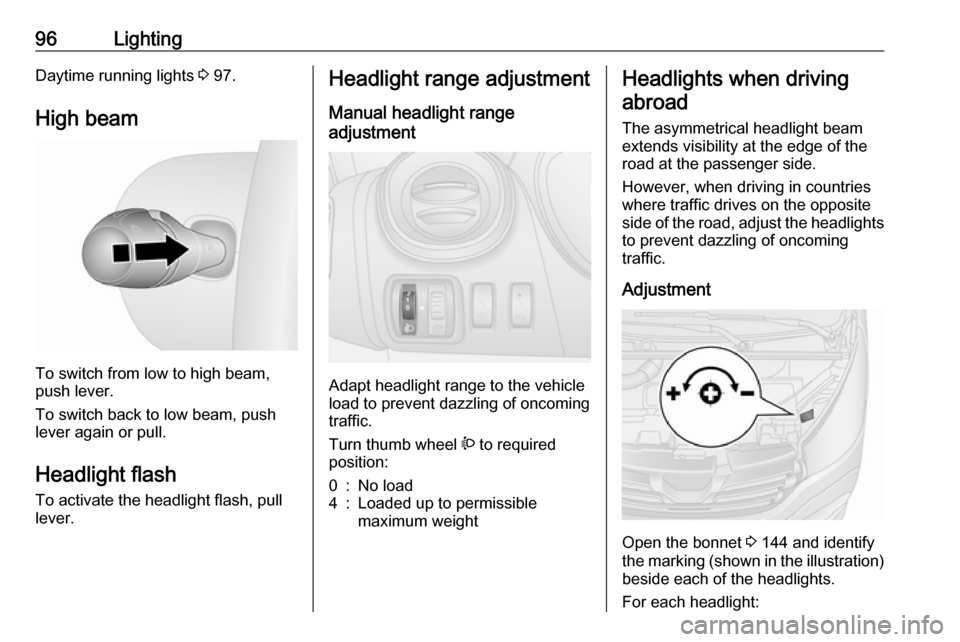
To switch from low to high beam,
push lever.
To switch back to low beam, push
lever again or pull.
Headlight flash To activate the headlight flash, pull
lever.
Headlight range adjustment
Manual headlight range
adjustment
Adapt headlight range to the vehicle
load to prevent dazzling of oncoming
traffic.
Turn thumb wheel ? to required
position:
0:No load4:Loaded up to permissible
maximum weightHeadlights when driving
abroad
The asymmetrical headlight beam
extends visibility at the edge of the
road at the passenger side.
However, when driving in countries
where traffic drives on the opposite
side of the road, adjust the headlights to prevent dazzling of oncoming
traffic.
Adjustment
Open the bonnet 3 144 and identify
the marking (shown in the illustration)
beside each of the headlights.
For each headlight:
Page 99 of 209
![VAUXHALL VIVARO 2016 User Guide Lighting97Using a screwdriver, turn the screw
by a 1
/4 turn towards the
] symbol to
lower the beams or towards the <
symbol to raise the beams.
Ensure the headlight beams are
returned to their or](/img/38/19590/w960_19590-98.png "VAUXHALL VIVARO 2016 User Guide Lighting97Using a screwdriver, turn the screw
by a 1
/4 turn towards the
] symbol to
lower the beams or towards the <
symbol to raise the beams.
Ensure the headlight beams are
returned to their or")
Lighting97Using a screwdriver, turn the screw
by a 1
/4 turn towards the
] symbol to
lower the beams or towards the <
symbol to raise the beams.
Ensure the headlight beams are
returned to their original positions
when required.
Daytime running lights
Daytime running lights increase
visibility of the vehicle during daylight. They are switched on automatically
when the ignition is switched on.
If required, the daytime running lights
can be deactivated via the
Infotainment system. For further
information, refer to Infotainment
system manual.
Automatic light control 3 95.Adaptive forward lighting
Cornering light
With the low beam switched on,
depending on the steering angle, vehicle speed and gear selected
when cornering, the front fog light will also switch on, to illuminate the
corner of the road on the respective
side.
Hazard warning flashers
Operated with the ¨ button.
In the event of hard braking, the
hazard warning flashers may turn on
automatically. Switch off by pressing
the ¨ button.
Turn and lane-change signalslever up:right turn signallever down:left turn signal
When the steering wheel is turned
back, the lever automatically returns
to its original position and the turn
signal is deactivated. This will not
Page 100 of 209

98Lightinghappen when making a minor
steering manoeuvre such as lane
changing.
For three flashes, e.g. when changing
lanes, move lever part way to first
stop and then release.
If the lever is moved past the first stop, the turn signal is switched on
constantly. Switch the turn signal off
manually by moving the lever to its
original position.
Front fog lights
Turn inner switch to position >.
Front fog lights will only operate when
the ignition and headlights are
switched on.
Rear fog lights
Turn inner switch to position r.
Rear fog light comes on together with front fog lights and will only operate
when the ignition and headlights are
switched on.
Reversing lights The reversing lights come on when
the ignition is on and reverse gear is
selected.
Misted light covers
The inside of the light covers may mist up briefly in poor, wet and cold
weather conditions, in heavy rain or
after washing. The mist disappears
quickly by itself; to help, switch on the headlights.Interior lighting
Instrument panel illumination control
Brightness of the following lights can
be adjusted when the exterior lights
are on:
● instrument panel illumination
● info-display
● illuminated switches and operation elements.
Turn thumb wheel b until the desired
brightness is obtained.
Page 101 of 209

Lighting99Interior lights
Courtesy lights
During entry and exit of the vehicle,
depending on switch position the front
and rear courtesy lights automatically switch on, together with the foot well
lights, then switch off after a delay.
Front courtesy lights
Operate rocker switch:
press 7:offcentre posi‐
tion:automatic switching
on and offpress d:onWith the rocker switch in its central
position, the light functions as a
courtesy light and illuminates when
the front doors are opened.
When the front doors are closed, the
courtesy light extinguishes after a
delay.
Rear courtesy lights
The upper load compartment lights
can be set to illuminate when the side or rear doors are opened, or switchedon constantly.
Depending on vehicle, adjustable LED spotlights, also including rocker
switch, may be present.Operate rocker switch:press 7:offcentre posi‐
tion:automatic switching
on and offpress d:on
With the rocker switch in its central
position, the light functions as a
courtesy light and illuminates when
the side or rear doors are opened.
When the doors are closed, the
courtesy light extinguishes after a
delay.
Load compartment lighting
The lower load compartment lights
come on when the load compartment is opened.
Glove box lighting
The glovebox light comes on when
the glovebox is opened.
Page 102 of 209
100LightingLighting featuresEntry lighting
Welcome lighting Vehicle lights are switched on for a
short time to facilitate locating the
vehicle when it is dark.
Remote control operation
Lights switch on when unlocking the
vehicle with the remote control.
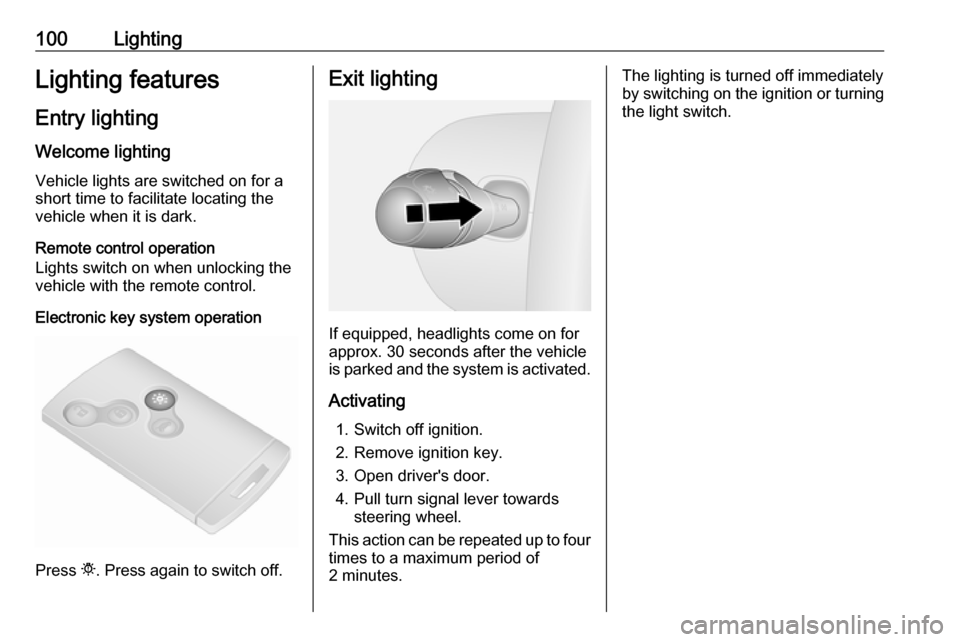
Electronic key system operation
Press t. Press again to switch off.
Exit lighting
If equipped, headlights come on for
approx. 30 seconds after the vehicle
is parked and the system is activated.
Activating 1. Switch off ignition.
2. Remove ignition key.
3. Open driver's door.
4. Pull turn signal lever towards steering wheel.
This action can be repeated up to four times to a maximum period of
2 minutes.
The lighting is turned off immediately
by switching on the ignition or turning
the light switch.
Page 139 of 209

Driving and operating137Trajectory lane display (1)
Depending on version, the trajectory
lane (1) of the vehicle is shown in blue
on the Info-Display. It shows the path of the vehicle in accordance with the
steering angle.
Fixed lane display (2)
The fixed lane display (2) shows the
path of the vehicle if the wheels are
kept straight.
Guide lines (3, 4, 5) are used together
with the fixed lane display (2) and
indicate the distance behind the
vehicle.
The guide line intervals are as
follows:3 (red):30 cm4 (yellow):70 cm5 (green):150 cm
Settings
Settings, e.g. brightness, contrast
and colours can be changed via the
Infotainment system. The feature
may also be switched off
permanently. Refer to Infotainment
system manual for further
information.
Deactivation
The camera is deactivated after a
delay if reverse gear is not engaged
for approx. 5 seconds.
Fault
The rear view camera may not
operate properly when:
● the surrounding is dark
● the sun or the beam of headlights
is shining directly into the camera
lens
● ice, snow, mud, or anything else covers the camera lens. Clean
the lens, rinse it with water, and
wipe it with a soft cloth
● the rear doors/tailgate are not closed correctly
● the vehicle had a rear-end accident
● there are extreme temperature changes
Page 144 of 209

142Vehicle careVehicle careGeneral Information...................143
Accessories and vehicle modifications .......................... 143
Vehicle storage ........................143
End-of-life vehicle recovery .....144
Vehicle checks ........................... 144
Performing work ......................144
Bonnet ..................................... 144
Engine oil ................................. 145
Engine air filter ........................ 146
Engine coolant ......................... 147
Power steering fluid .................147
Washer fluid ............................ 148
Brakes ..................................... 148
Brake fluid ............................... 148
Vehicle battery ......................... 149
Diesel fuel filter ........................150
Diesel fuel system bleeding .....151
Wiper blade replacement ........152
Bulb replacement .......................152
Headlights ............................... 152
Fog lights ................................. 153
Front turn signal lights .............154
Tail lights ................................. 154
Side turn signal lights ..............155Centre high-mounted brake
light ......................................... 155
Reversing light ......................... 155
Number plate light ...................156
Fog tail light ............................. 156
Interior lights ............................ 156
Instrument panel illumination ...157
Electrical system ........................157
Fuses ....................................... 157
Instrument panel fuse box .......159
Vehicle tools .............................. 162
Tools ........................................ 162
Wheels and tyres .......................163
Tyres ....................................... 163
Winter tyres ............................. 163
Tyre designations ....................163
Tyre pressure .......................... 163
Tyre pressure monitoring system .................................... 164
Tread depth ............................. 167
Changing tyre and wheel size . 167
Wheel covers ........................... 167
Tyre chains .............................. 168
Tyre repair kit .......................... 168
Wheel changing .......................171
Spare wheel ............................ 172
Jump starting ............................. 174Towing....................................... 175
Towing the vehicle ...................175
Towing another vehicle ...........176
Appearance care .......................177
Exterior care ............................ 177
Interior care ............................. 178