warning VAUXHALL VIVARO 2016 User Guide
[x] Cancel search | Manufacturer: VAUXHALL, Model Year: 2016, Model line: VIVARO, Model: VAUXHALL VIVARO 2016Pages: 209, PDF Size: 4.86 MB
Page 31 of 209
Keys, doors and windows29Doors
Sliding door
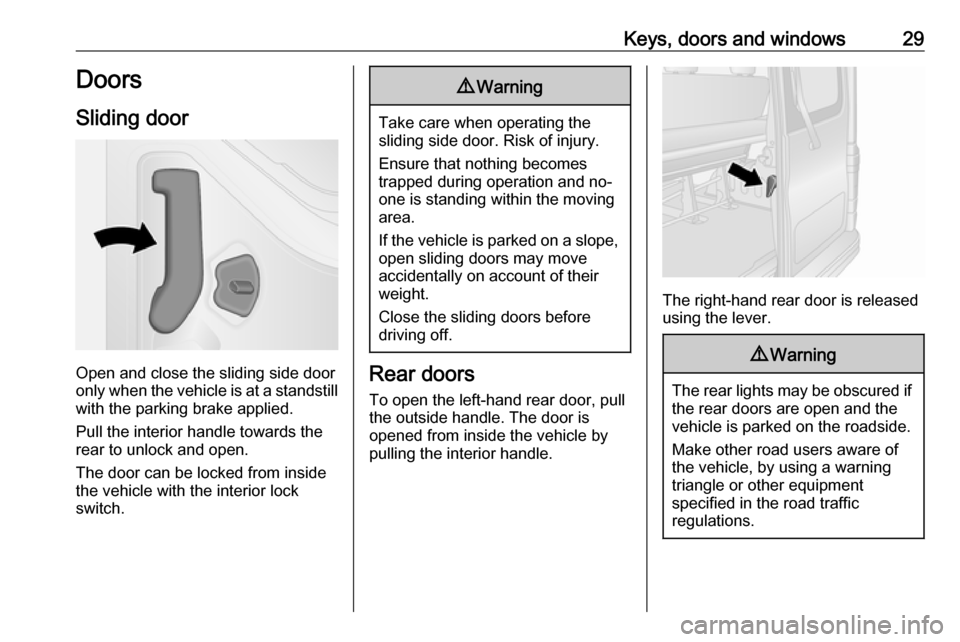
Open and close the sliding side door
only when the vehicle is at a standstill
with the parking brake applied.
Pull the interior handle towards the
rear to unlock and open.
The door can be locked from inside
the vehicle with the interior lock
switch.
9 Warning
Take care when operating the
sliding side door. Risk of injury.
Ensure that nothing becomes
trapped during operation and no-
one is standing within the moving
area.
If the vehicle is parked on a slope,
open sliding doors may move
accidentally on account of their
weight.
Close the sliding doors before
driving off.
Rear doors
To open the left-hand rear door, pull
the outside handle. The door is
opened from inside the vehicle by
pulling the interior handle.
The right-hand rear door is released using the lever.
9 Warning
The rear lights may be obscured if
the rear doors are open and the
vehicle is parked on the roadside.
Make other road users aware of the vehicle, by using a warning
triangle or other equipment
specified in the road traffic
regulations.
Page 32 of 209
30Keys, doors and windows
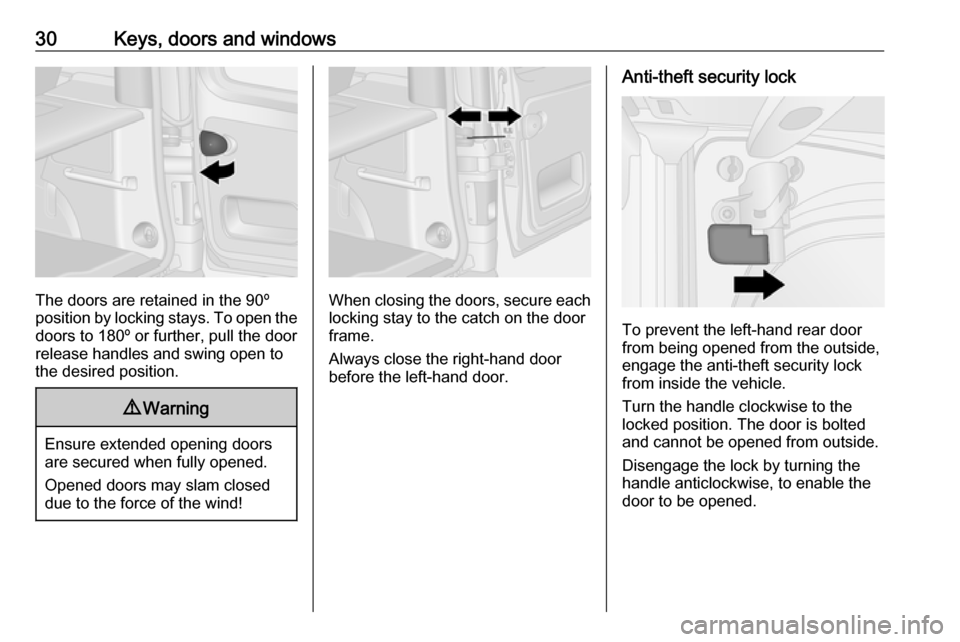
The doors are retained in the 90º
position by locking stays. To open the
doors to 180º or further, pull the door
release handles and swing open to
the desired position.
9 Warning
Ensure extended opening doors
are secured when fully opened.
Opened doors may slam closed due to the force of the wind!
When closing the doors, secure each locking stay to the catch on the door
frame.
Always close the right-hand door
before the left-hand door.
Anti-theft security lock
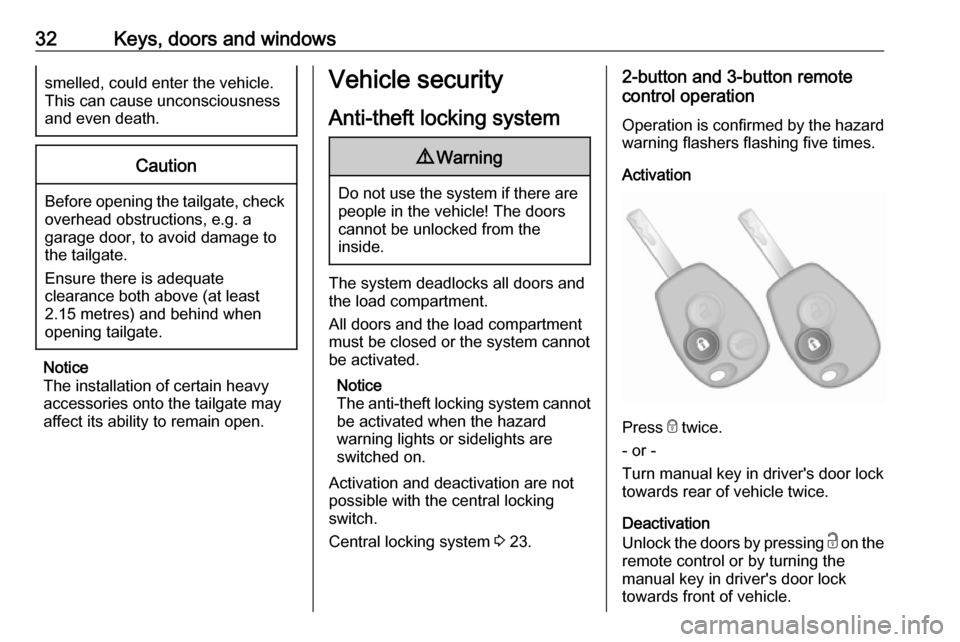
To prevent the left-hand rear door
from being opened from the outside,
engage the anti-theft security lock
from inside the vehicle.
Turn the handle clockwise to the
locked position. The door is bolted
and cannot be opened from outside.
Disengage the lock by turning the
handle anticlockwise, to enable the
door to be opened.
Page 34 of 209
32Keys, doors and windowssmelled, could enter the vehicle.
This can cause unconsciousness
and even death.Caution
Before opening the tailgate, check overhead obstructions, e.g. a
garage door, to avoid damage to
the tailgate.
Ensure there is adequate
clearance both above (at least
2.15 metres) and behind when
opening tailgate.
Notice
The installation of certain heavy
accessories onto the tailgate may
affect its ability to remain open.
Vehicle security
Anti-theft locking system9 Warning
Do not use the system if there are
people in the vehicle! The doorscannot be unlocked from the
inside.
The system deadlocks all doors and the load compartment.
All doors and the load compartment
must be closed or the system cannot
be activated.
Notice
The anti-theft locking system cannot be activated when the hazard
warning lights or sidelights are
switched on.
Activation and deactivation are not possible with the central locking
switch.
Central locking system 3 23.
2-button and 3-button remote
control operation
Operation is confirmed by the hazard warning flashers flashing five times.
Activation
Press e twice.
- or -
Turn manual key in driver's door lock
towards rear of vehicle twice.
Deactivation
Unlock the doors by pressing c on the
remote control or by turning the
manual key in driver's door lock
towards front of vehicle.
Page 35 of 209
Keys, doors and windows33Electronic key system operationOperation is confirmed by the hazard
warning flashers.
Activation
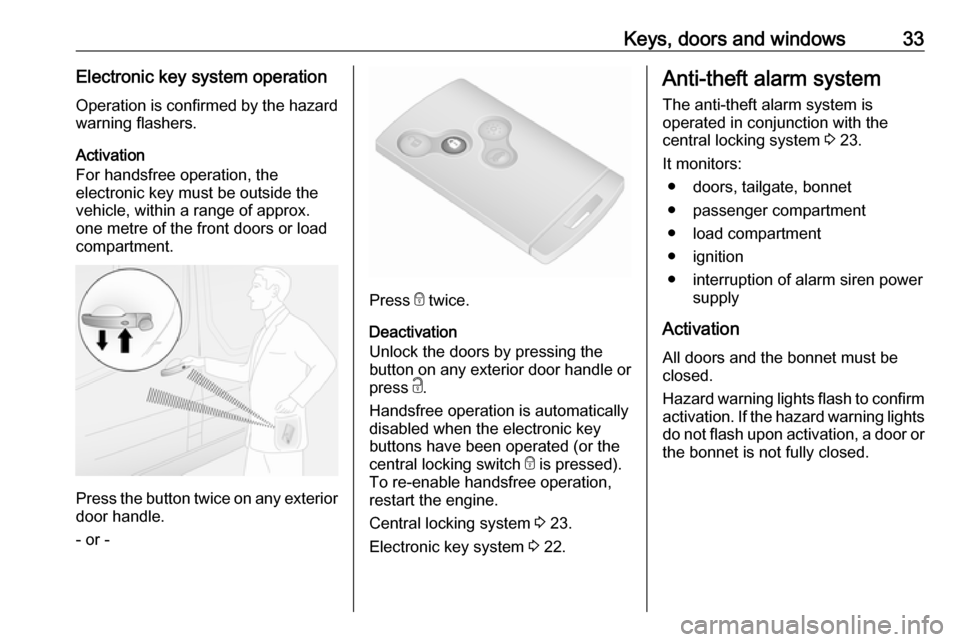
For handsfree operation, the
electronic key must be outside the
vehicle, within a range of approx.
one metre of the front doors or load
compartment.
Press the button twice on any exterior
door handle.
- or -
Press e twice.
Deactivation
Unlock the doors by pressing the
button on any exterior door handle or
press c.
Handsfree operation is automatically disabled when the electronic key
buttons have been operated (or the
central locking switch e is pressed).
To re-enable handsfree operation,
restart the engine.
Central locking system 3 23.
Electronic key system 3 22.
Anti-theft alarm system
The anti-theft alarm system is
operated in conjunction with the
central locking system 3 23.
It monitors: ● doors, tailgate, bonnet
● passenger compartment
● load compartment
● ignition
● interruption of alarm siren power supply
Activation
All doors and the bonnet must be
closed.
Hazard warning lights flash to confirm activation. If the hazard warning lights
do not flash upon activation, a door or the bonnet is not fully closed.
Page 36 of 209
34Keys, doors and windows2-button and 3-button remote control
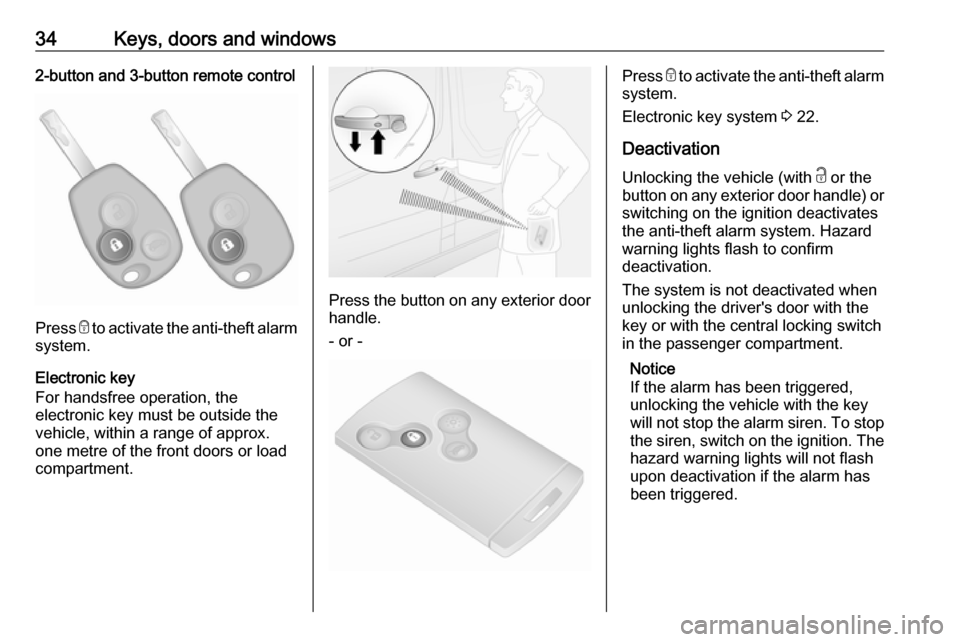
Press e to activate the anti-theft alarm
system.
Electronic key
For handsfree operation, the
electronic key must be outside the
vehicle, within a range of approx.
one metre of the front doors or load compartment.
Press the button on any exterior door
handle.
- or -
Press e to activate the anti-theft alarm
system.
Electronic key system 3 22.
Deactivation
Unlocking the vehicle (with c or the
button on any exterior door handle) or switching on the ignition deactivates
the anti-theft alarm system. Hazard
warning lights flash to confirm
deactivation.
The system is not deactivated when
unlocking the driver's door with the
key or with the central locking switch
in the passenger compartment.
Notice
If the alarm has been triggered,
unlocking the vehicle with the key
will not stop the alarm siren. To stop the siren, switch on the ignition. The
hazard warning lights will not flash
upon deactivation if the alarm has
been triggered.
Page 37 of 209

Keys, doors and windows35Activation without monitoring of
passenger compartment
Disable monitoring of the passenger
compartment, e.g. when animals are
being left in the vehicle, or if the
auxiliary heater has been set for a
timed or remote controlled start
3 106.
Press and hold e on the remote
control or electronic key; an audible
signal will sound as confirmation.
The status will remain until the doors
are unlocked.
Alarm
When triggered, the alarm sounds via a separate battery-backed power
sounder, and the hazard warning
lights flash simultaneously. The
number and duration of alarm signals are stipulated by legislation.
If the vehicle battery is disconnected
or its power supply is interrupted, the
alarm siren will be triggered. First
deactivate the anti-theft alarm system
if the vehicle battery must be
disconnected.To silence the alarm siren (if
triggered) and therefore deactivate
the anti-theft alarm system, reconnect vehicle battery and unlock the vehicle
or switch on the ignition.
Immobiliser
The immobiliser is part of the ignition
switch and checks whether the
vehicle is allowed to be started with
the key being used.
The immobiliser is activated
automatically after the key has been
removed from the ignition switch and
also if the key is left in the ignition
switch when the engine is turned off.
If the engine cannot be started, switch off the ignition and remove key, wait
approx. 2 seconds and then repeat
the start attempt. If start attempt is
unsuccessful, attempt to start the
engine using the spare key and seek
the assistance of a workshop.Notice
The immobiliser does not lock the doors. You should always lock the
vehicle after leaving it and switch on the anti-theft alarm system 3 23,
3 33.
Page 40 of 209
38Keys, doors and windowsAutomatic anti-dazzle
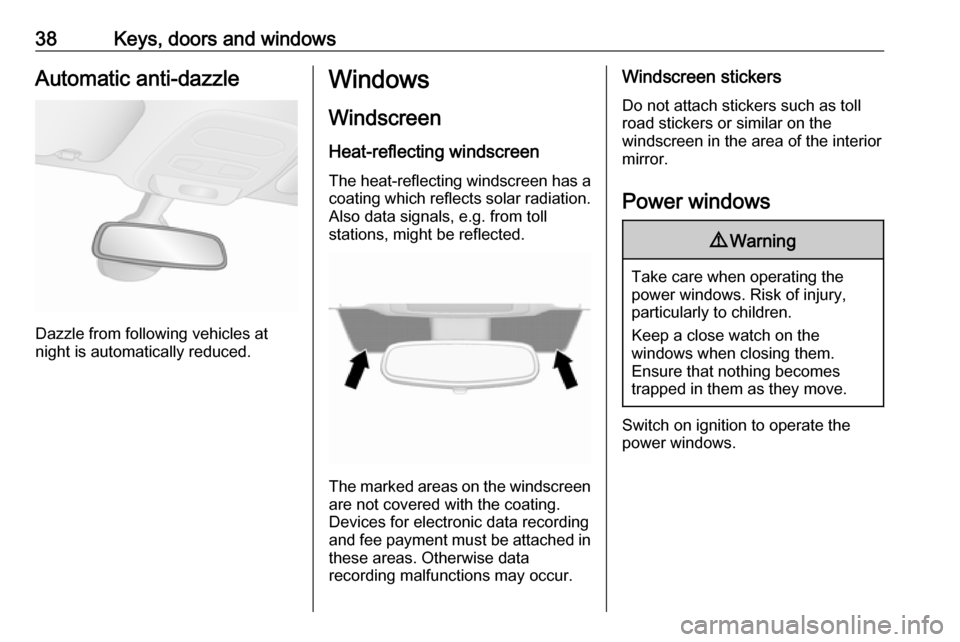
Dazzle from following vehicles at
night is automatically reduced.
Windows
Windscreen Heat-reflecting windscreenThe heat-reflecting windscreen has a
coating which reflects solar radiation.
Also data signals, e.g. from toll
stations, might be reflected.
The marked areas on the windscreen are not covered with the coating.
Devices for electronic data recording
and fee payment must be attached in
these areas. Otherwise data
recording malfunctions may occur.
Windscreen stickers
Do not attach stickers such as toll
road stickers or similar on the
windscreen in the area of the interior
mirror.
Power windows9 Warning
Take care when operating the
power windows. Risk of injury,
particularly to children.
Keep a close watch on the
windows when closing them.
Ensure that nothing becomes
trapped in them as they move.
Switch on ignition to operate the power windows.
Page 43 of 209
Seats, restraints41Seats, restraintsHead restraints............................ 41
Front seats ................................... 42
Seat position .............................. 42
Seat adjustment ........................43
Seat folding ............................... 44
Armrest ...................................... 45
Heating ...................................... 45
Rear seats ................................... 45
Seat belts ..................................... 48
Three-point seat belt .................49
Airbag system .............................. 52
Front airbag system ...................55
Side airbag system ....................55
Curtain airbag system ...............56
Airbag deactivation ....................56
Child restraints ............................. 57
Child restraint systems ..............57
Child restraint installation locations ................................... 59
Isofix child restraint systems .....64
Top-tether fastening eyes ..........64Head restraints
Position9 Warning
Only drive with the head restraint
set to the proper position.
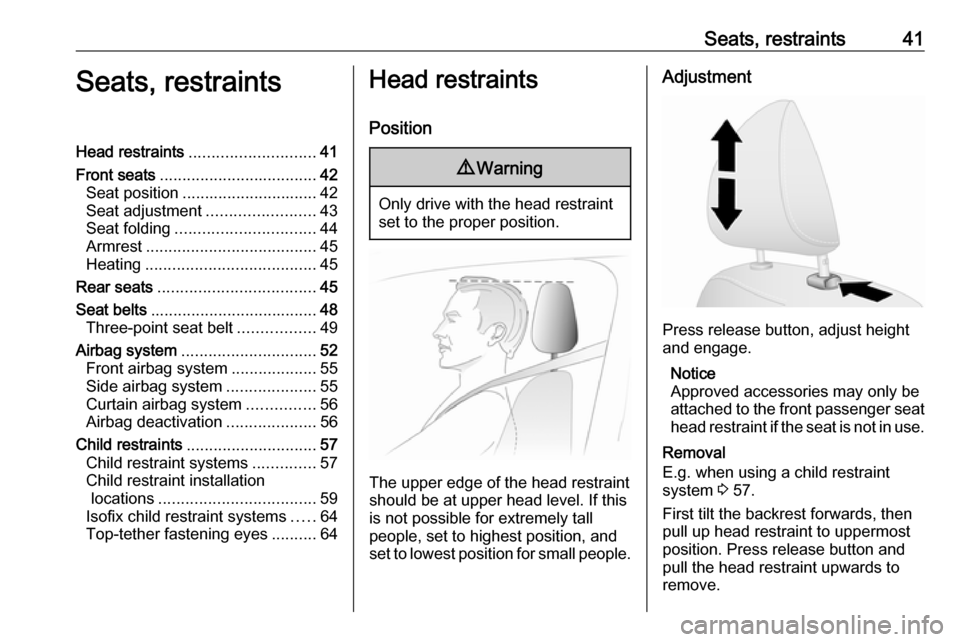
The upper edge of the head restraint
should be at upper head level. If this
is not possible for extremely tall
people, set to highest position, and
set to lowest position for small people.
Adjustment
Press release button, adjust height
and engage.
Notice
Approved accessories may only be
attached to the front passenger seat head restraint if the seat is not in use.
Removal
E.g. when using a child restraint
system 3 57.
First tilt the backrest forwards, then
pull up head restraint to uppermost
position. Press release button and
pull the head restraint upwards to
remove.
Page 44 of 209
42Seats, restraintsStow head restraints securely in load
compartment. Do not drive with head
restraints removed if the seat is
occupied.Front seats
Seat position9 Warning
Only drive with the seat correctly
adjusted.
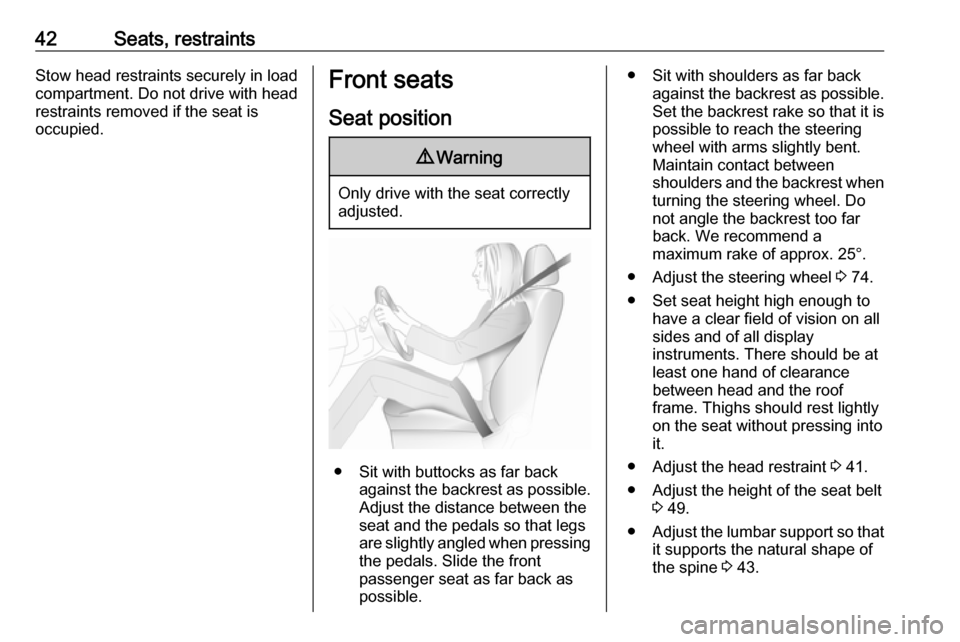
● Sit with buttocks as far back
against the backrest as possible.
Adjust the distance between the
seat and the pedals so that legs
are slightly angled when pressing
the pedals. Slide the front
passenger seat as far back as
possible.
● Sit with shoulders as far back against the backrest as possible.Set the backrest rake so that it is
possible to reach the steering
wheel with arms slightly bent. Maintain contact between
shoulders and the backrest when turning the steering wheel. Do
not angle the backrest too far
back. We recommend a
maximum rake of approx. 25°.
● Adjust the steering wheel 3 74.
● Set seat height high enough to have a clear field of vision on allsides and of all display
instruments. There should be at
least one hand of clearance
between head and the roof
frame. Thighs should rest lightly
on the seat without pressing into
it.
● Adjust the head restraint 3 41.
● Adjust the height of the seat belt 3 49.
● Adjust the lumbar support so that
it supports the natural shape of
the spine 3 43.
Page 45 of 209
Seats, restraints43Seat adjustment
Drive only with engaged seats and
backrests.9 Danger
Do not sit nearer than 25 cm from
the steering wheel, to permit safe
airbag deployment.
9 Warning
Never adjust seats while driving as
they could move uncontrollably.
9 Warning
Never store any loose objects
under the seats.
Underseat storage, storage box 3 67.
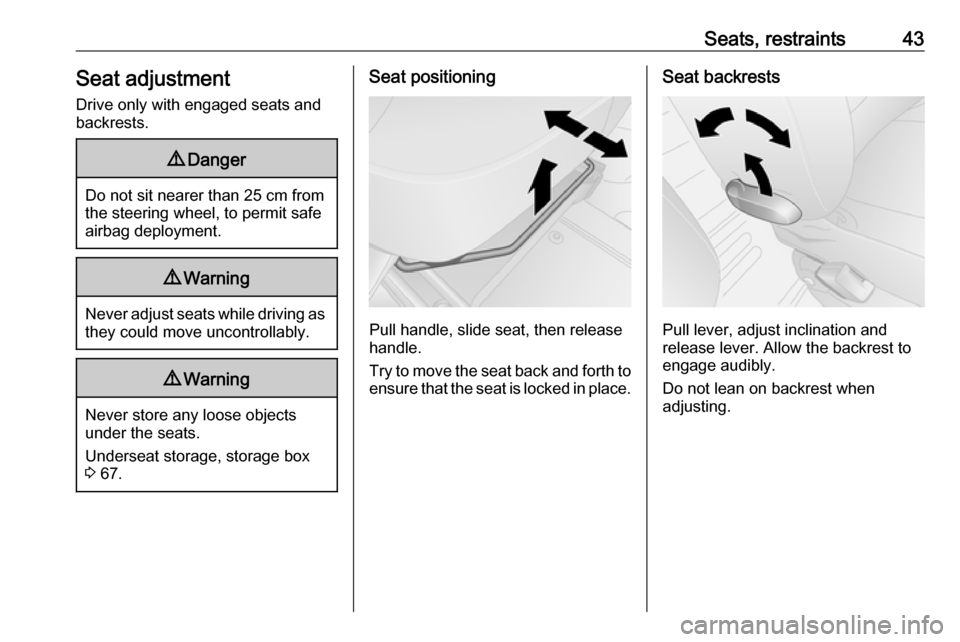
Seat positioning
Pull handle, slide seat, then release
handle.
Try to move the seat back and forth to ensure that the seat is locked in place.
Seat backrests
Pull lever, adjust inclination and
release lever. Allow the backrest to
engage audibly.
Do not lean on backrest when
adjusting.