Locking VAUXHALL VIVARO 2016 Owner's Guide
[x] Cancel search | Manufacturer: VAUXHALL, Model Year: 2016, Model line: VIVARO, Model: VAUXHALL VIVARO 2016Pages: 209, PDF Size: 4.86 MB
Page 92 of 209

90Instruments and controlsVehicle messagesMessages are displayed in the Driver
Information Centre (DIC) and may be
accompanied by illumination of
control indicator F or C in the
instrument cluster.
Information messages
Information messages regarding, e.g.
engine starting conditions, stop-start
system, parking brake application,
central locking, steering wheel lock
etc. provide the current status of
certain vehicle functions and
instructions for use.
Fault messages Fault messages regarding, e.g. fuel
filter, airbags, exhaust emissions etc.
are displayed together with control
indicator F. Drive with caution and
seek the assistance of a workshop as soon as possible.
To remove fault messages, e.g.
" CHECK INJECTION ", from the
display, press button on end of wiper
lever. After a few seconds themessage may disappear
automatically and F remains
illuminated. The fault will then be
stored in the on board system.
Warning messages
Warning messages regarding, e.g.
engine, battery or brake system
failure, are displayed together with
control indicator C and may be
accompanied by a warning chime.
Stop engine immediately and seek
the assistance of a workshop.
Warning messages, e.g. " BATTERY
CHARGING FAULT " disappear from
the display automatically when the
cause of the fault has been remedied.
Fuel economy messages
Fuel economy messages provide tips to improve fuel efficiency. Journeys
can be saved in the system memory,
enabling you to compare
performances.
Refer to Infotainment system manual
for further information.
Fuel economy rating 3 91.Warning chimes
Only one warning chime will sound at
a time.
A corresponding message may also
appear in the Driver Information
Centre (DIC) when a warning chime
is sounded.
When starting the engine or whilst driving:
● If seat belt is not fastened 3 48.
● During operation of the turn and lane-change signals 3 97.
● During illumination of certain control indicators.
● If the parking assist detects an object 3 134.
● If the vehicle speed briefly exceeds a set limit 3 131,
3 134.
● If a door or the bonnet is not properly closed when vehicle
exceeds a certain speed.
● If there is a fault in the brake system 3 85.
Page 102 of 209
100LightingLighting featuresEntry lighting
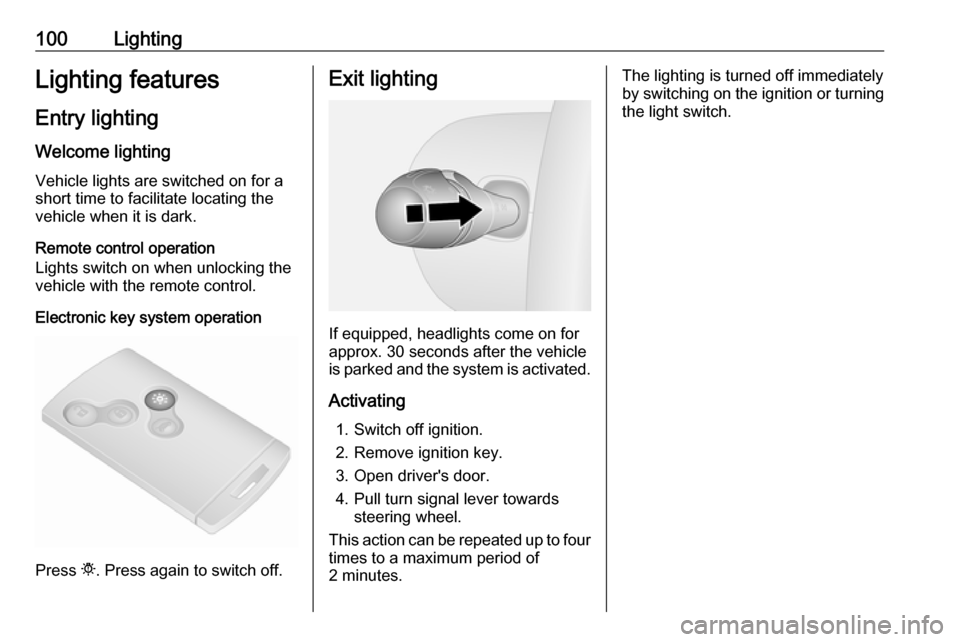
Welcome lighting Vehicle lights are switched on for a
short time to facilitate locating the
vehicle when it is dark.
Remote control operation
Lights switch on when unlocking the
vehicle with the remote control.
Electronic key system operation
Press t. Press again to switch off.
Exit lighting
If equipped, headlights come on for
approx. 30 seconds after the vehicle
is parked and the system is activated.
Activating 1. Switch off ignition.
2. Remove ignition key.
3. Open driver's door.
4. Pull turn signal lever towards steering wheel.
This action can be repeated up to four times to a maximum period of
2 minutes.
The lighting is turned off immediately
by switching on the ignition or turning
the light switch.
Page 117 of 209

Driving and operating115Some functions, e.g. Infotainment
system, are available for use as soon
as you enter the vehicle.
Accessory power mode
Press START/STOP without
operating clutch or brake pedal to
enable further electrical functions to
be operated.
Engine start
Operate clutch and brake pedal and press START/STOP . Release button
after starting procedure begins.
If a gear is engaged, the engine can
be started only by operating the clutch
pedal and pressing the
START/STOP button.
In some cases, it may be necessary
to move the steering wheel slightly
while pressing START/STOP to
release the steering wheel lock. A
corresponding message appears in
the DIC 3 89.
At very low outside temperatures (e.g. below -10 °C) keep the clutch pedal
depressed while pressing
START/STOP until the engine starts.If one of the starting conditions is not
applied, a corresponding message
appears in the DIC 3 89.
Vehicle messages 3 90.
Engine stop
Electronic key must be inside the
vehicle, either in the card reader or the front passenger compartment.
With the vehicle stationary, press
START/STOP to stop the engine. The
steering wheel lock is engaged when
the driver's door is opened and the
vehicle is locked.
If the electronic key is not detected, a
corresponding message appears in
the DIC 3 89. In this event, press
START/STOP for 2 seconds to stop
the engine.
Central locking system 3 23.
Retained power off
Press START/STOP for more than
two seconds; the engine is stopped
while some functions, e.g.
Infotainment system, are available for
use for approx. 10 minutes.These functions stop working when
the driver's door is opened and the vehicle is locked.
Notice
Always take the electronic key with
you when exiting the vehicle.
The electronic key being left in the
card reader is indicated by a warning chime 3 90 and a message in the
Driver Information Centre (DIC)
3 90 when the driver's door is
opened.9 Danger
Never leave an electronic key
inside the vehicle when children or animals are left in the vehicle, to
avoid unintended operation of
windows, doors or engine. Risk of
fatal injury.
Fault
If the engine cannot be started, the
cause may be one of the following:
● Fault in electronic key.
● Electronic key out of reception range.
Page 118 of 209
116Driving and operating● Battery voltage too low.
● Overload of the central locking system by operating at frequentintervals, the power supply is
interrupted for a short time.
● Interference from higher-power radio waves from other sources.
Battery replacement 3 20.
Central locking system 3 23.
Electronic key system 3 22.
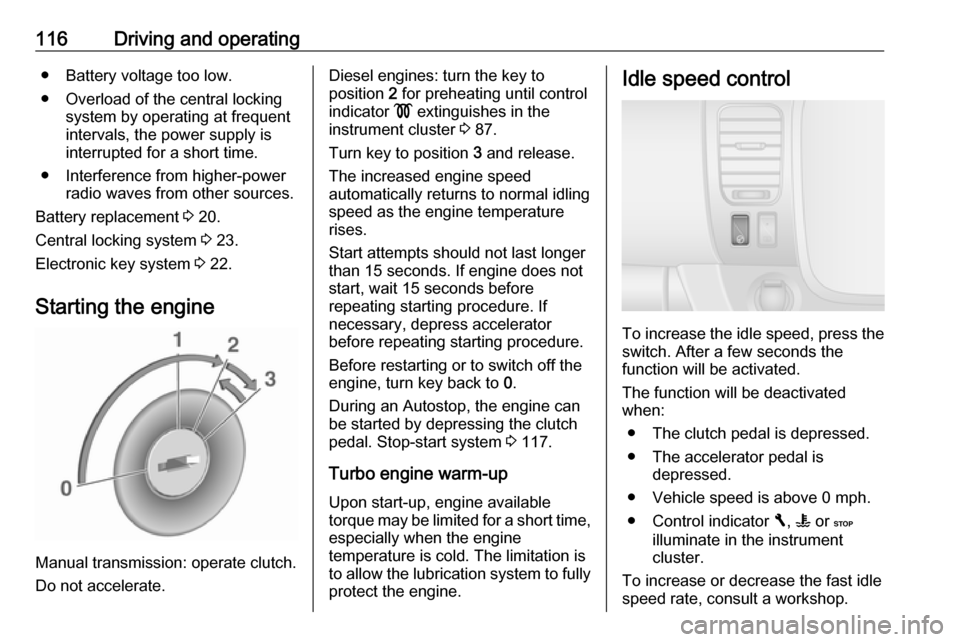
Starting the engine
Manual transmission: operate clutch.
Do not accelerate.
Diesel engines: turn the key to
position 2 for preheating until control
indicator ! extinguishes in the
instrument cluster 3 87.
Turn key to position 3 and release.
The increased engine speed
automatically returns to normal idling
speed as the engine temperature
rises.
Start attempts should not last longer
than 15 seconds. If engine does not
start, wait 15 seconds before
repeating starting procedure. If
necessary, depress accelerator
before repeating starting procedure.
Before restarting or to switch off the
engine, turn key back to 0.
During an Autostop, the engine can
be started by depressing the clutch
pedal. Stop-start system 3 117.
Turbo engine warm-up Upon start-up, engine available
torque may be limited for a short time,
especially when the engine
temperature is cold. The limitation is
to allow the lubrication system to fully protect the engine.Idle speed control
To increase the idle speed, press theswitch. After a few seconds the
function will be activated.
The function will be deactivated
when:
● The clutch pedal is depressed.
● The accelerator pedal is depressed.
● Vehicle speed is above 0 mph.
● Control indicator F, W or C
illuminate in the instrument
cluster.
To increase or decrease the fast idle
speed rate, consult a workshop.
Page 122 of 209
120Driving and operatingParking9Warning
● Do not park the vehicle on an
easily ignitable surface. The
high temperature of the
exhaust system could ignite the
surface.
● Always apply parking brake without pressing release
button. Apply as firmly as
possible on a downhill slope or
uphill slope. Depress foot brake at the same time to reduce
operating force.
● Switch off the engine.
● If the vehicle is on a level surface or uphill slope, engage
first gear. On an uphill slope,
turn the front wheels away from
the kerb.
If the vehicle is on a downhill
slope, engage reverse gear.
Turn the front wheels towards the kerb.
● Lock the vehicle 3 23
● Activate the anti-theft locking system 3 32 and anti-theft alarm
system 3 33.Engine exhaust9 Danger
Engine exhaust gases contain
poisonous carbon monoxide,
which is colourless and odourless and could be fatal if inhaled.
If exhaust gases enter the interior
of the vehicle, open the windows.
Have the cause of the fault
rectified by a workshop.
Avoid driving with an open load
compartment, otherwise exhaust
gases could enter the vehicle.
Diesel particle filter
The diesel particle filter system filters
harmful soot particles out of the
exhaust gases. The system includes
a self-cleaning function that runs
automatically during driving without
any notification.
The filter is cleaned by periodically
burning off the soot particles at high
temperature. This process takes
place automatically under set driving
Page 128 of 209

126Driving and operatingCaution
It is inadvisable to drive with hand
resting on the selector lever.
Brakes
The brake system comprises two
independent brake circuits.
If a brake circuit fails, the vehicle can
still be braked using the other brake
circuit. However, braking effect is
achieved only when you depress the
brake pedal firmly. You need to use
considerably more force for this. The
braking distance is extended. Seek
the assistance of a workshop before
continuing your journey.
When the engine is not running, the
support of the brake servo unit
disappears once the brake pedal has
been depressed once or twice.
Braking effect is not reduced, but
braking requires significantly greater
force. It is especially important to bear this in mind when being towed.
If control indicator R illuminates in
the instrument cluster while driving
and a corresponding message
appears in the Driver Information
Centre (DIC) 3 89, there is a fault in
the braking system. Seek the
assistance of a workshop
immediately.Control indicator R 3 85.
Vehicle messages 3 90.
Antilock brake system Antilock brake system (ABS)
prevents the wheels from locking.
ABS starts to regulate brake pressure as soon as a wheel shows a tendency to lock. The vehicle remains
steerable, even during hard braking.
ABS control is made apparent
through a pulse in the brake pedal
and the noise of the regulation
process.
For optimum braking, keep the brake
pedal fully depressed throughout the
braking process, despite the fact that
the pedal is pulsating. Do not reduce
the pressure on the pedal.
After starting-off, the system performs
a self-test which may be audible.
Control indicator u 3 86.
Fault
If control indicator u does not go out
a few seconds after the ignition is
switched on, or if it illuminates while
Page 163 of 209

Vehicle care161No.Circuit1Adblue injection battery2Vehicle battery (with electronic
key system)3APC battery backup (with elec‐
tronic key system)4Heating and ventilation system5Adaptations6Adaptations7Heating and ventilation system8Additional heating and ventila‐
tion / air conditioning system9Supplementary heating and
ventilation system10Electric exterior mirrors / addi‐
tional adaptations11Heated exterior mirrors12Radio / multimedia / electric
exterior mirrors / diagnostic
socket13Multimedia / trailer hitchNo.Circuit14Courtesy lights / battery
discharge protection15Fuel injection system / tyre pres‐ sure monitoring system / elec‐
tronic key system16Hazard warning flashers / turn
and lane-change signals17Central locking18Left-hand high beam / right-
hand low beam / tail lights / left- hand daytime running light19Front fog lights / rear fog lights /
number plate lighting20Alarm / horn / lighting / wiper21Instrument cluster22Light switch23Rear window wiper / wind‐
screen washer pump / horn24APC general battery25Reversing lightsNo.Circuit26Brake switch27Fuel injection / starter28Airbag / steering column lock29Passenger power window30Power steering31Brake lights32APC battery backup (with elec‐
tronic key system)33Service display34Cigarette lighter / power outlet35Right-hand high beam / left-
hand low beam / sidelights /
right-hand daytime running light36Brake lights / ABS / immobiliser37Interior lighting / air conditioning38Starting with electronic key
system39Rear window wiper40Warning chimes
Page 201 of 209

Customer information199Vehicle data recording
and privacy
Event data recorders Data storage modules in the
vehicle
A large number of electronic
components of your vehicle contain
data storage modules temporarily or
permanently storing technical data
about the condition of the vehicle,
events and errors. In general, this
technical information documents the
condition of parts, modules, systems
or the environment:
● operating conditions of system components (e.g. filling levels)
● status messages of the vehicle and its single components (e.g.
number of wheel revolutions / rotational speed, deceleration,
lateral acceleration)
● dysfunctions and defects in important system components● vehicle reactions in particulardriving situations (e.g. inflation of
an airbag, activation of the
stability regulation system)
● environmental conditions (e.g. temperature)
These data are exclusively technical
and help identifying and correcting
errors as well as optimising vehicle
functions.
Motion profiles indicating travelled
routes cannot be created with these
data.
If services are used (e.g. repair
works, service processes, warranty
cases, quality assurance),
employees of the service network
(manufacturer included) are able to
read out this technical information
from the event and error data storage
modules applying special diagnostic
devices. If required, you will receive
further information at these
workshops. After an error has been
corrected, the data are deleted from
the error storage module or they are
constantly overwritten.When using the vehicle, situations
may occur in which these technical
data related to other information
(accident report, damages on the
vehicle, witness statements etc.) may
be associated with a specific person - possibly, with the assistance of an
expert.
Additional functions contractually
agreed upon with the client (e.g.
vehicle location in emergency cases)
allow the transmission of particular vehicle data from the vehicle.
Radio Frequency
Identification (RFID)
RFID technology is used in some
vehicles for functions such as tyre
pressure monitoring and ignition
system security. It is also used in
connection with conveniences such
as radio remote controls for door
locking/unlocking and starting, and in-
vehicle transmitters for garage door
openers. RFID technology in
Vauxhall vehicles does not use or
record personal information or link
with any other Vauxhall system
containing personal information.
Page 202 of 209

200IndexAAbsorptive Glass Mat battery .....149
Accessories and vehicle modifications .......................... 143
Adaptive forward lighting .............97
Adblue .......................................... 91
AdBlue .......................... 87, 121, 181
AdBlue tank ................................ 195
Adjustable air vents ...................109
AGM battery ............................... 149
Airbag and belt tensioners ...........84
Airbag deactivation ................56, 84
Airbag label............................. 52, 56
Airbag system .............................. 52
Air conditioning regular operation ................................ 110
Air conditioning system .............. 102
Air intake .................................... 110
Air recirculation ...................102, 175
Air vents...................................... 109
Alert .............................................. 90
Antifreeze ................................... 147
Antilock brake system ................ 126
Antilock brake system (ABS) .......86
Anti-theft alarm system ................33
Anti-theft bolts............................. 171
Anti-theft locking system .............. 32
Anti-theft security lock ..................23
Appearance care ........................177
Armrest ........................................ 45Ashtrays ....................................... 78
Automatic anti-dazzle ..................38
Automatic fuel cut-off ..................117
Automatic light control .................95
Automatic locking ........................28
Autostop ............................... 88, 116
Auxiliary heater ........................... 106
B Battery ........................................ 149
Battery, jump starting.................. 174
Belts.............................................. 48 Bench seat.................................... 67
BlueInjection ............................... 121
Bonnet ....................................... 144
Bottle holders................................ 66
Brake and clutch fluid .................181
Brake assist ............................... 127
Brake fluid .................................. 148
Brakes ............................... 126, 148
Brake system ............................... 85
Breakdown.................................. 175
Bulb replacement ....................... 152
C Capacities .................................. 195
Car Pass ...................................... 20
Catalytic converter .....................121
Central locking system ................23
Centre high-mounted brake light 155
Changing tyre and wheel size ...167
Page 207 of 209

205Vehicle storage........................... 143
Vehicle tools ....................... 162, 175
Vehicle unlocking ........................... 6
Vehicle weight ........................... 187
Ventilation ................................... 101
W
Warning chimes ........................... 90
Warning lights ............................... 78
Warning messages .......................90
Warning triangle .......................... 70
Washer and wiper systems .........14
Washer fluid ............................... 148
Washing the vehicle ...................177
Welcome lighting ........................100
Wheel changing .........................171
Wheel cover hook .......................162
Wheel covers ............................. 167
Wheels and tyres .......................163
Wheel wrench ............................. 162
Wide view mirror ........................... 37
Windows ....................................... 38
Windscreen................................... 38
Windscreen stickers .....................38
Windscreen wiper/washer ...........75
Winter tyres ............................... 163
Wiper blade replacement ..........152