service VAUXHALL ZAFIRA TOURER 2018.5 Owner's Manual
[x] Cancel search | Manufacturer: VAUXHALL, Model Year: 2018.5, Model line: ZAFIRA TOURER, Model: VAUXHALL ZAFIRA TOURER 2018.5Pages: 339, PDF Size: 10.02 MB
Page 3 of 339

Introduction.................................... 2
In brief ............................................ 6
Keys, doors and windows ............19
Seats, restraints ........................... 35
Storage ........................................ 65
Instruments and controls .............95
Lighting ...................................... 129
Infotainment system ...................139
Climate control ........................... 188
Driving and operating .................196
Vehicle care ............................... 257
Service and maintenance ..........302
Technical data ........................... 305
Customer information ................320
Index .......................................... 330Contents
Page 5 of 339

Introduction3Vehicle specific dataPlease enter your vehicle's data on
the previous page to keep it easily
accessible. This information is
available in the sections "Service and
maintenance" and "Technical data"
as well as on the identification plate.
Introduction
Your vehicle is a designed
combination of advanced technology, safety, environmental friendliness
and economy.
This Owner's Manual provides you
with all the necessary information to
enable you to drive your vehicle
safely and efficiently.
Make sure your passengers are
aware of the possible risk of accident
and injury which may result from
improper use of the vehicle.
You must always comply with the
specific laws and regulations of the
country that you are in. These laws
may differ from the information in this Owner's Manual.
Disregarding the description given in
this manual may affect your warranty.When this Owner's Manual refers to a
workshop visit, we recommend your
Vauxhall Authorised Repairer. For
gas vehicles, we recommend a
Vauxhall Authorised Repairer
licensed to service gas vehicles.
All Vauxhall Authorised Repairers
provide first-class service at
reasonable prices. Experienced
mechanics trained by Vauxhall work according to specific Vauxhall
instructions.
The customer literature pack should
always be kept ready to hand in the
vehicle.
Using this manual ● This manual describes all options
and features available for this
model. Certain descriptions,
including those for display and
menu functions, may not apply to
your vehicle due to model
variant, country specifications,
special equipment or
accessories.
● The "In brief" section will give you
an initial overview.● The table of contents at the beginning of this manual and
within each section shows where the information is located.
● The index will enable you to search for specific information.
● This Owner's Manual depicts left-
hand drive vehicles. Operation is similar for right-hand drive
vehicles.
● The Owner's Manual uses the engine identifier code. The
corresponding sales designation
and engineering code can be
found in the section "Technical
data".
● Directional data, e.g. left or right, or front or back, always relate to
the direction of travel.
● Displays may not support your specific language.
● Display messages and interior labelling are written in bold
letters.
Page 97 of 339

Instruments and controls95Instruments and
controlsControls ....................................... 96
Steering wheel adjustment ........96
Steering wheel controls .............96
Heated steering wheel ...............96
Horn ........................................... 97
Windscreen wiper and washer ..97
Rear window wiper and washer ...................................... 98
Outside temperature ..................99
Clock ......................................... 99
Power outlets ........................... 100
Cigarette lighter .......................101
Ashtrays .................................. 101
Warning lights, gauges and indi‐ cators ......................................... 102
Instrument cluster ....................102
Speedometer ........................... 102
Odometer ................................ 102
Trip odometer .......................... 102
Tachometer ............................. 103
Fuel gauge .............................. 103
Fuel selector ............................ 104
Engine coolant temperature gauge ..................................... 106Service display........................ 106
Control indicators ....................107
Turn lights ................................ 109
Seat belt reminder ...................110
Airbag and belt tensioners .......110
Airbag deactivation ..................111
Charging system .....................111
Malfunction indicator light ........111
Brake and clutch system .........111
Operate pedal .......................... 112
Electric parking brake ..............112
Electric parking brake fault ......112
Antilock brake system (ABS) ...112
Gear shifting ............................ 113
Power steering ........................ 113
Following distance ...................113
Lane departure warning ..........113
Electronic Stability Control off . 113
Electronic Stability Control and Traction Control system .........113
Traction Control system off .....113
Preheating ............................... 114
Exhaust filter ............................ 114
AdBlue ..................................... 114
Tyre pressure monitoring system .................................... 114
Engine oil pressure ..................114
Low fuel ................................... 115
Immobiliser .............................. 115
Exterior light ............................ 115High beam............................... 115
High beam assist .....................115
LED headlights ........................ 115
Fog light ................................... 115
Rear fog light ........................... 115
Cruise control .......................... 115
Adaptive cruise control ............116
Vehicle detected ahead ...........116
Speed limiter ........................... 116
Traffic sign assistant ................116
Door open ................................ 116
Displays ..................................... 116
Driver Information Centre ........116
Info Display .............................. 121
Vehicle messages ......................122
Warning chimes .......................122
Battery voltage ........................ 123
Vehicle personalisation ..............123
Telematics service .....................125
OnStar ..................................... 125
Page 108 of 339
106Instruments and controlsSeek the assistance of a workshop in
the event of all other faults.Caution
Repairs and adjustments may only be made by trained specialists in
order to maintain the safety and
warranty on the LPG system.
Liquid gas is given a particular odour
(odorised) so that any leaks can be
detected easily.
9 Warning
If you smell gas in the vehicle or in
the immediate vicinity, switch to petrol mode immediately. No
smoking. No naked flames or
ignition sources.
If the gas odour persists, do not start
the engine. Have the cause of the
fault remedied by a workshop.
When using underground car parks,
follow the instructions of the operator
and local laws.
Notice
In the event of an accident, switch off
the ignition.
Fuel for liquid gas operation 3 246.
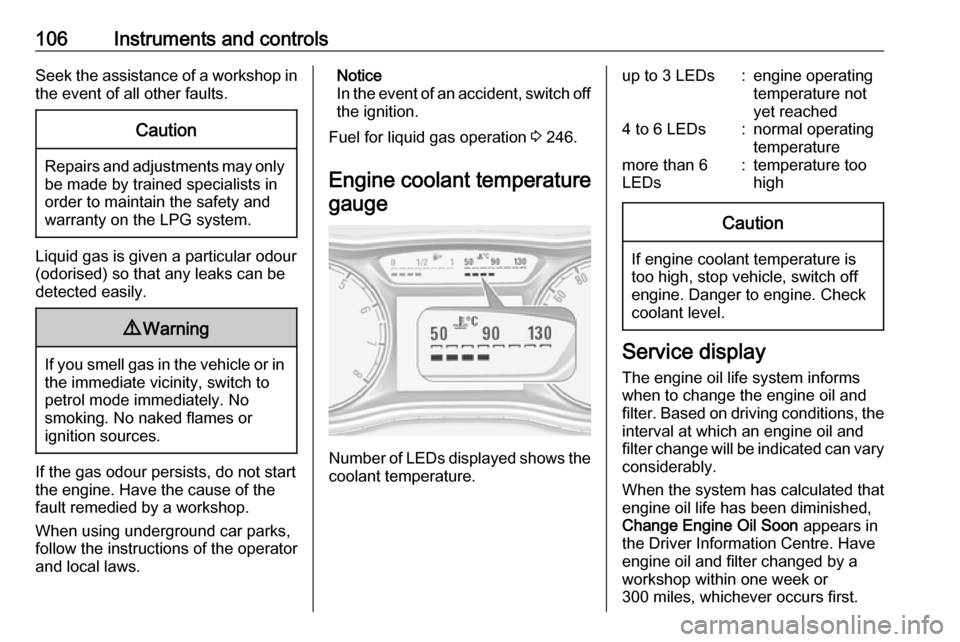
Engine coolant temperature gauge
Number of LEDs displayed shows the coolant temperature.
up to 3 LEDs:engine operating
temperature not
yet reached4 to 6 LEDs:normal operating
temperaturemore than 6
LEDs:temperature too
highCaution
If engine coolant temperature is
too high, stop vehicle, switch off
engine. Danger to engine. Check
coolant level.
Service display
The engine oil life system informs
when to change the engine oil and
filter. Based on driving conditions, the interval at which an engine oil and
filter change will be indicated can vary
considerably.
When the system has calculated that
engine oil life has been diminished,
Change Engine Oil Soon appears in
the Driver Information Centre. Have engine oil and filter changed by a
workshop within one week or
300 miles, whichever occurs first.
Page 109 of 339
Instruments and controls107This can be an additional engine oil
and filter change or part of a regular
service.
The remaining oil life duration menu
is displayed in the Driver Information
Centre 3 116.
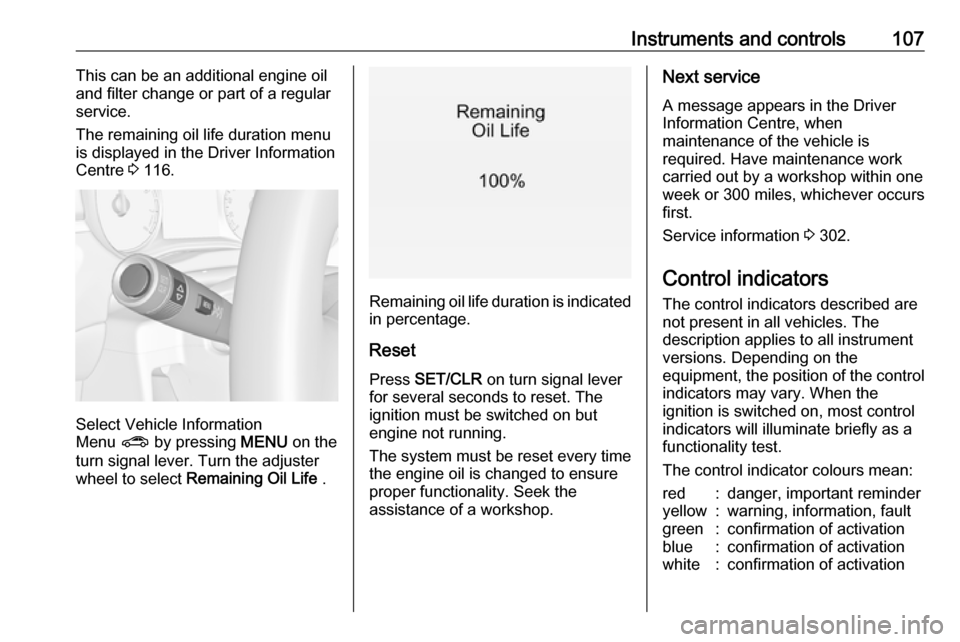
Select Vehicle Information
Menu ? by pressing MENU on the
turn signal lever. Turn the adjuster wheel to select Remaining Oil Life .
Remaining oil life duration is indicated
in percentage.
ResetPress SET/CLR on turn signal lever
for several seconds to reset. The
ignition must be switched on but
engine not running.
The system must be reset every time
the engine oil is changed to ensure
proper functionality. Seek the
assistance of a workshop.
Next service
A message appears in the Driver
Information Centre, when
maintenance of the vehicle is
required. Have maintenance work
carried out by a workshop within one
week or 300 miles, whichever occurs
first.
Service information 3 302.
Control indicators
The control indicators described are
not present in all vehicles. The
description applies to all instrument
versions. Depending on the
equipment, the position of the control indicators may vary. When the
ignition is switched on, most control
indicators will illuminate briefly as a
functionality test.
The control indicator colours mean:red:danger, important reminderyellow:warning, information, faultgreen:confirmation of activationblue:confirmation of activationwhite:confirmation of activation
Page 114 of 339

112Instruments and controls9Warning
Stop. Do not continue your
journey. Consult a workshop.
Illuminates when the manual parking
brake is applied and ignition is
switched on 3 212.
Operate pedal - illuminates or flashes yellow.
Illuminates
Brake pedal must be depressed to release the electric parking brake
3 212
Clutch pedal must be depressed to
start the engine in Autostop mode.
Stop-start system 3 200.
Flashes
Clutch pedal must to be depressed to start the engine with the key 3 16,
3 198.
On some versions, the message to
operate the clutch pedal is indicated
in the Driver Information Centre
3 122.
Electric parking brake
m illuminates or flashes red.
Illuminates
Electric parking brake is applied
3 212.
Flashes
Electric parking brake is not fully
applied or released. Switch on
ignition, depress brake pedal and
attempt to reset the system by first
releasing and then applying the
electric parking brake. If m remains
flashing, do not drive and seek the
assistance of a workshop.
Electric parking brake fault
j illuminates or flashes yellow.Illuminates
Electric parking brake is operating
with degraded performance 3 212.
Flashes
Electric parking brake is in service
mode. Stop vehicle, apply and
release the electric parking brake to
reset.9 Warning
Have the cause of the fault
remedied immediately by a
workshop.
Antilock brake system
(ABS)
u illuminates yellow.
Illuminates for a few seconds after the ignition is switched on. The system is
ready for operation when the control
indicator extinguishes.
If the control indicator does not
extinguish after a few seconds, or if it illuminates while driving, there is a
Page 119 of 339
Instruments and controls117The following indications appear if
required:
● warning messages 3 122
● gear shift indication 3 113
● drive mode indication 3 208
● tyre pressure warning 3 282
● seat belt reminder indication 3 110
● service information 3 106
Some of the displayed functions differ
when the vehicle is being driven or at
a standstill. Some functions are only
available when the vehicle is being
driven.
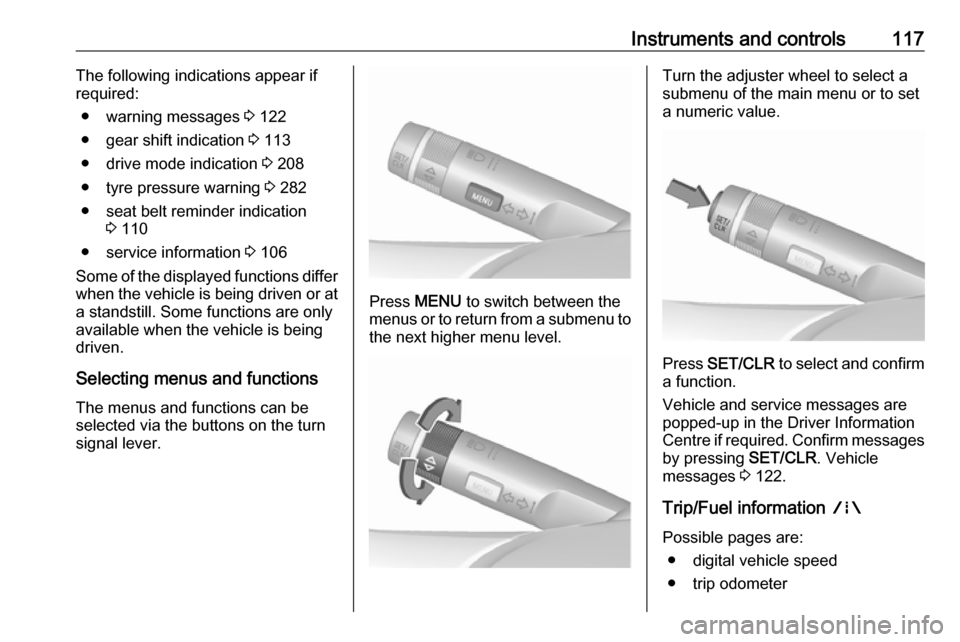
Selecting menus and functions The menus and functions can be
selected via the buttons on the turn signal lever.
Press MENU to switch between the
menus or to return from a submenu to the next higher menu level.
Turn the adjuster wheel to select a
submenu of the main menu or to set a numeric value.
Press SET/CLR to select and confirm
a function.
Vehicle and service messages are
popped-up in the Driver Information
Centre if required. Confirm messages
by pressing SET/CLR. Vehicle
messages 3 122.
Trip/Fuel information ;
Possible pages are: ● digital vehicle speed
● trip odometer
Page 124 of 339

122Instruments and controlsVehicle messagesMessages are indicated mainly in the
Driver Information Centre, in some
cases together with a warning and
signal chime.
Vehicle and service messages in
the Driver Information Centre
The vehicle messages are displayed
as text. Follow the instructions given
in the messages.
Press SET/CLR , MENU or turn the
adjuster wheel to confirm a message.
Messages in the Info-Display
Some important messages appear
additionally in the Info-Display. Some messages only pop-up for a few
seconds.
Warning chimes If several warnings appear at the
same time, only one warning chime will sound.
When starting the engine or whilst
driving
The warning chime regarding
unfastened seat belts has priority
over any other warning chime.
● If seat belt is not fastened.
● If a door or the tailgate is not fully
closed when starting-off.
● If a certain speed is exceeded with parking brake applied.
● If adaptive cruise control deactivates automatically.
● If approaching a vehicle ahead too closely.●If a programmed speed or speed
limit is exceeded.
● If a warning message appears in the Driver Information Centre.
● If the parking assist detects an object.
● If an unintended lane change occurs.
● If reverse gear is engaged and the rear carrier system is
extended.
● If the exhaust filter has reached the maximum filling level.
When the vehicle is parked and/or
the driver's door is opened
● With exterior lights on.
During an Autostop ● If the driver's door is opened.
● If any condition for an autostart is
not fulfilled.
Page 127 of 339

Instruments and controls125Telematics service
OnStar
OnStar is a personal connectivity and
service assistant with integrated
Wi-Fi hotspot. The OnStar service is
available 24 hours a day, seven days
a week.
Notice
OnStar is not available for all
markets. For further information,
contact your workshop.
Notice
In order to be available and
operational, OnStar needs a valid
OnStar subscription, functioning
vehicle electrics, mobile service and GPS satellite link.
To activate the OnStar services and
set up an account, press Z and speak
with an advisor.Depending on the equipment of the
vehicle, the following services are available:
● Emergency services and support
in the case of a vehicle
breakdown
● Wi-Fi hotspot
● Smartphone application
● Remote control, e.g. location of the vehicle, activation of horn and
lights, control of central locking
system
● Stolen vehicle assistance
● Vehicle diagnostics
● Destination download
Notice
The OnStar module of the vehicle is
deactivated after ten days without an
ignition cycle. Functions requiring a
data connection will be available
again after switching on the ignition.OnStar buttons
Notice
Depending on the equipment, the
OnStar buttons can also be
integrated in the rear view mirror.
Privacy button
Press and hold j until a message is
heard to activate or deactivate the transmission of the vehicle location.
Press j to answer a call or to end a
call to an advisor.
Press j to access the Wi-Fi settings.
Service button
Press Z to establish a connection to
an advisor.
Page 128 of 339

126Instruments and controlsSOS button
Press [ to establish a priority
emergency connection to a specially
trained emergency advisor.
Status LED
Green: The system is ready with activated transmission of the vehicle
location.
Green flashing: The system is on a call.
Red: A problem arose.
Off: The system is ready with
deactivated transmission of the
vehicle location or the system is in
standby mode.
Red / green flashing for a short period of time: The transmission of the
vehicle location has been
deactivated.
OnStar services
General services
If you need any information e.g.
opening hours, points of interest and
destinations or if you need any
support e.g. in the case of a vehiclebreakdown, a flat tyre and empty fuel
tank, press Z to establish a
connection to an advisor.
Emergency services
In the case of an emergency situation,
press [ and talk to an advisor. The
advisor then contacts emergency or
assistance service providers and
directs them to your vehicle.
In the case of an accident with
activation of airbags or belt
tensioners, an automatic emergency
call is established. The advisor is
immediately connected to your
vehicle to see whether help is
needed.
Wi-Fi hotspot
The Wi-Fi hotspot of the vehicle
provides internet connectivity with a
maximum speed of 4G/LTE.
Notice
The Wi-Fi hotspot functionality is not available for all markets.
Notice
Some mobile devices connect to Wi- Fi hotspots automatically and use
mobile data capacity in thebackground, even if they are not in
use. This includes automatic
updates, downloads, as well as
programme or app synchronisation
traffic. The data volume purchased
via OnStar might be consumed
rapidly. Turn off automatic
synchronisations in the settings of
your device.
Up to seven devices may be connected.
To connect a mobile device with the
Wi-Fi hotspot:
1. Press j and then select Wi-Fi
settings on the Info-Display. The
settings displayed include the Wi- Fi hotspot name (SSID),
password and connection type.
2. Start a Wi-Fi network search on your mobile device.
3. Select your vehicle hotspot (SSID) when listed.
4. When prompted, enter the password on your mobile device.