Top VOLKSWAGEN BEETLE 2004 User Guide
[x] Cancel search | Manufacturer: VOLKSWAGEN, Model Year: 2004, Model line: BEETLE, Model: VOLKSWAGEN BEETLE 2004Pages: 138, PDF Size: 48.59 MB
Page 46 of 138
Downloaded from www.Manualslib.com manuals search engine Electric windows
Introduction
Thi .h'" t r co nt ins information on the following
'll j· t ":
I' · A WARNING (Continued) ·----""=~·
ning r cl ing the windows elec trically . . 60
• Never leave children or people requiring
assistance alone in the vehicle when the ve
hicle is locked. The windows can no longer
be opened in an emergency.
tric wind ws - functions . . . . . . . . . . . . . . 61
R 1\-b k fun ction f or th e electric windows . . . 61
Additional information and warnings:
• V lk wag n information system ~page 26
• ntr I loc king system :::) page 46
• lnfo tai nm ent system ~page 31
• Always take all vehicle keys with you ev
ery time you leave the vehicle. The windows
can still be operated using the buttons sever
al minutes after the ignition has been switch
ed off, provided that the driver door and front
passenger door are not opened.
A~ WARNING
~-~~------------------·~--------~~~
• When transporting children on the rear
bench seat, the rear electric windows should
always be deactivated using the safety button
so that they cannot be opened or closed.
ltnproper or unsupervised use of the electric
windows can cause serious injuries.
• The electric windows should only be
opened or closed when you are sure that no
body is in their operating area . During sudden rain showers, water can enter
the vehicle interior via open windows and
cause damage
to the vehicle.
Opening or closing the windows electrically
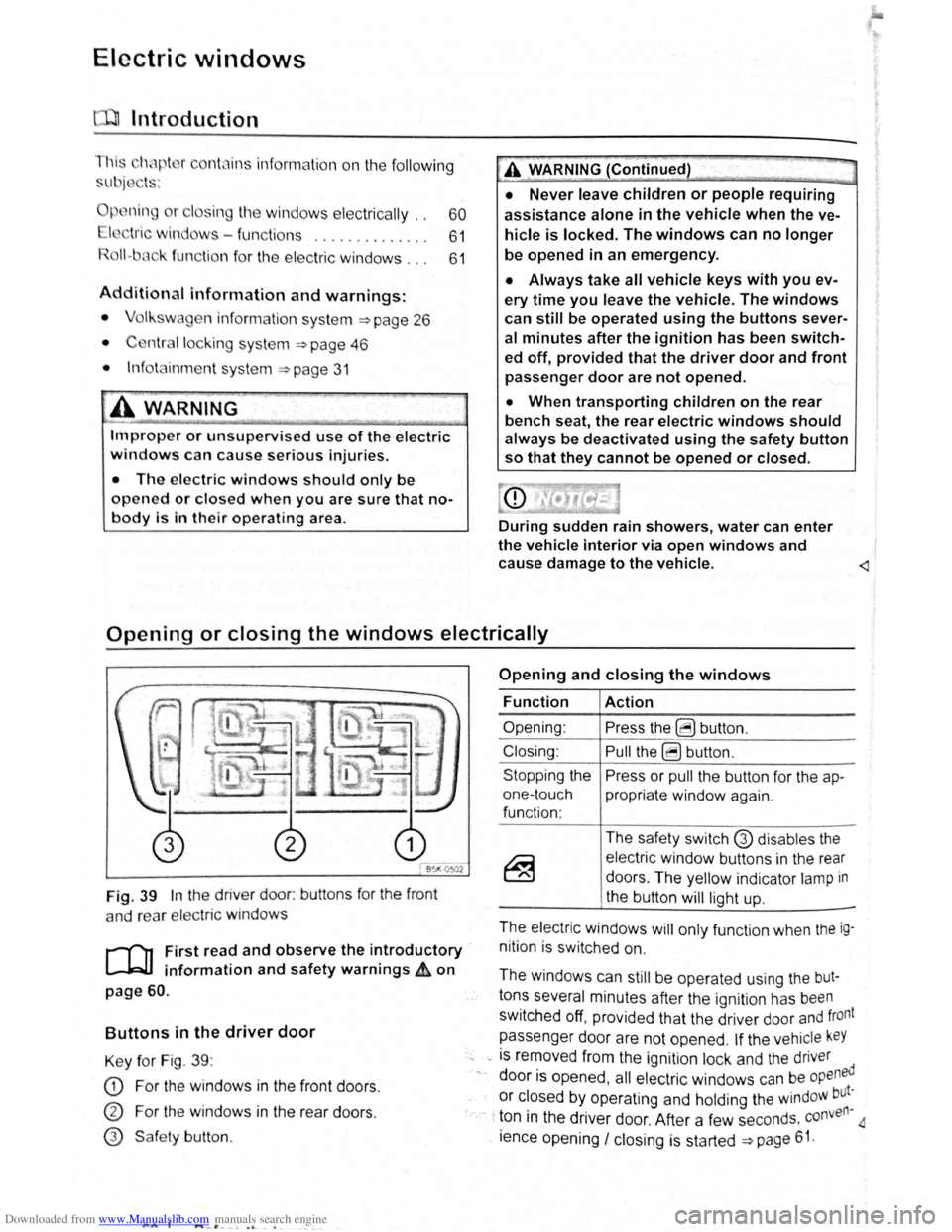
Fig. 39 In the driver door: buttons for the front
a nd rear
elec tric windo ws
r--('n First read and observe the introductory
~ information and safety warnings £ on
page 60.
Buttons in the driver door
Key for Fig. 39 :
CD For the windows in the front doors .
CD For the windows in the rear doors .
@ Safe ty button .
AA l ..._-'. --~ o. -•
Opening and closing the windows
Function
Opening :
Closing:
Stopping the
one-touch
function :
Action
Press the ~ button .
Pull the ~ button .
Press or
pull the button for the ap
propriate window again.
The safety switch
G) disables the
electric window buttons in the rear
doors . The yellow indicator
lamp in
the button
will light up.
-
The electric windows will only function when the ig
nition is switched on.
The windows can
still be operated using the but
tons several minutes after the ignition has been
switched off, provided that the driver door and front
passenger door are not opened .
If the vehicle keY
... -is removed from the ignition lock and the driver
" door is opened , all electric windows can be opened
or closed by operating and holding the windoW but~
· · ton in the driver door. After a few seconds . conven
ience opening
I closing is started ~page 61.
Page 47 of 138
Downloaded from www.Manualslib.com manuals search engine lcctrlc windows-functions
lr .. t r ,nd nd obsorv the Introductory
lnf rmotl n nn d 1 fety warnings~ on
n - t uc h opening ond closing
11 t ur.11 p n ln a n d cl sing mnk s it possib le
t fully p n n
butt on , do n t h v t o e h Id do wn to do this .
r
o n -touch closing: pull th button fo r th e ap
pr prl1 l window up brl fly Into the s co nd posi
tion.
or ono-touch opening: pr ss the bu tto n for the
ppr prl1t wind w down bri fly Into the seco nd
p
s lti n .
Stopping the one-touch function: press or pull
lh
bu tt n f r the appropri te window again.
R
estoring one-touch opening and closing
On - touc h op ning and closing is deac tiv a te d if
th v hi 'I batt ery has been disconnec ted or dis
c h
rg d whil e the wind ow s were not fully closed.
The fun ction will ha ve to be reset.
• Cl s all windows and doors .
• Swi tc h on the ignit ion .
• Pull up the bu tton for the window and hold it in
thi s posi tion for longer than 2 sec onds .
• Let go of the bu tton then pull it up aga in and
ho ld i t in this position . On e-to uch opening and
c los ing is
now ready for operation .
The one -to uch function can be res tored for individ
u
I windows or for several wind ow s a t th e same
tim e.
Convenience opening and closing
The windows ca n be opened and clos ed from out
side
t11e v e hi cle using the vehicle key :
• Press and hold the locking or unlocking button
o n the
ve hi cle k e y. All electr ic windows will be ei
ther opened or closed.
•
To interrupt this function , let go of the locking or
unlo cking button .
During co
nveni ence closing , the windows and the
elec tric panorama sliding/tilting roof close .
A varie ty of setti ngs re lated to window operation
can be made and adjusted using the @) button
and the
G and (open and close ) function buttons
~page 31.
A WARNING
Improper or unsupervised use of the electric
windows can cause serious injuries.
• The electric windows should only be
opened or closed when you are sure that no
body is in their operating area.
• Never leave children or people requiring
assistance alone in the vehicle when the ve
hicle is locked. The windows can no longer
be opened in an emergency.
• Always take all vehicle keys with you ev
ery time you leave the vehicle. The windows
can still be operated using the buttons sever
al minutes after the ignition has been switch
ed off, provided that the driver door and front
passenger door are not opened.
• When transporting children on the rear
bench seat, the rear electric windows should
always be deactivated using the safety button
so that they cannot be opened or closed.
r::l One-touch opening and closing and the roii
L!J back function will not work if there is a fault in
the
electric windows . Proceed to a qualified work-
shop . ~
Roll-back function for the electric windows
r-('n First read and observe the i~troductory
l.-W.I information and safety warnmgs A on
page 60.
The roll -b ac k function for the electric windows can
reduce the risk
of injuri es when the windows are
closing => ,&. If the one- touch closing function for a
wind ow
does not work beca use it is stiff or is being
obs tructe d the
window will autom atically open I
again.
• Check to see why the window has not closed.
• Try to close the window again. ..,..
Opening and closing 61
Page 48 of 138
Downloaded from www.Manualslib.com manuals search engine l
• If the window is again prevented from closing
within approximately
10 seconds of the first at
temp t because it is stiff or obstructed, the automat
Ic clo s
1ng fun ctio n Is switched off fo r approximately
10 seconds.
• If the window is still obstructed , the window
st ops at this point. To c lose the window withou t the
roll-bac k function, press the button again within
1 0 seconds ~ &,.
Closing the window without the roll-back
function
• Try to close the window again within approxi
mately 10 seconds by holding the button . The roll
back function will be dea ctiva ted for a small
section of the path of the closing window.
• If the c losing procedure takes longer than ap
proximately 10 seconds, the roll-back functio n will
be reac tivat ed . The window will then stop again if it
Is s tiff o r meets another obstacle .
• Please proceed to a qualified workshop if the
window
st1ll can not be closed .
t:2 I Bflfore th journey
---
A WARNING
Closing the electric windows without the roll
back function can lead to severe injuries.
• Always take care when closing electric
windows.
• Ensure that nobody obstructs the path of
the electric windows, especially if the roll
back function is not active.
• The roll-back function does not prevent
fingers or other body parts from being press
ed against the window frame and sustaining
injury.
W The roll-back fun ctio n is also ac tivated if the
l!J windows are closed using t he ve hicle key f or
convenience closing
~page 61.
I ..
Page 50 of 138
Downloaded from www.Manualslib.com manuals search engine Electrical controls on the front seats ~~~~~~~~~~~~-----------------------
®
651<-()590
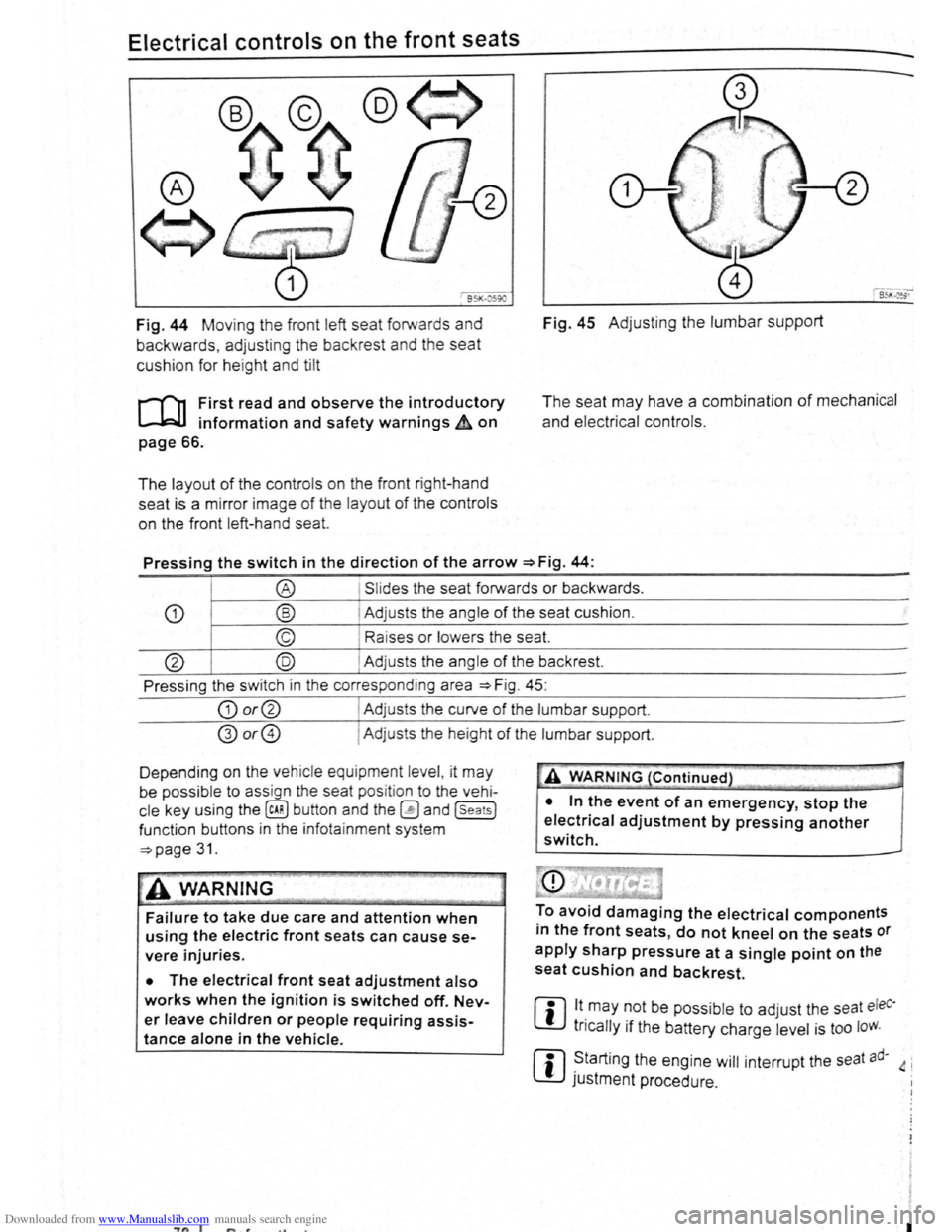
Fig. 44 Moving th e front left seat forwards and
backwards , ad j
usting the backrest and the seat
cushion for hei
ght and tilt
r-('n First read and observe the introductory
L-.lc:J.I information and safety warnings~ on
page 66.
The layout of the contro ls on the front r ight-hand
seat is a m irror image
of the layout of th e contro ls
on the front left-hand sea
t.
Fig. 45 Adju stin g the lumbar support
The seat may have a combination of mechanical
and electrical controls.
Pressing the switch in the direction of the arrow ~Fig. 44:
® Slides the seat forwards or backwards .
CD ® Adjusts the ang le of the seat cushion.
© Raises or lower s the seat.
@ @ Adjust s th e angle of the backrest.
Press ing the s witch in th e corresponding area
~Fig. 45:
CD or@ I Adjusts the curv e of the lumbar support.
@or@ I Ad justs the he ight of the lumbar support .
D epending on the veh ic le equ ipment leve l, it
may
be possib le to ass ign the seat pos it ion to the vehi
cle key using the @ill button and the~ and (seats]
funct ion buttons in the info ta inment system
~page 31.
~A WARNING
Failure to take due care and attention when
using the electric front seats can cause se
vere injuries.
• The electrical front seat adjustment also
works when the ignition is switched off. Nev
er leave children or people requiring assis
tance alone in the vehicle.
~"'A WARNING (Continued} --~ ~ -·-
• In the event of an emergency, stop the
electrical adjustment by pressing another
switch.
To avoid damaging the electrical components
in the front seats, do not kneel on the seats or
apply sharp pressure at a single point on the
seat cushion and backrest.
m lt.may ~Ot be poss ib le to adjust the seat eleC·
W tncally 1f the battery charge level is too loW.
m ~tarting the engine will interrupt the seat ad· 4 i
W JUStment procedure .
"7n I I
Page 51 of 138
Downloaded from www.Manualslib.com manuals search engine Adjusting the head restraints
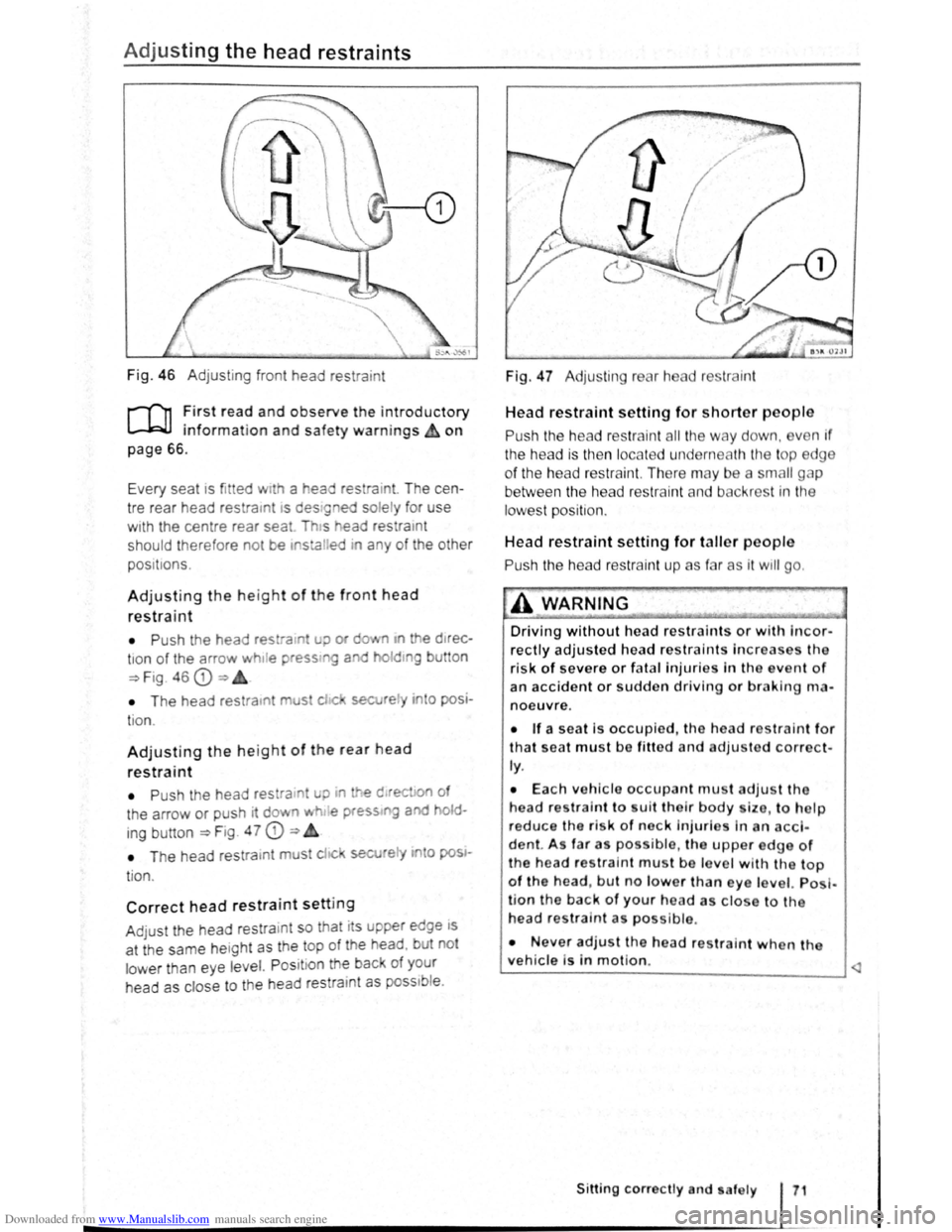
Fig. 46 Adjustin g f ront head restra int
r-T'n :irst rea? and observe the introductory
L..-.WJ 1nfor mat1on an d safety warnings & on
page
66 .
Ev ery s
eat 1s fit ted w1th a t'lea r es ra10t. T he ce n
tre rear head restra rnt
IS d e stgned so le ly for use
wrth the centre rear sea Th s ead res ratnt
s hould therefore no t be ,stalred ira any of th e othe r
pos 1t 1ons .
Adjusting the height of th e front head
restraint
• P ush th e head res ra in u;> or cfo.• n •n e d Jrec -
tron of the arrow h1Je pressmg a holdtng bu tto n
~Fig 46 CD=>
• T he head re stratn mus chc sec re~y n o posi
t io n.
Adjusting the height of the rear head
restraint
• P ush the head res ra in! uo ~ e d rec on of
t h e a rrow
or push rt do vn wh . e press g aod old
ing b utton ~Fig. 4 7 CD ~
• T he head re str a tn t must c! c secJ 'e i'1 o pos •
t io n.
Correct head restraint setting
A dju st the head rest ra 1nt s o t hat its upper ed ge rs
a t th e sa me he ig ht as th e top of th e head . b ut no t
l o w
er th a n eye le vel. P osit ion th e bac of you r
h ead
as close to th e hea d res tram t as poss1b le .
Fig. 47 Adju ting rear h ad r str ai nt
Head restraint setting for shorter people
Push the he ad restra in t all the w ay d own , ve n if
the head is then locat e d un derneath th e top edg e
of the head res traint. There may b e a sm all g p
between the head res trai nt and b ck ros t in tt1e
lowes t position .
Head restraint setting for taller people
Pus h the hea d r estrain t up as f r as it w ill go .
A WARNING
Driving without head restraints or with Incor
rectly adjusted head restraints Increases tho
risk of severe or fatal injuries In th o even t of
an accident or sudden driving or braking rlHl
noeuvre.
• If a seat is occupied, the hea d r traint for
that seat must be fitted and adjusted corre ct·
ly.
• Each vehicle occupant mu t adjus t the
head restra i
nt to uit tho lr body ize , to h lp
reduce the risk of nock injurlo in an acci
d ent. A s fa r a po s ibl e, the upper edge of
the head res tra int mu t be lo ve l w ith the top
of the head , but no lower 'than eye le vel. Po I·
l ion the back of your head as clo e to th e
head restra int as possible .
• Never adjust the hea d restraint when tha
vehicle is in motion. ~
Sitting correctly nd . af ely
Page 53 of 138
Downloaded from www.Manualslib.com manuals search engine -
When removing or fitting head restraints, make
sure that they do not hit the roof or other parts
of the vehicle. The roof and other vehicle parts
could otherwise be damaged.
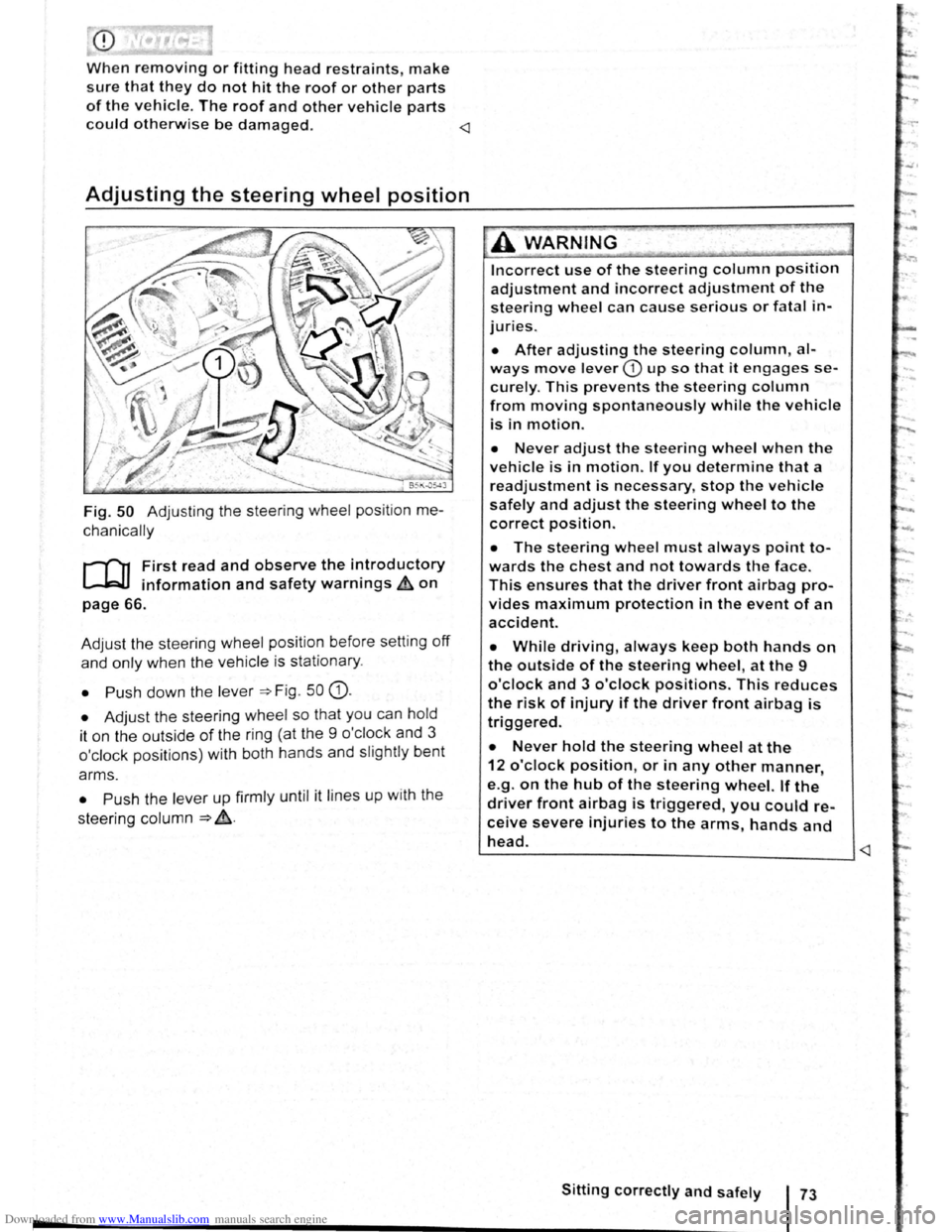
Fig. 50 Adjusting the steering wheel position me
chanically
r-f"'n First read and observe the i~troductory
~ information and safety warnmgs ~on
page 66.
Adjust the steering wheel position before setting
off
and only when the vehicle is sta tionary.
• Push down the lever =>Fig . 50 G).
• Adjust the steering wheel so that you can hold
it on the outside
of the ring (at the 9 o'cl ock and 3
o'clock positions) with both hands and slightly bent
arms.
• Push the lever up firmly until it lines up with the
steering column
=> ~-
Incorrect use of the steering column position
adjustment and incorrect adjustment of the
steering wheel can cause serious or fatal in
juries.
• After adjusting the steering column, al
ways move lever CD up so that it engages se
curely. This prevents the steering column
from moving spontaneously while the vehicle
is in motion.
• Never adjust the steering wheel when the
vehicle is in motion. If you determine that a
readjustment is necessary, stop the vehicle
safely and adjust the steering wheel to the
correct position.
• The steering wheel must always point to
wards the chest and not towards the face.
This ensures that the driver front airbag pro
vides maximum protection in the event of an
accident.
• While driving, always keep both hands on
the outside of the steering wheel, at the 9
o'clock and 3 o'clock positions. This reduces
the risk of injury if the driver front airbag is
triggered.
• Never hold the steering wheel at the
12 o'clock position, or in any other manner,
e.g .
on the hub of the steering wheel. If the
driver front airbag is triggered, you could re
ceive severe injuries to the arms, hands and
head. ~--------------------------____ _j
Page 58 of 138
Downloaded from www.Manualslib.com manuals search engine Lit up Possible cause Solution
Tr ailer turn signal. -......
Q\~ The indica tor lamp goe s out if a tra iler turn Check the trailer l ighting as required.
signal
or all trailer lig ht s st op working .
Main beam is swi tc h e d on or the headlight
----D =>pa ge 106 .
flasher is being opera ted .
-
0 Main beam ass ist swi tc hed on. =>page 110 .
-1
) A separate display appears in the instrumen t cluster if there is a bend lighting fault.
>) Displayed in colour on an instru ment cluster with colour display .
Several warning and indicato r lamps will light up
briefly as a
functiona l check when the ign iti on i s
switched
on. T he y will swi tc h off after a few sec
onds.
--·--~-
Failure to observe illuminated warning lamps
and text messages can lead to your vehicle
breaking down in traffic, and can cause acci
dent and serious injury.
• Never ignore any illuminated warning
lamps or text messages.
• Stop the vehicle as soon as possible and
when safe to do so.
Turn signal and main beam lever
®
B5K ·0415
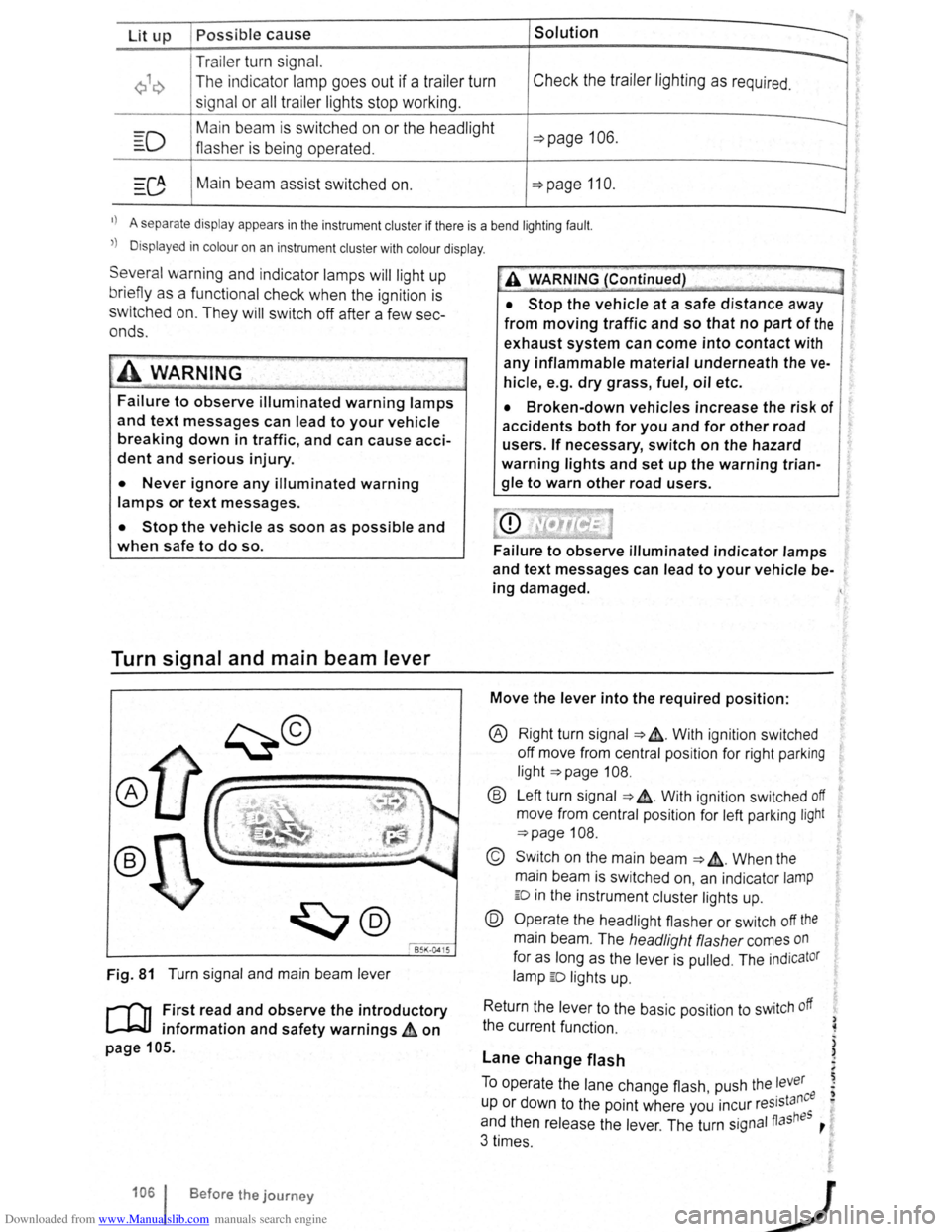
Fig. 81 T urn signa l and main beam lever
r-('n F irst read and observe the introductory
1.-J=JJ information and safety warnings~ on
page 105 .
1061 Before the journey
--
~>A WARNING (Continued) -
• Stop the vehicle at a safe distance away
from moving traffic and so that no part of the
exhaust system can come into contact with
any inflammable material underneath the ve
hicle, e .g . dry grass, fuel, oil etc.
• Broken-down vehicles increase the risk of
accidents both for you and for other road
users. If necessary, switch on the hazard
warning lights and set up the warning trian
gle to warn other road users.
Failure to observe illuminated indicator lamps
and text messages can lead to your vehicle be
ing damaged.
Move the lever into the required position:
® Right turn signa l ~ &. W it h ignit ion swi tched
off m ove from centr al posit io n for right parking
li g ht
~page 108.
® Left turn sig na l ~ ~. W ith ignition switched off
move from centra l posi tion for left parking light
~page 108 .
© Switch on the main beam ~ &. Whe n the
main beam is switc hed on, an indicator
lamp
ED in the instr ument cluster lights up.
@ Operate the headlight flasher or switch off the
main beam. The h eadligh t flasher comes on
for as long as the leve r is pulled . The indicator
lamp ED lights u p .
R etu
rn the le ver to the basic position to switch off
the c urrent fu nc tio n.
Lane change flash
) ~
)
)
To o pe rate the la ne c hange flash push the lever ' . nee I) u p or d own to the poin t where you incur reslsta eo
and th en release the le ver. The turn signal fiashBS ,
3 times .
Page 73 of 138
Downloaded from www.Manualslib.com manuals search engine ~
cornp~rtment in the front centre armrest
r-('n First read and observe the introductory
l.-J,r::JJ information and safety warnings th on
png 151.
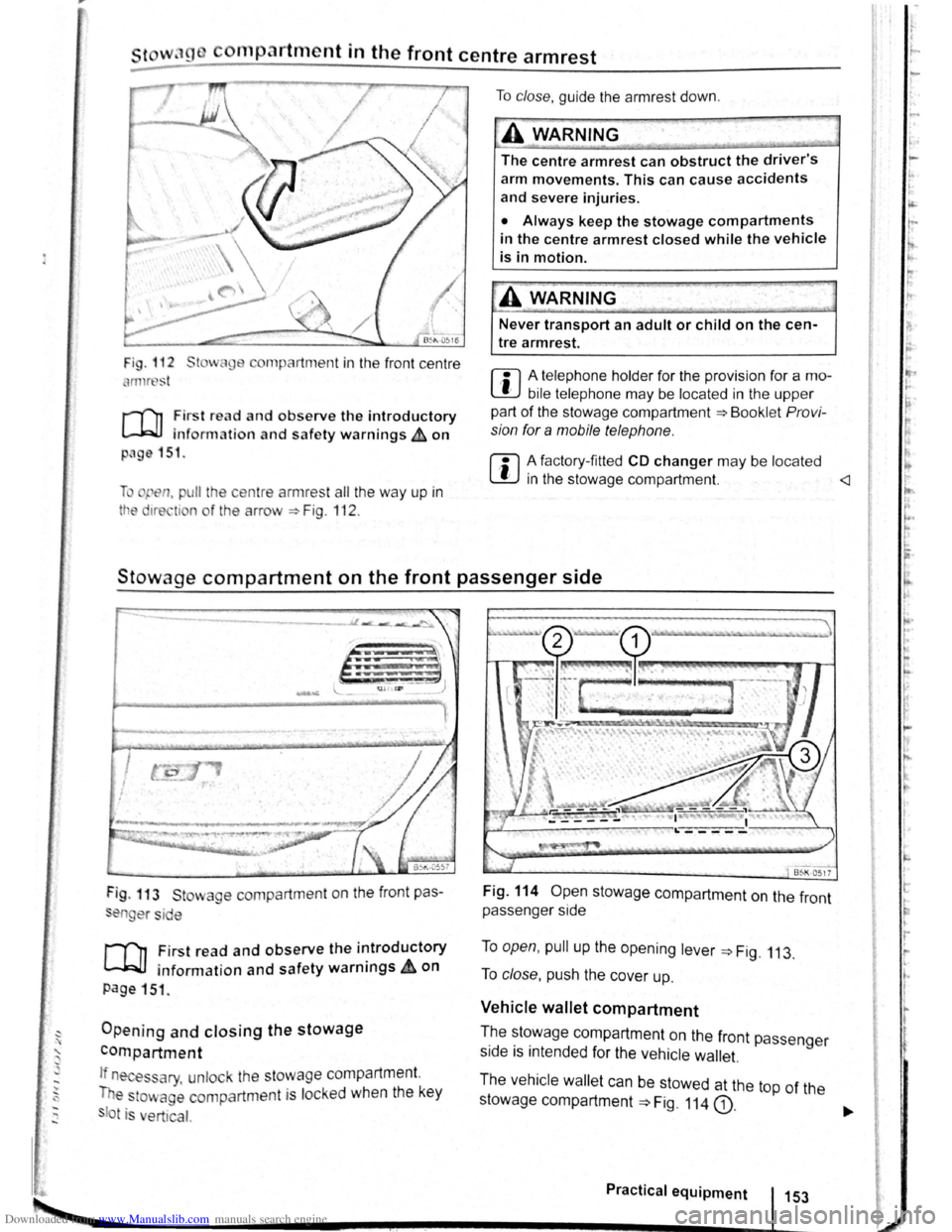
li pen, pu ll the ce ntre armres t all the way up in
tt e 1re ti n o f the arrow ::. Fig . 112 .
To clo se, guide the a rmr est down .
A WARNING
The centre armrest can obstruct the driver's
arm movements. This can cause accidents
and severe injuries.
• Always keep the stowage compartments
in the centre armrest closed while the vehicle
is in motion.
Never transport an adult or child on the cen
tre armrest.
m A telephone holder for the provision for a mo
L!J bile telephone may be located in the upper
part of the stowage compartment ::.Bookl et Pro vi
sion for a mobile telephone .
m A factory-fi tted CD changer may be located
W in the stowage compartment.
Stowage compartment on the front passenger side
Fig . 113 St wage compartment on the front pas
en er si e
,.....-('n First read and observe the introductory
~ information and safety warnings.&. on
page 151 .
Opening and closing the stowage
compartment
If n es ary, unlock the stowage compartment.
T e
to~ age compartm ent is locked when the key
t is ert ical.
Fig. 114 Open stowage compartment on the front
passenger side
To open, pull up the opening lever ::. Fig. 113.
To close , push the cover up.
Vehicle wallet compartment
T.he ~~~wage compartment on the front passenger
s1de IS mtended for the vehicle wallet.
The vehicle wallet can be stowed at the top of the
stowage compartment
==>Fig. 114 G).
Practical equipment 153
~--------------------~~----------~--~.~! ~--.J-------~
I ,.
~·
~
I
t
r
r r I.
t·
'
Page 75 of 138
Downloaded from www.Manualslib.com manuals search engine CD
Please note the following to help avoid damag o
and premature wear:
• Do not rest your hand on the g ear le ve r
when
driving. The pressure from your hand is
passed onto the selector forks in the gearbox.
Automatic gearbox: selecting a gear
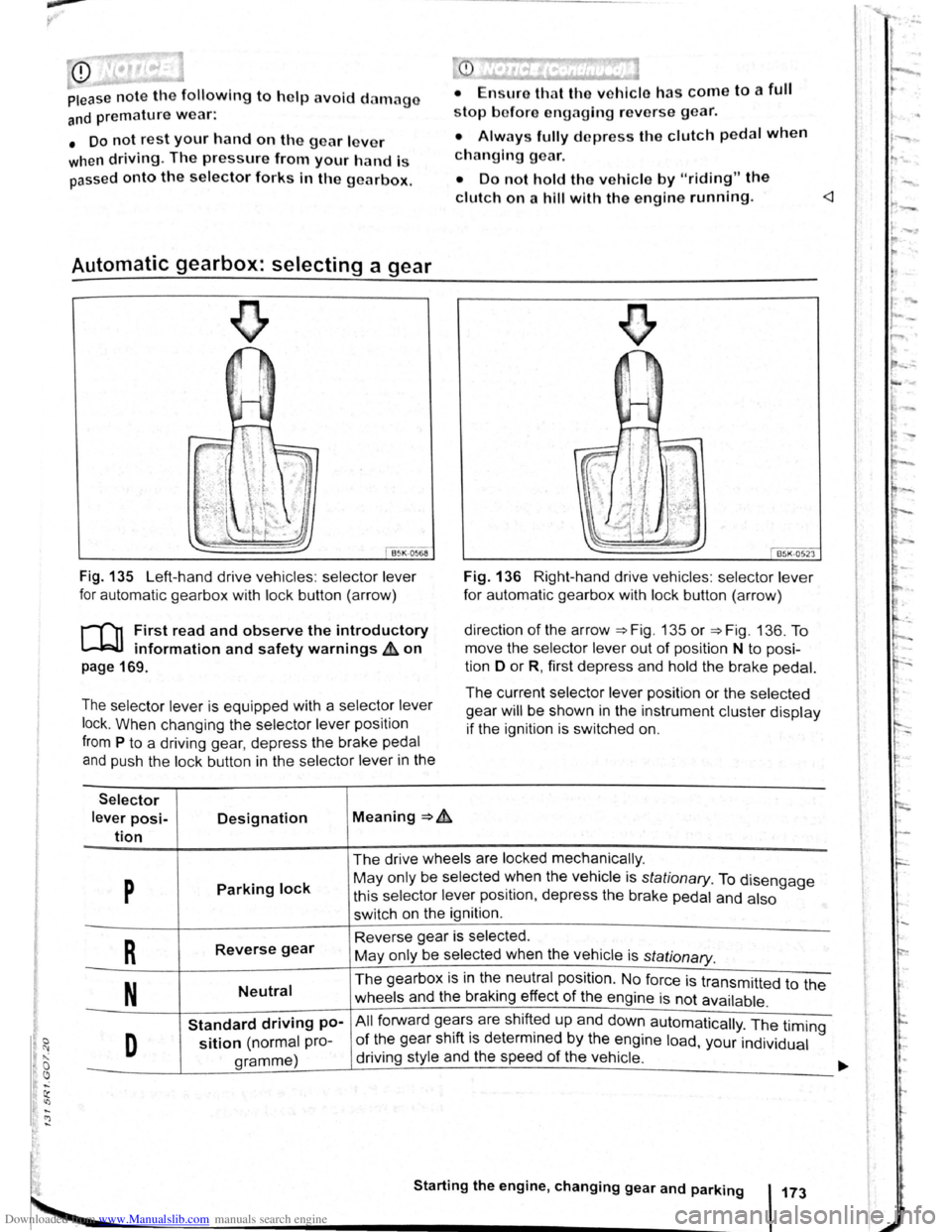
Fig . 135 Left-hand drive vehicles : selector lever
for automatic gearbox with lock button (arrow)
r-('n First read and observe the introductory
~ information and safety warnings & on
page 169.
The selector lever is equipped with a selector lever
lock .
When changing the selector lever position
from P to a driving gear, depress the brake pedal
and push the lock button in the selector lever in the
Selector
lever posi-Designation Meaning ~ .&.
tion
stop bofore engaging re verse gear.
• Always fully d epress the clutch pedal when
changing gear.
• Do not hold the vehicle by "riding" the
clutch on a hill with the engine running.
Fig. 136 Right-hand drive vehicles : selector lever
for automatic gearbox with lock button (arrow)
direction
of the arrow ~Fig. 135 or ~Fig. 136. To
move the selector
lever out of position N to posi
tion D
or R, first depress and hold the brake pedal.
The current selector lever position or the selected
gear
will be shown in the instrument cluster display
if the ignition is switched on.
The drive wheels are locked mechanically .
p Parking lock May only be selected ~hen the vehicle is stationary. To disengage
this selector lever pos1t1on, depress the brake pedal and also
switch on the ignition .
R Reverse gear Reverse gear is selected.
May only be selected when the vehicle is
stationary.
N Neutral The gearbox is in the neutral position . No force is transmitted to the
wheels and the braking effect
of the engine is not available .
Standard driving po-All forward ge~r~ are shift~d up and down automatically . The timing
D sition (normal pro-of the gear sh1ft 1s determmed by the engine load, your individual
gramme) driving
style and the speed
of the vehicle . -
Starting the engine, changing gear and parking 173
Page 78 of 138
Downloaded from www.Manualslib.com manuals search engine riving with an automatic gearbox
r-T'n First read and observe t h e introductory
L-..kJJ information and safety warnings~ on
page 169.
The gearbox changes th e forwa rd gears up and
down automat ic a lly .
Driving down hills
The steeper the gradi ent, the lower the gear you
will need . Lower gears increase the braking effect
of the engine . Never allow the vehicle to roll down
mountains or hills in the neutral position N.
• Reduce your speed.
• Push the selector lever from posit ion D t o the
r i
ght into the Tiptron ic gate ~page 175.
• Gently push the selector le ver to the rear to
change down gear.
• OR: shift down a gear using the padd les on the
s te
erin g wheel ~page 175 .
Stopping the vehicle and pulling away when
driving uphill
The steeper the incline, the lower the gear you will
need.
If you wish to stop the vehic le or pu ll away when
driv ing uphill you should use the Auto -Ho
ld func
tion
~page 196.
When you stop the vehicle on an incl ine and the
vehicle remains in gear , the vehicle must always
be prevented fro m rolling by depress ing the brake
pedal or
by applying the electron ic park ing brake .
The brake pedal or the electronic parking brake
should
not be released until you pull away ~CD.
Freewheel driving with dual clutch gearbox
DSG®
In
freewheel mode, the momentum of the vehicle is
used to save fuel with a foresighted driving style.
The engine is declutched and no longer brakes the
vehicle -the vehicle can
roll out over a longer dis
t a nce.
Switch-on condit io n: the selector lever must be in
positio n D.
Triggering freewheel driving
• Select the Eco driving mode from the Driving
Mode Selection menu ~page 248 .
• Remove foot from accelerator pedal. The en
gine
w ill be disengaged and run in freewheel
mode. The vehicle rolls without the braking effect
of the eng ine .
Cancelling freewheel mode
• Press the bra e pedal brieny or pull the 1 ft.
hand paddle G towards the stee ring wh 1.
Kick-down
The kickdown function enab~~s ma imum accelera.
tion in the selec tor lever pos1t1ons D and S, or in
th e Tiptron ic posi tio n.
If the acce lerator pedal is d epre ssed fully. the gear.
box will automat ically sh ift to a lower gear, depend
ing on the speed and engine revs. This will make
use of the full veh icle acceleration ~ Lt.
The gearbox does not shift up to the next gear until
the engine reaches the maximum engine s
peed for
the gear.
When the
Eco driving mode is sel ected in vehicles
with Driving Mode Selection ~page 248 and the
accelerator is depressed
fully beyond the pressure
point, the engine output is automatically regulated
to ensure maximum vehicl e acceleration .
Launch control programme
The launch control programme enables maximum
accelerat ion from a stand ing start .
• Switch off TCS ~page 179.
• Depress and hold the brake pedal with your left
foot.
• Move the selector lever to position S, or into the
Tiptronic position. Alte rnatively , select the Sport
driving mode in vehi cles with Driv ing Mode Selec
tion ~page 248 .
• With your right foot, depress the accelerator un
til the engines speed reaches approximately
3,200 rpm.
• Take your left foot off the brake ~ ~. The vehi
cle will start with maximum acceleration.
• Switch the TCS back on after accelerat ion.
A WARNING
Rapid acceleration can cause loss of traction
and skidding, particularly on slippery roads .
This can cause you to lose control of the ~e
hicle, which can lead to accidents and sen·
ous injuries.
• Always adjust your driving style in ac·
cordance with the flow of traffic.
• Only use kickdown or fast acceleration if
visibility, weather road and traffic conditions ' t permit, and other road users are not put a
risk due to the acceleration and the driving
style.
,