Top VOLKSWAGEN BEETLE 2004 Owner's Guide
[x] Cancel search | Manufacturer: VOLKSWAGEN, Model Year: 2004, Model line: BEETLE, Model: VOLKSWAGEN BEETLE 2004Pages: 138, PDF Size: 48.59 MB
Page 117 of 138
Downloaded from www.Manualslib.com manuals search engine I ation to standstill (only vehicles with pece er )
rnatic gearbox 3uto hicle travelling ahead brakes to a standst1ll ,
If a ;~c will also brake your vehicle to a s tands till.
~:e vehicle is then he ld stationary by th e brakes.
Stationary phase (only vehicles with
autornatic gearbox)
If the adap tive cruise control has decele ra t d the
vehicle to a standstill, the adapt.ive cruise contr o l
will not be switched off automatically wh en the
brake pedal is depressed .
The electronic parking brake will be activated auto4
matically and the adap tive cruise control will be
switched off if one of the following situations occurs
while the vehicle is stationary:
• The safety be lt is unfastened .
• The driver's door is opened.
• The ignition is switched off.
• The stationary phase lasts longer than approxi4
mately 3 minutes .
Driving off after a stationary phase (only
vehicles with automatic gearbox)
After a stationary phase, the adaptive cruise con
trol can start the vehicle moving automatically as
soon as the vehicle in front begins to move again.
Overtaking
If the turn signal is activated when starting an over
taking manoeuvre , the adaptive cruise control ac
celerates the vehicle automatically and thus re
duces the distance to the vehicle in front.
If you move your vehicle into the overtaking lane
and there is no vehicle ahead of you , the ACC will
automatically increase the speed to your set level
and maintain it.
Acceleration can be stopped at any point
by de
Pressing the brake pedal or pressing the @ button
on the multifunction steering wheel ~page 229.
When driving through bends
While dr iving through bends, the radar sensor may
sometimes lose the ve hicle travelling ahead or
rnay r eac t to a ve hicle in the next lane
; Fig. 169 A. In such situations, the vehicle might
.
ecel e rate unnec essarily or not react to the veh icle
In front. In this case the driver must override the
Abcc by depressing the accelerator, or interrupt the rak· lng procedure by depressing the brake peda l
or Pressing the ~ button on the multifunction
ste · ~ enng wh eel ~page 229.
Driving In tunn I
Th rnd~u nso r run .tton mt y lH n slt11.l clln tun ·
n Is. Sw1tch off th ACC m tunn I•
Narrow v e hlcl
situation
nd · zl -z g tr ff c
Vehicles with special load or p cl
equipment
Any load or cc sari th, t pr
trude from tile sld , r r or ov r 111 r o f o f th v •
hicle m y no t be d t et d y th ACC .
Swit ch
off the ACC wh n tt1 v 'hi cl ~h ld h e
special lo d or sp ci I equi pm nt o r whil ov rt ;Jk·
ing such vehic les. If req uir d. brak th v hi I
yourself.
When othe r vehicles change lane
V ehicles that are ve ry close whon th y mov Into
your lane can onl y be do tec t d by th r d. r s n
sors when they h ave moved Into the s nsor r ng
This w ill resul t in a late r action by th dap tiv
cruise control
F1g. 17 0 C. If r quir d , br ke th e
vehicl e your self.
Stationary vehicles
The ACC do es not de tec t st tionary obj cts durin
a journey , such as st tion ary traffic
or a ve hi cl
th at has brok en down .
If a stationary ve hi cle is hidd en behind a ve hi cle
th at h as been detected by
the adap tive cruis e con
trol and this vehic le turns off the road or changes
la ne , the adaptive cruise contr ol will not be ble to
re ac t to the s ta tion ary vehicle Fig.
170 D. If re-
quired, brake the vehic le yourself.
Oncoming vehicles and vehicles crossing
your path
The adap tive cruise contro l does not react to ap
proaching vehicles or v ehicles crossing your p th.
Metal
objects
M eta l objects, such as tracks In the road or m et 1
plates used in roadworks, can confuse the radar
sensor and cause in correc t reactions from the
adap tive cr uise con trol.
..,..
Driver assist systems 233
Page 120 of 138
Downloaded from www.Manualslib.com manuals search engine ssis t an Issue unnecessary warn
ut unwanted braking inter-
h n ils f m ti n is impaired, e .g . If
sili " f the radar sensor has been
hil the ehicle is in motion, Front As
t r a t to persons, animals and
r s ing or a proaching in the same
li."f ' ll.'v.
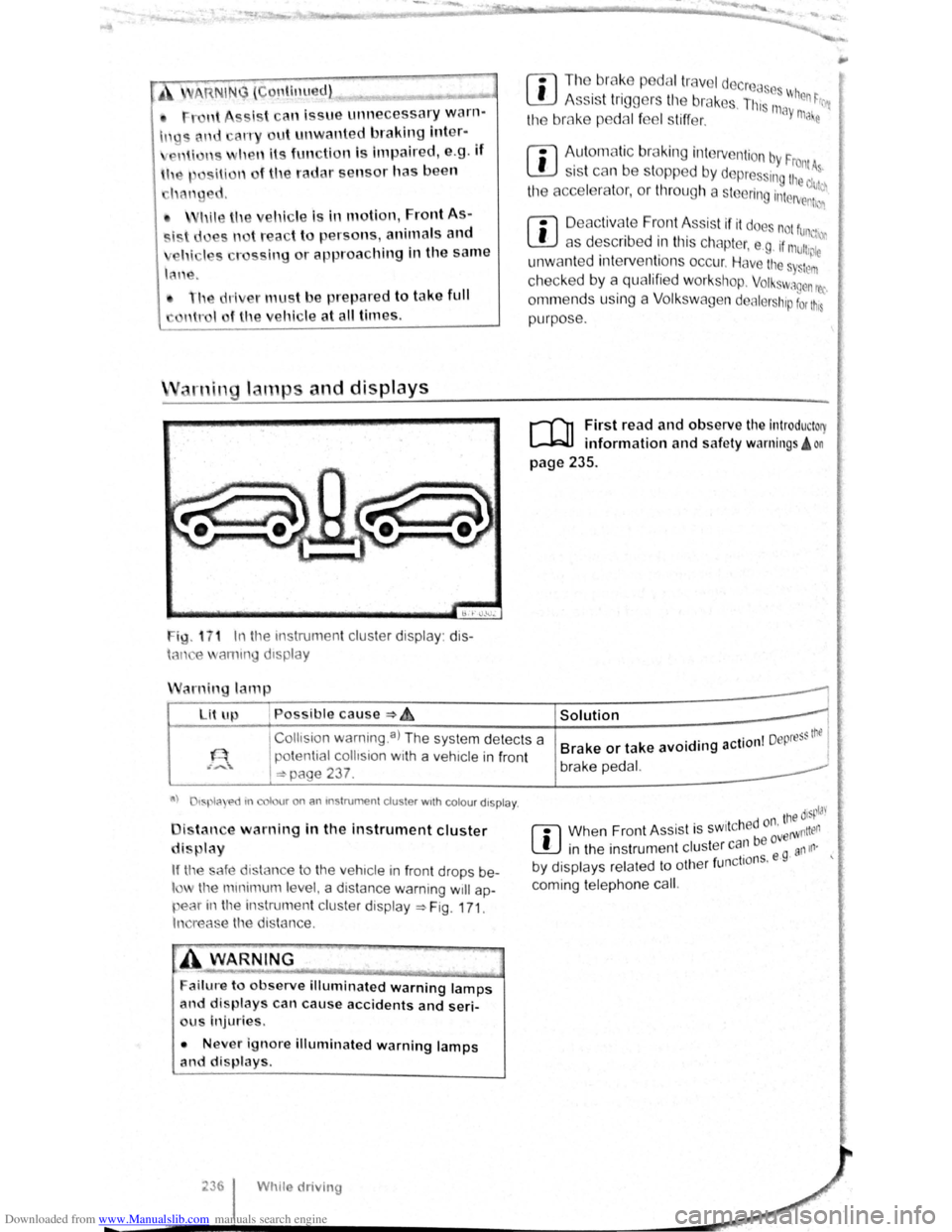
ig. 1 7 1 In t11e instrumen t cluster display: dis
h-m e ammg d1splay
arnin lamp
Lit up , Possible cause :::) ~
r:l Tl1o br ake p dal tr ave l decrcas ~
L!J A ss is t tr iggers til e br ak s. Th, 111 When ~rr
the bmke p dal f el s tiff er. ay ma e
rn
Aut om atic br aking intervention by F . rontA s 1s t can be stopped by depres ing the d~~~
the acce l rator, or throug h a steering interv enh~n
r:l D eac tivate Front Assis t if it doe not fun,
L!J as describ ed in tl1is chapter, e .g . if mu11,~;:
unw ant ed inte rventions occur. Have the s Sttlm
checked by a qualifi ed workshop. Volkswagen rec
ornm ends using a Volk swagen dealer hip for t11s
purpose .
r-fl1 First read and observe the introductory
l-W1 information and safe ty warnings! on
page 235 .
I
Collts ion warning .a) The system detects a
potential
collision with a veh1cle in front
I =:-page 237 .
Solution 1
. . I Depress thtl Brake or take avoiding action I brake pedal.
a) tspla e>d tn colour on an mstrumen t cluster wtth colou r dtspla y.
i tan e warning in the instrument cluster
di play
If tl'e safe d1stance to the veh1cle in front drops be
l the mmimum le el, a distance warning will ap
pear in the instrumen t cluster display ~Fig. 171.
In reas e the distance.
ailure to observe illuminated warning lamps
and displays can cause accidents and seri
us Injuries.
• Never ignore illuminated warning lamps
and displays.
Whtle driving
. ' tne disp!J'
r:l Whe n Fron t As sist is sw1t c h ed or' erWntten
L!J in the instrumen t cluster can be ovg an111·
. 1 f nctio ns. e · by d1splays related to ot 1e r u
coming telephone cal
l.
Page 123 of 138
Downloaded from www.Manualslib.com manuals search engine ere is oncomin g traffic . • If
en loads or attachment parts on other vehi-
• tru e to the side, rear or above the normal .e s h. I ~-ers s of he ve ICe.
C ity emergency brake function
rl'i1 First read and observe the introductory
L-WJ information and safety warnings A on
page 235 .
e city emerg ency brake function is part of the
a'Ba monitorin g system (Front Assist) and is act ive
"' .en Front Ass ist is s witched on.
The c· emerg ency brake function gathers in for
ma ·on on the traffic situation up to a distance of
about 10 m in front of the vehicle with in a speed
ra ge of abo ut 5 km/h (3 mph) to 30 km /h
( 9 mph).
e system prepare s the vehicle for emergency
bra in g if it detects a possib le colli sion with a vehi -
eahead ~~-
If the dr iver does not react to a possib le serious
collis ion, the s ystem can autom atically stop the ve
h i
cle with bra ke pressure with increas ing intensit y
so as to reduce the s peed in a possib le co llision .
Hence the s ys tem can help min im ise the conse
quences of an accident.
A WARNING
The intelligent technology of the city emer
gency brake function cannot change the laws
of physics. The driver is always responsible
for braking in time.
• Adapt your speed and distance from the
Vehicles ahead to suit visibility, weather, road
an d traffic conditions.
• The city emergency brake function cannot
Prevent accidents and serious injuries by itself '---" ----------------------------~
• The city emergency brake function can
carry out unwanted brake interventions in
certain complex driving situations, e.g. at
traffic islands, building sites and metal
tracks.
• Front Assist can issue unnecessary warn
ings and carry out unwanted braking inter
ventions when its function is impaired, e .g . if
the position of the radar sensor has been
changed.
• While the vehicle is in motion, Front As
sist does not react to persons, animals and
vehicles crossing or approaching in the same
lane.
m The brake pedal travel decreases when the
~ city emergency brake function is triggered .
This
may make the brake pedal feel stiffer.
m Automatic brake intervention by the city
~ emergency brake fun ction can be stopped by
using the clutch , the accelerator or steering inter
vent ion.
m The city emergency brake function can brake
~ the vehicle to a standstill. The vehicle will not
be held permanently by the braking system. De
press the brake.
m Switch off Front Assist and the city emergen
~ cy brake functio n in the event of multiple un
wanted interventions . Proceed to a qualified work
shop . Volkswagen recommends using a Volkswa-
gen dealership for this purpose .
Page 125 of 138
Downloaded from www.Manualslib.com manuals search engine Display
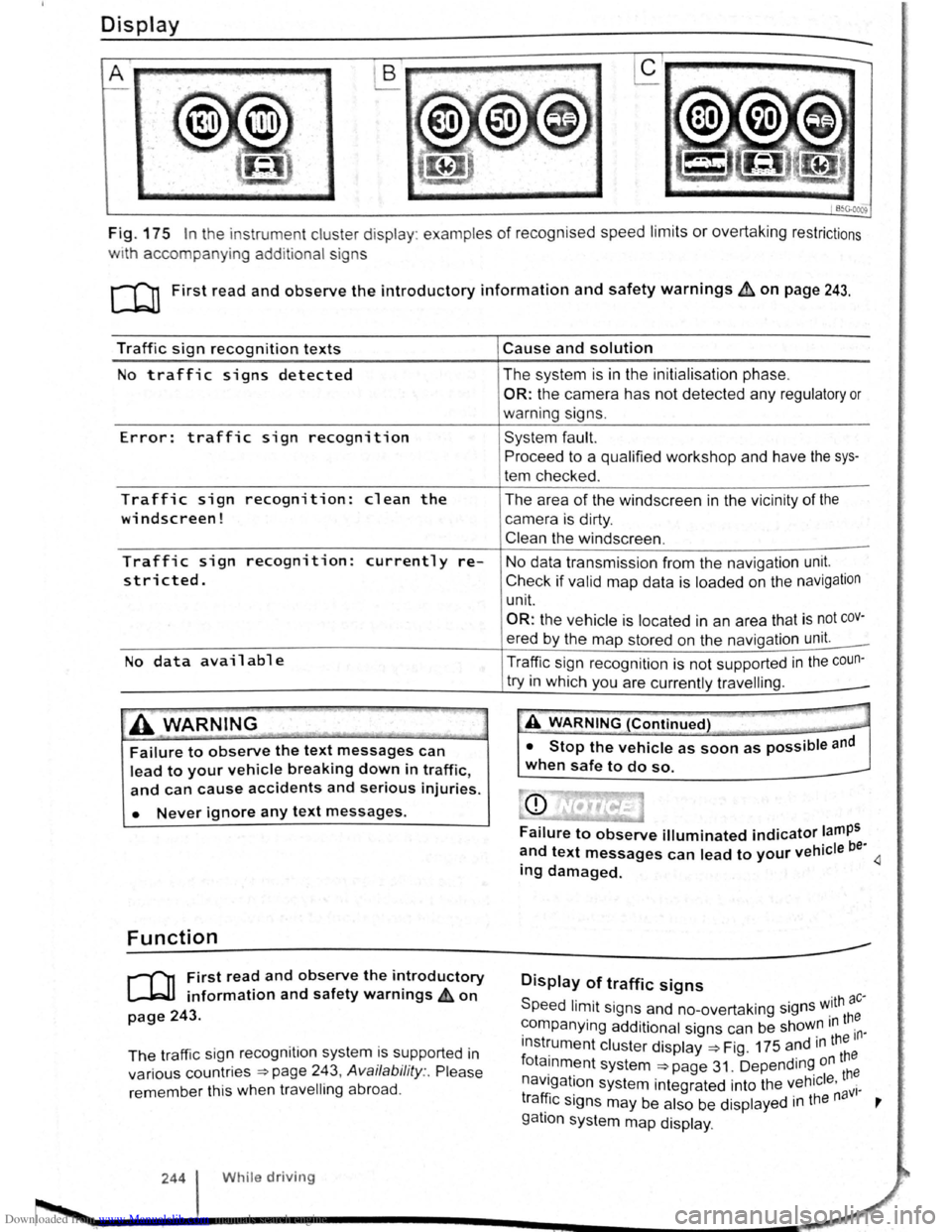
Fig. 175 In the instrument cluster display : examples of recognised speed limits or overtaking restrictions
w1th accompanying additional signs
c:cn First read and observe the introductory information and safety warnings b:. on page 243.
Traffic sign recognition texts
No traffic signs detected
Error: traffic sign recognition
Traffic sign recognition: clean the
windscreen!
Traffic sign recognition: currently re
stricted.
No data available
.A WARNING _
Failure to observe the text messages can
lead to your vehicle breaking down in traffic,
and can cause accidents and serious injuries.
• Never ignore any text messages.
Function
r-f'n First read and observe the introductory
~ information and safety warnings £on
page 243.
The traffic sig n recognition system is supported in
various countries
~page 243, Availability :. Please
remember this when travelling abroad .
244 While driving
Cause and solution
The system is in the initialisation phase.
OR: the camera has not detected any regulatory or
warning signs.
System fault.
Proceed to a qualified workshop and have the sys
tem checked .
The area
of the windscreen in the vicinity of the
camera is dirty.
Clean the windscreen .
No data transmission from the navigation unit.
Check if valid map data is loaded on the navigation
unit.
OR: the vehicle is located in an area that is not cov
ered by the map stored on the navigation unit. _
Traffic sign recognition is
not supported in the coun-
try in which you are currently travelling . _
-A WARNING (Continued) T'" -___.
• Stop the vehicle as soon as possible and
when safe to do so.
Failure to observe illuminated indicator lamps
~nd text messages can lead to your vehicle be· 4 mg damaged.
Display of traffic signs
Speed limit signs and no-overtaking signs w.ith ac·
~ompanying additional signs can be shoW~ m th~
lnst~ument cluster display ~Fig. 175 and 1
n ~~~e
fota1nment system ~page 31. Depending on
navigation system integrated into the vehicle . th~ · . . aVI· tra~lc s1gns may be also be displayed 1n the n '
gatlon system map display .
Page 127 of 138
Downloaded from www.Manualslib.com manuals search engine J DFW«Z
Driving Mode Selection
o:n Introduction
This chapte r con ta in s inform ation on the following
subje cts :
Function an d ope ratio n . . . . . . . . . . . . . . . . . . .
248
Adjusting the driving mode to suit yo ur
r equir em ents . . . . . . . . . . . . . . . . . . . . . . . . . . .
250
Th e driver can use Driving Mode Selection to acti
vate a variety
of vehicle settings as required .
Additional information and warnings:
• Lights ~page 105
•
lnfo ta in ment system ~page 31
• Changing gear ~page 169
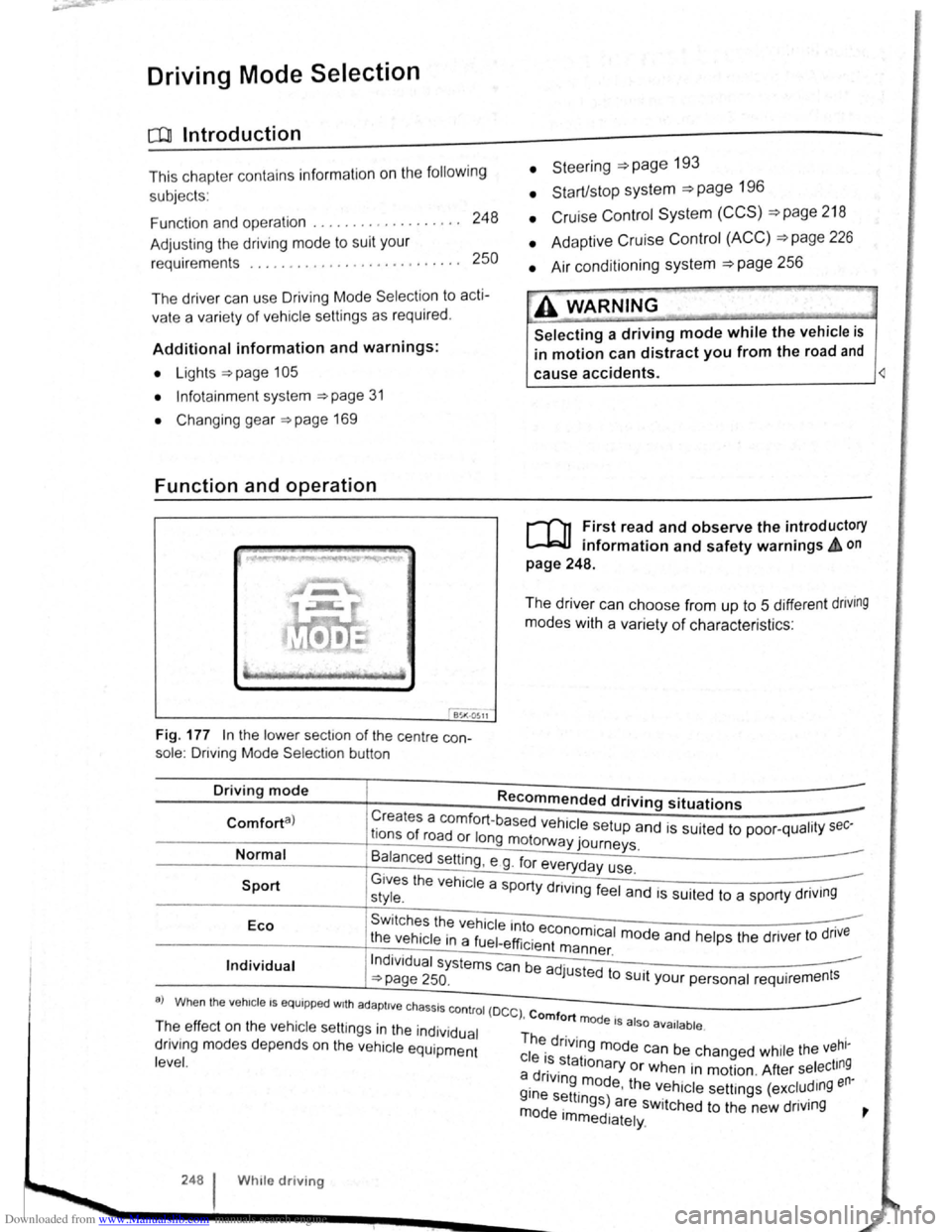
Function and operation
Fig. 177 In the lo we r sect1o n of the centre con
sole : Driving Mode Selectio n button
• Steeri ng =>page 193
• Start/stop system =>page 196
• Cruise Con trol System (CCS) =>page 218
• Adaptive Cruise Control (ACC) =>page 226
• Air conditioning system =>page 256
A WARNING
Selecting a driving mode while the vehicle is
in motion can distract you from the road and
cause accidents. ~
r-f"n First read and observe the introductory
L-lr:JJ information and safety warnings & on
page 248.
The driver can choose from up to 5 different dnving
modes with a variety of characteris ti cs :
Driving mode Recommended driving situations
Creates a comfort-ba se d h 1 . Comforta) r f ve ICe setup and is suited to poo r-qualit y sec-Ions o road or long motorway journeys.
Normal
Sport
B~lanced setting , e g . fo r everyday use.
G1ves the vehicle a sport d .. style. Y rtvlng feel and is suited to a sporty driv1ng
Eco Swi tches the vehicle into . .
t he vehicle in a fuel-effi . economica l mode and he lp s the drive r to dnve 1c1ent m ann er
Individual Indi vidua l systems can be ad ·u · . ~page 250. J sted to SUit your personal requir ement s
a) Wh en the veh1c le I S equipp ed w1th ad apti ve chassis co ntro l (D
C C) , Comfort mode I I T~e ef fec t o n th e vehicle se ttin gs in the individual Th . . 5 a 50 ava1lable .
dnv1ng m od es depends on the vehi cle equipment ~ dnvlng mode can be chang ed whil e the vehl-
l eve
l. c le ~~.stationary or when in motion . After select ing a dnv1ng m od th en· i . e, e ve h icle se tt ings (excludmg
~~~ s~ttmgs) are switched to the new driving ~ e Immediately.
248 W h1le driv ing
Page 128 of 138
Downloaded from www.Manualslib.com manuals search engine J J
' ·, ' '~
' i '
traff ic c ond itions allow, briefly take your foot
When accle rator to activate the newly selected off the . . .
9 mode fo r the eng me. dnvm
daptive chassis control (DCC)
~h·le the vehicle is in motion , the DCC constantly
d.
1
sts the suspensio n characteristics to match the
a J~ surface and the cu rrent driving situation, in
~~~ordance with the preset vehicle setti ngs.
If there is a fault in the DCC, th e ~ symbol appears
in the instrument cluste r display along with the
message Fault: damper control.
Steering
In Sport mode, power steerin~ is r~duced and the
effort required to stee r the vehicle mcreases. The
vehicle's driving response becomes more agile.
Powertrain (engine and gearbox)
The engine and gearbox will give either a more dy
namic or more balanced response to the move
ment of the accelerato r, depending on th e selec ted
driving mode . In vehicles with an automatic gear
box, the gear shift po ints and the coasting mode
will also change . An active cruise contro l sys tem
(CCS) can affec t the acceleration response.
Adaptive Cruise Control (ACC)
When the ACC is active, accele ratio n and deceler
ation of the vehicle becomes more ecological or
sporty.
Dynamic bend lighting and automatic main
beam assist
The dynamic bend lighting and the automatic main
beam assist will give either a more dynamic or
more balanced respo nse to the current driving sit
uation, depe nding on the selected driving m ode.
Air conditioning system
In Eco mode , the air cond itio ning will be set to run
even more economica lly.
Displaying the driving mode
• Ensure that the ignition is switched on.
• Press the Driving Mode Selection button(~ MOD£)
~Fig. 177 . The Driving Mode Selec tio n menu ap
~ears in the infotainment system display. The ac
tive driving mode is selected .
• Touch the (Informa tion ) function button to disp lay
additional information about the current driving
rnode.
..,...,_ . _ ..
-
Selecting the driving mode
• Ensure that the igniti on 1s swit c hed on.
• Press the Driving Mode Se lection button (t:'t wooe)
~Fig. 177 and touch the fun ction button for the se·
lected driving mode in the lnfota inm ent system dis
pla y.
The selec te d driving mode
will re m ain set e ve n a f
t e r the ignition has bee n swi tc he d off . Th e las t acti ·
va ted driving mode will be assigned to the ve hic le
key that h as been use d.
Changing the driving mode can alter the vehi
cle handling. Never allow Driving Mode S elec
tion to tempt you into taking any risks when
driving.
• Always adapt your speed and driving style
to suit visibility, weather, road and traffic con
ditions.
It A WARNING . ~
Failure to observe illuminated w arning lamps
and text messages can lea d to your vehicle
breaking down in traffic, and can cause acci
dent and serious injury.
• Never ignore any illuminated warning
lamps or text messages.
• Stop the vehicle as soon as possible and
when safe to do so.
---
Failure to observe illuminated indicator lamps
and text messages can lead to your vehicle be
ing damaged.
r::l The Eco mode is blocked when the ve hicle is
l!J towi ng a trai le r. If the vehi cle is in Eco mode
when a trailer is hitched and electrica lly connected
to the towing
ve hicle via th e trailer socket. the sys
tem will automatica lly swi tch to
Normal mode.
r::l In vehicles with an automa tic gearbox, the
l!J system automatically switches to gear posi
tion S when the
Sport drivin g mode is se lected .
The syste m aut omatically switches to
gear position
E when the
Eco driving mode is se lected .
r::l The driver can adjust certain vehicle fun c
l!J tions irrespective of the selected driving
mode . For examp le, the driver can swi tc h to
gear
position
S wh en the Eco driving mode is selected.
r::l In some model ve rsions the highest speed of
l!J th e veh ic le ca n only be achie ved in the Nor-
mal or Sport driving modes.
Page 130 of 138
Downloaded from www.Manualslib.com manuals search engine Tyre monitoring system
Introduction
Th1s ct1,1pt r contnin s inform ation on th e follow1ng
SlllliN~ts.
Tymmomto r in d1ca to r lamp . . . . . . . . . . . . . . 253
T
ro m onito r disp l y . . . . . . . . . . . . . . . . . . . 254
Additional information and warnings:
• Voll-.s w age n Inf orm ation sys te m ~p ag e 26
• lnfotainment sys te m ~page 3 1
• Tmnspo rting c:> page 126
• Brak1ng. stopp rng and parking ~page 179
• C leani ng a nd ca rin g for th e vehicle ex terio r
::-page 294
• Wheels and tyres ~page 308
•
A ccessones, modrficatrons, re parr s and renewal
or parts ~page 320
•
Consumer i nfor mation ~pag e 328
A WARNING ~~-~ ,c_. ""]
Incor rec t handling of the wheels and tyres
can lead to a sudden loss of pressure in the
tyres , trea d separation and even tyre blowout.
• Check tyre pressures regularly and always
keep to the specified tyre pressure value. If
the tyre pressure is too low, the tyre could
warm up to such an extent that the tread may
separate and the tyre could burst
~e monitor indicator lamp
• Always maintain correct cold tyre inflation
pressure as listed on the tyre pressure label
=>page 308 .
• Check tyre inflation pressure regularly
when the tyres are cold. Adjust tyre pressure
in the cold tyre to the recommended tyre
pressure for the tyres installed on your vehi
cle as necessary.
• Check your tyres regularly for signs of
w ea r or damage.
• Never exceed the top speed and load per
mitted for the fitted tyres.
CQ"' Und er-in nated tyres w111 increase fuel con
(Jtf sumption and tyre wear.
m When new tyres are dnven at high speeds for
W the firs t time, they can expand slightly and
trigger a one-off pressure
warn1ng.
m O ld tyres should o nly be re placed by tyres
W tha t have bee n app roved by Vo lkswagen fo r
the vehrcle type.
m Do not rely solely on the Tyr e Pressure Moni
L!J to nng System . Check your tyres regularly to
ensure that th
ey are properly inflated and have no
srgns of damage, such as punc tures, cuts, cracks ,
and bliste rs Remove an y
Objects th at become em
bedded 1n the tyre tread but have not penetrated
into the body
of the tyre itself
r--~~L~it_u_p _____ P_o_s_s_ib_l_e_c_a_u_s_e_~--.----------------T,S--o-lu-t-io_n __________________________ __
(I
The tyre pressure of one tyre or several • ir; Do not drive on! Reduce speed lmmedi
tyres has decreased considerably in com- 1 ately St op the vehic le as soon as possrble
panson to the tyre
pressure set by the I and when safe to do so. Avo1d swerv1ng me-
driver . or the structure of the tyre is dam-1 noeuvres and heavy brakrng'
aged .
An acoustic wamrng wrll also be Check all tyres and the tyre pressures The
sounded ,
and a correspondrng message damaged tyre should be replaced
will appear 1n the mstrument cluster and
infotainment system displays
Driver assi
st systems 253
Page 132 of 138
Downloaded from www.Manualslib.com manuals search engine • If tll ly .
s i
de. n
ch a ng ed manu al-
is t
oo low.
I lo ded more heavily on one
• If tile wh el on one axle are loaded more
heav ily. e .g . high load level.
• If snow chains h ve been fitted.
• If a te mper ry spare wheel ha s been fitted.
• If one wheel per axle has been changed .
In certain circumsta nces. the tyre monitor dis-
play W may become slow or may not display any thing, e .g . with a sporty driv ing style. in winter driving condit ions , on unpaved roads, or when driving
w ith snow chains .
Calibrating
the tyre monitor display
The tyre monitor display will have to be re-ca librated after changing the tyre pressure . or after
c h anging one or more wheels. Th is also applies when wheels are swapped, e.g . from the front to the rear.
-
• Switch on the ignition .
• Open the Tyre monitor display menu option in the infotai nment system display ~page 31.
• Touch the @ID function button .
• If all 4 wheels are se t to the correct va lues,
t o uc h the (Co nfirm ) function button to store the tyre
p ressu re s.
• To uc hing the (cancel) button w ill prevent the cu r
rent tyre pressures from being stored and the system will n ot be cali brated .
During normal ve hi cle operation , the
system cali
br ates itse lf independently to the the fitted tyres
and the tyre pressures filled by the
driver. The cali
brated values are accepted and monitored after a
l ong journey at vari ous speeds .
If the wheels are loaded more heavily than normal,
e .g . if the veh icle is ca rrying hea vy payload, the
tyre press ure must be rais ed to the r
ecommended full-load tyre pressure before calibration =>page 308.
l:l The tyre monitor dis play stops working if W the re is a malfunction in the ESC or ASS =>page 179 .
l:l When using snow chains , an incorre ct disL!J play may be shown as the snow chains in-
crease the tyre circumference .