trac VOLKSWAGEN BEETLE 2008 Owners Manual
[x] Cancel search | Manufacturer: VOLKSWAGEN, Model Year: 2008, Model line: BEETLE, Model: VOLKSWAGEN BEETLE 2008Pages: 138, PDF Size: 48.59 MB
Page 11 of 138
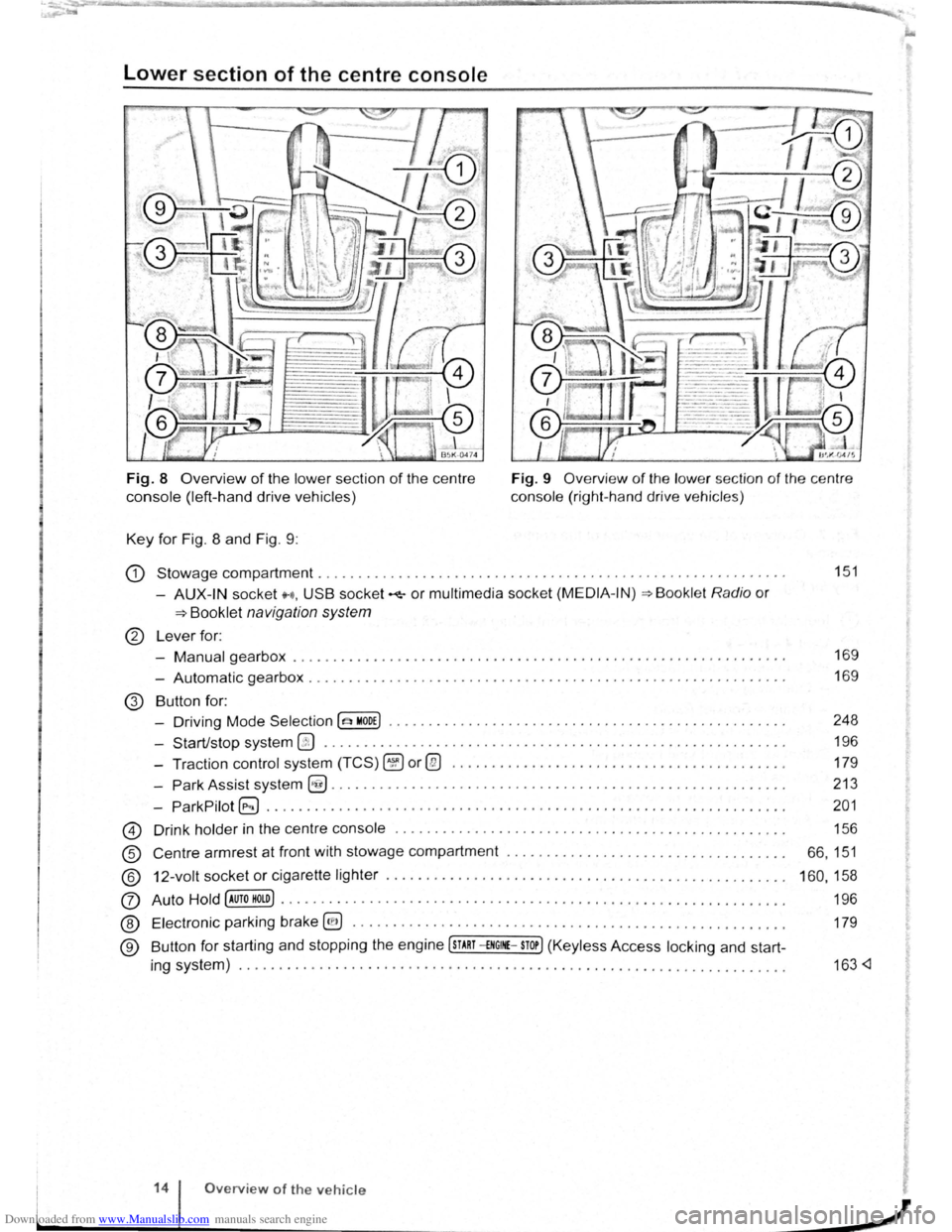
Downloaded from www.Manualslib.com manuals search engine Lower section of the centre console
Fig. 8 Overview of the lower section of the centre
console (left-hand drive vehicles)
Key for Fig. 8 and Fig. 9 : Fig.
9
Overview of the low er sec tion of the ce ntr e
console (right -hand drive ve hicle s)
G) Stowage compartment . . . . . . . . . . . . . . . . . . . . . . . . . . . . . . . . . . . . . . . . . . . . . . . . . . . . . . . . . . . 151
-AUX-IN socket H, USB socket~ or multimedia socket (MEDIA -IN)=> Bookl et Radio or
=>Booklet navigation system
® Lever for:
-
Manual gearbox . . . . . . . . . . . . . . . . . . . . . . . . . . . . . . . . . . . . . . . . . . . . . . . . . . . . . . . . . . . . . . 169
- Automatic gearbox . . . . . . . . . . . . . . . . . . . . . . . . . . . . . . . . . . . . . . . . . . . . . . . . . . . . . . . . . . . . 169
@ Button for:
- Driving Mode
Selection(~ MODE) • . • . . . • . . • • . • • . • . . . . • . . • • . . . . . • . • . . . . • • • • . • • • • • . . . 248
- Start/stop system
@ . . . . . . . . . . . . . . . . . . . . . . . . . . . . . . . . . . . . . . . . . . . . . . . . . . . . . . . . . . 196
- Traction
control system (TCS) ~or@ . . . . . . . . . . . . . . . . . . . . . . . . . . . . . . . . . . . . . . . . . . 179
-
Park Assist system~......................................................... 213
-
ParkPilot G;) . . . . . . . . . . . . . . . . . . . . . . . . . . . . . . . . . . . . . . . . . . . . . . . . . . . . . . . . . . . . . . . . . 201
@ Drink holder in the centre console ..... ........................................... .
® Centre armrest at front with stowage compartment .................................. .
® 12-volt socket or cigarette lighter ....... .............. .................. .......... .
(J) Auto Hold [AUTO HOLD) ...•••..•.•.•..•.•...•.••••••.•..•.••••..••••.•••....• •.•.••...
® Electronic pa rking brake @) ........... ...... .............................. .... .. .
® Button for starting and stopping the engine [sTART -£NGINE-STOP] (Keyless Access locking and start-
ing system) ..
............. ................................ .... ................ .
14 Overview of the vehicle
156
66 ,
151
160 , 158
196
179
163
Page 16 of 138
Downloaded from www.Manualslib.com manuals search engine Instruments
CClJ Introduction
This chapter contains information on the following
subjects :
I nst
rument overview . . . . . . . . . . . . . . . . . . . . . 20
D isplays . . . . . . . . . . . . . . . . . . . . . . . . . . . . . . . 21
S ervice interval disp lay . . . . . . . . . . . . . . .
. . . . 24
Additional information and warnings:
• W arning and indicato r la mps ::;. page 16
• V olkswage n inf orm ation system :::;. page 26
• lnfota inment s ys tem ~page 31
Instrument overview
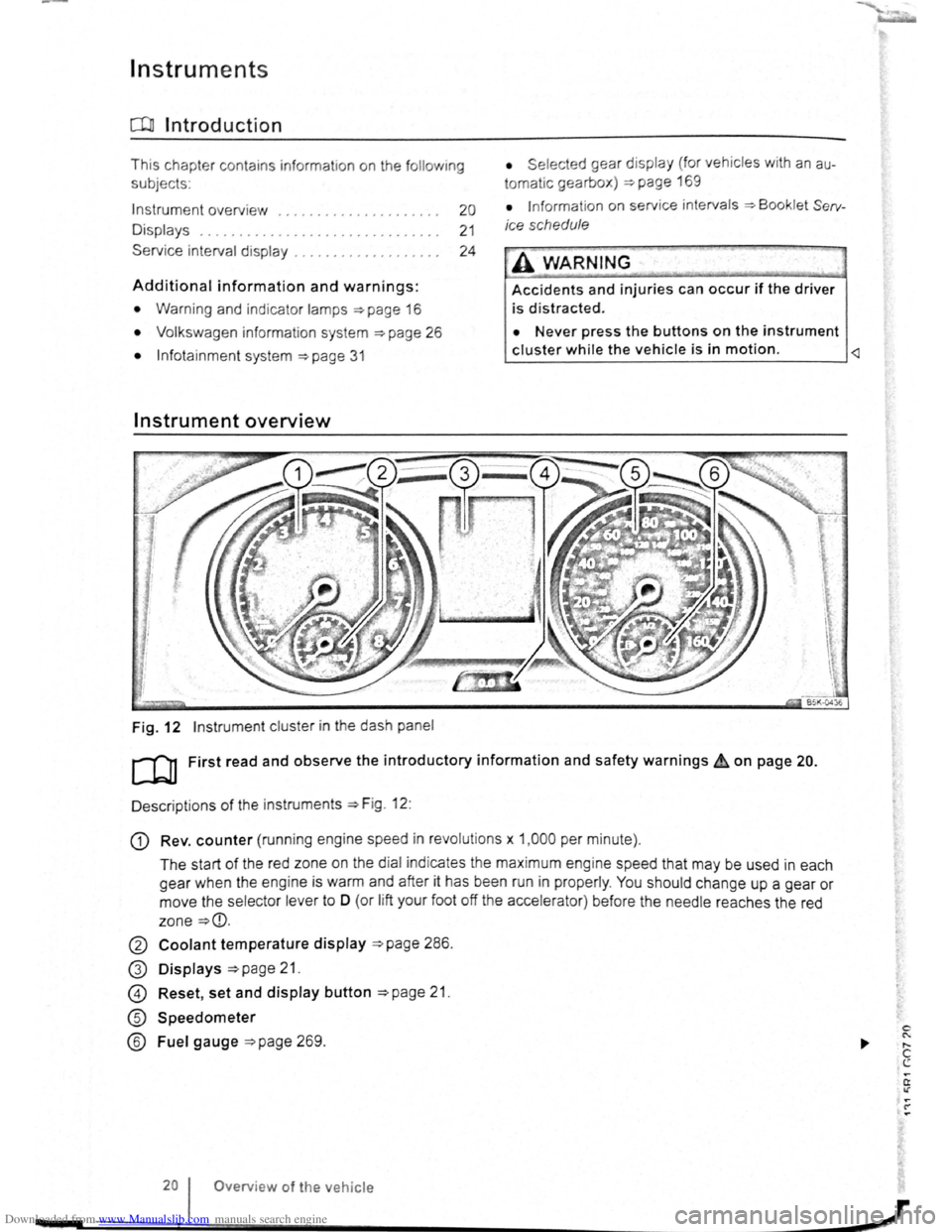
Fig. 12 Instrument clus ter in the das h pane l
• Se lec ted gear displa y (for veh icles w ith an au
tomatic gearbox) ::;.page 169
• Informat ion on service intervals ~Booklet Serv
ice schedule
·A WARNING
Accidents and injuries can occur if the driver
is d is tracted .
• Never press the buttons on the instrument
cluster while the vehicle is in motion.
D escriptions
of the instr uments ~Fig. 12:
G) Rev. counter (runn ing engine speed in revo lutio n s x 1, 00 0 per minute).
The start of the red zone on th e d ia l ind icates th e max im um e ng ine sp eed that may be used in each
gear when the eng ine
is warm and after it has been run in proper ly . You should change up a gear or
move the selector lever to
0 (or lift your foot off th e a ccele ra tor ) be fore the need le reaches the red
zone
~CD.
0 Coolant temperature display ~page 28 6.
G) Displays ~page 21.
@ Reset , set and display button ~page 21.
® Speedometer
® Fuel gauge ~page 269.
Overv iew
of the vehicle
Page 22 of 138
Downloaded from www.Manualslib.com manuals search engine Volkswagen information system
o::n Introduction
This chapter contains information on the following subjects:
Overview of the menu structure . . . . . . . . . . . . 26
Using the selection menu in the instrument cluster . . . . . . . . . . . . . . . . . . . . . . . . . . . . . . . . . 27 Button for the driver assist systems 28
Selection menu . . . . . . . . . . . . . . . . . . . . . . . . . 28 Driving data . . . . . . . . . . . . . . . . . . . . . . . . . . . . 29
Assist systems menu . . . . . . . . . . . . . 30
When the ignition is switched on, the various display functions can be accessed via the selection menu, e.g . the driving data disp lay (multifunction display (MFD)).
There are no buttons on the windscreen wiper lever in vehicles equipped with a multifunction steering wheel. Operation is exclusiv ely via the buttons on the multifunction steering wheel.
The scope of the menus and information shown in the instrument cluster display depends on the vehicle electronics and the vehicle equ ipment level.
A
qualified workshop can program and modify other functions depending on the vehicle equipment
level. Volkswagen recommends us ing a Volkswagen dealership for this purpose.
If any priority 1 warn ing reports are being displayed, you will be unable to access any menus or information displays. A few warning messages can
Overview of the menu structure
r-'('n First read and observe the introductory l....-J=,ll information and safety warnings & on
page 26.
The following menu structure shows how the Volkswagen information system menus in the instrument cluster display are structured . The size and layout of the Volkswagen information system menu depends on the vehicle electronics and the
level of vehicle equipment.
Driving data ~page 29
• Since start
• Since refuel
• Long-term
• Traffic sign recognition
26 Overview of the vehicle
be confirmed and hidden by pressing the OK/RESET button on the windscreen wiper lever or the OK button on the multifunction steering wheel.
Additional information and warnings:
• lnfotainment system ~page 31
• Driver assist systems ~page 196
• Radio or navigation system ~Booklet Radio or ~Booklet Navigation system
• Provision for mobile telephone ~Booklet Provision for mobile telephone
A WARNING -Accidents and injuries can occur if the driver is distracted.
• Never open the menus on the instrument cluster display while the vehicle is in motion.
r::l After starting the engine with a discharged ~ vehicle battery, or after the battery has been
changed , system settings (time, date, personal
convenience settings and programming) may have
been changed or deleted .
Check and correct the
settings as necessary once the vehicle battery has
been sufficiently charged.
• Digital speed
• Fuel range
• Convenience consumers
Driver assist systems ~page 28
• Lane Assist on/off
• Front Assist on/off
• Adaptive cruise control (ACC)
Navigation ~Booklet Navigation system
Audio ~Booklet Radio or ~Booklet Navigation system
Telephone ~Booklet Provision for a mobile tel· ephone
Vehicle status ~page 28
,J
--------
Page 27 of 138
Downloaded from www.Manualslib.com manuals search engine lnfotainment system
Menu and system settings (SETUP)
o:n Introduction
This chapte r con ta in s info rm ation on th e fo llo w in g
su bjects :
V ehi cle se ttin
gs menu . . . . . . . . . . . . . . . . . . . . 31
Additional information and warnings:
• Instrum ents ~page 20
•
V olks wage n informa tion syst em ~page 26
• C entral locking system ~page 46
• Electric windows ~page 60
•
Lights ~page 105
• Windscreen wiper/ wa she r ~page 117
• Mirrors ~page 122
• Brake assist systems ~page 179
• Driver assist systems ~page 196
• Tyre monitoring system ~page 253
• Wheels and tyres ~page 308
•
~Booklet Radio or ~Booklet Navigation sys
tem
General information on operating the unit
The following section contains information on the
settings that can be adjusted in the
Vehicle set
tings menu . Basic information on operating the
i nfotainment system and on warning and safety in
structions are contained in a separate manual
~Booklet Radio or ~Booklet Navigation system.
Systems settings and display of vehicle
information
After pressing the (ill] infotainment button you can
t
ouch the corresponding function button to displ ay
information
or adjust settings , e .g . you can check
the current status
of the start/stop system
~page 196 in the Vehicle status menu .
Vehicle settings menu
r-f"'n First read and observe the i~troductory
L-1=J.1 information and safety warnmgs A on
page 31.
Opening the Vehicle settings menu
• Switch on the ignition .
• If necessary, switch on the infotainment system.
• Vehi cle se ttings (setup) ~page 31.
• Auxili ary hea te r sett ings ~page 256.
• Radio sta tio n selection .
• Vehicle status .
• Driving da ta .
• Conv enien ce consumers .
A WARNING
Accidents and injuries can occur if the driver
is distracted. Operating the lnfotainment sy s
tem can distract you from the road.
• Always drive carefully and responsibly.
r::l Aft er sta rt ing the engine with a disc harged
L!J ve hi cle battery , or after the battery has been
chang ed,
system settings (time, da te , personal
conveni ence settings and program ming)
may have
be en chang ed or de leted . Ch eck and correc t
the
s e ttin gs as necessa ry once the ve hi cle ba tte ry has
been sufficiently charged .
• Touch the 0 function button to open the Vehi
cl e settings menu.
• Touc h the corresponding function button to
open additional menus in the
Vehicle settings
menu, or to adjust settings in the menu points. ...,.
lnfotainment system 31
..
Page 28 of 138
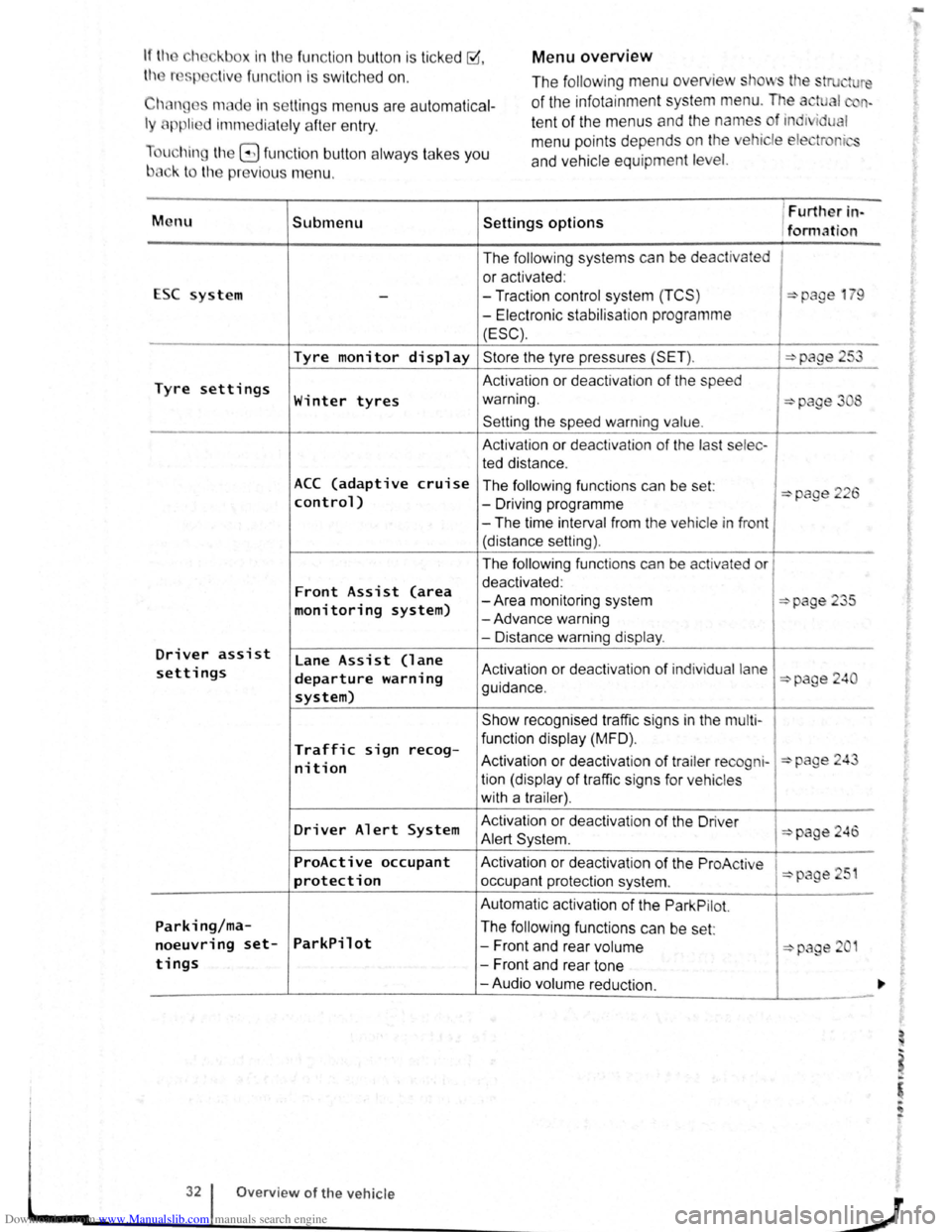
Downloaded from www.Manualslib.com manuals search engine Menu overview If the eh ckbox in the fun ction button is ticked ~.
th r sp liv e fun ction i s swi tc h ed on .
Chan ges made in settin gs menu s are autom atica l
ly applie d imm ediate ly afte r entry .
u hin g
t11e G fun ction button alw ays ta kes you
b3ck to the previo us m enu . The
following menu overview
stows tl e stru ture
of the infota inment system menu. The a tual n
te nt of the menus and the names of ind1 i u I
m enu points depends on the ehicle ele tr r i
and ve hicle equ ipment level.
M enu Submenu Settings options
1 Furtller in-
/formation
The
follow ing systems can be de activated
or activated :
ESC system
--Traction control system (TCS ) :::>page 1 9
-Electronic stabilisat ion programme
(ESC).
Tyre monitor display Store the tyre pressures (SET ). :::>page 253
Tyre settings Activation or deactivat ion of the speed
Winter tyres warning. :::>page 3 8
Setting the speed warning value.
A ctivation or dea ctivation of the last selec -
ted distance .
ACC (adaptive cruise The following functions can be set: :::>page 226 control) -Driving programme
-The time interval from the vehicle in front
(distance setting).
The
follow ing functions can be activated or
Front Assist (area deactivated :
-Area monitoring system :::>page 235 monitoring system) -Advance warning
- Distance warning
display .
Driver assist lane Assist (lane settings departure warning Activation or deactivation of ind iv idual lane :::>page 240
system) guidance .
Show recognised traffic signs in the
mu lt i-
Traffic sign func tion display (MFD) . recog-Activation or deactiv atio n of trailer re cogni-:::>page 24 nit ion tion (display of traffic signs for ve hicles
with a trailer) .
Driver Alert System Activation
or deactivation of the Driver :::>page 246 Alert Syst em .
ProActive occupant Activation or dea ctiv atio n of the ProAc tive 51 protection occupant protection system . :::>page
Automatic activation of the Park Pilot.
Parking/ma-The following functions can be set:
noeuvring set-ParkPilot -Front and rear volume :::::>page 2 1
tings -Front and rear tone
-Audio volume reduction.
32 Overview of the vehicle
J
-
Page 32 of 138
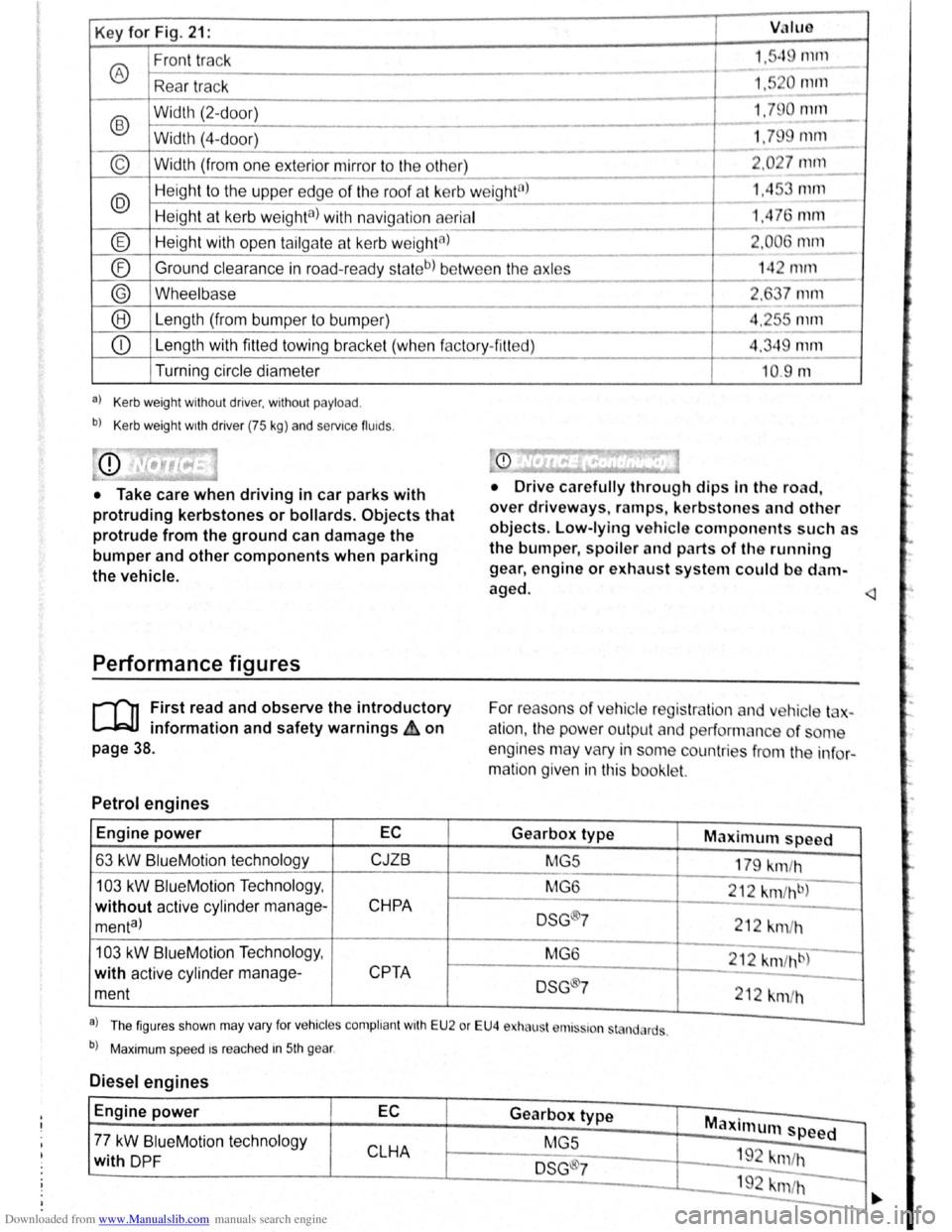
Downloaded from www.Manualslib.com manuals search engine Key for Fig. 21: VJIUO
Front track 1."q rnrn
® ---
Rea r tr ac k 1,5 0 111112.._
-
®
Width (2-d oor) 1.79 0 null
- -Width (4-
door) 1.79 mm
----
© Width (from one exterior mirror to the other) 2 .0 27 mm
---
@ Heig ht to the uppe r edge of the roof at kerb w eight8l 1.45 mm ---
Height at kerb weighta) with navig ation aerial 1,4 76 mm ---
® Height with open tailga te a t kerb w eightal 2.006 1111ll
- --
® Ground
clearance in road-read y sta teb) be tw ee n the axles 14 2 mrn ------
® Wheelbase 2, 7 mm
--® Le ngth (from bumper to bump er) 4.2r-s mm
---
CD Length with fitted towing bracke t (whe n f actory- fitt ed) 4.349 mm
Turning circle diameter
a) Kerb weight without driver, without payload .
b) Kerb weight wrth driver (75 kg) and servrce fluids .
• Take care when driving in car parks with
protruding kerbstones or bollards. Objects that
protrude from the ground can damage the
bumper and other components when parking
the vehicle.
Performance figures
r-('n First read and observe the introductory
L-1=JJ information and safety warnings ih on
page 38.
Petrol engines
Engine power EC
63 kW BlueM otio n technology CJZB
103 kW BlueMotion Techno logy ,
without active cylind er manage-CHPA
menta)
103 kW Blue Motio n Technolog y,
with active cylinder manage-
CPTA
ment
--10.9 m
• Drive c arefully through dips In the road,
over driveways, ramps , kerbstones and other
objects. Low-lying vehicle components such as
the bumper, spoiler and parts of th e running
gear , engine or exhaust system could be d am
aged.
For reaso ns
of ve hicle reg is tr lio n and v hic le t -
a
tio n, the pow er outpu t an d performan ce of ome
engines may vary in some countries f
rom the in fo r
matio n given in this booklet.
Gearbox type Maximum speed
MG5
179 km/h
MG 6
212
km fh b)
DSG ®7 212 km /h
M G6
212 km /hb)
DSG 7
212 km/h
a . . l Th e figur es sh o wn may va ry fo r vehrc les compli ant wrth E U 2 or EU4 e ha ust r111s~ron st nd, rds .
b) Maxim um spee d rs rea ched in 5th gear .
Diesel engines
Engine power EC Gearbox type Maxi mum speed -77 kW BlueM otio n tec hnol ogy
MGS
CLHA 1 9 -with DP F DSG ®7 "m /h
192 krn/h -
-
·.
Page 57 of 138
Downloaded from www.Manualslib.com manuals search engine Lights and vision
Lights
Introduction
Th1s ·hapt r c nt 1n inf rm lion on th e f llowing
utject :
lnd1 ator lamps . . <>-~ • .. .. .. .. .. • .. .. ~ • .. • .. • • .. •
Turn s1gnal and main beam lever ..•.......
Svvitching lights on and off .............. .
Lights
and v1sion -functions ............ .
~1ain beam ass1st . . . . . . . . . . . . . . . . ... .
Ma king or sv itching over headlights for
dnving abroad (travel mode) . . . . ........ .
Commg Home and Leaving Home functions
(onentation
lighting) . . . . . . . ............ .
Headl i
ght range control, instrument and
s~ itch lighting . . . . . . . . . . . . . . . ....
Interior and reading hght s ...............•.
105
106
107
108
110
111
111
112
113
Observe any country-spec•fic regu lations when us
ing veh1c le lighting.
The driver 1s responsib le for the correct headlight
pos1t1on and the correct headlight settm g.
Addit ional information and warnings:
• Exterior views ~page 6
• lnfotamment system ~page 31
• Changing bulbs ~page 362
Indicator lamps
A WARNING
Accidents and serious injuries can occur if
roads are not sufficiently illuminated and oth
er r oad users have d ifficulty seeing the vehi
cle, or cannot see it at all.
• Always switch the dipped beam head
lights on if it is dark, raining or visibility is
poor.
A WARNING
Setting headlights too high, and the incorrect
use of the main beam, could d istract and daz
zle other road users. This can lead to acci
dents and serious injuries.
• Always ensure that the headlights are ad
justed correctly.
• Never use the main beam or the headlight
flasher if other road users could be dazzled.
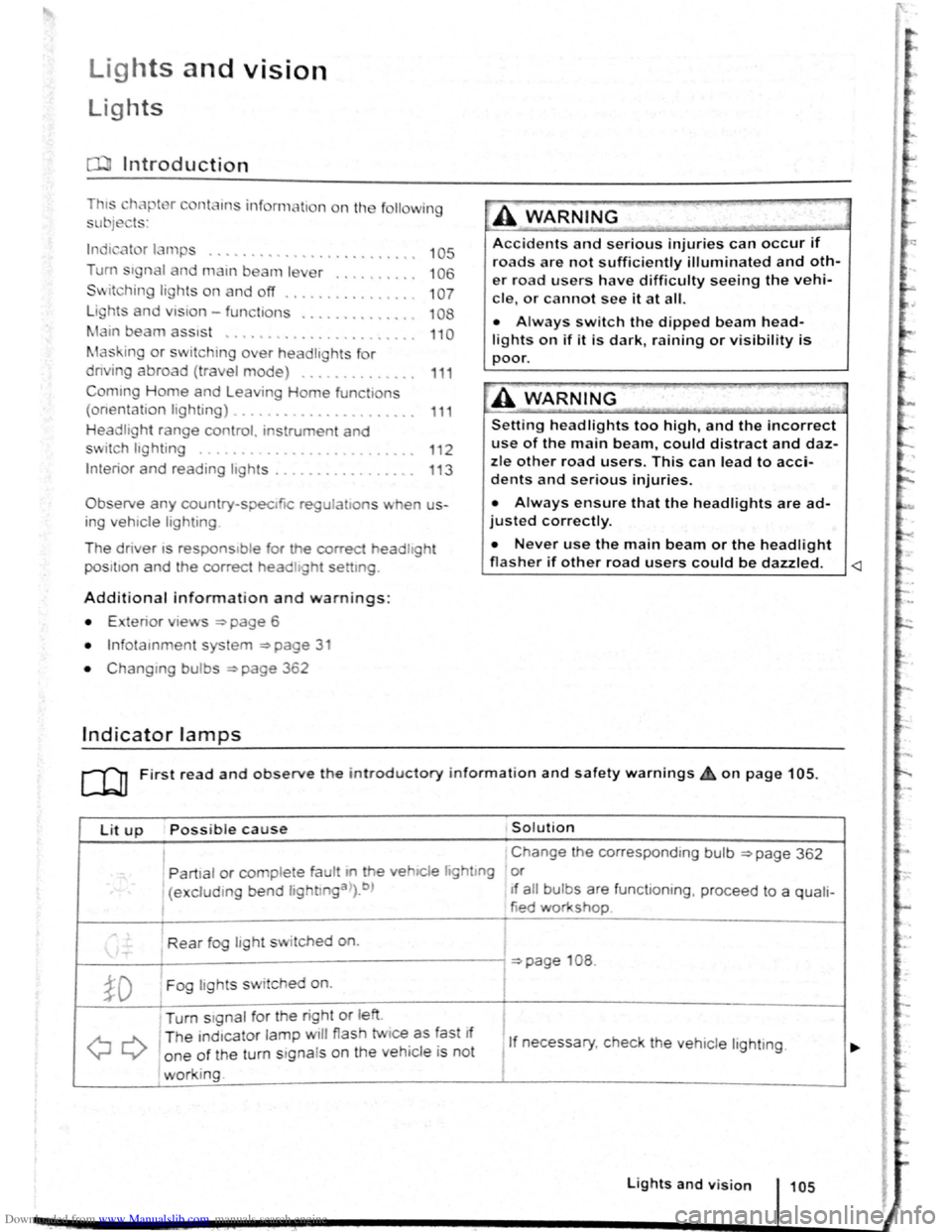
Lit up Possi ble cause Solution
I Change the corresponding bulb ~page 362
' Partial or complete fau tt m he vehiCle hghtmg or
(excluding bend lightlnga>).b ) If a ll bulbs are functioning , proceed to a quali-
tied workshop
Rear fog light switched on.
~page 108 .
~D Fog lights sw itched on. I
Turn stgnal for the right or left i
I
QQ
T he ind1cator lamp will flash twice as fast If
1 If necessary, c heck the vehicle lighting. o ne of the turn signals on the vehicl e is not
working. I
Lights and v is ion 105
Page 59 of 138
Downloaded from www.Manualslib.com manuals search engine ..,
of turn signals, a failure to use
r f rg tting to switch off a turn
nfuse other road users. This can
nt and serious Injuries.
• lw. y activate the turn signal In good
tim wh n ch anging lanes and performing
'lt king or turning manoeuvres.
• Alw ys switch off the turn signal once the
le ne change or overtaking or turning ma-
n euvre has been completed.
A W~RNING
In correct use of the main beam headlights
ca n lead to accidents and serious injuries as
the main beam headlights can distract and
dazzle other road users.
Switching lights on and off
m The turn signal will only work when the igni
W tion is switched on. The hazard warning lights
a ls o work
when the ignition is switched off
=>page 336.
m If one turn signal fails, the indicator lamp will
W start flashing twice as fast.
m The main beam headlights can only be
W switched on if the dipped beam headlights
are already on.
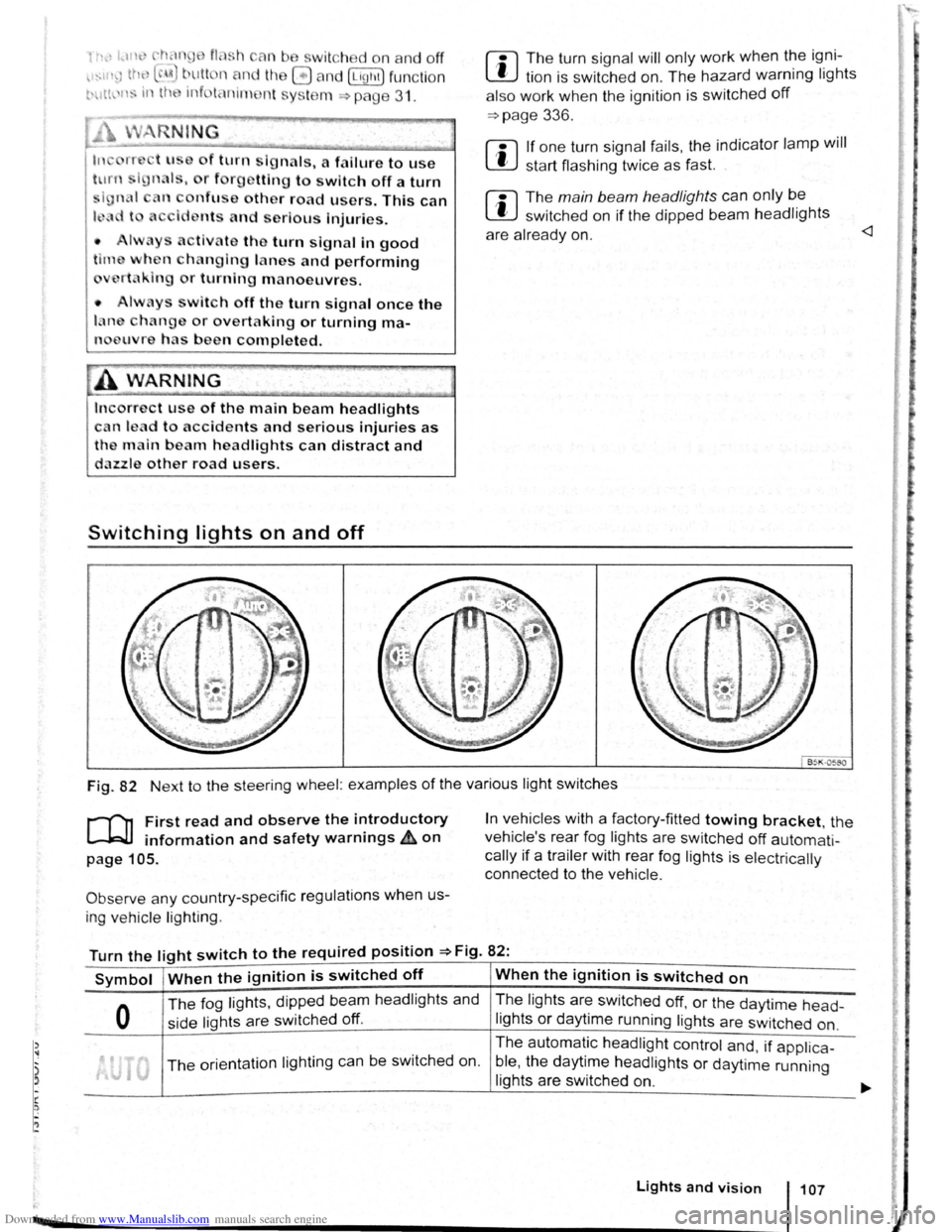
Fig. 82 Next to the steering wheel: examples of the various light switches
r-("n First read and observe the introductory
L-.W1 information and safety warnings ~on
page 105.
Observe any country-specific regulations when us
ing ve hic le lighting .
In vehicles with a factory-fitted towing bracket, the
vehicle's rear fog lights are switched
off automati
cally if a trailer with rear fog lights is electrically
connected to the vehicle .
Turn the light switch to the required position =>Fig. 82:
Symbol When the ignition is switched off When the ignition is switched on
0
The fog lights, dipped bea m headlights and
side lights are switched
off.
The lights are switched off, or the daytime head-
lights or daytime running lights are switched on.
The orientation lighting ca n be switched on. The
automatic
headlight control and, if applica -
ble ,
the daytime headlights or daytime running
lights are switched
on.
Lights and vision 107
Page 65 of 138
Downloaded from www.Manualslib.com manuals search engine To adjust, turn the control CD to:
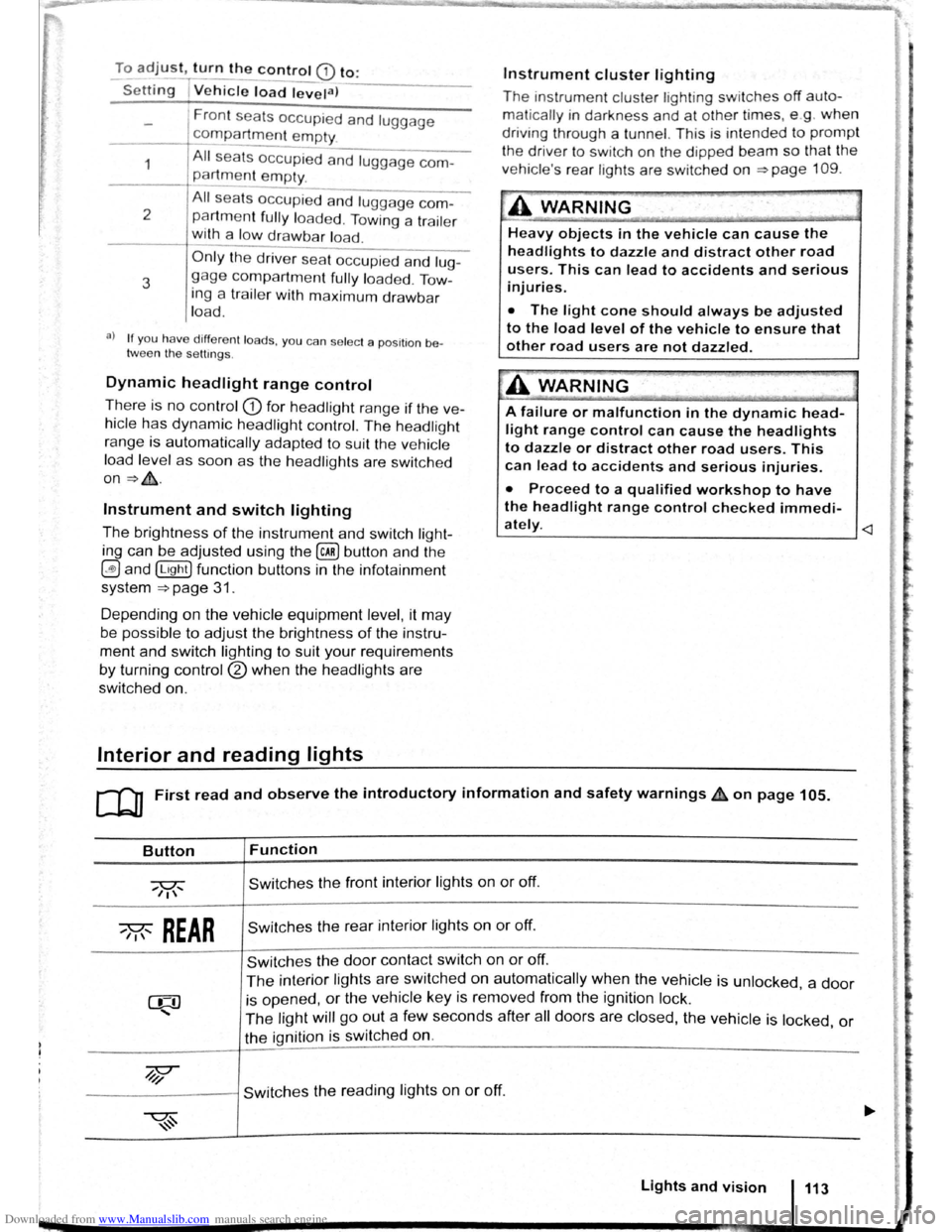
-Set~ng I Vehicle load lev~la) -------
1
2
3
Fron t seats occupied and luggage
compa rtment
empty.
All seats occupied and luggage com
partment empty.
All sea ts occ upi ed and luggage com
partm ent fully loaded . Towing a trai le r
wit h a
lo w drawbar load .
Only the driver sea t occupi ed and lug
ga ge compartm ent fully load ed . Tow
ing a trai le r w ith maximum drawbar
l
oad.
a) If you have diff ere nt loads. you can select a positi on be
tween th e settings.
Dynamic headlight range control
Th ere is no control CD for headlight range if the ve
hicle
has dynamic headli ght control. The head light
r ange is
automatically adapted to suit the ve hicle
load level as soon as the headli ghts are switched
on~&.
Instrument and switch lighting
The brightness of the in strument and switch li gh t
ing can be adjusted using the @ill button and the
~and !Ltght] function buttons in the infot ainm ent
system
~page 31 .
Depending on the vehicle equipment level, it may
be possible to adjust the brightness of the instru
ment and switch lighting to suit your requirements
by turning control® when the headlights are
switched on.
Interior and reading lights
Instrument cluster lighting
The instrumen t cl uste r ligh ting sw it c hes off auto
mati cally
in darkness and at other times, e.g . when
driving through a tunnel. This is in tended to prompt
the driver to switch on the dipped beam so that the
v e hi cle' s rea r l
ights are swit c hed on ~page 109.
.A WARNING
-
Heavy objects in the vehicle can cause the
headlights to dazzle and distract other road
users. This can lead to accidents and serious
injuries.
• The light cone should always be adjusted
to the load level of the vehicle to ensure that
other road users are not dazzled.
A WARNING
A failure or malfunction in the dynamic head
light range control can cause the headlights
to dazzle or distract other road users. This
can lead to accidents and serious injuries.
• Proceed to a qualified workshop to have
the headlight range control checked immedi
I
ately. ~--------------- --------------------~
ClJ] First read and observe the introductory information and safety warnings & on page 105.
Button
~REAR
Function
Switches the front interior lights on or off.
Switches the rear interior lights on or off.
Switches the door contact switch on or off.
The interior lights are switche d on automatically when the vehicle is unlocked , a door
is opened, or the ve hicle key is removed from the ignition lock.
The light will go out a few seconds after all doors are closed, the vehicle is locked, or
the ignition is switched on.
/q'j/
---------j Switches the reading lights on or off.
Lights and vision 113
Page 78 of 138
Downloaded from www.Manualslib.com manuals search engine riving with an automatic gearbox
r-T'n First read and observe t h e introductory
L-..kJJ information and safety warnings~ on
page 169.
The gearbox changes th e forwa rd gears up and
down automat ic a lly .
Driving down hills
The steeper the gradi ent, the lower the gear you
will need . Lower gears increase the braking effect
of the engine . Never allow the vehicle to roll down
mountains or hills in the neutral position N.
• Reduce your speed.
• Push the selector lever from posit ion D t o the
r i
ght into the Tiptron ic gate ~page 175.
• Gently push the selector le ver to the rear to
change down gear.
• OR: shift down a gear using the padd les on the
s te
erin g wheel ~page 175 .
Stopping the vehicle and pulling away when
driving uphill
The steeper the incline, the lower the gear you will
need.
If you wish to stop the vehic le or pu ll away when
driv ing uphill you should use the Auto -Ho
ld func
tion
~page 196.
When you stop the vehicle on an incl ine and the
vehicle remains in gear , the vehicle must always
be prevented fro m rolling by depress ing the brake
pedal or
by applying the electron ic park ing brake .
The brake pedal or the electronic parking brake
should
not be released until you pull away ~CD.
Freewheel driving with dual clutch gearbox
DSG®
In
freewheel mode, the momentum of the vehicle is
used to save fuel with a foresighted driving style.
The engine is declutched and no longer brakes the
vehicle -the vehicle can
roll out over a longer dis
t a nce.
Switch-on condit io n: the selector lever must be in
positio n D.
Triggering freewheel driving
• Select the Eco driving mode from the Driving
Mode Selection menu ~page 248 .
• Remove foot from accelerator pedal. The en
gine
w ill be disengaged and run in freewheel
mode. The vehicle rolls without the braking effect
of the eng ine .
Cancelling freewheel mode
• Press the bra e pedal brieny or pull the 1 ft.
hand paddle G towards the stee ring wh 1.
Kick-down
The kickdown function enab~~s ma imum accelera.
tion in the selec tor lever pos1t1ons D and S, or in
th e Tiptron ic posi tio n.
If the acce lerator pedal is d epre ssed fully. the gear.
box will automat ically sh ift to a lower gear, depend
ing on the speed and engine revs. This will make
use of the full veh icle acceleration ~ Lt.
The gearbox does not shift up to the next gear until
the engine reaches the maximum engine s
peed for
the gear.
When the
Eco driving mode is sel ected in vehicles
with Driving Mode Selection ~page 248 and the
accelerator is depressed
fully beyond the pressure
point, the engine output is automatically regulated
to ensure maximum vehicl e acceleration .
Launch control programme
The launch control programme enables maximum
accelerat ion from a stand ing start .
• Switch off TCS ~page 179.
• Depress and hold the brake pedal with your left
foot.
• Move the selector lever to position S, or into the
Tiptronic position. Alte rnatively , select the Sport
driving mode in vehi cles with Driv ing Mode Selec
tion ~page 248 .
• With your right foot, depress the accelerator un
til the engines speed reaches approximately
3,200 rpm.
• Take your left foot off the brake ~ ~. The vehi
cle will start with maximum acceleration.
• Switch the TCS back on after accelerat ion.
A WARNING
Rapid acceleration can cause loss of traction
and skidding, particularly on slippery roads .
This can cause you to lose control of the ~e
hicle, which can lead to accidents and sen·
ous injuries.
• Always adjust your driving style in ac·
cordance with the flow of traffic.
• Only use kickdown or fast acceleration if
visibility, weather road and traffic conditions ' t permit, and other road users are not put a
risk due to the acceleration and the driving
style.
,