Time VOLKSWAGEN BEETLE 2014 3.G Workshop Manual
[x] Cancel search | Manufacturer: VOLKSWAGEN, Model Year: 2014, Model line: BEETLE, Model: VOLKSWAGEN BEETLE 2014 3.GPages: 380, PDF Size: 5.78 MB
Page 287 of 380

Only use maintenance-free vehicle batteries meeting standards TL 825 06 and VW 7 50 73. These standards must date from August 2008 or later.
Disconnecting the vehicle battery
If the battery must be disconnected from the vehicle's electrical system, note the following:
x Switch off all electrical systems and devices and the ignition.
x Unlock the vehicle before disconnecting the battery; otherwise the alarm system will go off.
x First disconnect the negative cable (-) and then the positive cable (+) ⇒ .
Connecting the vehicle battery
x Prior to reconnecting the battery, switch off all electrical systems and devices and the ignition.
x Connect the positive cable (+) first and then the negative cable (-) ⇒ .
After the battery is connected and the ignition is switched on, different indicator lights may come on. They should go out after you drive a short distance at 10–12 mph (15–20 km/h). If the indicator lights do not go out, contact an authorized Volkswagen dealer or an authorized Volkswagen Service Facility and have the vehicle checked.
If the battery was disconnected for a long time, the next scheduled service may not be correctly
calculated and displayed ⇒ page 18, Instrument cluster. The maximum permissible service and
maintenance intervals are shown in the ⇒ Booklet Warranty and Maintenance.
Vehicles with Keyless Access
If the ignition will not start after reconnecting the vehicle battery, lock the vehicle from the outside and unlock it again, Unlocking or locking the vehicle with Keyless Access. Then try to start the ignition again. If the ignition cannot be switched on, contact an authorized Volkswagen dealer, an authorized Volkswagen Service Facility, or another qualified workshop for assistance.
Automatic electrical load deactivation
If the vehicle battery drain is high, the intelligent onboard electrical system management automatically takes steps to help prevent battery drain.
x The idle speed is increased so that the alternator provides more power.
x The power to devices that consume a lot of electricity is cut back or switched off completely.
x When the engine is started, the power supply to the 12 Volt sockets is temporarily interrupted.
The onboard electrical system management cannot always keep the battery from being drained. For example, the battery will drain if the engine is not running, but the ignition is switched on or the parking lights are left on for a long time when parked.
What drains the vehicle battery?
x Long periods when the engine is not running, especially when the ignition is on.
x Using electrical systems or devices when the engine is switched off.
x The selector lever is left for a long period of time in any position other than (P) when the ignition is switched off, Automatic transmission: Selector lever.
WARNING
Failure to use the proper battery with proper mounting and connections may cause short circuits, fires, and serious personal injuries.
x Always use only maintenance-free or cycle-free, leak-proof batteries with the same specifications and dimensions as the original equipment battery. Specifications are listed on the battery housing.
Page 292 of 380

Never use a power washer to clean the engine compartment, Cleaning the engine compartment.
WARNING
Improper use of power washers can cause serious invisible permanent damage leading to tire failure and loss of vehicle control. This can cause accidents and severe personal injury.
x Keep sufficient distance between water jet and tires. Never wash tires with a nozzle that sprays the water out in a direct stream regardless of the distance to the tire and even for a very short time.
x Never use “dirt blasters” to clean tires. Even spraying from a relatively long distance for a very short time can do visible or invisible damage to tires.
WARNING
After the vehicle has been washed, the wet brakes or, in winter, brake discs or pads coated with ice, react slower and need longer stopping distances.
x Always dry the brakes and clean off any ice coatings with a few careful applications of the brake. Make sure not to endanger other motorists or cyclists or disobey legal requirements.
NOTICE
x Water temperature should not be more than +140 °F (+60 °C).
x To help prevent damage to the paint, do not wash the vehicle in direct sunlight.
x In order for Park Distance Control to work correctly, the sensors in the rear bumper must be kept clean and clear of snow and ice.
x When using a power washer or steam cleaner, only spray the sensors directly for a short period of time and always keep the nozzle at least 4 inches (10 cm) from the sensor.
x Do not clean icy or snow-covered windows with a power washer.
x When washing or rinsing the vehicle in cold weather, do not let water get into the lock cylinders or point the hose at gaps around the doors, hood, or rear hatch. The water could freeze on the locks and seals and make it difficult to open the vehicle!
Cleaning windows and outside mirrors
Page 296 of 380

Vehicle graphics are design elements that can be applied to the vehicle body that are made of soft polyvinyl chloride (PVC).
In areas where the vehicle is covered by vehicle graphics, the paint finish below the PVC covering is protected from the weather and other environmental factors.
If vehicle graphics stay on the vehicle for a long time, you may notice a difference in appearance between areas protected by vehicle graphics and areas where no vehicle graphics cover the paint finish. These differences can normally be reduced by polishing the vehicle.
Volkswagen recommends contacting an authorized Volkswagen dealer or authorized Volkswagen Service Facility for information on suitable care products.
Durability of vehicle graphics
Environmental factors such as exposure to sunlight, moisture, atmospheric pollutants, and stone impact affect the durability and color of vehicle graphics. Signs of use and aging are normal and are not a defect in the material.
After applying vehicle graphics, high summer temperatures or other factors may cause the material to blister for a period of time. Blistering normally goes away on its own and does not have a lasting effect on the material.
In moderate or warm climates, vehicle graphics may fade slightly after about 2 to 3 years. In warmer or hot climates, vehicle graphics may already show signs of use and slight fading after about one year.
In very hot climates, heat exposure from direct sunlight can cause vehicle graphics to show signs of aging, including fading, within one year.
Cleaning vehicle graphics
Vehicle graphics can be washed in an automatic car wash, provided that hot wax is not applied.
Please heed the information and instructions on, Washing the vehicle and, Washing with a power washer.
When using a pre-spray cleaner or steam cleaner, always keep the nozzle at least 8 inches (20 cm)
from vehicle graphics ⇒ .
Insect splatter, bird droppings, tree sap, road dirt, industrial deposits, tar, soot, road salt, and other aggressive materials can damage vehicle graphics.
The longer these aggressive deposits stay on the vehicle graphics, the more damage they do. High temperatures (including strong sunlight) increase their corrosive effects. Wash the vehicle immediately
and thoroughly with warm water or with a mild soap solution ⇒ .
Remove stubborn deposits carefully with mild alcohol-based cleaners and then rinse with warm water. Do not clean vehicle graphics with aggressive cleaning agents such as gasoline, paint thinner, or solvents.
Caring for vehicle graphics
In general, follow the same care instructions for vehicle graphics as you do for the vehicle’s paint finish, Waxing and polishing vehicle paint.
Apply a coat of liquid hard wax to vehicle graphics regularly, at least once every three months. Hard wax smoothes out the surface and repels dirt.
To apply hard wax, use a microfiber cloth only.
Volkswagen recommends contacting an authorized Volkswagen dealer or authorized Volkswagen Service Facility for information on suitable care products.
NOTICE
x Always keep the spray nozzle perpendicular to the edges and surface of vehicle graphics.
Page 305 of 380

Type of stain Cleaning
Special stains, such as ballpoint pen, marker, nail polish, latex paint, or shoe polish.
– Dab dry with an absorbent cloth. – Clean with a special stain remover designed for leather.
NOTICE
x Stains that have been left in place too long will penetrate the surface of the leather and cannot be removed.
x Never treat leather with solvents, floor wax, shoe polish, stain remover or similar products.
x Wipe up spilled liquids immediately with an absorbent cloth. Liquid can penetrate leather surfaces and seams within a few seconds.
x If the vehicle is left in the sun for a long time, cover the upholstery to protect the leather from direct sunlight and to help prevent fading and discoloration.
Slight discoloration caused by wear and tear is normal.
Cleaning leatherette
Page 307 of 380

WARNING
Damage to safety belts reduces their overall effectiveness and increases the risk of serious personal injury and death whenever the vehicle is being used.
x Check the condition of all safety belts regularly. If you notice that the safety belt webbing, hardware, retractor, buckle, or any other part of the safety belts is damaged, immediately have an authorized Volkswagen dealer or authorized Volkswagen Service Facility replace the safety belt with the correct replacement belt for your vehicle model and model year.
x Never use chemical cleaning agents, solvents, or any substance that may damage or weaken the safety belt webbing or any other parts of the safety belt. Never let the belts come into contact with corrosive fluids or sharp objects. Otherwise, the safety belt webbing will be significantly weakened.
x After cleaning, always give the safety belts time to dry completely before letting them retract. The moisture can damage the retractor and keep it from working properly.
x Never let foreign objects or liquids get into the safety belt latch. This could prevent the belt buckles and safety belts from working properly.
x Damaged safety belts must be replaced; they cannot be repaired.
x Never try to repair a damaged safety belt yourself. Never remove or modify the safety belts in any way.
x Safety belts that were subject to stress in an accident and stretched must be replaced with a correct, new safety belt, preferably by an authorized Volkswagen dealer or authorized Volkswagen Service Facility.
x Replacement after a crash may be necessary even if a safety belt shows no visible damage. Anchorages that have been loaded must also be inspected.
Page 314 of 380

human body. Limits and guidelines have been established by governmental authorities and international committees in an effort to keep the electromagnetic radiation from mobile phones at levels that will not cause health problems. However, there is no scientifically based proof that wireless phones are absolutely safe.
Therefore, some experts recommend a precautionary approach regarding the use of mobile phones by taking measures that lower the personal exposure to electromagnetic fields. When using a mobile telephone inside a motor vehicle without a proper connection to an integrated vehicle telephone antenna, the personal exposure to electromagnetic fields will be higher than when using the mobile telephone while properly connected to an integrated or other outside vehicle telephone antenna.
Your vehicle may be equipped with an optional hands-free system that will permit many of the features of compatible Bluetooth® enabled mobile telephones to be used for greater convenience and is consistent with the laws of an increasing number of states and localities that prohibit the use of mobile telephones without some kind of hands-free device.
The hands-free system in your vehicle can be used with certain mobile phones that are connected by wire and hardware connector or via compatible Bluetooth® enabled phones with a cradle that is designed to fit your mobile telephone. The special cradle offers several advantages: The phone cradle must be safely secured to the base plate. Your phone is firmly attached to the instrument panel and is within reach at all times. Placing the phone in its cradle permits it to be charged, but more importantly connects the mobile phone to the vehicle's outside antenna. A mobile telephone that is properly connected to the integrated or other outside vehicle telephone antenna will lower the personal exposure to electromagnetic fields. You should also experience a better quality of service. Although a mobile telephone can be used inside your vehicle without a cradle, the phone will not be securely attached to the vehicle, will not be charged through the cradle wiring, and more importantly will not be connected to the vehicle's integrated telephone antenna. The mobile phone will also not be recharged. You might also experience more dropped calls and an overall impaired quality of the connection.
Therefore we strongly recommend that you use your mobile telephone in your vehicle only when it is properly attached to an appropriate cradle mounted on a base plate on the instrument panel.
Because of the large number and variety of mobile telephones on the market and the frequency with which new models are introduced, Volkswagen does not offer cradles for mobile telephones. Please check with the manufacturer of the mobile telephone that you plan to use.
Bluetooth® is a registered trademark of Bluetooth® SIG, Inc.
WARNING
A mobile phone on the seat, instrument panel or in other places can be thrown around the inside of the vehicle during a sudden braking maneuver, a crash or other accident and injure vehicle occupants.
x Never place or attach accessories or other objects (such as cup holders, telephone brackets, note pads, navigation systems, large, heavy or bulky objects) on the doors, on the windshield, over or near the area marked “AIRBAG” on the steering wheel, instrument panel, backrests or between these areas and the occupant. Such objects could cause serious injury in a collision, especially if an airbag inflates.
Page 328 of 380

Switch on the emergency flashers when:
x Traffic suddenly slows down or stops in front of you to warn those approaching from behind.
x In any emergency situation.
x If the vehicle breaks down.
x When being towed.
Always obey traffic laws that govern the use of emergency flashers where you are driving.
If the emergency flashers are not working, a different method – as permitted by law – must be used to alert other motorists and cyclists to the breakdown.
WARNING
Disregarding the safety-related checklist may lead to accidents and serious personal injuries.
x Always review and follow the checklist. Follow accepted safety practices and use common sense.
WARNING
The vehicle exhaust system and the catalytic converter or diesel particulate filter get very hot. They can cause fires and serious personal injury.
x Never park where parts of the hot exhaust system or catalytic converter could ignite flammable materials, such as dry grass, brush, leaves, spilled fuel, etc.
The vehicle battery will be drained if the emergency flashers are on for a long time – even if the ignition is switched off.
Page 354 of 380

WARNING
Improper replacement of burned out headlights and other light bulbs can cause serious personal injury.
x Stop! Always read and heed the WARNINGS before doing any work in the engine
compartment ,Working in the engine compartment. The engine compartment of any motor vehicle is a potentially dangerous area, and work in this area can lead to serious personal injury.
x HID – High Intensity Discharge (Xenon) headlights get power from a high voltage source that can cause severe personal injury and even death if handled improperly.
x HB2 (H4) bulbs and HID – High Intensity Discharge (Xenon) headlights are under high pressure and can explode if handled improperly.
x Always let a burned out light bulb cool down before replacing it.
x Never replace a light bulb unless you are familiar with all of the necessary procedures. In particular, never remove a headlight unless you know exactly how to carry out the job and have the correct tools and light bulbs.
x If you are uncertain about what to do, have the work performed by an authorized Volkswagen dealer, an authorized Volkswagen Service Facility, or another qualified workshop. Serious personal injury may result from improperly performed work.
x We strongly recommend that you always have HID – High Intensity Discharge (Xenon) headlights and HB2 (H4) bulbs replaced by a qualified technician.
x Do not touch the glass of light bulbs with your bare hands. Fingerprints left on the bulb evaporate due to the heat when the bulb is switched on and cause the reflector to “cloud.”
x There are sharp edges on and around the headlight housing in the engine compartment and the rear light housing. Wear hand protection if you replace bulbs.
NOTICE
After replacing a headlight bulb or other light bulb, always make sure that the rubber covers or plastic caps have been properly and securely reinstalled to help prevent water from getting into the electrical connections and headlight housing and damaging the electrical system.
You cannot replace the LEDs in LED daytime running lights. Contact your authorized Volkswagen dealer or an authorized Volkswagen Service Facility for assistance.
Indicator light
Page 357 of 380
Different models may have different lights, and the location and design of covers, bulb holders, and bulbs may be in a different location than shown in the illustrations.
You cannot replace the LEDs in LED daytime running lights. Contact your authorized Volkswagen dealer or an authorized Volkswagen Service Facility for assistance.
Replacing headlight bulbs - after removing the headlight assembly
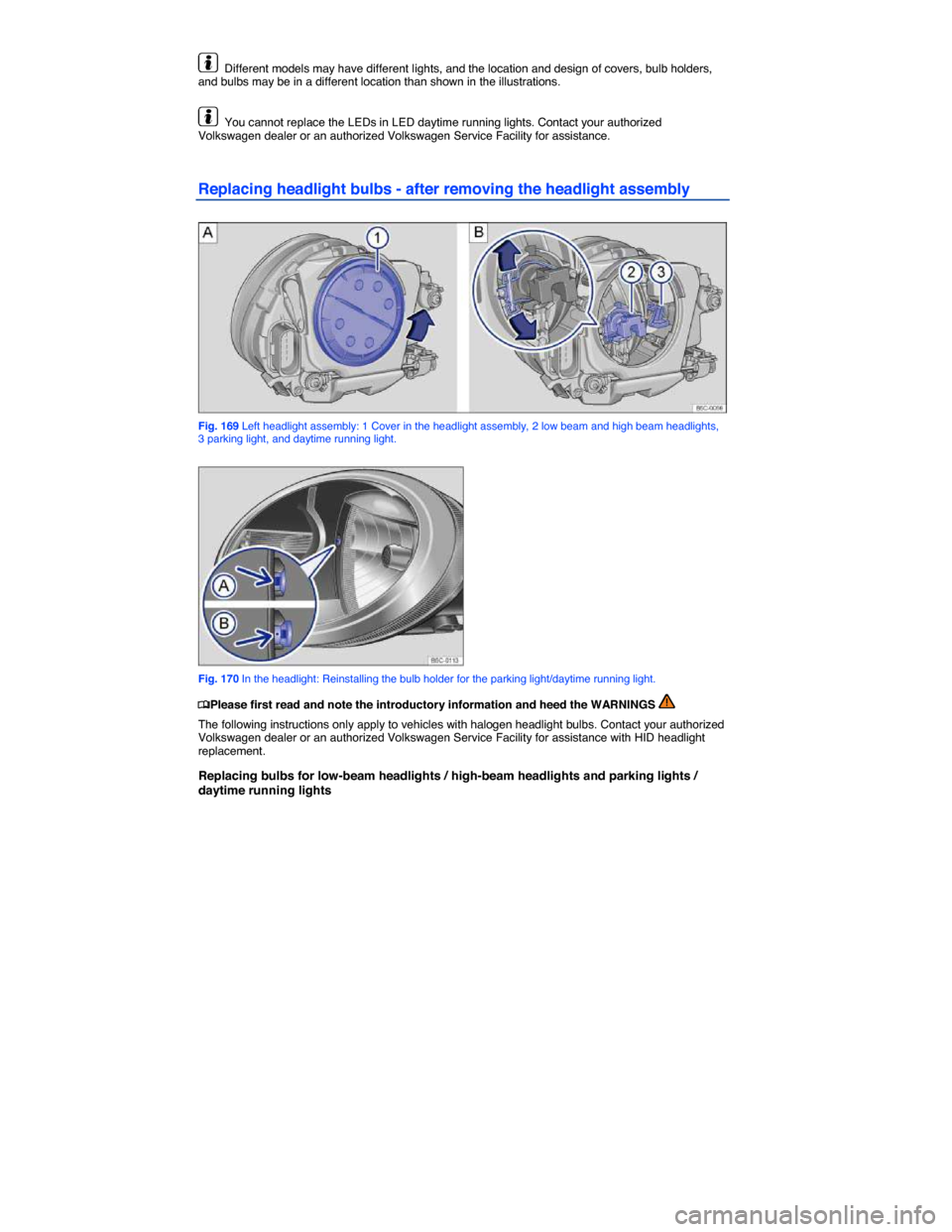
Fig. 169 Left headlight assembly: 1 Cover in the headlight assembly, 2 low beam and high beam headlights, 3 parking light, and daytime running light.
Fig. 170 In the headlight: Reinstalling the bulb holder for the parking light/daytime running light.
Page 358 of 380

Please carry out each step only in the order specified:
⇒ fig. 169 (2)(3)
Low beam headlights / high beam headlights Parking lights / daytime running lights
1. Please review and follow the checklist
2. Open the engine hood