brake VOLKSWAGEN BORA 1998 Manual PDF
[x] Cancel search | Manufacturer: VOLKSWAGEN, Model Year: 1998, Model line: BORA, Model: VOLKSWAGEN BORA 1998Pages: 339, PDF Size: 2.35 MB
Page 128 of 339
Downloaded from www.Manualslib.com manuals search engine 01-125
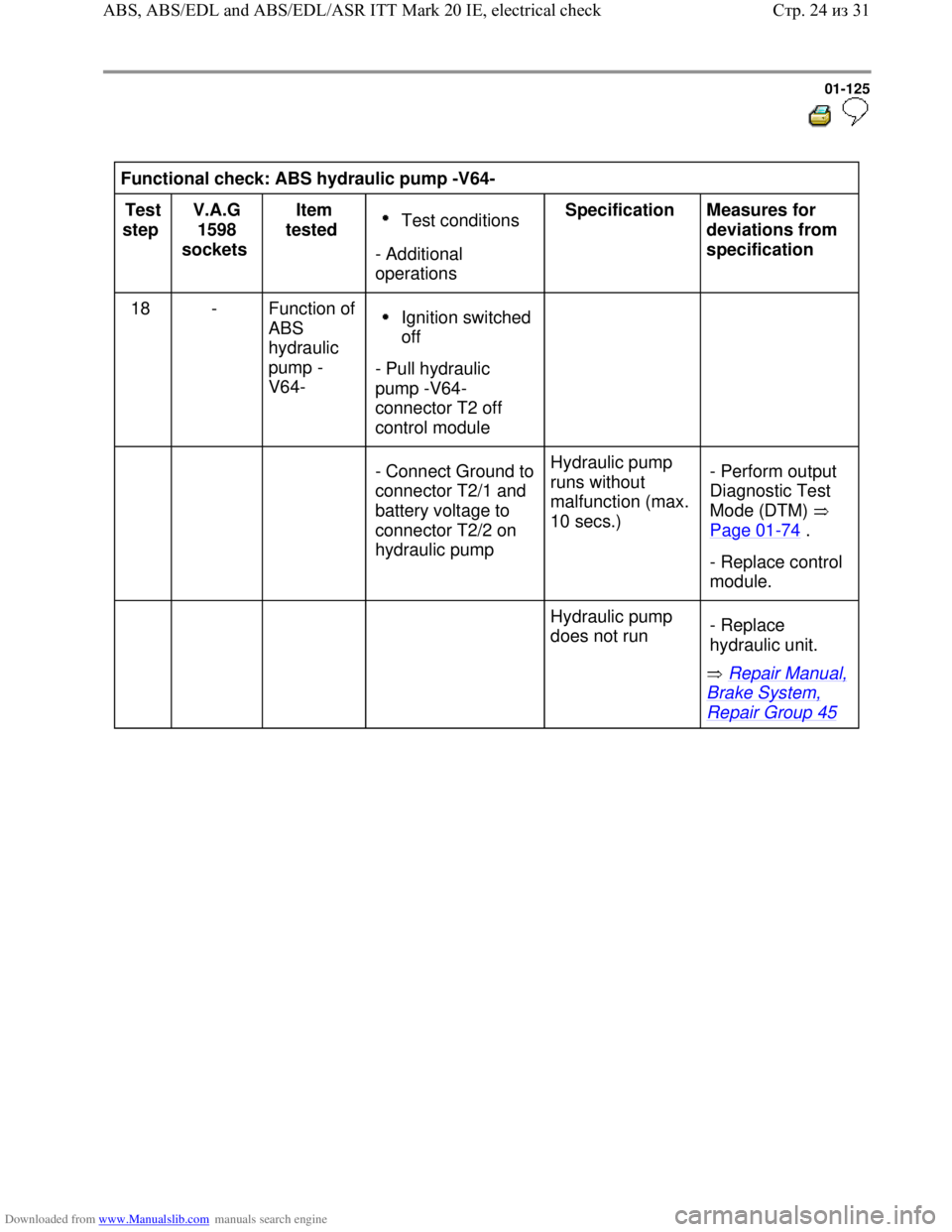
Functional check: ABS hydraulic pump -V64-
Test
step V.A.G
1598
sockets Item
tested
Test conditions
- Additional
operations Specification
Measures for
deviations from
specification
18 - Function of
ABS
hydraulic
pump -
V64-
Ignition switched
off
- Pull hydraulic
pump -V64-
connector T2 off
control module
- Connect Ground to
connector T2/1 and
battery voltage to
connector T2/2 on
hydraulic pump Hydraulic pump
runs without
malfunction (max.
10 secs.) - Perform output
Diagnostic Test
Mode (DTM)
Page 01
-74 .
- Replace control
module.
Hydraulic pump
does not run
Repair Manual,
Brake System,
Repair Group 45 - Replace
hydraulic unit.
Стр. 24из 31 ABS, ABS/EDL and ABS/EDL/ASR ITT Mark 20 IE, electrical check
Page 134 of 339
Downloaded from www.Manualslib.com manuals search engine 01-131
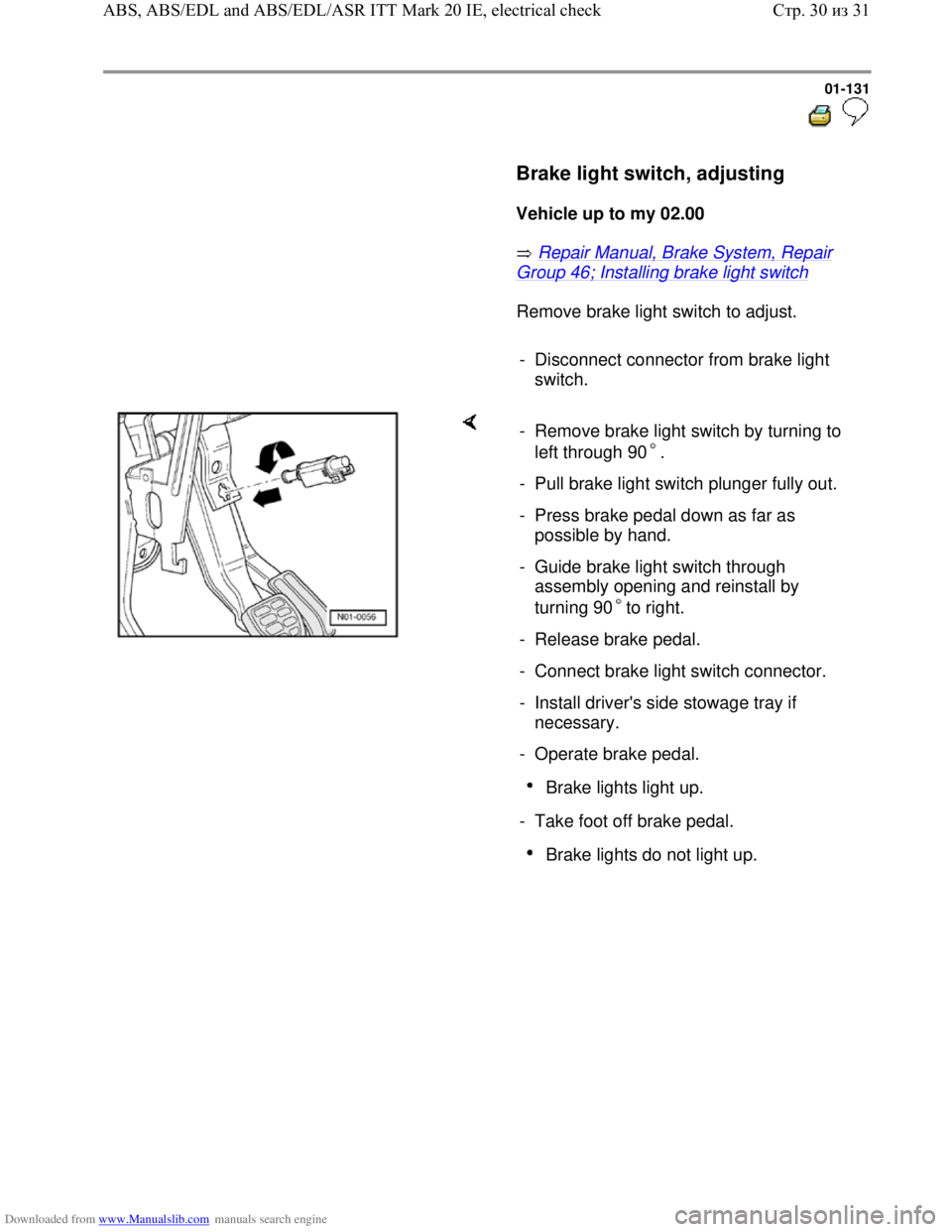
Brake light switch, adjusting
Vehicle up to my 02.00
Repair Manual, Brake System, Repair
Group 46; Installing brake light switch
Remove brake light switch to adjust.
- Disconnect connector from brake light
switch.
- Remove brake light switch by turning to
left through 90 .
- Pull brake light switch plunger fully out.
- Press brake pedal down as far as
possible by hand.
- Guide brake light switch through
assembly opening and reinstall by
turning 90 to right.
- Release brake pedal.
- Connect brake light switch connector.
- Install driver's side stowage tray if
necessary.
- Operate brake pedal.
Brake lights light up.
- Take foot off brake pedal.
Brake lights do not light up.
Стр. 30из 31 ABS, ABS/EDL and ABS/EDL/ASR ITT Mark 20 IE, electrical check
Page 135 of 339
Downloaded from www.Manualslib.com manuals search engine 01-132
Vehicle from my 03.00
- Pull out brake light switch plunger to full
extension.
- Keep brake pedal in up position (IMPORTANT!
hold pedal up if necessary while installing
switch).
- Guide switch through mounting hole (only fits in
one position).
- Seat switch fully into opening (pressing plunger
against pedal to adjust.
-
Seat switch by turning it 45 clockwise. This
action also turns the plunger shoe into the
correct orientation to make electrical contracts in
switch operate as well as locks in plunger
adjustment.
- Connect brake light switch connector.
- Operate brake pedal to verify proper function.
- Reinstall lower cover panel.
Стр. 31из 31 ABS, ABS/EDL and ABS/EDL/ASR ITT Mark 20 IE, electrical check
Page 139 of 339
Downloaded from www.Manualslib.com manuals search engine 01-136
Features of 4MOTION
In order to utilize the engine's maximum
performance for a test, e.g. on a rolling road
test bed, the longitudinal acceleration sensor -
G251- must be switched off Page 01
-264 ,
Initiating basic setting, Display group number
040.
Switch ignition off and on again to reactivate
the longitudinal acceleration sensor -G251-.
All-wheel drive vehicles with a Haldex coupling
are equipped with EDL (Electronic Differential
Lock).
Special detail for bleeding brake systems
with ABS/EDL
If a chamber in the brake fluid reservoir has run
empty, basic setting must be performed for
bleeding the brakes Page 01
-264 .
V.A.G 1551 scan tool or tester VAS 5051
The On Board Diagnostic must be initiated at
the commencement of troubleshooting.
Electrical malfunctions which influence the
braking characteristics will be stored.
They can be checked with the V.A.G 1551
Scan Tool, Vehicles system tester V.A.G 1552
or Vehicle Diagnosis, Testing and Information
System VAS 5051.
The program card in the V.A.G 1551 must be at
least version 9.0 and in vehicle system tester
V.A.G 1552, at least version 6.0.
Стр. 4из 10 ABS Mark 60 On Board Diagnostic (OBD), vehicles from my 10.00
Page 140 of 339
Downloaded from www.Manualslib.com manuals search engine 01-137
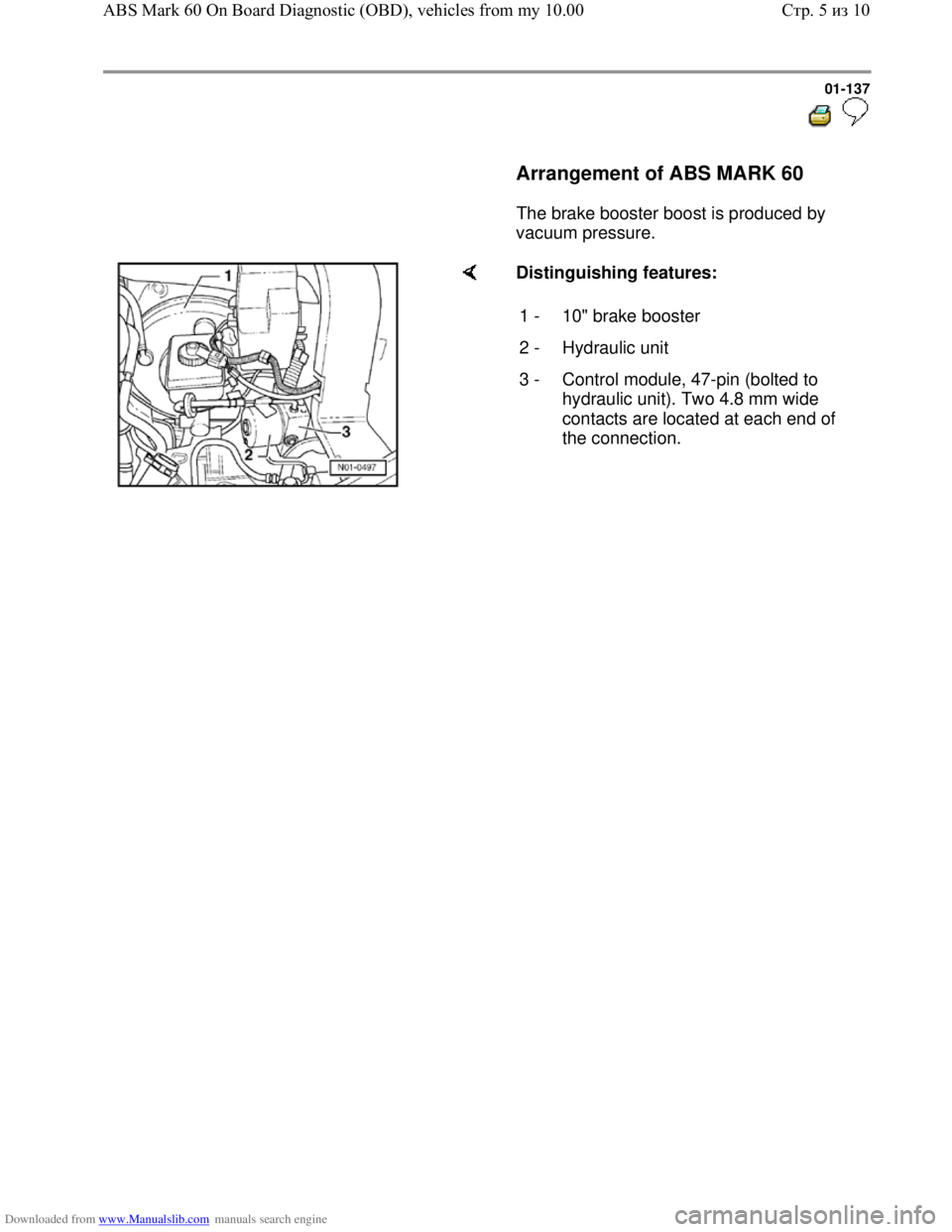
Arrangement of ABS MARK 60
The brake booster boost is produced by
vacuum pressure.
Distinguishing features:
1 - 10" brake booster
2 - Hydraulic unit
3 - Control module, 47-pin (bolted to
hydraulic unit). Two 4.8 mm wide
contacts are located at each end of
the connection.
Стр. 5из 10 ABS Mark 60 On Board Diagnostic (OBD), vehicles from my 10.00
Page 141 of 339
Downloaded from www.Manualslib.com manuals search engine 01-138
Technical data
Control module identification
The version of the control module is displayed
after the V.A.G 1551 scan tool or the tester VAS
5051 has been connected and the control
module for brake electronics has been selected
Page 01
-163 .
1C0 907 379 C /
J ABS
1C0 907 379 D /
K ABS/EDL/ASR
1C0 907 379 E /
G ABS/EDL/ASR/ESP
1C0 907 379 F /
H ABS/EDL/ASR/ESP
4MOTION
Diagnostic Trouble Code (DTC) memory
A non-volatile memory ensures that the contents
of the DTC memory are retained even without
voltage.
Data output takes place on V.A.G 1551 scan tool
in operating mode 1 (rapid data transfer), and on
tester VAS 5051 in operating mode "vehicle
OBD".
Стр. 6из 10 ABS Mark 60 On Board Diagnostic (OBD), vehicles from my 10.00
Page 142 of 339
Downloaded from www.Manualslib.com manuals search engine 01-139
Safety precautions and fundamental
points regarding troubleshooting
Note:
The ABS is a vehicle safety system; the
appropriate knowledge is necessary to work on
the system.
In order to check complaints and to be able to
carry out pin-pointed troubleshooting, the
Diagnostic Trouble Code (DTC) memory must
be checked before commencing work on the
ABS system.
Only separate connectors when the ignition is
switched off.
Observe the appropriate instructions regarding
the handling of brake fluid.
Repair Manual, Brake System, Repair Group
47
ABS malfunctions are indicated by the ABS
warning light illuminating. Certain malfunctions
will only be recognized at speeds above 20
km/h (approx. 13 mph) (carry out road test).
If the ABS -K47- and the brake system -K118-
warning lights do not illuminate, but the brake
system is not functioning correctly then the
malfunction must be sought in the conventional
braking system.
Repair Manual, Brake System, Repair Group
45
Стр. 7из 10 ABS Mark 60 On Board Diagnostic (OBD), vehicles from my 10.00
Page 143 of 339
Downloaded from www.Manualslib.com manuals search engine 01-140
Technical information
Electrical Wiring Diagrams, Troubleshooting
&Component Locations binder
Repair Manual, Brake System
Repair Manual, Suspension, Wheels,
Steering
Стр. 8из 10 ABS Mark 60 On Board Diagnostic (OBD), vehicles from my 10.00
Page 144 of 339
Downloaded from www.Manualslib.com manuals search engine 01-141
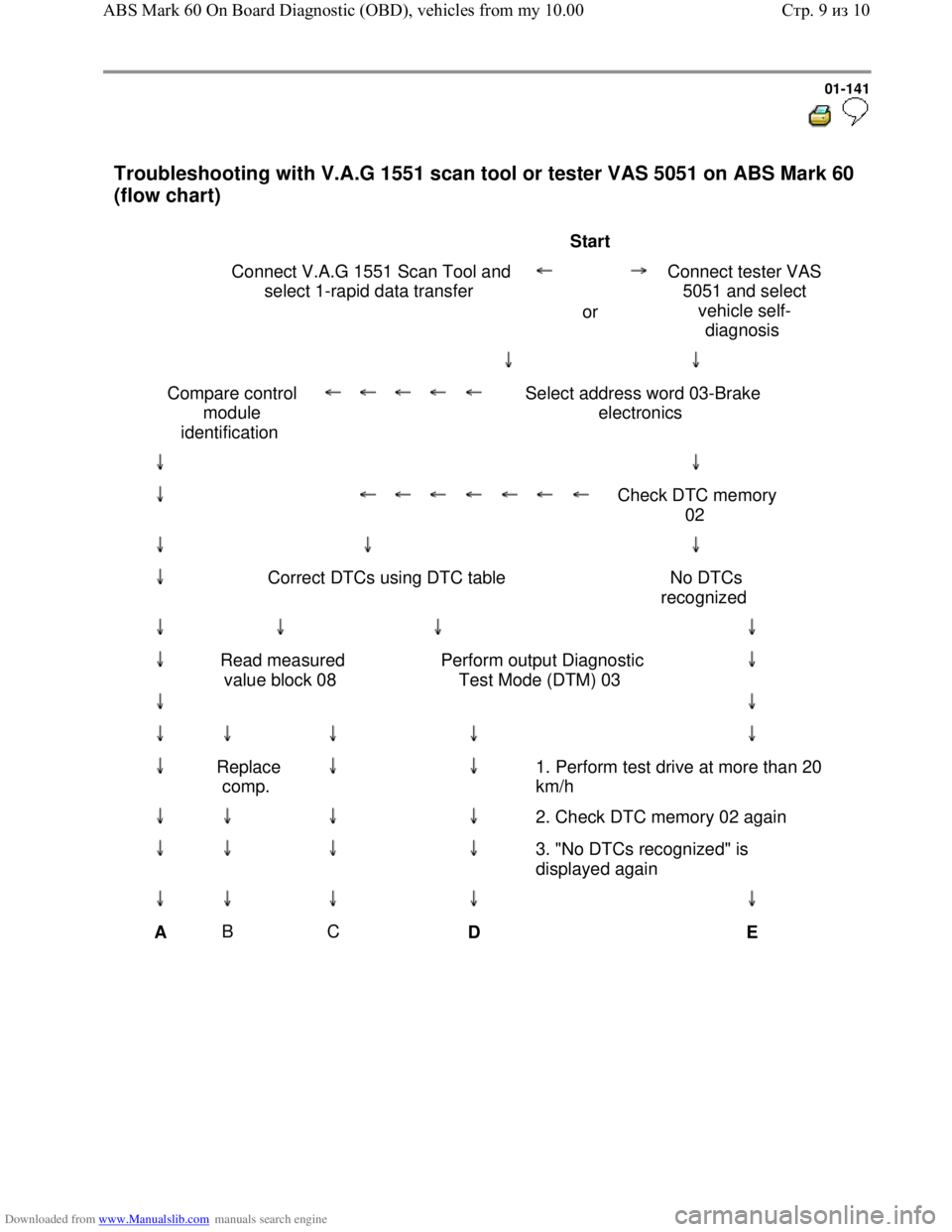
Troubleshooting with V.A.G 1551 scan tool or tester VAS 5051 on ABS Mark 60
(flow chart)
Start
Connect V.A.G 1551 Scan Tool and
select 1-rapid data transfer
or Connect tester VAS
5051 and select
vehicle self-
diagnosis
Compare control
module
identification
Select address word 03-Brake
electronics
Check DTC memory
02
Correct DTCs using DTC table No DTCs
recognized
Read measured
value block 08 Perform output Diagnostic
Test Mode (DTM) 03
Replace
comp.
1. Perform test drive at more than 20
km/h
2. Check DTC memory 02 again
3. "No DTCs recognized" is
displayed again
A B
C
D
E
Стр. 9из 10 ABS Mark 60 On Board Diagnostic (OBD), vehicles from my 10.00
Page 145 of 339
Downloaded from www.Manualslib.com manuals search engine 01-142
A B
C
D
E
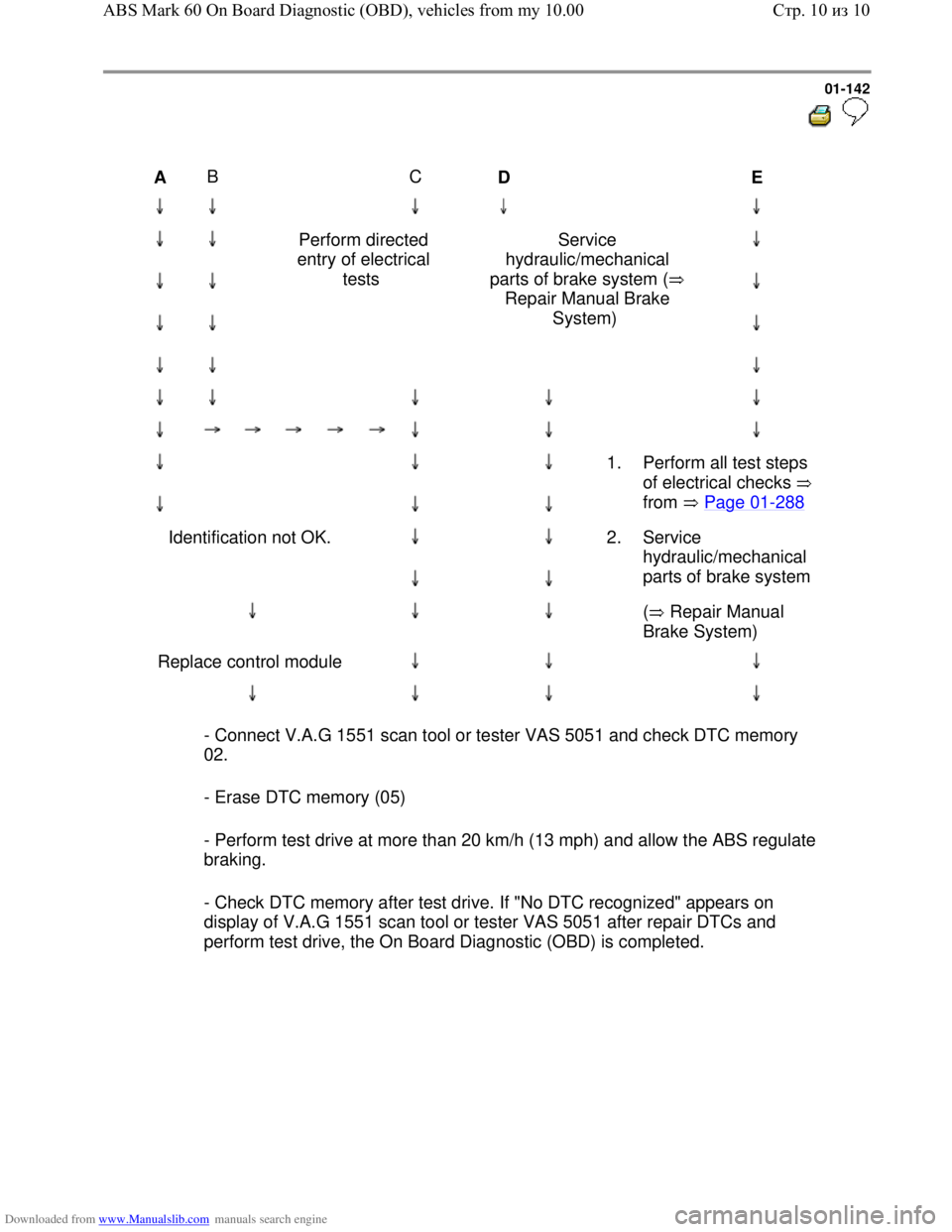
Perform directed
entry of electrical
tests Service
hydraulic/mechanical
parts of brake system (
Repair Manual Brake
System)
1.
Perform all test steps
of electrical checks
from Page 01
-288
Identification not OK.
2. Service
hydraulic/mechanical
parts of brake system
( Repair Manual
Brake System)
Replace control module
- Connect V.A.G 1551 scan tool or tester VAS 5051 and check DTC memory
02.
- Erase DTC memory (05)
- Perform test drive at more than 20 km/h (13 mph) and allow the ABS regulate
braking.
- Check DTC memory after test drive. If "No DTC recognized" appears on
display of V.A.G 1551 scan tool or tester VAS 5051 after repair DTCs and
perform test drive, the On Board Diagnostic (OBD) is completed.
Стр. 10из 10 ABS Mark 60 On Board Diagnostic (OBD), vehicles from my 10.00