VOLKSWAGEN EOS 2013 1.G Owners Manual
EOS 2013 1.G
VOLKSWAGEN
VOLKSWAGEN
https://www.carmanualsonline.info/img/18/7350/w960_7350-0.png
VOLKSWAGEN EOS 2013 1.G Owners Manual
Page 1 of 329
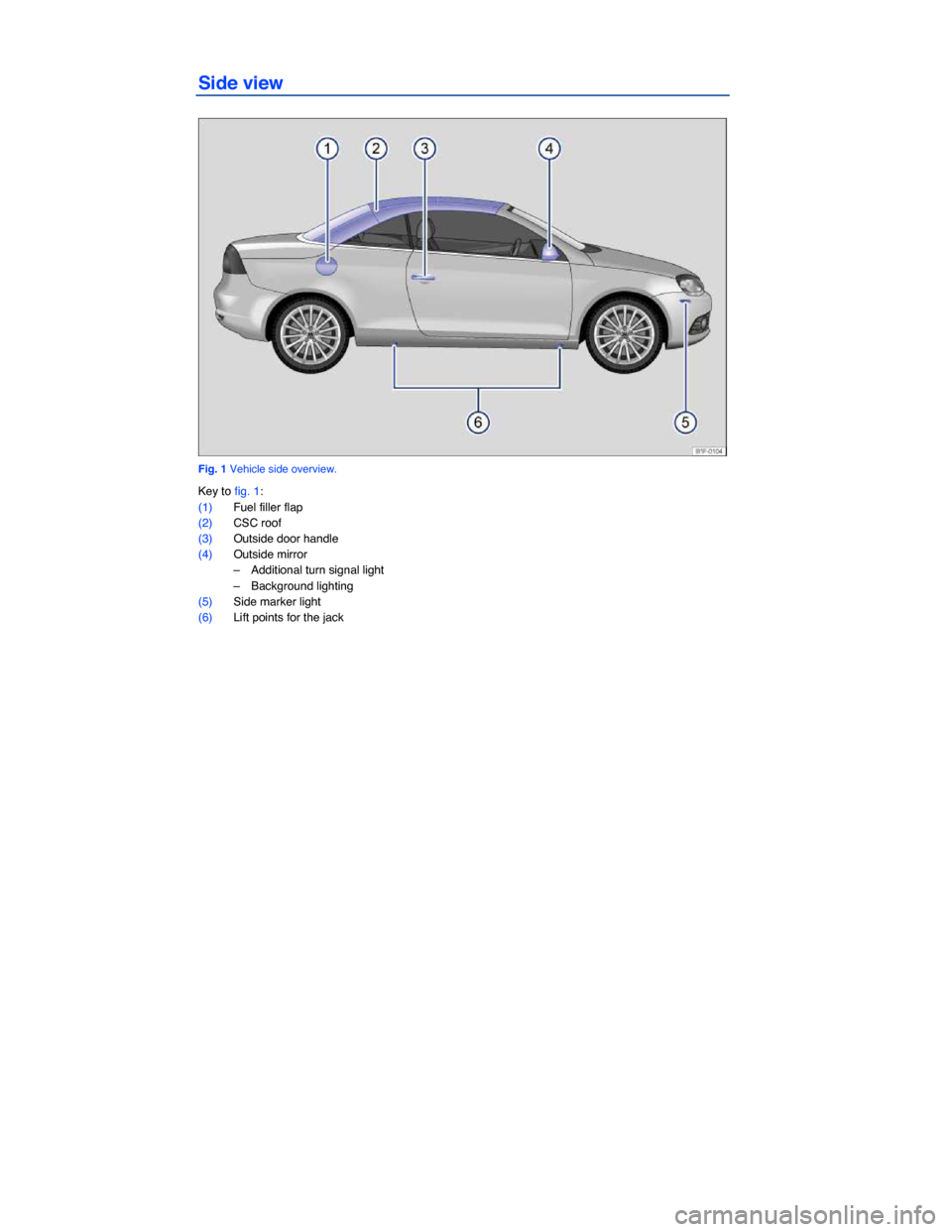
Side view
Fig. 1 Vehicle side overview.
Key to fig. 1:
(1) Fuel filler flap
(2) CSC roof
(3) Outside door handle
(4) Outside mirror
– Additional turn signal light
– Background lighting
(5) Side marker light
(6) Lift points for the jack
Page 2 of 329
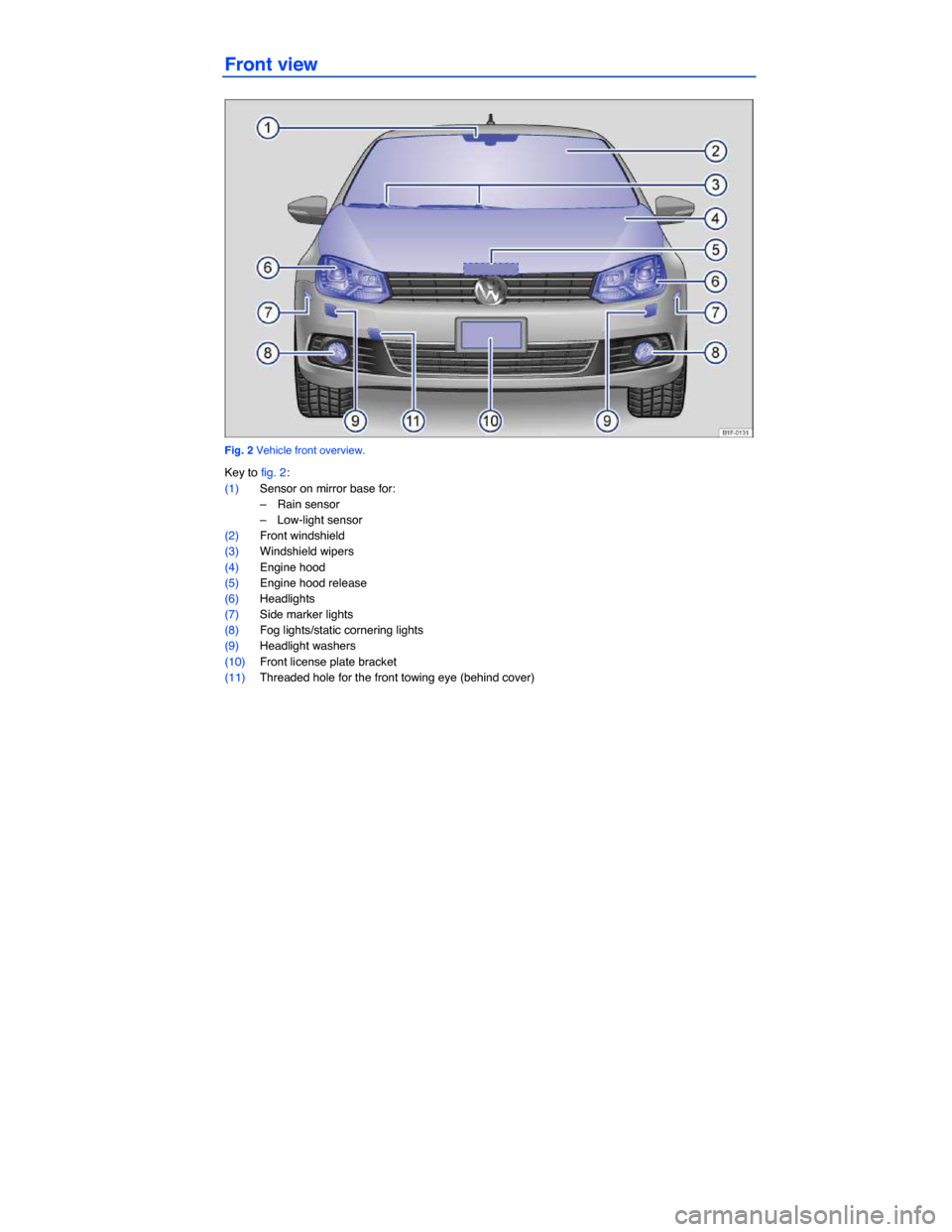
Front view
Fig. 2 Vehicle front overview.
Key to fig. 2:
(1) Sensor on mirror base for:
– Rain sensor
– Low-light sensor
(2) Front windshield
(3) Windshield wipers
(4) Engine hood
(5) Engine hood release
(6) Headlights
(7) Side marker lights
(8) Fog lights/static cornering lights
(9) Headlight washers
(10) Front license plate bracket
(11) Threaded hole for the front towing eye (behind cover)
Page 3 of 329
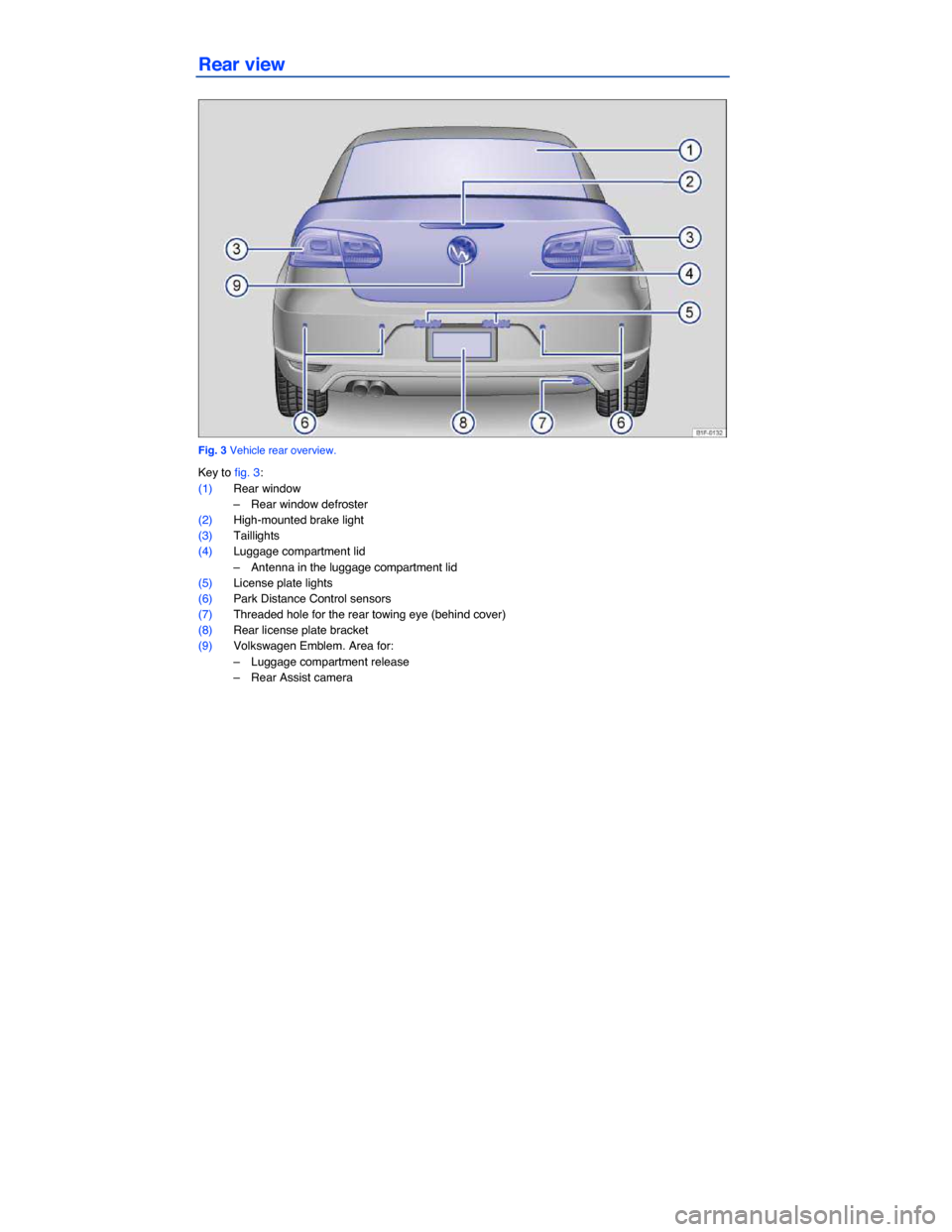
Rear view
Fig. 3 Vehicle rear overview.
Key to fig. 3:
(1) Rear window
– Rear window defroster
(2) High-mounted brake light
(3) Taillights
(4) Luggage compartment lid
– Antenna in the luggage compartment lid
(5) License plate lights
(6) Park Distance Control sensors
(7) Threaded hole for the rear towing eye (behind cover)
(8) Rear license plate bracket
(9) Volkswagen Emblem. Area for:
– Luggage compartment release
– Rear Assist camera
Page 4 of 329
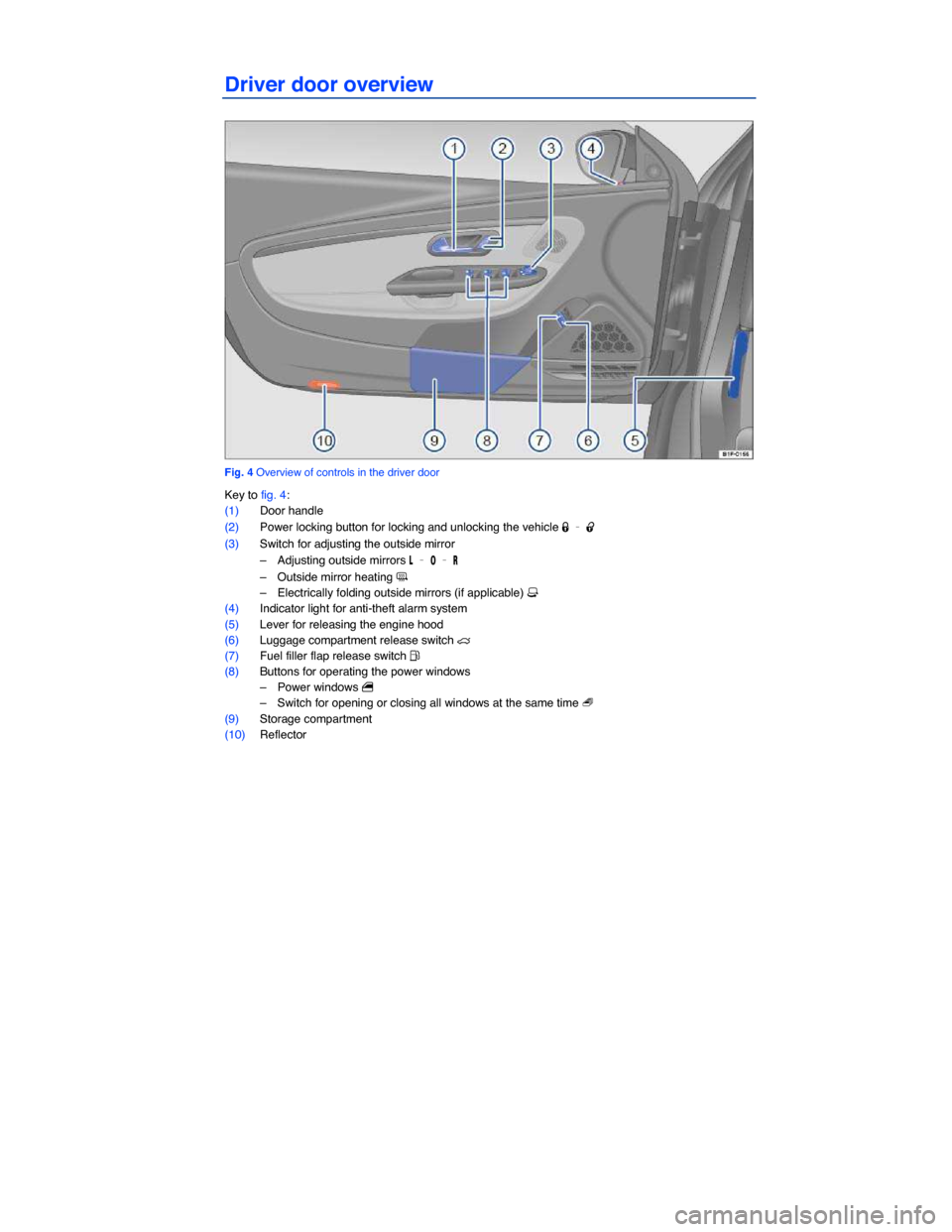
Driver door overview
Fig. 4 Overview of controls in the driver door
Key to fig. 4:
(1) Door handle
(2) Power locking button for locking and unlocking the vehicle 1 – 0
(3) Switch for adjusting the outside mirror
– Adjusting outside mirrors , – / – 2
– Outside mirror heating ?
– Electrically folding outside mirrors (if applicable) #
(4) Indicator light for anti-theft alarm system
(5) Lever for releasing the engine hood
(6) Luggage compartment release switch q
(7) Fuel filler flap release switch �
(8) Buttons for operating the power windows
– Power windows
– Switch for opening or closing all windows at the same time -
(9) Storage compartment
(10) Reflector
Page 5 of 329
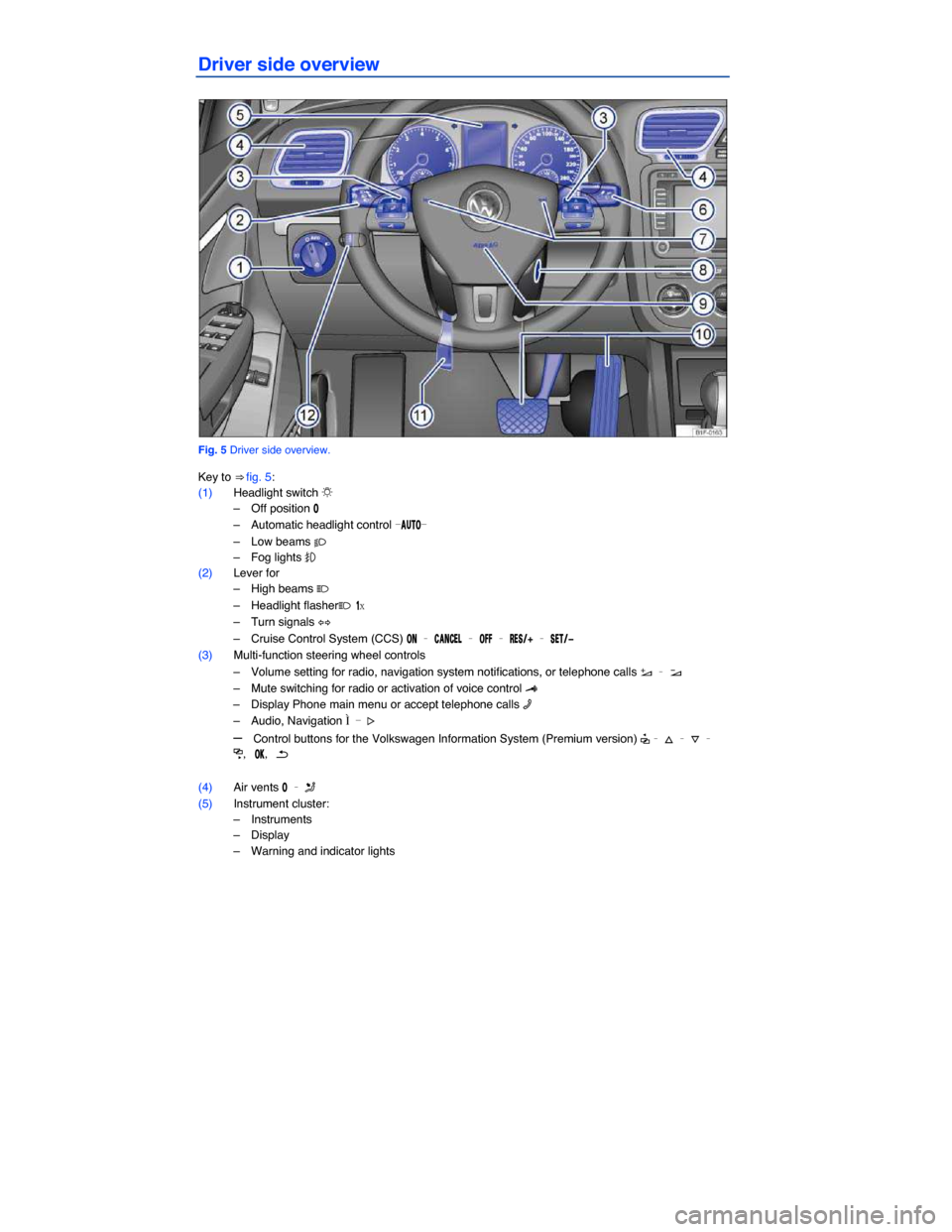
Driver side overview
Fig. 5 Driver side overview.
Key to ⇒ fig. 5:
(1) Headlight switch
Page 10 of 329
Applicable only in the United States
Symbols on the roof console
Symbol Meaning
* � / s � Interior and reading lights
Applicable only in Canada
Symbols on the roof console and sun visor
Symbol Meaning
* � / s � Interior and reading lights
1 2 3 HomeLink® Universal Transmitter
Page 19 of 329
▪ Lights & Vision
– Coming home
– Leaving home
– Footwell light
– Conv. turn sig. (convenience turn signal)
– Factory setting
▪ Time
– Hours
– Minutes
– 24 hr. mode
– Daylight save
▪ Snow tires (winter tires)
– --- mph (--- km/h)
– On
– + 5 mph (10 km/h)
– - 5 mph (10 km/h)
▪ Units
– Temperature
– Consump./dist.
▪ Alt. speed dis. (alternative speed display On / Off)
▪ Service
– Info
– Reset
▪ Factory setting
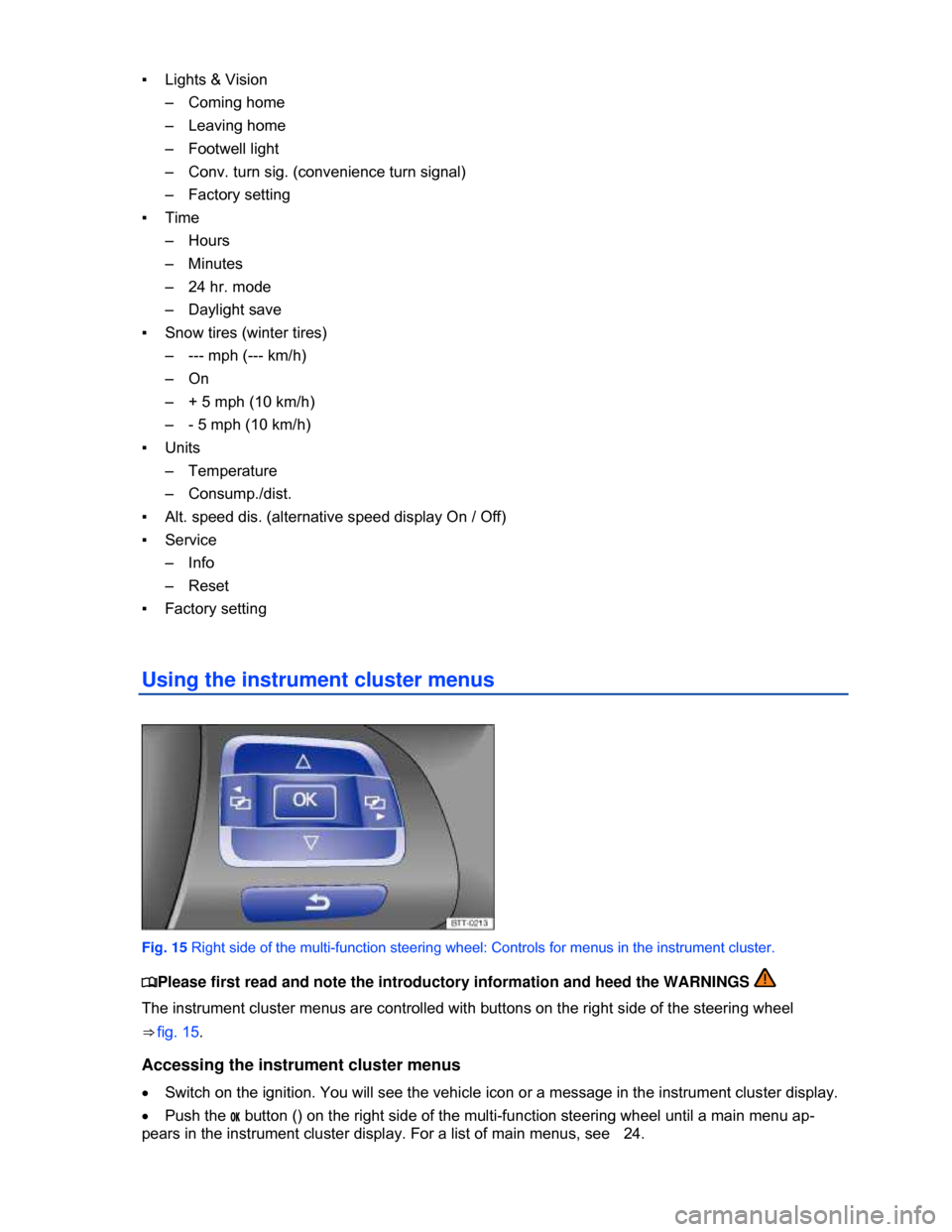
Using the instrument cluster menus
Fig. 15 Right side of the multi-function steering wheel: Controls for menus in the instrument cluster.
Page 23 of 329
Settings menu Function
Lights & Vision Vehicle lighting settings
Time
Set hours and minutes for the instrument cluster clock and the Radio &
Navigation System clock. The time can be displayed in 12 or 24 hour
format, and can also be set to daylight savings time.
Snow tires
Set up a visual and acoustic speed warning. Use the feature only when
winter tires are installed that have a speed rating less than top vehicle
speed.
Units
Set the units in which temperature, fuel consumption, and distances
should be displayed (for example, whether to show distance driven in
miles or kilometers).
Alt. speed dis. Activate/deactivate alternative speed display (mph or km/h).
Service Display service messages or reset service reminder display.
Factory setting Reset the functions in the Settings menu back to the factory settings.
Convenience submenu
Page 24 of 329

Convenience
menu Function
Auto unlock
You can enable or disable Auto unlock. If Auto unlock is
enabled (box checked), it is triggered on vehicles without
Keyless Access by taking the key out of the ignition.
On Keyless Access vehicles, Auto unlock is triggered by
opening the driver door. Auto unlock works only if the
vehicle has been automatically locked after reaching a
speed of 10 mph (15 km/h) . It unlocks the doors that
would be unlocked if you pushed the unlock button on the
remote control vehicle key once.
Window op.
Off Manual unlocking/locking: No windows open or close when
the key is held in the unlocking or locking position .
All Manual unlocking/locking: All windows open or close when
the key is held in the unlocking or locking position.
Driver
Manual unlocking: The driver window opens when the key
is held in the unlocking position.
Manual locking: All windows close when the key is held in
the locking position.
Back The display switches back to the Convenience menu.
Mirror down Tilts passenger mirror down when backing up so you can see the curb
Mirror adjust
Individually Both outside mirrors are adjusted separately.
Both mirrors The front passenger outside mirror is adjusted at the same
time as the driver outside mirror.
Back The display switches back to the Convenience menu.
Factory
setting Resets the features in the Convenience submenu back to the factory settings.
Back The display returns to the Settings menu.
Lights & Vision submenu
Page 34 of 329
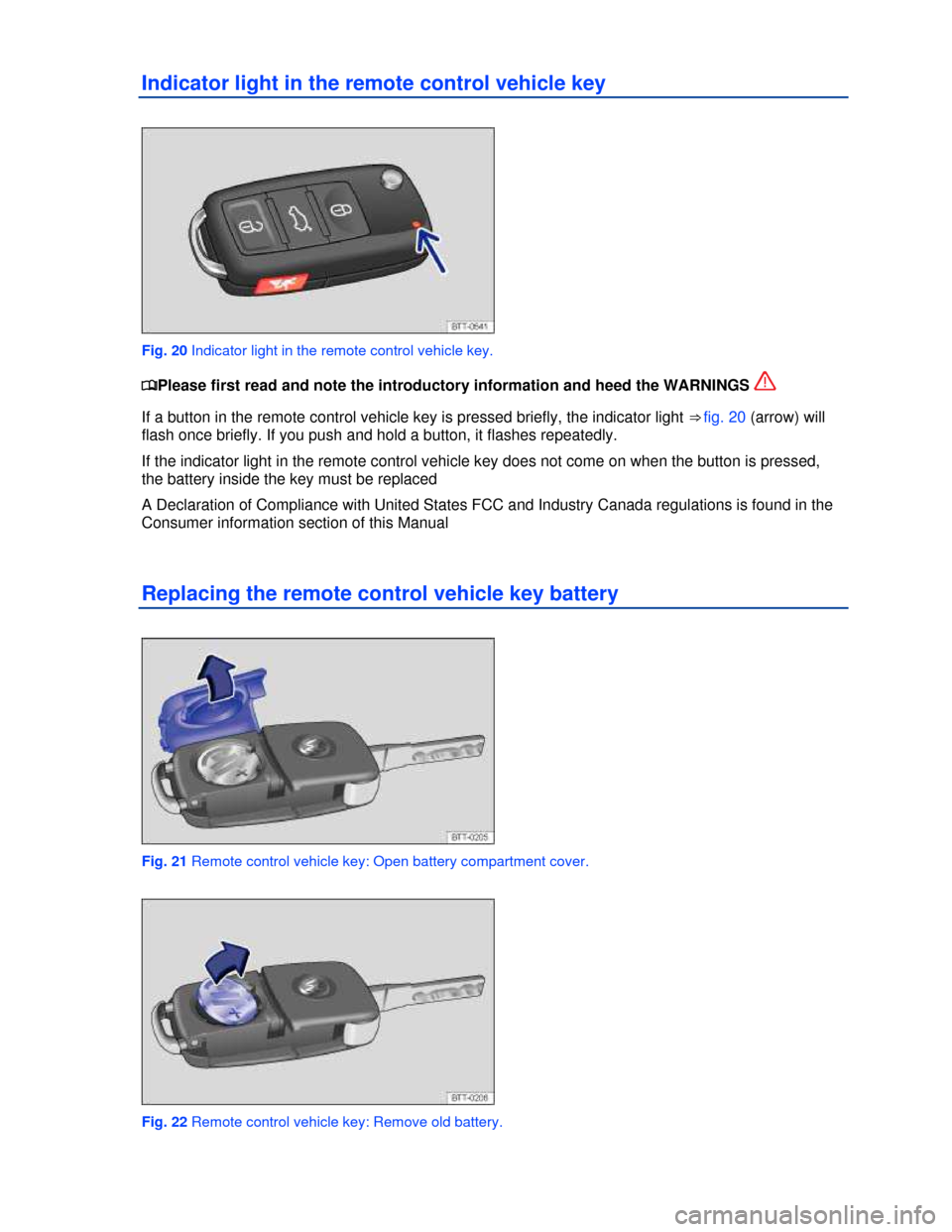
Indicator light in the remote control vehicle key
Fig. 20 Indicator light in the remote control vehicle key.