Engine parts VOLKSWAGEN GOLF 2011 Owner´s Manual
[x] Cancel search | Manufacturer: VOLKSWAGEN, Model Year: 2011, Model line: GOLF, Model: VOLKSWAGEN GOLF 2011Pages: 138, PDF Size: 49.24 MB
Page 3 of 138

Downloaded from www.Manualslib.com manuals search engine nd maintenance ...... 277 -M anu al op ening or clo sin g ........... .
- Vehic le tool kit .
...................... .
-Hub caps ................ i • , ••• , • , •••
-Changing a wh ee l ...... , ............ .
are and maintenance
- Brea kdown set ......................•
-Fuses ............................... 3
- Changing bulbs .................... . . 3
- Starting the engine with jump leads .... 370
-Tow- starting and towing . . . . . . . . . . . . . . . 3 7 3
-' I il1 f r nd cl aning the ve hicl e
l
ri r ........................ .... . 294
1 '111111 and car ing for the interior ..... 302
Abbreviations ..................... 378
-Wl1 ,1 nd tyres .................... 308
ori s, modifications, repairs and
Index ............... .. ........ ....... 379
r n wal of parts ............... . ...... 320
- C n um r inform ation ................ 328
.... ngin manage ment system and
h u st purification system
............ 332
If and when ........................ 334
Practical tips
~ r quently asked questions ........... 334
-In an em ergency ..................... 336
Page 32 of 138
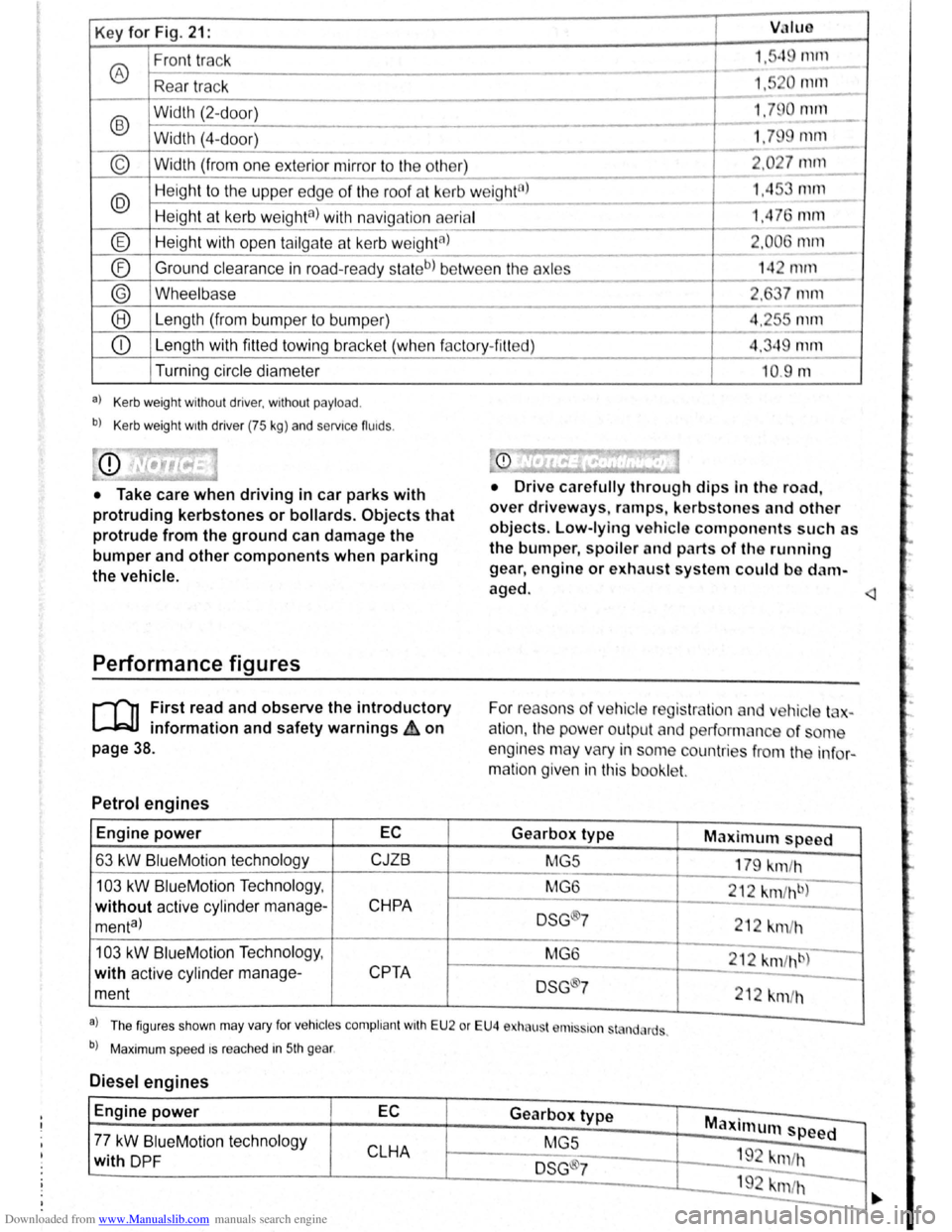
Downloaded from www.Manualslib.com manuals search engine Key for Fig. 21: VJIUO
Front track 1."q rnrn
® ---
Rea r tr ac k 1,5 0 111112.._
-
®
Width (2-d oor) 1.79 0 null
- -Width (4-
door) 1.79 mm
----
© Width (from one exterior mirror to the other) 2 .0 27 mm
---
@ Heig ht to the uppe r edge of the roof at kerb w eight8l 1.45 mm ---
Height at kerb weighta) with navig ation aerial 1,4 76 mm ---
® Height with open tailga te a t kerb w eightal 2.006 1111ll
- --
® Ground
clearance in road-read y sta teb) be tw ee n the axles 14 2 mrn ------
® Wheelbase 2, 7 mm
--® Le ngth (from bumper to bump er) 4.2r-s mm
---
CD Length with fitted towing bracke t (whe n f actory- fitt ed) 4.349 mm
Turning circle diameter
a) Kerb weight without driver, without payload .
b) Kerb weight wrth driver (75 kg) and servrce fluids .
• Take care when driving in car parks with
protruding kerbstones or bollards. Objects that
protrude from the ground can damage the
bumper and other components when parking
the vehicle.
Performance figures
r-('n First read and observe the introductory
L-1=JJ information and safety warnings ih on
page 38.
Petrol engines
Engine power EC
63 kW BlueM otio n technology CJZB
103 kW BlueMotion Techno logy ,
without active cylind er manage-CHPA
menta)
103 kW Blue Motio n Technolog y,
with active cylinder manage-
CPTA
ment
--10.9 m
• Drive c arefully through dips In the road,
over driveways, ramps , kerbstones and other
objects. Low-lying vehicle components such as
the bumper, spoiler and parts of th e running
gear , engine or exhaust system could be d am
aged.
For reaso ns
of ve hicle reg is tr lio n and v hic le t -
a
tio n, the pow er outpu t an d performan ce of ome
engines may vary in some countries f
rom the in fo r
matio n given in this booklet.
Gearbox type Maximum speed
MG5
179 km/h
MG 6
212
km fh b)
DSG ®7 212 km /h
M G6
212 km /hb)
DSG 7
212 km/h
a . . l Th e figur es sh o wn may va ry fo r vehrc les compli ant wrth E U 2 or EU4 e ha ust r111s~ron st nd, rds .
b) Maxim um spee d rs rea ched in 5th gear .
Diesel engines
Engine power EC Gearbox type Maxi mum speed -77 kW BlueM otio n tec hnol ogy
MGS
CLHA 1 9 -with DP F DSG ®7 "m /h
192 krn/h -
-
·.
Page 48 of 138
Downloaded from www.Manualslib.com manuals search engine l
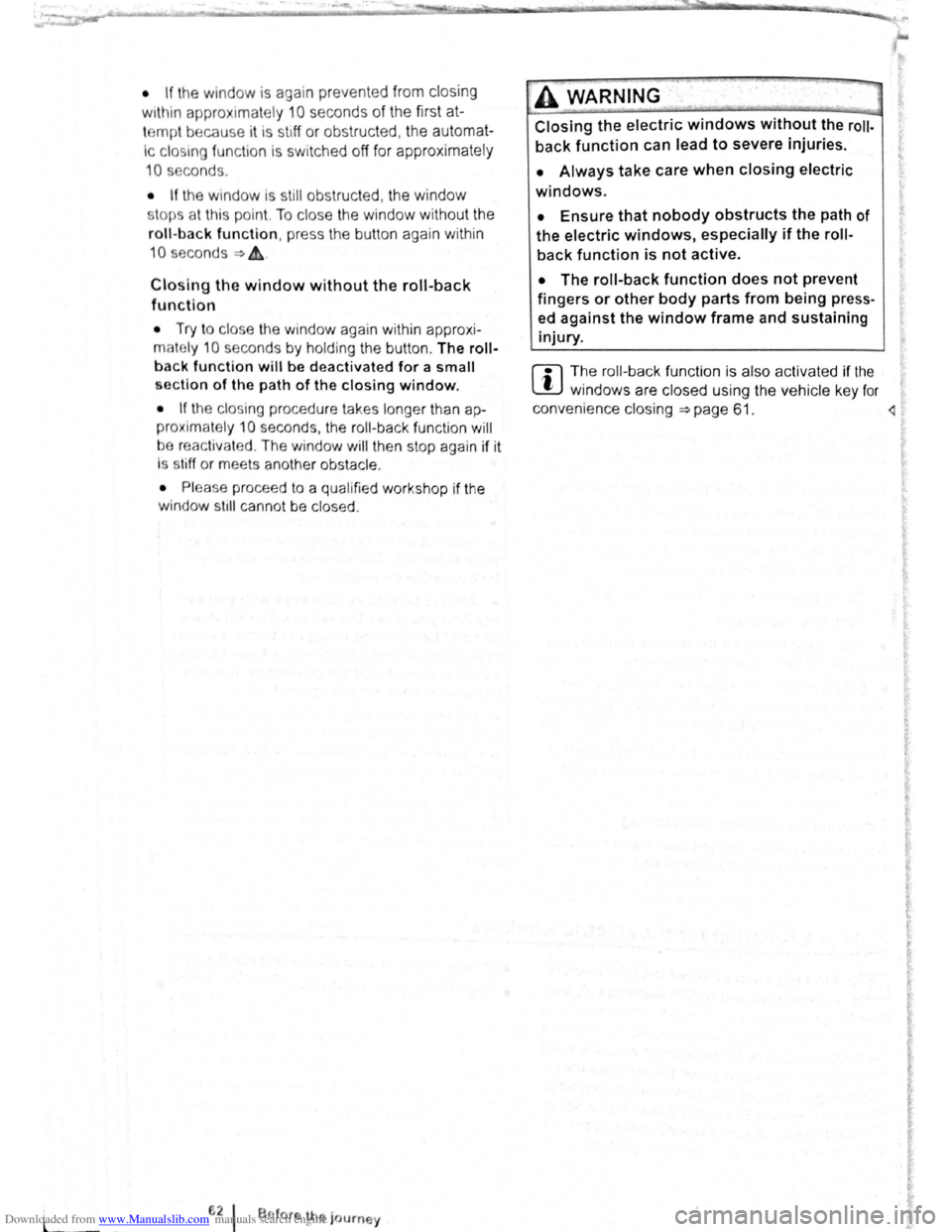
• If the window is again prevented from closing
within approximately
10 seconds of the first at
temp t because it is stiff or obstructed, the automat
Ic clo s
1ng fun ctio n Is switched off fo r approximately
10 seconds.
• If the window is still obstructed , the window
st ops at this point. To c lose the window withou t the
roll-bac k function, press the button again within
1 0 seconds ~ &,.
Closing the window without the roll-back
function
• Try to close the window again within approxi
mately 10 seconds by holding the button . The roll
back function will be dea ctiva ted for a small
section of the path of the closing window.
• If the c losing procedure takes longer than ap
proximately 10 seconds, the roll-back functio n will
be reac tivat ed . The window will then stop again if it
Is s tiff o r meets another obstacle .
• Please proceed to a qualified workshop if the
window
st1ll can not be closed .
t:2 I Bflfore th journey
---
A WARNING
Closing the electric windows without the roll
back function can lead to severe injuries.
• Always take care when closing electric
windows.
• Ensure that nobody obstructs the path of
the electric windows, especially if the roll
back function is not active.
• The roll-back function does not prevent
fingers or other body parts from being press
ed against the window frame and sustaining
injury.
W The roll-back fun ctio n is also ac tivated if the
l!J windows are closed using t he ve hicle key f or
convenience closing
~page 61.
I ..
Page 53 of 138
Downloaded from www.Manualslib.com manuals search engine -
When removing or fitting head restraints, make
sure that they do not hit the roof or other parts
of the vehicle. The roof and other vehicle parts
could otherwise be damaged.
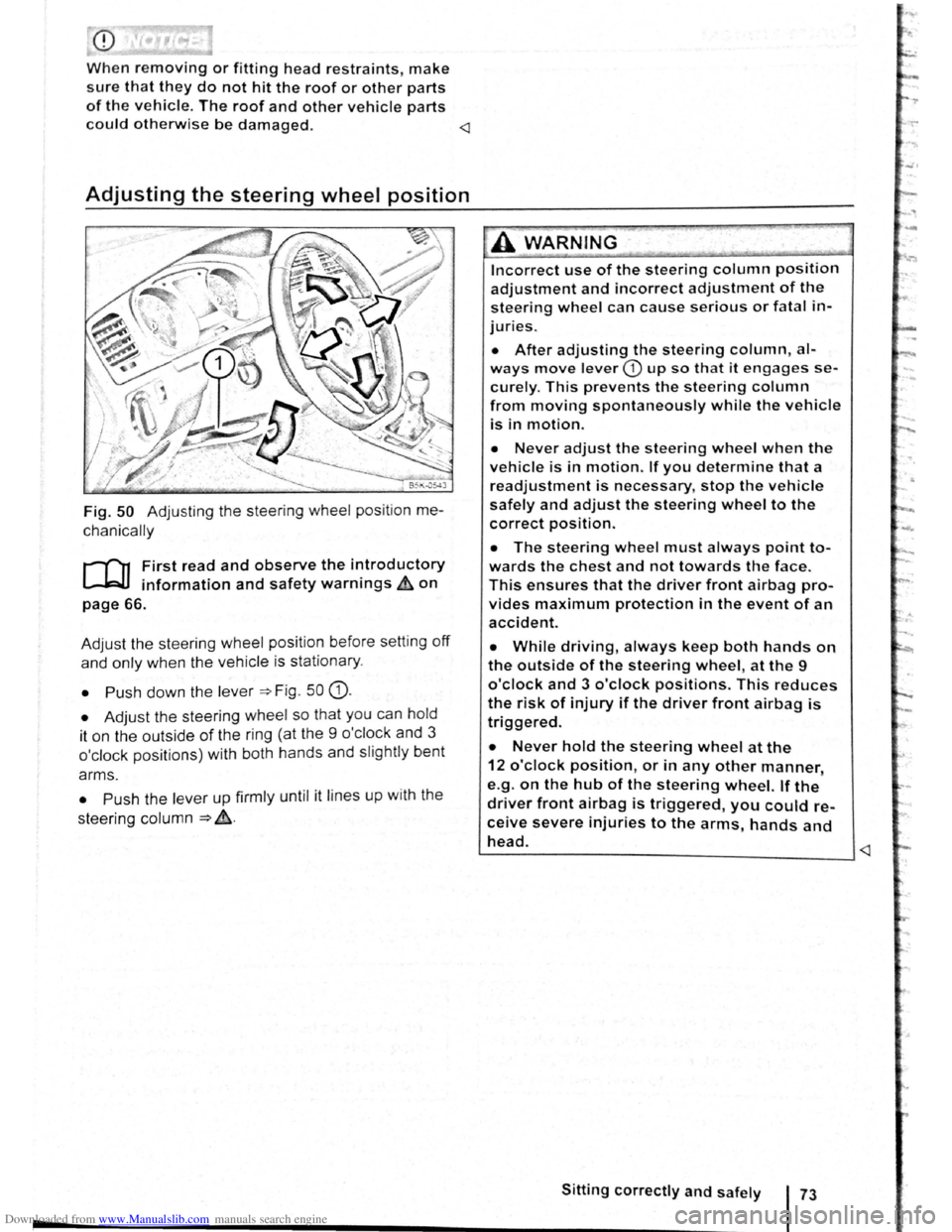
Fig. 50 Adjusting the steering wheel position me
chanically
r-f"'n First read and observe the i~troductory
~ information and safety warnmgs ~on
page 66.
Adjust the steering wheel position before setting
off
and only when the vehicle is sta tionary.
• Push down the lever =>Fig . 50 G).
• Adjust the steering wheel so that you can hold
it on the outside
of the ring (at the 9 o'cl ock and 3
o'clock positions) with both hands and slightly bent
arms.
• Push the lever up firmly until it lines up with the
steering column
=> ~-
Incorrect use of the steering column position
adjustment and incorrect adjustment of the
steering wheel can cause serious or fatal in
juries.
• After adjusting the steering column, al
ways move lever CD up so that it engages se
curely. This prevents the steering column
from moving spontaneously while the vehicle
is in motion.
• Never adjust the steering wheel when the
vehicle is in motion. If you determine that a
readjustment is necessary, stop the vehicle
safely and adjust the steering wheel to the
correct position.
• The steering wheel must always point to
wards the chest and not towards the face.
This ensures that the driver front airbag pro
vides maximum protection in the event of an
accident.
• While driving, always keep both hands on
the outside of the steering wheel, at the 9
o'clock and 3 o'clock positions. This reduces
the risk of injury if the driver front airbag is
triggered.
• Never hold the steering wheel at the
12 o'clock position, or in any other manner,
e.g .
on the hub of the steering wheel. If the
driver front airbag is triggered, you could re
ceive severe injuries to the arms, hands and
head. ~--------------------------____ _j
Page 55 of 138
Downloaded from www.Manualslib.com manuals search engine Seat functions
[ Introduction
1 hi · chnptor contnins inforrnntion o n th e follo wing
sub wrts :
'" t dt ll 'nting . . . . . . . . . . . . . . . . . . . . . . . . . . . 75
8dl.k nm~S<. g fun ction . . . . . . . . . . . . . . . . . . . 76
F lldm .. th front Pt ~seng r s n t bac kres t
ft.)rWflrd.. . . . . . . . . . . . . . . . . . . . . . . . . . . . . . . . 77
Additiona l inforn1ation and warnings:
• Adjus ting the s t1t po sitio n ;;. page 66
• S at b Its -:-pag e 79
• Airbrtg sys te m => pag e 88
• Child s ts (accessories ) ::::>page 97
• Ex t rior mirr ors =-> pflge 1 22
• Arr condi tio ning ->page 256
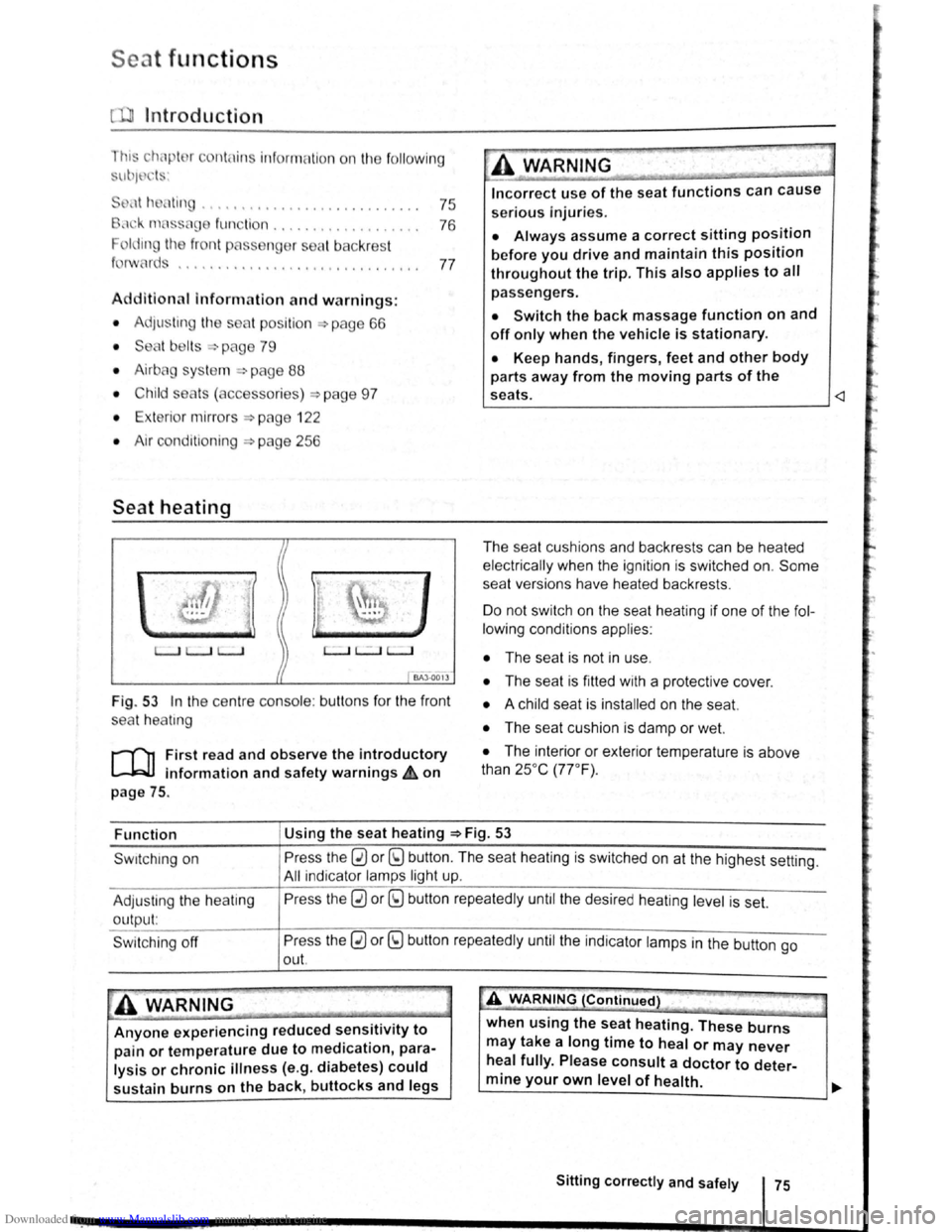
Seat heating
c.:.:..J L.:..J L..:..l
BAJ -0013
Fig . 53 In the ce ntre conso le : butt ons for the front
sea t
hea trng
i""""fl1 First read and observe the introductory
L-...lr::JJ information and safety warnings £ on
page
75.
Incorrect use of the seat functions can cause
serious Injuries.
• Always assume a correct sitting position
before you drive and maintain this position
throughout the trip. This also applies to all
passengers.
• Switch the back massage function on and
off only when the vehicle is stationary.
• Keep hands , fingers, feet and other body
parts away from the moving parts of the
seats.
elec trical ly when the ignition is switched on.
Some
seat ve rsions have heated backrests .
Do not switc h on the seat heating if one of the fol
lowing conditions applies:
• The seat is not in u se.
• The seat is fitted with a protect ive cover.
• A chi ld seat is installed on the seat.
• The seat cushion is damp or wet.
• The interior or exterior tempera ture is above
than 25oc (77 °F) .
Function Using
the seat heating ::::>Fig. 53
Swrtching on
Adjus ting
the heating
output:
Swi tchi ng off
Press the 0 or (9 button. The seat heating is switched on at the highest setting.
All indicato r l amps light up.
Pre ss the
0 or (9 button repeatedly until the desired heating level is set.
Press the
0 or (9 button repeatedly until the ind ica tor lamps in the button go
out.
~A WARNING (Continued) " ._..~~1 ~...... -~.~. ~-~ ~----J
Anyone experiencing reduced sensitivity to
pain or temperature due to medication, para
lysis or chronic illness (e.g. diabetes) could
sustain burns on the back, buttocks and legs when
using the
seat heating. These burns
may take a long time to heal or may never
heal fully. Please consult a doctor to deter
mine your own level of health.
~--------------~--------~~
Sitting correctly and safely 75
Page 56 of 138
Downloaded from www.Manualslib.com manuals search engine Folding the front passenger seat backrest forwards
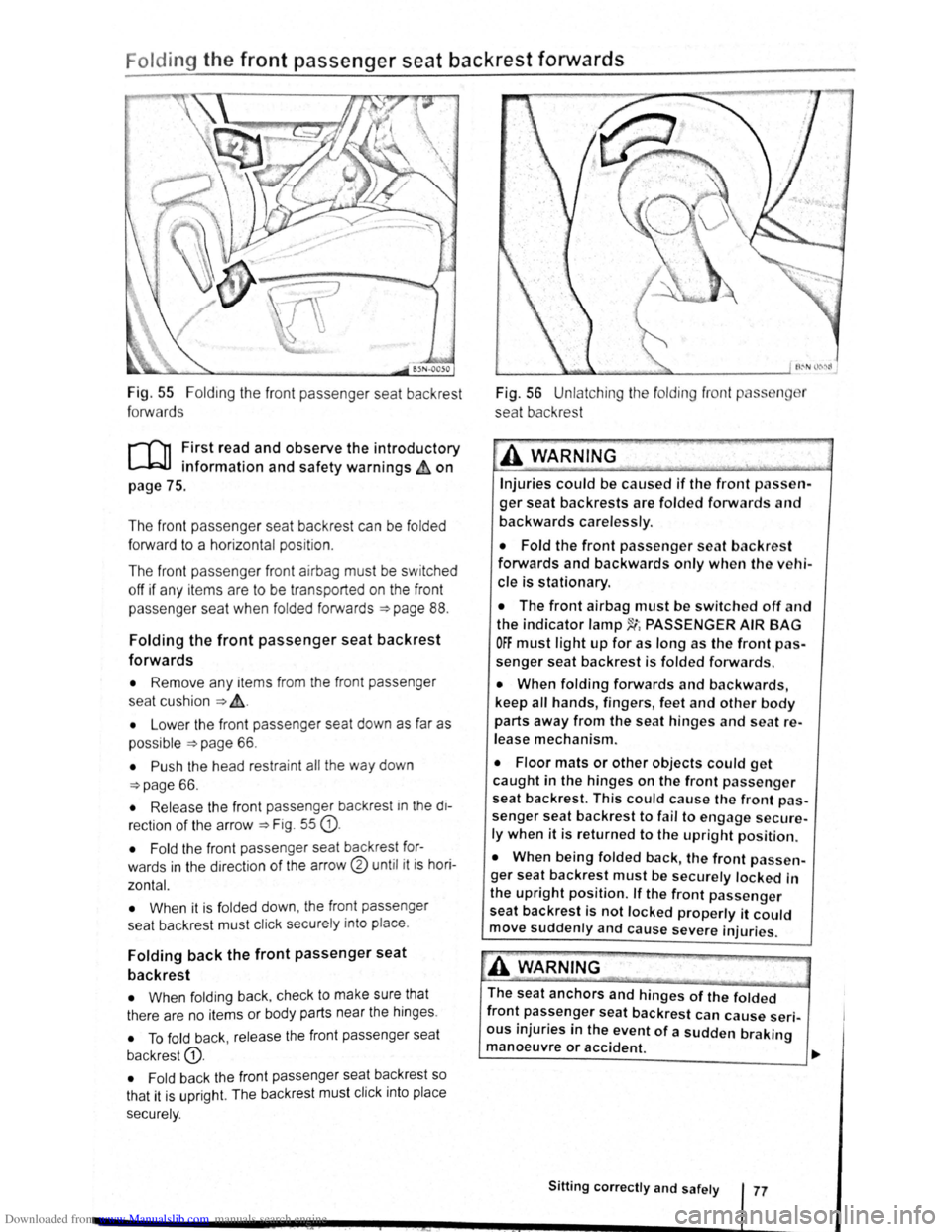
Fig. 55 Folding the front passenger seat backrest
forwards
r-('n First read and observe the introductory
l-.b1.l information and safety warnings~ on
page
75 .
The front passenger seat backrest can be
folded
forward to a horizontal position .
The
fron t pass enge r front airbag must be switched
off if any it e ms are to be transported on the front
p asse nger seat when
folded forwards ~page 88.
Folding the front passenger seat backrest
forwards
• Remove any items from the front passenger
seat cu shio n
~ ~-
• Lower the front passenger seat down as far as
possible
~page 66 .
• Push the head restra int all the way down
~page 66.
• Release the front passenger backrest in the di
rection
of the arrow ~Fig. 55 G).
• Fold the front passe nger seat backrest for
wards
in the dir ec tion of the arrow® until it is hori
zontal.
•
When it is fol ded down , the front passenger
sea t backrest must click securely into place .
Folding back the front passenger seat
backrest
• When foldi ng back , check to make sure that
there are no items or body parts near the hinges .
• To fold back , release the front passenger seat
backrest
G).
• Fold back the front passenger seat backrest so
that it is upr
ight. The backrest must click into place
sec urely .
Fig. 56 Unlatching the fo lding front p ss n r
seat backrest
A WARNING '·
Injuries could be caused if the front passen
ger seat backrests are folded forwards and
backwards carelessly .
• Fold the front passenger seat backres t
forwards and backwards only when the vehi
cle is stationary.
• The front airbag must be switched off and
the indicator lamp~~ PASSENGER AIR BAG
OFF must light up for as long as the front pas
senger seat backrest is folded forwards.
• When folding forwards and backwards,
keep
all hands , fingers , feet and other body
parts away from the seat hinges and seat re
lease mechanism.
• Floor mats or other objects could get
caught in the hinges on the front passenger
seat backrest. This could cause the front pas
senger seat backrest to fail to engage secure
ly when it is returned to the upright position.
• When being folded back, the front passen
ger seat backrest
must be securely locked in
the
upright position. If the front passenger
seat backrest is not locked properly it could
move suddenly and cause severe injuries.
A WARNING
The seat anchors and hinges of the folded
front passenger seat backrest can cause seri
ous injuries in the event of a sudden braking
manoeuvre or accident.
~------------------------~~
Sitting correctly and safely 77
Page 63 of 138
Downloaded from www.Manualslib.com manuals search engine • In dusty or sandy a re a s.
• If thore is s to ne damage in the cam era's field of
V IO W .
• If the viewing fie ld of the camera is mis te d up,
d
irty, cov e re d by a sticke r, snow or ice.
I '~A WARNING ~
~ .
Do not le t the extra convenience afforded by
main b
eam assist or automatic main beam
ass is t tempt you Into taking any risks when
driving . The system is not a substitute
for the
full concentration of the driver.
• Always check the lights yourself and ad
just them to the prevailing conditions for
lights, vision and road traffic .
• The main beam assist or automatic main
beam assist may not
be able to detect all
driving situations correctly and may not work
properly in certain situations.
A WARNING (Continued)
• If the camera's field of view is dirty, cov
ered or damaged, the function of the main
beam assist and automatic main beam assist
may
be impaired. This also applies if changes
are made
to the vehicle's lighting system, for
example if additional headlights are fitted.
(Dt
Please observe the following points in order to
avoid impairing the proper function of the sys
tem:
• Regularly clean the camera's field of view,
and keep it free from snow and ice.
• Do not cover the camera's field of view.
• Check the area of the windscreen that is in
the camera's field
of view for damage.
r::l The headlight flasher and the main beam can
L!:J be switched on and off manually at any time
with the turn signal and main beam lever
~page 106.
r-l'n First read and observe the introductory
L-W.I information and safety warnings£ on
page 105.
If you have to drive a right -hand drive vehicle in a
l e ft-h a nd drive country , or vice versa , the asymmet
ric dipped beam headlights may dazzle oncoming
traffic . Th erefo re, the headl
ights must be masked
or switched over
if you are driving abroad.
Th e headlight orientation can be adjusted using
the@) button and the 0 and (L ight ] function but
t o ns in the infotai nment system
~page 31.
In vehicles in which the headl ights cannot be ad
just ed via a
menu , stickers should be applied to
certain parts
of the headlight lenses, or the head
lights should be adjusted by a qualified workshop.
A qualified workshop can provide you with further
information . Volkswagen recom mends using a
Volkswagen dea lership for this purpose .
r::l The use of travel mode and stickers on the
L!J headlights is only permitted for limited peri
ods .
Please contact a qualified workshop for a per
manent alteration . Volkswagen recommends using
a Volkswag en dealership for this purpose.
r-('n First read and observe the i~troductory
L-W.I information and safety warnmgs • on
page 105.
The Coming Home function is switched on manual
ly. However, the Leaving Home function is cotltrol-
led automatically
by a twilight sensor . ..,.
Lights and vision 111
Page 86 of 138
Downloaded from www.Manualslib.com manuals search engine -•
parkPilot
COl Introduction
This chapter contains information on the following
subjects:
Operating ParkPilot . . . . . . . . . . . . . . . . . . . . . . 202
parkPilot display
. . . . . . . . . . . . . . . . . . . . . . . . 204
ParkPilot menu . . . . . . . . . . . . . . . . . . . . . . . . . 206
Vehicle path display . . . . . . . . . . . . . . . . . . . . . 207
Towing a trailer . . . . . . . . . . . . . . . . . . . . . . . . . . 208
The ParkPilot assists the driver when manoeuvring
and parking . If the vehicle is approaching an obsta
cle located in the range of the ultrasound sensors ,
an intermittent acoustic warning is sounded , de
pending on the distance . The shorter the distance ,
the shorter the intervals . The acoustic warning will
sound continuously if the obstacle is very close .
The ultrasound sensors in the bumpers transmit
and receive ultrasound waves. The system uses
the time difference between the ultrason ic waves
(i.e. between the transmission and reflection from
obstacles and the point of reception) to continu
ously calculate the distance between the bumper
and the obstacle.
Additional information and warnings:
• Exterior views ~page 6
• lnfotainment system ~page 31
• Braking , stopping and parking ~page 179
• Reverse assist system (Rear Assist)
~page 209
• Park
assist system (Park Assist) ~page 213
• Cleaning and caring for the vehicle exterior
~page 294
• Accessories , modificat ions , repairs and renewal
of parts ~page 320
A WARNING
The ParkPilot cannot replace the full concen
tration of the driver.
• Unintentional vehicle movements can
cause serious injury.
• Always adapt your speed and driving style
to suit visibility, weather, road and traffic con
ditions.
• Ultrasound sensors have blind spots in
Which obstacles and people cannot be detec
ted '--.
A WARNING (Continued) ~-
• Always monitor the area around the vehi
cle as the ultrasound sensors will not always
detect infants, animals and objects.
• Certain surfaces of objects and clothes
cannot reflect the signals from the ultrasound
sensors. The system is unable to detect
these objects or people wearing this type of
clothing, or they may be detected incorrectly.
• External sources of sound can affect the
signals of the ultrasound sensors. In certain
circumstances, the system may not recog
nise people or objects.
A WARNING ~-.
Automatic activation of the ParkPilot only oc
curs at very low speeds. An inappropriate
driving style can cause accidents and serious
injuries.
• Always bear in mind the time delay be
tween the signals.
• The ultrasound sensors may not always be
able to detect objects such as trailer drawbars,
thin rails, fences, posts, trees and open or
opening tailgates. This can result in damage to
your vehicle.
• If the ParkPilot has detected an obstacle
and issued a warning, the obstacle may move
out of the detection range of the sensors as the
vehicle approaches it, particularly if the object
is very high or very low. These objects are no
longer registered.
• The vehicle can sustain considerable dam
age if the warning given by the ParkPilot is ig
nored.
• The ultrasound sensors in the bumper can
be displaced or damaged through impacts, e.g.
when parking.
• The ultrasound sensors in the bumpers
must be kept clean and free of ice and snow
and not be covered up by stickers or other
items, as these may prevent the system from
working properly.
Driver assist systems 2o1
Page 94 of 138
Downloaded from www.Manualslib.com manuals search engine ~ ; ) J
Reverse assist system (Rear Assist)
eo Introduction
ThiS c hflp t r co nlc:tln s Informa tio n on th e fo llowing
subjor.ts :
G 11 rat Infor m ation . . . . . . . . . . . . . . . . . . . . . . 210
Parking ....... ········· ....... . ........ 2 12
A cam era in th e ta il g a te he lp s th e driver when re
ve rsing o r m an o e uv ring the ve hi cle . The came ra
picture and th e o rienta tio n lin e s projecte d by the
syste m are di sp la ye d o n the s creen of th e facto ry
littcd ra d io or n avi gatio n sy ste m .
Additional information and warnings:
• Exte rio r v ie ws ~p age 6
• Accessories, modifica tio ns , re pai rs a nd re ne w al
of parts ::>p ag e 32 0
•
=>Bookle t R ad io o r ~Booklet N av iga tio n sy s
te m
A WARNING
Using cameras to estimate the distance from
obstacles (persons, vehicle etc. ) is inaccurate
and can cause accidents and severe injuries.
• The camera lens enlarges and distorts the
field of vision and makes objects on the
screen appear to be different and imprecise.
• Certain objects, for example narrow posts
or grids , may be difficult or impossible to see
on the screen because of its low resolution or
poor light conditions.
• The camera has blind spots within which
obstacles and people cannot be detected.
• Keep the camera lens clean, free of snow
and ice and do not cover it.
A WARNING
~------------~--------~~~------~ The technology of the Rear Assist system
cannot overcome the laws of physics or sys
tem-related vehicle limitations. Careless or
unintentional use of the Rear Assist system
can cause accidents and severe injuries. The
system is not a substitute for the full concen
tration of the driver.
• Adapt your speed and driving style to suit
visibility, weather, road and traffic conditions.
• Keep looking to check the direction in
which you are parking and the relevant area
around the vehicle. The front of the vehicle
swings out more than the rear of the vehicle.
•
Do not allow the images shown on the
screen to distract you from the traffic around
you.
• Always monitor the area around the vehi
cle as the cameras will not always detect in
fants, animals and objects.
• The system may not be able to d isplay all
areas clearly.
• The Rear Assist system should only be
used when the tailgate is fully closed.
• The camera only shows two-dimensional
images on the screen. The lack of depth of field
means that recesses and protruding objects on
the ground may only be detected with difficulty,
or may not be detected at all.
• The camera may not always be able to de
tect objects such as thin rails, fences, posts,
trees etc. This can result in damage to your ve
hicle.
Driver assist systems 209
Page 96 of 138
Downloaded from www.Manualslib.com manuals search engine 1) The Roar A
ss is t s y ste m should not be used in the following situations:
-If the rear of the ve hi cle is heavily loaded.
-If tl'e driv er is no t famili a r with the sy s tem .
-If the pos ition or angl e of the cam era has changed, e.g . following a rear-end collision. The system
sh ould be checked by a qualifi ed workshop.
2) Optica l deception by the camera :
The Rear Ass is t r eve rs ing camera only supplies two-dimen sional image s. Due to the lack of depth of field
on the sc ree n, potho les and dips in the ground , protruding parts on another ve hicle or protruding objects
on the gro und may be difficult or impossible to see on the image .
Objects or other ve hicles m ay appear closer or further away on the screen than they actually are.
-If you d rive from a le ve l surface onto an upward or downward slope.
-If you drive from an upward or downward slope onto a level surface .
-If the rear of th e ve hi cle is hea vily loaded .
-
Whe n app roac hing protruding objects. Su ch obje cts can leave the camera 's field of vision while you are
r e ve rs
ing.
Cleaning the camera lens
Keep the cam era le ns clean and free of ice and
s n o w :
• Switch o n the ignition .
• Switch on the electronic parking brake.
• Selec t re ve rse gea r.
• Moisten the le ns with a commercially available
alcohol- b ase d glass clea ner and clean the le ns
with a dry clot h ~CD.
• Remove snow with a brush .
• Remove ice with a de -ice r spray ~CD.
• Never use an abrasive cleaning product to
clean the lens.
•
Never use warm or hot water to remove
snow and ice from the lens of the camera . The
lens could otherwise be damaged.
m lt is not possible to open the tailgate if the
W V olkswagen badge is folded out.
m Volkswagen reco mmends that you practise
W parking with the rear assist system in a traf
fic-calmed area or car park with good vision and
we ather conditions .
In this way you can become
familiar with the system and the orientation lines in
a safer environment.
m The rear assist system cannot be switched
W on if the tailgate is open . <1
Driver assist systems