display VOLKSWAGEN GOLF 2012 Service Manual
[x] Cancel search | Manufacturer: VOLKSWAGEN, Model Year: 2012, Model line: GOLF, Model: VOLKSWAGEN GOLF 2012Pages: 516, PDF Size: 105.12 MB
Page 126 of 516
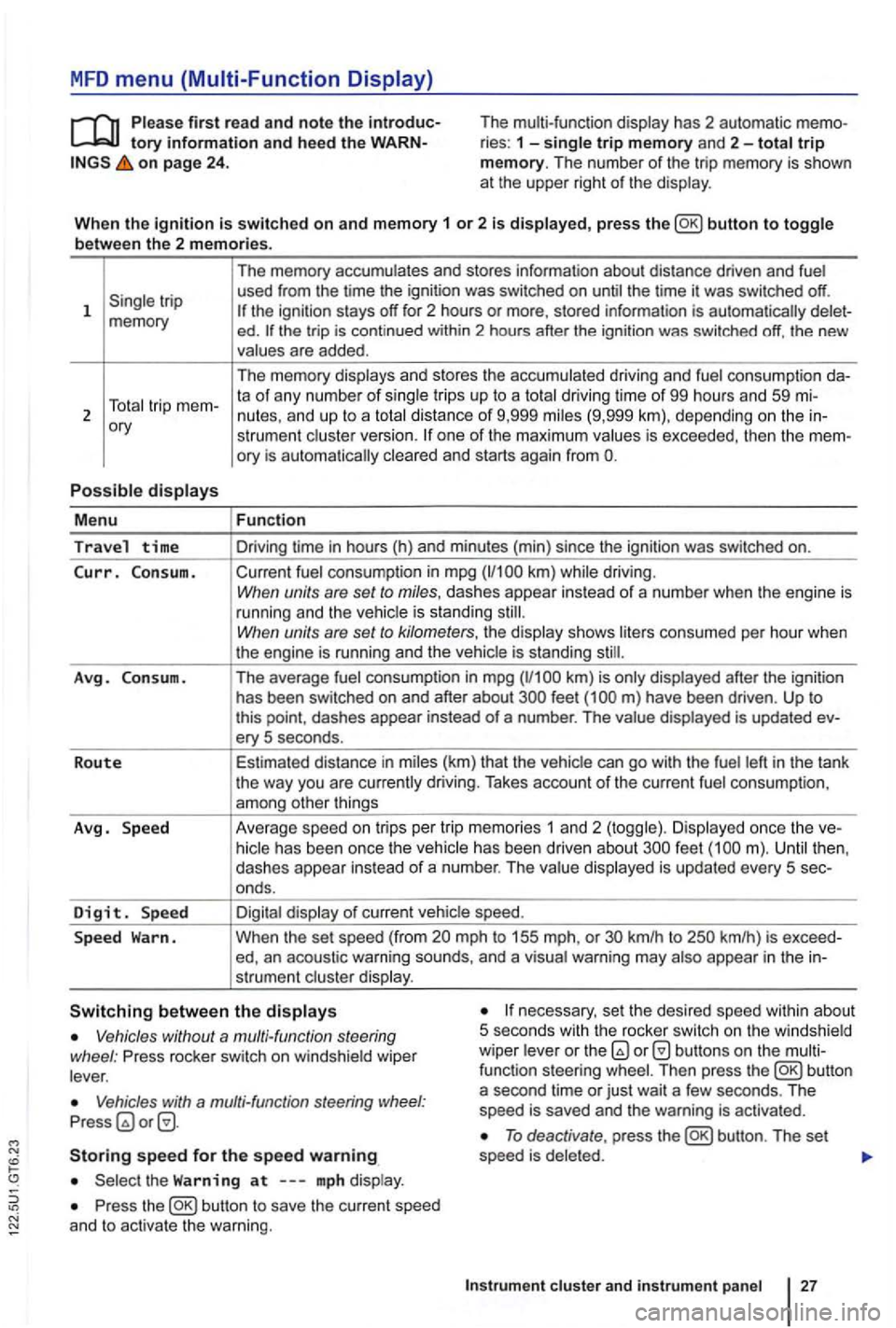
MFD menu (Multi-Function Display)
tory information and hee d the on page 24 . The multi-function
display has 2 automatic ries : 1 -single trip memory and 2-total trip memory. The number of the trip memory is shown
at the upper right of the display .
Wh en th e
ignition is switched on and memory 1 or 2 is displayed, press button to toggle
b etwee n the 2 m em ories.
1
ory
P o
ssible displays
M enu
Travel time
Curr. C on sum.
A vg . Consu m .
R o
ute
Avg . Speed
D
igit. Sp ee d
S p ee d
Warn. The
memory accumulates and stores information about distance driven and fuel
used from the time the ignition was switched on until the time it was switched off.
ed . the trip is cont inued within 2 hours after the ignition was switched off, the new
values are added .
The memory displays and stores the accumulated driving and fuel consumption
strumen t cluste r version. one of the maximum values is exceeded, then the
Fun ction
Driving time in hours (h) and minu tes (min) since the ignition was switched on.
Current fuel consumption in mpg
have been driven . Up to this point , dashes appear instead of a number . The value displayed is updated ery 5 seconds .
Estimated distance in miles (km) that the vehic le can
go with the fuel left in the tank
the way you are currently driving. Takes account of the current fuel consumpt ion ,
among other things
Ave rage speed on tri
ps per tr ip memor ies 1 an d 2 (toggle) . Di splayed once the feet
mph to 155 mph, or km/h to
necessary, set the desired speed within about
5 seco nds with th e rocker switch on the w indshield
wiper leve r or the Vehicles without a multi-function steering
wheel : Press rocker switch on windshie ld wiper
lever .
Vehicles with a multi-fun ction steering Press
Storing speed for the speed warning
Press the
To deactivate , press
Instrum ent cluste r and in str um en t panel
Page 127 of 516
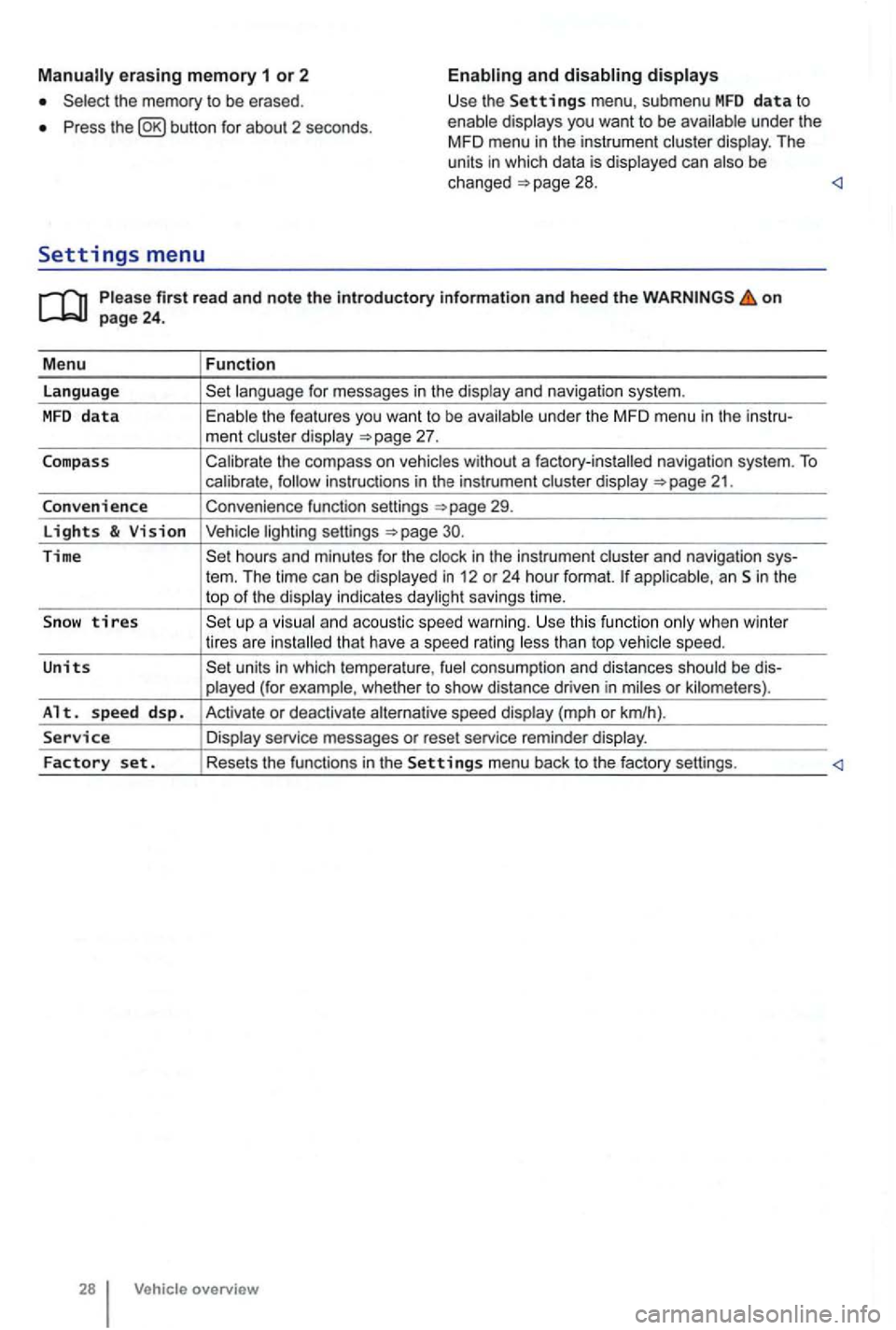
erasing memory 1 or 2
Press button for about 2 seconds.
and
Please firs t r ead and note t he i ntrodu ctory infor ma tion an d heed th e o n page 24 .
M enu
Function
language
unde r the MFD menu in the instru-
ment cluste r display
Calibrate the compass on vehicles without a factory-installed navigation system. To calibrate ,
Convenience function settings
30.
Time hours and minutes for the and navigation sys-
tern. The time can be displayed in 12 or 24 hour format. applicab le, an Sin the
top of the disp lay indicates daylight savings time.
S
now tires t han top vehicle speed.
Units units in which tempera ture , consumption and distances should be dis-
p layed (for example , whet her to show distance driven in miles or kilomete rs).
Alt. s p ee d d sp. Activate or deactiva te speed display (mph or km/h).
Service Display service messages or reset service reminder display.
Factory set . Resets the functions in the Se tting s menu back to the factory settings.
Vehicle overv ie w
Page 129 of 516
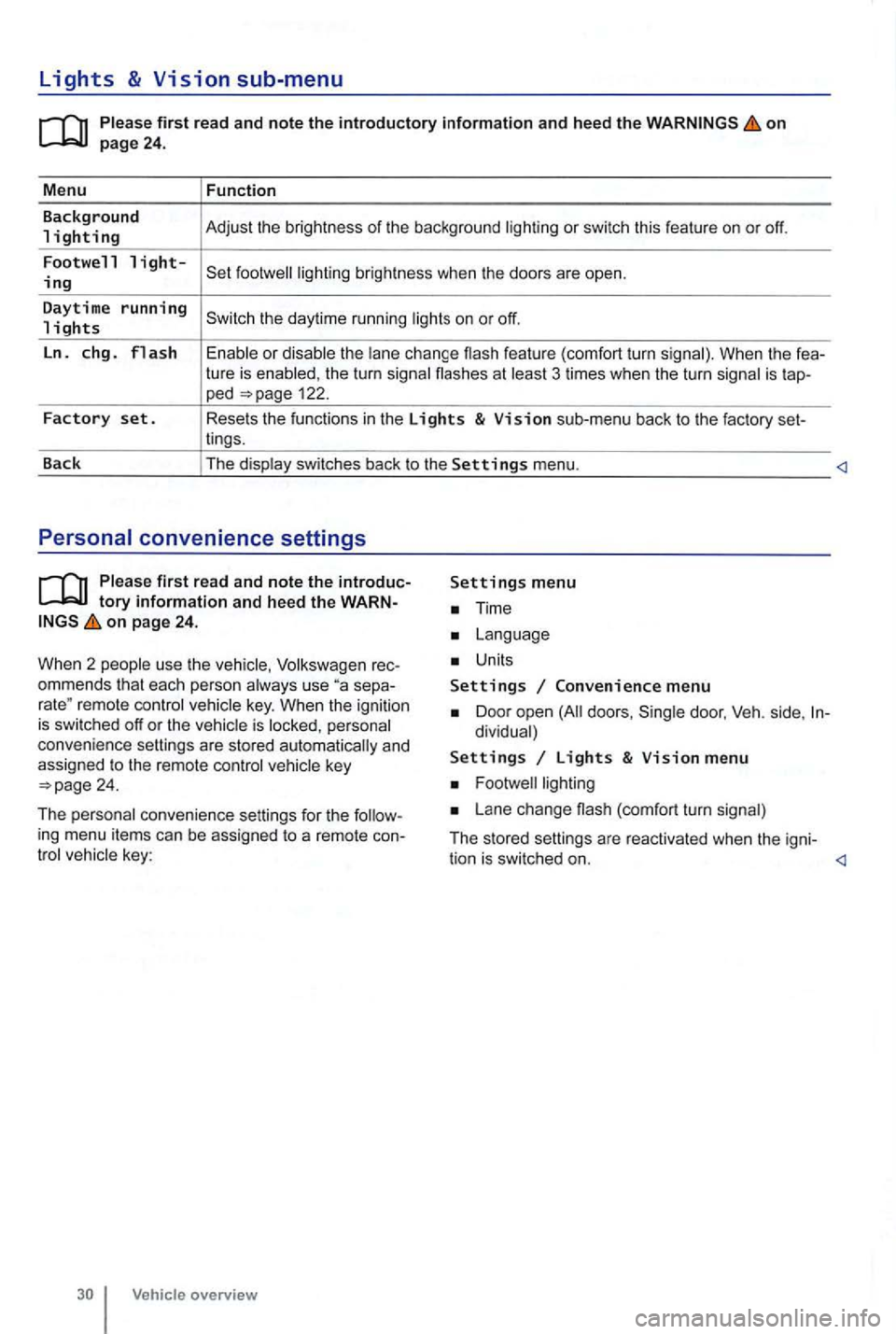
Lights & Vision sub-menu
on
the turn signa l flashes at 3 times when the turn signal is tap-ped 122.
Factory set. Resets the functions in the Lights & Vision sub-menu back to the factory set-
lings.
Back The display switches back to the
Settings menu.
tory information and heed the WARNon page 24.
W hen 2 people use th e
Volksw agen rec
ommends that each person always use separemote control veh icle key. When the ignition is switched off or the vehicle is personal
convenience settings are stored automatically and
assigned
to the remote control
Time
Units
Settings Convenience menu
Door open doors , dividual)
Settings Lights & Vision menu
Lane change (com fort turn signal)
The stored settings are reac tivated when the igni-
tion is switched on.
Page 144 of 516
N
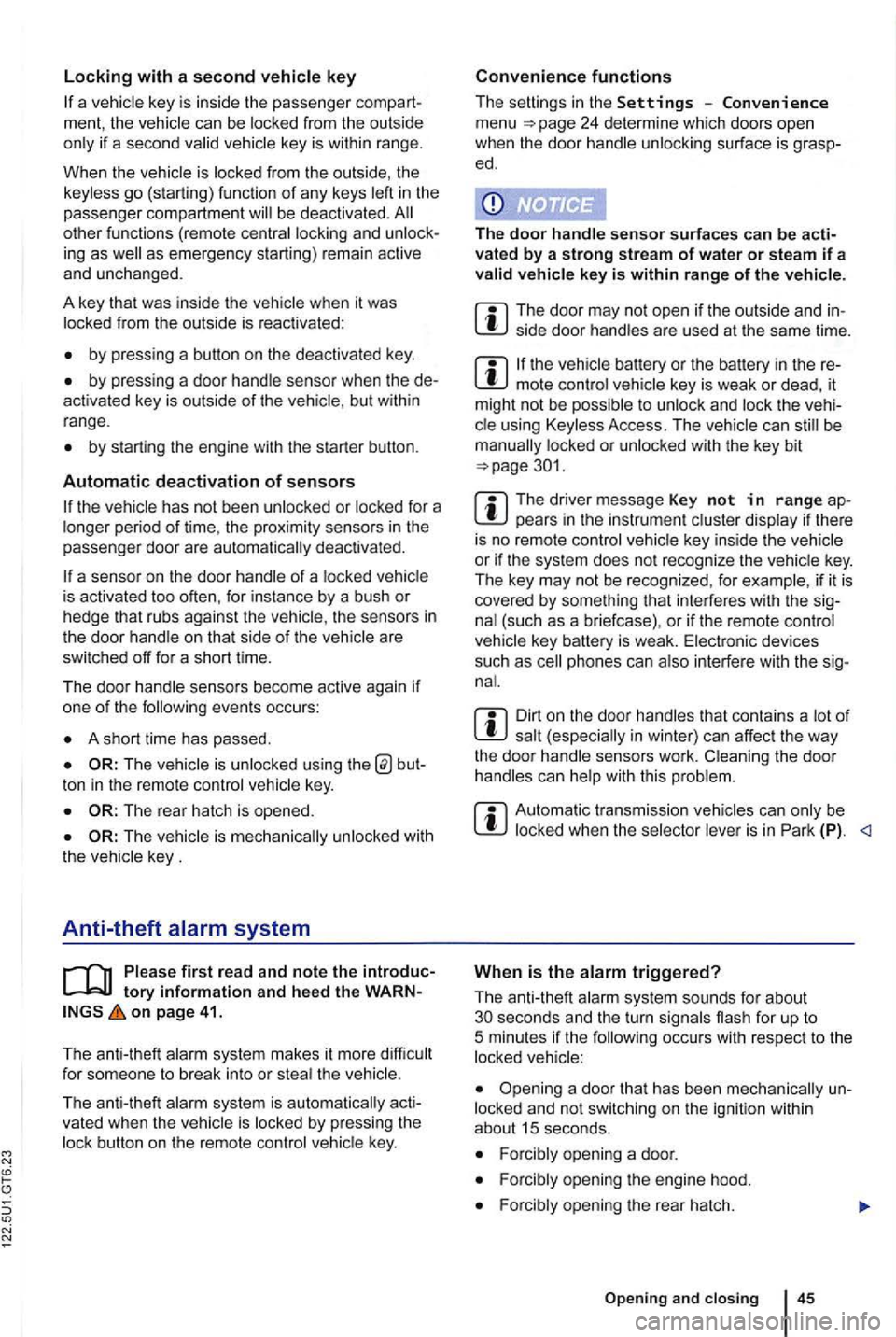
if a seco nd valid
by press ing a button on the deactivated key.
by pressing a door handle sensor when the de
activated key is outside of the vehicle , but with in
range .
by starting the engine with the starter butto n.
Automatic deactivation of sensors
deactivated .
is activated too often, for instance by a bush or hedge that rubs against the the sensors in the door handle on that side of the vehicle are
switched off for a short time.
T he door handle sensors become active again if
one of the even ts occurs:
A short time has passed.
The rear hatch is opened .
The key .
Anti-theft
tory information and hee d the WARN on page 41.
T he anti-theft alarm system makes it more difficult
for someon e to break into or steal the veh icle .
The anti-theft alarm system is
key i s within range of the vehicle.
T he door may not open if the outside and in side door handles are used at the same time.
the vehicle battery or the battery in the remote control vehicle key is weak or dead , it
might not be possible to unlock and using Keyless Access. The vehicle can locked or unlocked with the key bit
The driver message Key not in ra nge ap pears in the instrument cluster display if there
is no remote control vehicle key inside the vehicle
or if the system does not recognize the
key. The key may not be recognized , for example, if it is
covered by something that interferes with the sig
(such as a briefcase) , or if the remote control
vehicle key battery is weak. Electronic devices
such
as phones can interfere with the sig
Dirt on the door handles that conta ins a of in winter) can affect the way
the door handle sensors work.
with this problem .
Automatic transmissio n vehic les can
Opening a door that has been un
locked and not switching on the igni tion with in
about 15 seconds.
Forcibly opening a door.
Forcibly opening the engine hood.
Forcib ly opening the rea r hat ch.
and closi ng 45
Page 146 of 516
Doors
. . . . . . . . . . . . . . . . . . . . . . . . . . . 47
Child
saf ety lock . . . . . . . . . . . . . . . . . . . . . . . . 48
More information:
Exterior views 6
Vehicle key set
Power loc king and closing sys tem
Power windows
Emergency clo sing an d opening
...
A door that is not closed properly may open suddenly when the vehicle is moving and cause severe injuries.
Warning
A door kept open with the door stop may
close in strong winds or on inclines and cause injuries.
on
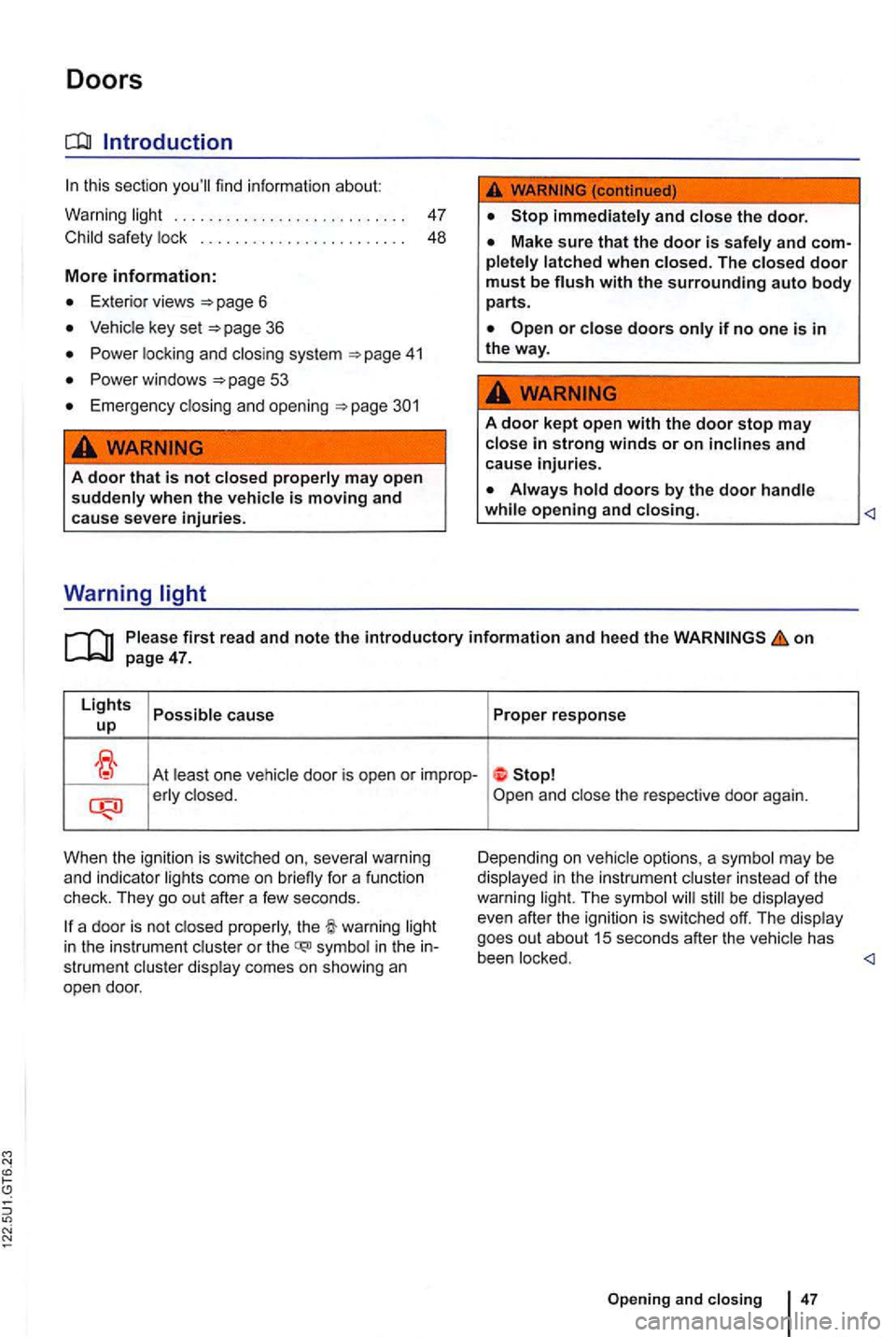
At least on e vehicle door is open or improp-erly clo sed.
When the ignition is swi tc h
ed on, several warning
and indi cato r lig hts come on briefly for a function
check. They go out after a few seconds.
be displayed
even after the ignition is swi tched off. The display
goes out about
15 seconds after the vehicle has
in the instrument cluster or the symbol in the strument cluste r display comes on showing an
open door. been locked.
47
Page 269 of 516
on page 165.
The immobilizer helps to pre ve
nt the engine fr om
being started and driven with an unauth orized
vehicles with Keyless
Access , th e vehicle key must be outside the
driving The
engine can therefore
dependent repair facilities and locksmiths who are to make vehicle keys 36.
an unauthorized vehicle key is used , Immobilizer active! appears in the instr ument cluste r
display . Th e
Using genuine mize the risk of malfun ctions .
Page 278 of 516
Braking, stopping, and parking
this sectio n
Parking brake . . . . . . . . . . . 182
P arking . . . . . . . . . . . . . .
. . . . . . . . . . . . . . . . . 182
About the brakes . . . . . . . . . . . . . . . . . . . . . . . . 183
Braking assistance systems
Switching
L ock Brake System (ABS) . Br ak e Assist System
(BAS ), Ele ctronic Differential Lock (EDL), R eg ulatio n (ASR) and Electronic C ontrol
(ESC).
More information:
Trai ler towi ng 149
Starting assistance systems 1 95
Tires and whee ls 258
Driving with bad brakes or worn brake pads can cause a and serious personal
injury.
lights up in the instrument cluster display, whether alone or together with a text message, immediately contact an authorized Volkswagen dealer or authorized Facility to have the brake pads checked and, if necessa
ry, replaced .
Parking improperly can cause serious sonal injury.
lock and you
haust system or catalytic converter could
fu el, etc.
riously injure you and your passengers.
sonal injury.
mote control vehicle key, trapping passengers in the vehicle in an emergency. For ample, depending on the time of year, people trapp ed in the vehicle can be exposed to very high or very low temperatures.
children.
Starting, shifting, parking 179
Page 281 of 516
Failure to heed warning lights or t ex t WARN-can result in vehicle damage .
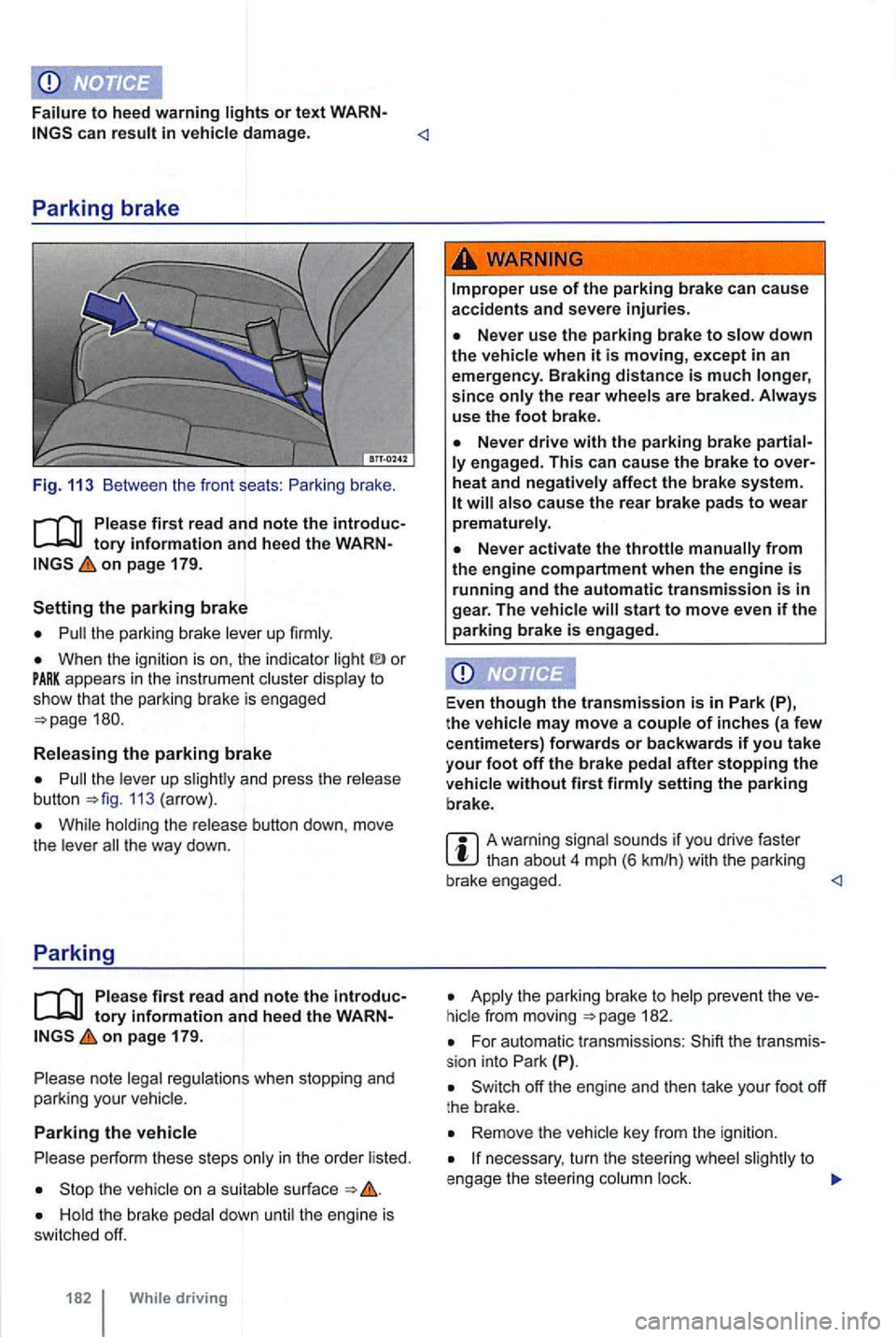
Fig. 113 Between the front seats :
on page 179.
the parking brake lever up firmly.
When the ignition is on , the indicator or appears in the instrume nt c luster display to show th at the park ing brake is engaged
the leve r up 113 (arrow) .
While hold ing the release button down, move
t h e lever t he way down.
Parking
Ple ase firs t r ea d and note the introductory info rm ation and heed the WARNon pa ge 179.
note legal regulations when stopping and
parking your vehicle.
Parking the vehicle
p erform these steps only in the order listed.
the vehicle on a suitab le surface
the rear wheels are braked . Always
use the foot bra ke.
engag ed. This c an cause the brak e to over
heat and neg ati vely affec t the b rak e sys te m .
start to move even if the parking brake is e ngag ed .
Even
though the tra nsmission is in P ark (P),
t h e vehi cle may move a couple of inche s (a fe w
c entimeters) forwards or backwards if you take
your f oot off the brake pedal after stopping the
ve hicl e without fir s t firmly setting the parking
b rake .
A warning signal sounds if you drive faster
Apply t he parking brake to 182.
For automatic transmissions : (P).
Remove the vehicle key from the igni tion.
necessary , turn the steer ing whee l to
e ngage the steer ing column lock.
Page 283 of 516
Brake system malfunction
you brake and find that vehicle doesn't brake
nearly as
come on
and a m essage may appear in the instrument ter display. you believe the vehic le is safe to
d rive, immediately take it to the nearest authorized
Volkswagen dealer or authorized Volkswagen
Service
f or repair. Drive slowly and very
carefully , for the longer stopping distance ,
and be ready to push longer and harder on the
brake pedal to slow the vehicle down.
Brake booster
The brake booster works only when the engine is
running . in creases the force on the brakes above
and beyond the pressure put on the brake pedal by
the driver .
New brake pad s do not provide maximum braking performance.
miles You can
compensate for the reduc ed braking force by putting more pressure on the brake
pedal.
other vehicles too closel y or put yourself into other situations that might require sudden, hard braking , especially
when the brake pads have not b ee n broken
in.
Overh eated brakes reduce the vehicle's stopping power and increa se stopping distances considerably.
that are long or s teep, always reduce speed
and shift into lower gear (manual or automat-
184 While driving
ic transmission). This let the vehicle use
engine braking and reduce the load on the brakes. Otherwise, the brake system could overheat and possibly fail.
A damaged front spoiler or a non-standard spoiler can redu ce airflow to th e brakes and make them overheat.
Wet brakes or brakes coated with ice or road
salt react slower and need longer stopping distances.
apply the brakes to tes t them .
Driving when the brake booster is not working increases stopping distances and can
cause accidents and serious per sonal inju
rie s.
Nev er let the vehicle coas t when the
the bra ke booster is not working (suc h
a s wh en th e vehic le is being towed) , a lot more pedal force is needed to slow down and stop.
Neve r the brake s by keeping your foot on the brak e pedal when you do not want to brak e. Constant pres sure on the brake ped al
ca n make the brak es overheat. Riding the bra kes substantially r educe brakin g performance, increase stopping distance, and can
cause complete brake system failure .
that are long or s teep, always reduce speed and shift into lower gear (manua l or automatic tran smission). This gine brakin g and reduce the load on t he brakes. Otherwise, the brake system cou ld
o ve rheat and possibly fail. use the brakes when you n eed them to slow the vehicle down more or to stop.
Page 300 of 516
tires are identica l to those that were removed
and even if the tire pressure does not change 264.
WARNING
Improper use of the button can cause the tire sure
and tire wear.
Do not rely on the Tire Pressure Check your tires and have no
signs of damage , such as punctures , cuts , cracks ,
and Remove any objects that become
to the body of tire it self.
When you take delivery of the vehicle, the Tire Pressure Monitoring is calib ra ted
fo r the facto ry- recommended cold tire
pressure for the tires on your vehicle, as shown on
the label inside the driver door 138.
reinstalled or rep lacement wheels and tires are
identical to those that wer e removed and even if
the tire pressure does not change
you have to adjust the tire pressure on a
w arm tire ,
138 .
determines that the air pressure in at least one tire is too low, care fully check the sure in cannot be mined by looking at the tir e . This is especially true of low-profile tires .
you have work done on your wheels or tires, inform the workshop that the vehicle is
equ ipped with a Tire Pressure Monitoring
New tires may expand slightly the first time they are driven at high speeds, which can
trigger a tire pressure warning. Remember that lire
pressu re can only be pro perly measured when the
tire is "co ld "
repla ce old tires with tires that have been approved by Volkswagen for you r vehi-
cle type .
P up Proper response
A chime may also sound .
T he infl ation pressure of one or more tires is sign ifica ntly lower than the benchmark pres-Reduce
speed immediately! Avoid fast corne ring
su re set by the driver or a tire has structural and
hard braking! I damage. Depending on vehicle equipment , Check the
condition and pressure of a message may ment cluste r display.
D river assistance systems