Safety VOLKSWAGEN JETTA 2007 Owners Manual
[x] Cancel search | Manufacturer: VOLKSWAGEN, Model Year: 2007, Model line: JETTA, Model: VOLKSWAGEN JETTA 2007Pages: 477, PDF Size: 77.6 MB
Page 425 of 477
Booklet 3.3 Technical Data
Roof weight
Th e maxim um pe rmissib le roof we ight is 165 lbs ( 75 kg ).
On ly us e the roof rack system sp eci fica lly d e
s ign ed, tested and approved by Vo lk swage n.
The roo f weig ht increa ses the weight of t he front
and rear ax le and correspondingly re d uces the
o th er l oa d that your vehicle can carry.
D istri bute th e load even ly and do not exceed th e
P erm iss ible Roof Weight (including th e we ig ht
o f th e roof rack system ) or t he Gross Vehicle
weig ht.
For mor e details see
2.1 "Safety first",
c h ap te r " Safe driving " and "Con
t rols a nd Eq u ip m ent", ch apter "Seats and
s torag e."
WARNING
Transpor ting heavy bulky loa ds on th e roo f will ch ange the way the ve hicle han dles by
s hi fti ng the ve hicle's cen ter o f grav ity,
c h an gin g its aero dyna mics and the way it re
ac ts to side winds.
Dimensions
T he speci fica tio ns re fer to the ba sic m ode l. Dif
fere nces may occ ur depending on the mod el
type and options orde red, for example, tir e siz es .
yo ur vehicle
in are a s wi th parking b arri ers or c urbs. Pa rking
barri ers a nd cur bs va ry in h eig h t. They co ul d
dam age yo ur bum per and re la ted co mponent s
w hen th e fro nt of you r ve hicle moves over a bar
ri er or
curb that is too To avoid dam age to
yo ur car you sh o uld stop a nd park t he car
w ith out t ouch ing the pa rking barri er or curb.
4 G ener al not es
WARN ING {co ntin ued)
• Cargo that i s la rg e , h eavy, bulky, lo ng or
fl at w ill have a mo re nega tive in fluence o n th e
ve hicle's aerodyna mics, ce nter of grav ity a nd
ove ra ll h an dl ing.
• Always adapt your driv ing and sp eed to
w hat yo u arc ca rryi ng on the roof as we ll as to
road,
wea ther and w ind cond it ions.
• Always avoi d sud den brak ing or dr iv ing
maneuve rs.
• Always make sur e th at l oads a rc proper ly
di stri but ed and th at heavier i te m s a rc in th e
fr ont ..
• Nev er excee d th e m ax imu m roof load for
t h e ve hicle, max im um ax.le loads or the max
im um gross vehicle
th ere is dan ger
of dam age to th e ve hicle. -4
• When dr iv in g up stee p ramp s, on ro ugh
roads, or ove r curb s e tc. it i s important t o re
m ember t hat so me pa rts o f yo ur vehicle, suc h as
s p oilers or exhau st system compone nts, may b e
very close to the g round . Be caref ul not t o
dam age them .
Tip s
Th e
ma y he ifa dd iti nnal e q ui p
m en t is for differe nt mode ls , for specia l
ve hicl es and for oth er co untri es . -4
Page 435 of 477
About this booklet
This booklet contains important informati on,
tip s, sugges tions and warning s o n using your ve
hicle . Th e other booklets in th e Owner's Litera
tur e contain more informati on that you should
be aware of for your own safety and for th e safe ty
of your passenger s.
Make sure that you alwa ys kee p the compl ete
Owner 's Literature in the vehicle. Thi s is espe
ciall y important when you lend or sell the ve
hicle.
This manual describes the vehicle equipment at
the time of publicat ion. The content s of this
booklet correspond to the equi pment options
on your vehicle.
Illustratio ns ma y vary from your vehicle. For
this r ea so n you sh ou ld regard illustration s as a
gene ral guide.
At the beginning of
bookle t, you will find a
tab le of con tents sho win g all the item s de
sc ribed in thi s manua l in the ord er th ey appear.
An alphabetical index is at the end of the
bookl et.
Directions and posit ions (for example ri ght , le ft,
front, rear) ar e always relative
10 the direction of
tra vel of the vehicle unl ess stated otherw ise .
So me section s of thi s book let do not appl y
to all
vehicles. If this is the case, a texl at the b eginnin g
of the section indicates which vehicle s it appli es
to , for examp le "Applies to
Models onl y".
Th e section is cont inued on th e nex t p age.
Indicat es the end of a sect ion .
® Reg is tered trad emar ks are mark ed or®.
H owever, t he ab senc e of thi s symbol does
1101 con stitute a waiver of the right s co n
cern ing any te rm.
Cross- re fere nce to a "WARN IN G" within
or ou ts id e of a sec tion.
Cross-refe re nce to a within or side of a sec tion.
W AR NIN G
Tex ts with this symbo l contain impo rtant in
formation on safety and how to reduce t he risk
of persona l injury or death.
No te
Tex ts w ith this sy mbol draw yo ur attent ion to
po tent ial source s of dam age to your vehicl e.
Fo r th e sake of environ men t
with this symbol contain informa tion env ironm ent and how you can he lp
prot ect it.
Tip s
symbol special tips and
o th er inform ation abo ut getting the most out of
your veh icle and its fe ature s.
Page 438 of 477
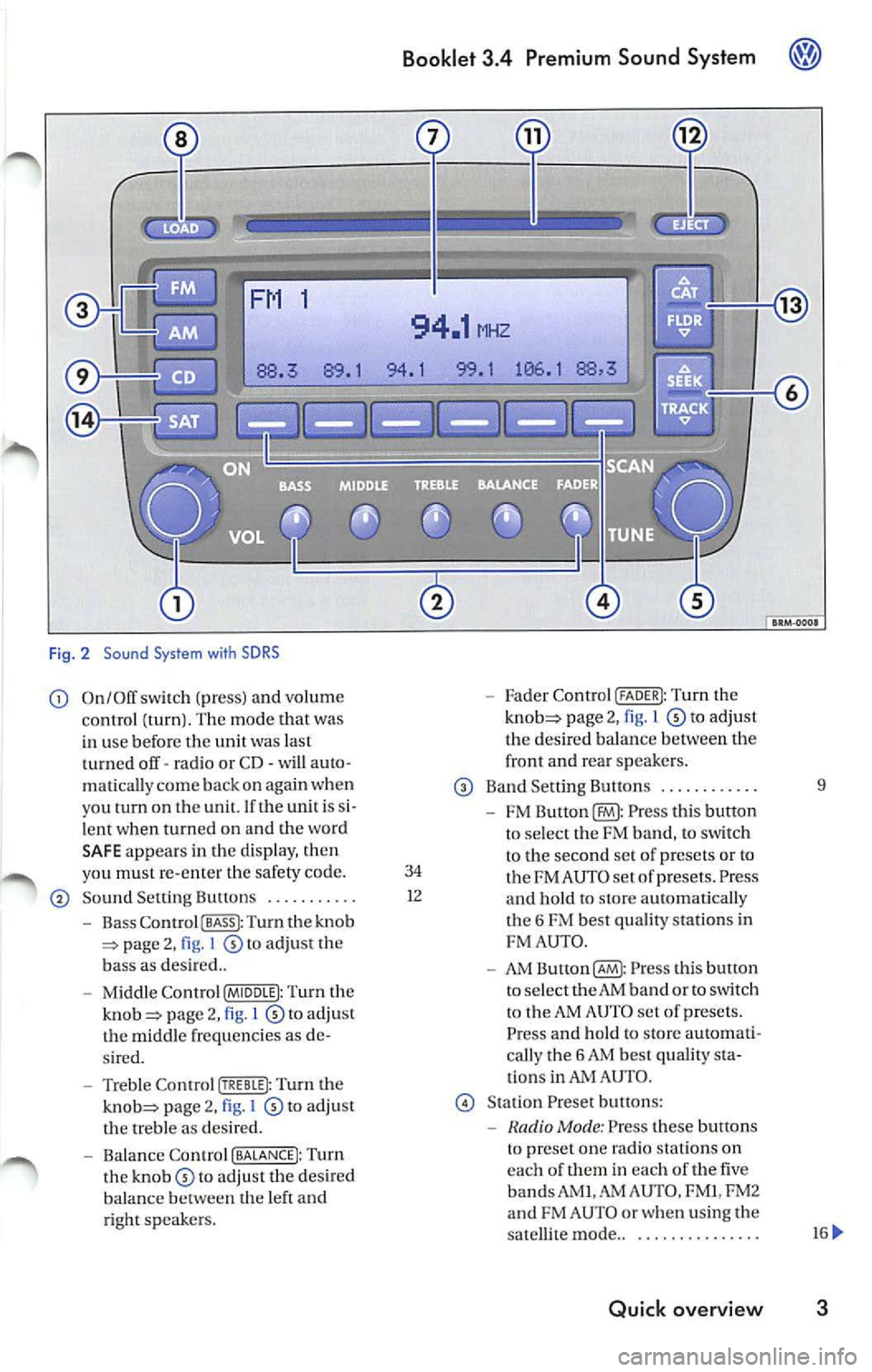
Fig . 2 Sound System with SDRS
On/Off switch (pr ess) and volume Fader Control (FADER I: Tu rn the
c ontrol (turn ). The mode that was page 2, 1 to adjust
in use befor e the unit was last th
e des ired balan ce betwee n the
t urned off· ra dio or CD· will auto · front and
rear sp eake rs .
matica lly c om e back on aga in when
Band Sett ing Button s .... ..... ... 9
you tu rn on th e un it. If th e unit i s
FM Press thi s butto n
l e nt when turn ed on and the wo rd
to se lec t the FM band, to sw itch
SA FE appear s in the d is pla y, th en
to the second set of p rese ts or to
yo u must re-en ter the safety code. 34 FM AU TO set of prese ts . Press So und Setting Bultons ........... 1
2
and hold to sLOre automati cal ly
Bass Co ntro l I BASS I: Turn the knob t
h e 6 FM best quality station s in page 2, I to adjust the FM
AUT O.
b ass as des ired ..
AM Button(§ : Pr ess this bulton
Mi ddle Contr ol (MIDDLE I: Turn the to
select the AM band or to switch page 2, l to adju st t
o the AM AUTO set of presets.
t h e m id dle frequ enci es as Press and hold to store automati-
s ir ed . call
y the 6 AM bes t quality
Treble Control Turn the ti
ons in AUTO .
page 2, I to adj ust Stat ion Preset butt ons:
th e treble as des ired.
Mode : Press these buttons
Balance Contro l (BALANCE!: Turn t
o pre set on e radio statio ns on
th e to adjust the desired eac
h of th em in eac h of the five
balance th e left and bands AM
I.AM AUTO , FM I, FM2
ri ght sp eake rs. and
FM AUTO or whe n using the
sa tellit e mode ..
............. ..
Quick overview 3
Page 468 of 477
Booklet 3.4 Premium Sound System ®
Tips
• Whe n
external CD changer is selected
EXT will appear in the radio display.
• The LED s above the slot buttons I to 6 will
stay on
to indi cate that there is a CD inside the
s lo t.
• It is po ssible to reproduce Howeve r the reproduction depends on th e terial quality of the CD .
• Always inser t the CD with the prin ted s ide
fac ing up . •
Make sure the CDs are prop erly install ed in
the CD changer. Also, make su re the CDs are
moved from the slot before you close the rest, otherwise you cou ld damage th e CDs.
• Only use standard
12 cm (4.72 inch) CDs. T he
s h ap ed CDs or 8 cm (3.15 in ch) CDs can not be
played.
• If no CD slot is se lected after pressing the
LOAD button, the radio unit will automatically
select the next empty tray .
• I f the ejected CD is not removed from the slot
in t he next
15 secon ds, it will be pulled back tomat ically into the CD slot to prevent damage
and the eject mod e will be
Tips for operating your internal CD-Changer and external CD
Changer
To assu re a sound reproduction of the highest
quality, u se on ly CDs which are clean and free of
sc ratch es or any other type of damage.
Do not u se tran sparent
Wa re availabl e in the
market. Use of these CDs w ill cause th e changer
improp erl y load.
If yo u are going
to make your own CDs, do not
s tick an adhesive labe l on the CD itself. The heat
Preventive measures for laser units.
Laser devices are divided into safety classes I 4.
Your VOLKSWAGEN CD ch an ger conforms to
safety class I.
The laser used in cla ss l is so low a nd so we ll
s hield ed, that no danger exi sts wi th proper
usage . generated
by the CD play er ca n loosen t he
sive label, which then coud come off and and
jam up the unit. This could result in a costly
pair. Use a marker labe l your CDs in stead.
Always sto re CDs in tl1eir cases whe n you are not
li stening to th em.
Neve r leave CDs in direct
Note
Never remove the cover from the uni t. The unit
doc s not contain any parts that can b e serviced
b y the use r.
Radio I CD 33