warning VOLKSWAGEN JETTA 2007 Owners Manual
[x] Cancel search | Manufacturer: VOLKSWAGEN, Model Year: 2007, Model line: JETTA, Model: VOLKSWAGEN JETTA 2007Pages: 477, PDF Size: 77.6 MB
Page 440 of 477
Booklet 3.4 P remi um Sound System
.0, WARNING (conti nued )
• Us e the Sound System only if road , traffic
an d weath er cond itions permit and you will
not be distracted from your driving.
Important information
Operating the Sound System while driving
D rivi ng on today 's road s demands th e full atten
ti o n of the driver.
The w ide range of sophisti cate d eq uipm ent de
tail s of modern car radio s offer not onl y a vas t
so urce of entertainmen t, but also import ant in
form ation reg arding t raffic updates, road condi
t ions, wea ther repo rts. etc.
Bu t re mem ber, you should onl y operate the
ra di o system wit h its num erous fe atures when
th e traffic situ atio n rea lly
in "Con
tro ls" on page 2.
For examp le, c hangin g CDs o r re ading song t i
tl es on a CD case or in th e rad io display when
drivi ng is o ften the ca use of aut o acc idents .
You s hould also set th e vo lume of your radio
sys tem so that yo u ca n h ear s ig n als from other
dr iv ers at a ny tim e.
Convenience radio coding For tec hn ical reason s. the conve nience radio
c oding is not ava ila bl e for all vehicle models.
In the past, it used to be tha t yo u had to manu
a lly recode t he radio wheneve r th e uni t was re
m oved from the ve hicle (for example, if th e unit
was removed to be repaired). or whenever the
veh icle battery was disco nnected (for examp le,
if yo u brou ght yo ur v ehicl e in to t he deale rship
for service a nd it was necessary to dis con nect
t he bauery). In eith er case , the power sup ply to
th e unit was cut off.
T hat has all ch anged w ith the new conven ie n ce
radio cod ing f un cti on: Once t he co de number
ha s bee n ent ered. it
will th en sy nchro nize itse lf
w ith "its" vehicl e!
.0, WARNING (co ntinu ed)
• Always set volume leve ls so that you can
clearly hear horns , si rens and oth er warning
sounds outside the vehicle .
If the power supp ly has been interrupted , the
radio will automa tically c hec k to see if it i s s till in
vehicle after the ignition has been switched
on . If this hap pen, th e radio will be ready for use
af ter just a few seconds.
It is th erefo re no longer necessary to d isengage
th e e lect ronic lock manuall y!
If t11e rad io ha s been in s ra ile d in anot her ve hicl e,
how ever, the electronic lock ha ve to be dis
engaged manually.
If
SAFE ap pea rs i n the disp lay a fter switchin g the
rad io on , it can then only be operated aga in afte r
entering tJ1e co rrect code
=> pa ge 34.
External CD changer1l
You also have the option of installin g a Ge nuine
Vo lkswagen CD Changer. Ask your authoriz ed
Vo lkswagen dealer about thi s optio n.
The CD change r is in stalle d in the front armres t
co mp artment. It is "re mote controlled" by th e
radio unit.
It allow s you ro load up to 6 CDs. See => page 32 for furt her information.
Vo lkswage n dea ler s have a ll the informa tion
conce rning in stallin g th e CD c hange r.
Tip s
• Please note tha t it em s marked with an as
t e ri sk(*) may be standard on ce rtain m odels , op
tional on otJ1 ers or no t ava ilabl e on yo ur model.
Always ch eck with your authorized Volkswage n
deale r to see if the feat ure or item ap plies to your
mod el.
• The radio code numb er and the radio seria l
numb er ca n be found on th e "Radio Card" at the
beg inning of the
Lit erature . ._
I) Availa ble as a fa cto ry install ed opt ion, or your author ized Volkswagen dealer can install the oplional C D
c h anger for you. A lways chec k with yo ur a utho rize d Vol kswage n deale r if th is op tio n i s ava ilab le fo r yo ur
model.
Quick overview 5
Page 442 of 477
Booklet 3.4 Premium Sound System
Radio I CD
Radio
ON /OFF Button
88.3 89.1 94.1
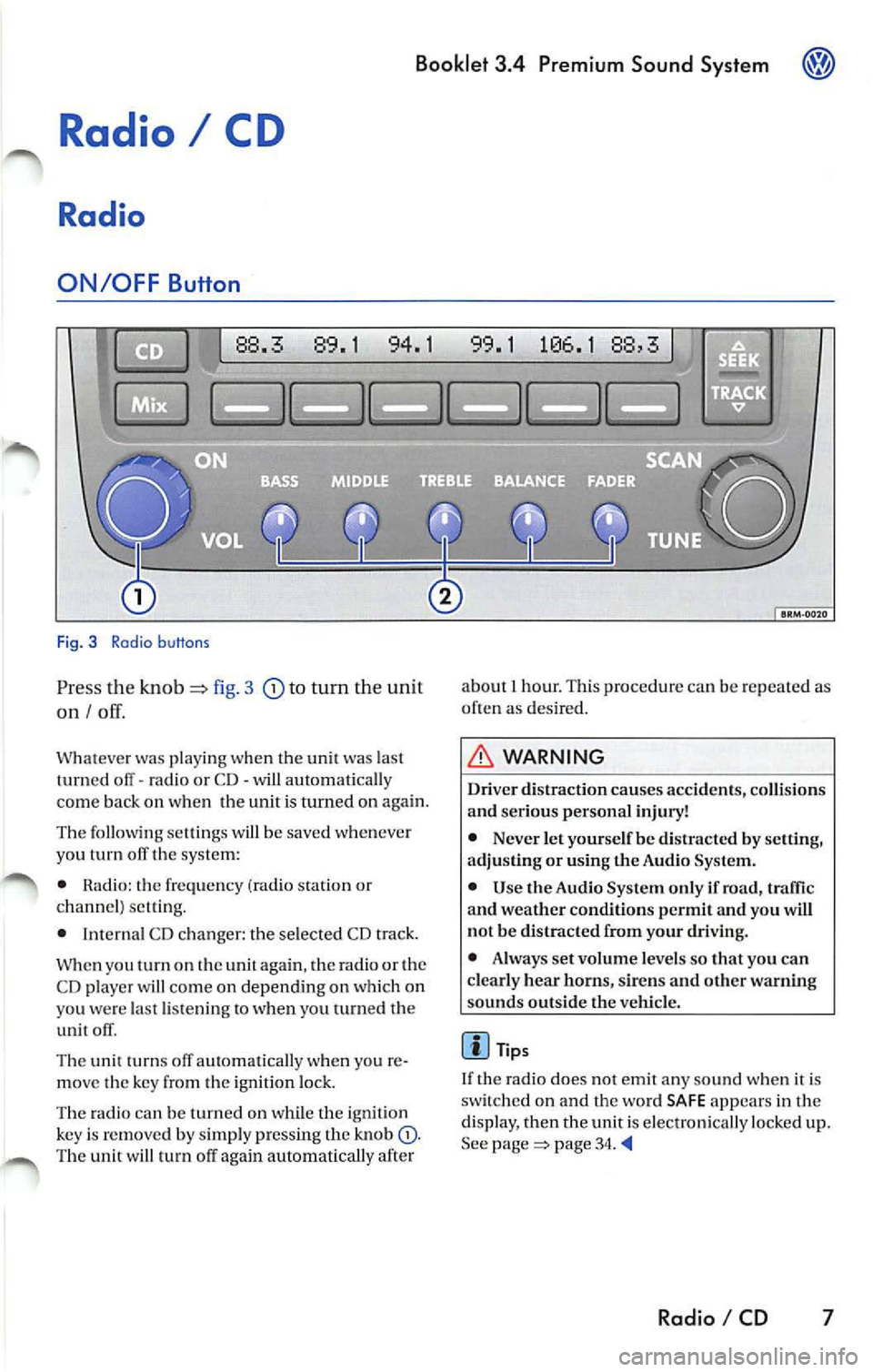
Fig. 3 Radio b uttons
Pr ess the knob fig. 3 to turn the unit
on I
Whatever was playing when the uni! was las!
turned off -radio or CD -will automaticall y
come back on when the unit is turned on again.
The foll owing se lling s will b e saved whenever
yo u tu m off the system:
• Rad io: the frequen cy (ra dio s tat ion or
c h an nel) se ttin g.
• Interna l CD c han ger : the se lected CD track.
W hen you
on the again , th e ra di o or the
CD player w ill co me on depend ing on which on
yo u wer e la st li ste nin g
when you turn ed the
unit off .
The uni! turn s off au!Omati ca lly w hen you re
m ove the key fro m the ign ition lock.
The radio can be turn ed on wh ile th e ignition
key is rem oved b y simpl y pressing the kn ob
88,3
about 1 hour. This procedure can be re p eate d as
o ften as des ired .
WARNING
Dri ver distraction causes accid ents, collision s
and ser ious personal injury!
• Never let yourse lf be distr acted by setting,
a djusting or using the Audio System.
• Use the Audio System only if road, traffic
and weather conditions p ermit and you will
not b e distracted from your driving .
• Alwa ys set vo lum e le vel s so that you can
clearly hear horns, sir ens and other warning
s ounds outside the vehicl e.
Tips
If th e radio does not emit any so un d w hen it is
sw itched on and the word SAFE appears in the
display, then the unit i s electronica lly lock ed u p.
See
page 34.
Radio I CD 7