Com VOLKSWAGEN JETTA 2008 Owners Manual
[x] Cancel search | Manufacturer: VOLKSWAGEN, Model Year: 2008, Model line: JETTA, Model: VOLKSWAGEN JETTA 2008Pages: 477, PDF Size: 77.6 MB
Page 196 of 477
Safet y belts 13, 19
Ex tende r 22
H ow can I adjust the height of m y safe ty
b elt ? 24
I - l ow d o you put on yo ur safe ty belt
cor re ctly? 19
Im properl y wo rn 25
In sta lli ng child res traint 60
No t wo rn 1 6
Safety be lt po sit io n 20
Safety i nstru cti ons 17
S pec ial co nsid erations for pregnan t
wo men 21
Sw itchab le locki ng feat ure 62
safet y belt s 24
Warn ing light l4
Wha t hap pens to occupa nts not wea ring
sa fe ty belts? 16
Why a ssum e th e corr ect sea ting
p osi tion ? 27
Why safety be lts protect? 17
Why wear safety belt s? 15, 27
Sa fe ty be lts pro tec t 17
Safe ty e quip ment 2
Safe ty in stru ctions
Be lt pre ten sioner s 26
C hil d res traint on th e fro nt sea t 29
C hild seats 54
Lo ad ing the luggage comp artm ent 10
Mo nitoring t he Advanced Air bag
Sys tem 41
Prop er se ating posit io n fo r pa sse ngers in
r ea r sea ts 6
Proper seating positio n for t he dri ve r
Prop er se ating posit ion for th e fron t
p ass en ge r 5
Sa fe ty belt exte nder 22
S af ety b elts 17
S ide a irbags 46
S id e C urtain Protectio n
airbags 50
Sea t marki ngs 67
Sea ting capac ity 13
S eatin g po sit ion
Di stance betw een driver an d stee rin g
w hee l 4
D riv er 4
Fro nt passe nger 5
Im prope r se ating posit io ns 8
Occ upa nts 4
R ea r pa sse ngers 6
Booklet 2 .1 Safety first
Sea ts
N umber of seats 13
S id e a irb ags 44
Description 44
H ow they wo rk? 46
Sa fety instruction s 46
S id e C urtain Prot ectio nT M a irbag s
Desc ription 48
Ho w they wo rk ? 49
Sa fe ty in stru cti ons 50
S teer ing w hee l
Di sta nce to th e dri ve r 4
Stow ing lug gage in the lugg age
c ompartm ent 1 0
Sw itchabl e lo ck in g fea ture
Act iv ating 62
Deactivating 63
T
Tether an ch or s 65
T ether stra p 65
T ie-dow ns 11
T orn or frayed safety belt s 17
T runk
IQ
u
Unfa ste ni ng
Safe ty be lts 24
U phol stery
Pre ssur e ma rks 67
V
Ve ntil ati on slo ts
w
Warn ing lig ht s
PA SSENGE R AIR BAG OF F 39
Safety belts 14
Wha t happe ns if yo u do no t wea r yo ur safe ty
b elt ? 16
W hat happ ens if yo u w ear your safe ty heir to o
l oose '? 20
What happen s to occupants not wea rin g
sa fe ty be lts? 16
W hat im pairs dri ving safe ty ? 3
Alphabetical inde x 73
Page 200 of 477
Afterword
Volkswage n works continu ou sly to develop and
imp rove its p rod ucts. We must therefore reserve
t h e rig ht
10 c h ange any part of the ve hicle, its
eq uipm ent or technical specifications at any
time. No legal commitment can therefor e be de·
ri ve d from the information , illu stratio ns or
sc ript ions in 1hi s manu al.
The texts, illustratio ns and standard s in this
m an ua l are based on th e info rmati on ava ilab le
at the tim e of pub licatio n. No part of
this manu al m ay be reprinted, repro
du ced or translated without the written per mi s
s io n of Vo lkswage n de Mexico.
A ll rights under the copyright laws are ex pressly
r eserve d by Vo lkswage n de Mexico.
Print ed in Mexico
© 2005 Volkswage n de Mexico, S.A. de C.V.
For the sake of environment
This paper was bleached withou t th e use of ri ne.
Page 203 of 477
About this booklet
This booklet conta ins important information ,
t ip s, su ggest ions, and WARN INGS on using your
vehicle. The other booklet s in th e Owner's Liter
ature contain further information that you
should be aware of for your own safety and for
the safety of your passengers.
Make sure that you always keep the comp lete
Owner's Literature in the vehicle. This i s espe
cially important when you len d or sell th e ve
hicle .
Thi s manual describe s the vehicle equipment at
the time of publication. Som e of the equipment
described will not be available until a later date,
or is only available for certain markets.
Illustration s may slight ly vary from your vehicle.
F or thi s rea son you should regard illu stration s as
a general guide.
At the beg inning of this bookl et, you will find a
t a ble of contents showing all the items de
sc ribed in this manual in the order they appear.
An alphabetical index
at the end o f the
booklet.
Dir ections a nd positions (for examp le right, left.
front, rear) are always relative
to the dire ction of
trav el of the ve hicle unl ess s tated otherwise.
Some sect ions of this booklet do not apply to all
ve hicles. If this i s the case, a text at the beginning
of th e sect ion indicates which vehicles it applies
to , for example "Applies to vehicles with Die sel
engine ".
® Regi ster ed trademark s are marked®. How
ever, the absence of this symbo l doe s not
co nstitute a wa iver of the right s concern ing
any term.
The sectio n is con tinued on t he next pa ge.
Indicates the e nd of a section.
Cro ss-refe rence to a "WARN ING" within
or outside of a section.
Cross-reference to a "Note" wit hin or out
s ide of a section.
Texts with this symbo l contain important ' formation on safety and how to reduce the risk
of personal injury or death.
Tips
Texts with this symbo l contain special tips and
other informat ion about gelling th e most out of
yo ur vehicle and its features.
Page 204 of 477
Booklet 3.1 Controls and Equipm ent ®
Table of contents
Instrument panel ........... .. .. ... .
Overview .............................. .
Overview of the contro l butto ns on the
mu lti- function steering w heel ..... .... . . .
Instrument cluster ...... ............. ... . .
Display in the in strument cluster ......... .
Menus in the instrument cluster ..... •.. ..
Warning lights .... ....... ........ ..... . .
2
2
4
5
7
12
20
Op ening and closing Keys . . . . . . . .
31
K ey Set . . . . . . . . . . . . . . . . . . . . . . . . . . . . . . . . . . 31
Remo te cont rol key . . . . . . . . . . . . • . . . . . . • . . 32 C ent ral locking system . . . . . . . . . . . . . . . . . . . 34
Anti-the ft o lorm system . . . . . . . . . . . . . . . • . . 36
Rear lid . . . . . . . . . . . . . . . . . . • . . . . . . . . . . . . . . 37
Windows .... .. . . .. .... ... . .... . .. .. .. . .
39 Po wer roof . . . . . . . . . . . . . . . . . . . . . . . . . . . • . . 42
H ome link® Universal Transm itter . . . . . . . . 44
Lights and a clear view . . . . . . . . . . . 46
Lights . . . . . . . . . . . . . . . . . . . . . . . . . . . . . . . . . . . 46
Interior lights . . . . . . . . . . . . . . . . . . . . . . . . . . . . 50
Clear vision . . . . . . . . . . . . . . . . . . . . . . . . . . . . . 52
Windshie ld wi pers . . . . . • . . . . . . . . . . . . . . . . 53
Mirrors . . . . . . . . . . . . . . . . • . . . . . . . . . . . . . . . . 55
Seat s and storag e . . . . . . . . . . . . . . . . . . 57
Why is seat adjust ment so im portant ? . . . . 57
H ead restraints . . . . . . . . . . . . . . . . . . . . . . . . . . 58 Front seats .
..... .... ... •..... .• .... .....
Rear seat bench . ... ...... ....... •.. .... .
Sto rage ......... ................... .... .
Additiona l storage comportmen t ond
elec trica l sockets .... ... .... .... ... ...... .
Luggage comportment ........... ....... .
R oo f rock . .......... ......•.... .. •.......
Air conditioning system ...... ... .. . 60
66
69
73
74
76
80
Heal
ing . . . . . . . . . . . . . . . . . . . . . . . . . . .. . . . . . 80
Cl imatic . . . . . . . . . . . . . . . . . . . . . . . . . . . • . . . . . 8 1 Climotronic . . . . . . . . . . . . . . . . . . . . . . . . . . . . . . 84
Im portan t no tes . . . . . . . . . . . . . . . . . . . . . . . . . 88
Driving ................... ............. 90
Steering . . . . . . . . . . . . . . . . . . . . . . . . . . . . . . . . . 90
Safety . . . . . . . . . . . . . . . . . . . . . . . . . . . . . . . . . . . 91
Igniti on lock . . . . . . . . . . . . . . . . . . . . . . . . . . . . . 93
Starting ond stopping the engine . . . . . . . . . 95
Monuol transmission . . . . . . . . . . . . . . . . . . . . . 97
Automatic transmissio n
I Direct sh ift
gea rbox . . . . . . . . . . . . . . . . . . . . . . . . . . . . . . . . . 98
P arking brok e . ...... .... .... .. .. .. . .. ...
104 Electronic Parking Assistance . ........ •.. . 10 6
Crui se co ntrol ......... ........ .... ...... 107
Alphabetical inde x .... ...... .... ... 10 9
T ab le of contents
Page 206 of 477
Booklet 3.1 Controls and Equipment
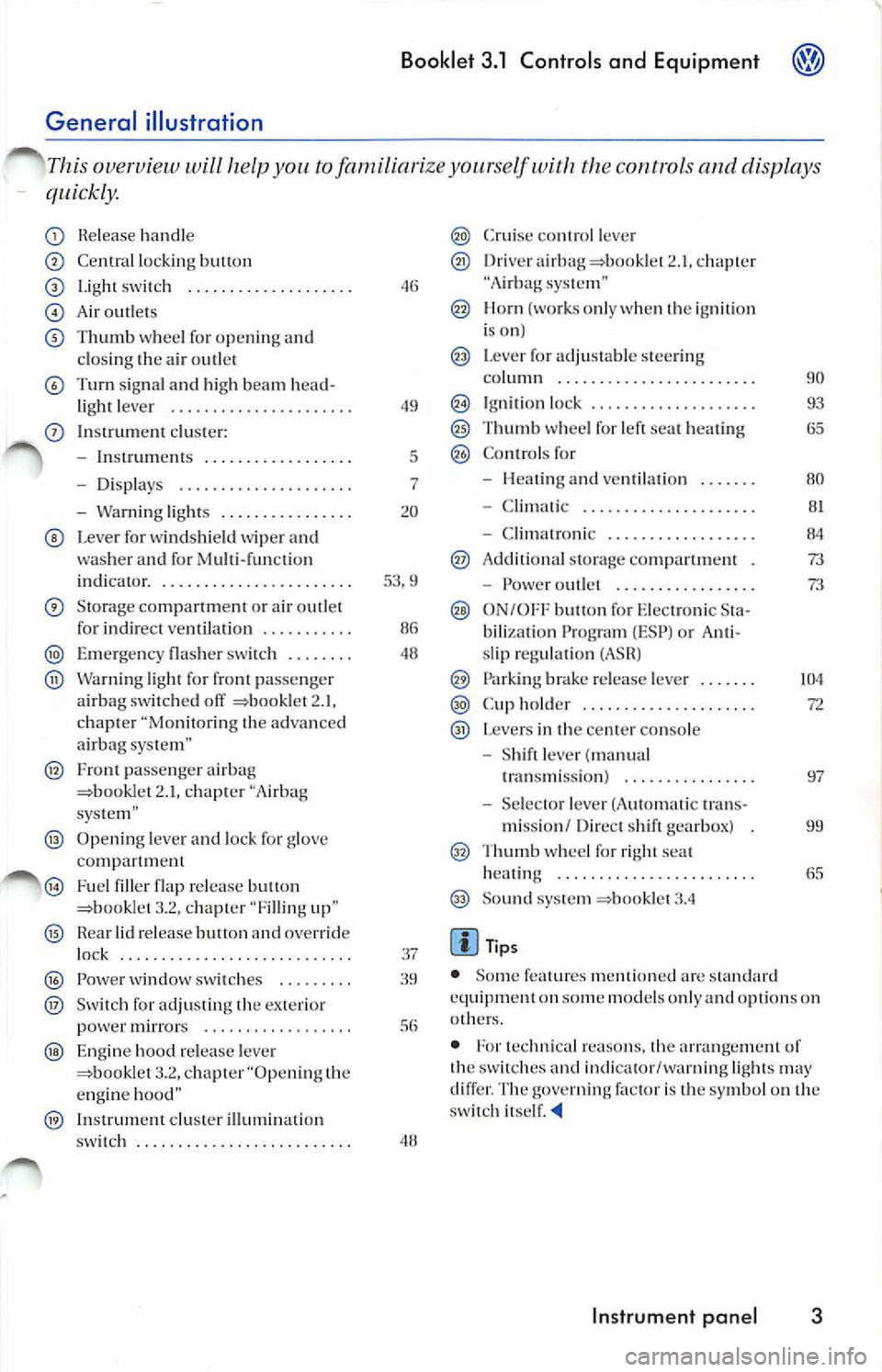
help you t o fami liarize yo urself the control s and displays
quickly.
Re lease hand le
Central locking button
Light switc h ............ •... ..•.
A ir out le ts
Th um b whee l for ope nin g and
cl osing th e air outl et
T urn sig n al a nd high beam head-
li ght lever ..................... .
In strum ent clu ste r:
Inst rum ents ...... ........... .
Display s .... .... ........ .... .
Warn ing lights ............... .
Lever for win dshi eld wipe r and
was her an d for Mu lti-fun ctio n
indicator. ............ ......... . .
Sto rage compartm ent or ai r outlet
fo r in di rec t ve ntilation .......... .
Emerge ncy flas her sw itch ... ... . .
Warni ng light fo r fro nt passe nger
a irbag switched off 2.1 ,
c h ap te r "Mo nitoring th e advan ced
a irb ag sys te m "
Fron t passe nge r a irb ag 2.1, c hap te r "Airbag
sys tem"
Openi ng leve r and lock for glove
co mp artm ent
Fuel fi ller flap release b utton
= bo okle t 3.2, cha pter "F illing
Hea r lid releas e butt on and overr ide
lock .... .. .... ....... ....... ... .
Power w indow switch es ..... ... .
Sw it c h for adj ust ing the pow er mir rors ................. .
Engine hood re lease leve r 3.2. cha pte r "Op ening the
e ngi ne
In strument cluster illumin atio n
49
5
7
20
53 .9
48
37
sw itch . . . . . . . . . . . . . . . . . . . . . . . . . .
C rui se contr ol leve r
Driv era irha g 2.1 , cha pter
"A irb ag
I lorn {wo rks onl y whe n the ig ni tio n
is on)
L eve r for adjustable steering
co lumn ...... ................. .
Ig niti on lock ................... .
Thumb w hee l fo r l eft se at heati ng
Co ntr ols for
Hea tin g and ve ntilat ion . ..... .
Clima tic ........ ..... ....... .
Clima troni c ................. .
Ad ditional storage comp artme nt
Powe r outl et . ............ ... .
ON/OFF b utton fo r Elec tronic Sta
b ili za tion Pr ogram {ESP) or Ant i
sli p regu latio n (ASH)
Park ing brak e re lease leve r ...... .
Cup hold er ... .... .... .........•
Levers in the center conso le
Sh ift le ver (ma nual
t ra nsmi ssio n) ....... .... .
Se lec tor le ve r (A utomatic tran s-
111i ssio n / Dir ect shi ft gearbox)
Thu111b whee l for r ight seat
heat ing .. .... ..... .... ........ .
So un d sys te111 =book le t
Tips
90
93
80
8 1
84
73
73
104
• Some feature s m en tion ed arc s ta nd ard
e quip111en t o n so me m od els on ly and opti ons on
o th ers.
• For tec hn ica l reasons, t he
of
t h e sw itches and indica tor/warn ing lig h ts ma y
di ffer. T he
factor is t he sy mbol o n th e
sw itch its elf.
Instrument panel 3
Page 209 of 477
Booklet 3.1 Controls and Equipment
Tachometer
The tachomete r display s the engi ne s pee d in rev olutions p er minute (rpm).
If, fo r examp le, the n eedle is di rec 1ly ove r 1h e 2.
this corre sp on ds 10 a n eng in e sp ee d of2000 rpm
( r evo lution s per minut e).
T he red zone on the dial indi ca tes 1he m ax imum
e n gin e spee d th at may be use d brie fly w hen the
e n gin e is warm an d aft er it has bee n b roken in
properly. However . it is ad visa ble 10 up sh if1 or
m ove 1he se lec 1o r lev er 1 0
D (or take yo ur fool ofT
th e acce le rator pedal 10 slow down ) b efo re I h e
n eed le rea ches the red zo ne.
Engine coolant tempera ture gauge
Th.i s gaug e sh ow s the en gi ne coola nt tem peratur e.
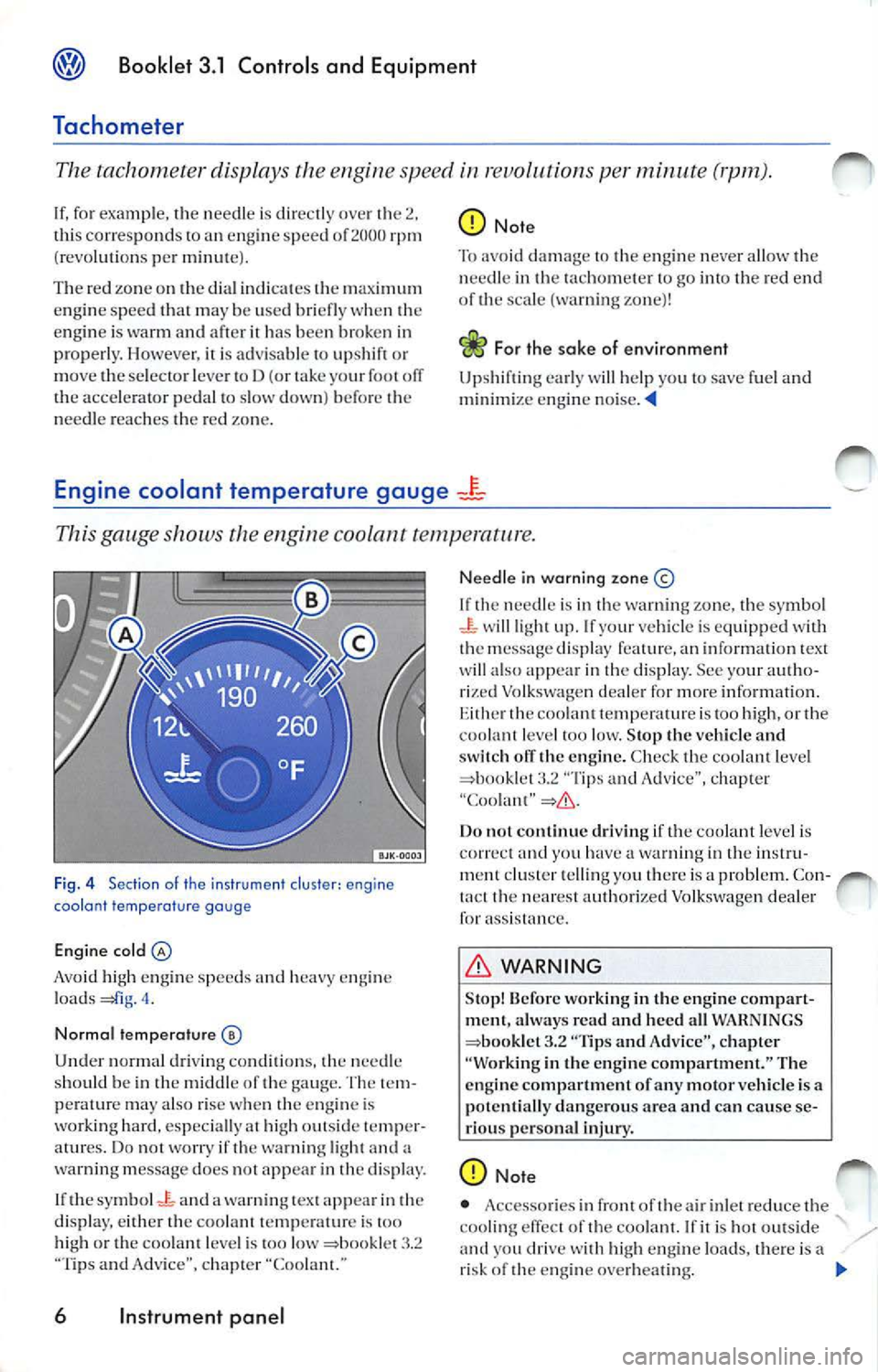
Fi g. 4 Sect ion of th e i nstrument cluster: engine
coola nt tempe ra tu re gauge
Engine cold
Avoid high en gin e s pee ds and heavy en gin e
l o ad s
nee dle
s h ould b e in th e middl e of the ga uge. The lem
pe rat ur e ma y also rise whe n the en gin e is
work ing hard, espec iall y at high out sid e te mp er
a tur es. D o no t worry if th e wa rning light and a
warning message does not appea r in th e displa y.
I f th e sy mbol
Jc: and a wa rning text app ear th e
d is pla y, eith er the coo la n1 t emp eratur e is
hi gh or the coo la nt l eve l is 100 low "Tips a nd Advice", c hapte r "Coo lant."
6 Instrument panel
N ee dle in warning zon e©
If need le is in the warning zo ne, the symb ol wi ll light up. If yo ur vehicle is equi pp ed wit h
1hc m essage displa y feature, an in forma tion tex t
wi ll al so appea r in the display . See yo ur a uth o
rize d Volksw age n dea le r fo r m ore inform atio n .
the coo la nt 1e mp erature is too high, or th e
coo lanl le vel loo low . Stop the vehicle and
ofT the e ngine. Check the coo la nt leve l "Ti ps and Advice", c hapter
Do not cont inue driving if th e coo lant level is
c orre ct and yo u have wa rnin g in th e in stru
ment clus1e r te llin g yo u th ere is a prob le m. Con-
the nea res t auth orized Volk swagen dea le r
fo r ass is ta nce.
WARNING
Stop! Before working in the en gin e co mpart
ment, alwa ys read a nd heed all WARNI NGS
"Tips and Advice", c hapter
"Wo rking in th e en gi ne compartment. " The
e ngin e co mpartm ent of any motor veh icle is a
potentiall y dang erou s area and can ca use se
riou s pers onal injury .
of th e air inlet red uce the
coo ling efTec1 of th e coo la nt. If is ho1 out sid e drive high e ngin e loads, th ere is a
ri sk of the en gin e ove rhea tin g. .,
Page 220 of 477
Booklet 3.1 Controls and Equipment
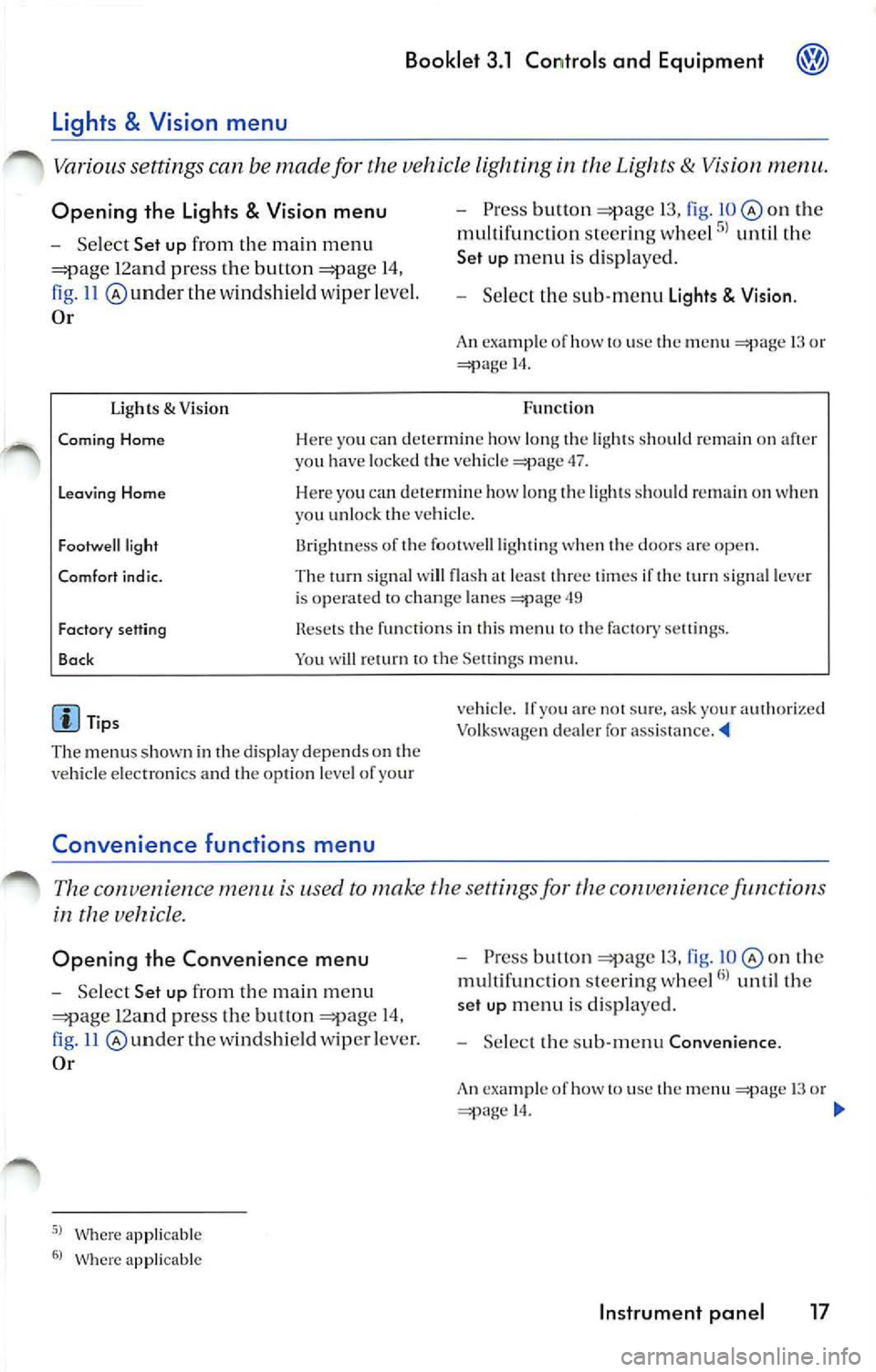
Opening the Lights & Vision menu
Select Set up from the main m enu
12a nd pr ess the button 14,
ll @ underthe wind shi eld wip er leve l.
Or
Ugh ts & Visio n
Pre ss button 13, fig . on the
multi fun cti on stee ring whee l
until th e
Set up menu i s dis pl aye d.
Selec t th e sub -m enu Lights Visio n.
An ex ampl e of how to use th e menu 13 o r 14.
Fun cti on
Coming Home Her e yo u ca n dete rmi ne how long the light s should remain on aft er
yo u h ave loc ked th e ve hicle 47.
Leavin g Home Here yo u ca n dete rmin e how l ong th e lig ht s s ho uld on when
y o u unlo ck th e veh icl e.
Fo otwe ll light
Comfort i nd ic. 13rightn ess of th e footwell ligh ting when t he doo rs are op en.
Th e tum sig nal w ill fla sh at leas t thr ee tim es if the turn sign al lever
i s o pera ted to chan ge lan es
49
Fact ory sett ing
Bac k Rese ts th e funct io ns in thi s m enu to th e fa cto ry se tting s.
Yo u will return to th e Se ttings m enu .
Tip s
The menu s shown in the dis pla y depend s on the
ve hicl e elec tron ics and th e opti on l evel of yo ur
Convenience functions m enu
ve hicle. If yo u ar e no t sur e. ask your aut ho ri ze d
Vo lkswagen deal er fo r ass is ta nce. '4
The con venien ce is used to make th e sett ings fo r the conve 11 ie n ce function s
in the
Opening the Convenience menu
Select Set up from the m ain m enu
12an d pr ess the but ton 14,
11 und er th e w indsh ie ld wipe r leve r.
Or
Where ap plicable
Wher e app licable
P ress bu lion 13, fig. o n th e
mu lt ifun ctio n stee rin g w hee l
unt il th e
set up m enu i s di spl ayed .
Selec t th e sub-m enu Convenience .
An exa mpl e of h ow to use th e 13 o r 14.
Instrument panel 17
Page 221 of 477
Booklet 3.1 Controls and Equipment
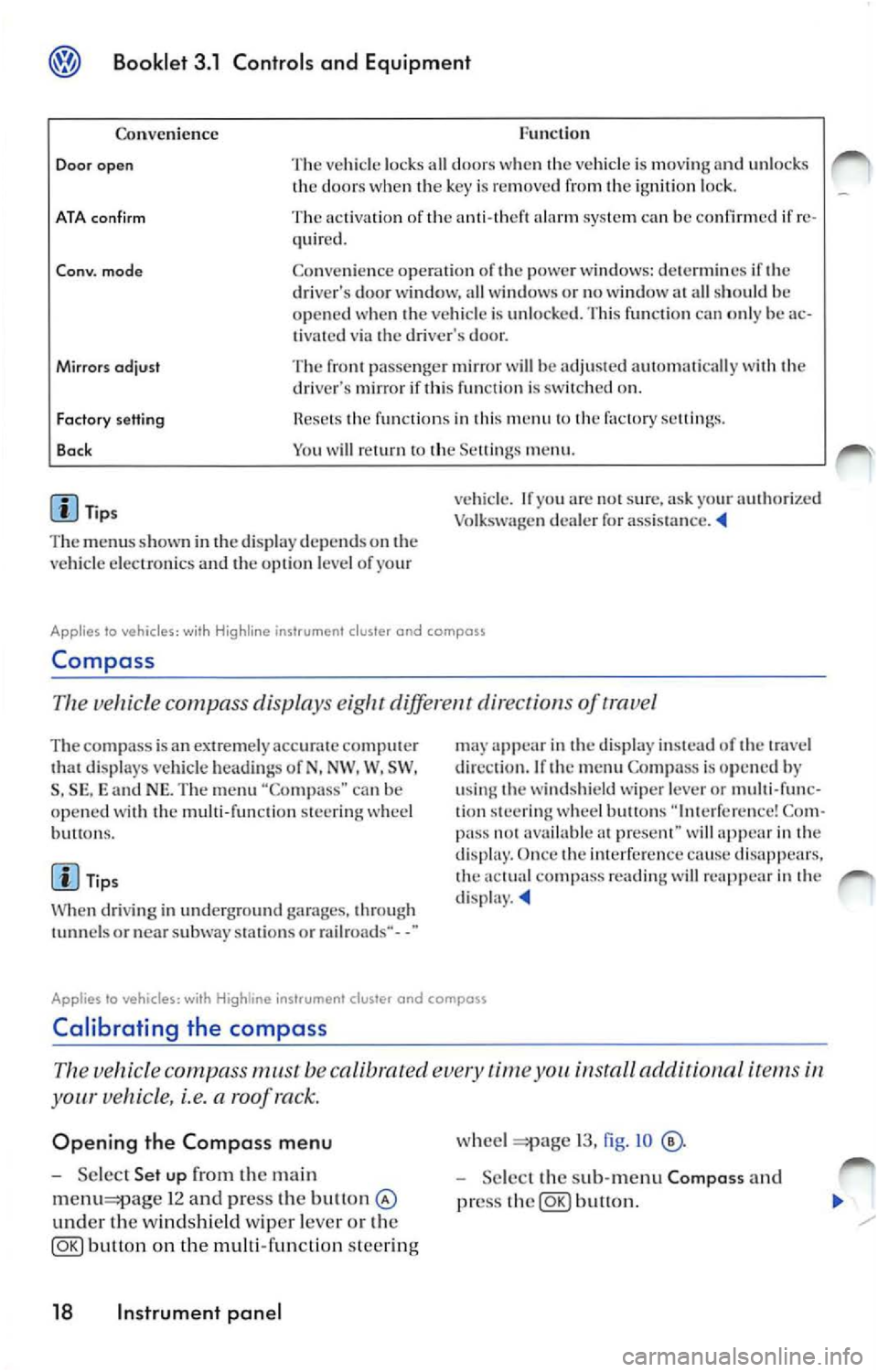
Func tion
Co nven ience
Door open The vehicl e lock s all door s w he n th e vehicle is mov ing and unl ocks
th e door s w hen key is re mo ved fr om ignition loc k.
ATA con firm The activati on of ala rm sys te m ca n be confirmed if re
quir ed .
Co nv. mode Co nve nien ce opera tio n of powe r w ind ows: dete rm in es if dri ver's door wi ndow, all w indows o r no window all sh ould h e
o p en ed when ve hicle is unlo cked. Thi s fun ctio n ca n o nly be ac
t ivated via dr iver's door.
Mirrors odjust The pa sse nger mir ror will be adju ste d au to mati cally wit h dri ve r's mirror if thi s fun cti o n is on.
Factory setting
Bo ck fun ctio n s in thi s m en u factory sellin gs.
Y o u w ill
m enu .
Tip s
T he m enu s show n in
displ ay depends on ve hicl e elec troni cs and o pti on l eve l of yo ur v
ehicl e. If
arc s ur e, ask yo ur authori zed
Vo lk sw age n dealer for assis ta nce .
Applies lo vehicles: wi th Hig hline ins trument cluster and compass
Compa ss
Th e ve hicle c ompa ss displa ys diff ere nt dir ect of trave l
The com pass is a n extremely ac curat e comput er di spl ays veh icle hea di ng s of N, NW . W, SW ,
S , SE , and NE. Th e m enu "Co mpa ss" can b e
op en ed wit h th e mu lti-fun cti on stee ring w hee l
bu H ons.
Ti ps
W hen dri vi ng in und erg round garages, throug h
or nea r subwa y stat ions o r rail roads·· - -"
app ear in displa y in stead of tr ave l
di rec tio n. If
m enu Compa ss is op en ed by
u sing w ind shi eld wipe r lever or multi-func
tion stee rin g w hee l butto ns Co m
pa ss avai lable prese nt" wi ll in dis p lay. Once imerfer cn ce cause dis appears. co mp ass rea ding will re app ear in d isp lay.
Applies to vehicles: with instrument cluster and compass
Calibrating the compass
vehicle compass must be calibrated time install aclditionnl i te m s
your vehicle, i.e. a roof ra ck.
Opening the Compass menu
Se lec t Set up the ma in
1 2 and press the bu11on
und er th e windsh ie ld wiper leve r o r th e
button on the multi-func tion steer ing
18 Instrument panel
wheel 13, fig . IO
Selec t th e sub-m enu Composs and
pr ess
button.
Page 222 of 477
Booklet 3.1 Controls and Equipm ent
Calibrat ing the compas s
-Ma rk the m enu ent ry Calibra tion and
pr ess
butt on. The fo llow ing m es
sage will be di sp layed To calib rate drive
round a comp lete circle.
- Drive t he ve hicle in circl es a t 5 mph (10
km/h) or less until th e disp lay indica tes
th at th e ca libra tio n process has bee n com
pl eted. • Durin g th e ca libration process or the cali
b ra tio n process is not su ccess rully accom
pli sh ed th e word "CA I."
will ap pear in the dis
p la y in stead or the directio n.
• 1r "CAL" ap pea rs in the dis p lay instead of the trave l di rectio n th e co mpa ss mu st be ca librat ed.
• While calib ratin g th e co mpass do no t drive
w ith the rea r lid ope n or the rea r seatback un
l o ck ed to avoid ina ccurate
Adjusting the compass variance zone
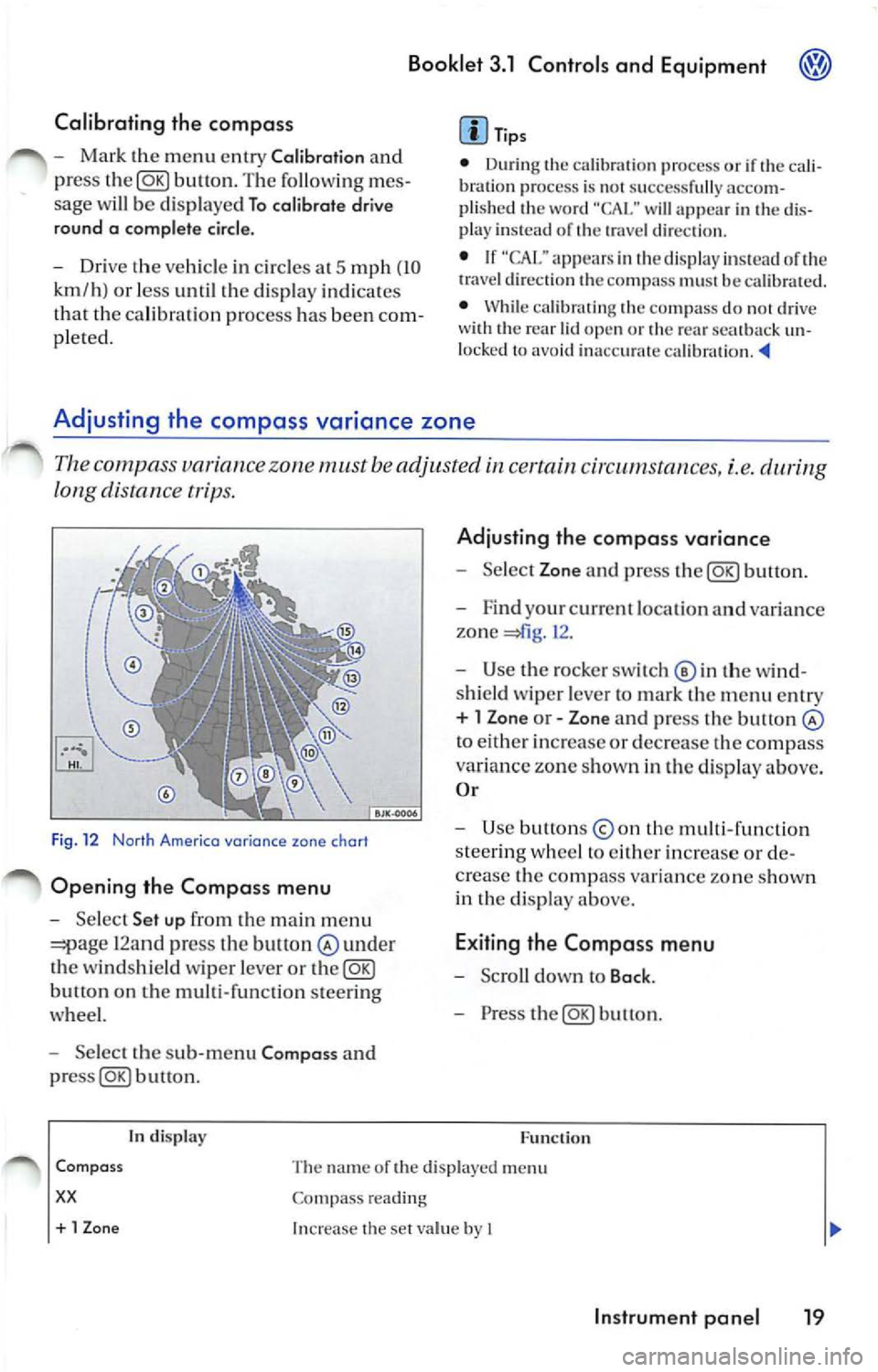
Th e c ompa ss variance zone must be adjusted certain cir cums tances, i.e.
long distance tr ips.
F ig . 12 Norlh Americo variance zone chort
Opening the Compa ss menu
- Se lec t Set up fr om the main m enu
12and press the bult on under
th e winds hield wiper leve r or the@g)
butt on on the multi-function steer ing
whee l.
- Select the sub -m enu Compa ss and
buu on .
tn disp lay
Adju sting th e compass variance
- Select Zone and press button.
- F ind your cur rent loca tio n an d varia nce
zone
1 2 .
- Use the rock er switch© in th e wi nd
s hi eld wiper leve r to ma rk th e m enu entr y
+ l Zon e or - Zone and press the button
to eith er in crease or decrease the compass
variance zone sh own in th e d isplay above.
O r
- Use button s
the multi -fun ction
s tee rin g w hee l to eith er increase o r de
c rea se the comp ass va ria n ce zone s how n
in th e di sp lay above.
E xiting the Compa ss menu
- Scro ll down to Back .
- Press the@g)button.
F u nc tion
Com pass
xx
The name or the di sp layed menu
Co mpass reading
+ 1 Zon e Increase the se t va lue by I
In strument pan el 19
Page 223 of 477
® Booklet 3.1 Controls and Equipment
In display Function
-1 Z
one
Ba ck Dec
reases the se t va lue by I
Th e Compass m enu is cl osed and the last displayed menu is ope ned.
Tips
The menu s sho wn in the disp lay dep end s on th e
ve hicl e electro nics and the o ption leve l of your
Warning lights
Overview of the warning lights
vehicle. If yo u are no t s ure, ask your authorize d
Vo lkswage n dealer for
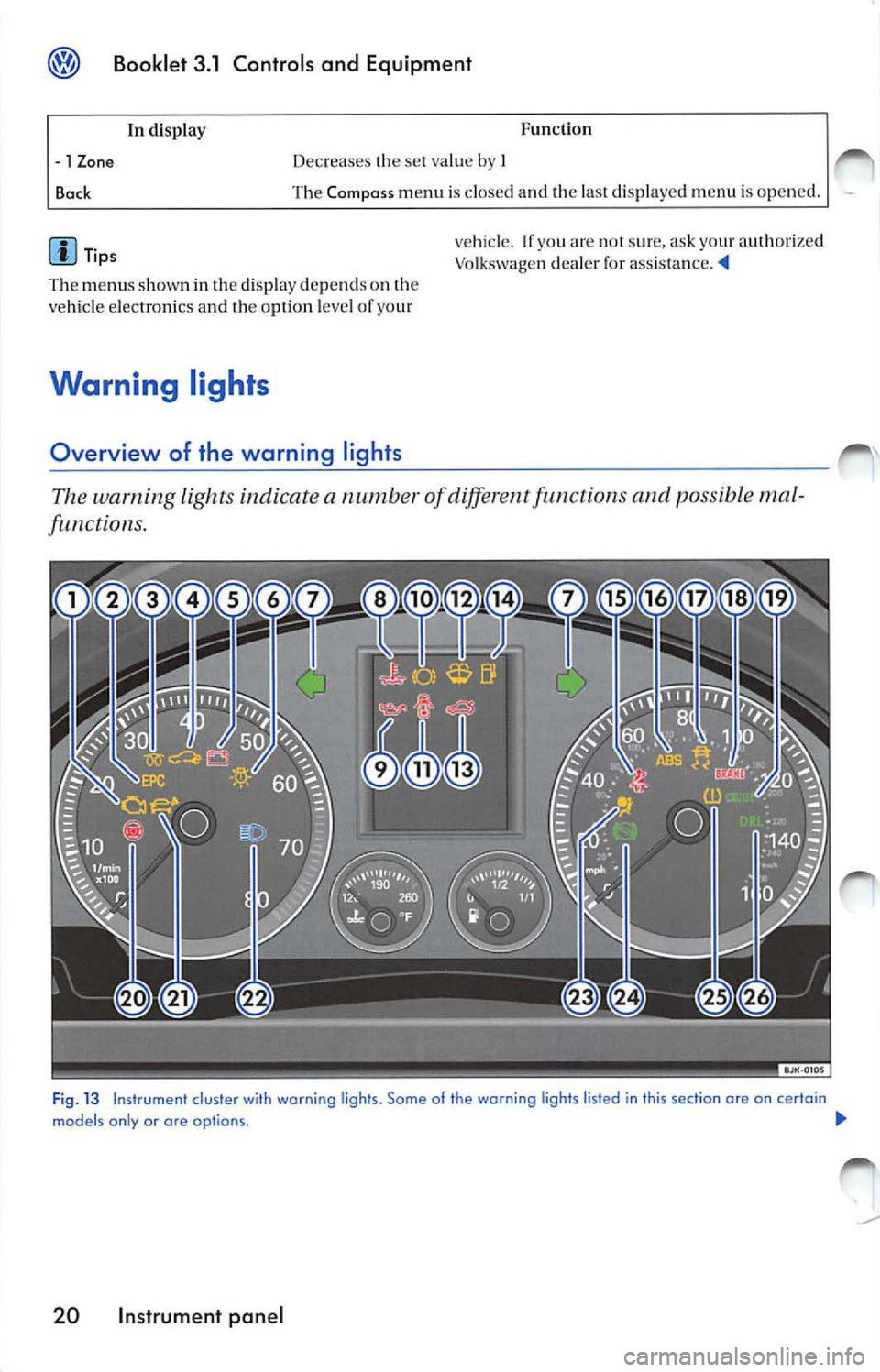
The warning light s indicate a numb er of diff ere n t functions and possibl e mal
functions.
Fi g. 13 Instrument cluster wi th warning ligh ts. Some of the warning lights listed in this section ore on certain
models only or are op tio ns. !JI,,
20 Instrument panel