turn signal VOLKSWAGEN JETTA 2008 User Guide
[x] Cancel search | Manufacturer: VOLKSWAGEN, Model Year: 2008, Model line: JETTA, Model: VOLKSWAGEN JETTA 2008Pages: 477, PDF Size: 77.6 MB
Page 443 of 477
Booklet 3.4 Pre mium Sound System
Volume Knob
Volume Control
Turn the rotary page 7, fig. 3
to adjust the vo lum e.
Setting Custom Turn-On Volume Level
Press and hold the [SCAN/TUNE) button©
for longer than 2 seconds to enter the set
up mod e. You will hear a signal tone .
Turn the [SCAN/TUNE) button until
SELECT ON VOLUME appears in the dis
pla y.
Use the knob to set the desired turn
on volume.
Press the [SCAN /TUNE) button again for
lon ger than 2 seconds to confirm the set
ting you have just made. You will hear a
s ignal ton e.
Setting the Speed Volume Control
(SVC)
Press and hold down the [SCAN/TUNE)
button for longer than 2 seconds to ent er
th e set up mod e. You wi ll hear a sign al
ton e.
Turn the [SCA N/TUNE) button until SPEED
DEP. VOLUME
appears in the di sp lay.
8 Radio I CD
In the lower part of the display the
words OFF and the number s 1, 2 and 3
appear. By using the station preset buttons
below these words select the volume
l eve l you want. 1 for a minimum volum e
ad justme nt in accordance to spee d.2 for a
m ed ium volume adjustemtn in accor
dance to speed.3 for a maximum volum e
a djustment in accordance to spe ed.
Pre ss the [SCA N/TUNE) b utton again for
longer than 2 seconds to confirm the set
ting you ha ve just mad e. You will h ear a
s ignal tone.
Cu stom Turn-On Volume L evel
The volum e setting when the unit is tu rned on is
the same it was when the unit was turned off
(or ig inal factor y setting). However, yo u can pro-
g ram the unit for your own per sonal turn -on
vo lume level.
Speed Volume Control (SVC)
The Speed Volume Contro l automatica lly ad
justs the vol um e in accordance wit h road sp ee d.
Tips
• If you do not confirm the sellin g yo u ha ve
j u st made , th e unit automati cally return to
th e norma l operat io n m ode af te r about LS sec
onds . Your c usto m turn -on volume will no t b e
s tor ed.
• If
c u sto m turn-on volume th at you stored
is lo ud er than the t urn -off volum e leve l, the unit
wi ll use the turn-off volume th e nex t tim e it is
turn ed on.
• If the audio volume leve l is loud er than the
turn-on vo lume that you stor ed and
unit is
turn ed off, the unit will use the stor ed leve l the
next t im e it is turned on.
Page 453 of 477
Booklet 3.4 Premium Sound System
SAT display selection
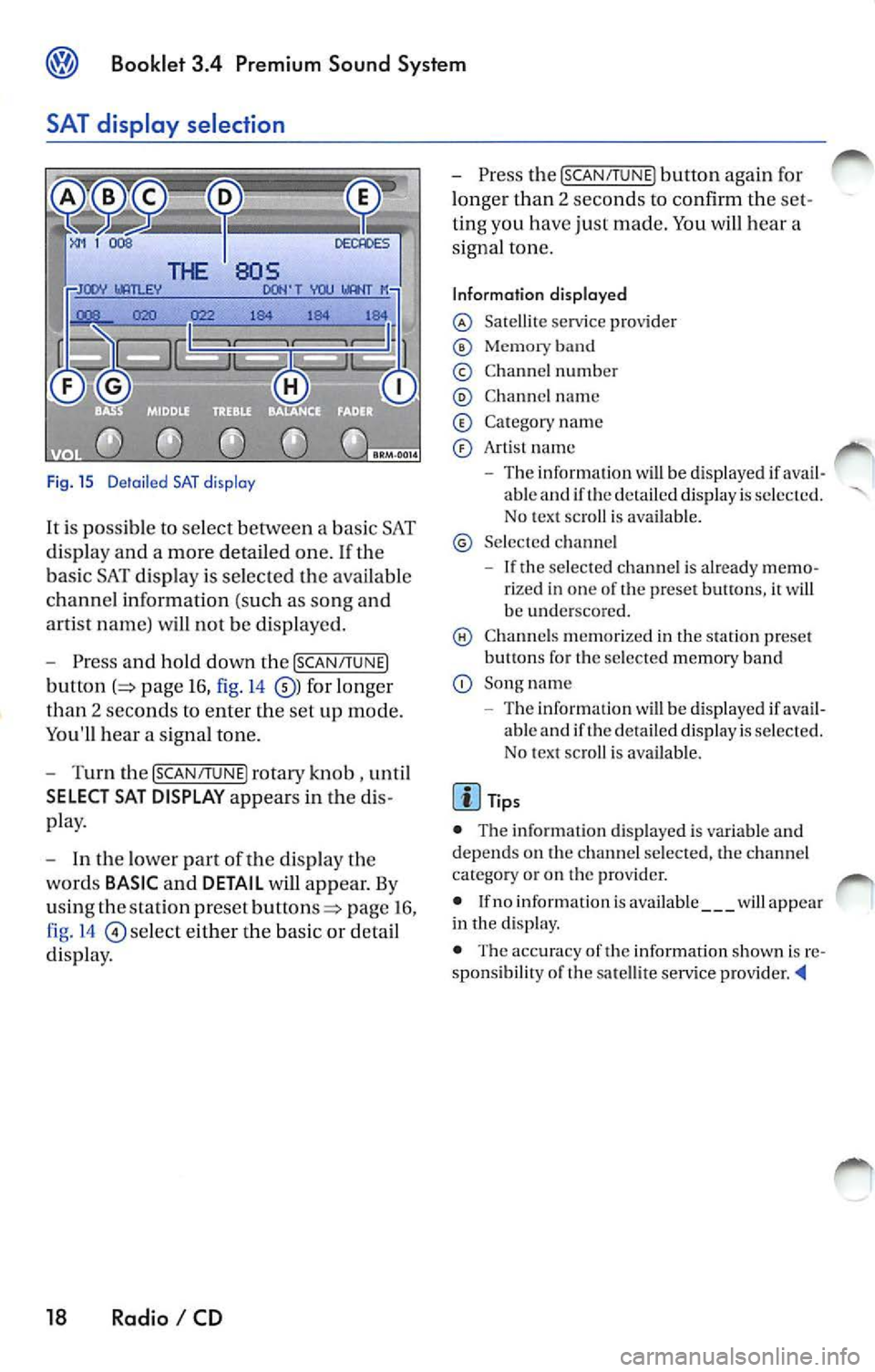
Fig. 15 D etail ed SAT disp lay
It i s possible to select between a bas ic SAT
di spl ay an d a more detailed one .
If the
ba sic SAT displa y is sel ecte d the availab le
channe l information ( such as song and
arti st nam e) will not b e displayed.
Press and hold down the [SCAN /TUNE]
button page 16, fig. 14 for longer
than 2 seco nds to enter th e se t up mode.
You'll hear a signal tone.
Turn th e [SCAN/T UNE] rotary knob , unti l
SELECT SAT DISPLAY appears in the
pla y.
In th e lo wer part of the di spl ay the
wo rds
BASIC and DETAIL will appear. By
u sing th e sta tion pre set
p age 16 ,
fig . 14
se lec t eit her the ba sic or detai l
di spla y.
18 Radio I CD
Press the [SCAN /TUN El button again for
l onger than 2 seco nds to confirm th e
ting you have just made. You will hear a
signa l ton e.
Information displayed
Satellit e service provider
Memor y band
© Chann el n um ber
C hann el name
C at egory nam e
Art is t name
The inform ation w ill be displayed if able and if the detail ed di spla y is s ele cted.
No tex t sc roll is ava ilab le.
S el ecte d ch anne l
If the se lec ted c hannel is already rize d in one of th e prese t button s, it wi ll
b e und ersco re d.
C hann els m em or ized in the sta tion preset
b utt ons fo r th e se lecte d memory band
Song name
- Th e information
will be di splayed if ava il
ab le and if th e de ta iled displa y is se lec te d.
N o tex t sc roll is av ail able.
• The inform ation d is p layed is var iable and
dep ends o n the channel sele cted, the c hann el
c ate gory or o n th e prov ider.
• If no inform ation is av ailabl e
will app ear
in th e displ ay.
• The acc ura cy of the information shown is
sponsibilit y of th e sa te llit e serv ice pro vider
Page 463 of 477
![VOLKSWAGEN JETTA 2008 User Guide Booklet 3.4 Premium Sound System
Track search Buttons
"Scroll" through the same track (Fast
Forward /Fast R ev ie w)
- Press and hold the !SEEK/TRACK ] button
page fig . 2 to scro ll](/img/18/55688/w960_55688-462.png "VOLKSWAGEN JETTA 2008 User Guide Booklet 3.4 Premium Sound System
Track search Buttons
\"Scroll\" through the same track (Fast
Forward /Fast R ev ie w)
- Press and hold the !SEEK/TRACK ] button
page fig . 2 to scro ll")
Booklet 3.4 Premium Sound System
Track search Buttons
"Scroll" through the same track (Fast
Forward /Fast R ev ie w)
- Press and hold the !SEEK/TRACK ] button
page fig . 2 to scro ll upwards or
downwards
trough the same track.
The track elapsed time appears in the
upper left corne r of the d isp lay.
Information displayed
Fig. 24 SCAN/ TUNE button
MP3 display selection
It is possible to select betwee n a basic MP3 dis
play and a more detailed one. If th e bas ic MP3
display is selec ted the file informat ion (such as
s ong and artist name) w ill not be displayed.
• Press and ho ld down
(SCAN/TUNE) butt on fig. 24 for longer than 2 seconds to ent er
the set up mode. You will hear a sig nal tone.
• Turn the
(SCAN/TUNE) rotary knob, un til SELEC T MP3 DISPLAY appears i n the display.
• In
low er part of the display words BASIC and DETAIL will appear. By usi ng th e s ta
tion pr eset bu tto ns © select eith er the bas ic o r
deta il di splay.
• Press the
SCAN/TUNE buu on again fo r
long er th an 2 second s to confirm the setting
you've just made . Yo u will hear a signa l tone.
28 Radio I CD
-Release t he button to stop skipp ing
through the track.
Text sc roll select ion
You can decide whether the available informa
tion in the MP3 file is scrolled or not in the di s
play.
• Press and hold down the
(SCAN/TUNE) button
for longer than 2 seconds to enter the set u p
mode. You w ill hear a signal tone.
• Turn the
(SCAN/T UNE) rotary knob,
station preset buttons © select eith er ON or OFF.
• Press the (SCAN/TUNE) button again for longer
th an 2 seco nds to confirm the settin g yo u've just
made. You'll hear a signal to ne.
• If yo u decide to scroll the fil e information
follow ing warn ing will appear in the d isplay: CAUTION! THIS MAY CAUSE DRIVER
DISTRACTION.