display VOLKSWAGEN JETTA 2010 Owner's Guide
[x] Cancel search | Manufacturer: VOLKSWAGEN, Model Year: 2010, Model line: JETTA, Model: VOLKSWAGEN JETTA 2010Pages: 477, PDF Size: 77.6 MB
Page 452 of 477
Booklet 3.4 Premium Sound System
Automatic channel selection
-Briefly press the ISCAN/TUN EJ button to
sta rt a utom atic sca nning to the n ext
c hann el w ithin a give n category. Aft er
abou t 10 sec ond s, scan ning will resume
and go to the ne xt channel.
SCAN appears
in the displ ay and the c hann el available in
formation will be display ed.
- To stop scan ning, press the
ISCAN/T UNEJ
button bri efly during th e 10 seco nd "h old "
time.
- T he sca n function stop s automatica lly
after one loop of the available chann els in
the pr eset memori es or in the ca tego ry if
the operation is not manually stopped.
If a
diff erent cate gory i s to b e scan ned, first se
le ct that category manually and th en pr ess
[SCAN/TUNEJ.
Preset scan
-It is po ssible for you to select between a
sca n opera tion through the enti re range of
chann els w ithin a giv en category or ju st
tho se memorized in the station preset but
t o ns. Press and hold do wn the
!SCAN/T UNE )
button for l on ge r th an 2 seco nds to e nter
th e set up mod e. You'll hear a sign al ton e.
- Turn th e
!SCAN/T U NE J rotary knob , until
SELECT SCAN SAT appears in the di spl ay. -
In th e lower part of the di spla y th e
w ord s
CHANNELS and PRESETS wi ll ap
pear . By using the stat ion pr eset button s©
belo w these wor ds se lect th e type of scan
operat ion you want.
- P ress the
ISCAN/T UNEJ button again for
long er than 2 secon ds to c onfirm th e set
ting you've just m ad e. You' ll hea r a s ig nal
ton e. Th e pr ese t scan function sto ps au to
m aticall y after one loop of th e available
channels in the preset memories if the op
eration is not manuall y stopped .
Tips
• The category name to which each chan nel
b elong s w ill app ear in the displ ay.
• When se lec tin g cha nnels on ly th e ch ann el
and ca tegory names will app ear in th e di splay.
After a few second s the availab le chan nel infor
mat ion will appea r in the display.
• Non se lec ta bl e ch annel s arc automatically
p asse d over w hen search ing ch annel s and are
not shown in the display. It dep ends on your
provider wheth er the chann el is covered.
• If the channel fou nd is already saved on a sta
tion butt on , the corres pon din g chann el numb er
will be undersc ored in th e displa y.
• When category ALL is select ed the
(SEEK /TRACK) button will sea rc h chan nels in all cat egories.
• category ALL is selec ted t he next ava ilable
c h annel will be selec ted when usin g th e
(SEEK/TRACK) button, rega rdless if it belong s to different category. -'4
Radio I CD 17
Page 453 of 477
Booklet 3.4 Premium Sound System
SAT display selection
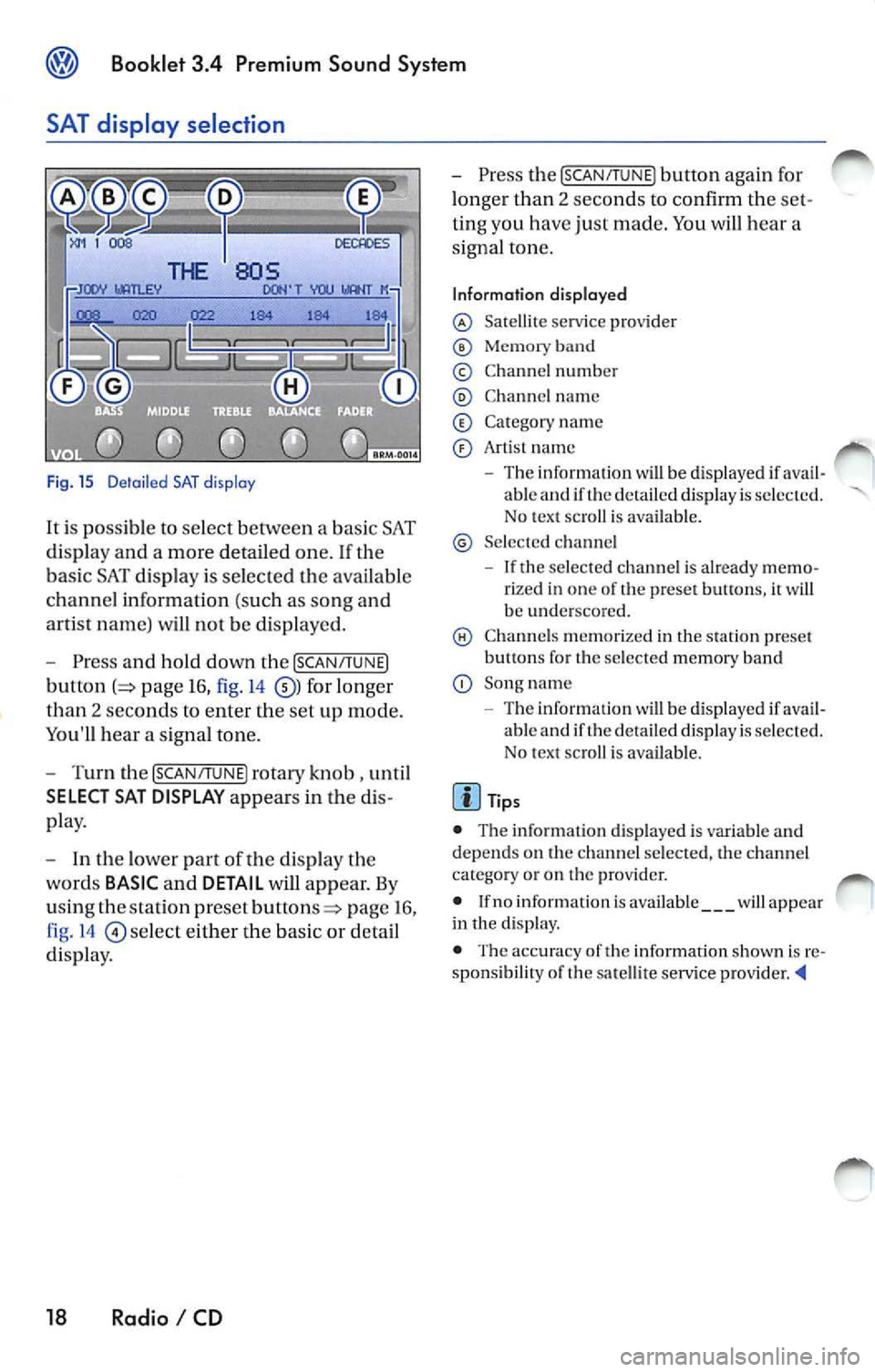
Fig. 15 D etail ed SAT disp lay
It i s possible to select between a bas ic SAT
di spl ay an d a more detailed one .
If the
ba sic SAT displa y is sel ecte d the availab le
channe l information ( such as song and
arti st nam e) will not b e displayed.
Press and hold down the [SCAN /TUNE]
button page 16, fig. 14 for longer
than 2 seco nds to enter th e se t up mode.
You'll hear a signal tone.
Turn th e [SCAN/T UNE] rotary knob , unti l
SELECT SAT DISPLAY appears in the
pla y.
In th e lo wer part of the di spl ay the
wo rds
BASIC and DETAIL will appear. By
u sing th e sta tion pre set
p age 16 ,
fig . 14
se lec t eit her the ba sic or detai l
di spla y.
18 Radio I CD
Press the [SCAN /TUN El button again for
l onger than 2 seco nds to confirm th e
ting you have just made. You will hear a
signa l ton e.
Information displayed
Satellit e service provider
Memor y band
© Chann el n um ber
C hann el name
C at egory nam e
Art is t name
The inform ation w ill be displayed if able and if the detail ed di spla y is s ele cted.
No tex t sc roll is ava ilab le.
S el ecte d ch anne l
If the se lec ted c hannel is already rize d in one of th e prese t button s, it wi ll
b e und ersco re d.
C hann els m em or ized in the sta tion preset
b utt ons fo r th e se lecte d memory band
Song name
- Th e information
will be di splayed if ava il
ab le and if th e de ta iled displa y is se lec te d.
N o tex t sc roll is av ail able.
• The inform ation d is p layed is var iable and
dep ends o n the channel sele cted, the c hann el
c ate gory or o n th e prov ider.
• If no inform ation is av ailabl e
will app ear
in th e displ ay.
• The acc ura cy of the information shown is
sponsibilit y of th e sa te llit e serv ice pro vider
Page 455 of 477
® Booklet 3.4 Premium Sound System
Tips
Always hold the CD either by the center or by the
out er edge with the print ed sid e facing up.
LOAD button
The internal CD changer is operated easily and convenient ly usin g the cont rols
on the radio.
It allows you to load up to six CD's.
FM 1
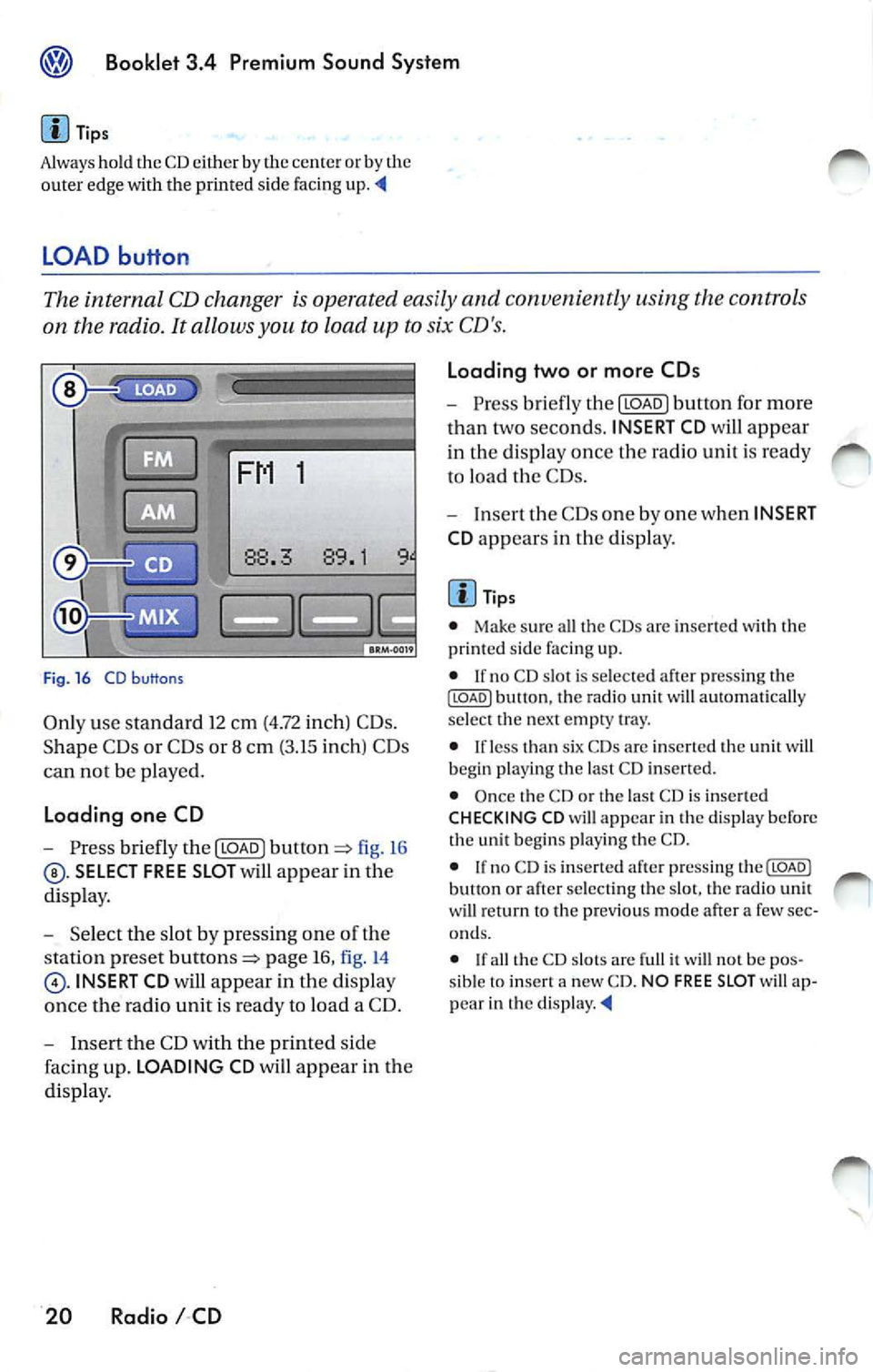
Fig . 16 CD b uttons
Only use standa rd 12 cm (4.72 inch) CD s.
Shape C Ds or CDs or 8 cm (3.15 inch) CDs
can not be played.
Loading one CD
- Press briefly the I LOAD J fi g. 16
SELECT FREE SLOT will appear in the
di spla y.
- Selec t th e slot by pressing one of t he
s tation pr eset
page 16, fig. 14
INSERT CD will app ear in the disp lay
once th e radio unit is read y to load a CD.
- I nse rt the CD with the printed side
faci ng up. LOADING CD will app ear in the
di splay .
20 Radio I CD Loading two or more CDs
-
Press briefly the I LOAD J button for more
t h an two second s. INSERT CD
will app ear
in the display once t he rad io unit i s ready
to load the CDs.
- Inse rt th e CDs one by one when INSERT
CD app ears in the di splay.
Tips
• Make sur e all the CDs arc inse rted wi th the
printed side facing up.
• If no CD slot is se lected a fter pressing th e
ILOADJ button, the rad io unit will automat ica lly
selec t the nex t empty tray.
• I f le ss than six CDs are inser te d th e uni t will
b egi n playi ng the last C D inserted.
• Once the CD or th e las t CD is inserted
CHECKING CD will appea r in the di spl ay before
the unit b egins playing the CD.
• If no C D is inserted afte r press ing th e(LOADJ
b utt on or after select ing the slot , the rad io unit
w ill r eturn to the p rev iou s m ode after a few sec
o nd s.
•
th e CD slot s are full it w ill not be pos
sib le to insert a new CD . NO FREE SLOT w ill ap
pear in th e
Page 456 of 477
Booklet 3.4 Premium Sound System
CD button
-Press the@button page 20, fig. 16
when you wan t to li ste n to the CD
pl aye r or to select an externa l CD changer •
if ava ilabl e.
Tips
• If no disc is lo aded in int ernal CD
c h anger you wi ll hear an a udibl e signal, and NO
C D
w ill app ear in th e disp lay.
M ix Mode bu tton
• If no disc is loaded in th e interna l C D
c h anger but there is a disc loaded in the ex terna l
C D changer •, t he exte rnal CD change r mode
w ill be selec ted.
• If neither a disc is loaded in internal CD
c h anger nor the external CD change r is ava ilab le
you
w ill hear an aud ible s igna l, a nd NO CD will app ear in th e display. '4
When you select MIX, the CD tracks will be played in random order.
Radios without SRDS: Playing tracks
in random order
-Press bu tton page 20, fig. 16
for more than 2 second s. MIX-CD a p
pears in the disp lay. Pr ess
again to stop the random play operat ion.
Radios with SRDS: Playing tracks in
random order
- Press the@button for more than 2
page 20, fig.16 MIX-CD
appe ars in the di splay. Press th e@button
aga in for more th an 2 seco nds agai n to
s top th e random play operat ion.
Select the type of random play mode
- Press and hold do wn the ISCA N/TU NEI
button :=> page 16, fig .14 long er than
2 seco nds to enter the set up mod e. You
w ill hear a signal tone. -
Pres s th e
!SCAN/TUN El button briefly,
until
SELECT MIX MODE appears in the
disp lay.
- In the lowe r part of the display the
words FLOR,
MAG will appear. By
u sing th e s tatio n pre set but tons=> page 16,
fig . 14
be low th ese wo rds se lect the
of scan operation you wan t.
- Press the
ISCAN/TUNEI button again for
l onge r than 2 seconds to confirm the set
t in g yo u have just made. You
will hear a
signa l tone.
Type of random play mode
• page 25
• CD -th e random play mode occ urs only
through the tracks of th e cu rrent disc , MIX-CD
ap pea rs in th e display.
• MAG -th e random play mode occ urs th rough
a ll th e i nserted discs in th e internal CD ch anger
o r in Lh e externa l C D
if availab le. MIXMAG ap pear s in th e di splay. '4
Radio I CD 21
Page 459 of 477
Booklet 3.4 Premium Sound System
• Briefly press ing butto n wh ile a track is
pl ayi ng (more than 2 seconds play) will cause the u
nit to ''j um p" back to the beginning of the
track and resume playing from there.
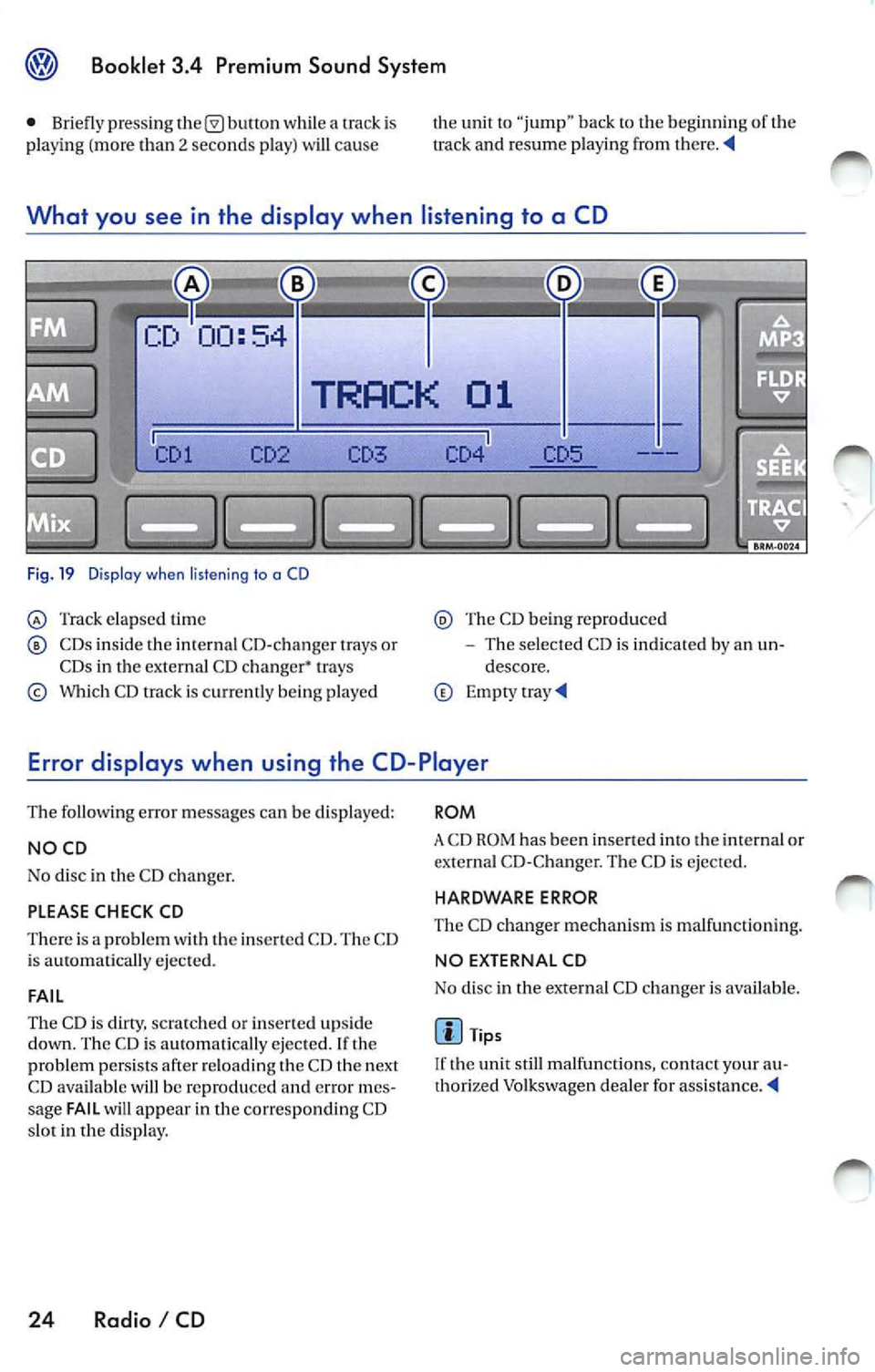
What you see in the display when listening to a CD
Fig. 19 Dis pla y w he n liste ning to a CD
Track elap sed time
CDs inside the in te rnal CD-c hanger trays or
CDs in the external CD changer• trays
Which CD track is c urr ent ly being p layed
Th e CD being reproduced
The selected CD is indicated by an un
descore.
Error displays when using the CD-Player
The following error messages can be displayed:
NOCD
No disc in the CD c hanger.
PLEASE CHECK CD
There is a problem with the inserted CD. The CD
i s ejected.
FAIL
The CD is clirry, scratc hed or inserte d upside
down. The CD is au tomatically ejected. If th e
problem persists afte r reloading t he CD th e next
CD available will be reproduced
error mes
sage FAIL will appear in the corresponding CD
s lot in the display.
24 Radio I CD
ROM
A CD ROM has been inse rted into the int ernal or
externa l CD-C hange r. The CD is ejected.
HARDWARE ERROR
The CD ch anger mechanis m is ma lfunc tion ing.
NO EX TERNAL CD
No disc in the external CD changer i s available .
Tips
If the unit still malfunctions, contact your au
thorized Volkswagen dea ler for
Page 460 of 477
Booklet 3.4 Premium Sound System ®
MP3
MP3 player operation
The interna l CD-C hanger also allows you to play
CD-Rs co ntaining MP3 data. Howeve r, t he re
flectivity rate must be 60
% or high er.
D iff ere nt kind s of info rmation (e.g. name of the
so ng and artist) may appear in th e di sp lay
during MP3 player operation
On ly use s tandar d 12 cm (4.72 in ch) CDs. The
s h ape d CDs or 8 cm (3.15 inch ) CDs can not b e
p layed.
Tips
• The u nit ca n only play either discs con
taining audio or MP 3 data. If a CD co ntaining
both audio and M P3 data is inserted, an error
message will appear in the display and the CD
will be automatica lly ejected ..
• The ex terna l CD changer • can not play dis cs
co ntainin g MP3 files.
<4
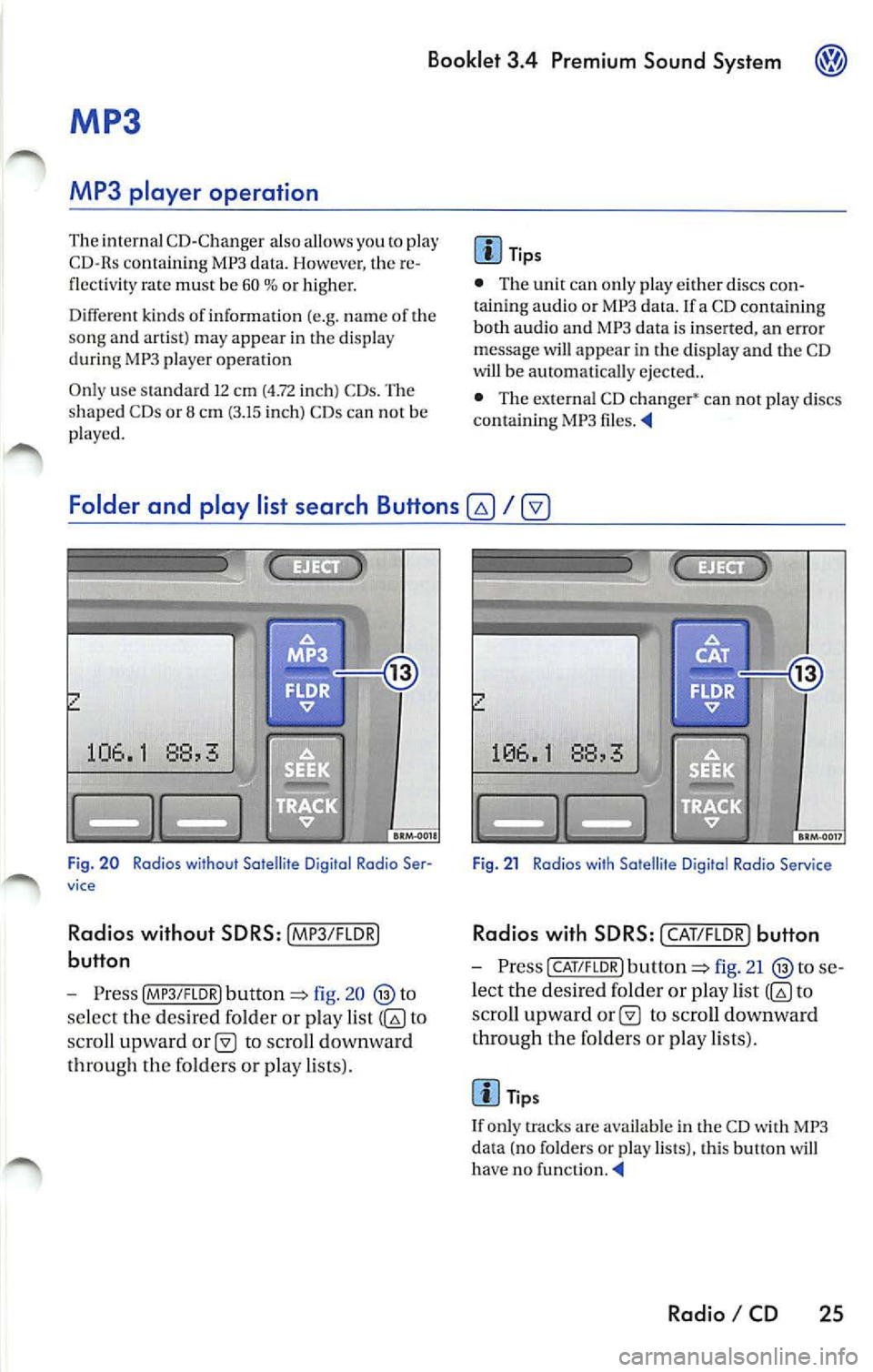
Folder and play list search Buttons
fig. 20
se lect the des ired folder or play list to
sc ro ll upward
to scro ll downward
th roug h th e fo lders or pla y lists).
Fig . 21 Radios with Satellite D igital Rodia Service
Rad ios with SD RS: I CAT/F LOR) button
- Press CAT/FLOR l fig. 21 se
l ec t the desired folder or p lay list
to
s cro ll upward
to scro ll downward
th rough the fo lder s or p lay lists) .
Tips
I f only tracks are availab le in the CD with MP3
da ta (no folders or play lists), this button will
ha ve no funct ion . ._
Radio I CD 25
Page 462 of 477
Booklet 3.4 Premium Sound System
Track selecting
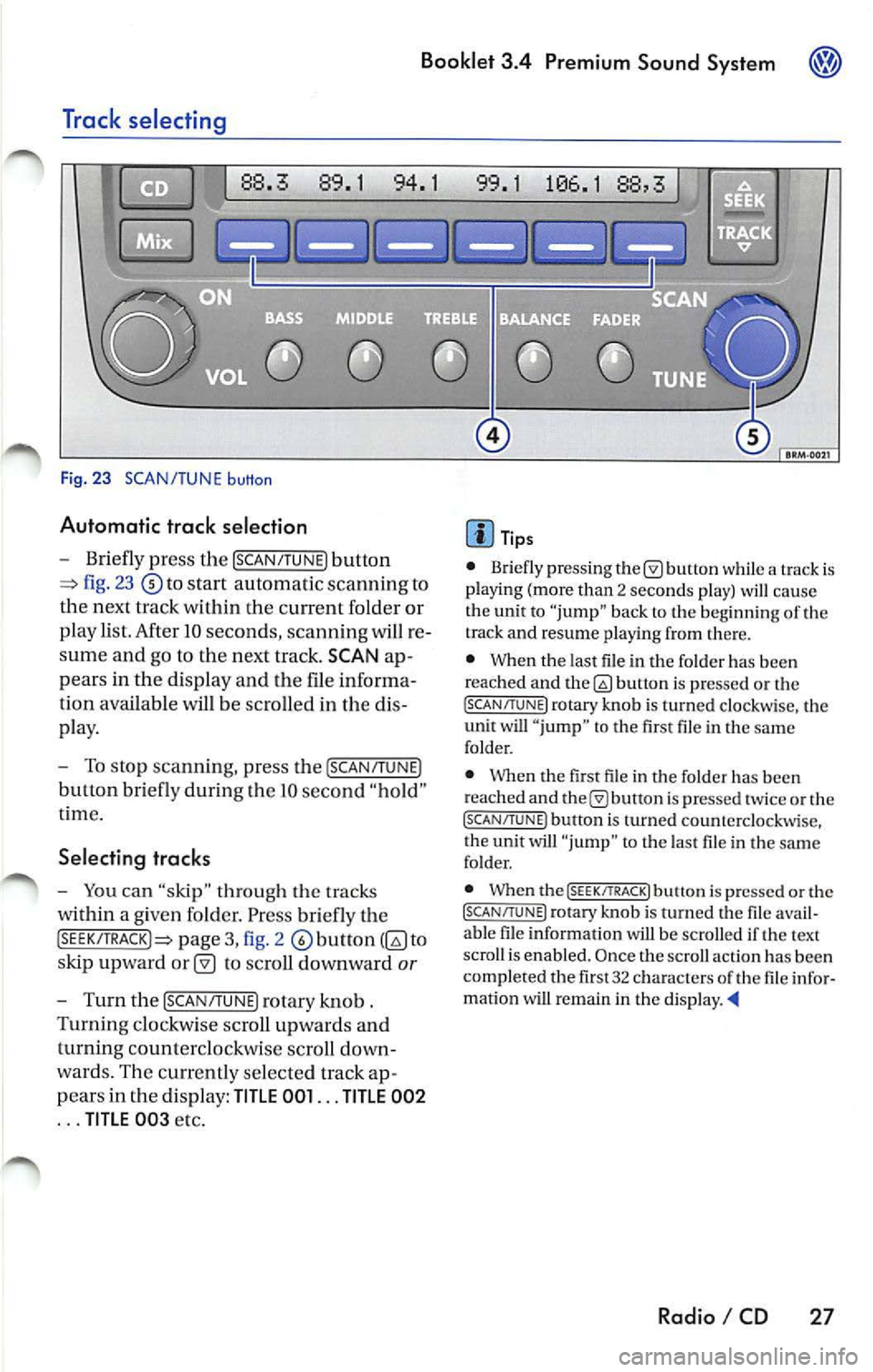
Fig. 23 SCAN/TUNE button
Automatic trac k selection
-Briefly press the !SCAN/TUNE) button
fig. 23 to sta rt automatic scannin g to
the next track within the curre nt folder or
p lay list. After 10 seconds , scannin g will re
sume and go to the next track. SCAN ap
pears in the display and the file informa
tion available
be scro lled in the dis
pla y.
- To stop scannin g, pre ss the [SCAN/T UNE)
button bri efly during Lhe IO seco nd "hold "
t ime.
Selecting tracks
-You can "skip" through th e trac ks
within a given fo lder. Pr ess briefly th e
pag e 3, fig. 2 to
s kip upward
to scroll downward or
- Turn th e !SCAN/TUNE) rotary knob .
Turnin g clo ckw ise sc roll up wards and
turning counterclockwi se scroll down
wa rds. Th e curr en tly se lected track ap
p ears in the di spl ay:
TITLE 001 ... TITLE 002
... TITLE 00 3 etc.
Tip s
• Briefly press ing butt on while a track is
pla ying (mo re than 2 seco nds play) cau se
the unit to "jump" bac k to the beginning of th e
track and resume pla yin g from there.
• When the last file in the fo lder has been
reached and
bu non is pre ssed or th e (SC AN/TUNE! rotary knob is turned clockwi se, the
unit will " jump " to th e first file in th e same
folder.
• Whe n the first fil e in t he folder has been
r eached and
is pr essed tw ice or the (SCAN/TUNE ) button is turned counterclockwise,
t he unit will "ju mp " to t he last file in the sa me
fo lder.
• When the
(SEEK/TRACK! butt on i s pre ssed or the (SCAN/TUNE) rotary kno b is turn ed the fil e avail
a bl e fil e in formation will be scro lled if th e text
scro ll is enabl ed. Once the scroll actio n ha s be en
comp le ted the fir st 32 characters
th e fil e infor
matio n wi U remain in the di sp la y. •
Radio I CD 27
Page 463 of 477
![VOLKSWAGEN JETTA 2010 Owners Guide Booklet 3.4 Premium Sound System
Track search Buttons
"Scroll" through the same track (Fast
Forward /Fast R ev ie w)
- Press and hold the !SEEK/TRACK ] button
page fig . 2 to scro ll](/img/18/55686/w960_55686-462.png "VOLKSWAGEN JETTA 2010 Owners Guide Booklet 3.4 Premium Sound System
Track search Buttons
\"Scroll\" through the same track (Fast
Forward /Fast R ev ie w)
- Press and hold the !SEEK/TRACK ] button
page fig . 2 to scro ll")
Booklet 3.4 Premium Sound System
Track search Buttons
"Scroll" through the same track (Fast
Forward /Fast R ev ie w)
- Press and hold the !SEEK/TRACK ] button
page fig . 2 to scro ll upwards or
downwards
trough the same track.
The track elapsed time appears in the
upper left corne r of the d isp lay.
Information displayed
Fig. 24 SCAN/ TUNE button
MP3 display selection
It is possible to select betwee n a basic MP3 dis
play and a more detailed one. If th e bas ic MP3
display is selec ted the file informat ion (such as
s ong and artist name) w ill not be displayed.
• Press and ho ld down
(SCAN/TUNE) butt on fig. 24 for longer than 2 seconds to ent er
the set up mode. You will hear a sig nal tone.
• Turn the
(SCAN/TUNE) rotary knob, un til SELEC T MP3 DISPLAY appears i n the display.
• In
low er part of the display words BASIC and DETAIL will appear. By usi ng th e s ta
tion pr eset bu tto ns © select eith er the bas ic o r
deta il di splay.
• Press the
SCAN/TUNE buu on again fo r
long er th an 2 second s to confirm the setting
you've just made . Yo u will hear a signa l tone.
28 Radio I CD
-Release t he button to stop skipp ing
through the track.
Text sc roll select ion
You can decide whether the available informa
tion in the MP3 file is scrolled or not in the di s
play.
• Press and hold down the
(SCAN/TUNE) button
for longer than 2 seconds to enter the set u p
mode. You w ill hear a signal tone.
• Turn the
(SCAN/T UNE) rotary knob,
station preset buttons © select eith er ON or OFF.
• Press the (SCAN/TUNE) button again for longer
th an 2 seco nds to confirm the settin g yo u've just
made. You'll hear a signal to ne.
• If yo u decide to scroll the fil e information
follow ing warn ing will appear in the d isplay: CAUTION! THIS MAY CAUSE DRIVER
DISTRACTION.
Page 464 of 477
Booklet 3.4 Premium Sound System
• By using the stati on preset buttons© select
eit her ACCEPT t o scroll the file information or
DECLINE not to scro ll th e ava ilabl e file inform a
tion.
File information
T he file informat ion which is available, will be
scro lled or will appear in the displa y if the detail
display has been selected. The type of informa
tion displayed depends on the follow ing:
• lflD3 tag data is ava ila bl e in an MP3 file this
unit can display the title (t rack title) and art is t name. If
no ID3 tag is av ailable, th e name of the
fold er an d the name of the file w ill appear in the
di sp lay.
• The fo lder and
names can be displa yed
like titles. Capital letters and/ or numerals and
(und erscores) are scro lled.
• A maximum o f32 characte rs can be dis
p layed .
• Folder a nd file nam es usin g other symbo ls
will not b e disp layed properly.
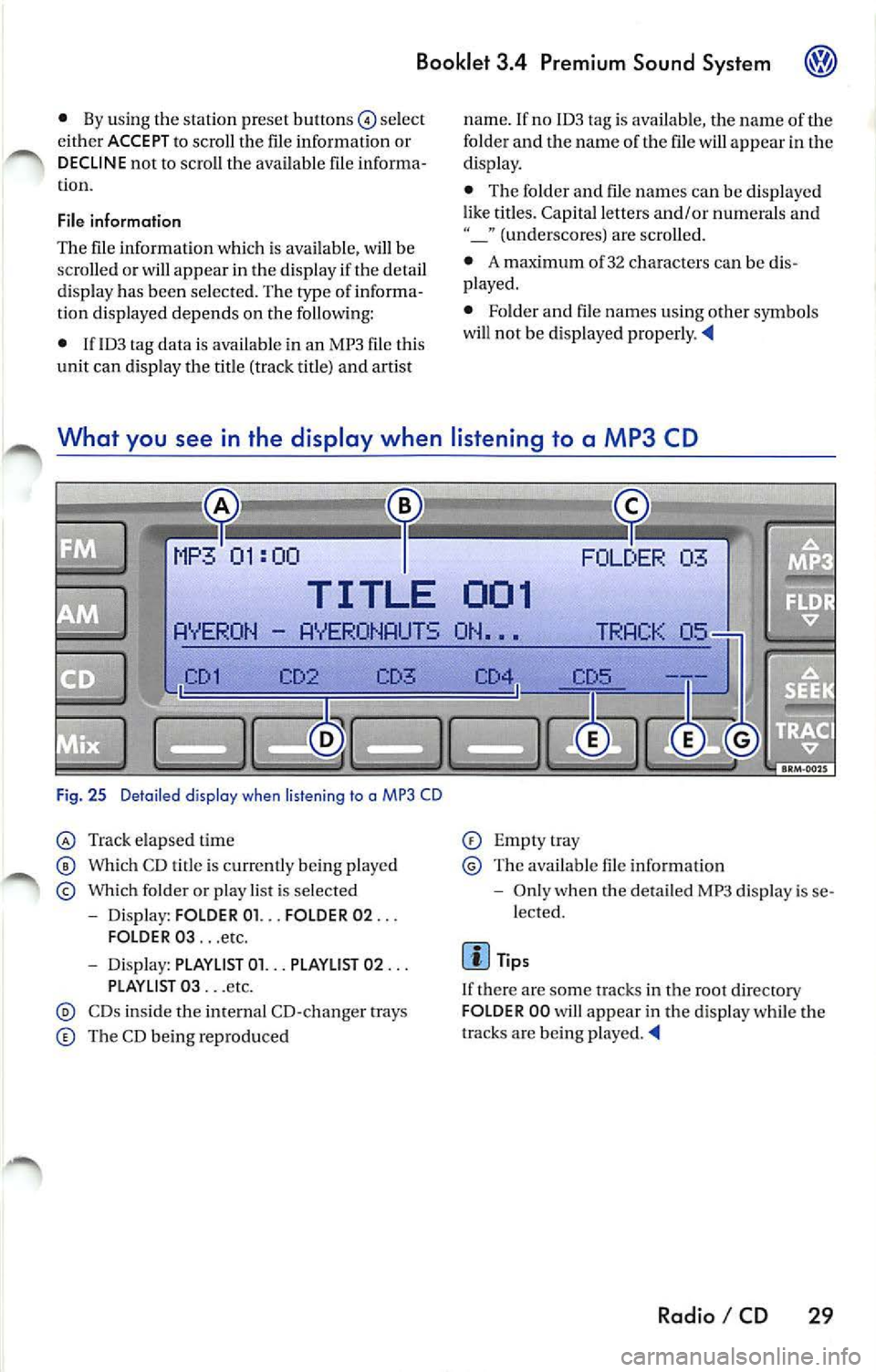
What you see in the display when listening to a MP3 CD
03
TITLE 001
AYER ON AYERONAUTS ON •••
CD3
Fi g. 25 Deta iled display when listen ing to a MP3 CD
Tra ck elapsed time
Which CD t itle is cu rrentl y being playe d
Which folder o r play list is se lected
- Dis play: FOLD ER 01. .. FOLDER 02 ...
FOLDER 03 ... etc.
- Dis pl ay: PLAYLlST 01. .. PLAYLIST 02 ...
PLAYLI ST 03 ... etc.
CDs ins ide tl1e internal CD- cha nger trays
The CD bein g repro duced
Empt ytray
Th e available file informat io n
- Onl y when the detail ed MP3 di spl ay is se
lected.
Tip s
I f there a re some tracks in the root directory
FOLD ER 00 will appear in the disp lay while the
tracks are being played.
Radio I CD 29
Page 465 of 477
Booklet 3.4 Premium Sound System
Error displays when playing MP3 music with the CD player
The following err or messages can b e displayed:
NOCD
No disc in the CD ch an ge r.
PLEASE CHECK CD
There is a problem with the in serted CD. The CD
i s automatica lly ejec te d .
ROM
A CD ROM has bee n in serte d into the ch anger.
The CD is automatic ally ejected.
About MP3
Except for personal enjoyment, duplicati ng
data or distributing, transferring or copying it, whether for free or for a fee , withou t the permis
sion of the copyright holder i s strict ly prohib
i t ed by the Copyright Act and by internationa l
treaty.
What is
MP3
MP3 (MPEG audio layer 3) is a compress ion
stan dard prescribed by the ISO and MEG.
MP3 files contain compressed audio data. MP3
encoding is capable of compress ing the audio
da ta at extremely hi gh ratios , shrinki ng mu sic
file s by as mu ch as one-tent h their original size.
The MP3 forma t rea lizes su ch high compre ssion
ratios by elimi nating th e sounds that are either
in audible to t he hum an ear or ma sked b y other
sounds.
How to create
MP3 files
The soft wa re use d to create MP3 files is wide ly
so ld from var ious sourc es. For d etail s on cre
atin g MP3 files, re fer to the owner's manual for
t hat so ftwa re.
The MP 3 files that can be played by this device
ha ve the file extension "MP3". Files wit h no ex
tension can not be played back .
Cor respon ding File Syste ms
T hi s unit support s discs formatted
ISO
9660. It a lso can p lay back d iscs in Jolie t standard
30 Radio I CD
FAIL
Th e CD is dirty, scratc hed or inserted upside
down. T he CD is auto mati cally ejected. If the
p roblem pers ist s after reload ing the CD the next
CD avai lable will be reproduced and error mes
s age FAIL will appea r in the correspo nding CD
s lo t in
display.
HARDWARE ERROR
The CD chan ger mechanism is malfunctioning.
Tips
If the unit still malfunctions, contact your au
thori zed Vo lkswagen dealer for assistance.
which conforms to ISO 9660. However , some
time s the file names, fo lder nam es, etc. are not
displayed correct ly.
P lease
in to account the follow ing points:
• When creati ng a CD the burner software
mu st be set up to burn a Mode
1 CD ROM type
disc. Mode 2 CD ROM XA can not b e pla yed
back.
• Multi-session discs can not be played back
by this unit.
• Remembe r tha t th e audio quality depends
o n th e
rate" used to create the MP3
file .
• Make sure the crea ted disc is finalized. Your
CD burner softwar e has an option to fina lize the
disc.
• Whe n nam ing you r MP3 file s, use short file
nam es (no more than 64 char acters).
• We recommend th at you use onl y one word
to name t he folde rs (i.e. Fold er_A) and t hat yo u
do not repeat the same fold er name throughout
the CD. This cou ld cause t he rad io un it not
to recognize the file path .
• When creat ing an MP3 disc, use no more
than 99 fo lder s. Altho ugh thi s unit can support
up
to 255 folders , finding the files yo u wa nt t o
p lay w ill be mor e difficult if you have used man y