light VOLKSWAGEN PASSAT CC 2014 1.G User Guide
[x] Cancel search | Manufacturer: VOLKSWAGEN, Model Year: 2014, Model line: PASSAT CC, Model: VOLKSWAGEN PASSAT CC 2014 1.GPages: 429, PDF Size: 6.46 MB
Page 28 of 429

Menu Function See
Assistants Turn the Adaptive Front Lighting System (AFS) on and off (if applicable).
Vehicle status Current warning and information messages. This menu item is only displayed when warning or infor-mation messages are available. The number of available messages is shown in the display. Example: 1/1 or 2/2.
Settings Includes the Convenience and Lights & Vision submenus, as well as many settings such as time, speed warning for winter tires, language, and units.
MFI menu (Multi-Function Indicator)
Page 33 of 429

Convenience menu Function
Auto unlock
You can enable or disable Auto unlock. If Auto unlock is enabled (box checked), the doors automatically unlock when you switch off the ignition and open a door from inside the vehicle. On vehicles with automatic transmission, the doors will also unlock when the selector lever is in Park (P) and the ignition is switched off. Auto unlock works only if the vehicle has been automatically locked after reaching a speed of 10 mph (15 km/h). Auto unlock always unlocks all the doors.
Unlock doors
Doors are unlocked as follows depending on the option selected: – All doors: Pushing the unlock button 0 on the remote control vehicle key unlocks all doors and the luggage com-partment lid. – Single door: Pushing the unlock button 0 on the remote control vehicle key unlocks only the driver door. To unlock all doors and the luggage compartment, push the unlock button 0 on the key a second time within about 5 seconds. On vehicles with Keyless Access, touching the sensor sur-face of the door handle on the side where the valid vehicle key is located unlocks the respective door . – Vehicle side: Pushing the unlock button 0 on the re-mote control vehicle key unlocks the doors on the driver side of the vehicle. On vehicles with Keyless Access, touching the sensor sur-face of a door handle on the side where the valid vehicle key is located unlocks the doors on that side of the vehicle.
Window op.
Off Power window settings when unlocking/locking the driver door. All
Driver
Back The display switches back to the Convenience menu.
Mirror down Tilts passenger mirror down when backing up so you can see the curb. Feature only available on vehicles equipped with memory seats.
Mirror adjust IndividuallyBoth outside mirrors are adjusted separately.
Both mirrorsThe front passenger outside mirror is adjusted at the same time as the driver outside mirror.
Back The display returns to the Convenience menu.
Factory setting Resets the features in the Convenience submenu back to the factory set-tings.
Back The display returns to the Settings menu.
Lights & Vision submenu
Page 34 of 429

Lights & Vision menu Function
Coming Home Set how long the headlights and inside lights stay on after locking or unlocking the vehicle. Feature can also be switched on or off. Leaving Home
Footwell light Set footwell lighting brightness or switch this feature on or off.
Conv. turn sig. Enable/disable convenience turn signal (lane change feature). When the feature is enabled, the turn signal flashes at least 3 times when the turn signal is tapped.
Factory setting Resets the functions in the Lights & Vision submenu back to the factory settings.
Back The display returns to the Settings menu.
Personal convenience settings
Page 37 of 429

Checklist
Some countries have special safety standards and emissions requirements that your vehicle may not meet. Before taking your vehicle to another country, Volkswagen therefore recommends that you ask your authorized Volkswagen dealer or authorized Volkswagen Service Facility about the following issues with regard to the country to which you would like to travel:
d S h o u l d t h e v e h i c l e b e t e c h n i c a l l y p r e p a r e d f o r t h e t r i p a b r o a d , s u c h a s m a s k i n g o r a d j u s t i n g h e a d -lights?
d A r e m a i n t e n a n c e , r e p a i r f a c i l i t i e s , n e c e s s a r y t o o l s a n d t e s t i n g e q u i p m e n t a s w e l l a s s p a r e p arts readily available for your vehicle?
d A r e t h e r e a u t h o r i z e d V o l k s w a g e n d e a l e r s a n d a u t h o r i z e d V o l k s w a g e n S e r v i c e F a c i l i t i e s i n t h e countries where you will be driving?
d F o r g a s o l i n e e n g i n e s : I s u n l e a d e d f u e l w i t h t h e r i g h t o c t a n e r a t i n g r e a d i l y a v a i l a b l e ?
d A r e e n g i n e o i l (Engine oil) and other operating fluids that meet Volkswagen quality and perfor-mance requirements available where you will be driving? For more information, please see
⇒ booklet Warranty and Maintenance.
d D o e s t h e f a c t o r y - i n s t a l l e d n a v i g a t i o n s y s t e m w o r k i n t h e c o u n t r i e s w h e r e y o u w i l l b e d r i v i n g , a n d i s navigation data available?
d A r e s p e c i a l o r h e a v y - d u t y t i r e s n e c e s s a r y f o r t h e k i n d o f d r i v i n g e x p e c t e d ?
NOTICE
Volkswagen is not responsible for mechanical damage that may result from substandard fuel or service or the unavailability of Genuine Volkswagen parts.
Driving through water on roads
Page 46 of 429
Releasing and removing the emergency key
Press and hold button (1).
Pull out the emergency key by the eyelet (2) in the direction of the arrow.
Using the emergency key
The emergency key can be used for the following:
x Locking and unlocking the glove compartment on the passenger side, Storage areas.
x Locking and unlocking the luggage compartment pass-through, Seat functions.
x Locking and unlocking the luggage compartment lid using the key switch in the driver door
⇒ page 8, Driver door overview
x Manually locking and unlocking the vehicle, Emergency closing and opening.
Reinserting the emergency key
Insert the emergency key (3) into the opening in the remote control vehicle key.
Slide the emergency key in the direction opposite to the arrow until it locks into place.
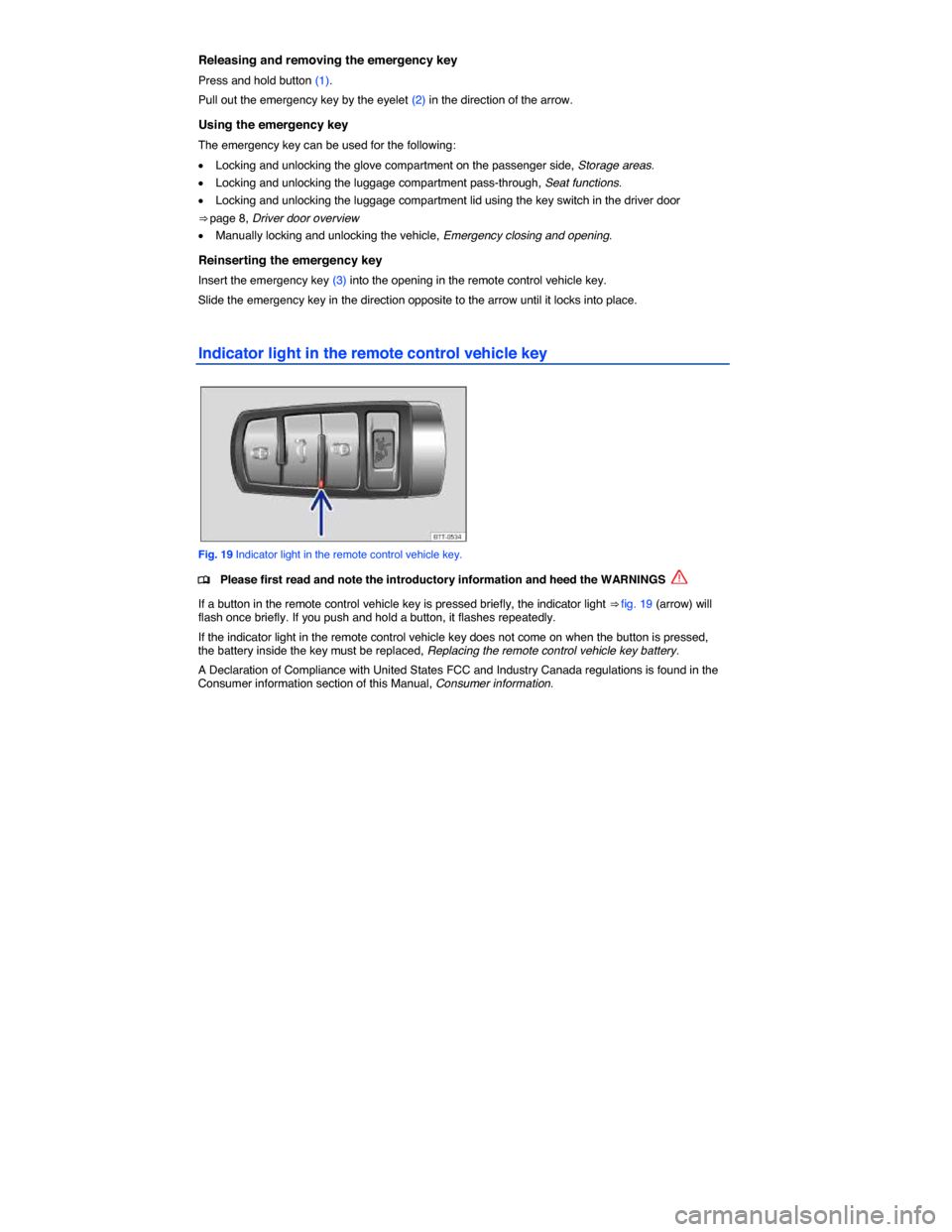
Indicator light in the remote control vehicle key
Fig. 19 Indicator light in the remote control vehicle key.
Page 50 of 429
WARNING
Improper use of power locks can result in serious personal injury.
x The power locking button locks all doors. Locking the doors from the inside can help prevent unintended door opening during a collision and can also prevent unwanted entry from the outside. Locked doors can, however, delay assistance to vehicle occupants and rescue from the outside in an accident or other emergency.
x Never leave children or anyone who cannot help themselves behind in the vehicle. All doors can be locked from the inside with the power lock button. This could leave people trapped in the vehicle in an emergency. Depending on the time of year, people trapped in the vehicle can be exposed to very high or very low temperatures.
x A closed vehicle can become very hot or very cold, depending on the season. Particularly in the summer, heat buildup in the passenger and luggage compartment of a parked vehicle can result in temperatures in the vehicle that are much higher than the outside temperatures. Temperatures can quickly reach levels that can cause unconsciousness and death, particularly to small children.
x Never allow passengers to remain in a locked vehicle. In an emergency any person still inside the vehicle might not be able to get out.
Indicator light in the driver door
Page 51 of 429
The doors and the luggage compartment lid can be locked manually if the vehicle key or the power locking system is not working, Emergency closing and opening.
Automatic locking (Auto lock)
The vehicle locks automatically when it reaches a speed of about 10 mph (15 km/h). When the vehicle
is locked, the indicator light W comes on in the power locking button ⇒ fig. 22.
Automatic unlocking (Auto unlock)
All doors automatically unlock when you switch off the ignition and open a door from inside the vehicle. On vehicles with automatic transmission, the doors will also unlock when the selector lever is in Park (P) and the ignition is switched off. Auto unlock works only if the vehicle has been automatically locked with the Auto lock feature. The indicator light W goes out in the power locking button when the doors
unlock ⇒ fig. 22.
Locking the vehicle after airbag inflation
If the airbags are activated during a collision, the entire vehicle is unlocked. Depending on the severity of the damage, the vehicle can be locked after a collision when the airbags have deployed as follows:
Function Action
Locking the vehicle with the power locking button: – Switch the ignition off. – Open and close a door once. – Press the power locking button 1.
Locking the vehicle with the remote control vehicle key: – Switch the ignition off. OR: Remove the vehicle key from the ignition. – Open a door once. – Lock the vehicle with the remote control vehicle key.
If the vehicle key button, Unlocking or locking the vehicle from the outside or the power locking buttons, Unlocking or locking the vehicle from the inside are pushed repeatedly in quick succession, the power locking system is switched off for a brief period to help keep it from being overloaded. The vehicle is then unlocked for about 30 seconds. Unless a door or the luggage compartment lid is opened during this time, the vehicle is automatically locked afterwards.
Unlocking or locking the vehicle from the outside
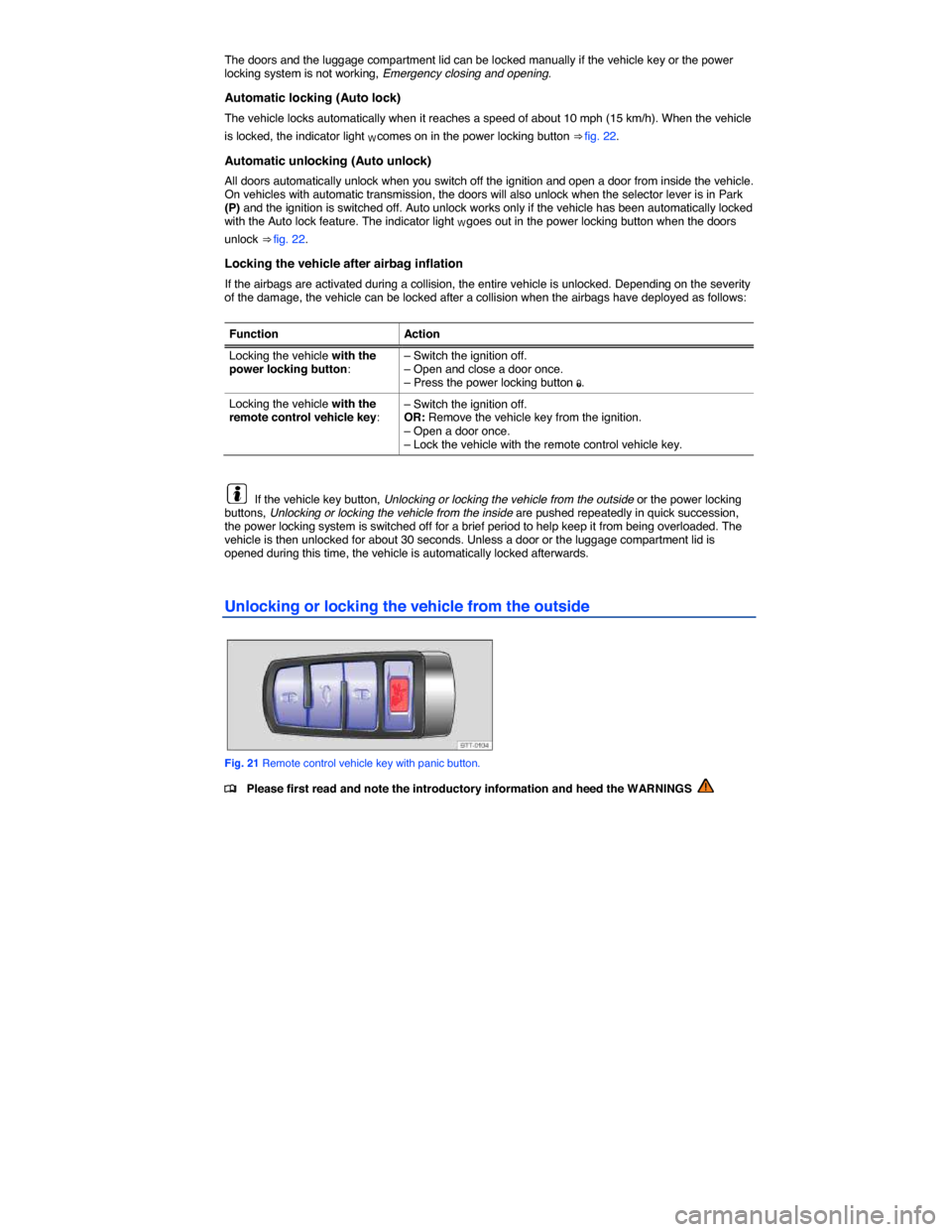
Fig. 21 Remote control vehicle key with panic button.
Page 52 of 429
Function Using the buttons on the remote control vehicle key
⇒ fig. 21
Unlock the vehicle. Press the 0 button.
Lock the vehicle. Press the 1 button.
Unlock the luggage compartment lid. Press and hold the q button. The luggage compartment lid
opens automatically ⇒ page 67.
Note: Depending on the settings for the power locking system in the Convenience submenu, it may be necessary to press the 0button on the remote control vehicle key twice to unlock all doors and the luggage compartment lid, Volkswagen Information System.
The vehicle key unlocks or locks the vehicle only when the battery in the remote control vehicle key has enough power, and the remote control vehicle key is within a few yards/meters of the vehicle.
x All turn signals flash once and the horn beeps once to confirm that the vehicle has been locked. The horn beep can be disabled by deactivating the ATA confirm feature in the Convenience submenu, Volkswagen Information System.
x All turn signals flash twice to confirm that the vehicle has been unlocked.
If the turn signals do not flash to confirm locking, one or more doors or the luggage compartment lid is not locked.
If the driver door is open, the vehicle cannot be locked with the remote control vehicle key.
If the vehicle was unlocked with the remote control vehicle key and the door or the luggage compartment lid has not been opened within a few seconds, the vehicle is automatically locked again. This feature helps prevent you from leaving the vehicle unlocked unintentionally.
NOTICE
Check to make sure that the windows go down slightly when you unlock the vehicle. Otherwise the windows and seals could be damaged when opening the door.
Unlocking or locking the vehicle from the inside
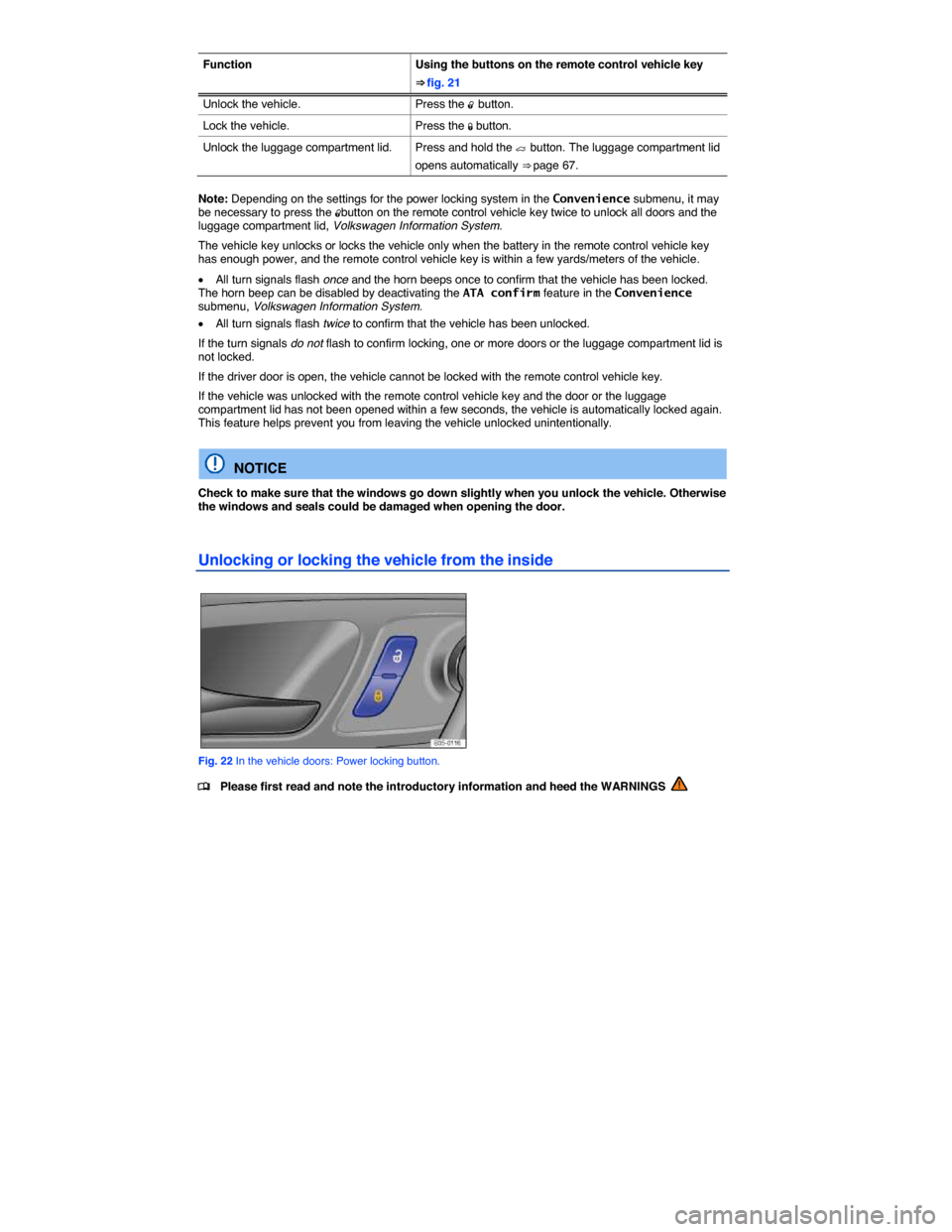
Fig. 22 In the vehicle doors: Power locking button.
Page 53 of 429
Press button ⇒ fig. 22:
0 Unlock the vehicle.
1 Lock the vehicle.
The power locking button works whether the ignition is switched on or off but only when all doors are closed.
If the vehicle is locked with the vehicle key, the power locking button is deactivated.
If the vehicle is locked with the power locking button:
x The yellow indicator light W in the power locking button comes on to indicate that all doors are locked.
x If the vehicle is equipped with an anti-theft alarm, the system is not turned on.
x Opening doors or the luggage compartment lid from the outside is not possible, at a traffic light, for example.
x Doors can be unlocked and opened separately from inside the vehicle by pulling the door handle to open the door. The indicator light W goes out. The unopened doors and luggage compartment lid remain locked and cannot be opened from the outside.
x An open driver door will not be locked. This helps keep the driver from being locked out of the vehicle.
The vehicle is unlocked if you push the 0 button while the vehicle is standing still. Depending on the settings in the Convenience submenu, Convenience submenu, Convenience submenu, it may also be unlocked when you switch off the ignition and open a door from inside the vehicle (Auto unlock). On vehicles with automatic transmission, the doors will also unlock when the selector lever is in Park (P) and the ignition is switched off.
Applicable only in the United States
Unlocking or locking the vehicle with Keyless Access
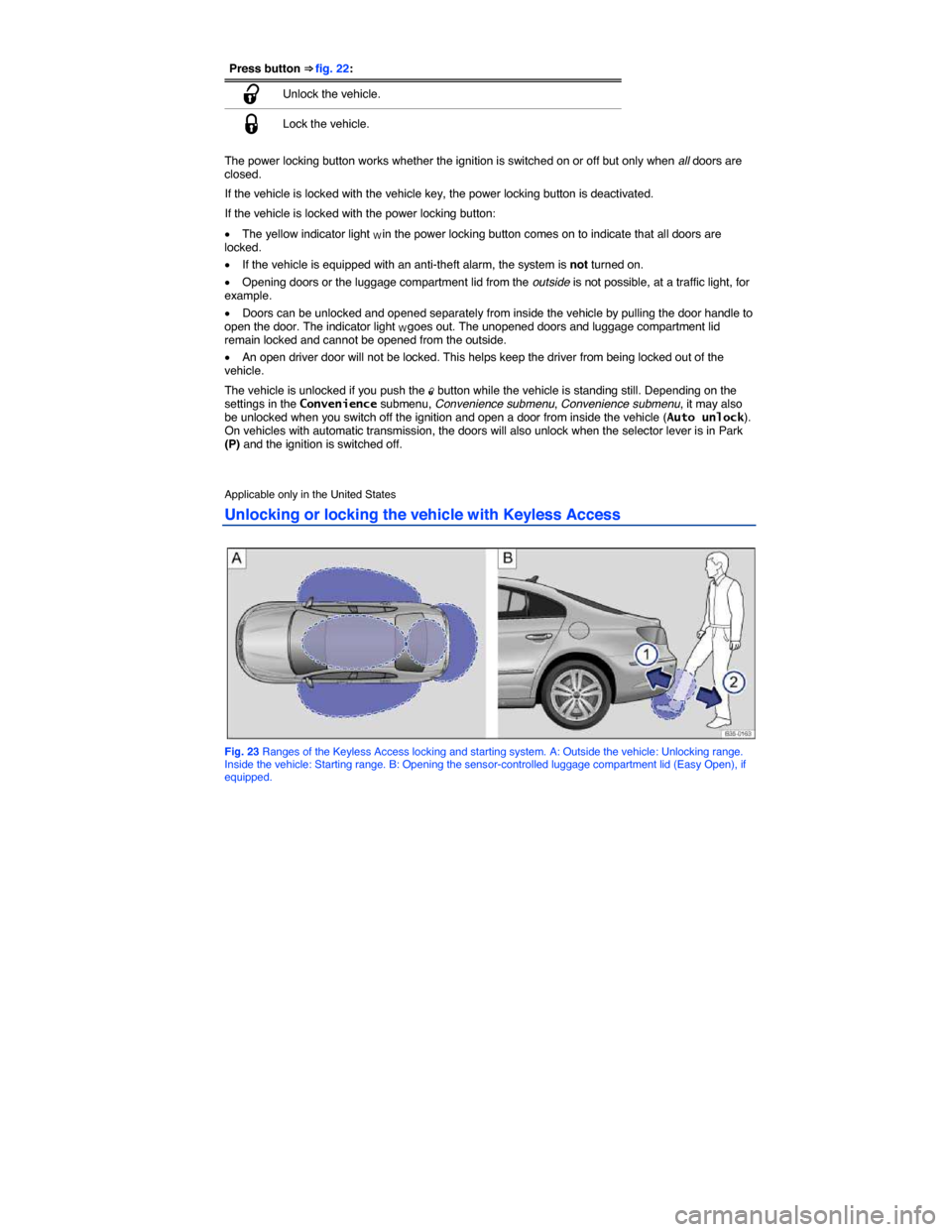
Fig. 23 Ranges of the Keyless Access locking and starting system. A: Outside the vehicle: Unlocking range. Inside the vehicle: Starting range. B: Opening the sensor-controlled luggage compartment lid (Easy Open), if equipped.
Page 55 of 429

Unlocking and locking the luggage compartment lid
If the vehicle is locked and a valid remote control vehicle key is within range ⇒ fig. 23 A of the luggage compartment lid, it unlocks automatically when opened.
Open and close the luggage compartment lid as you would a standard luggage compartment lid, Luggage compartment lid
The luggage compartment lid locks automatically when it is closed except in the following situations:
x The vehicle is completely unlocked.
x When an authorized remote control vehicle key is inside the vehicle.
Sensor-controlled luggage compartment lid opener (Easy Open)
If your vehicle has Keyless Access, it may also be equipped with the Easy Open feature.
When a valid vehicle key is within the opening range of the luggage compartment lid A, the luggage compartment lid can be unlocked and opened by moving your foot within the sensor’s range B below the rear bumper.
x Switch off the ignition.
x Stand in front of the middle of the rear bumper.
x Quickly move your foot and shin as close to the bumper as possible. Your shin must be in the upper part of the sensor’s range and your foot in the lower part B (1).
x Quickly move your shin out of range B (2). The luggage compartment lid opens automatically.
If the luggage compartment lid does not open, wait a few seconds and try again.
The high-mounted brake light flashes once to show that the Easy Open feature is opening the luggage compartment lid.
The luggage compartment lid locks automatically after closing if the vehicle was locked before and a valid vehicle key is not inside the vehicle.
Easy Open may not work properly or at all in the following situations (examples):
x If the rear bumper is very dirty.
x If the rear bumper has salty water on it after driving on salted roads.
x If a trailer hitch has been retrofit on the vehicle.
Easy Open may be automatically deactivated in heavy rain to help prevent unintentional deployment caused by water running down the vehicle, for example.
The Easy Open feature may be turned on and off in the Settings – Convenience menu, Volkswagen Information System.
Locking with a second vehicle key
If a remote control vehicle key is inside the passenger compartment, the vehicle can be locked from the outside only if a second valid remote control vehicle key is within range.
When the vehicle is locked from the outside, the keyless go (starting) function of any keys left in the passenger compartment will be deactivated, Starting and stopping the engine. A key that was inside the vehicle when it was locked from the outside is reactivated by pressing the 0 button on the
deactivated key ⇒ fig. 21.
Automatic deactivation of sensors
If the vehicle has not been unlocked or locked for a longer period of time, the proximity sensors in the passenger door are automatically deactivated.
If a sensor on the door handle of a locked vehicle is activated too often, for instance by a bush or hedge that rubs against the vehicle, the sensors in the door handle on that side of the vehicle are switched off for a short time.
The door handle sensors become active again if one of the following events occurs: