key battery VOLKSWAGEN POLO 2015 Owner´s Manual
[x] Cancel search | Manufacturer: VOLKSWAGEN, Model Year: 2015, Model line: POLO, Model: VOLKSWAGEN POLO 2015Pages: 100, PDF Size: 4.14 MB
Page 44 of 100
Downloaded from www.Manualslib.com manuals search engine 12/29/2015Bedienungsanleitung < Service & Zubehör < Volkswagen Deutschland
9/136
Introduction
This chapter contains information on the following subjects:
→ Vehicle key
→ Indicator lamp in the vehicle key
→ Replacing the battery
→ Synchronising the vehicle key
Additional information and warnings:
Settings in the Volkswagen information system → Volkswagen information system
Central locking system → Central locking system
Starting and stopping the engine → Starting and stopping the engine
Consumer information → Consumer information
Manual opening and closing → Manual opening and closing
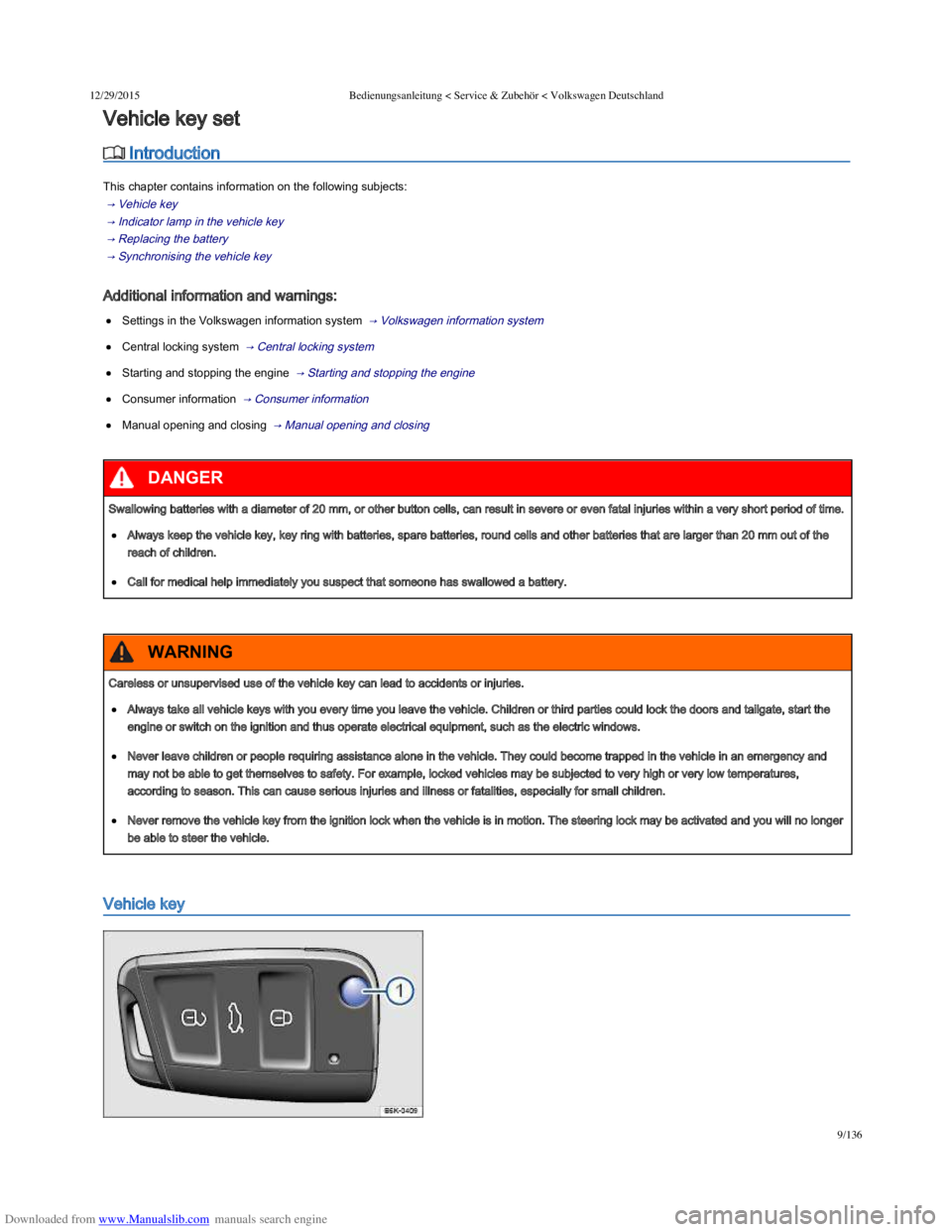
Vehicle key
Vehicle key set
Swallowing batteries with a diameter of 20 mm, or other button cells, can result in severe or even fatal injuries within a very short period of time.
Always keep the vehicle key, key ring with batteries, spare batteries, round cells and other batteries that are larger than 20 mm out of the
reach of children.
Call for medical help immediately you suspect that someone has swallowed a battery.
DANGER
Careless or unsupervised use of the vehicle key can lead to accidents or injuries.
Always take all vehicle keys with you every time you leave the vehicle. Children or third parties could lock the doors and tailgate, start the
engine or switch on the ignition and thus operate electrical equipment, such as the electric windows.
Never leave children or people requiring assistance alone in the vehicle. They could become trapped in the vehicle in an emergency and
may not be able to get themselves to safety. For example, locked vehicles may be subjected to very high or very low temperatures,
according to season. This can cause serious injuries and illness or fatalities, especially for small children.
Never remove the vehicle key from the ignition lock when the vehicle is in motion. The steering lock may be activated and you will no longer
be able to steer the vehicle.
WARNING
Page 45 of 100
Downloaded from www.Manualslib.com manuals search engine 12/29/2015Bedienungsanleitung < Service & Zubehör < Volkswagen Deutschland
10/136
Fig. 22 Vehicle key
First read and observe the introductory information and safety warnings →Introduction
Vehicle key
The key can be used to lock and unlock the car from a distance → Central locking system .
The remote control transmitter and the battery are integrated in the key. The receiver is located in the vehicle interior. The remote control range is
several metres around the vehicle when the battery is fully charged.
If the vehicle cannot be opened and closed using the vehicle key, the vehicle key will have to be re-synchronised → Synchronising the vehicle
key , or the battery in the key replaced → Replacing the battery .
Several vehicle keys can be used.
Opening and closing the key bit
Press button → Fig. 22 ① to release the key bit and open it.
To fold in, press button ① and simultaneously fold in the key bit until it clicks into place.
Replacement key
You will need to quote the vehicle chassis number when ordering a replacement key or additional remote control keys.
Each new key contains a microchip which must be encoded with the data for the vehicle's electronic immobilizer. The vehicle key will not work if it
is not fitted with a microchip, or if the microchip has not been encoded. The same goes for keys that have been cut to fit the vehicle.
New keys or replacement keys are available from Volkswagen dealerships or from qualified workshops and authorised key services that are
qualified to manufacture these vehicle keys.
New and replacement vehicle keys must be synchronised before use. Go to a qualified workshop.
Press the buttons on the key only if the corresponding function is actually needed. Pressing a button when the function is not required
could lead to the vehicle being unlocked unintentionally or the alarm going off. This also applies even when you are not within the effective range.
The function of the vehicle key can be affected temporarily if there is more than one transmitter in the direct vicinity working on the same
frequency (e.g. a two-way radio or mobile telephone).
Obstacles between the key and the vehicle, bad weather conditions and weak batteries can reduce the range of the remote control.
If the buttons on the vehicle key → Fig. 22 or one of the central locking buttons → Central locking system are pressed repeatedly within a
short period of time, the central locking system will switch off briefly to prevent overloading. The vehicle will then be unlocked. Lock the vehicle if
necessary.
Indicator lamp in the vehicle key
Every vehicle key contains electronic components. Protect the key from damage, moisture and excessive vibration.
NOTICE
Page 46 of 100
Downloaded from www.Manualslib.com manuals search engine 12/29/2015Bedienungsanleitung < Service & Zubehör < Volkswagen Deutschland
11/136
Indicator lamp in the vehicle key
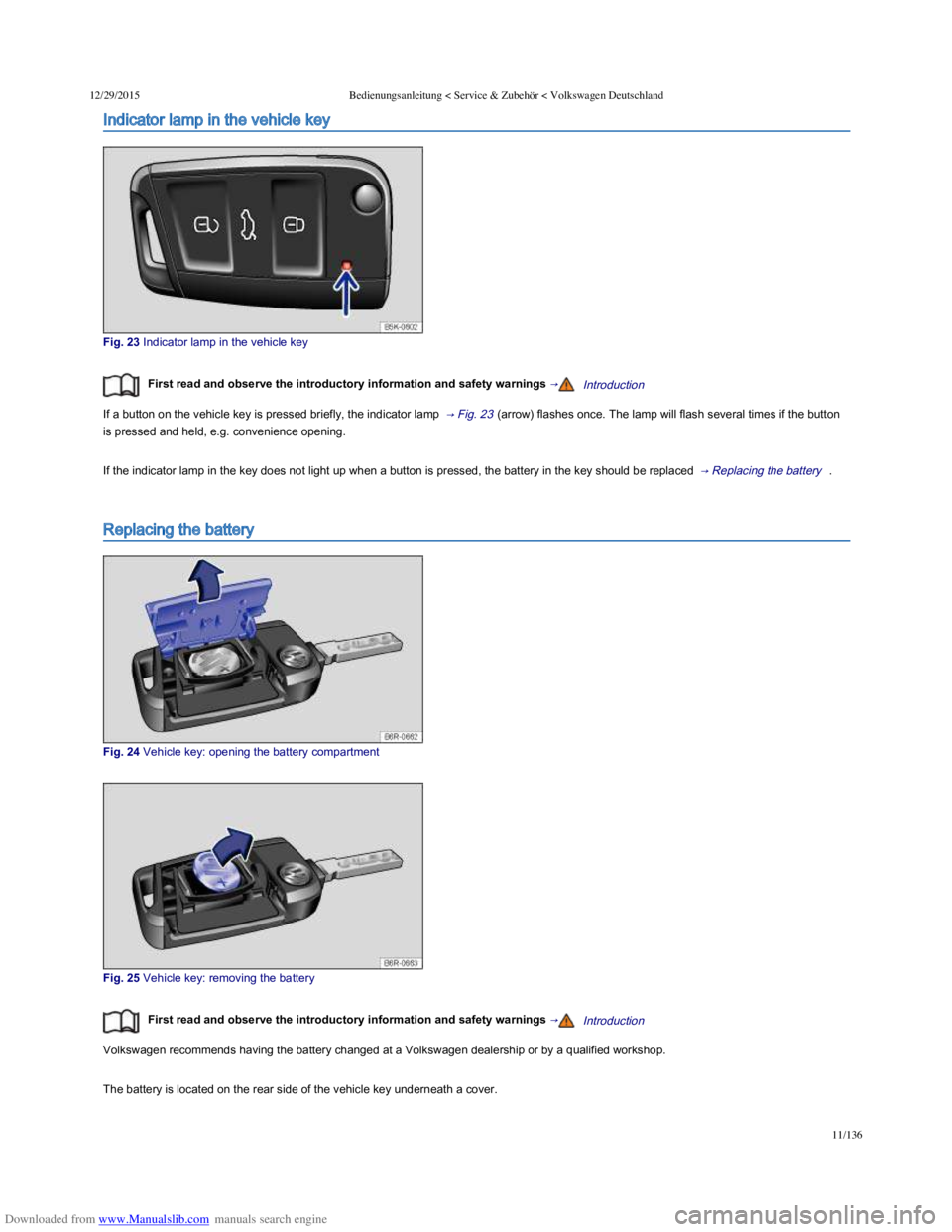
Fig. 23 Indicator lamp in the vehicle key
First read and observe the introductory information and safety warnings →Introduction
If a button on the vehicle key is pressed briefly, the indicator lamp → Fig. 23 (arrow) flashes once. The lamp will flash several times if the button
is pressed and held, e.g. convenience opening.
If the indicator lamp in the key does not light up when a button is pressed, the battery in the key should be replaced → Replacing the battery .
Replacing the battery
Fig. 24 Vehicle key: opening the battery compartment
Fig. 25 Vehicle key: removing the battery
First read and observe the introductory information and safety warnings →Introduction
Volkswagen recommends having the battery changed at a Volkswagen dealership or by a qualified workshop.
The battery is located on the rear side of the vehicle key underneath a cover.
Replacing the battery
Page 47 of 100
Downloaded from www.Manualslib.com manuals search engine 12/29/2015Bedienungsanleitung < Service & Zubehör < Volkswagen Deutschland
12/136
Replacing the battery
Fold out the key bit of the vehicle key → Opening and closing the key bit .
Pull up the cover on the rear side of the vehicle key → Fig. 24 in the direction of the arrow → .
Using a suitable thin object, lever the battery out of the battery compartment → Fig. 25 .
Insert the new battery as shown → Fig. 25 and push it into the battery compartment against the direction of the arrow → .
Fit the cover as shown → Fig. 24 and push it onto the vehicle key housing against the direction shown by the arrow until it engages.
Dispose of discharged batteries in accordance with regulations governing the protection of the environment.
The battery in the vehicle key may contain perchlorate. Please comply with any legal requirements and regulations when handling and
disposing of these batteries.
Synchronising the vehicle key
First read and observe the introductory information and safety warnings →Introduction
It may no longer be possible to lock or unlock the vehicle with the remote control if the button is pressed repeatedly outside of the
effective range of the vehicle key. If this is the case, the vehicle key should be re-synchronised as follows:
Fold out the key bit of the vehicle key → Opening and closing the key bit .
Press the button on the vehicle key. Remain standing close to the vehicle.
Unlock the vehicle with the key bit within one minute. The synchronisation process is complete.
Fold in the key bit of the vehicle key.
Introduction
This chapter contains information on the following subjects:
→ Indicator lamp
→ Description of the central locking system
→ Locking and unlocking the vehicle from the outside
→ Locking and unlocking the vehicle from the inside
→ SAFELOCK mechanism
→ Anti-theft alarm
→ Interior monitoring system and anti-tow alarm
The central locking system will only work correctly when all doors and the tailgate are properly closed. The vehicle cannot be locked with the key
if the driver door is open.
If the vehicle is unlocked and not used for a long time (e.g. in your own garage) the vehicle battery could discharge or the engine may not start.
The vehicle key can be damaged if the battery is not changed properly.
Unsuitable batteries can damage the vehicle key. Replace discharged batteries only with new batteries of the same voltage rating, size and
specification.
Make sure that the battery is fitted the right way round.
NOTICE
Central locking system
Page 50 of 100
Downloaded from www.Manualslib.com manuals search engine 12/29/2015Bedienungsanleitung < Service & Zubehör < Volkswagen Deutschland
15/136
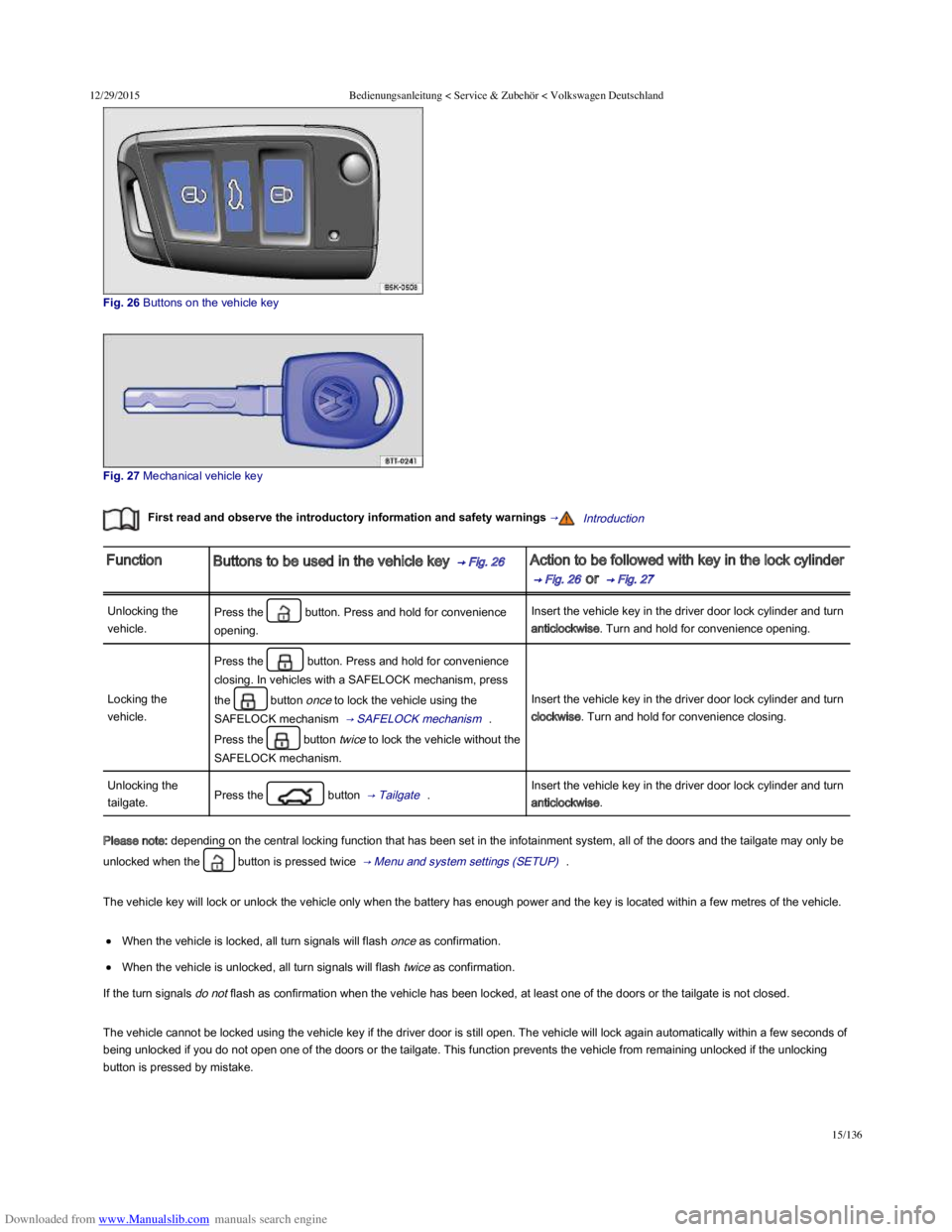
Fig. 26 Buttons on the vehicle key
Fig. 27 Mechanical vehicle key
First read and observe the introductory information and safety warnings →Introduction
FunctionButtons to be used in the vehicle key → Fig. 26 Action to be followed with key in the lock cylinder
→ Fig. 26 or → Fig. 27
Unlocking the
vehicle.
Press the button. Press and hold for convenience
opening.
Insert the vehicle key in the driver door lock cylinder and turn
anticlockwise. Turn and hold for convenience opening.
Locking the
vehicle.
Press the button. Press and hold for convenience
closing. In vehicles with a SAFELOCK mechanism, press
the button once to lock the vehicle using the
SAFELOCK mechanism → SAFELOCK mechanism .
Press the button twice to lock the vehicle without the
SAFELOCK mechanism.
Insert the vehicle key in the driver door lock cylinder and turn
clockwise. Turn and hold for convenience closing.
Unlocking the
tailgate.Press the button → Tailgate .Insert the vehicle key in the driver door lock cylinder and turn
anticlockwise.
Please note: depending on the central locking function that has been set in the infotainment system, all of the doors and the tailgate may only be
unlocked when the button is pressed twice → Menu and system settings (SETUP) .
The vehicle key will lock or unlock the vehicle only when the battery has enough power and the key is located within a few metres of the vehicle.
When the vehicle is locked, all turn signals will flash once as confirmation.
When the vehicle is unlocked, all turn signals will flash twice as confirmation.
If the turn signals do not flash as confirmation when the vehicle has been locked, at least one of the doors or the tailgate is not closed.
The vehicle cannot be locked using the vehicle key if the driver door is still open. The vehicle will lock again automatically within a few seconds of
being unlocked if you do not open one of the doors or the tailgate. This function prevents the vehicle from remaining unlocked if the unlocking
button is pressed by mistake.
Page 53 of 100
Downloaded from www.Manualslib.com manuals search engine 12/29/2015Bedienungsanleitung < Service & Zubehör < Volkswagen Deutschland
18/136
First read and observe the introductory information and safety warnings →Introduction
Depending on the vehicle equipment level, the vehicle may have an anti-theft alarm and a SAFELOCK mechanism → SAFELOCK mechanism .
The anti-theft alarm makes it more difficult to break into the vehicle or steal it.
The anti-theft alarm is activated automatically when the vehicle is locked using the vehicle key.
When does the system trigger an alarm?
The anti-theft alarm will sound an acoustic alarm for approximately 30 seconds and trigger a visible warning for up to 5 minutes if any of the
following unauthorised actions are performed while the vehicle is locked:
In vehicles with an open lock cylinder: a door unlocked mechanically with the vehicle key is opened and the ignition is not switched on within
approximately 15 seconds.
In vehicles with a covered lock cylinder: a door unlocked mechanically with the vehicle key is opened.
A door is opened.
The bonnet is opened.
The tailgate is opened.
The ignition is switched on using an invalid key.
The vehicle battery is disconnected.
There is movement inside the vehicle (in vehicles with interior monitoring) → Interior monitoring system and anti-tow alarm .
The vehicle is towed (vehicles with anti-tow alarm) → Interior monitoring system and anti-tow alarm .
The vehicle is lifted (vehicles with anti-tow alarm) → Interior monitoring system and anti-tow alarm .
The vehicle is transported on a car ferry or by rail (vehicles with anti-tow alarm or interior monitoring) → Interior monitoring system and anti-
tow alarm .
A trailer that is connected to the anti-theft alarm system is removed → Towing a trailer .
Switching off the alarm
Unlock the vehicle using the release button on the vehicle key or switch on the ignition using a valid vehicle key.
The alarm will be triggered again if a person gains access to the same or a different secured zone after the alarm has been switched off.
For example, if the tailgate is opened after a door had been opened.
The anti-theft alarm will not be activated if the vehicle is locked from the inside using the central locking button .
If you unlock the driver door mechanically using the vehicle key, only the driver door is unlocked, and not the whole vehicle. The
SAFELOCK mechanism on all doors is not deactivated and the central locking button is not activated until you switch on the ignition (however the
doors will not be unlocked).
The anti-theft alarm will not function correctly if the vehicle battery is weak or discharged.
Interior monitoring system and anti-tow alarm
Page 63 of 100
Downloaded from www.Manualslib.com manuals search engine 12/29/2015Bedienungsanleitung < Service & Zubehör < Volkswagen Deutschland
28/136
For one-touch opening: press the button for the appropriate window down briefly into the second position.
Stopping the one-touch function: press or pull the button for the appropriate window again.
Restoring one-touch opening and closing
One-touch opening and closing is deactivated if the vehicle battery has been disconnected or discharged while the windows were not fully closed.
The function will have to be reset.
Close all windows and doors.
Pull up the button for the window and hold it in this position for at least one second.
Let go of the button then pull it up again and hold it in this position. One-touch opening and closing is now ready for operation.
The one-touch function can be restored for individual windows or for several windows at the same time.
Convenience opening and closing
The windows can be opened and closed from outside the vehicle using the vehicle key:
Press and hold the locking or unlocking button on the vehicle key. All electric windows will be either opened or closed.
To interrupt this function, let go of the locking or unlocking button.
During convenience closing, first the windows and then the electric panorama sliding/tilting glass roof.
One-touch opening and closing and the roll-back function will not work if there is a fault in the electric windows. Go to a qualified
workshop.
Roll-back function for the electric windows
First read and observe the introductory information and safety warnings →Introduction
The roll-back function for the electric windows can reduce the risk of injuries when the windows are closing → . If the one-touch closing
function for a window does not work because it is stiff or is being obstructed, the window will automatically open again.
Check to see why the window has not closed.
Try to close the window again.
Careless or unsupervised use of the electric windows can cause serious injuries.
The electric windows should only be opened or closed when you are sure that nobody is in their operating area.
Never leave children or people requiring assistance alone in the vehicle when the vehicle is locked. The windows can no longer be opened
in an emergency.
Always take all vehicle keys with you every time you leave the vehicle. The windows can still be operated using the buttons several minutes
after the ignition has been switched off, provided that the driver door and front passenger door are not opened.
When transporting children on the rear bench seat, the rear electric windows should always be deactivated using the safety button so that
they cannot be opened or closed.
WARNING