key VOLKSWAGEN SCIROCCO 2010 Owner's Guide
[x] Cancel search | Manufacturer: VOLKSWAGEN, Model Year: 2010, Model line: SCIROCCO, Model: VOLKSWAGEN SCIROCCO 2010Pages: 138, PDF Size: 48.59 MB
Page 92 of 138
Downloaded from www.Manualslib.com manuals search engine ...
h parkPil ot is au tomatica lly muted whe n the
!le~tronic parking brake is switc he d on.
Vehicle path display
611-0~17
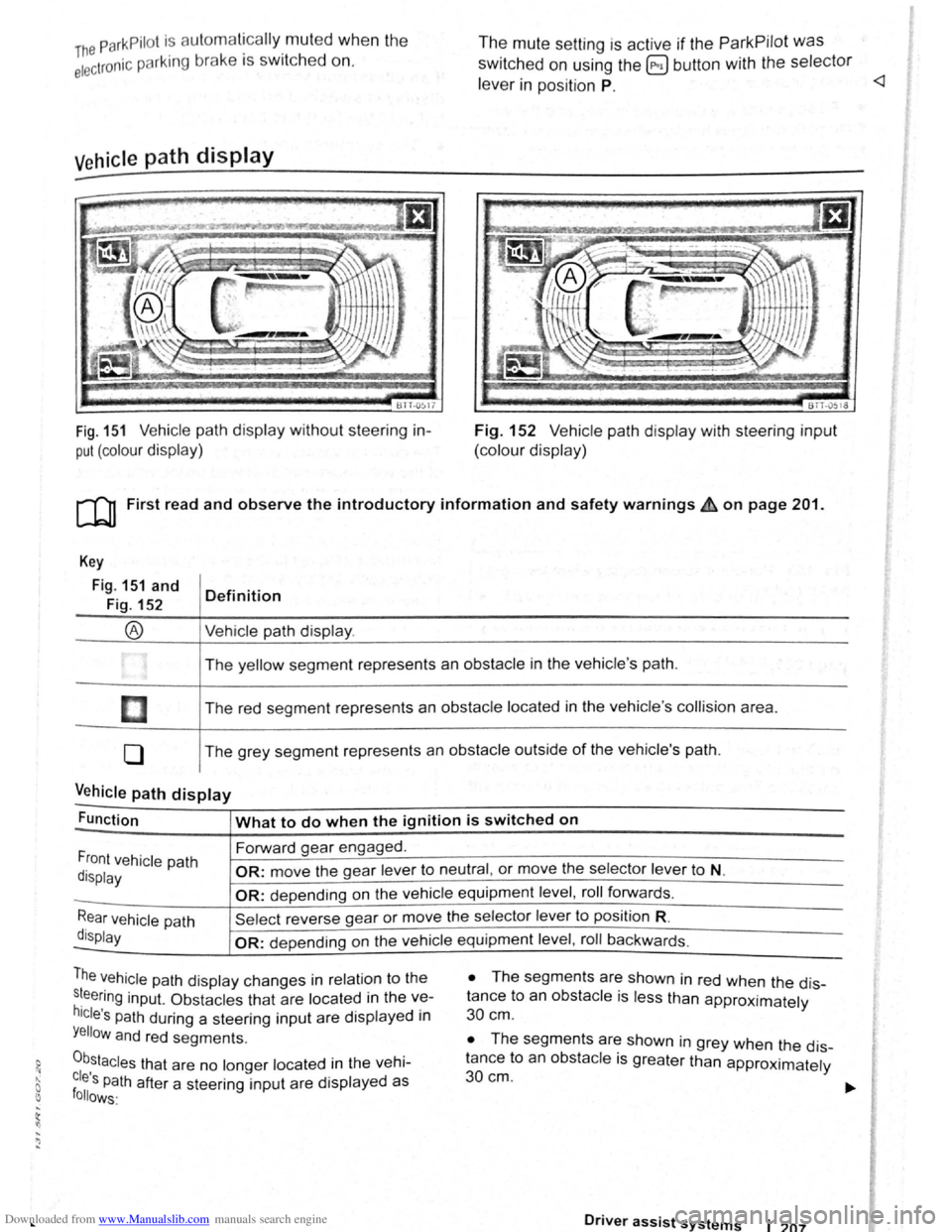
Fig. 151 Vehicle path display w ithout steering in
put (colour display)
The mute setting is active if the ParkPilot was
switched on using the @ button with the selector
le ve r in position P.
BTT -051o
Fig. 152 V ehi cle path display with steering input
(colour display)
[Q) First read and observe the introductory information and safety warnings £ on page 201.
Key
Fig. 151 and
Fig. 152
®
I
[]
0
Definition
Vehi cle path display .
The yellow segment represents an obstacle in the vehicle 's path .
The red seg ment represents an
obstacle located in the vehicle 's collision area .
The grey segment represents an
obstacle outside of the vehicle's path.
Vehicle path display -
Function What to do when the ignition is switched on
Forward gear engaged .
Front vehicle path
display OR: move the gear lever to neutral , or move the selector lever to N.
-OR: depending on the vehicle equipment level , roll forwards .
Rear vehicle path
display
Sel ect reverse gea r or move the selector lever to position R.
-OR: depen ding on the vehi cle equipment level , roll ba ckw ards.
The vehicle path dis play changes in relation to the
s~eering inp ut. Ob stacles that are located in the ve
hicle's path during a steering input are disp layed in
Yellow and red segments.
0b,stacles that are no longer located in the vehi
cles Path after a steering input are displayed as follows·
• The segm ents are shown in red when the dis
tance to an
obstacle is less than approximately
30 cm .
• The segments are shown in grey when the dis
tance to an
obsta cle is greater than approximately
30cm.
Driver assist systems 1 207
Page 128 of 138
Downloaded from www.Manualslib.com manuals search engine J J
' ·, ' '~
' i '
traff ic c ond itions allow, briefly take your foot
When accle rator to activate the newly selected off the . . .
9 mode fo r the eng me. dnvm
daptive chassis control (DCC)
~h·le the vehicle is in motion , the DCC constantly
d.
1
sts the suspensio n characteristics to match the
a J~ surface and the cu rrent driving situation, in
~~~ordance with the preset vehicle setti ngs.
If there is a fault in the DCC, th e ~ symbol appears
in the instrument cluste r display along with the
message Fault: damper control.
Steering
In Sport mode, power steerin~ is r~duced and the
effort required to stee r the vehicle mcreases. The
vehicle's driving response becomes more agile.
Powertrain (engine and gearbox)
The engine and gearbox will give either a more dy
namic or more balanced response to the move
ment of the accelerato r, depending on th e selec ted
driving mode . In vehicles with an automatic gear
box, the gear shift po ints and the coasting mode
will also change . An active cruise contro l sys tem
(CCS) can affec t the acceleration response.
Adaptive Cruise Control (ACC)
When the ACC is active, accele ratio n and deceler
ation of the vehicle becomes more ecological or
sporty.
Dynamic bend lighting and automatic main
beam assist
The dynamic bend lighting and the automatic main
beam assist will give either a more dynamic or
more balanced respo nse to the current driving sit
uation, depe nding on the selected driving m ode.
Air conditioning system
In Eco mode , the air cond itio ning will be set to run
even more economica lly.
Displaying the driving mode
• Ensure that the ignition is switched on.
• Press the Driving Mode Selection button(~ MOD£)
~Fig. 177 . The Driving Mode Selec tio n menu ap
~ears in the infotainment system display. The ac
tive driving mode is selected .
• Touch the (Informa tion ) function button to disp lay
additional information about the current driving
rnode.
..,...,_ . _ ..
-
Selecting the driving mode
• Ensure that the igniti on 1s swit c hed on.
• Press the Driving Mode Se lection button (t:'t wooe)
~Fig. 177 and touch the fun ction button for the se·
lected driving mode in the lnfota inm ent system dis
pla y.
The selec te d driving mode
will re m ain set e ve n a f
t e r the ignition has bee n swi tc he d off . Th e las t acti ·
va ted driving mode will be assigned to the ve hic le
key that h as been use d.
Changing the driving mode can alter the vehi
cle handling. Never allow Driving Mode S elec
tion to tempt you into taking any risks when
driving.
• Always adapt your speed and driving style
to suit visibility, weather, road and traffic con
ditions.
It A WARNING . ~
Failure to observe illuminated w arning lamps
and text messages can lea d to your vehicle
breaking down in traffic, and can cause acci
dent and serious injury.
• Never ignore any illuminated warning
lamps or text messages.
• Stop the vehicle as soon as possible and
when safe to do so.
---
Failure to observe illuminated indicator lamps
and text messages can lead to your vehicle be
ing damaged.
r::l The Eco mode is blocked when the ve hicle is
l!J towi ng a trai le r. If the vehi cle is in Eco mode
when a trailer is hitched and electrica lly connected
to the towing
ve hicle via th e trailer socket. the sys
tem will automatica lly swi tch to
Normal mode.
r::l In vehicles with an automa tic gearbox, the
l!J system automatically switches to gear posi
tion S when the
Sport drivin g mode is se lected .
The syste m aut omatically switches to
gear position
E when the
Eco driving mode is se lected .
r::l The driver can adjust certain vehicle fun c
l!J tions irrespective of the selected driving
mode . For examp le, the driver can swi tc h to
gear
position
S wh en the Eco driving mode is selected.
r::l In some model ve rsions the highest speed of
l!J th e veh ic le ca n only be achie ved in the Nor-
mal or Sport driving modes.
Page 137 of 138
Downloaded from www.Manualslib.com manuals search engine ~E~Ie~c~tr~ic~a~l~c~o~n~tr~o~ls~o~n~th~e~f~r~o~n~t~se~a~t~s--~==========~---
BSK -0590
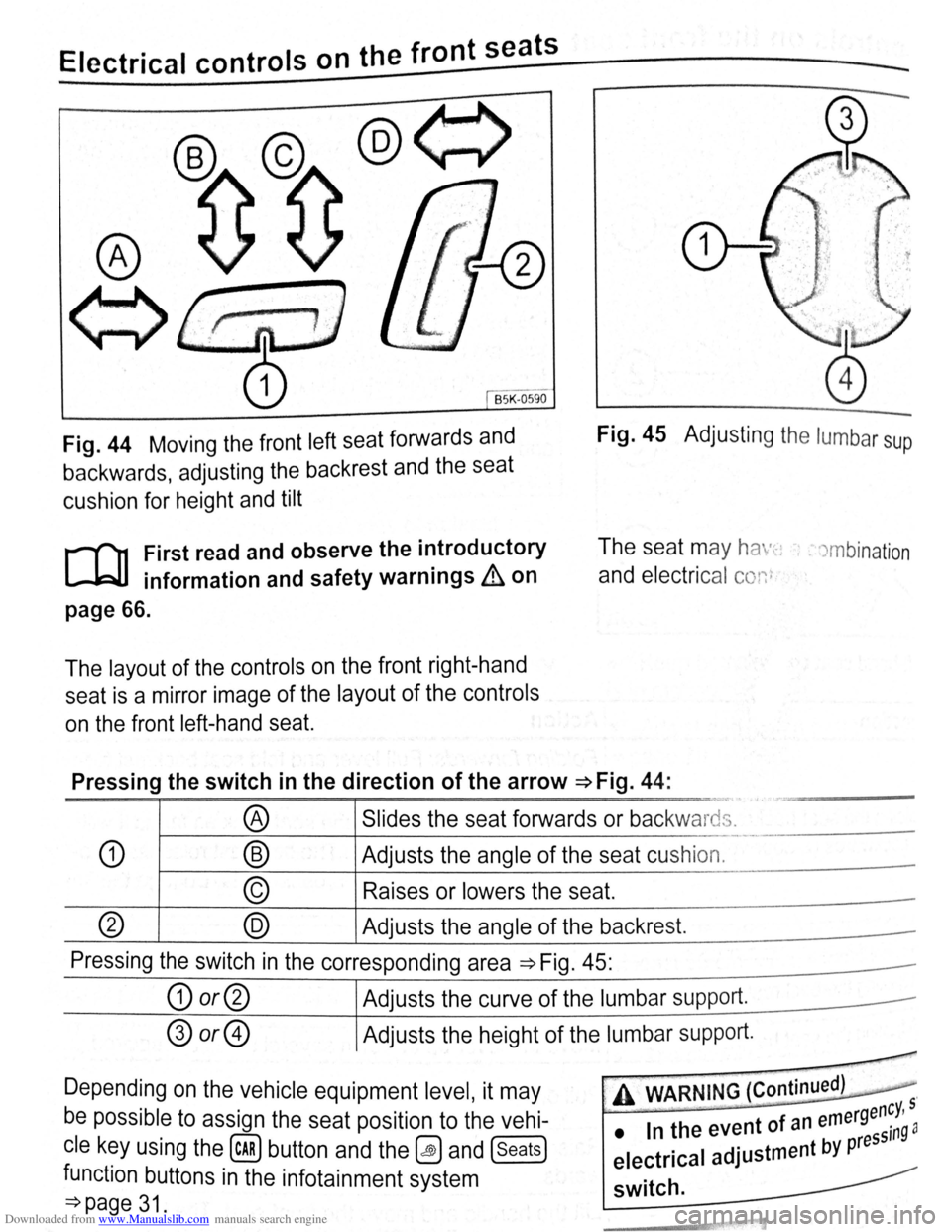
Fig. 44 Moving the front left seat forwards and
backwards, adjusting the backrest and the seat
cushion for height and tilt
Fig. 45 Adjusting the lumbar sup
r-f'n First read and observe the i~troductory
lJ=JJ information and safety warn1ngs & on
The seat may ha ·-~: , . )mbination
and electrical conr
page 66.
The layout of the controls on the front right-hand
seat is a mirror image of the layout of the controls
on the front left-hand seat.
Pressing the switch in the direction of the arrow ~Fig. 44:
··-
® Slides the seat forwards or backwards.
L.
-· -·--
CD ® Adjusts the angle of the seat cushion.
© Raises or lowers the seat.
(?) @ Adjusts the angle of the backrest.
Pressing the switch in the corresponding area ~Fig. 45:
G) or@ Adjusts the curve of the lumbar supp ort.
® or@ Adjusts the height of the lumbar support.
-
Depending on the vehicle equipment level, it may
be possible to assign the seat position to the vehi
cle key using the (cAR) button and the~ and (seats)
function buttons in the infotainment system
=:}page 31.
, A WARNING (Continued) .
-rgency, 5
• In the event of an eme ssin9 a
electrical adjustment by pre
switch.