display VOLKSWAGEN SCIROCCO 2012 User Guide
[x] Cancel search | Manufacturer: VOLKSWAGEN, Model Year: 2012, Model line: SCIROCCO, Model: VOLKSWAGEN SCIROCCO 2012Pages: 138, PDF Size: 48.59 MB
Page 23 of 138
Downloaded from www.Manualslib.com manuals search engine 0
0
Using the selection menu in the instrument cluster
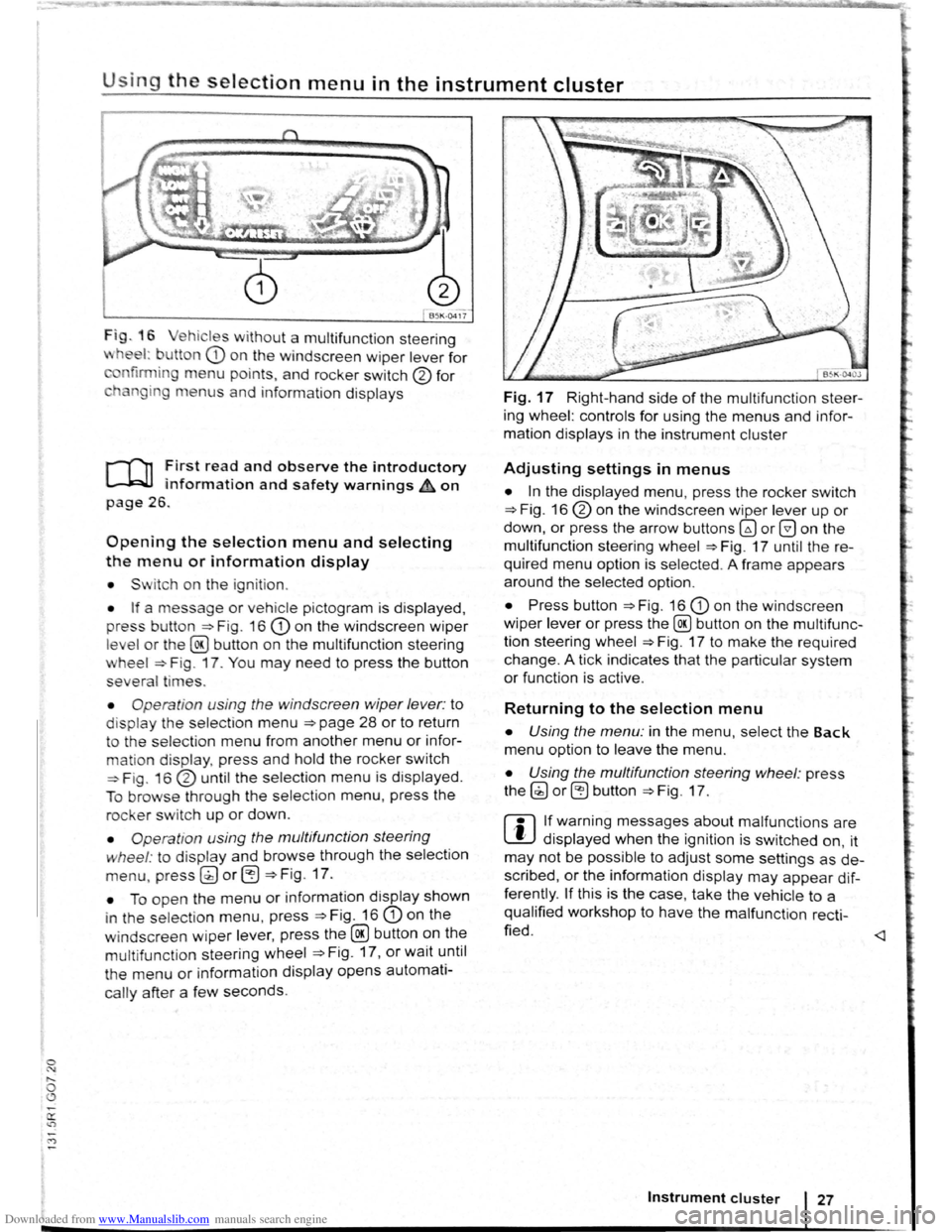
Fig . 16 ehicl es w ithout a multifunct ion steering
wheel: b utton CD o n th e windscreen wiper lever for
nfirmin g menu points, and ro cker switch 0 for
h n gin g m e
nus and info rm ation displays
r-T'n First read and observe the introductory
l.-.W.I information and safety warnings&, on
page 26.
Opening the selection menu and selecting
the menu or information display
• Sw itch on th e ig nit io n.
• If a messag e or vehicle p ictogram is displayed,
p res s bu tton
=>F ig . 16 CD on the windscreen wiper
level or the @ button on the multifunction steering
wheel => F ig . 17. You may need to press the button
several ti
mes .
• Opera tion u sin g the windscreen wiper lever: to
dis p lay the selection menu =>page 28 or to return
to the selection menu from another menu or infor
mation dis play, press and hold the rocker switch
=>Fig. 1 6 0 until the select ion menu is displayed.
To
brows e through the select ion menu, press the
rocker switch up or down.
• Operatio n using the multifunction steering
wh
eel : to display and browse through the selection
menu, press g) or eJ =>Fig. 17.
• To open the menu or information display shown
i n th e s election
menu, press =>Fig . 16 CD on the
w i
ndscreen wiper lever, press the @ button on the
multifunct ion steering wheel =>Fig . 17, or wait until
th e
menu or information display opens automati
cally after a few seconds.
Fig. 17 Right-hand side of the multifunction steer
ing wheel: controls
for using the menus and infor
mation displays in the instrument cluster
Adjusting settings in menus
• In the displayed menu, press the rocker switch
=>Fig. 16 0 on the windscreen wiper lever up or
down, or press the arrow buttons~ or G on the
multifunction steering wheel
=>Fig. 17 until the re
quired menu option is selected . A frame appea rs
around the selected option .
• Press button =>Fig. 16 CD on the windscreen
wiper lever
or press the@ button on the mult ifunc
tion steering wheel
=>Fig. 17 to make the requir ed
change.
A tick indicates that the part icular system
or function is act ive .
Returning to the selection menu
• Using the menu: in the menu , select the Back
menu option to leave the menu .
• Using the multifunction steering wheel: p ress
the (;) or ~ button => Fig . 17 .
r:l If warning messages about malfunctions are
L!J displayed when the ignition is switched on, it
may not be possible to adjust some settings as de
scribed ,
or the information display may appear dif
ferently .
If this is the case, take the vehicle to a
qualified workshop to have the malfunction
recti
fied .
Instrument cluster 27
Page 25 of 138
Downloaded from www.Manualslib.com manuals search engine Driving data
r-T'n ~irst rea~ and observe the introductory
L......kJJ mformat1on and safety warnings ~on
page 26.
• Since start
• Since refuel
• long-term
The multifunction display (MFD) shows a variety of
travel and fuel consumption data.
The currently selected memory is shown in the dis
play.
Switching between displays Press the [OK/RESET] button on the windscreen wiper
lever or press the @ button on the multifunction
steering wheel to switch between recorders
when
the ignition is switched on and the recorder is dis
played.
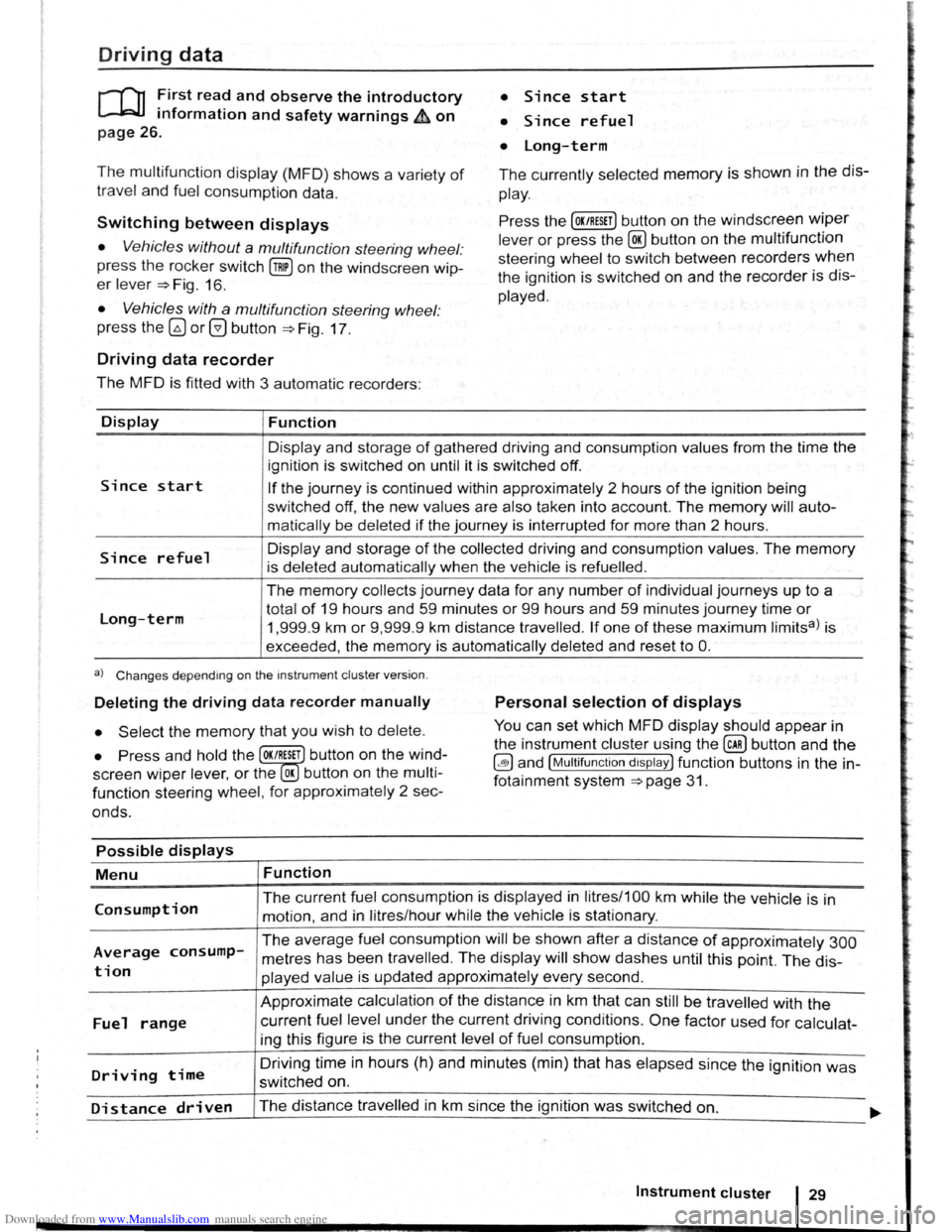
• Vehicles without a multifunction steering wheel:
press the rocker switch
(!ill on the windscreen wip
er lever ~Fig. 16.
• Vehicles with a multifunction steering wheel:
press
the~ or@ button ~Fig. 17 .
Driving data recorder
The MFD is fitted with 3 automatic recorders:
Display
Since start
Since refuel
Long-term
Function
Display and storage of gathered driving and consumption values from the time the
ignition is switched on until it is switched off.
If the journey is continued within approximately 2 hours of the ignition being
switched
off, the new values are also taken into account. The memory will auto
matically be deleted
if the journey is interrupted for more than 2 hours.
Display and storage
of the collected driving and consumption values. The memory
is deleted automatically when the vehicle is refuelled .
The memory collects journey data for any number of individual journeys up to a
total
of 19 hours and 59 minutes or 99 hours and 59 minutes journey time or
1,999.9 km or 9,999 .9 km distance travelled. If one of these maximum limitsa) is
exceeded, the
memory is automatically deleted and reset to 0.
a) Changes depending on the instrument cluster version.
Deleting the driving data recorder manually Personal selection of displays
• Select the memory that you wish to delete. You can set which MFD display should appear in
the instrument cluster using the
@ill button and the
~and [Multifunction display) function buttons in the in
fotainment system
~page 31.
• Press and hold the OK/RESET button on the wind
screen
wiper lev er, or the OK button on the multi
function steering wheel, for approximately 2 sec
onds.
Possible displays
Menu
Consumption
Average consump
tion
Fuel range
Driving time
Function
The current fuel consumption is displayed in litres/1 00 km while the vehicle is in
motion, and in litres/hour while the vehicle is stationary.
The average fuel consumption will be shown after a distance of approximately 300
metres has been travelled . The display will show dashes until this point. The dis
played value is updated approximately every second.
Approximate calculation
of the distance in km that can still be travelled with the
current fuel level under the current driving conditions . One factor used for calculat
ing this figure is the current level
of fuel consumption .
Driving
time in hours (h) and minutes (min) that has elapsed since the ignition was
switched on.
Distance driven The distance travelled in km since the ignition was switched on. ..... ~~~--------~--------------------------~----------------------------~
Instrument cluster 29
Page 26 of 138
Downloaded from www.Manualslib.com manuals search engine Possible displays
Menu Function
Average speed The
average sp ee d
will be shown after a distan ce of appro ximately 100 metres
h as be en trav e
lled . The display will show dashes until this point. The displayed
valu es
will be updated approximately every 5 se conds .
Digit al sp ee d display Current vehicle speed displayed digitally .
Warning
at
---km/h
orWarning at
If the saved speed (within the range of 30 km/h (18 mph) and 250 km/h
m
ph
(155 mph)) is exceeded , an acoustic warning will be sounded , along with a vis ible
warning if required .
Oil temperature Current temperature of the engine oil displayed digitally .
Saving a speed for the speed warning
• Select the Speed warning ---km/h display .
• Press the OK/RESET button on the windscreen wip
er lever, or the OK button on the multifunction steer
ing wheel to save the current speed and activate
the warning system.
• If necessary , use the @!) rocker switch on the
windscreen wiper lever, or the
G) or 0 buttons on
the multifunction steering wheel, within approxi-
Assist systems menu
mately 5 seconds to set the desired speed. Then
press the
[OK/RESET] or@ button again, or wait a few
seconds . The speed is now saved and the warning
is activated .
• To deactivate , press the [OK/RESET] or@ button .
The stored speed
will be deleted .
Menu Function
Lane
Assist Swi tches the lane departure warning system on and off =>page 240.
Front Assist Switches the area monitoring system on or off =>page 235.
_A_c_c ____________ ~A_d_a~p_tiv_e __ cr_u_is_e_c_o_n_tr_o_ld_i~sp_l~ay~=>~p_a~g~e~2~2~6~·----------------------------
Page 27 of 138
Downloaded from www.Manualslib.com manuals search engine lnfotainment system
Menu and system settings (SETUP)
o:n Introduction
This chapte r con ta in s info rm ation on th e fo llo w in g
su bjects :
V ehi cle se ttin
gs menu . . . . . . . . . . . . . . . . . . . . 31
Additional information and warnings:
• Instrum ents ~page 20
•
V olks wage n informa tion syst em ~page 26
• C entral locking system ~page 46
• Electric windows ~page 60
•
Lights ~page 105
• Windscreen wiper/ wa she r ~page 117
• Mirrors ~page 122
• Brake assist systems ~page 179
• Driver assist systems ~page 196
• Tyre monitoring system ~page 253
• Wheels and tyres ~page 308
•
~Booklet Radio or ~Booklet Navigation sys
tem
General information on operating the unit
The following section contains information on the
settings that can be adjusted in the
Vehicle set
tings menu . Basic information on operating the
i nfotainment system and on warning and safety in
structions are contained in a separate manual
~Booklet Radio or ~Booklet Navigation system.
Systems settings and display of vehicle
information
After pressing the (ill] infotainment button you can
t
ouch the corresponding function button to displ ay
information
or adjust settings , e .g . you can check
the current status
of the start/stop system
~page 196 in the Vehicle status menu .
Vehicle settings menu
r-f"'n First read and observe the i~troductory
L-1=J.1 information and safety warnmgs A on
page 31.
Opening the Vehicle settings menu
• Switch on the ignition .
• If necessary, switch on the infotainment system.
• Vehi cle se ttings (setup) ~page 31.
• Auxili ary hea te r sett ings ~page 256.
• Radio sta tio n selection .
• Vehicle status .
• Driving da ta .
• Conv enien ce consumers .
A WARNING
Accidents and injuries can occur if the driver
is distracted. Operating the lnfotainment sy s
tem can distract you from the road.
• Always drive carefully and responsibly.
r::l Aft er sta rt ing the engine with a disc harged
L!J ve hi cle battery , or after the battery has been
chang ed,
system settings (time, da te , personal
conveni ence settings and program ming)
may have
be en chang ed or de leted . Ch eck and correc t
the
s e ttin gs as necessa ry once the ve hi cle ba tte ry has
been sufficiently charged .
• Touch the 0 function button to open the Vehi
cl e settings menu.
• Touc h the corresponding function button to
open additional menus in the
Vehicle settings
menu, or to adjust settings in the menu points. ...,.
lnfotainment system 31
..
Page 28 of 138
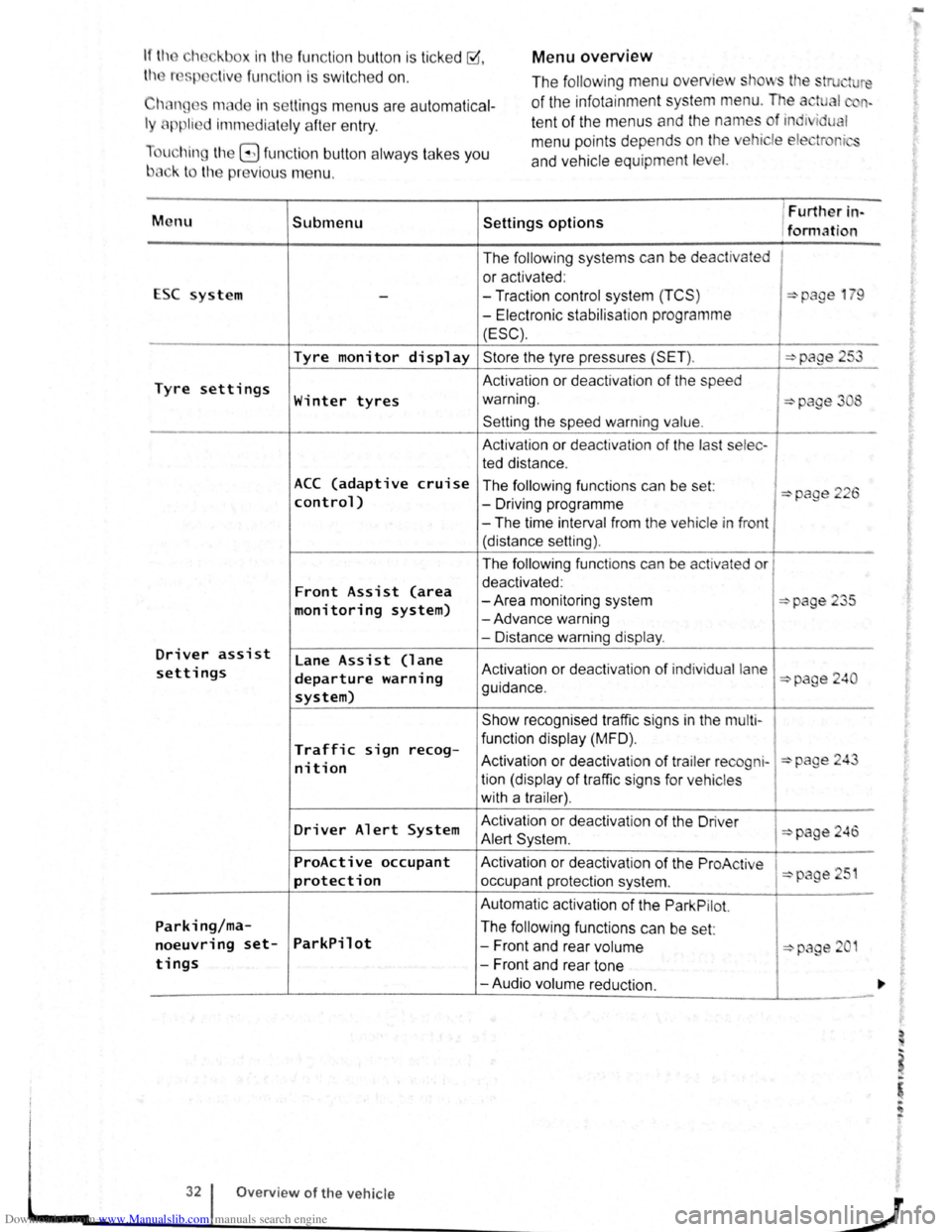
Downloaded from www.Manualslib.com manuals search engine Menu overview If the eh ckbox in the fun ction button is ticked ~.
th r sp liv e fun ction i s swi tc h ed on .
Chan ges made in settin gs menu s are autom atica l
ly applie d imm ediate ly afte r entry .
u hin g
t11e G fun ction button alw ays ta kes you
b3ck to the previo us m enu . The
following menu overview
stows tl e stru ture
of the infota inment system menu. The a tual n
te nt of the menus and the names of ind1 i u I
m enu points depends on the ehicle ele tr r i
and ve hicle equ ipment level.
M enu Submenu Settings options
1 Furtller in-
/formation
The
follow ing systems can be de activated
or activated :
ESC system
--Traction control system (TCS ) :::>page 1 9
-Electronic stabilisat ion programme
(ESC).
Tyre monitor display Store the tyre pressures (SET ). :::>page 253
Tyre settings Activation or deactivat ion of the speed
Winter tyres warning. :::>page 3 8
Setting the speed warning value.
A ctivation or dea ctivation of the last selec -
ted distance .
ACC (adaptive cruise The following functions can be set: :::>page 226 control) -Driving programme
-The time interval from the vehicle in front
(distance setting).
The
follow ing functions can be activated or
Front Assist (area deactivated :
-Area monitoring system :::>page 235 monitoring system) -Advance warning
- Distance warning
display .
Driver assist lane Assist (lane settings departure warning Activation or deactivation of ind iv idual lane :::>page 240
system) guidance .
Show recognised traffic signs in the
mu lt i-
Traffic sign func tion display (MFD) . recog-Activation or deactiv atio n of trailer re cogni-:::>page 24 nit ion tion (display of traffic signs for ve hicles
with a trailer) .
Driver Alert System Activation
or deactivation of the Driver :::>page 246 Alert Syst em .
ProActive occupant Activation or dea ctiv atio n of the ProAc tive 51 protection occupant protection system . :::>page
Automatic activation of the Park Pilot.
Parking/ma-The following functions can be set:
noeuvring set-ParkPilot -Front and rear volume :::::>page 2 1
tings -Front and rear tone
-Audio volume reduction.
32 Overview of the vehicle
J
-
Page 30 of 138
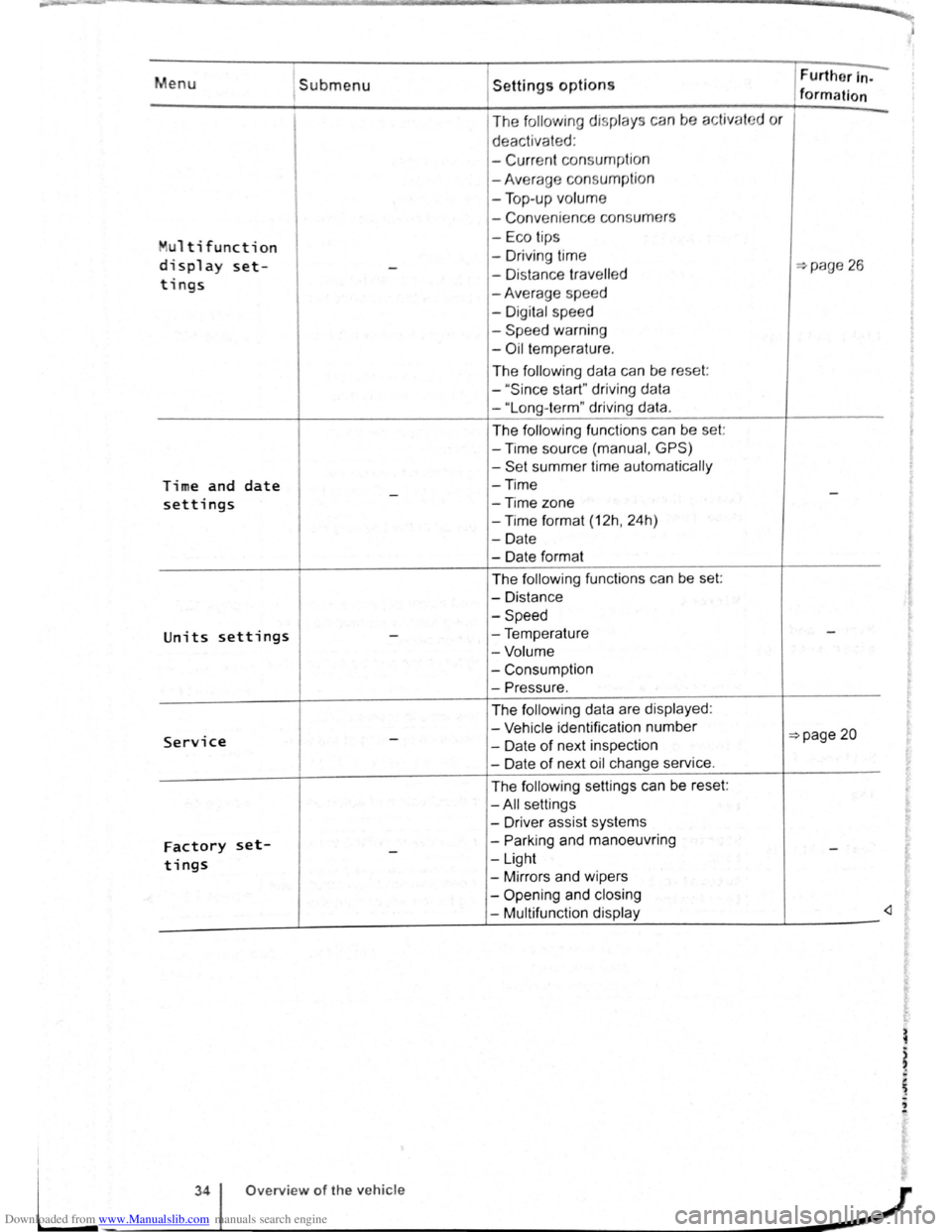
Downloaded from www.Manualslib.com manuals search engine Menu 1submenu
Multi function
display set--
tings
Time and date -settings
Units settings -
Service -
Factory set--tings
Settings options
The following display s ca n be activat
deactivated :
-
Curr ent consu mption
-Average consumpti on
- Top -up volume
- Conveni ence consum ers
- Eco tips
- Driv ing time
- Di stance
travell ed
-Average spee d
- Digital speed
-
Speed warning
-Oil t empe rature .
The
foll ow ing data can be reset:
-
" Sin ce start" driving data
-"Long -term" driving data.
The following functions can be set:
-Time source (manual , GPS)
-Set summer time automatically
-Time
-Time
zone
-Time format (12h, 24h)
-Date
- Date format
The
following functions can be set:
-Distance
-Speed
-Temperature
-Volume
-Consumption
-Pressure.
The follow ing data are displayed :
- Vehicle identification number
- Date
of next inspection
-Date of next oil change service.
The
following settings can be reset:
-All settings
- Driver assist systems
-
Parking and manoeuvring
-Light
-Mirrors and wipers
-
Opening and closing
- Multifunction display Further
In-
formation ~ ~
d
or
...,page 26
-
-
=>page 20
-
-
"'
L
34 Overview of the vehicle
-~~------------~J
Page 40 of 138
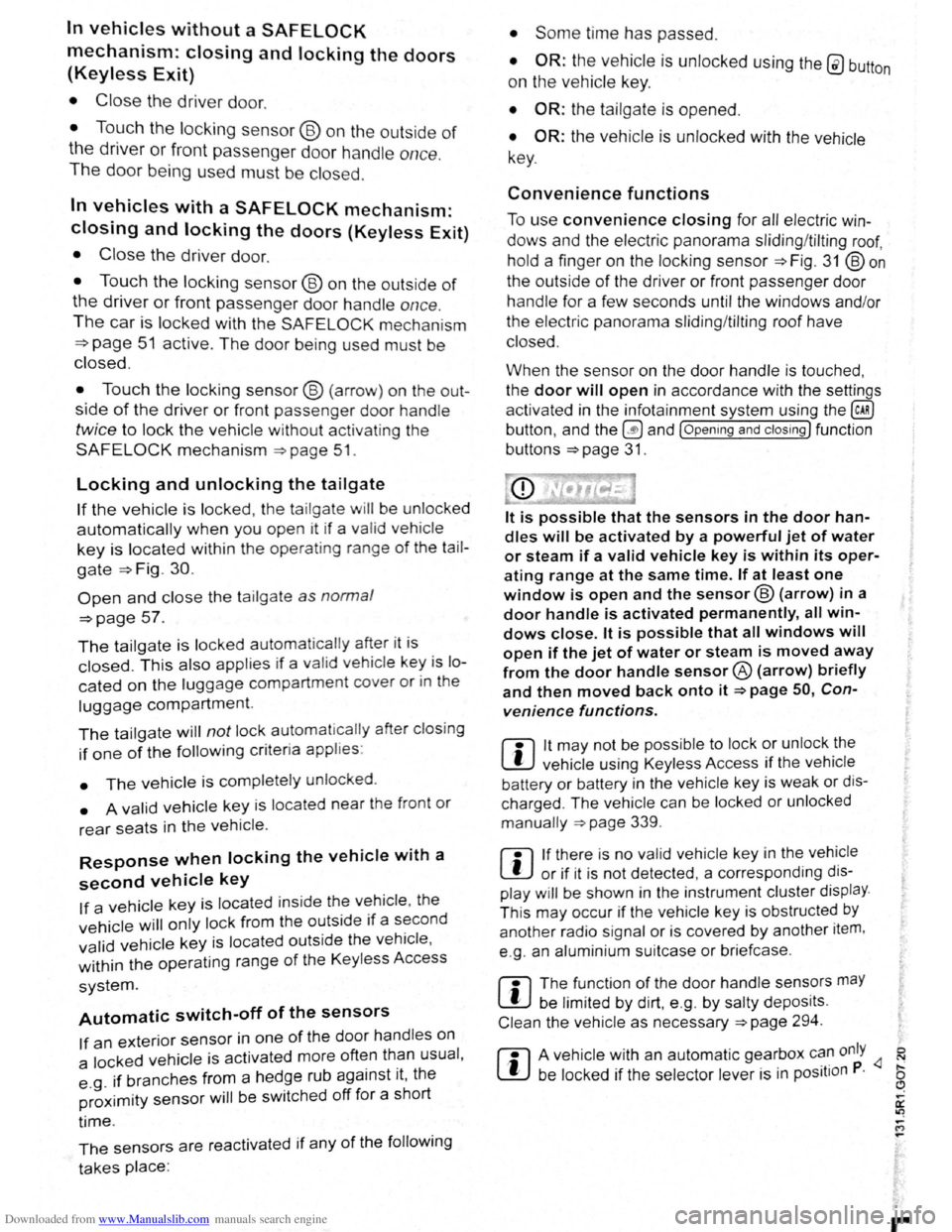
Downloaded from www.Manualslib.com manuals search engine In vehicles without a SAFELOCK
mechanism: closing and locking the doors
(Keyless Exit)
• Close the driver door.
• Touch the locking sensor@ on the outside of
the driver or front passenger door ha ndle once .
The door being used must be closed.
In vehicles with a SAFELOCK mechanism:
closing and locking the doors (Keyless Exit)
• Close the driver door.
• Touch the locking sensor@ on the outside of
the driver or front passenger door handle once .
The car is locked with the SAFELOCK mechan ism
=>page 51 active. The door be ing used must be
closed.
• Touch the locking sensor@ (arrow) on the out
side of the driver or fron t passenger door handle
twice to lock the vehicle without activating the
SAFE LOCK mechanism =>page 51.
Locking and unlocking the tailgate
If the vehicle is locked, the tailgate will be unlocke d
automatically when you open it if a valid vehicle
key is located within the operating range of the tail
gate =>Fig . 30.
Open and close the tailgate as normal
=>page 57.
The tailgate is locked automat ically after it is
closed. This al so applies if a val id vehicle key is lo
cated on the luggage compart ment cover or in the
luggage compartment.
The tailgate will not lock automat ically after closing
if one of the following criteria applies :
• The vehicle is complete ly un locked .
• A valid vehicle key is located near the front or
rear seats in the v ehicle .
Response when locking the vehicle with a
second vehicle key
If a vehicle key is loca ted inside the vehicle, the
vehicle w ill only lock from the outside if a se cond
valid vehicle key is located outside the vehicle,
within the operating range of the Keyless Access
system.
Automatic switch-off of the sensors
If an exterior sensor in one of the door handles on
a locked
vehicle is activated more often than usual ,
e .g.
if branches from a hedge rub against it, the
proxim i
ty sensor will be switched off for a short
t ime .
The sensors are reactivated if any of the following
takes place:
• Some time has passed.
• OR: the vehicle is unlocked using the 0 button
on the vehicle key.
• OR: the tailgate is opened.
• OR: the vehicle is unlocked with the vehicle
key .
Convenience functions
To use convenience closing for all electric win
dows and the electric panorama sliding/tilting roof,
hold a finger on the locking sensor
=>Fig . 31 @on
the outside of the driver or front passenger door
handle for a few seconds until the windows and/or
the electric panorama sliding/tilting r
oof have
closed.
When the sensor on the
door handle is to uched ,
the
door will open in accordance with the settings
activated in the infotainment system using
the~
button, and the~ and (Open ing and closing ) function
buttons
=>page 31.
lt is possible that the sensors in the door han
dles will be activated by a powerful jet of water
or steam if a valid vehicle key is within its oper
ating range at the same time. If at least one
window is open and the sensor@ (arrow) in a
door handle is activated permanently, all win
dows close. lt is possible that all windows will
open if the jet of water or steam is moved away
from the door handle sensor® (arrow) briefly
and then moved back onto it =>page 50, Con
venience functions.
m lt may not be possible to lock or unlock the
L!J vehicle using Keyless Access if the vehicle
battery or battery
in the vehicle key is weak or dis
charged . The vehicle can be locked or unlocked
manually
=>page 339 .
m If there is no valid vehicle key in the vehicle
L!J or if it is not detected , a co rre spond ing dis
play w ill be shown in the instrum ent cluster display.
T his may occur if the vehicle key is obstructed
by
another radio signal or is cov ered by another item,
e .g . an aluminium suitcase or briefcase.
m The function of the door handle sens?rs maY
L!J be limited by dirt, e.g . by salty depos1ts.
Clean the vehi cle as necessary =>page 294 .
m A veh icle with an automatic gearbox c~~ only
Page 41 of 138
Downloaded from www.Manualslib.com manuals search engine -
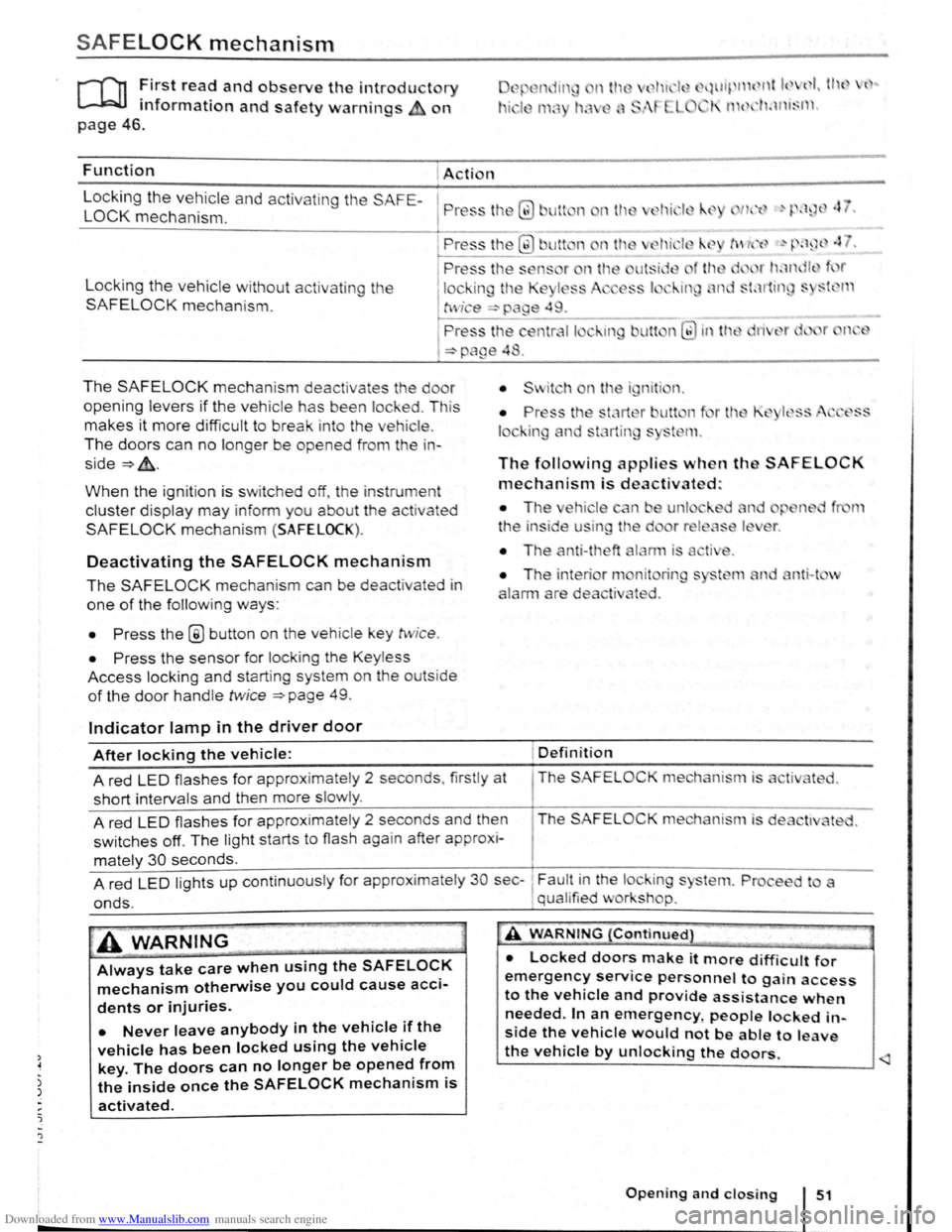
SAFELOCK mechanism
ro ~irst rea? and observe the introductory
mformat1on and safety warnings on
~.wl~ 11 { nt k ( I I tl l { ..
I' 1 t 1'klnt~l l .
page 46.
Function Action
L
ocking the vehicle and activating the SAFE-
LOCK mechanism. P ress tl1 Q) Jlt n nth
Locking the vehicle without activat in g the
SAFELOCK mechanis m .
The SAFELOCK mechanis m deactivates the do r
opening levers if the v e hic le has been lock ed . Th is
makes it more d ifficult to break in to the vehicle .
The doors can no longer be opened from th e in
side~&..
When the ignition is switched off, th e instrum ent
cluster display may inform you about t he activated
SAFELOCK mechani sm (SAFELOCK).
Deactivating the SAFELOCK mechanism
The SAFELOCK mechanis m can be deactivated in
one of the following ways:
• Press the @ button on the veh icle key twic e .
• Press the sensor fo r lock ing the Keyless
Access locking and s tarting system on the outs ide
of the door handle twice ~page 49.
Indicator lamp in the driver door
The following applies when th SAFELOCK
mechanism is deactivated:
• The ehi le n e unl
t
he in side u in the d
• The anti-theft
nit rin
ted .
nti-t v
After locking the vehicle: Definition
A red LED flash es for approximately 2 seconds , firstly at The SAFELOC
short intervals and then more slowly .
A red
LED flashes for approximate ly 2 seconds and then The SAFELOCK me hanism is de
switches off. The light starts to flash again after approx i-
mately 30 seconds.
A red
LED lights up cont inuous ly for approx imate ly 30 sec-~ Fault in the lock ing s
onds. , qual ified v or shop.
A WARNING
Always take care when using the SAFELOCK
mechanism otherwise you could cause acci
dents or injuries.
• Never leave anybody in the vehicle if the
vehicle has been locked using the vehicle
key. The doors can no longer be opened from
the inside once the SAFELOCK mechanism is
activated.
A WARNING {Continued}
• Locked doors make it more difficult for
emergency service personnel to gain access
to the vehicle and provide assistance when
needed. In an emergency people locked in
side the vehicle would not be able to leave
the vehicle by unlocking the doors.
Page 58 of 138
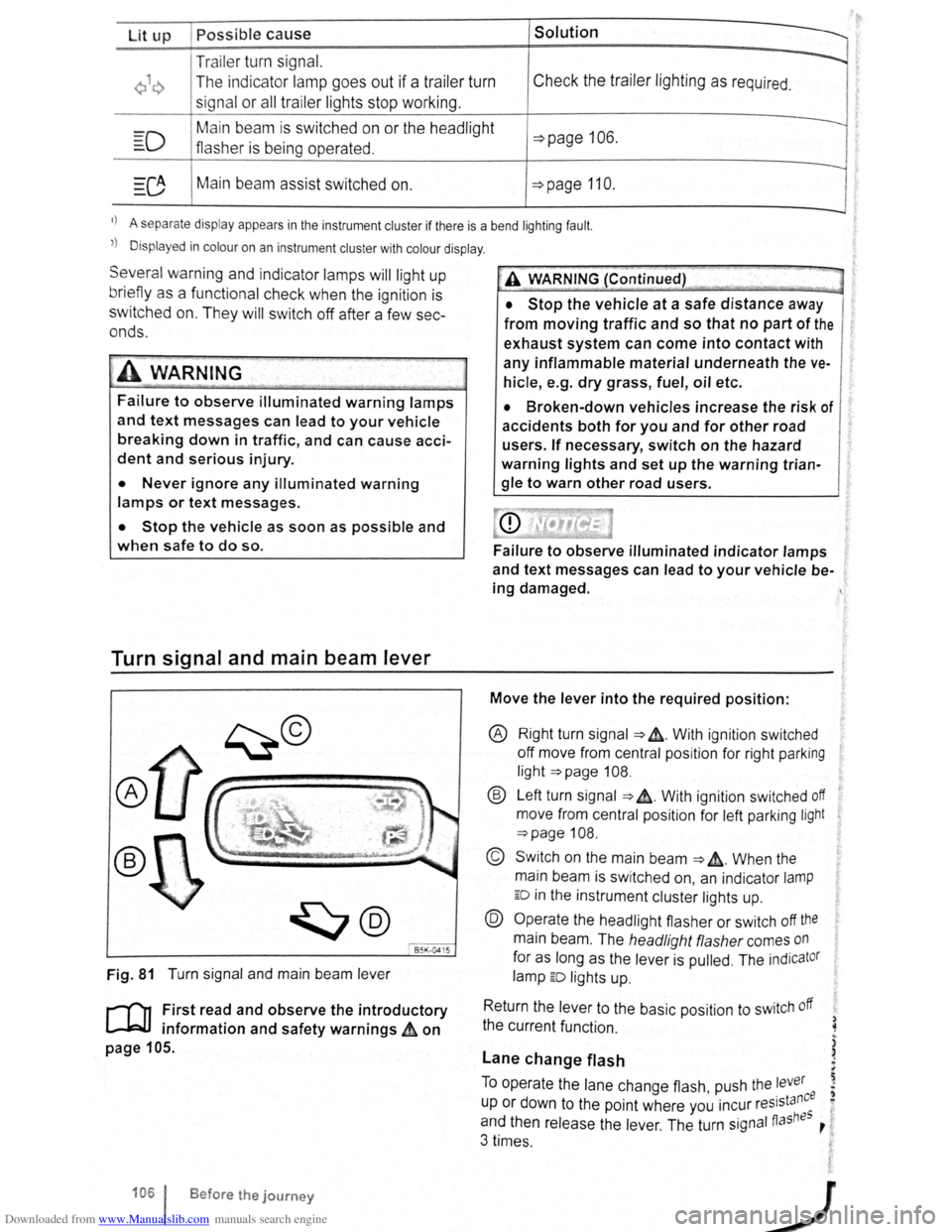
Downloaded from www.Manualslib.com manuals search engine Lit up Possible cause Solution
Tr ailer turn signal. -......
Q\~ The indica tor lamp goe s out if a tra iler turn Check the trailer l ighting as required.
signal
or all trailer lig ht s st op working .
Main beam is swi tc h e d on or the headlight
----D =>pa ge 106 .
flasher is being opera ted .
-
0 Main beam ass ist swi tc hed on. =>page 110 .
-1
) A separate display appears in the instrumen t cluster if there is a bend lighting fault.
>) Displayed in colour on an instru ment cluster with colour display .
Several warning and indicato r lamps will light up
briefly as a
functiona l check when the ign iti on i s
switched
on. T he y will swi tc h off after a few sec
onds.
--·--~-
Failure to observe illuminated warning lamps
and text messages can lead to your vehicle
breaking down in traffic, and can cause acci
dent and serious injury.
• Never ignore any illuminated warning
lamps or text messages.
• Stop the vehicle as soon as possible and
when safe to do so.
Turn signal and main beam lever
®
B5K ·0415
Fig. 81 T urn signa l and main beam lever
r-('n F irst read and observe the introductory
1.-J=JJ information and safety warnings~ on
page 105 .
1061 Before the journey
--
~>A WARNING (Continued) -
• Stop the vehicle at a safe distance away
from moving traffic and so that no part of the
exhaust system can come into contact with
any inflammable material underneath the ve
hicle, e .g . dry grass, fuel, oil etc.
• Broken-down vehicles increase the risk of
accidents both for you and for other road
users. If necessary, switch on the hazard
warning lights and set up the warning trian
gle to warn other road users.
Failure to observe illuminated indicator lamps
and text messages can lead to your vehicle be
ing damaged.
Move the lever into the required position:
® Right turn signa l ~ &. W it h ignit ion swi tched
off m ove from centr al posit io n for right parking
li g ht
~page 108.
® Left turn sig na l ~ ~. W ith ignition switched off
move from centra l posi tion for left parking light
~page 108 .
© Switch on the main beam ~ &. Whe n the
main beam is switc hed on, an indicator
lamp
ED in the instr ument cluster lights up.
@ Operate the headlight flasher or switch off the
main beam. The h eadligh t flasher comes on
for as long as the leve r is pulled . The indicator
lamp ED lights u p .
R etu
rn the le ver to the basic position to switch off
the c urrent fu nc tio n.
Lane change flash
) ~
)
)
To o pe rate the la ne c hange flash push the lever ' . nee I) u p or d own to the poin t where you incur reslsta eo
and th en release the le ver. The turn signal fiashBS ,
3 times .
Page 62 of 138
Downloaded from www.Manualslib.com manuals search engine f!l In cool or damp wea her, the mtenor of the
L!J headltgh s. rear lights and turn stgnals may
m1st up bm.:fly Thts 1s normal and does not affect
the serv•ce life of the hghts on your vehicle
l'('n First read and observo the Introductory
L-..kJ.J Information and safety warnings.&. on
page 105 .
Main beam assist (Light Assist)
W•thtn the limit s of th e sy s te m , th e main b eam as
sis t au t
omatically swi tc h es the main bea m on at
speeds o f o ve r approxim ate ly 60 km/h (3 7 m ph) ,
depending on environm ent al a nd traffic condttions,
and swi tc hes it off again at spee ds und er appr oxi
mately 30 km /h (18 mph) ~&.The fun ction is
controlled by a came ra lo ca te d nea r the int erior
mirro r.
Main beam ass is t n ormall y recog nises illumin ate d
areas such as to wn s and deac tivates
the main
beam while driving throug h th em .
Automatic main beam assist (Dynamic Light
Assist)
W ithin the limits of the sys tem , the aut omatic main
beam assist (Dynamic Light A ssist) ca n minimi se
or even prevent dazzling of other road use rs ~ &.
The system detects other road users and their dis
tan ce from your vehic le and covers part o f th e
he adlights appropriately .
If dazz ling other road u
so rs canno t be
pre vented , th e ligh t dtstnbution rs
automa ticall y se t to d1pped beam headlights . The
func tion is controlled by a camera located on the
in side of th e wind screen above the mterior m~rror
The automatic m am beam assist automati cally
s w it c hes the main beam on at speeds
of more than
approximately 60 km /h (37 m ph) and off again at
speeds under approxima te ly 30 km /h (18 mph ) de
pending on whether there a re vehicles ahead.
wh eth er t here is oncoming traffic, and also on
oth
e r g eneral factors and traffic conditions .
Th e
automat1c main beam assist does no t work
w hen
travel mode is ac tt v ated ~page 111.
If the dynamt c bend llgh ttng is deac tivate d
~page 109 , or t he headltgh t switc h -ove r is acti va
t ed
~page 111, the f ull beam lights are only
s w it ched on and off automa ttcall y. This occurs i n
r esponse to
the v ehtcles ahead, oncoming traffic
a nd
the road lighting
Aut oma t
1c main beam assist normally dete cts illu
min ate d areas such as to wns and deac tiv a tes the
mai n beam wh ile dnving throug h them .
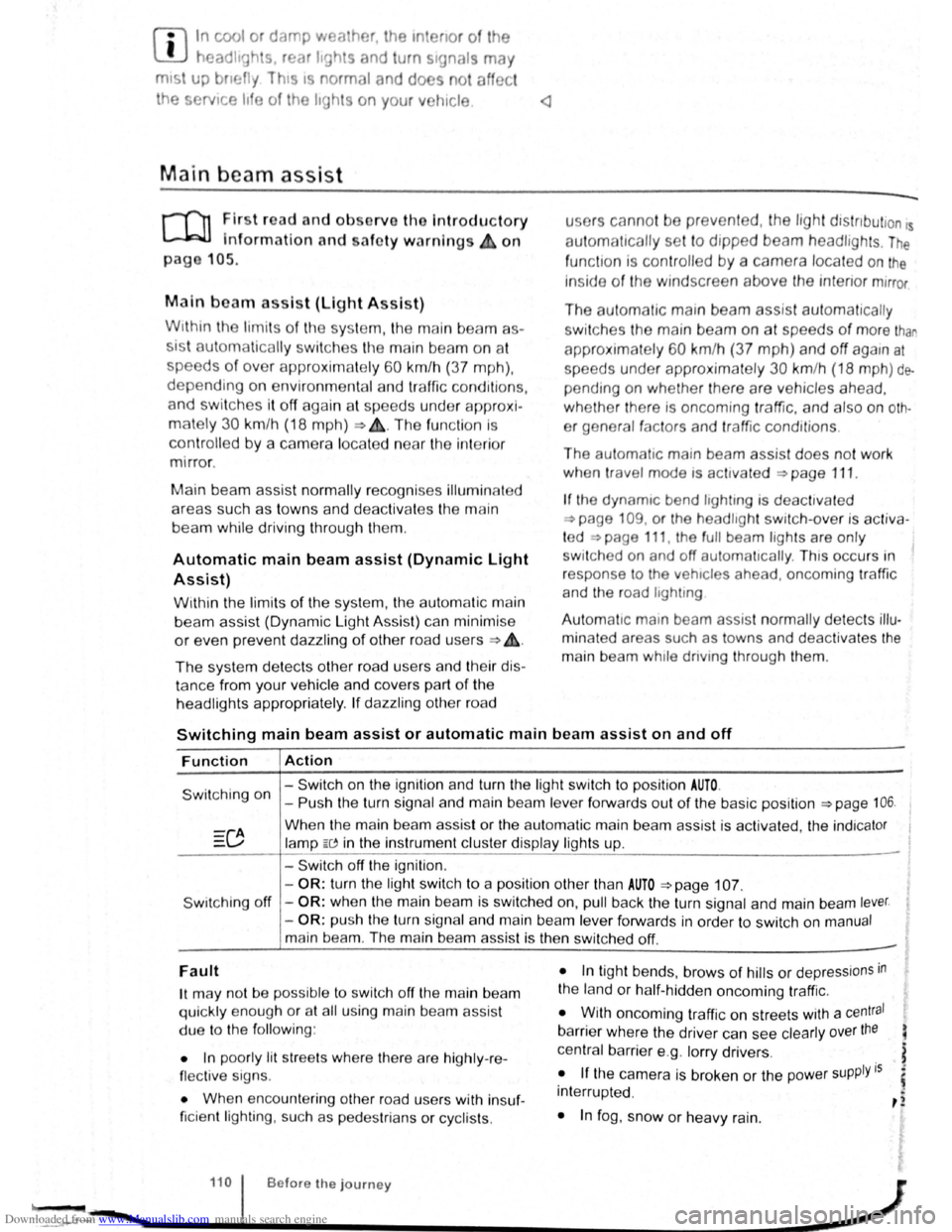
Switching main beam assist or automatic main beam assist on and off
Function Action
- Switch on the ignition and turn the light switch to positio n AUTO.
Switching on -Push the turn signal and main be am le ve r forwards out of the basic position ~page 106.
Wh en the m ain beam assis t or the au tom atic main beam assist is activ ated, the indica tor
la mp W in the instrument clu ste r display ligh ts up .
- Swi tc h off
the ignition .
-
OR : turn the light swit ch to a position other than AUTO ~page 107.
S wit ching off -OR : when the main bea m is swi tc h ed on, pull back the turn signal a nd main beam lever.
- OR : push the turn signa l and main beam le ver forwards in order to switch on manual
main bea m. The main beam assist is then switched off. -
Fault
1t may not be pos sibl e to switch off the main beam
qui ckly e nou gh or at all using main bea m assist
due to
the follo win g:
• In poo rly lit
str ee ts whe re the re are highly -re
flec tiv e sig ns.
• Wh en enco unt ering other road u sers with insuf
ficie nt lighting , su ch as p ed es trian s or cyc lis ts .
• In tigh t bends, brows of hills or dep ressions in
the land or h alf-h idde n oncomi ng traffic.
• W ith oncoming traff ic on str eets with a central
barrier where the driver can see clearly over the
central barrier e .g . lo rry drivers .
• If the came ra is broken or the pow er supply is
interrupt ed .
• In fog , sno w or hea vy rain.
... ~.==~~~~~~------1•1•0.i .. B .. ef•o •re .. th •e• j•o •u •rn•e•y._ .................. __________________ .............. ~ -.,