warning VOLKSWAGEN T-ROC 2018 Owner's Manual
[x] Cancel search | Manufacturer: VOLKSWAGEN, Model Year: 2018, Model line: T-ROC, Model: VOLKSWAGEN T-ROC 2018Pages: 502, PDF Size: 8.58 MB
Page 37 of 502
ng wheel
Operating using the wiper lever
WARNING
Accidents and injuries can occur if the driver is distracted.
Never operate the menus on the instrument cluster display while the vehicle is in motion.
Check the system settings after charging or replacing the 12-volt vehicle battery. System settings
may be changed or deleted if the power supply is interrupted.
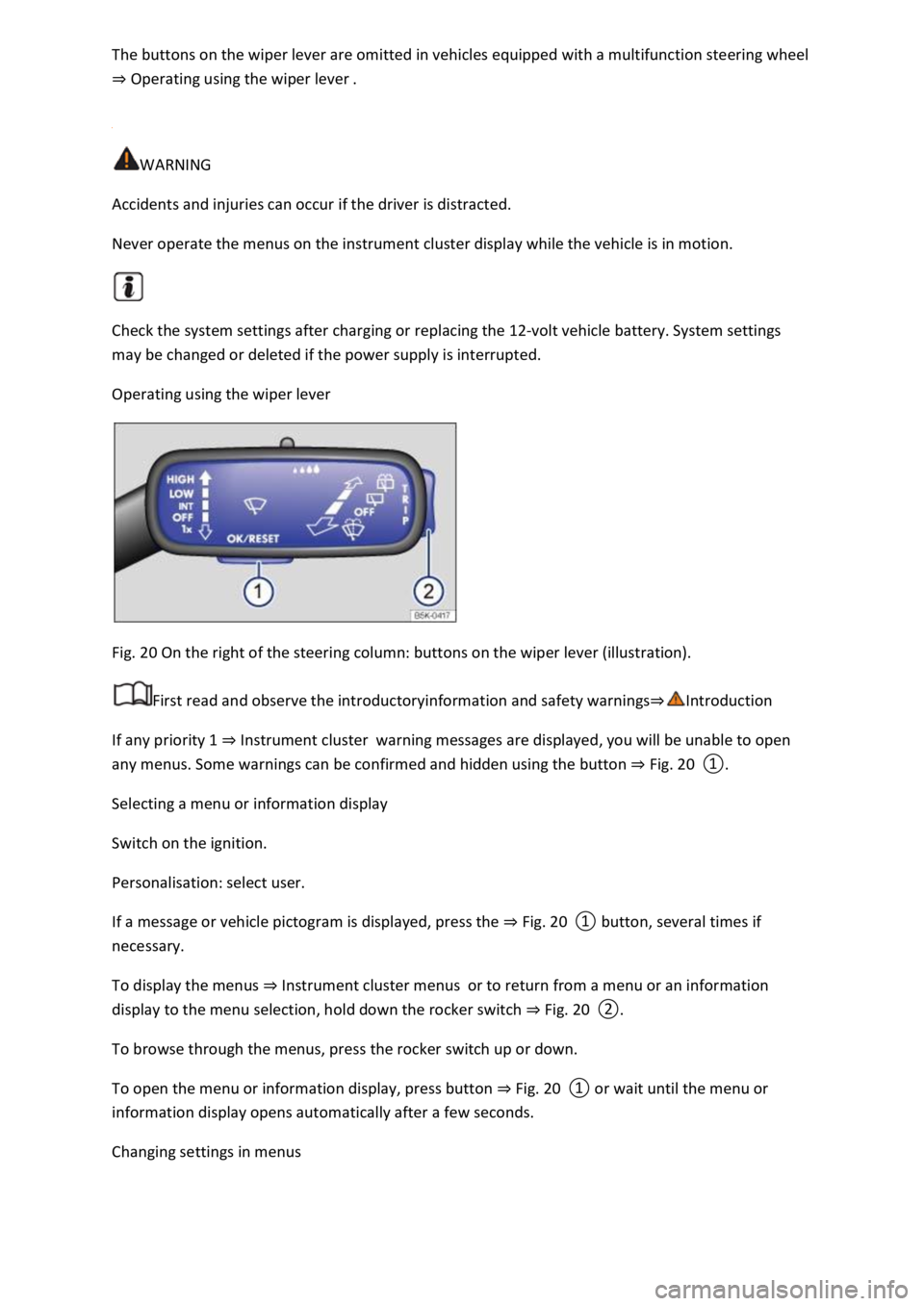
Operating using the wiper lever
Fig. 20 On the right of the steering column: buttons on the wiper lever (illustration).
First read and observe the introductoryinformation and safety warnings
If any priority 1 Instrument clusterwarning messages are displayed, you will be unable to open
any menus. Some warnings can be confirmed and hidden using the button Fig. 20
Selecting a menu or information display
Switch on the ignition.
Personalisation: select user.
If a message or vehicle pictogram is displayed, press the Fig. 20
To display the menus Instrument cluster menusor to return from a menu or an information
display to the menu selection, hold down the rocker switch Fig. 20
To browse through the menus, press the rocker switch up or down.
To open the menu or information display, press button Fig. 20
a few seconds.
Changing settings in menus
Page 38 of 502
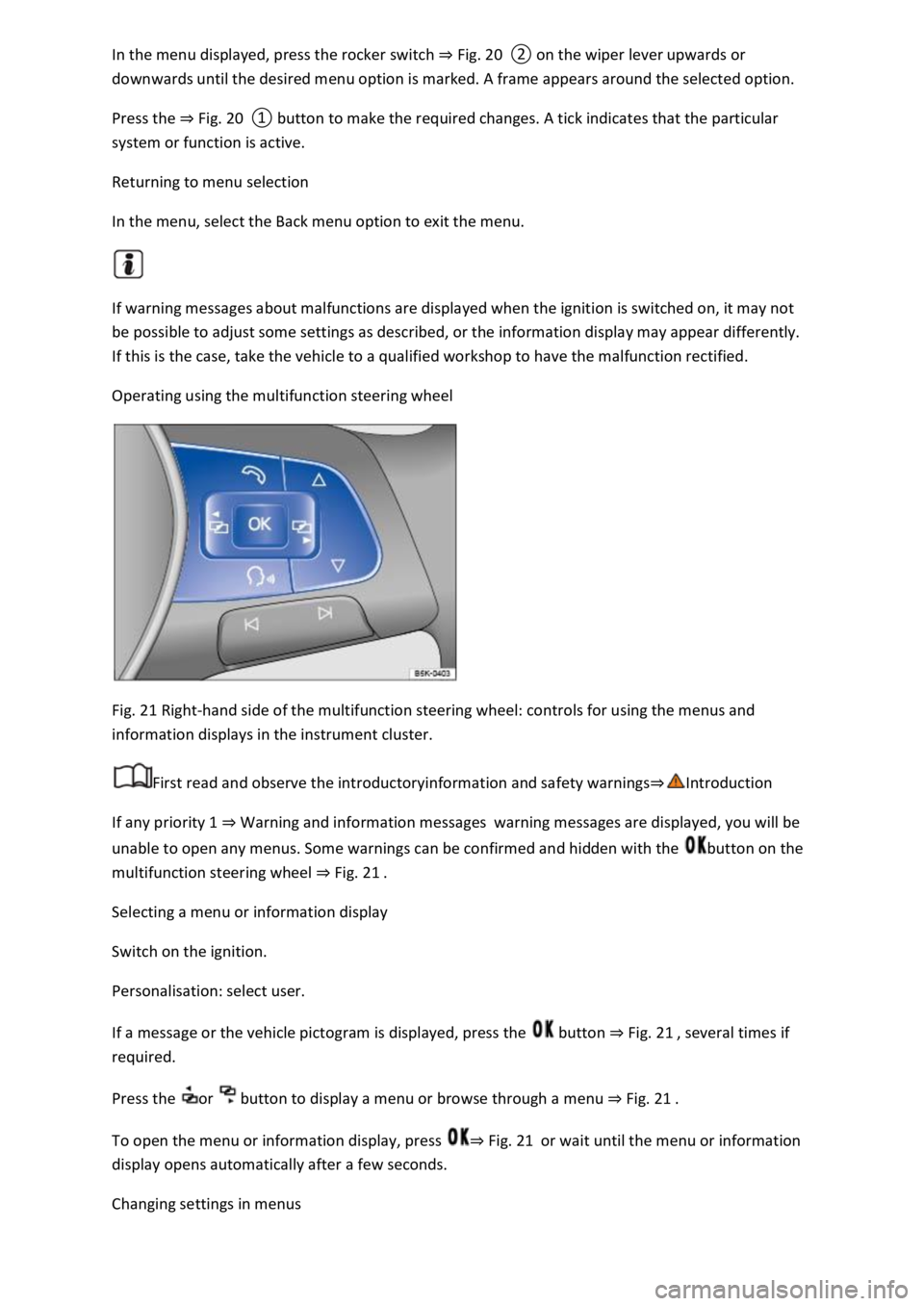
Fig. 20
Press the Fig. 20
system or function is active.
Returning to menu selection
In the menu, select the Back menu option to exit the menu.
If warning messages about malfunctions are displayed when the ignition is switched on, it may not
be possible to adjust some settings as described, or the information display may appear differently.
If this is the case, take the vehicle to a qualified workshop to have the malfunction rectified.
Operating using the multifunction steering wheel
Fig. 21 Right-hand side of the multifunction steering wheel: controls for using the menus and
information displays in the instrument cluster.
First read and observe the introductoryinformation and safety warnings
If any priority 1 Warning and information messageswarning messages are displayed, you will be
unable to open any menus. Some warnings can be confirmed and hidden with the button on the
multifunction steering wheel Fig. 21
Selecting a menu or information display
Switch on the ignition.
Personalisation: select user.
If a message or the vehicle pictogram is displayed, press the button Fig. 21
required.
Press the or button to display a menu or browse through a menu Fig. 21
To open the menu or information display, press Fig. 21or wait until the menu or information
display opens automatically after a few seconds.
Changing settings in menus
Page 39 of 502
or Fig. 21until the desired menu option is
marked. A frame appears around the selected option.
Press the button Fig. 21to make the required changes. A tick indicates that the particular
system or function is active.
Returning to menu selection
Press the or button Fig. 21
If warning messages about malfunctions are displayed when the ignition is switched on, it may not
be possible to adjust some settings as described, or the information display may appear differently.
If this is the case, take the vehicle to a qualified workshop to have the malfunction rectified.
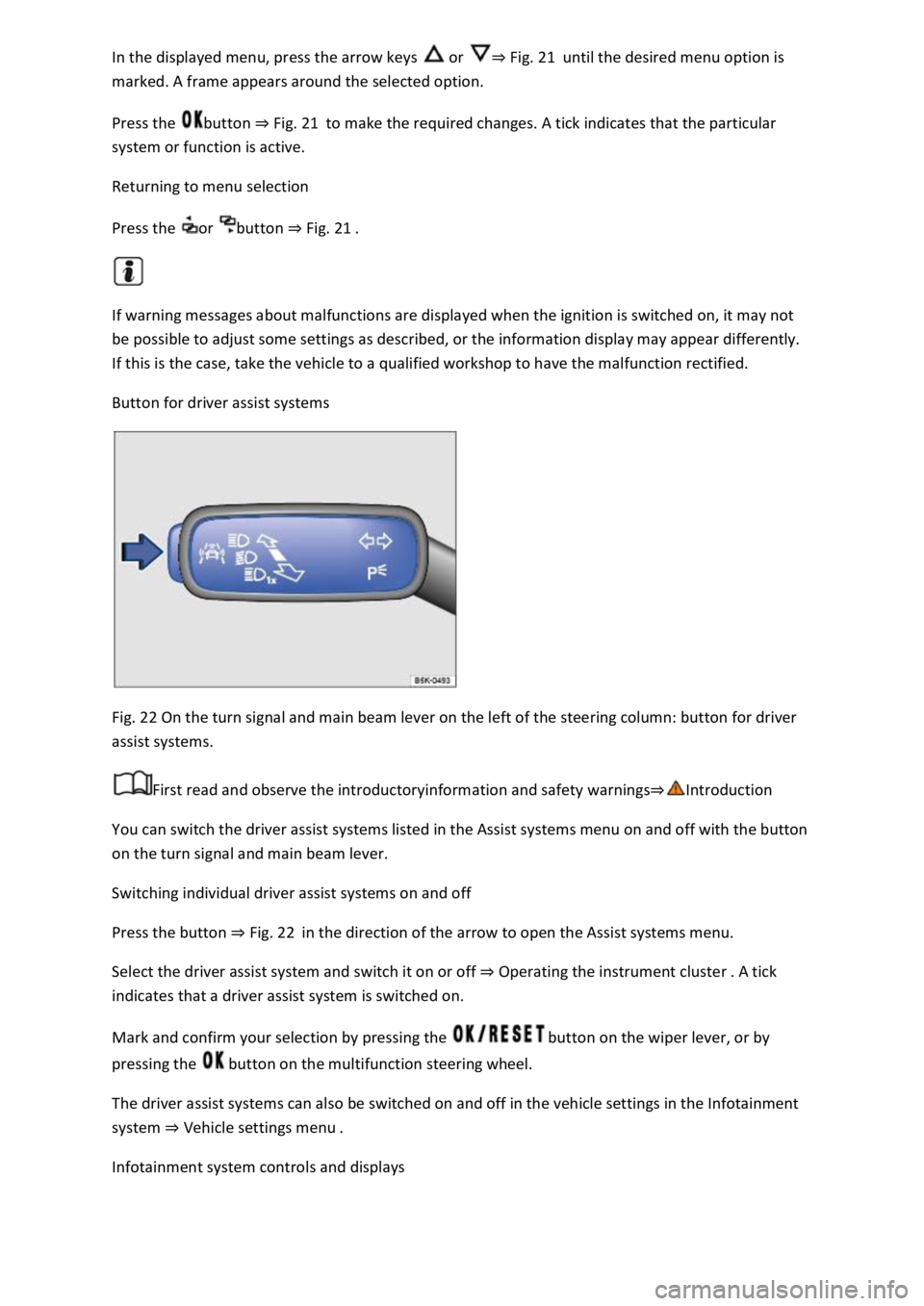
Button for driver assist systems
Fig. 22 On the turn signal and main beam lever on the left of the steering column: button for driver
assist systems.
First read and observe the introductoryinformation and safety warnings
You can switch the driver assist systems listed in the Assist systems menu on and off with the button
on the turn signal and main beam lever.
Switching individual driver assist systems on and off
Press the button Fig. 22in the direction of the arrow to open the Assist systems menu.
Select the driver assist system and switch it on or off Operating the instrument cluster
indicates that a driver assist system is switched on.
Mark and confirm your selection by pressing the button on the wiper lever, or by
pressing the button on the multifunction steering wheel.
The driver assist systems can also be switched on and off in the vehicle settings in the Infotainment
system Vehicle settings menu
Infotainment system controls and displays
Page 40 of 502

Introduction
This chapter contains information on the followingsubjects:
Vehicle settings menu
Performance monitor
Lap timer
Personalisat
The Infotainment system combines key vehicle systems in a central operating unit, e.g. menu
settings, radio or navigation system.
General information on operation
The following section contains relevant information on the settings that can be adjusted in the
Vehicle settings menu. Basic information on operating the Infotainment system and on warning and
safety instructions is contained in a separate manual Infotainment system,.
Systems settings and vehicle information display
After pressing the button or touching the function button followed by the Vehicle function
button, touch the corresponding function buttons to display information or make settings. The
current status of systems can be checked or system faults displayed by touching the function
button in the Vehicle status menu.
Vehicle settings (setup) Vehicl
Think Blue. Trainer. Think Blue. Trainer.
Performance monitor Performance monitor
Lap timer Lap timer
Offroad display Offroad driving situations
Auxiliary heater settings Auxiliary heater and ventilation
Active media.
Driving data.
Vehicle status.
Convenience consumers.
Radio station selection.
WARNING
Accidents and injuries can occur if the driver is distracted. Operating the Infotainment system can
distract you from the road.
Page 41 of 502
When you start the engine after the 12-volt vehicle battery has been totally discharged or changed,
you may find that system settings (time, date, personal convenience settings and programming) and
user accounts have been changed or deleted. Check and correct the settings as necessary once the
12-volt vehicle battery has been sufficiently charged.
Vehicle settings menu
First read and observe the introductoryinformation and safety warnings
You can switch individual functions and systems on and off and make settings in the vehicle settings
of the Infotainment system.
Opening the Vehicle settings menu
Switch on the ignition.
Switch on Infotainment system if necessary.
Press the button or function button.
Touch the Vehicle and function buttons to open the Vehicle settings menu.
Touch the corresponding function buttons to open additional menus in the Vehicle settings menu or
to make settings in the menu options.
If the checkbox in the function button is ticked , the respective function is switched on.
Touch the function button to return to the previous menu.
Performance monitor
First read and observe the introductoryinformation and safety warnings
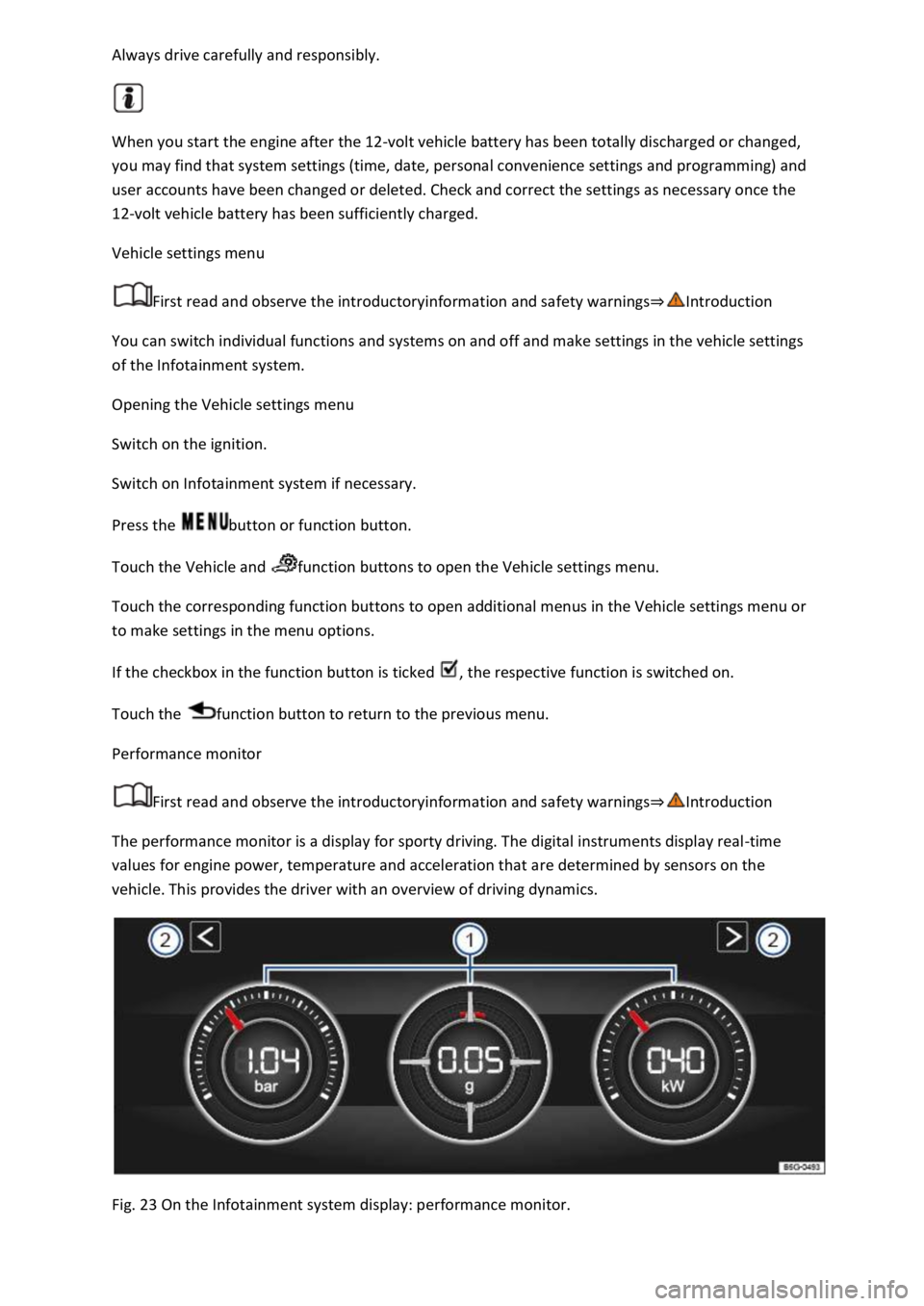
The performance monitor is a display for sporty driving. The digital instruments display real-time
values for engine power, temperature and acceleration that are determined by sensors on the
vehicle. This provides the driver with an overview of driving dynamics.
Fig. 23 On the Infotainment system display: performance monitor.
Page 43 of 502
needle may move further in a clockwise direction under high engine
loads and at high outside temperatures. This is no cause for concern unless the indicator lamp
in the instrument cluster display is lit up or flashing Engine oil
Adapting the display areas to the driving situation
Choose the three possible instruments corresponding to your individual driving style and the driving
situation.
WARNING
Accidents and injuries can occur if the driver is distracted. Operating the Infotainment system can
distract you from the road.
Always drive carefully and responsibly.
NOTICE
When starting from cold, avoid high engine speeds, driving at full throttle and over-loading the
engine.
Due to the principle of performance determination used in the vehicle, the physical accuracy of the
displayed values is not guaranteed.
Lap timer
First read and observe the introductoryinformation and safety warnings
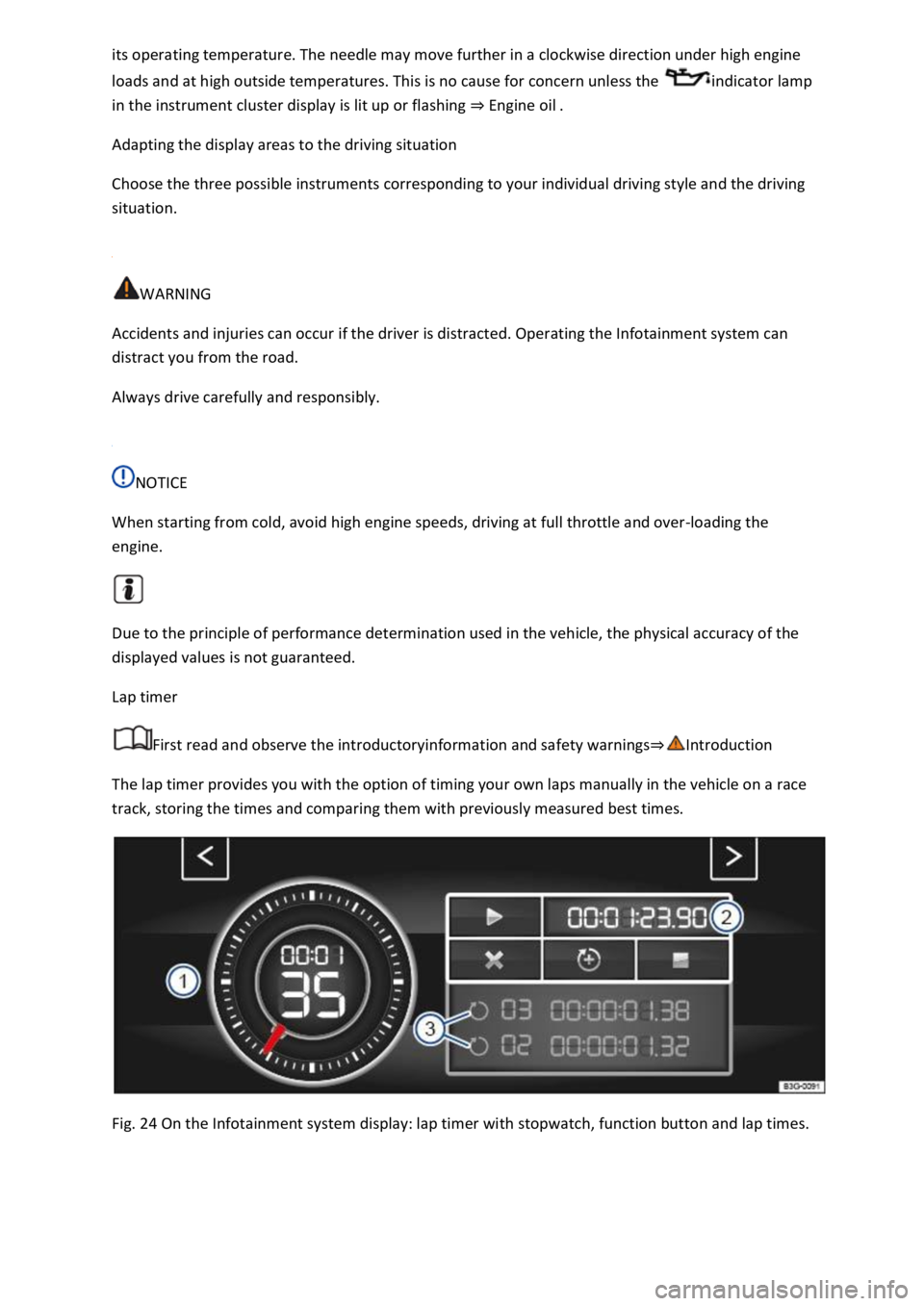
The lap timer provides you with the option of timing your own laps manually in the vehicle on a race
track, storing the times and comparing them with previously measured best times.
Fig. 24 On the Infotainment system display: lap timer with stopwatch, function button and lap times.
Page 45 of 502

Press the MENU button or function button, depending on the version of the Infotainment system.
Touch the Vehicle function button.
Touch the Selection function button.
Touch the Sport function button. The performance monitor is displayed.
Touch one of the arrow buttons Fig. 23
You can change between the lap timer and performance monitor at any time using the arrow
buttons Fig. 23Fig. 24
Measuring lap times
The stopwatch measures the lap time in two areas:
The red needle and the numerical value in the centre show the running time in seconds. The smaller
display in the inner area shows minutes and hours.
The display on the right side shows the current lap time with an accuracy of 1/100 seconds. There is
no difference between the stopwatch and lap times if there are not yet any laps with split times
stored in the lap timer.
WARNING
Avoid operating the lap timer when the vehicle is in motion if possible.
Make lap timer settings and access statistics only when the vehicle is stationary.
When the vehicle is in motion, use the lap timer only in driving situations which are easy to control.
Personalisation
First read and observe the introductoryinformation and safety warnings
The personalisation function allows personalised vehicle settings, such as air conditioning system,
instrument cluster or lighting settings, to be saved in a user account. Four user accounts are
available. Users are identified by the vehicle keys upon unlocking the vehicle. A user account is
assigned to each vehicle key.
Changes to the settings will be assigned to the active user account and saved upon locking the
vehicle or changing the user account.
Welcome and user account selection
When personalisation is activated, the name of the current user account appears on the instrument
cluster display for approximately ten seconds after you switch on the ignition.
During this time, you can select a user account using the buttons on the wiper lever or multifunction
steering wheel Infotainment system controls and displays
Page 50 of 502

Turn signals
Side lights, dipped beam headlights and main beam headlights
Tail light clusters
Brake lights
Rear fog light
Number plate light
Information on changing bulbs Changing bulbs
DANGER
Please observe important safety information about the front passenger front airbag Fitting and
using chi
WARNING
Driving under the influence of alcohol, drugs, medication or narcotics could cause accidents and fatal
injuries.
Alcohol, drugs, medication and narcotics can severely impair senses, reaction times and driving
safety. This could cause you to lose control of the vehicle.
WARNING
Always observe current traffic regulations and speed limits, and think ahead when driving. The
correct interpretation of the driving situation can make the difference between reaching your
destination safely and having an accident with serious injuries.
NOTICE
Volkswagen is not responsible for any vehicle damage caused by low-quality fuel, inadequate
servicing work or non-availability of Genuine Parts.
Observe the instructions and information for vehicles with an N1 approval Information about
vehicles with N1 approval (light commercial vehicle)
Page 51 of 502

not only about vehicle maintenance it also ensures that your vehicle
remains roadworthy and in perfect working order. You should therefore have your vehicle serviced
according to the Volkswagen guidelines. Some work may have to be carried out before the date of
the next service if the vehicle is subjected to severe operating conditions. Severe operating
conditions are, for example, regular stop-and-go driving or driving in areas with high levels of dust.
Further information can be obtained from your Volkswagen dealership or qualified workshop.
Sitting position
Introduction
This chapter contains information on the followingsubjects:
Dangers of assuming an incorrect sitting position
Correct sitting posi
Number of seats
The vehicle has a total of five seats: two at the front and three at the rear.
Each seat is equipped with a seat belt.
WARNING
Assuming an incorrect sitting position in the vehicle can increase the risk of severe or fatal injuries
during a sudden driving or braking manoeuvre in the event of a collision or accident or if the airbags
are triggered.
All vehicle occupants must assume a correct sitting position before setting off and maintain this
position throughout the trip. This also applies for the fastening of seat belts.
The number of vehicle occupants must never exceed the number of seats with seat belts in the
vehicle.
Always secure children in the vehicle in an authorised child restraint system which is suitable for
their height and weight Safe transport of childrenand Airbag system
Always keep your feet in the footwell while the vehicle is in motion. Never place your feet on the
seat or dash panel, for example, and never ride with your feet out of the window. The airbag and
seat belt can otherwise not provide optimal protection and can actually increase the risk of injury
during an accident.
Dangers of assuming an incorrect sitting position
First read and observe the introductoryinformation and safety warnings
If the seat belts are not worn or are worn incorrectly, the risk of severe or fatal injuries increases.
Seat belts can provide optimal protection only if seat belt routing is correct. An incorrect sitting
position considerably impairs the level of protection provided by a seat belt. This could lead to
severe or even fatal injuries. The risk of severe or fatal injuries is especially increased when a
Page 52 of 502

is responsible for all occupants transported in the vehicle, especially children.
The following list contains examples of sitting positions that can be dangerous for all vehicle
occupants.
Whenever the vehicle is in motion:
Never stand in the vehicle.
Never stand on the seats.
Never kneel on the seats.
Never tilt the backrest too far to the rear.
Never lean against the dash panel.
Never lie on the seats in the passenger compartment and on the rear bench seat.
Never sit on the front edge of a seat.
Never sit sideways.
Never lean out of a window.
Never put your feet out of a window.
Never put your feet on the dash panel.
Never place your feet on the seat cushion or seat backrest.
Never travel in a footwell.
Never sit on the armrests.
Never travel on a seat without wearing the seat belt.
Never travel in the luggage compartment.
WARNING
Every incorrect sitting position in the vehicle increases the risk of severe or fatal injuries in the event
of an accident or sudden driving or braking manoeuvre.
All vehicle occupants must maintain a correct sitting position and wear their seat belt properly while
the vehicle is in motion.
Sitting in an incorrect position, not fastening the seat belt, or not leaving adequate space between
the occupants and the airbags could inflict critical or fatal injuries, especially if the airbags deploy
and strike an occupant who has assumed an incorrect sitting position.
Correct sitting position