indicator VOLKSWAGEN T-ROC 2019 Owner's Manual
[x] Cancel search | Manufacturer: VOLKSWAGEN, Model Year: 2019, Model line: T-ROC, Model: VOLKSWAGEN T-ROC 2019Pages: 502, PDF Size: 8.58 MB
Page 97 of 502
Depending on the settings made for central locking in the Infotainment system, it may be the case
that all of the doors and the boot lid are unlocked only when the button has been pressed twice.
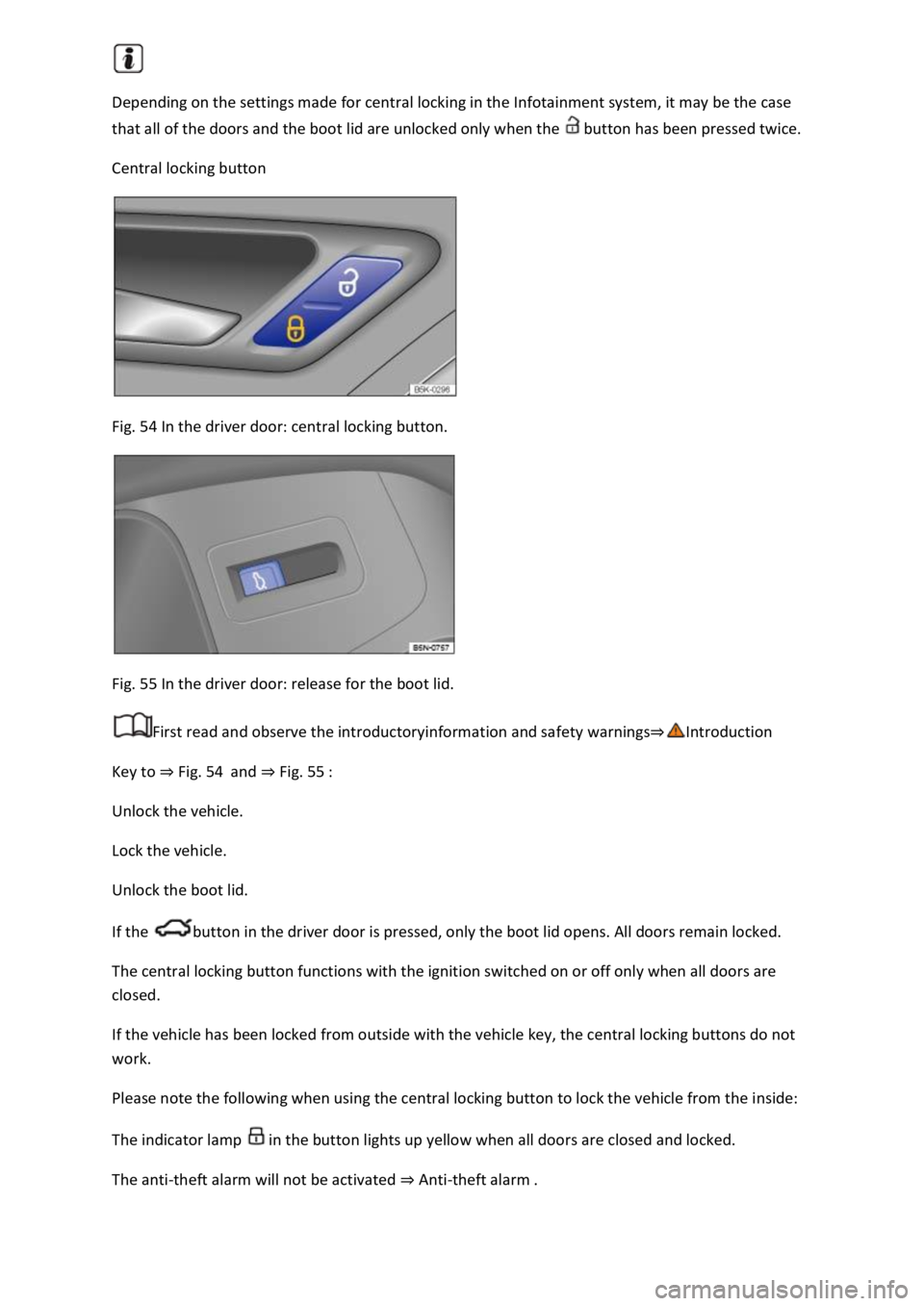
Central locking button
Fig. 54 In the driver door: central locking button.
Fig. 55 In the driver door: release for the boot lid.
First read and observe the introductoryinformation and safety warnings
Key to Fig. 54and Fig. 55
Unlock the vehicle.
Lock the vehicle.
Unlock the boot lid.
If the button in the driver door is pressed, only the boot lid opens. All doors remain locked.
The central locking button functions with the ignition switched on or off only when all doors are
closed.
If the vehicle has been locked from outside with the vehicle key, the central locking buttons do not
work.
Please note the following when using the central locking button to lock the vehicle from the inside:
The indicator lamp in the button lights up yellow when all doors are closed and locked.
The anti-theft alarm will not be activated Anti-theft alarm
Page 101 of 502
SAFELOCK deactivates the door release levers if the vehicle has been locked. This makes it more
difficult to break into the vehicle. The doors can no longer be opened from the inside
Press the button on the vehicle key once.
Press the button on the vehicle key twice in quick succession.
Vehicles with the Keyless Access locking and starting system: touch the sensor on the outside of the
door handle twiceUnlocking or locking the vehicle with Keyless Access
OR: press the central locking button in the driver door once Central locking button
There may be an indication of the activated SAFELOCK in the display of the instrument cluster
(SAFELOCK).
Deactivating SAFELOCK
Switch on the ignition.
OR: deactivate interior monitoring and the anti-tow alarm Temporarily switching off the interior
monitoring system and anti-tow alarm
Before locking the vehicle, temporarily deactivate the interior monitoring and the anti-tow alarm in
the Vehicle Settings menu in the Infotainment system Infotainment sy
The following applies when SAFELOCK is deactivated:
The interior monitoring and the anti-tow alarm are activated and deactivated in the Vehicle settings
menu in the Infotainment system Infotainment system controls and display
WARNING
Careless or unsupervised use of SAFELOCK can cause serious injuries.
Never leave other persons in the vehicle if the vehicle has been locked using the vehicle key. The
doors can no longer be opened from the inside once SAFELOCK is activated.
If you unlock the driver door mechanically using the vehicle key, only the driver door is unlocked,
and not the whole vehicle. The doors are released (but not unlocked) and the central locking button
is activated only when the ignition is switched on.
Troubleshooting
First read and observe the introductoryinformation and safety warnings
Indicator lamp lights up continuously
The red LED in the vehicle door flashes at short intervals and then lights up continuously.
Page 121 of 502

Fig.
0until it is
horizontal.
When it is folded down, the front passenger seat backrest must engage securely into place.
Folding back the front passenger seat backrest
When folding back, make sure that there are no items or body parts in the area of the hinges.
To fold back, release the front passenger seat backrest again Fig.
0
Fold back the front passenger seat backrest so that it is upright.
When it is folded up, the front passenger seat backrest must engage securely into place.
WARNING
Serious injuries could be caused if the front passenger seat backrest is folded forwards and
backwards in an uncontrolled way and without taking due care.
Fold the front passenger seat backrest forwards and backwards only when the vehicle is stationary.
When folding the front passenger seat backrest forwards, always make sure that there are no
people, animals or objects in its path.
The front airbag must be switched off and the PASSENGER AIR BAG indicator lamp must be
lit for as long as the front passenger seat backrest is folded forwards.
When folding forwards and backwards, keep all hands, fingers, feet and other body parts away from
the seat hinges and seat release mechanism.
Floor mats or other objects could get caught in the hinges on the front passenger seat backrest. This
could cause the front passenger seat backrest to fail to engage securely when it is returned to the
upright position.
When being folded back, the front passenger seat backrest must be securely locked in the upright
position. If the front passenger seat backrest is not locked properly, it could move suddenly and
cause serious injuries.
WARNING
The open seat anchorages and hinges of the folded front passenger seat backrest can cause serious
injuries in the event of a sudden braking manoeuvre or accident.
Never transport either adults or children on the front passenger seat if the front passenger seat
backrest is folded forwards.
If the front passenger seat backrest is folded forwards, you must use only the rear seat behind the
driver seat. This also applies to children in child seats.
Rear seats
Page 132 of 502
both sides of the vehicle switches on to
provide better illumination of the surrounding area when manoeuvring.
Switching the fog lights on and off
Switching on the front fog lights : pull the light switch Fig. 79out to the first position. The
indicator lamp in the light switch lights up green.
Switching on the rear fog light : pull the light switch all the way out. The indicator lamp in the
instrument cluster lights up yellow.
To switch the fog lights off, press in the light switch or turn it to position .
When the automatic headlights are switched on and the front or rear fog lights are switched
on, the dipped beam headlights will also be switched on irrespective of the current light conditions
outside.
In vehicles with a factory-fitted towing bracket: the vehicle's rear fog light is not switched on if a
trailer with rear fog light is electrically connected to the vehicle Trailer towing
Light functions
Side lights
If the side lights are switched on, both headlights light up with the side lights, parts of the tail
light clusters, the number plate lighting and the buttons in the centre console and the dash panel.
The daytime running lights also switch on when the ignition is switched on.
If the vehicle is not locked from outside when the ignition is switched off, the continuous parking
light on both sides of the vehicle switches on automatically after around 10 minutes to reduce 12-
volt vehicle battery discharge Switching the parking lights on and off
Automatic headlights
If the automatic headlights are switched on, the vehicle lighting and the instrument and
switch lighting will switch on and off according to the light conditions. When the lights are switched
on, the indicator lamp lights up yellow.
The automatic headlights are merely an aid and will not always be able to detect all driving
situations.
In vehicles with a corresponding equipment level, the switch-on time of the automatic headlights
can be adjusted in the Infotainment system in the Vehicle settings menu Infotainment system
controls an
Cornering light
A cornering light is switched on when turning slowly or travelling around very tight bends.
Signal tones if lights are not switched off
Page 133 of 502

and the driver door opened, acoustic
warnings sound under the following conditions:
If the parking light is switched on.
If the side lights are switched on or the rear fog light is switched on .
When the Coming Home function is switched on, no signal tone will be given as a reminder that a
light is still switched on when leaving the vehicle.
Some settings can be stored in the user accounts of the personalisation function and therefore
change when the user account changes Personalisation
Troubleshooting
Turn signal indicator lamp
If a turn signal on the vehicle has failed, the indicator lamp will start flashing twice as fast.
The indicator lamp flashes green.
Check the lighting and change the appropriate bulb as required Changing bulbs
If the problem persists, go to a qualified workshop.
Does not apply in China and Japan: trailer turn signals indicator lamp
The indicator lamp goes out if a trailer turn signal or all trailer lights stop working.
The indicator lamp flashes green.
Check the lighting and change the appropriate bulb as required Changing bulbs
If the problem persists, go to a qualified workshop.
Vehicle lighting not working
Vehicle lighting has failed either completely or partially.
The indicator lamp lights up yellow.
Check the lighting and change the appropriate bulb as required Changing bulbs
If the problem persists, go to a qualified workshop.
Fault in rain/light sensor
In the light switch position , the vehicle lighting is not switched on or off automatically.
The indicator lamp lights up yellow.
Switch the ignition off and on.
If the problem persists, go to a qualified workshop.
Page 134 of 502
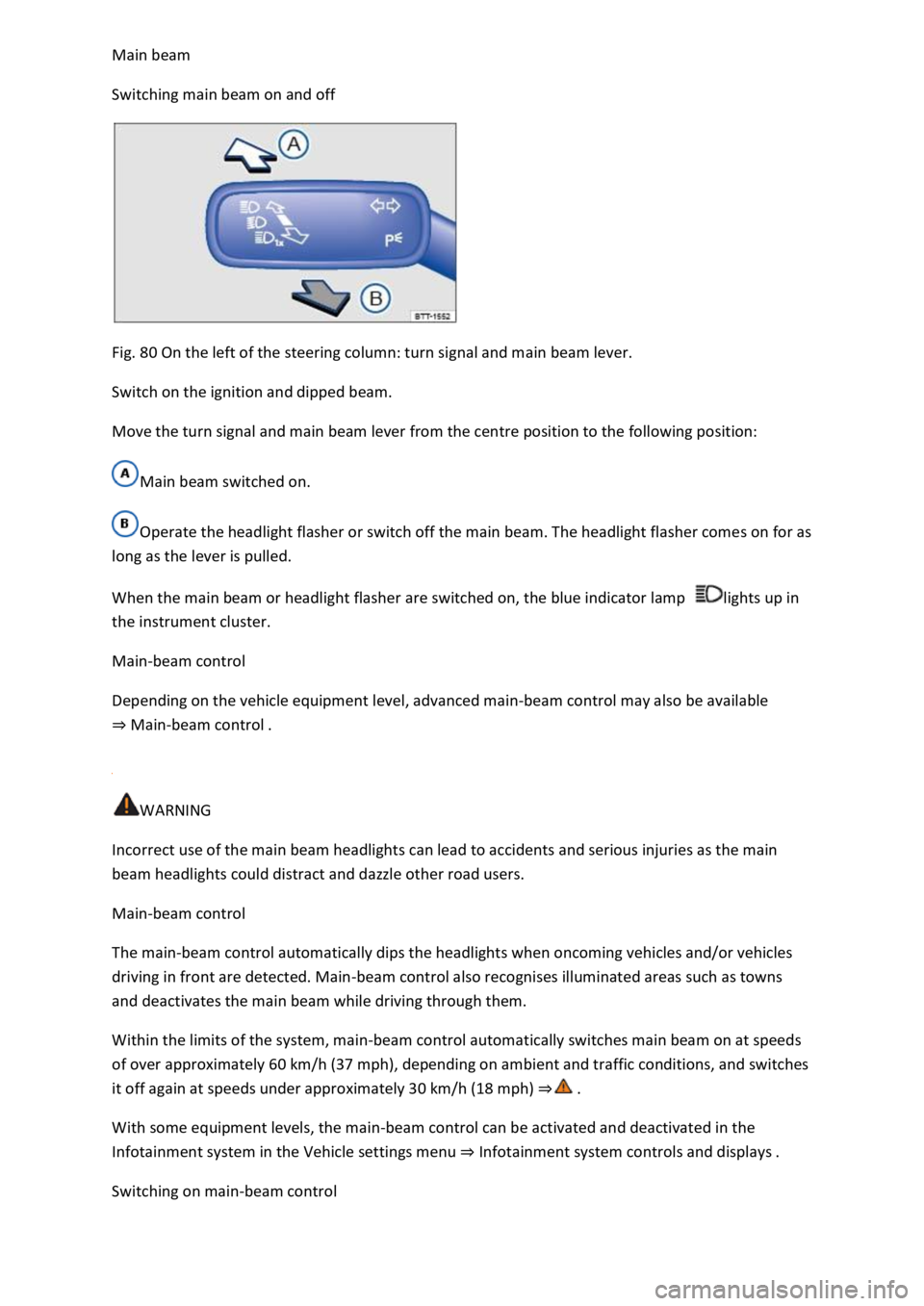
Switching main beam on and off
Fig. 80 On the left of the steering column: turn signal and main beam lever.
Switch on the ignition and dipped beam.
Move the turn signal and main beam lever from the centre position to the following position:
Main beam switched on.
Operate the headlight flasher or switch off the main beam. The headlight flasher comes on for as
long as the lever is pulled.
When the main beam or headlight flasher are switched on, the blue indicator lamp lights up in
the instrument cluster.
Main-beam control
Depending on the vehicle equipment level, advanced main-beam control may also be available
Main-beam control
WARNING
Incorrect use of the main beam headlights can lead to accidents and serious injuries as the main
beam headlights could distract and dazzle other road users.
Main-beam control
The main-beam control automatically dips the headlights when oncoming vehicles and/or vehicles
driving in front are detected. Main-beam control also recognises illuminated areas such as towns
and deactivates the main beam while driving through them.
Within the limits of the system, main-beam control automatically switches main beam on at speeds
of over approximately 60 km/h (37 mph), depending on ambient and traffic conditions, and switches
it off again at speeds under approximately 30 km/h (18 mph)
With some equipment levels, the main-beam control can be activated and deactivated in the
Infotainment system in the Vehicle settings menu Infotainment system controls and displays
Switching on main-beam control
Page 135 of 502

matic headlights .
Tap the turn signal and main beam lever forwards from the basic position.
When main-beam control is switched on, the indicator lamp lights up in the instrument cluster
display.
Switching off main-beam control
Pull back the turn signal and main beam lever.
OR: switch off the automatic headlights .
OR: switch off the ignition.
OR: push the turn signal and main beam lever forwards to switch on the manual main beam.
System limits
The main beam must be manually switched off under the following conditions, as it is not switched
off by the main-beam control in time or at all:
In poorly lit streets where there are highly-reflective signs.
Other road users with insufficient lighting facilities, such as pedestrians, cyclists.
In tight bends, with half-hidden oncoming traffic, on steep crests or in dips.
With oncoming traffic on roads with a central barrier where the driver can see clearly over the
central barrier e.g. truck drivers.
In fog, snow or heavy rain.
In conditions with swirled-up dust and sand.
If the windscreen is damaged in the camera's field of vision.
If the camera's field of vision is covered by condensation, dirt, a sticker, or by snow or ice.
If the camera is faulty or the power supply is interrupted.
WARNING
Do not let the extra convenience afforded by main-beam control tempt you into taking any risks
when driving. The system is not a substitute for the full concentration of the driver.
Always check the vehicle lights yourself and adapt them to the prevailing conditions for light,
visibility and road traffic.
The main-beam control may not be able to recognise all driving situations correctly and may not
work properly in certain situations.
If the camera's field of view is dirty, covered or damaged, the function of the main-beam control
may be impaired. This also applies if changes are made to the vehicle's lighting system, for example
if additional headlights are fitted.
Page 144 of 502
depending on the intensity of the rain.
Activating and deactivating the rain/light sensor
Position - the rain/light sensor is deactivated.
Position - the rain/light sensor is activated, automatic wipe when necessary.
The automatic wipe function can be activated and deactivated in the Infotainment system in
the Vehicle settings menu Infotainment system controls and displays
If the automatic wipe function is deactivated in the Infotainment system, the intervals are set at
fixed levels.
Adjusting the sensitivity of the rain/light sensor
The sensitivity of the rain/light sensor can be adjusted manually using the switch in the wiper lever
Fig.
Switch to the right high sensitivity.
Switch to the left low sensitivity.
WARNING
The rain/light sensor cannot always adequately detect all precipitation and activate the wipers
correspondingly.
If necessary, switch on the wipers manually in good time if the water on the windscreen restricts the
field of vision.
Some settings can be stored in the user accounts of the personalisation function and therefore
change automatically when the user account changes
Troubleshooting
Washer fluid level too low
The indicator lamp lights up yellow.
Fill up the washer fluid reservoir at the next opportunity Washer fluid
Fault in rain/light sensor
The wipers are not switched on automatically if it rains during rain/light sensor operation.
The indicator lamp lights up yellow.
Switch the ignition off and on.
If the problem persists, go to a qualified workshop.
Page 145 of 502

The wipers do not wipe.
The indicator lamp lights up yellow.
Switch the ignition off and on.
If the problem persists, go to a qualified workshop.
Changes in the activation behaviour of the rain/light sensor
Possible causes for faults and misinterpretations relating to the sensitive surface of the rain/light
sensor
Damaged wiper blades: a film of water or smears caused by damaged wiper blades can increase the
time the wipers are switched on, can shorten the length of the intervals between wipes or cause the
wipers to run quickly and continuously.
Insects: insects hitting the windscreen can cause the wipers to be activated.
Salt deposits: in winter, salt deposits can cause the wipers to continue to wipe the windscreen when
it is almost dry.
Dirt: dry dust, wax, windscreen coatings (lotus effect), or detergent deposits (from an automatic car
wash) can cause the rain/light sensor to become less sensitive and react too slowly, or prevent it
from reacting at all. Clean the sensitive surface of the rain/light sensor Caring for and cleaning the
vehicle exteriorat regular intervals and inspect the wiper blades for damage.
Crack in the windscreen: a wipe cycle will be triggered if the rain/light sensor is on when the
windscreen is impacted by a stone. The rain/light sensor will then register the impairment of the
sensitive surfaces and adjust accordingly. Depending on the size of the stone impact, the activation
behaviour of the rain/light sensor may be changed.
We recommend that you use an alcohol-based glass cleaner to remove wax and polish.
The wipers will try to wipe away any obstacles that are on the window. The wiper will stop moving if
the obstacle continues to block its path. Remove the obstacle and switch the wiper back on again.
Mirrors
Introduction
This chapter contains information on the followingsubjects:
Interior mirror
Exterior mirrors
You can use the exterior mirrors and the interior mirror to observe traffic behind you and adjust
your driving style accordingly.
Page 164 of 502

Food, medicine and other items that are sensitive to heat or cold could be either damaged or
rendered useless by the air flowing out of the vents.
Never leave food, medicines or other temperature-sensitive objects in front of the vents.
Switching the auxiliary heater and ventilation on and off
First read and observe the introductoryinformation and safety warnings
The auxiliary heater can be operated only when the ignition is switched off. If the ignition is switched
on while the auxiliary heater is working, the auxiliary heater continues to run to provide additional
heat.
Switching on the auxiliary heater
Press the immediate heat button in the air conditioning block Front controls
OR: press the button on the remote control Remote control
OR: program the departure time Programming the auxiliary heater and ventilation
The auxiliary heater heats the vehicle interior to at least 22
The auxiliary heater will not switch on if the 12-volt vehicle battery is low or the fuel tank is empty.
Switching off the auxiliary heater manually
Press the immediate heat button in the air conditioning block Front controls
OR: press the button on the remote control Remote control
OR: touch the function button on the Infotainment system Programming the auxiliary heater
Auxiliary heater switches off automatically
When the programmed departure time is reached, or after the programmed operating period has
elapsed Programming the auxiliary heater and ventilation
When the indicator lamp lights up (fuel gauge) Fuel gauge
If the charge level of the 12-volt vehicle battery is too low 12-volt vehicle battery
The auxiliary heater runs on for a short time after it has been switched off manually or automatically
so that the remaining fuel in the system can be burnt off.
When the vehicle is at a standstill, the auxiliary heater can be activated up to three times in
succession for the maximum operating duration.