display VOLKSWAGEN T-ROC 2020 Owners Manual
[x] Cancel search | Manufacturer: VOLKSWAGEN, Model Year: 2020, Model line: T-ROC, Model: VOLKSWAGEN T-ROC 2020Pages: 502, PDF Size: 8.58 MB
Page 265 of 502

is switched on automatically when reverse gear is engaged or if the vehicle
rolls backwards.
With some equipment levels, Park Distance Control can also be activated automatically when driving
forwards Automatic activation when driving forwards (with some equipment levels)
Switching off Park Distance Control
Press the button.
Park Distance Control is switched off automatically when the vehicle is driven forwards at a speed of
more than 10 km/h (6 mph.
OR: the selector lever is moved to P position.
Automatic activation when driving forwards (with some equipment levels)
Park Distance Control also switches itself on automatically if the vehicle approaches an obstacle in
the front area of the vehicle when driving forwards at a speed of less than 15 km/h (9 mph).
Automatic activation can be switched on in the Infotainment system.
Automatic activation takes place only once. Renewed automatic activation is possible under the
following conditions:
Press the button.
Switch the ignition off and then back on again.
Manoeuvre braking
If the vehicle is equipped with manoeuvre braking, the manoeuvre braking function triggers
emergency braking as soon as an obstacle is detected while reversing.
Depending on the vehicle equipment, the manoeuvre braking function can also trigger emergency
braking when driving forwards.
The manoeuvre braking function helps to prevent collisions. The vehicle speed must not be higher
than 10 km/h (6 mph). The manoeuvre braking function is activated or deactivated when Park
Distance Control is switched on or off. The manoeuvre braking function is inactive for five metres
after a braking operation in the same direction of travel. The manoeuvre braking function is ready
for braking again after changing gear or position. The same restrictions apply as to Park Distance
Control.
Manoeuvre braking is not active if Park Distance Control was activated automatically.
Touch the function button in the Infotainment system to switch manoeuvre braking on and off.
Display representation
Page 266 of 502
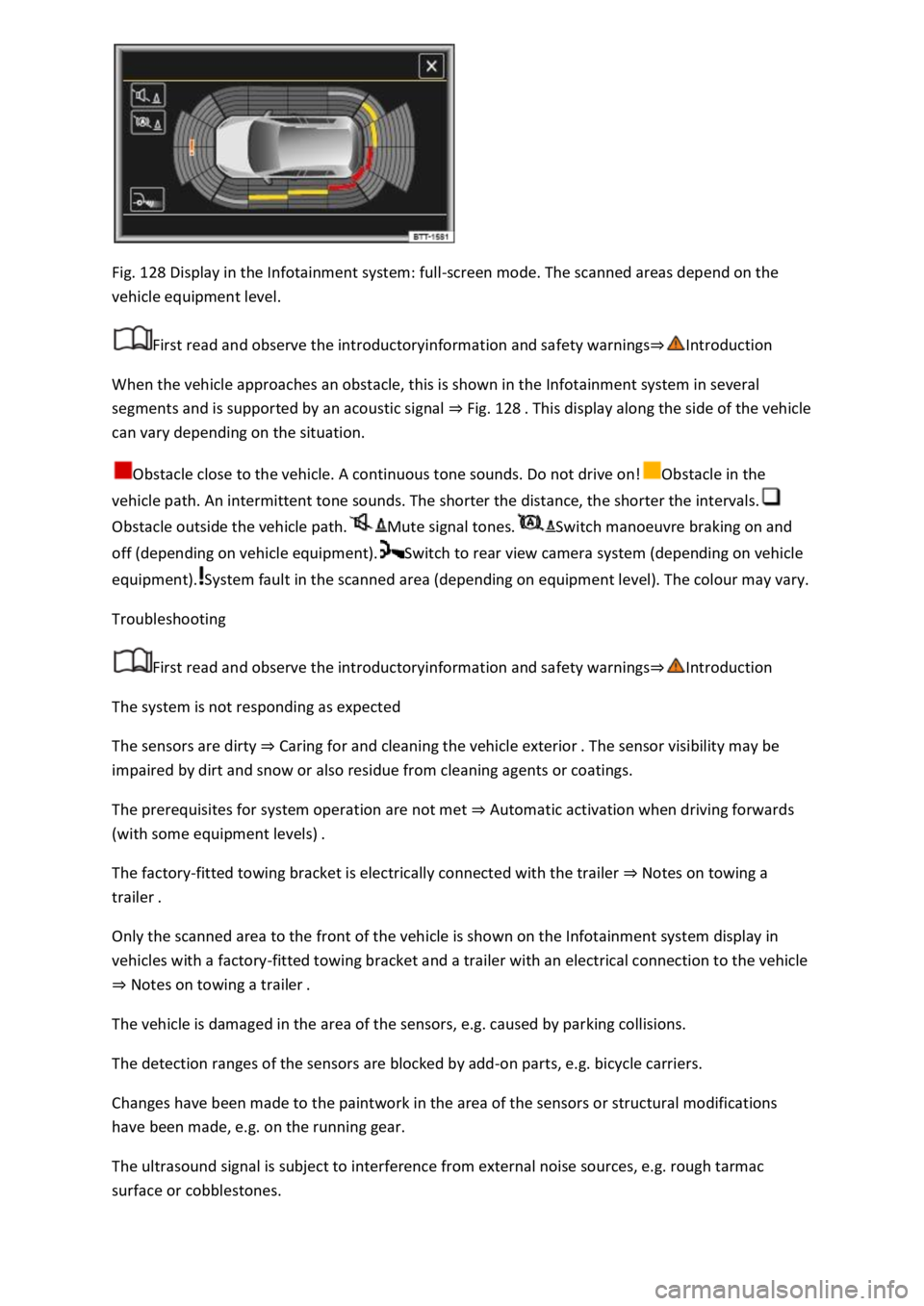
Fig. 128 Display in the Infotainment system: full-screen mode. The scanned areas depend on the
vehicle equipment level.
First read and observe the introductoryinformation and safety warnings
When the vehicle approaches an obstacle, this is shown in the Infotainment system in several
segments and is supported by an acoustic signal Fig. 128
can vary depending on the situation.
Obstacle close to the vehicle. A continuous tone sounds. Do not drive on!Obstacle in the
vehicle path. An intermittent tone sounds. The shorter the distance, the shorter the intervals.
Obstacle outside the vehicle path.Mute signal tones.Switch manoeuvre braking on and
off (depending on vehicle equipment).Switch to rear view camera system (depending on vehicle
equipment).System fault in the scanned area (depending on equipment level). The colour may vary.
Troubleshooting
First read and observe the introductoryinformation and safety warnings
The system is not responding as expected
The sensors are dirty Caring for and cleaning the vehicle exterior
impaired by dirt and snow or also residue from cleaning agents or coatings.
The prerequisites for system operation are not met Automatic activation when driving forwards
(with some equipment levels)
The factory-fitted towing bracket is electrically connected with the trailer Notes on towing a
trailer
Only the scanned area to the front of the vehicle is shown on the Infotainment system display in
vehicles with a factory-fitted towing bracket and a trailer with an electrical connection to the vehicle
Notes on towing a trailer
The vehicle is damaged in the area of the sensors, e.g. caused by parking collisions.
The detection ranges of the sensors are blocked by add-on parts, e.g. bicycle carriers.
Changes have been made to the paintwork in the area of the sensors or structural modifications
have been made, e.g. on the running gear.
The ultrasound signal is subject to interference from external noise sources, e.g. rough tarmac
surface or cobblestones.
Page 267 of 502
The sensor area is switched off permanently if a sensor fails.
Park Distance Control malfunctions will be indicated by a text message with an acoustic warning and
the indicator lamp in the button flashing when the system is switched on for the first time. If the
sensors are dirty or covered, the affected sensor cluster will be displayed on the Park Distance
Control screen. A cleaning message also appears (depending on the vehicle equipment level).
Possible solution
Switch off the system temporarily.
Check whether any of the causes described apply.
Clean the sensors or remove stickers or accessories from the sensors and cameras Caring for and
cleaning the vehicle exterior
Check whether any damage is visible.
You can switch the system back on again once you have rectified the cause of the problem.
If the system still fails to respond as expected, have the system checked by a qualified workshop or
your Volkswagen dealership.
Rear view camera system (Rear View)
Introduction
This chapter contains information on the followingsubjects:
Switching on and off
Display representation
Prerequisites
Parking
Troubleshooting
The rear view camera system in the rear of the vehicle makes it easier for the driver to see behind
the vehicle and provides support for parking manoeuvres.
The rear view camera system shows the area behind the vehicle on the Infotainment system screen.
Depending on the operating mode, orientation lines support the view to the rear.
WARNING
Using images from the camera to estimate the distance from obstacles (people, vehicles etc.) is
inaccurate and could cause accidents and severe injuries.
Camera lenses enlarge and distort the field of vision and show objects differently and inaccurately
on the screen.
Page 268 of 502
First read and observe the introductoryinformation and safety warnings
Switching on the rear view camera system
Select reverse gear.
OR: press the button.
Switching off the rear view camera system
Drive forwards at a speed of at least 10 km/h (6 mph).
Display representation
First read and observe the introductoryinformation and safety warnings
The functions and displays of the rear view camera system image vary according to the equipment
level and may differ from each other.
The display of the reversing camera picture varies if the factory-fitted towing bracket is electrically
connected to the trailer Notes on towing a trailer
Functions and symbols of the rear view camera system
You can make settings by means of the function buttons when the rear view camera system is
switched on. Some setting options depend on the vehicle equipment.
xClose current display.Adjust display: brightness, contrast, colour.Switch to Park
Distance Control Park Distance ControlShow Park Distance Control display.Hide Park
Distance Control display.
Orientation lines
Red line: safety distance to the rear.
Green lateral lines: extension of the vehicle.
Prerequisites
First read and observe the introductoryinformation and safety warnings
The prerequisites for parking using the rear view camera system must be met.
Do not exceed a speed of approximately 15 km/h (9 mph).
Width of the parking space: vehicle width + 0.2 m.
The following conditions must be met in order to display a correct image:
The boot lid is closed.
The surrounding area has a flat surface.
Vehicle does not have a heavy load at the rear.
Page 269 of 502
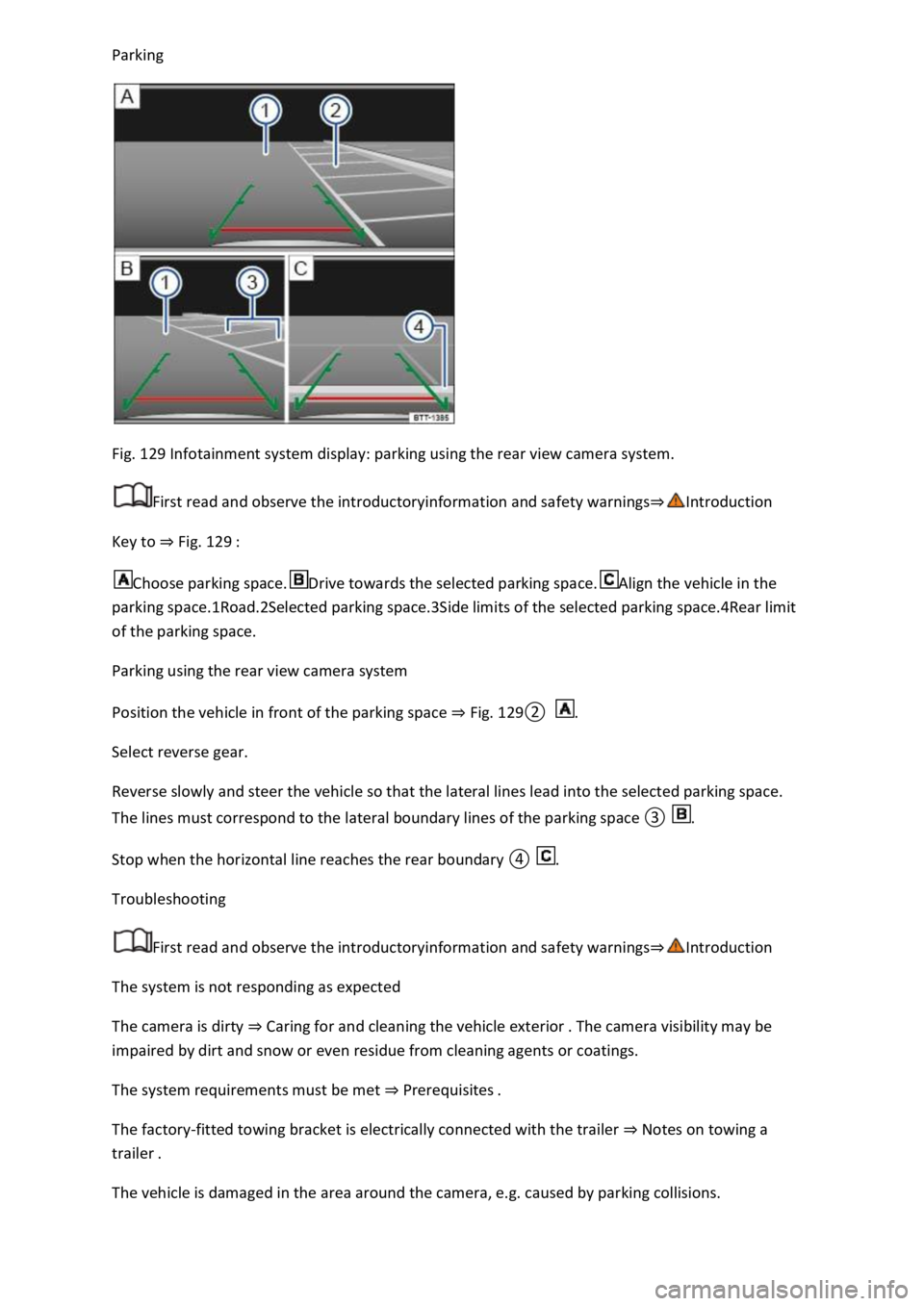
Fig. 129 Infotainment system display: parking using the rear view camera system.
First read and observe the introductoryinformation and safety warnings
Key to Fig. 129
Choose parking space.Drive towards the selected parking space.Align the vehicle in the
parking space.1Road.2Selected parking space.3Side limits of the selected parking space.4Rear limit
of the parking space.
Parking using the rear view camera system
Position the vehicle in front of the parking space Fig.
0.
Select reverse gear.
Reverse slowly and steer the vehicle so that the lateral lines lead into the selected parking space.
The lines must correspond to the l.
Troubleshooting
First read and observe the introductoryinformation and safety warnings
The system is not responding as expected
The camera is dirty Caring for and cleaning the vehicle exterior
impaired by dirt and snow or even residue from cleaning agents or coatings.
The system requirements must be met Prerequisites
The factory-fitted towing bracket is electrically connected with the trailer Notes on towing a
trailer
The vehicle is damaged in the area around the camera, e.g. caused by parking collisions.
Page 272 of 502
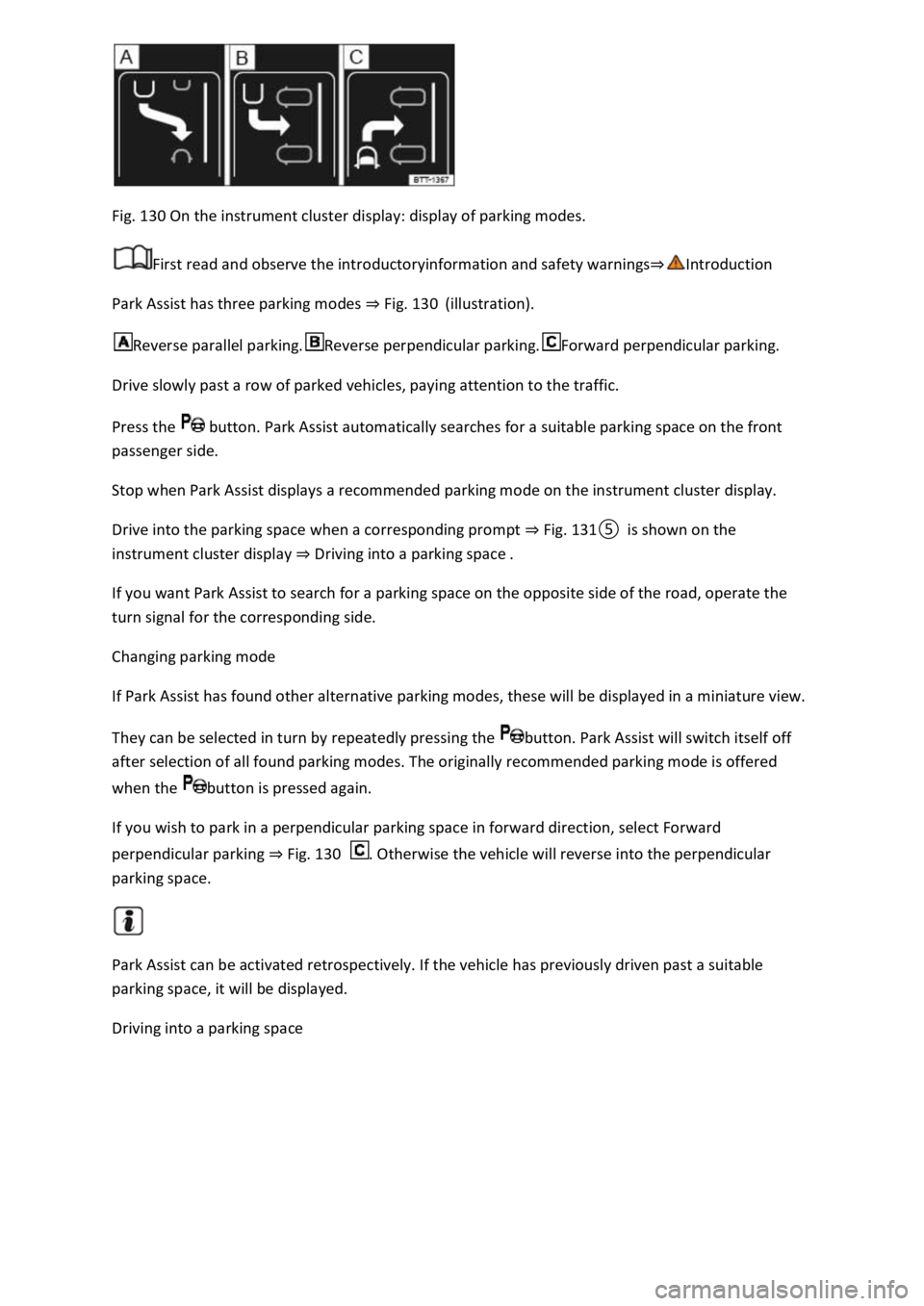
Fig. 130 On the instrument cluster display: display of parking modes.
First read and observe the introductoryinformation and safety warnings
Park Assist has three parking modes Fig. 130(illustration).
Reverse parallel parking.Reverse perpendicular parking.Forward perpendicular parking.
Drive slowly past a row of parked vehicles, paying attention to the traffic.
Press the button. Park Assist automatically searches for a suitable parking space on the front
passenger side.
Stop when Park Assist displays a recommended parking mode on the instrument cluster display.
Drive into the parking space when a corresponding prompt Fig.
Driving into a parking space
If you want Park Assist to search for a parking space on the opposite side of the road, operate the
turn signal for the corresponding side.
Changing parking mode
If Park Assist has found other alternative parking modes, these will be displayed in a miniature view.
They can be selected in turn by repeatedly pressing the button. Park Assist will switch itself off
after selection of all found parking modes. The originally recommended parking mode is offered
when the button is pressed again.
If you wish to park in a perpendicular parking space in forward direction, select Forward
perpendicular parking Fig. 130. Otherwise the vehicle will reverse into the perpendicular
parking space.
Park Assist can be activated retrospectively. If the vehicle has previously driven past a suitable
parking space, it will be displayed.
Driving into a parking space
Page 273 of 502
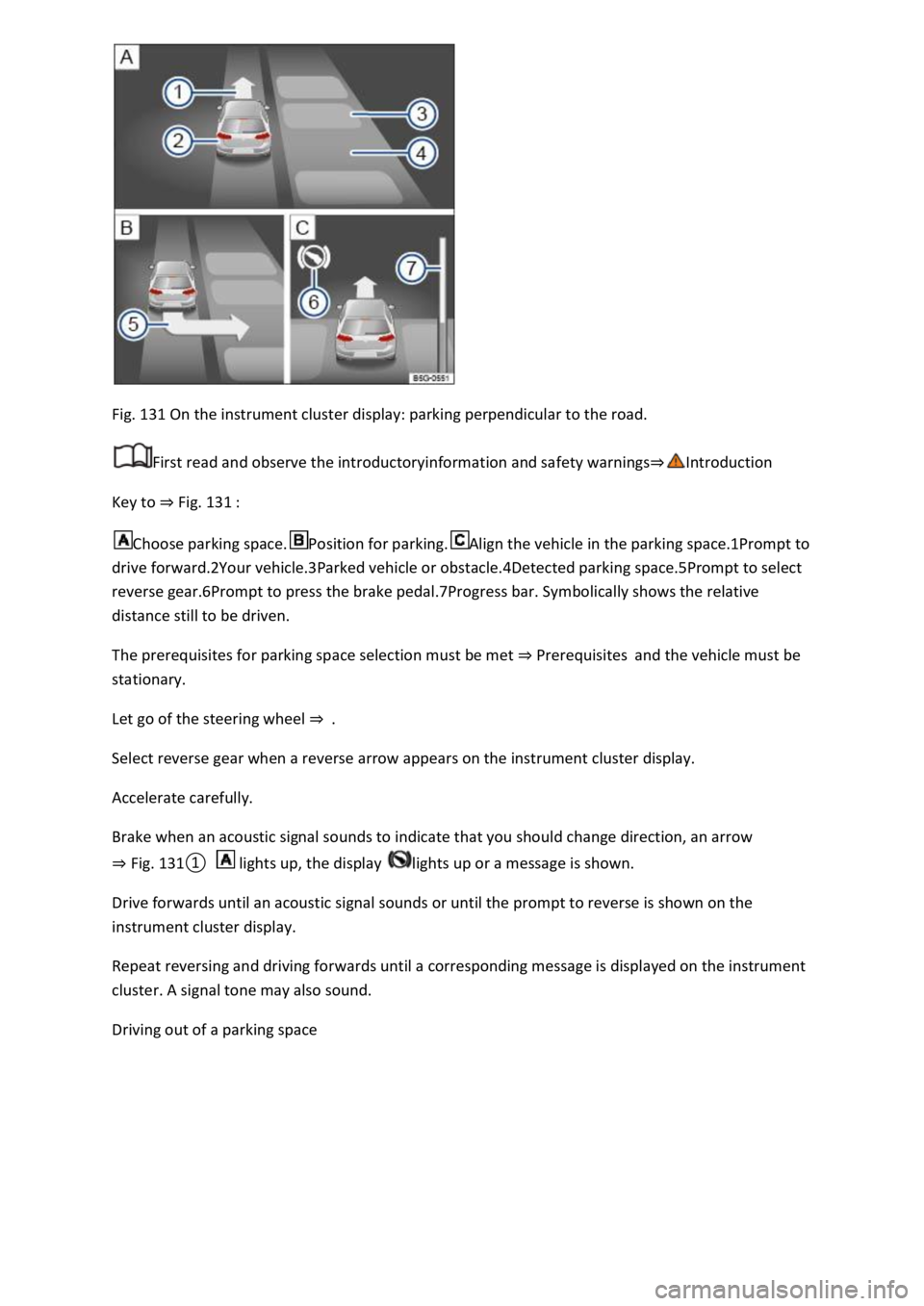
Fig. 131 On the instrument cluster display: parking perpendicular to the road.
First read and observe the introductoryinformation and safety warnings
Key to Fig. 131
Choose parking space.Position for parking.Align the vehicle in the parking space.1Prompt to
drive forward.2Your vehicle.3Parked vehicle or obstacle.4Detected parking space.5Prompt to select
reverse gear.6Prompt to press the brake pedal.7Progress bar. Symbolically shows the relative
distance still to be driven.
The prerequisites for parking space selection must be met Prerequisitesand the vehicle must be
stationary.
Let go of the steering wheel
Select reverse gear when a reverse arrow appears on the instrument cluster display.
Accelerate carefully.
Brake when an acoustic signal sounds to indicate that you should change direction, an arrow
Fig.
0 lights up, the display lights up or a message is shown.
Drive forwards until an acoustic signal sounds or until the prompt to reverse is shown on the
instrument cluster display.
Repeat reversing and driving forwards until a corresponding message is displayed on the instrument
cluster. A signal tone may also sound.
Driving out of a parking space
Page 274 of 502
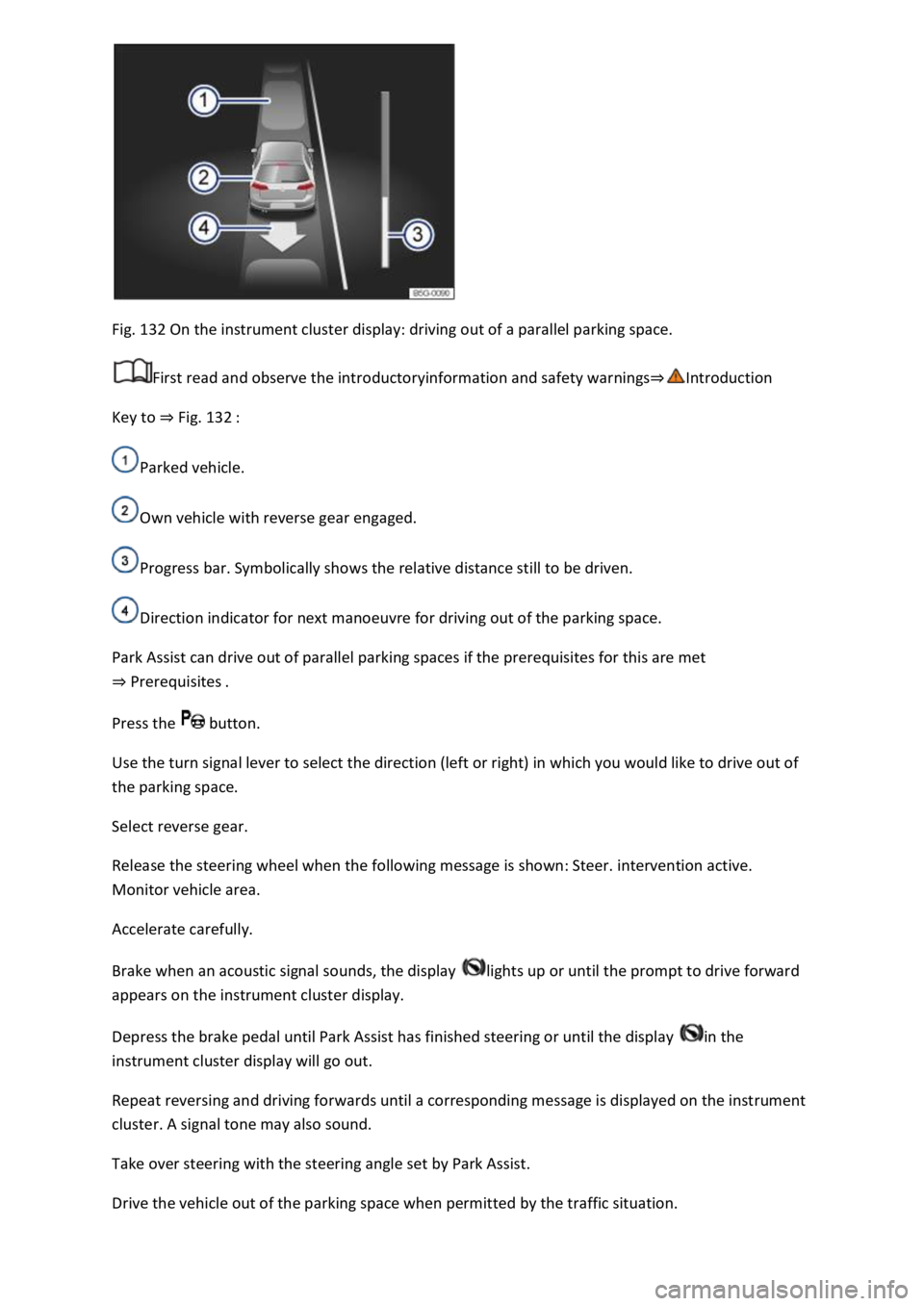
Fig. 132 On the instrument cluster display: driving out of a parallel parking space.
First read and observe the introductoryinformation and safety warnings
Key to Fig. 132
Parked vehicle.
Own vehicle with reverse gear engaged.
Progress bar. Symbolically shows the relative distance still to be driven.
Direction indicator for next manoeuvre for driving out of the parking space.
Park Assist can drive out of parallel parking spaces if the prerequisites for this are met
Prerequisites
Press the button.
Use the turn signal lever to select the direction (left or right) in which you would like to drive out of
the parking space.
Select reverse gear.
Release the steering wheel when the following message is shown: Steer. intervention active.
Monitor vehicle area.
Accelerate carefully.
Brake when an acoustic signal sounds, the display lights up or until the prompt to drive forward
appears on the instrument cluster display.
Depress the brake pedal until Park Assist has finished steering or until the display in the
instrument cluster display will go out.
Repeat reversing and driving forwards until a corresponding message is displayed on the instrument
cluster. A signal tone may also sound.
Take over steering with the steering angle set by Park Assist.
Drive the vehicle out of the parking space when permitted by the traffic situation.
Page 276 of 502
In some countries, Park Assist can assist the driver with an automatic braking intervention in certain
situations
Depending on the vehicle equipment and certain conditions, e.g. weather, load or inclination of the
vehicle, Park Assist can automatically brake the vehicle before an obstacle. Following this
intervention, the driver must depress the brake pedal.
The parking manoeuvre is ended if an automatic braking intervention occurs.
Rear Traffic Alert
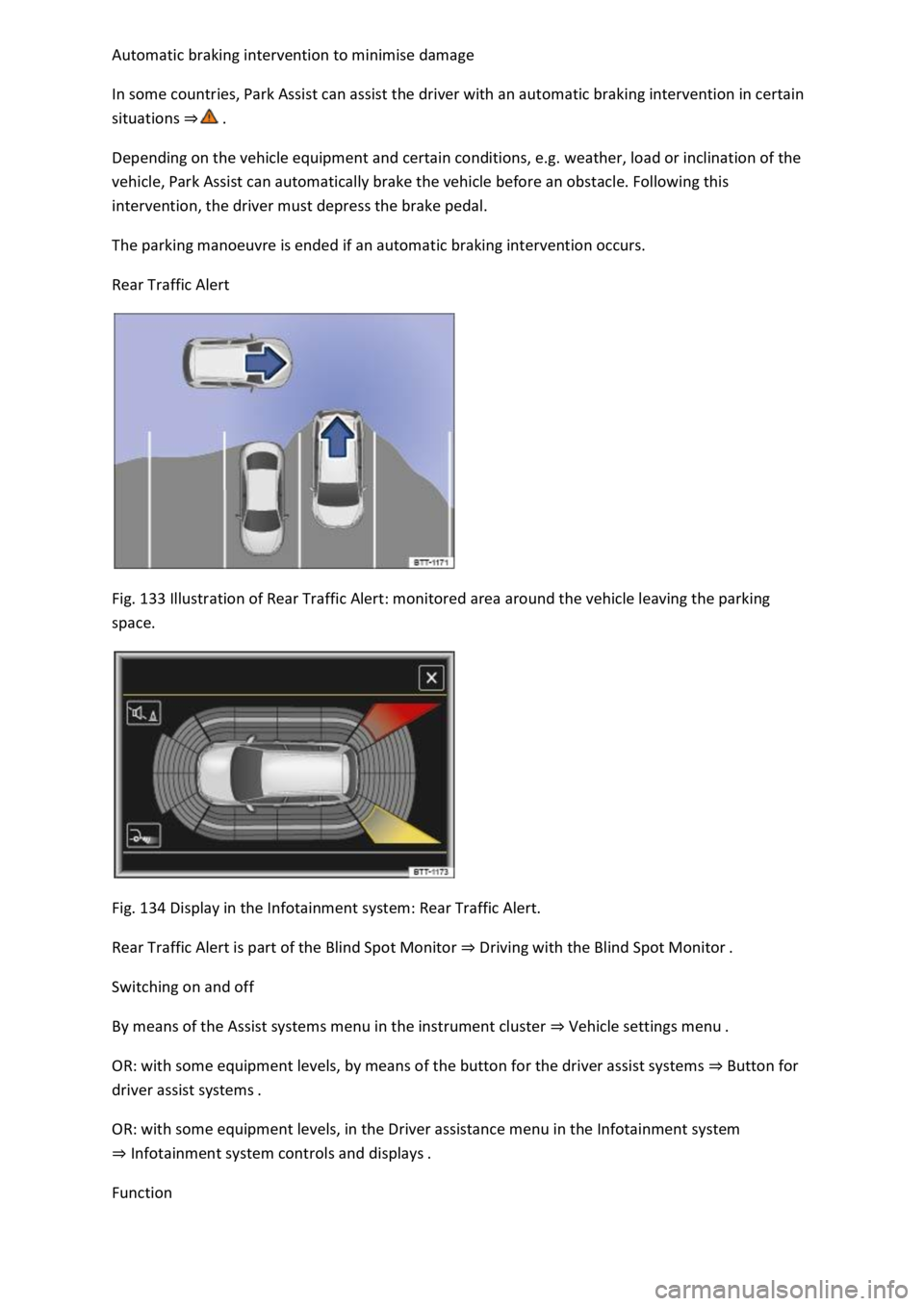
Fig. 133 Illustration of Rear Traffic Alert: monitored area around the vehicle leaving the parking
space.
Fig. 134 Display in the Infotainment system: Rear Traffic Alert.
Rear Traffic Alert is part of the Blind Spot Monitor Driving with the Blind Spot Monitor
Switching on and off
By means of the Assist systems menu in the instrument cluster Vehicle setti
OR: with some equipment levels, by means of the button for the driver assist systems Button for
driver assist systems
OR: with some equipment levels, in the Driver assistance menu in the Infotainment system
Infotainment system controls and
Function
Page 277 of 502

ng
space or manoeuvring. Rear Traffic Alert functions using radar sensors in the rear bumper.
Key to Fig. 134
Critical situation. Do not drive on!Possible critical situation.
Detection of a critical situation can also take place acoustically:
A warning signal will sound and a text message will be displayed in the instrument cluster for
vehicles without Park Distance Control.
In vehicles with Park Distance Control, an acoustic signal will sound with the continuous tone of Park
Distance Control. If the Park Distance Control is deactivated, no warning can be given to the driver
and the Rear Traffic Alert system will also be switched off temporarily.
If there is a system fault in the scanned area, the indicator lamp will light up yellow on the
instrument cluster display.
Automatic braking intervention to minimise damage
If Rear Traffic Alert detects an approaching road user and the driver has not pressed the brake, the
system can brake automatically.
Automatic braking intervention is activated when reversing at speeds of between 1 km/h (1
mph). The vehicle is held stationary for up to two seconds after vehicle standstill has been
detected.
After automatic braking intervention is activated to prevent damage to the vehicle, the system
requires approximately ten seconds before it can activate another automatic braking intervention.
Automatic braking intervention can be interrupted by pressing the accelerator or brake pedal
sharply and taking control of the vehicle.
Automatic deactivation
Rear Traffic Alert is deactivated automatically and cannot be switched on if the factory-fitted towing
bracket is electrically connected to a trailer or similar Notes on towing a trailer
electrically connected to the vehicle and the driver pulls away, a text message appears in the
instrument cluster display to inform the driver that Rear Traffic Alert has been deactivated. Rear
Traffic Alert will be automatically activated again when the trailer has been unhitched from the
vehicle. This applies if the functions were previously activated. Rear Traffic Alert must be switched
off manually for trailer towing if a non-factory-fitted towing bracket is used.
WARNING
The intelligent Rear Traffic Alert technology cannot overcome the laws of physics, and functions only
within the limits of the system. Do not let the assistance function of Rear Traffic Alert tempt you to
take any safety risks while driving. The system is not a substitute for the full concentration of the
driver.