display VOLKSWAGEN T-ROC 2020 Repair Manual
[x] Cancel search | Manufacturer: VOLKSWAGEN, Model Year: 2020, Model line: T-ROC, Model: VOLKSWAGEN T-ROC 2020Pages: 502, PDF Size: 8.58 MB
Page 170 of 502
NOTICE
Free access to the pedals must be ensured at all times. For example, a larger brake pedal travel will
be necessary in order to stop the vehicle if a brake circuit fails. The brake pedal will have to be
depressed further and harder than normal.
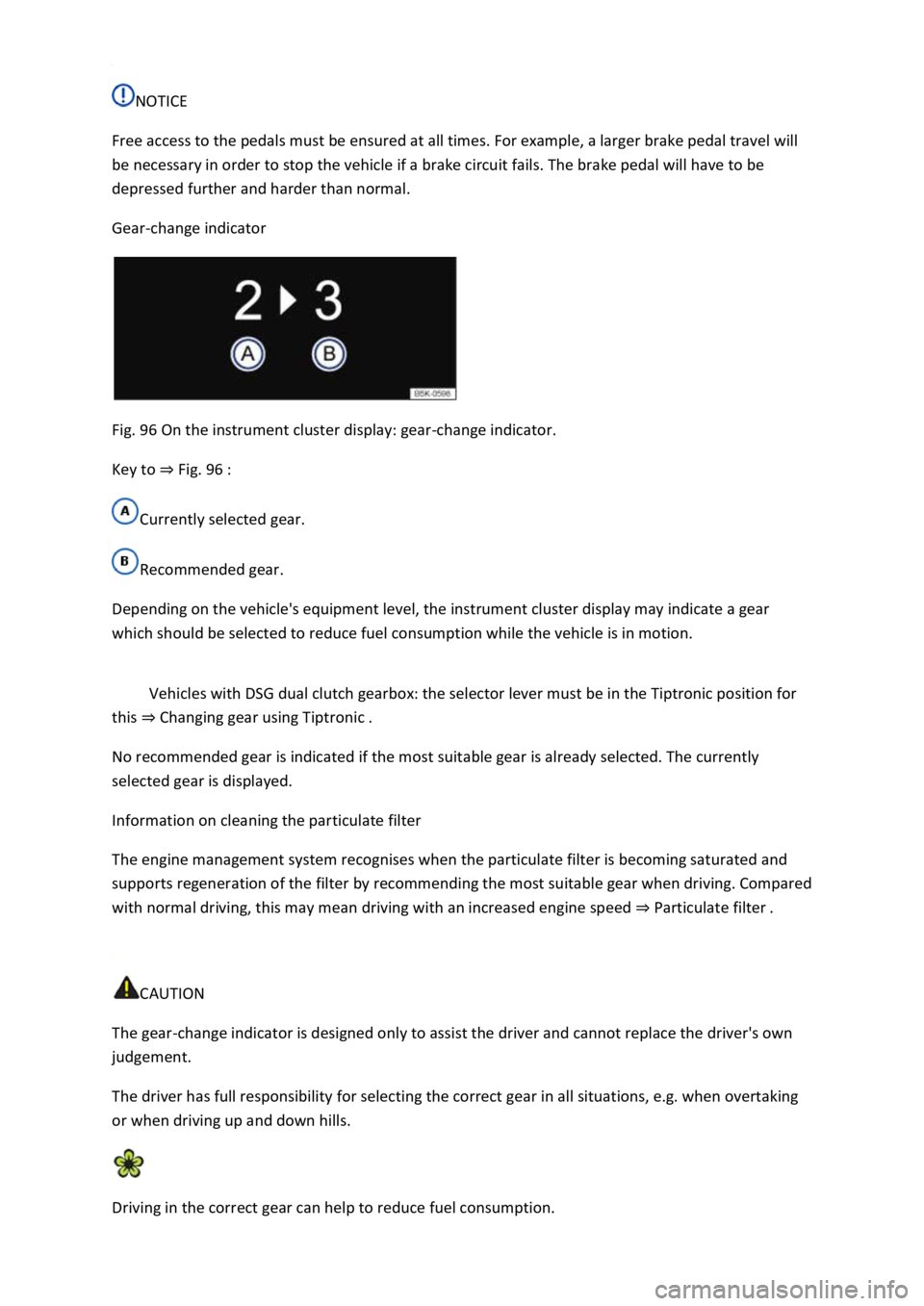
Gear-change indicator
Fig. 96 On the instrument cluster display: gear-change indicator.
Key to Fig. 96
Currently selected gear.
Recommended gear.
Depending on the vehicle's equipment level, the instrument cluster display may indicate a gear
which should be selected to reduce fuel consumption while the vehicle is in motion.
Vehicles with DSG dual clutch gearbox: the selector lever must be in the Tiptronic position for
this Changing gear using Tiptronic
No recommended gear is indicated if the most suitable gear is already selected. The currently
selected gear is displayed.
Information on cleaning the particulate filter
The engine management system recognises when the particulate filter is becoming saturated and
supports regeneration of the filter by recommending the most suitable gear when driving. Compared
with normal driving, this may mean driving with an increased engine speed Particulate filter
CAUTION
The gear-change indicator is designed only to assist the driver and cannot replace the driver's own
judgement.
The driver has full responsibility for selecting the correct gear in all situations, e.g. when overtaking
or when driving up and down hills.
Driving in the correct gear can help to reduce fuel consumption.
Page 171 of 502
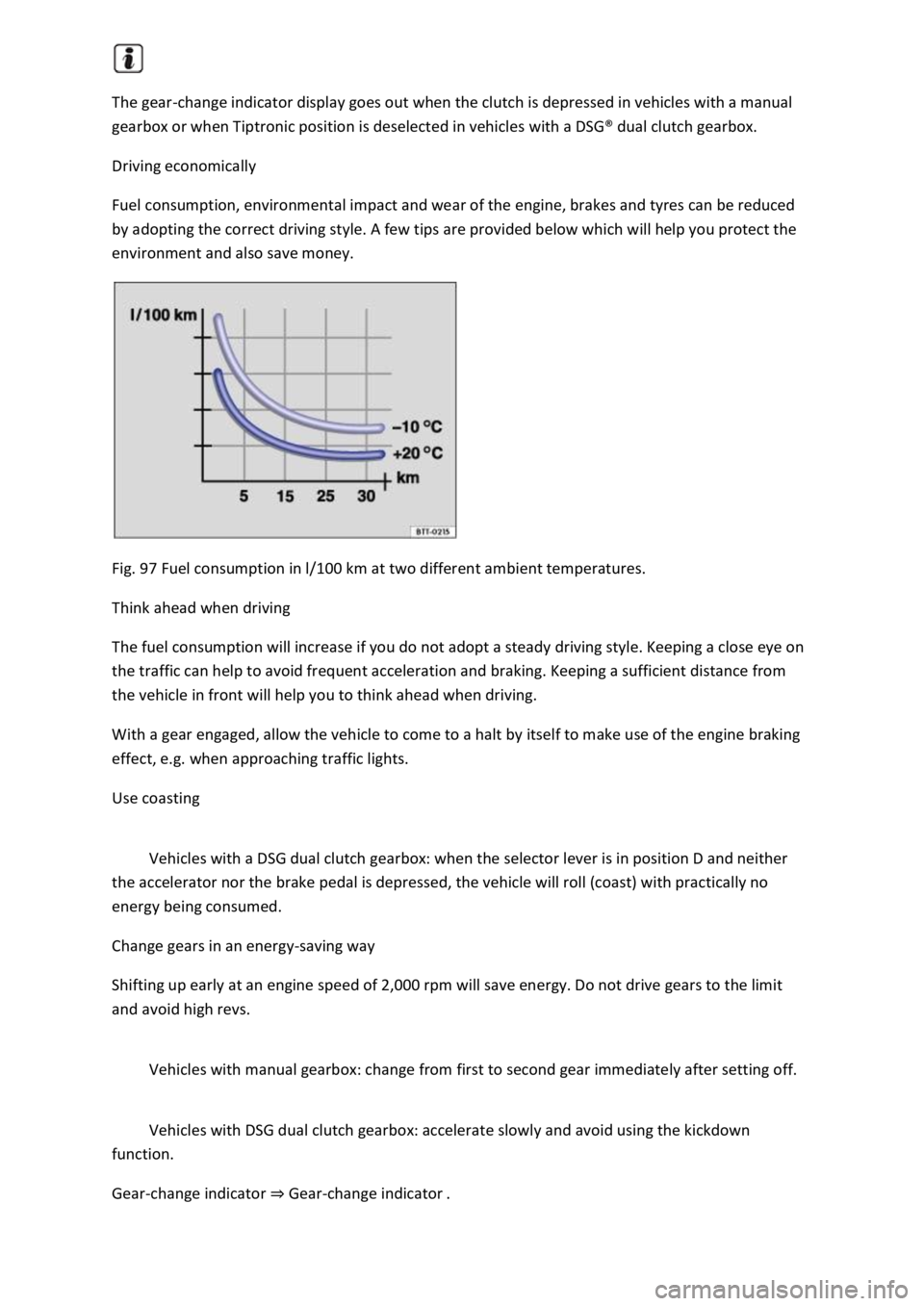
The gear-change indicator display goes out when the clutch is depressed in vehicles with a manual
gearbox or when Tiptronic position is deselected in vehicles with a DSG
Page 173 of 502
riven by the engine and generates electrical power for convenience consumers
such as the air conditioning system, windscreen heating and ventilation. Saving electrical energy is
easy, e.g.:
Open the windows and doors before driving at high outside temperatures and drive for a short
distance with a window open. Only then switch the air conditioning system on.
Switch the convenience consumers off as soon as they have served their purpose.
WARNING
Adapt your speed and distance from the vehicles ahead to suit visibility, weather, road and traffic
conditions.
Inform yourself about other ways of protecting the environment. Think Blue. is the global
Volkswagen trademark for sustainability and environmental compatibility.
Your Volkswagen dealership can provide you with further information on maintenance and energy-
efficient replacement parts, e.g. new tyres.
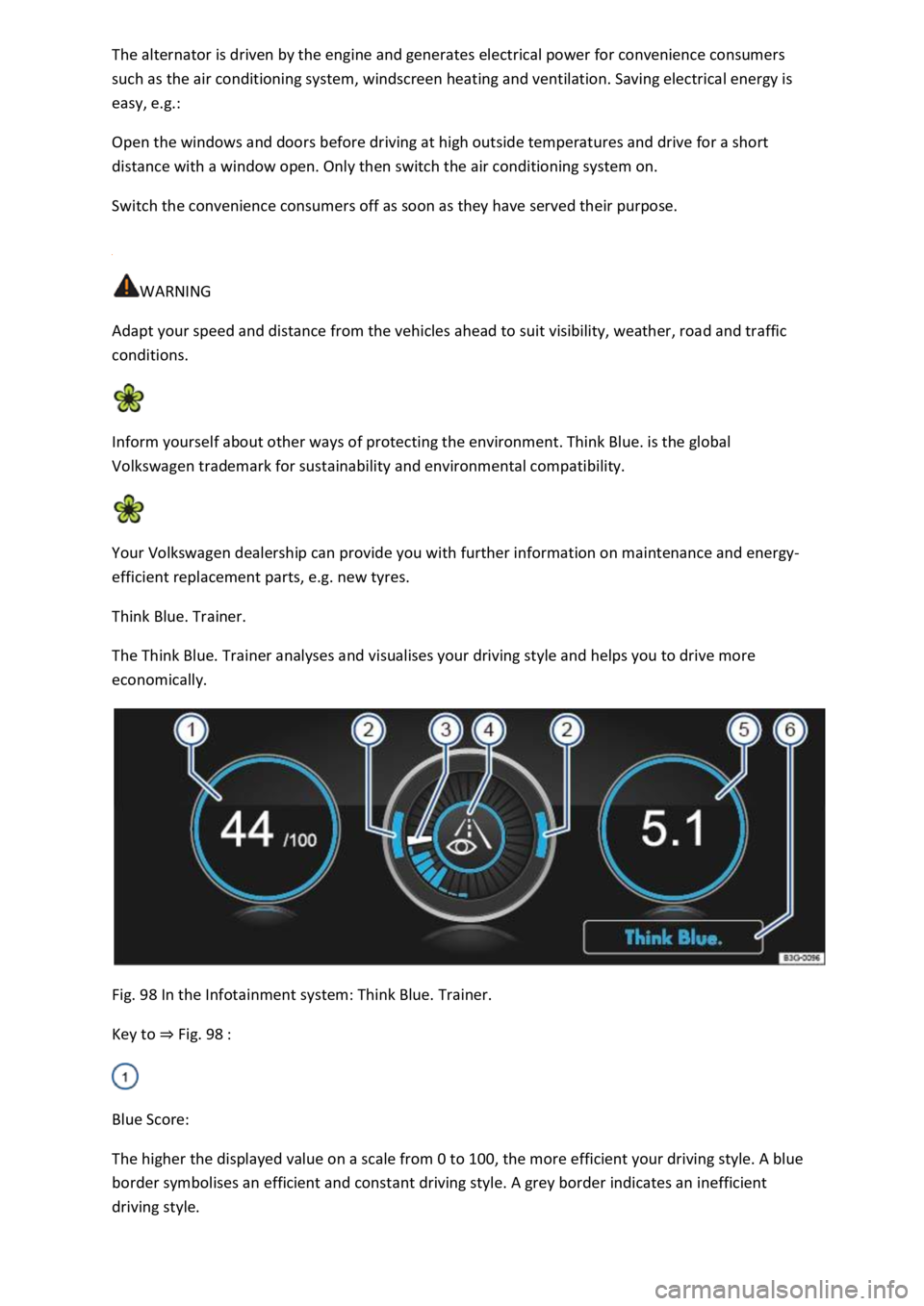
Think Blue. Trainer.
The Think Blue. Trainer analyses and visualises your driving style and helps you to drive more
economically.
Fig. 98 In the Infotainment system: Think Blue. Trainer.
Key to Fig. 98
Blue Score:
The higher the displayed value on a scale from 0 to 100, the more efficient your driving style. A blue
border symbolises an efficient and constant driving style. A grey border indicates an inefficient
driving style.
Page 174 of 502

driving minutes Since start.
Acceleration and braking:
At a constant speed, two arcs appear in the central area. The arcs move up and down during
acceleration and braking.
Progress display:
The efficiency of the driving style is indicated by the blue bars. The white bar stores a blue bar
approximately every five seconds.
The larger the bar, the more efficient the driving style has been.
Driving tips:
Think ahead when driving.
Gear-change indicator.
Adapt your speed.
Economical driving style.
Fuel consumption:
The display shows the average fuel consumption Since start in l/100 km. A blue border symbolises an
efficient and constant driving style. A grey border indicates an inefficient driving style.
Touch the display to open the statistics of the last 30 driving minutes Since start.
Tips for saving energy:
Touch the Think Blue. function button to access additional tips.
Opening the Think Blue. Trainer.
Press the button or function button on the Infotainment system according to the equipment
level.
Touch the function buttons Vehicle, Selection, Think Blue. Trainer..
WARNING
Page 175 of 502

nment system can
distract you from the road.
Always drive carefully and responsibly.
Information on the brakes
New brake pads cannot generate the full braking effect during the first 200 to 300 km and must first
be run in
pressure on the brake pedal. During the run-in period, the braking distance is longer for full or
emergency braking than when the brake pads have been run in. In the run-in period, full braking
should be avoided and also situations that create a heavy load on the brakes, e.g. when driving up
close to the vehicle ahead.
The wear of the brake pads depends to a great extent on the conditions under which the vehicle is
operated and the way the vehicle is driven. If the vehicle is used for regular urban trips, short
journeys, and is driven with a sporty driving style, the brake pads must be regularly checked by a
qualified workshop.
When driving with wet brakes, for example after driving through water, after heavy rainfall or after
washing the vehicle, the braking effect may be delayed as the brake discs will be wet, or possibly
iced up (in winter). The brakes must be dried as quickly as possible by careful braking at higher
speed. Please ensure that no following vehicle and no other road user is put at risk as a result of this
action
A layer of salt that accumulates on the discs and pads will reduce the braking effect and increase the
braking distance. If the vehicle has not been braked for a long time on roads which have been gritted
with salt, the layer of salt must be reduced through careful braking
Corrosion on the brake discs and dirt in the brake pads are facilitated through long standstill times,
low mileage and low load levels. If the brake pads have been hardly used or if they are corroded,
Volkswagen recommends that the brake discs and brake pads be cleaned by braking strongly several
times from high speed. Please ensure that no following vehicle and no other road user is put at risk
as a result of this action
Brake servo
The brake servo will function only when the engine is running and reinforces the pressure applied by
the driver on the brake pedal.
If the brake servo does not function or the vehicle is being towed, the brake pedal will have to be
depressed more forcefully as the braking distance will be increased due to the lack of assistance for
the brake system
WARNING
Driving with worn brake pads or with a faulty brake system can cause accidents and serious injuries.
If the warning lamp lights up either alone or together with a text message in the instrument
cluster display, go to a qualified workshop immediately to have the brake pads checked and the
worn brake pads replaced.
Page 180 of 502

instructions should be followed Safety
If the vehicle is going to be sold in another country or used in another country for an extended
period, the legal requirements applicable in that country must be observed.
In some cases, certain equipment will have to be fitted or removed and functions deactivated. The
scope of services and service types could also be affected. This is particularly important if the vehicle
is driven in another climate region for a long period of time.
Because different frequency bands are used in different countries, the factory-fitted Infotainment
system may not work in other countries.
NOTICE
Volkswagen is not responsible for any vehicle damage caused by low-quality fuel, inadequate
servicing work or non-availability of Genuine Parts.
Volkswagen cannot be held responsible if the vehicle does not comply with or only partly complies
with the relevant legal requirements in other countries and continents.
Troubleshooting
Unusual braking behaviour
The warning lamp lights up red.
A text message may also be displayed.
The vehicle does not brake in the usual way or the braking distance is longer than normal.
There is a malfunction in the brake system.
Go to the nearest qualified workshop without delay.
Drive at low speed and be prepared for longer braking distances and the need to apply increased
pedal pressure.
Brake pad wear indicator
The indicator lamp lights up yellow.
Front brake pads are worn.
Go to a qualified workshop immediately.
All brake pads should be checked and renewed as necessary.
Page 181 of 502
pping the engine
Ignition lock
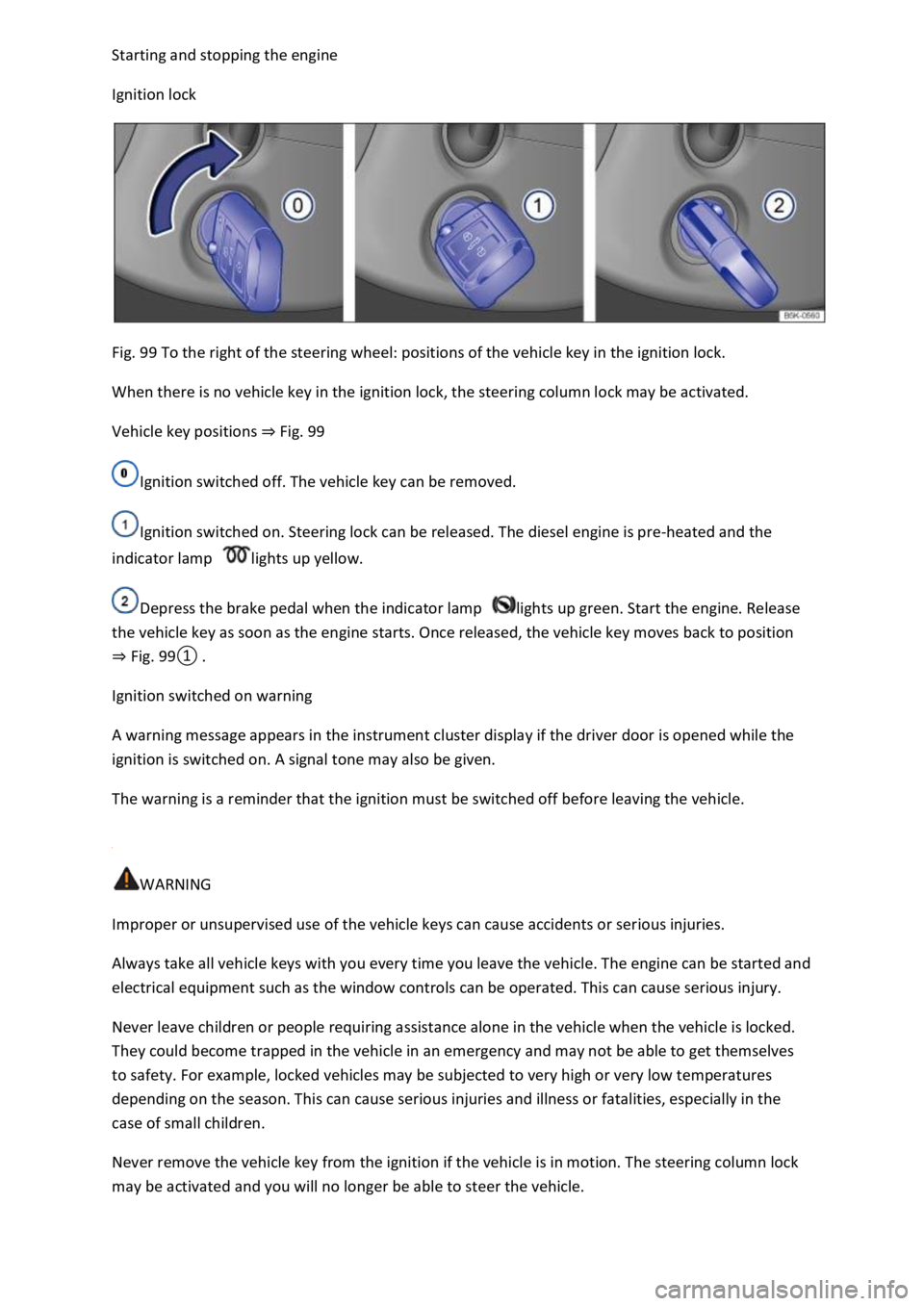
Fig. 99 To the right of the steering wheel: positions of the vehicle key in the ignition lock.
When there is no vehicle key in the ignition lock, the steering column lock may be activated.
Vehicle key positions Fig. 99
Ignition switched off. The vehicle key can be removed.
Ignition switched on. Steering lock can be released. The diesel engine is pre-heated and the
indicator lamp lights up yellow.
Depress the brake pedal when the indicator lamp lights up green. Start the engine. Release
the vehicle key as soon as the engine starts. Once released, the vehicle key moves back to position
Fig.
0
Ignition switched on warning
A warning message appears in the instrument cluster display if the driver door is opened while the
ignition is switched on. A signal tone may also be given.
The warning is a reminder that the ignition must be switched off before leaving the vehicle.
WARNING
Improper or unsupervised use of the vehicle keys can cause accidents or serious injuries.
Always take all vehicle keys with you every time you leave the vehicle. The engine can be started and
electrical equipment such as the window controls can be operated. This can cause serious injury.
Never leave children or people requiring assistance alone in the vehicle when the vehicle is locked.
They could become trapped in the vehicle in an emergency and may not be able to get themselves
to safety. For example, locked vehicles may be subjected to very high or very low temperatures
depending on the season. This can cause serious injuries and illness or fatalities, especially in the
case of small children.
Never remove the vehicle key from the ignition if the vehicle is in motion. The steering column lock
may be activated and you will no longer be able to steer the vehicle.
Page 183 of 502

off automatically when engine stop is active when the vehicle is stationary:
The driver seat belt has been unfastened.
No pedals are depressed.
The driver door is opened.
If the ignition is deactivated automatically while the dipped beam headlights are switched on,
the side lights remain switched on and lit for approximately 30 minutes.
The side lights can be switched off manually or will go off when the vehicle is locked.
Engine restart function
If no valid vehicle key is detected in the vehicle interior once the engine has been switched off, the
engine can be restarted within approximately five seconds. A corresponding message appears on the
instrument cluster display.
After this time, the engine cannot be re-started without a valid vehicle key in the vehicle interior.
WARNING
Unintentional vehicle movements can cause serious injury.
Do not depress the brake or clutch pedal when the ignition is switched on as the engine will start
immediately.
WARNING
Improper or unsupervised use of the vehicle keys can cause accidents or serious injuries.
Always take all vehicle keys with you every time you leave the vehicle. Children or unauthorised
persons could lock the vehicle, start the engine, switch on the ignition or operate electrical
equipment such as the electric windows.
Before leaving the vehicle, always switch off the ignition manually and observe any information
shown on the instrument cluster display.
Leaving the vehicle stationary for long periods with the ignition switched on can discharge the 12-
volt vehicle battery so that the engine can no longer be started.
Starting the engine
Page 188 of 502
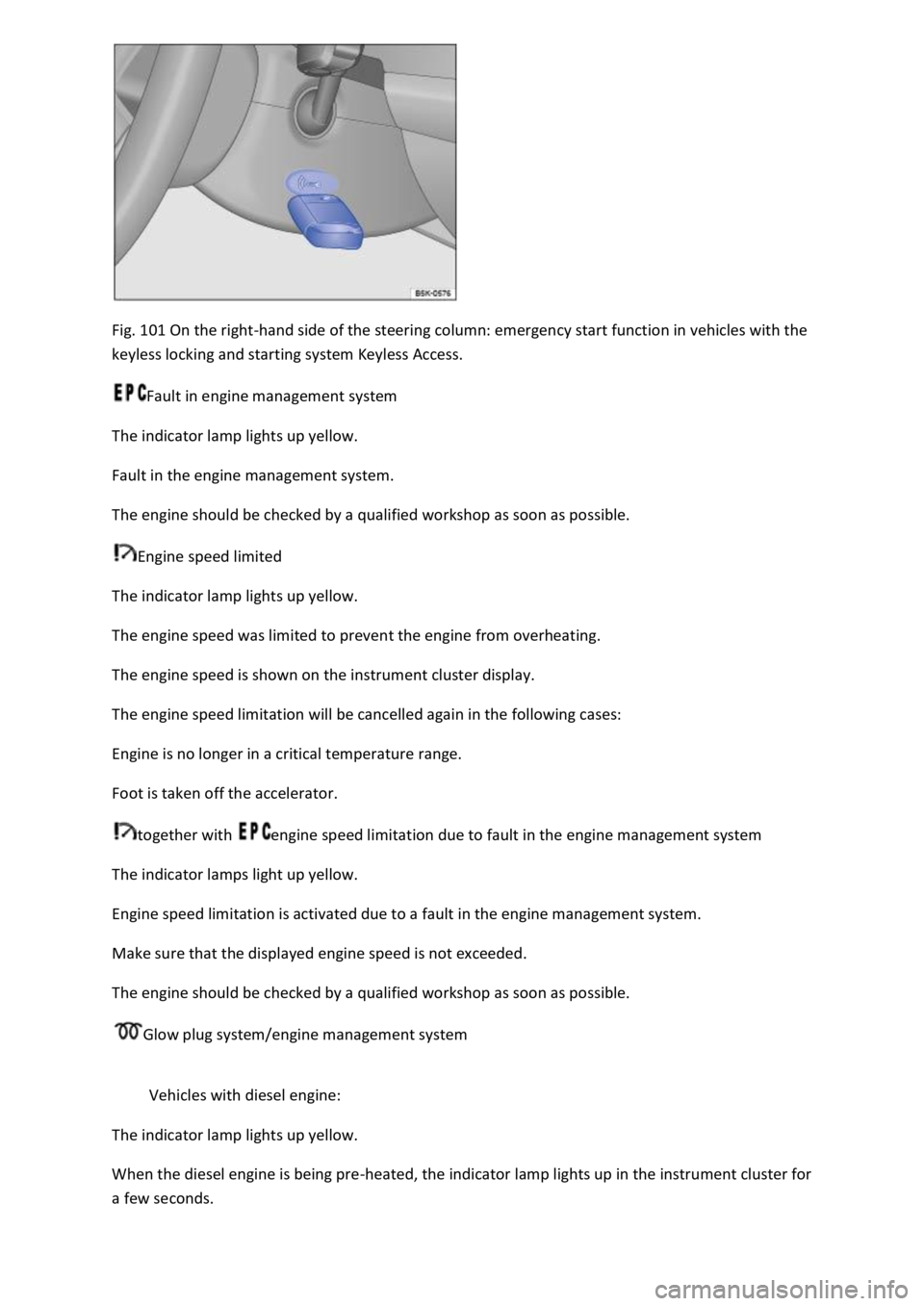
Fig. 101 On the right-hand side of the steering column: emergency start function in vehicles with the
keyless locking and starting system Keyless Access.
Fault in engine management system
The indicator lamp lights up yellow.
Fault in the engine management system.
The engine should be checked by a qualified workshop as soon as possible.
Engine speed limited
The indicator lamp lights up yellow.
The engine speed was limited to prevent the engine from overheating.
The engine speed is shown on the instrument cluster display.
The engine speed limitation will be cancelled again in the following cases:
Engine is no longer in a critical temperature range.
Foot is taken off the accelerator.
together with engine speed limitation due to fault in the engine management system
The indicator lamps light up yellow.
Engine speed limitation is activated due to a fault in the engine management system.
Make sure that the displayed engine speed is not exceeded.
The engine should be checked by a qualified workshop as soon as possible.
Glow plug system/engine management system
Vehicles with diesel engine:
The indicator lamp lights up yellow.
When the diesel engine is being pre-heated, the indicator lamp lights up in the instrument cluster for
a few seconds.
Page 189 of 502

There is a fault in the engine management system.
The engine should be checked by a qualified workshop as soon as possible.
Vehicle key cannot be removed from the ignition lock
An unauthorised vehicle key has been inserted in the ignition lock.
Remove the vehicle key as follows:
Vehicles with DSG dual clutch gearbox
Press the lock button in the selector lever and release.
Remove the vehicle key from the ignition lock.
Vehicles with a manual gearbox
Remove the vehicle key from the ignition lock.
No valid vehicle key recognised
A corresponding display will appear in the instrument cluster.
If the button cell in the vehicle key is weak or discharged, it is possible that the vehicle key will not
be recognised.
In this case, you will need to perform an emergency start:
Depress and hold the brake pedal.
Hold the vehicle key to the right of the steering column trim directly after pressing the starter button
Fig. 101
The ignition is switched on automatically, and in some cases the engine is started.
Engine cannot be switched off
The engine cannot be switched off by briefly pressing the starter button.
In this case it is necessary to perform an emergency switch-off procedure:
Press the starter button twice within a few seconds or press and hold once.
The engine will switch off automatically
Engine cannot be started
A corresponding message will be displayed in the instrument cluster if an unauthorised vehicle key is
used or there is a system fault.
Use an authorised vehicle key.
If the problem persists, seek expert assistance.