open VOLKSWAGEN T-ROC 2020 Owners Manual
[x] Cancel search | Manufacturer: VOLKSWAGEN, Model Year: 2020, Model line: T-ROC, Model: VOLKSWAGEN T-ROC 2020Pages: 502, PDF Size: 8.58 MB
Page 1 of 502
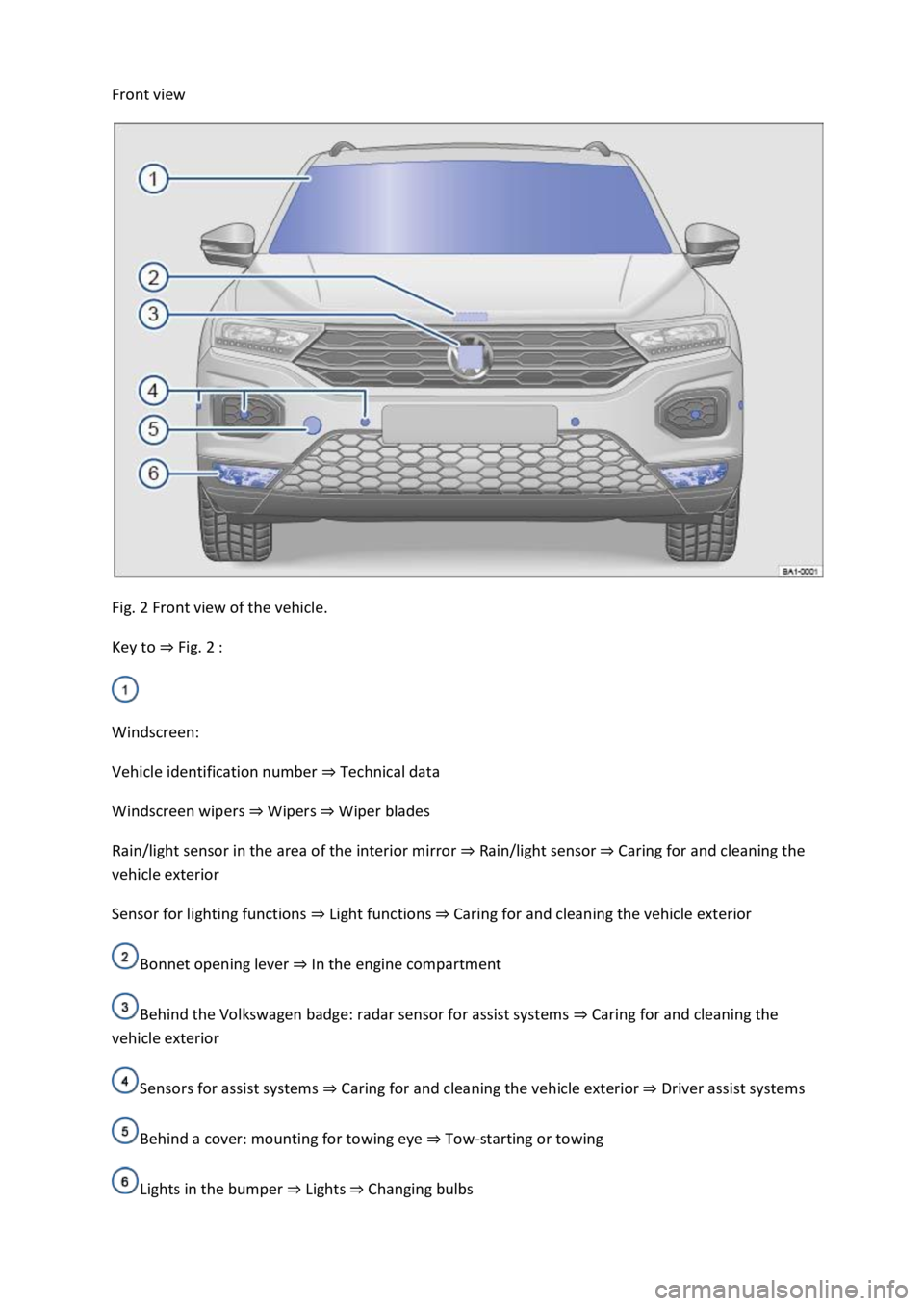
Front view
Fig. 2 Front view of the vehicle.
Key to Fig. 2
Windscreen:
Vehicle identification number Technical data
Windscreen wipers WipersWiper blades
Rain/light sensor in the area of the interior mirror Rain/light sensorCaring for and cleaning the
vehicle exterior
Sensor for lighting functions Caring for and cleaning the vehicle exterior
Bonnet opening lever In the engine compartment
Behind the Volkswagen badge: radar sensor for assist systems Caring for and cleaning the
vehicle exterior
Sensors for assist systems Caring for and cleaning the vehicle exteriorDriver assist systems
Behind a cover: mounting for towing eye Tow-starting or towing
Lights in the bumper LightsChanging bulbs
Page 3 of 502
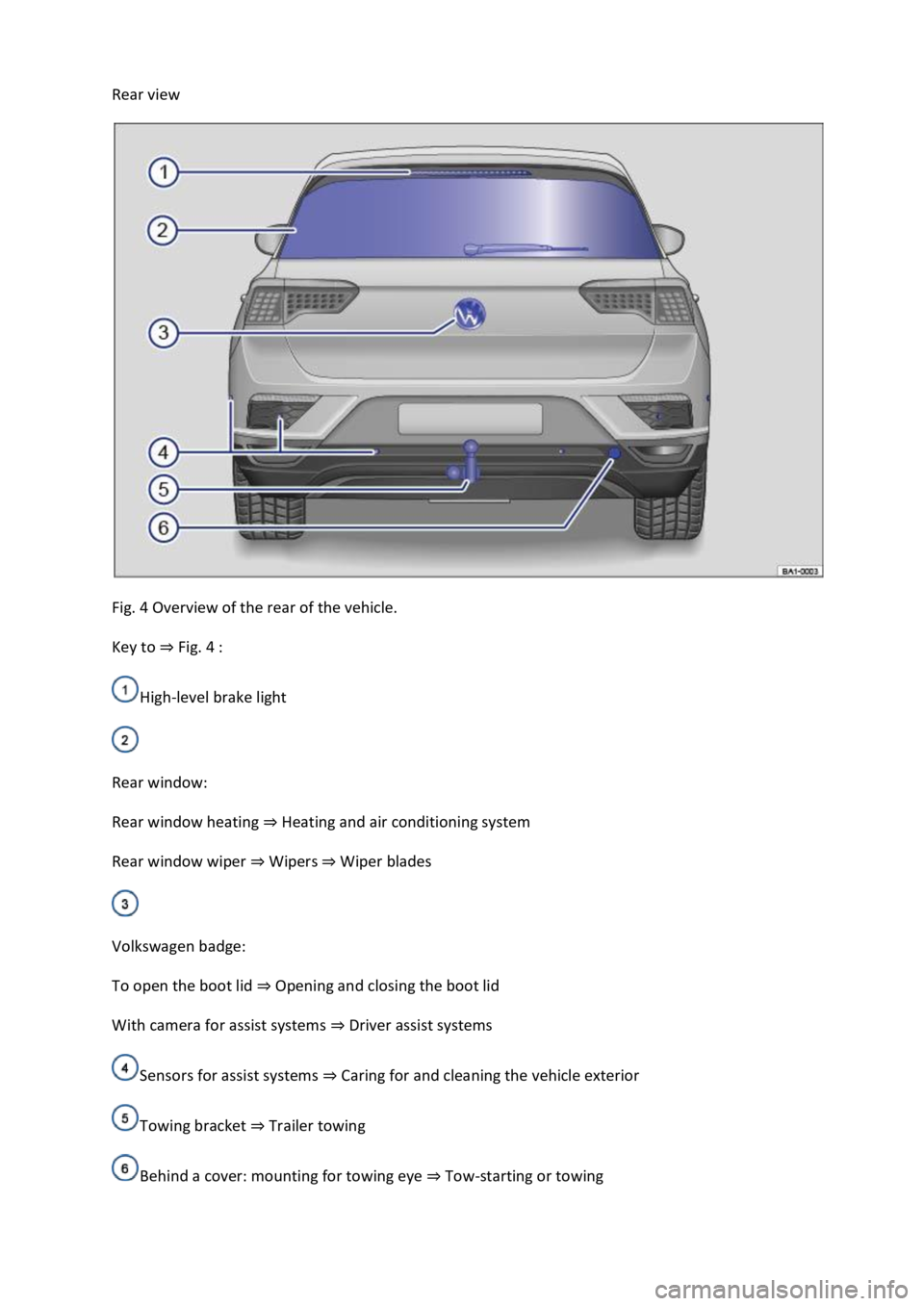
Rear view
Fig. 4 Overview of the rear of the vehicle.
Key to Fig. 4
High-level brake light
Rear window:
Rear window heating Heating and air conditioning system
Rear window wiper WipersWiper blades
Volkswagen badge:
To open the boot lid Opening and closing the boot lid
With camera for assist systems Driver assist systems
Sensors for assist systems Caring for and cleaning the vehicle exterior
Towing bracket Trailer towing
Behind a cover: mounting for towing eye Tow-starting or towing
Page 6 of 502

In the engine compartment
Fuse box cover Changing fuses
Lever for adjusting the steering column position Steering wheel
Light switch Vehicle lighting
Turn signal and main beam lever Vehicle lighting
With switches and buttons for the driver assist systems Button for driver assist systemsDriver
assist systems
Vents Heating and air conditioning system
Instrument cluster Instrument cluster
With warning and indicator lamps Symbols in instrument cluster
Lever for wipers and washers Wipers
With buttons for operating the menus Instrument cluster
Controls on the multifunction steering wheel:
Operating driver assist systems Operating using the multifunction steering wheelDriver assist
systems
Audio, navigation
Opening the telephone menu or accepting telephone calls
Volume adjustment
Activating voice control (no function in some models)
Horn
Location of the driver front airbag Airbag system
Ignition lock Starting and stopping the engine
Pedals Pedals
Page 18 of 502

or arrow button on the multifunction steering wheel to select the required
map size. A frame appears around the selected option.
Press the button on the multifunction steering wheel to confirm your selection.
With some equipment levels, navigation is shown on two screens or only one. The navigation map
can be displayed on the Active Info Display and Infotainment system or only on the Infotainment
system display. In the latter case, only navigation arrows are shown on the Active Info Display.
Displays
First read and observe the introductoryinformation and safety warnings
Possible instrument cluster displays
Open doors, bonnet and boot lid.
Warning and information messages.
Mileage displays.
Time Time
Radio and navigation information ookletInfotainment system,.
Telephone information Infotainment system,.
Outside temperature.
Compass display.
Selector lever positions.
Gear-change indicator Gear-change indicator
Driving data display (multifunction display) and menus for various settings Instrument cluster
menus
Service interval display Service interval display
Speed warning Instrument cluster menus
Speed warning for winter tyres.
Start/stop system status display Start/stop system
Road signs detected by the Dynamic Road Sign Display system Dynamic Road Sign Display (Sign
Assist)
Status display for Active Cylinder Management (ACT
Page 19 of 502

Personalisation
Open doors, bonnet and boot lid
The instrument cluster display indicates if any doors, the engine compartment or boot lid are open
once the vehicle has been unlocked, and while the vehicle is in motion. In some cases, a signal tone
is also given. Different instrument cluster designs may have different displays.
Selector lever positions (DSG
Page 22 of 502

Settings can be made in the Service menu1) depending on the vehicle equipment.
Opening the Service menu
To open the Service menu, select the Range information profile and press and hold the OK button on
the multifunction steering wheel for around four seconds. You can now navigate in the menu in the
usual way using the buttons on the multifunction steering wheel.
Resetting the service interval display
Select the Service menu and follow the instructions on the instrument cluster display.
Resetting oil change service
Select the Reset oil service menu and follow the instructions on the instrument cluster display.
Resetting driving data
Select the Reset trip menu and follow the instructions on the instrument cluster display to reset the
desired value.
Engine code
Select the Engine code menu. The engine codes are now shown on the instrument cluster display.
Setting the time
Select the Time menu and set the correct time with the arrow buttons or .
1) Only in vehicles with an Active Info Display.
Driving data display (multifunction display)
First read and observe the introductoryinformation and safety warnings
The driving data display (multifunction display) shows a variety of travel and fuel consumption data.
Switching between displays
Vehicles without multifunction steering wheel:
Press the rocker switch on the wiper lever Operating using the wiper lever
Vehicles with multifunction steering wheel:
Press the or button Operating using the multifunction steering wheel
Switching between memories
Press the button on the wiper lever, or press the button on the multifunction
steering wheel.
Since start memory
Page 24 of 502
rocker switch on the wiper lever or the
or buttons on the multifunction steering wheel. Then press the or button or
wait a few seconds. The speed is now saved and the warning is activated.
To deactivate, press the or button again. The stored speed will be deleted.
The speed warning can be adjusted within a range of 30 km/h (18 mph) to 250 km/h (155 mph).
Some settings can be saved in the user accounts for personalisation and therefore change
automatically when the user account is changed Personalis
1) Varies depending on the instrument cluster version.
2) Not available in all countries.
Warning and information messages
First read and observe the introductoryinformation and safety warnings
The system runs a check on certain components and functions in the vehicle when the ignition is
switched on or while the vehicle is in motion. Malfunctions are indicated by red and yellow warning
symbols with information messages on the instrument cluster display Symbols in instrument
cluster
messages and symbols can vary depending on the version of the instrument cluster.
In addition, a list of current malfunctions can be opened manually. To open the list, select the
Vehicle status or Vehicle menu Instrument cluster menus
Priority 1 warning (red)The symbol flashes or lights up (sometimes together with a signal tone).
Do not drive on! Danger. Check the fault and correct the cause. Seek expert assistance if
necessary.Priority 2 warning (yellow)The symbol flashes or lights up (sometimes together with a
signal tone). Malfunctions and insufficient service fluids can damage the vehicle and cause it to
break down. Check the fault as soon as possible. Seek expert assistance if necessary.Information
messageInformation about various vehicle procedures and conditions.
With some equipment levels, some settings and displays may also appear in the Infotainment
system.
If several warnings are present, the symbols will appear for several seconds, one after another. The
symbols will continue to appear until the faults are rectified.
If warning messages about malfunctions are displayed when the ignition is switched on, it may not
be possible to adjust some settings as described, or the information display may appear differently.
If this is the case, take the vehicle to a qualified workshop to have the malfunctions rectified.
Page 26 of 502

Towing a heavy/long trailer.
The driver is distracted.
The Driver Alert System is reset in the following situations:
The ignition is switched off.
The driver seat belt is unfastened and the driver door is opened.
The vehicle has been stationary for longer than 15 minutes.
The Driver Alert System is automatically reset in the event of an extended period of driving at slow
speeds (speed less than 60 km/h (37 mph)). When the speed is increased again, the system
evaluates the driving behaviour once more.
WARNING
The intelligent technology used in the Driver Alert System cannot overcome the laws of physics, and
functions only within the limits of the system. Do not let the extra convenience afforded by the
Driver Alert System tempt you into taking any risks when driving. During a long trip, plan regular and
sufficient breaks.
The driver is responsible at all times for their fitness to drive.
Never drive a vehicle when you are tired.
The system cannot always detect the driver's level of alertness. Observe the information in the
Function limitations section.
In certain situations, the system may wrongly interpret intentional driving manoeuvres as a lack of
alertness from the driver.
No urgent warning will be given in the event of the phenomenon known as microsleep.
Observe the information in the instrument cluster display and act according to the commands.
The Driver Alert System has been developed for use only while driving on motorways and good
roads.
If there is a system fault, go to a qualified workshop and have the system checked.
Page 32 of 502
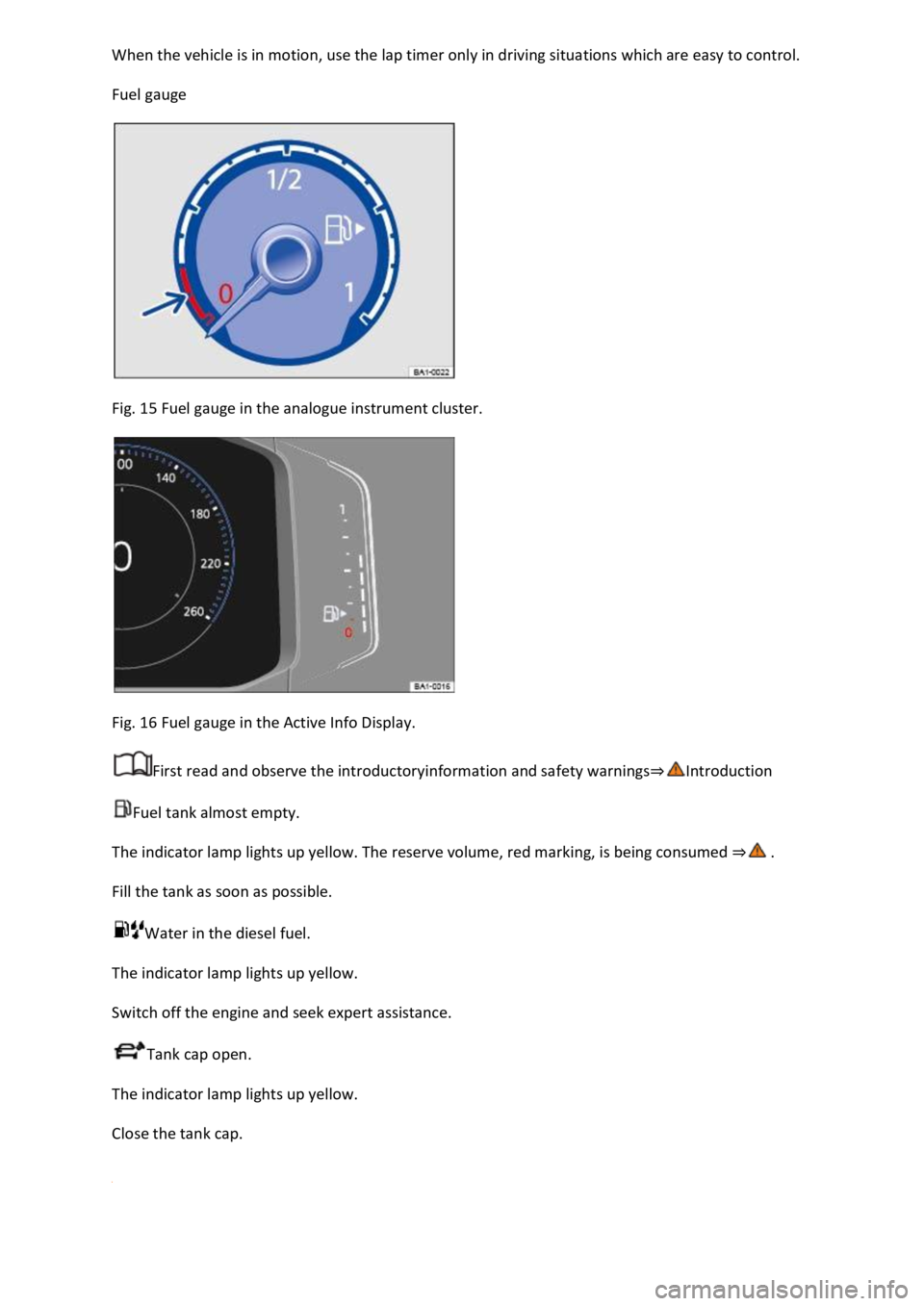
Fuel gauge
Fig. 15 Fuel gauge in the analogue instrument cluster.
Fig. 16 Fuel gauge in the Active Info Display.
First read and observe the introductoryinformation and safety warnings
Fuel tank almost empty.
The indicator lamp lights up yellow. The reserve volume, red marking, is being consumed
Fill the tank as soon as possible.
Water in the diesel fuel.
The indicator lamp lights up yellow.
Switch off the engine and seek expert assistance.
Tank cap open.
The indicator lamp lights up yellow.
Close the tank cap.
Page 37 of 502
ng wheel
Operating using the wiper lever
WARNING
Accidents and injuries can occur if the driver is distracted.
Never operate the menus on the instrument cluster display while the vehicle is in motion.
Check the system settings after charging or replacing the 12-volt vehicle battery. System settings
may be changed or deleted if the power supply is interrupted.
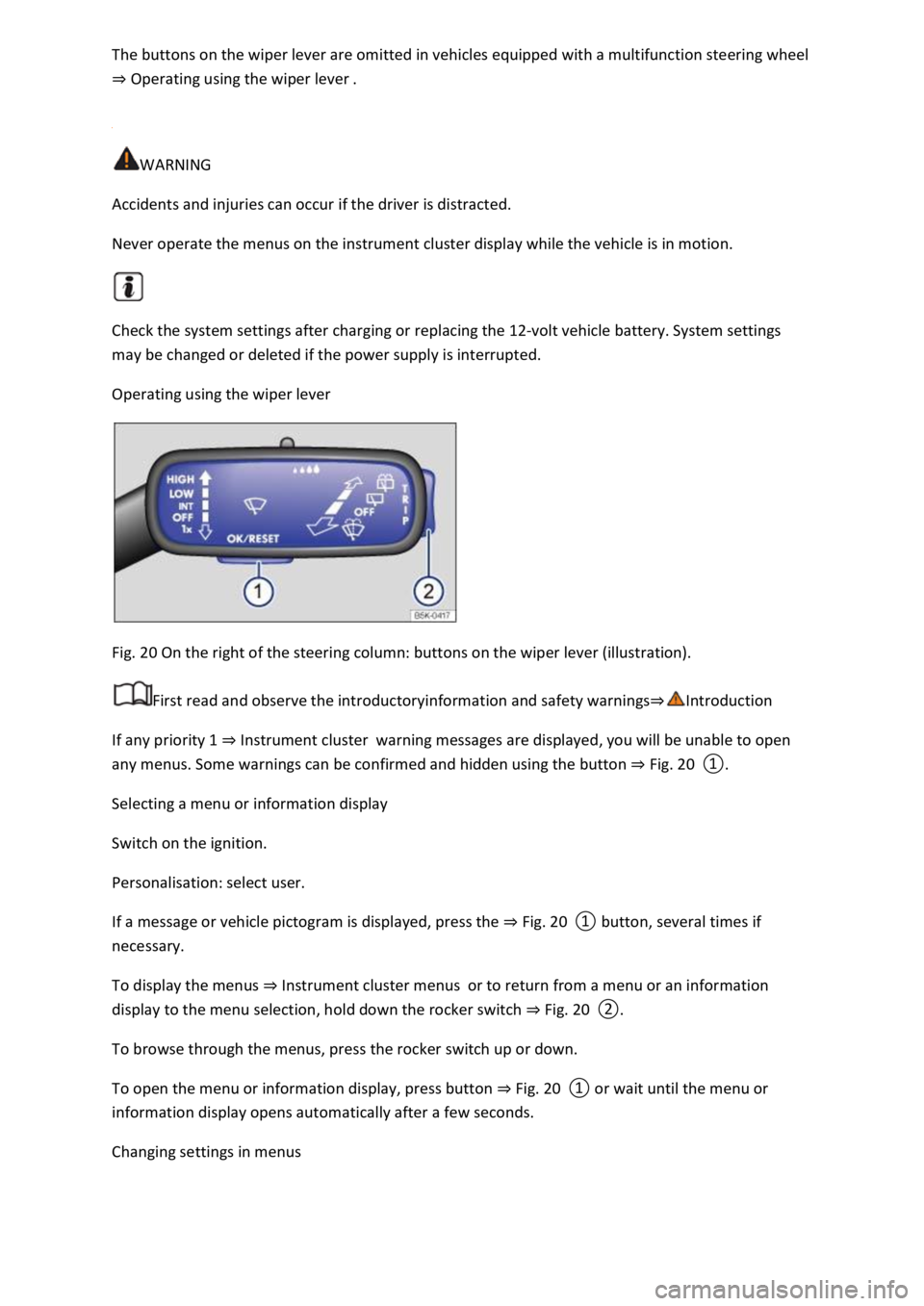
Operating using the wiper lever
Fig. 20 On the right of the steering column: buttons on the wiper lever (illustration).
First read and observe the introductoryinformation and safety warnings
If any priority 1 Instrument clusterwarning messages are displayed, you will be unable to open
any menus. Some warnings can be confirmed and hidden using the button Fig. 20
Selecting a menu or information display
Switch on the ignition.
Personalisation: select user.
If a message or vehicle pictogram is displayed, press the Fig. 20
To display the menus Instrument cluster menusor to return from a menu or an information
display to the menu selection, hold down the rocker switch Fig. 20
To browse through the menus, press the rocker switch up or down.
To open the menu or information display, press button Fig. 20
a few seconds.
Changing settings in menus