speed limit VOLKSWAGEN T-ROC 2021 Owner´s Manual
[x] Cancel search | Manufacturer: VOLKSWAGEN, Model Year: 2021, Model line: T-ROC, Model: VOLKSWAGEN T-ROC 2021Pages: 502, PDF Size: 9.42 MB
Page 66 of 502

First read and observe the introductoryinformation and safety warnings⇒Introduction
The proactive occupant protection system is an assistance system that initiates measures to protect
vehicle occupants in dangerous situations. However, the system cannot prevent a collision.
The full range of functions of the proactive occupant protection system will be available only if the
function has been activated in the Infotainment system, no special driving profile has been selected
and there are no malfunctions ⇒ Driving profile selection and 4MOTION Active Control , ⇒ Function
limitations .
Basic functions
Depending on country-specific legal requirements and also on the vehicle equipment, the following
functions may be initiated, either individually or jointly, in critical situations (e.g. emergency braking
or in the case of oversteering or understeering) as of a speed of approximately 30 km/h (19 mph):
Reversible tensioning of the fastened front seat belts.
Depending on the critical driving situation, the seat belts can be tensioned separately or together.
Additional information for vehicles with an area monitoring system (Front Assist)
In vehicles fitted with the area monitoring system (Front Assist) ⇒ Area monitoring system (Front
Assist) , the probability of a collision with the vehicle ahead is also calculated within the system
limits. The system can trigger the proactive occupant protection system if it detects a probable
collision or initiates strong braking.
Function limitations
The proactive occupant protection system will not be available, or will be available only to a limited
extent, in the following situations:
If there is a fault in the ESC, belt tensioner ⇒ Seat belts or airbag control unit ⇒ Airbag system .
WARNING
The intelligent technology of the proactive occupant protection system cannot overcome the laws of
physics, and functions only within the limits of the system. Never let the extra convenience afforded
by the proactive occupant protection system tempt you into taking any risks when driving. The
system cannot prevent a collision. The system is not a substitute for the full concentration of the
driver.
Adapt your speed and distance from the vehicles ahead to suit visibility, weather, road and traffic
conditions.
The system cannot detect objects in all situations.
The proactive occupant protection system does not react to people, animals, objects crossing in
front of the vehicle, or objects which are hard to detect.
Page 134 of 502
Main beam
Switching main beam on and off
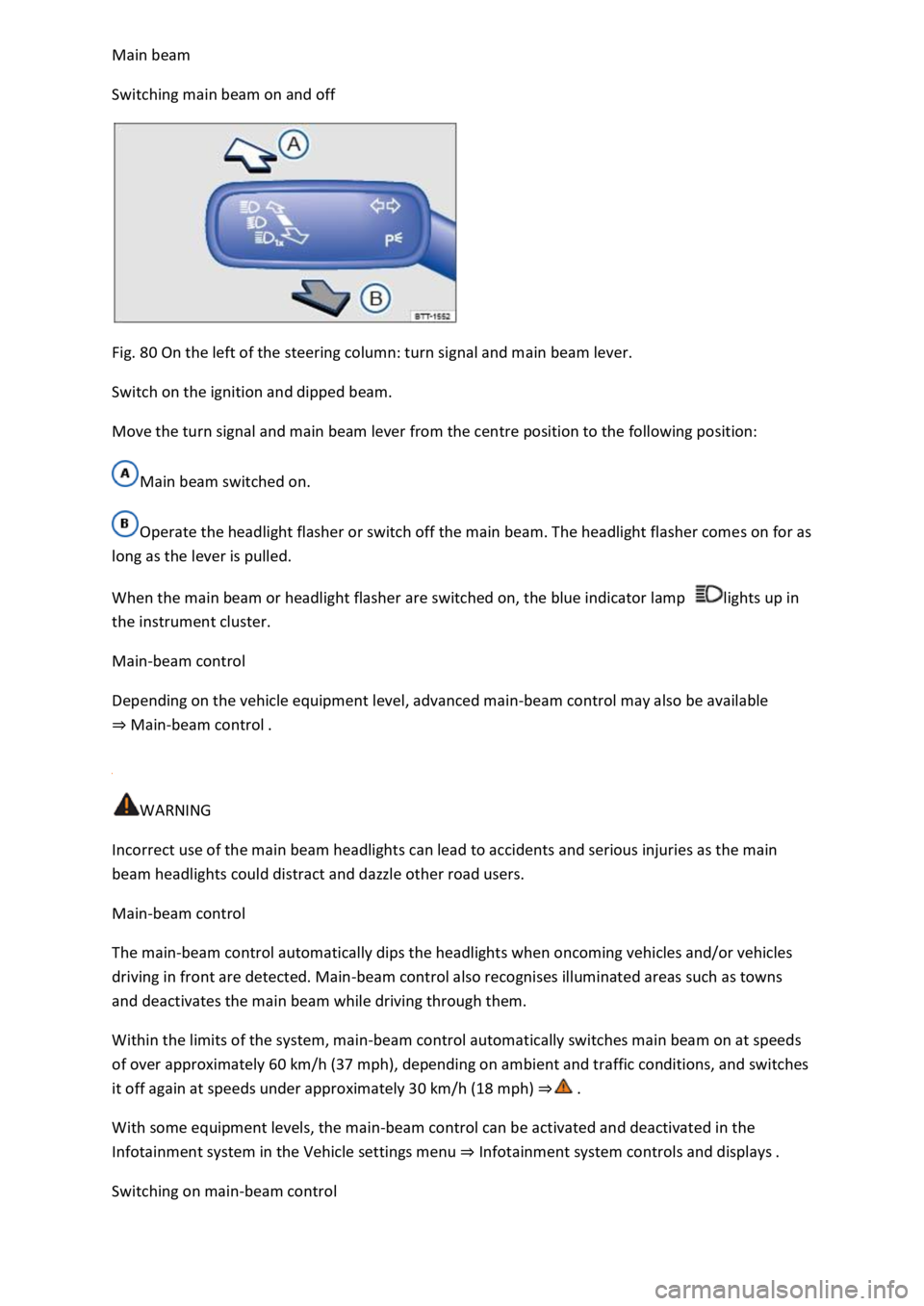
Fig. 80 On the left of the steering column: turn signal and main beam lever.
Switch on the ignition and dipped beam.
Move the turn signal and main beam lever from the centre position to the following position:
Main beam switched on.
Operate the headlight flasher or switch off the main beam. The headlight flasher comes on for as
long as the lever is pulled.
When the main beam or headlight flasher are switched on, the blue indicator lamp lights up in
the instrument cluster.
Main-beam control
Depending on the vehicle equipment level, advanced main-beam control may also be available
⇒ Main-beam control .
WARNING
Incorrect use of the main beam headlights can lead to accidents and serious injuries as the main
beam headlights could distract and dazzle other road users.
Main-beam control
The main-beam control automatically dips the headlights when oncoming vehicles and/or vehicles
driving in front are detected. Main-beam control also recognises illuminated areas such as towns
and deactivates the main beam while driving through them.
Within the limits of the system, main-beam control automatically switches main beam on at speeds
of over approximately 60 km/h (37 mph), depending on ambient and traffic conditions, and switches
it off again at speeds under approximately 30 km/h (18 mph) ⇒ .
With some equipment levels, the main-beam control can be activated and deactivated in the
Infotainment system in the Vehicle settings menu ⇒ Infotainment system controls and displays .
Switching on main-beam control
Page 171 of 502
The gear-change indicator display goes out when the clutch is depressed in vehicles with a manual
gearbox or when Tiptronic position is deselected in vehicles with a DSG® dual clutch gearbox.
Driving economically
Fuel consumption, environmental impact and wear of the engine, brakes and tyres can be reduced
by adopting the correct driving style. A few tips are provided below which will help you protect the
environment and also save money.
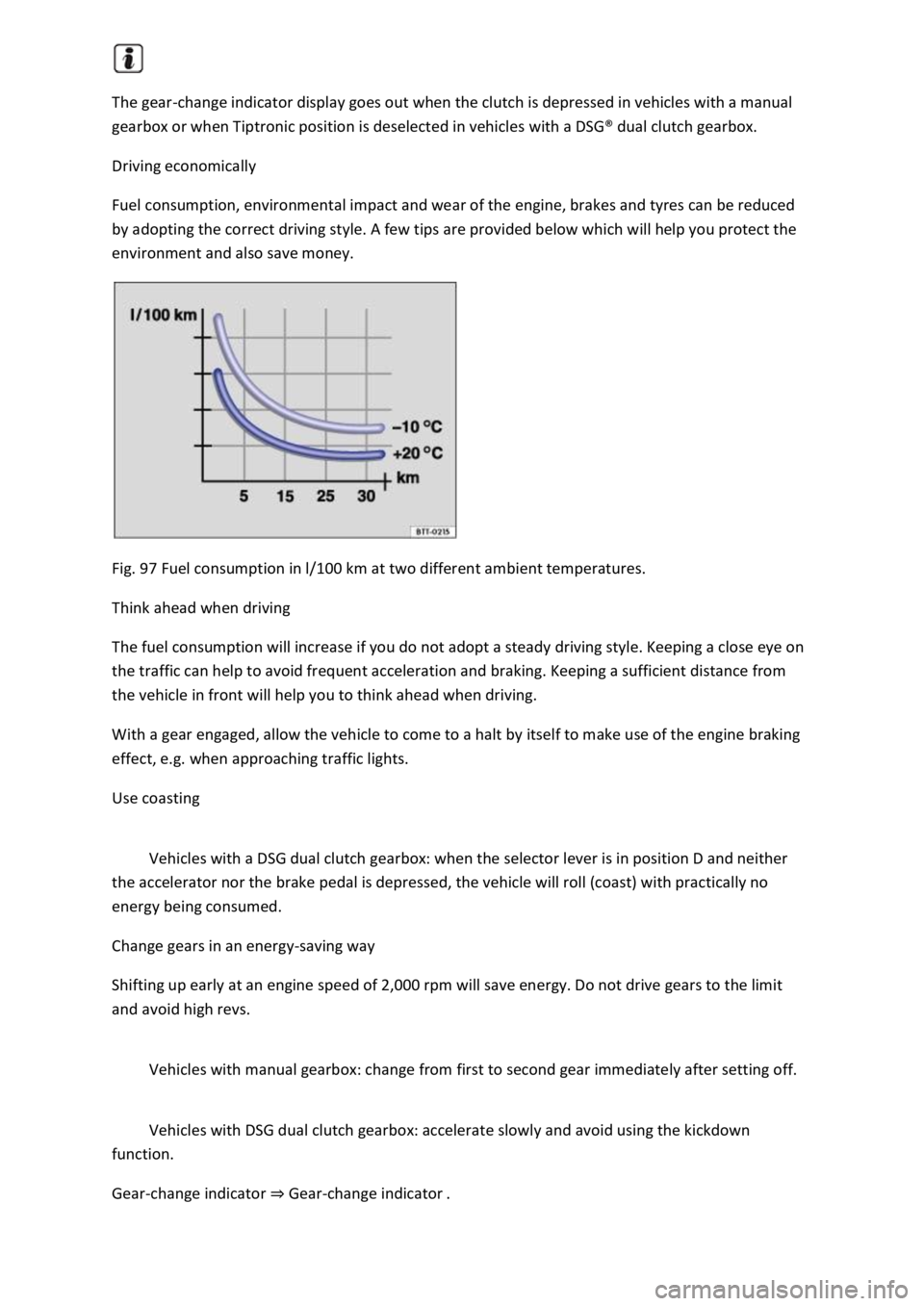
Fig. 97 Fuel consumption in l/100 km at two different ambient temperatures.
Think ahead when driving
The fuel consumption will increase if you do not adopt a steady driving style. Keeping a close eye on
the traffic can help to avoid frequent acceleration and braking. Keeping a sufficient distance from
the vehicle in front will help you to think ahead when driving.
With a gear engaged, allow the vehicle to come to a halt by itself to make use of the engine braking
effect, e.g. when approaching traffic lights.
Use coasting
Vehicles with a DSG dual clutch gearbox: when the selector lever is in position D and neither
the accelerator nor the brake pedal is depressed, the vehicle will roll (coast) with practically no
energy being consumed.
Change gears in an energy-saving way
Shifting up early at an engine speed of 2,000 rpm will save energy. Do not drive gears to the limit
and avoid high revs.
Vehicles with manual gearbox: change from first to second gear immediately after setting off.
Vehicles with DSG dual clutch gearbox: accelerate slowly and avoid using the kickdown
function.
Gear-change indicator ⇒ Gear-change indicator .
Page 188 of 502
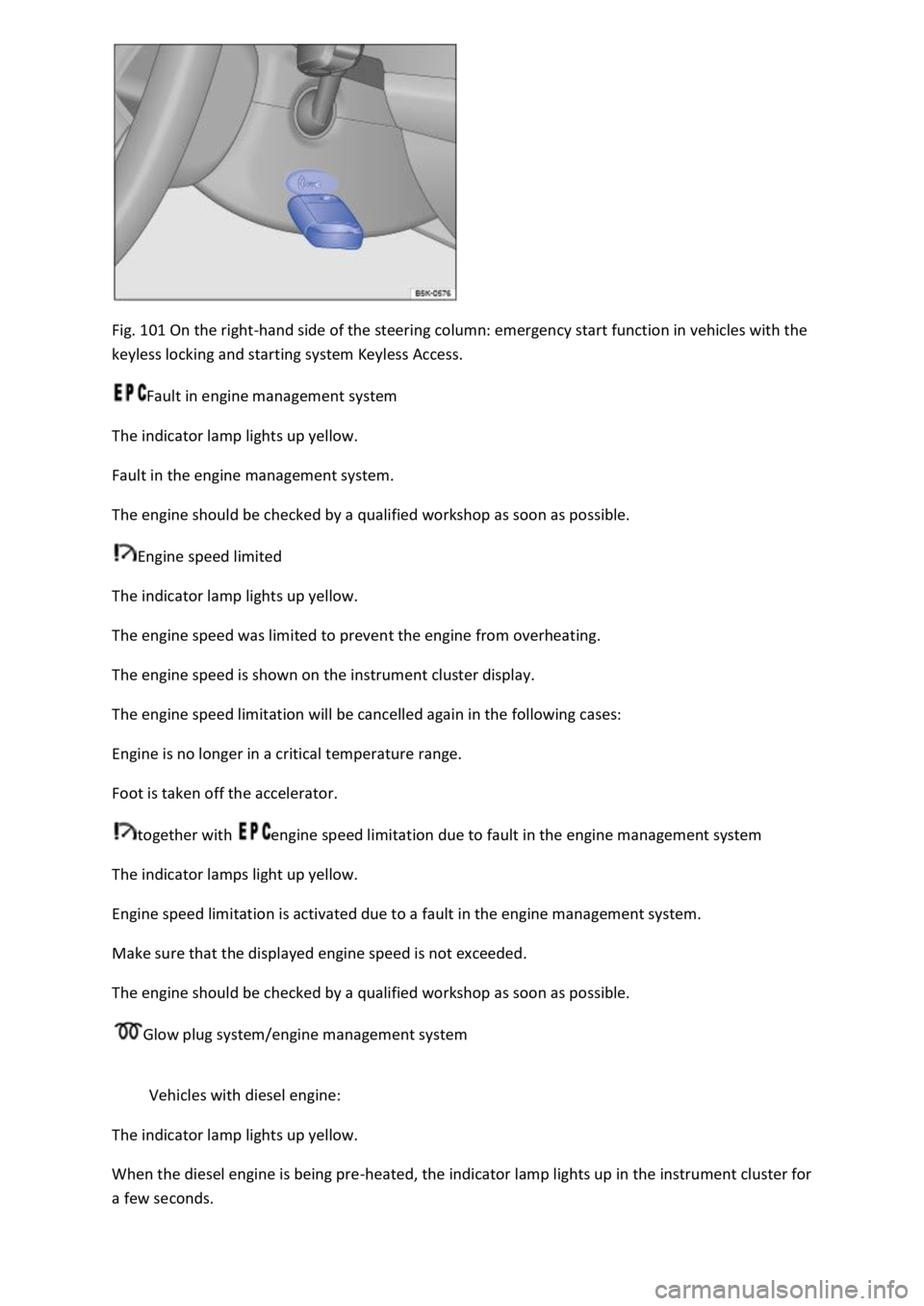
Fig. 101 On the right-hand side of the steering column: emergency start function in vehicles with the
keyless locking and starting system Keyless Access.
Fault in engine management system
The indicator lamp lights up yellow.
Fault in the engine management system.
The engine should be checked by a qualified workshop as soon as possible.
Engine speed limited
The indicator lamp lights up yellow.
The engine speed was limited to prevent the engine from overheating.
The engine speed is shown on the instrument cluster display.
The engine speed limitation will be cancelled again in the following cases:
Engine is no longer in a critical temperature range.
Foot is taken off the accelerator.
together with engine speed limitation due to fault in the engine management system
The indicator lamps light up yellow.
Engine speed limitation is activated due to a fault in the engine management system.
Make sure that the displayed engine speed is not exceeded.
The engine should be checked by a qualified workshop as soon as possible.
Glow plug system/engine management system
Vehicles with diesel engine:
The indicator lamp lights up yellow.
When the diesel engine is being pre-heated, the indicator lamp lights up in the instrument cluster for
a few seconds.
Page 206 of 502

If the text message and signal tone are repeated approximately every 10 seconds, park the vehicle
safely as soon as possible and switch the engine off. Allow the gearbox to cool down.
Do not drive on until the signal tone stops in order to avoid damage to the gearbox. You should not
pull away or drive the vehicle at very low speeds while the gearbox is overheated.
Downhill speed control
The downhill speed control system helps when braking and travelling downhill in vehicles with a
DSG® dual clutch gearbox ⇒ . The downhill speed control uses the braking power of the engine.
The DSG® dual clutch gearbox selects the best gear depending on the steepness of the gradient and
the current speed. The selector lever must be in position D/S. The downhill speed control is not
active in Tiptronic mode.
As the downhill speed control can shift down only as far as third gear, it may be necessary to activate
the Tiptronic mode when driving down particularly steep inclines. When in Tiptronic mode, select
second or first gear manually in order to make use of the braking effect of the engine and to relieve
the load on the brakes.
The start/stop system is automatically deactivated as long as downhill speed control is active.
Activating downhill speed control automatically:
If the downhill gradient is greater than approximately 6%.
AND: if the selector lever is in position D/S.
In addition, if the cruise control system or Adaptive Cruise Control (ACC) is switched off: if the
vehicle speed is less than approximately 80 km/h (50 mph) or the brake pedal is depressed.
In addition, if the cruise control system or Adaptive Cruise Control (ACC) is active: if the stored speed
is exceeded.
Deactivating downhill speed control automatically:
If the downhill gradient becomes less steep.
OR: if the gearbox shifts up a gear because the engine speed is higher than approximately 4,500 rpm.
Or additionally if the cruise control system or Adaptive Cruise Control (ACC) is active: if the stored
speed can be maintained.
WARNING
The intelligent downhill speed control technology cannot overcome the laws of physics, and
functions only within the limits of the system. Never let the extra convenience afforded by pull-away
assist systems tempt you into taking any safety risks when driving.
Unintentional vehicle movements can cause serious injury.
The downhill speed control cannot replace the full concentration of the driver.
Always adapt your speed and driving style to suit visibility, weather, road and traffic conditions.
Page 231 of 502

If necessary, remove the towing eye and the snow chains.
Check the tyres, suspension struts and axles for damage and remove dirt, stones and other foreign
bodies from the tyre tread.
Inspect the vehicle underbody and remove all items that are jammed in the brake system, on the
wheels, in the running gear, in the exhaust system and in the engine, such as branches, leaves or
pieces of wood . If you see any damage or leaks, take your vehicle to a qualified workshop or seek
expert assistance.
Clean heavy soiling from the radiator grille and the vehicle underbody Vehicle care.
Check the engine compartment to see if any dirt is affecting engine operation In the engine
compartment.
Deselecting the Offroad driving profile Setting a driving profile.
Switch on TCS again Brake support systems.
WARNING
Objects caught underneath the vehicle underbody pose a danger. The vehicle underbody must
always be examined for trapped objects after every journey offroad.
Never drive if objects are trapped in the underbody, brake system, wheels, running gear, exhaust
system and engine.
Inflammable materials, e.g. dry leaves, could ignite on hot vehicle components. A fire can cause
serious injuries.
Trapped objects could damage the fuel lines, brake system, seals and other running gear
components. This could cause you to lose control of your vehicle and cause accidents.
Driver assist systems
Speed limiter
Introduction
This chapter contains information on the followingsubjects:
Page 232 of 502

⇒ Operating the speed limiter with the multifunction steering wheel
⇒ Troubleshooting
The speed limiter helps you to stop exceeding a stored speed.
Speed range
The speed limiter is available when driving forwards at speeds from approx. 30 km/h (20 mph).
Driving with the speed limiter
You can interrupt the speed limiter at any time by depressing the accelerator all the way down past
the point of resistance. As soon as the stored speed is exceeded, the green indicator lamp will
flash and an acoustic warning may sound. The speed remains stored in the memory.
The speed limiter function switches back on automatically as soon as the speed drops back below
the stored speed.
Displays
When the speed limiter is switched on, the instrument cluster display shows the stored speed and
the status of the speed limiter:
Shown small or grey: speed limiter not active.Shown large or white: speed limiter active.
Driving downhill
Driving downhill may cause the set speed to be exceeded.
Apply the foot brake to slow the vehicle down, and change down a gear as required.
WARNING
Always switch off the speed limiter after use to avoid unintentional speed control.
The speed limiter does not relieve the driver of their responsibility for the speed of the vehicle. Do
not drive at full throttle if this is not required.
Use of the speed limiter in adverse weather conditions is dangerous and can cause serious injury,
e.g. through aquaplaning, snow, ice, or leaves. Use the speed limiter only when the road and
weather conditions allow it to be used safely.
The speed limiter cannot limit the vehicle speed when travelling downhill. The vehicle speed can
increase under its own weight. Select a lower gear or use the foot brake to slow the vehicle down.
Operating the speed limiter with the multifunction steering wheel
Page 233 of 502
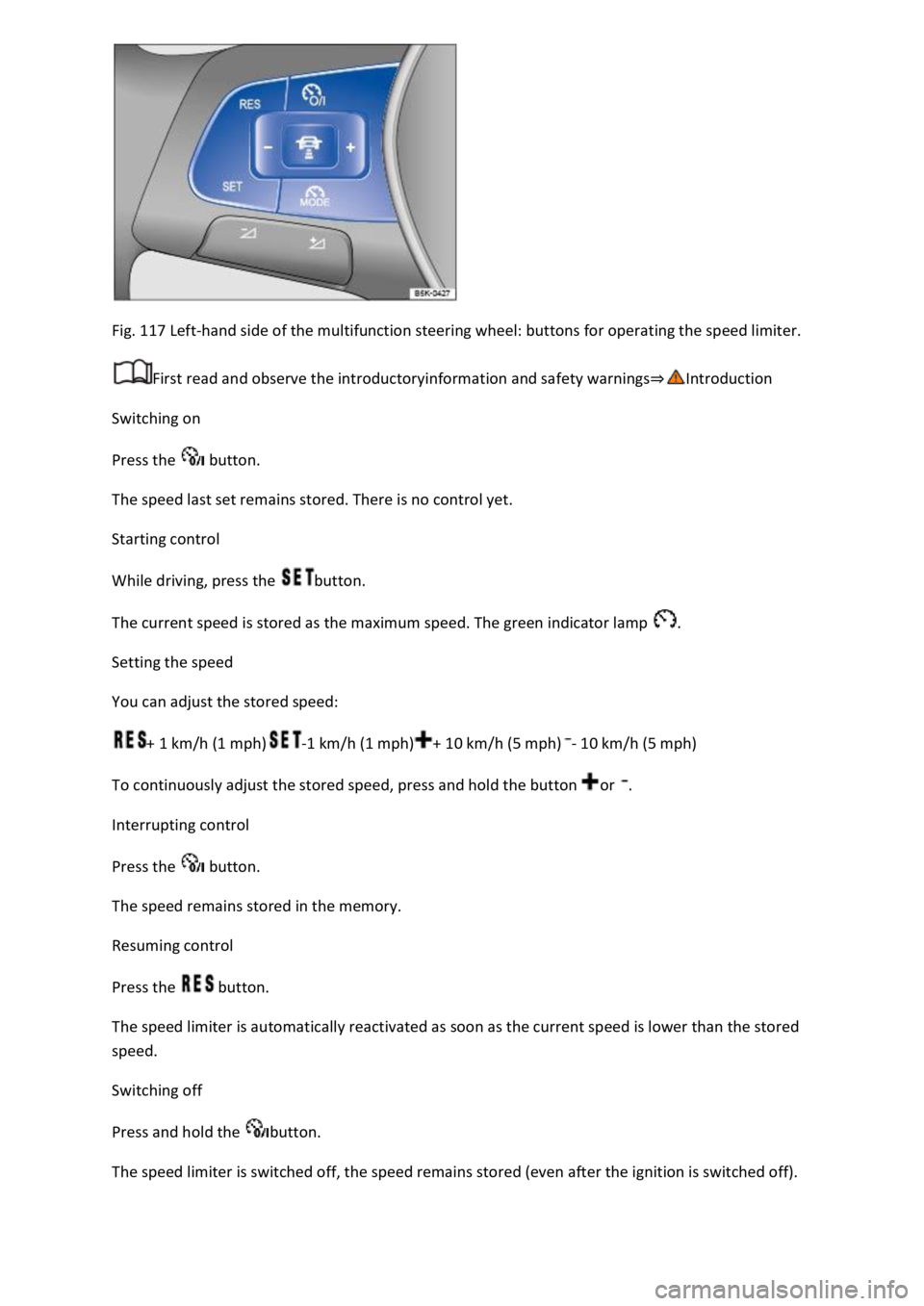
Fig. 117 Left-hand side of the multifunction steering wheel: buttons for operating the speed limiter.
First read and observe the introductoryinformation and safety warnings⇒Introduction
Switching on
Press the button.
The speed last set remains stored. There is no control yet.
Starting control
While driving, press the button.
The current speed is stored as the maximum speed. The green indicator lamp .
Setting the speed
You can adjust the stored speed:
+ 1 km/h (1 mph)-1 km/h (1 mph)+ 10 km/h (5 mph)- 10 km/h (5 mph)
To continuously adjust the stored speed, press and hold the button or .
Interrupting control
Press the button.
The speed remains stored in the memory.
Resuming control
Press the button.
The speed limiter is automatically reactivated as soon as the current speed is lower than the stored
speed.
Switching off
Press and hold the button.
The speed limiter is switched off, the speed remains stored (even after the ignition is switched off).
Page 234 of 502

Changing to Adaptive Cruise Control (ACC)
Press the button.
The speed limiter is switched off.
Troubleshooting
First read and observe the introductoryinformation and safety warnings⇒Introduction
Control is automatically interrupted.
Malfunction. Switch off the speed limiter and go to a qualified workshop.
For safety reasons, the speed limiter does not fully deactivate itself until you release the accelerator
once or switch the system off manually.
Adaptive Cruise Control (ACC)
Introduction
This chapter contains information on the followingsubjects:
⇒ Special driving situations
⇒ Limits of ACC
⇒ Switching ACC on and off
⇒ Setting ACC
⇒ Troubleshooting
The Adaptive Cruise Control (ACC) maintains a speed selected by the driver. If the vehicle
approaches a vehicle in front, the ACC automatically adapts the speed so that a distance you have
selected is maintained.
Speed range
ACC controls the vehicle in the speed range between 30 km/h (20 mph) and 160 km/h (100 mph)
or 210 km/h (130 mph). This speed range may differ in certain markets.
Driving with ACC
You can override the ACC at any time. Control will be interrupted when you brake. If you accelerate,
control will be interrupted for the duration of the acceleration process and will then continue again.
Control by ACC is less dynamic when towing a trailer ⇒ . The ACC will not perform control operation
if the trailer's brake lights are faulty.
Does the vehicle have ACC?
The vehicle is equipped with ACC if you can make settings for ACC in the vehicle settings of the
Infotainment system ⇒ Vehicle settings menu .
Brake request
Page 235 of 502
If automatic deceleration by ACC is not sufficient, ACC will request you to brake additionally by a
corresponding message on the instrument cluster. In addition, the red warning lamp lights up
and an acoustic warning is given. Brake immediately!
Radar sensor
ACC detects driving situations by means of the radar sensor at the front of the vehicle ⇒ Front view .
The radar sensor has a range of up to approximately 120 m.
WARNING
The intelligent technology used in the ACC cannot overcome the laws of physics, and functions only
within the limits of the system. Never let the extra convenience tempt you into taking safety risks
when driving. Careless or unintentional use of the Adaptive Cruise Control (ACC) can cause accidents
and lead to serious injury. The system is not a substitute for the full concentration of the driver.
Adapt your speed and distance from the vehicles ahead to suit visibility, weather, road and traffic
conditions.
Never use the ACC in poor visibility, on steep or winding roads, or on slippery road surfaces e.g. due
to snow, ice, wet roads, loose chippings, or on flooded roads.
Never use the ACC offroad or on non-surfaced roads. The ACC is designed for use on surfaced roads
only.
The ACC will not react to stationary vehicles.
The ACC will not react to persons, animals or vehicles crossing or approaching in the same lane.
Brake immediately if speed reduction by ACC is not sufficient.
Brake immediately if a request to brake appears on the instrument cluster display.
Brake if the vehicle starts rolling unintentionally after a request to brake.
Be prepared to control the speed yourself at all times.
Special driving situations
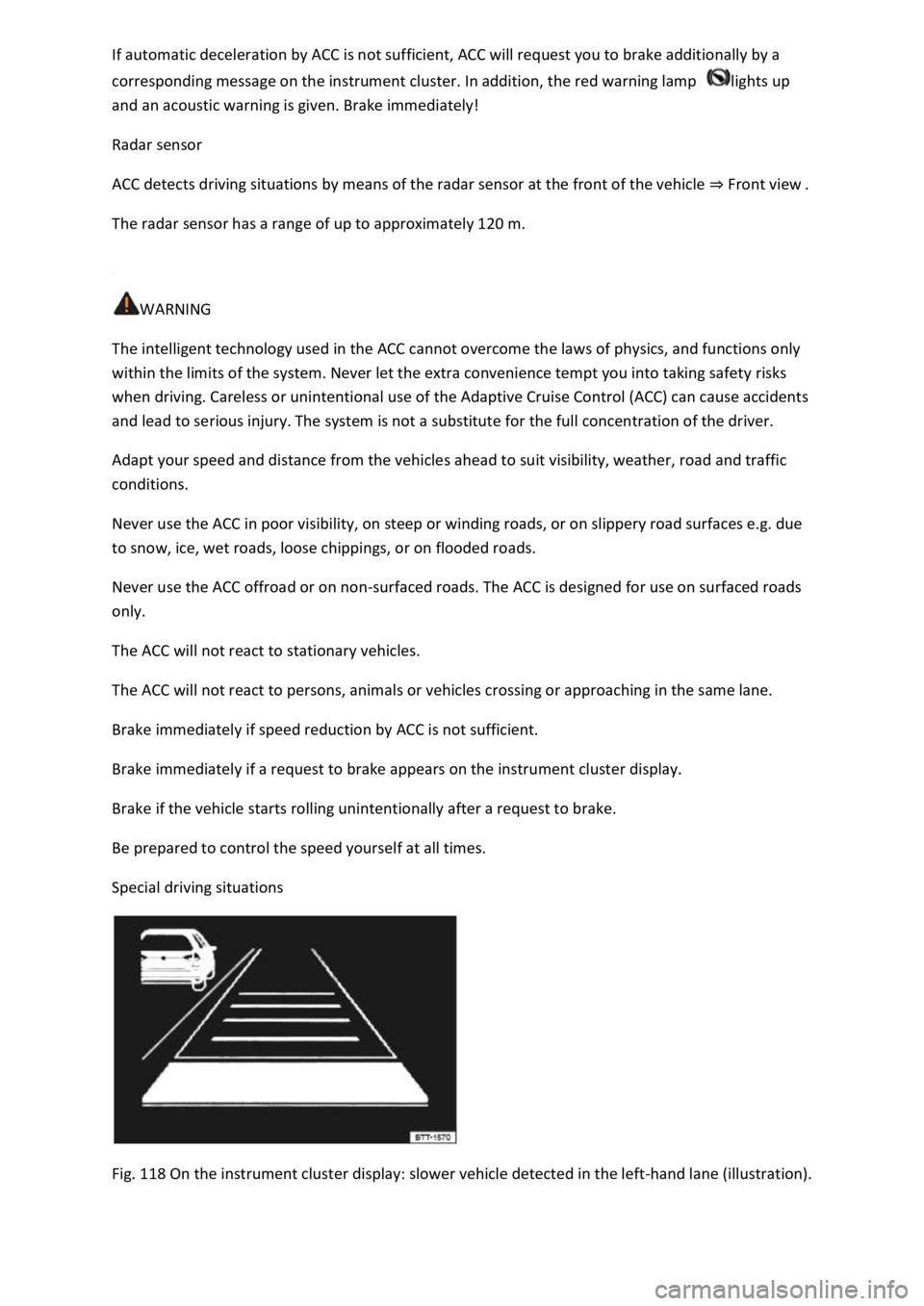
Fig. 118 On the instrument cluster display: slower vehicle detected in the left-hand lane (illustration).