steering wheel VOLKSWAGEN T-ROC 2021 Owner´s Manual
[x] Cancel search | Manufacturer: VOLKSWAGEN, Model Year: 2021, Model line: T-ROC, Model: VOLKSWAGEN T-ROC 2021Pages: 502, PDF Size: 9.42 MB
Page 31 of 502

The following higher-level menus can be displayed:
Lap timer
Lap (with the current lap number)
Statistics
Switching between the menus
Vehicles without multifunction steering wheel:
Press the rocker switch on the wiper lever ⇒ Operating the instrument cluster .
Vehicles with multifunction steering wheel:
Press the or button ⇒ Operating the instrument cluster .
The following list shows an example of how the menus in the instrument cluster display are
structured. The actual scope of the menus and the names of the individual menu options vary
according to the instrument cluster design and the vehicle electronics.
Menu displays and functions
Lap timer menu
StartStarts the lap timer.Since startTiming starts when the vehicle drives off. If the vehicle is already
in motion, timing will begin when the vehicle has come to a temporary standstill.StatisticsAn
overview of the laps driven until now are displayed.
Lap menu
Stop!Active timing is interrupted. This will not end the lap.ContinuePaused timing resumes.Split
time:A split time will be displayed for approximately five seconds. Active timing continues parallel to
this.New lapTiming of the current lap will then be interrupted and a new lap will begin. The time of
the completed lap will be carried over to the statistics.Abort lapThe timing is ended and disregarded.
The current lap is not entered into the statistics.EndTiming is ended. The lap is entered into the
statistics.
Statistics menu
BackIt will be reset to the previous menu.ResetAll stored statistics data will be reset.
In the Statistics menu, the lap times most recently achieved are shown. If the maximum number of
99 laps or the maximum time of 99 hours, 59 minutes and 59 seconds has been reached, a new
timing can only be started after the statistics have been reset.
WARNING
Accidents and injuries can occur if the driver is distracted.
Make lap timer settings and access statistics only when the vehicle is stationary.
Page 36 of 502

If the service or the inspection was not performed by a Volkswagen dealership, the display can be
reset as follows:
Vehicles with analogue instrument cluster.
Switch off the ignition.
Press and hold the button in the instrument cluster ⇒ Instrument cluster .
Switch on the ignition again.
Release the button when one of the following messages appears on the instrument cluster
display: Reset oil service? or Reset inspection?.
Press the button on the instrument cluster ⇒ Instrument cluster to confirm.
Vehicles with digital instrument cluster.
The service interval display can be reset only via the Service menu ⇒ Service menu .
Do not reset the service interval display between service intervals otherwise incorrect data will be
shown.
If the oil change service was manually reset, the service interval display then also changes to a fixed
service interval in vehicles with flexible oil change service.
The service message will disappear after a few seconds when the engine is running, or when the
button on the wiper lever or the button on the multifunction steering wheel is pressed
⇒ Operating the instrument cluster .
If the 12-volt vehicle battery was disconnected for long periods in vehicles with flexible service, the
system cannot calculate the time at which the next service is due. The information shown in the
service interval display may therefore be incorrect. In this case, please observe the maximum
permissible service intervals ⇒ Service .
Operating the instrument cluster
Introduction
This chapter contains information on the followingsubjects:
⇒ Operating using the wiper lever
⇒ Operating using the multifunction steering wheel
⇒ Button for driver assist systems
Some menu options can be accessed only when the vehicle is stationary.
Page 37 of 502
The buttons on the wiper lever are omitted in vehicles equipped with a multifunction steering wheel
⇒ Operating using the wiper lever .
WARNING
Accidents and injuries can occur if the driver is distracted.
Never operate the menus on the instrument cluster display while the vehicle is in motion.
Check the system settings after charging or replacing the 12-volt vehicle battery. System settings
may be changed or deleted if the power supply is interrupted.
Operating using the wiper lever
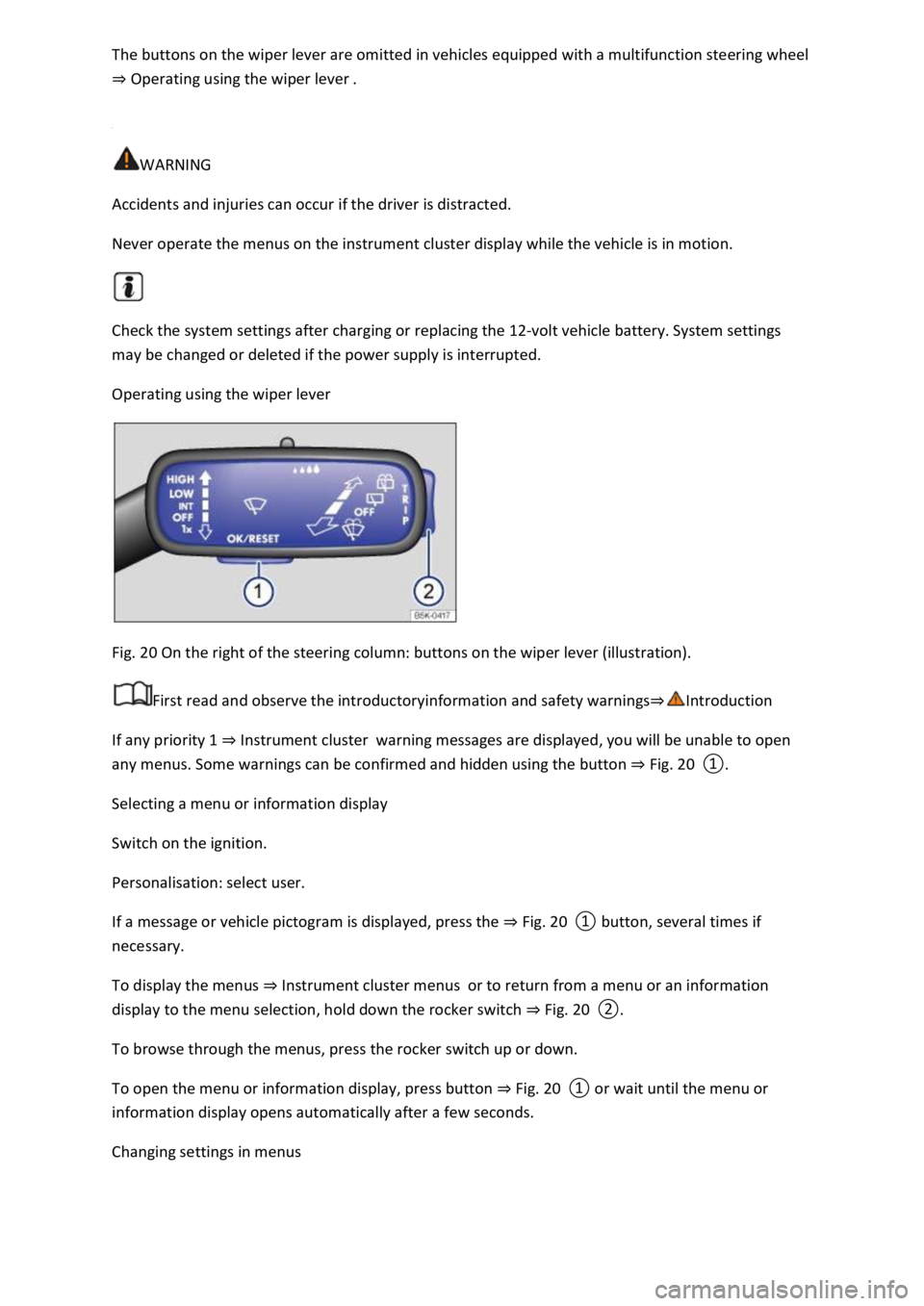
Fig. 20 On the right of the steering column: buttons on the wiper lever (illustration).
First read and observe the introductoryinformation and safety warnings⇒Introduction
If any priority 1 ⇒ Instrument cluster warning messages are displayed, you will be unable to open
any menus. Some warnings can be confirmed and hidden using the button ⇒ Fig. 20 ①.
Selecting a menu or information display
Switch on the ignition.
Personalisation: select user.
If a message or vehicle pictogram is displayed, press the ⇒ Fig. 20 ① button, several times if
necessary.
To display the menus ⇒ Instrument cluster menus or to return from a menu or an information
display to the menu selection, hold down the rocker switch ⇒ Fig. 20 ②.
To browse through the menus, press the rocker switch up or down.
To open the menu or information display, press button ⇒ Fig. 20 ① or wait until the menu or
information display opens automatically after a few seconds.
Changing settings in menus
Page 38 of 502
In the menu displayed, press the rocker switch ⇒ Fig. 20 ② on the wiper lever upwards or
downwards until the desired menu option is marked. A frame appears around the selected option.
Press the ⇒ Fig. 20 ① button to make the required changes. A tick indicates that the particular
system or function is active.
Returning to menu selection
In the menu, select the Back menu option to exit the menu.
If warning messages about malfunctions are displayed when the ignition is switched on, it may not
be possible to adjust some settings as described, or the information display may appear differently.
If this is the case, take the vehicle to a qualified workshop to have the malfunction rectified.
Operating using the multifunction steering wheel
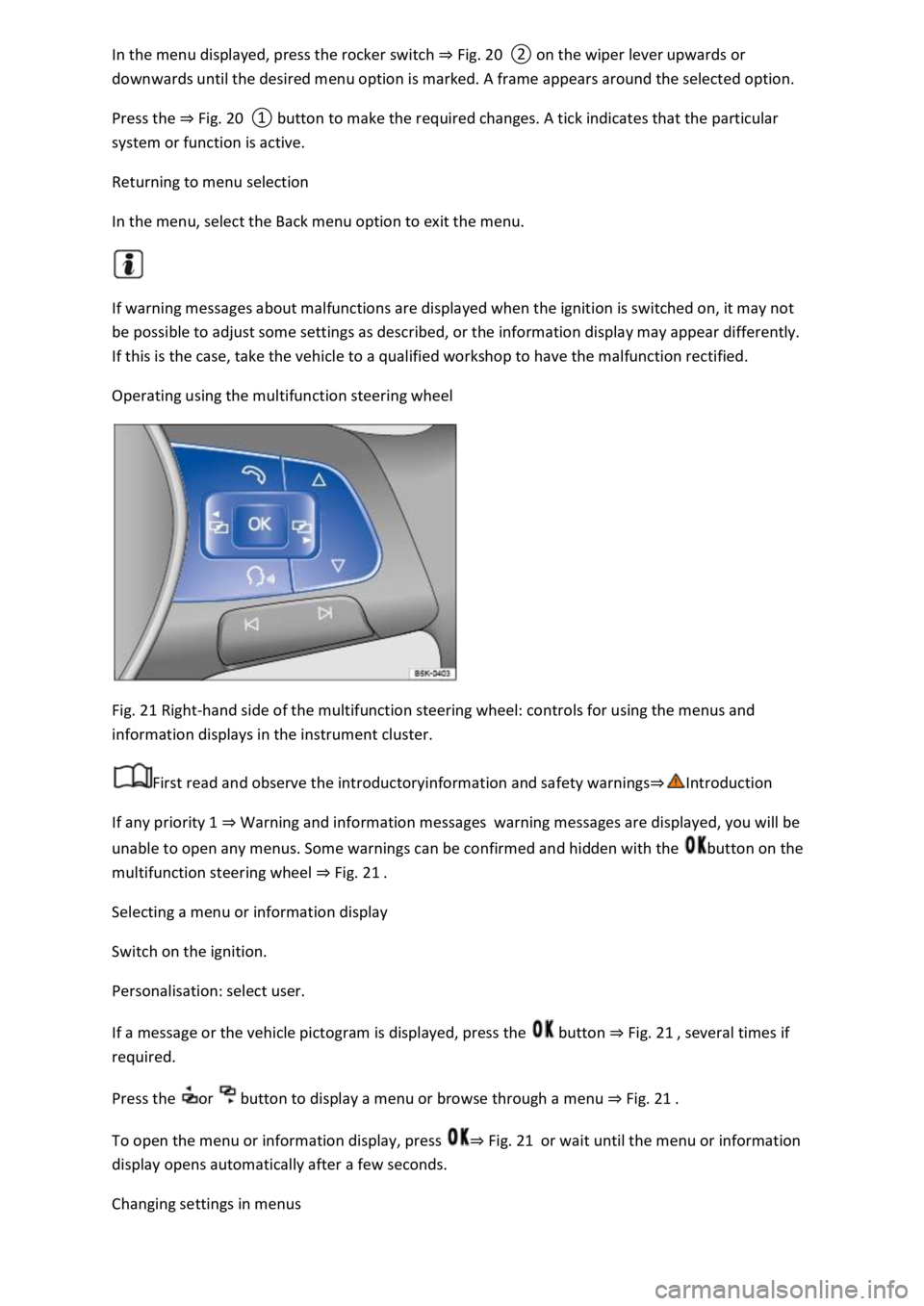
Fig. 21 Right-hand side of the multifunction steering wheel: controls for using the menus and
information displays in the instrument cluster.
First read and observe the introductoryinformation and safety warnings⇒Introduction
If any priority 1 ⇒ Warning and information messages warning messages are displayed, you will be
unable to open any menus. Some warnings can be confirmed and hidden with the button on the
multifunction steering wheel ⇒ Fig. 21 .
Selecting a menu or information display
Switch on the ignition.
Personalisation: select user.
If a message or the vehicle pictogram is displayed, press the button ⇒ Fig. 21 , several times if
required.
Press the or button to display a menu or browse through a menu ⇒ Fig. 21 .
To open the menu or information display, press ⇒ Fig. 21 or wait until the menu or information
display opens automatically after a few seconds.
Changing settings in menus
Page 39 of 502
In the displayed menu, press the arrow keys or ⇒ Fig. 21 until the desired menu option is
marked. A frame appears around the selected option.
Press the button ⇒ Fig. 21 to make the required changes. A tick indicates that the particular
system or function is active.
Returning to menu selection
Press the or button ⇒ Fig. 21 .
If warning messages about malfunctions are displayed when the ignition is switched on, it may not
be possible to adjust some settings as described, or the information display may appear differently.
If this is the case, take the vehicle to a qualified workshop to have the malfunction rectified.
Button for driver assist systems
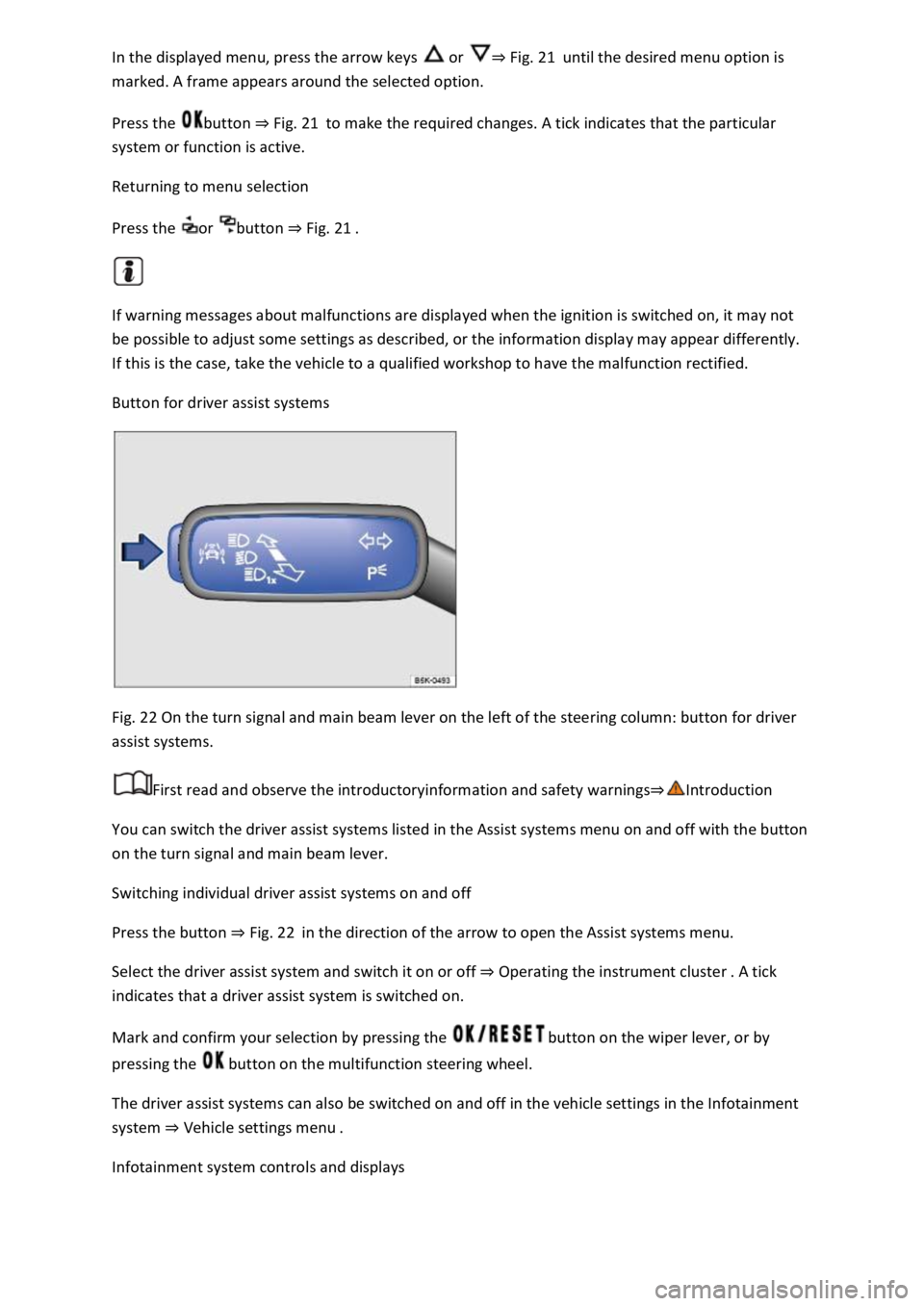
Fig. 22 On the turn signal and main beam lever on the left of the steering column: button for driver
assist systems.
First read and observe the introductoryinformation and safety warnings⇒Introduction
You can switch the driver assist systems listed in the Assist systems menu on and off with the button
on the turn signal and main beam lever.
Switching individual driver assist systems on and off
Press the button ⇒ Fig. 22 in the direction of the arrow to open the Assist systems menu.
Select the driver assist system and switch it on or off ⇒ Operating the instrument cluster . A tick
indicates that a driver assist system is switched on.
Mark and confirm your selection by pressing the button on the wiper lever, or by
pressing the button on the multifunction steering wheel.
The driver assist systems can also be switched on and off in the vehicle settings in the Infotainment
system ⇒ Vehicle settings menu .
Infotainment system controls and displays
Page 45 of 502
Opening the lap timer
Press the MENU button or function button, depending on the version of the Infotainment system.
Touch the Vehicle function button.
Touch the Selection function button.
Touch the Sport function button. The performance monitor is displayed.
Touch one of the arrow buttons ⇒ Fig. 23 ② in the performance monitor to change to the lap
timer.
You can change between the lap timer and performance monitor at any time using the arrow
buttons ⇒ Fig. 23 ② and ⇒ Fig. 24 .
Measuring lap times
The stopwatch measures the lap time in two areas:
The red needle and the numerical value in the centre show the running time in seconds. The smaller
display in the inner area shows minutes and hours.
The display on the right side shows the current lap time with an accuracy of 1/100 seconds. There is
no difference between the stopwatch and lap times if there are not yet any laps with split times
stored in the lap timer.
WARNING
Avoid operating the lap timer when the vehicle is in motion if possible.
Make lap timer settings and access statistics only when the vehicle is stationary.
When the vehicle is in motion, use the lap timer only in driving situations which are easy to control.
Personalisation
First read and observe the introductoryinformation and safety warnings⇒Introduction
The personalisation function allows personalised vehicle settings, such as air conditioning system,
instrument cluster or lighting settings, to be saved in a user account. Four user accounts are
available. Users are identified by the vehicle keys upon unlocking the vehicle. A user account is
assigned to each vehicle key.
Changes to the settings will be assigned to the active user account and saved upon locking the
vehicle or changing the user account.
Welcome and user account selection
When personalisation is activated, the name of the current user account appears on the instrument
cluster display for approximately ten seconds after you switch on the ignition.
During this time, you can select a user account using the buttons on the wiper lever or multifunction
steering wheel ⇒ Infotainment system controls and displays .
Page 53 of 502

Fig. 26 Illustration: correct distance between the driver and the steering wheel, correct seat belt
routing and correct head restraint adjustment.
First read and observe the introductoryinformation and safety warnings⇒Introduction
The correct sitting positions for the driver and passengers are described below.
If any vehicle occupants cannot assume a correct sitting position due to their physical build, they
should contact a qualified workshop to find out about possible special modifications. The seat belts
and airbags can only provide a maximum level of protection if a correct sitting position is assumed.
Volkswagen recommends using a Volkswagen dealership for this purpose.
Volkswagen recommends the following sitting positions for your own safety and to reduce the level
of injury in the event of a sudden braking manoeuvre or an accident:
The following applies to all vehicle occupants:
Adjust the head restraint so that its upper edge is at the same height as the top of the head, but not
lower than eye level. Position the back of your head as close to the head restraint as possible at all
times ⇒ Fig. 26 .
For small people, push the head restraint all the way down, even if the head is then located
underneath the top edge of the head restraint.
For taller people, push the head restraint up as far as it will go.
Keep both feet in the footwell while the vehicle is in motion.
Adjust and fasten seat belts properly ⇒ Seat belts .
Additional points for the driver:
Move the backrest into an upright position so that your back rests fully against it.
Adjust the steering wheel so that the distance between the steering wheel and your breastbone is at
least 25 cm ⇒ Fig. 26Ⓐ , and the circumference of the steering wheel can be held at the sides with
both hands and your arms slightly bent ⇒ Steering wheel .
The steering wheel must always point towards the breastbone and not towards the face.
Adjust the driver seat by moving it forwards or backwards so that you are able to press the pedals to
the floor with your knees still slightly bent and so that the distance from the dash panel to your
knees is at least 10 cm ⇒ Fig. 26Ⓑ .
Adjust the height of the driver seat so that you can reach the highest point of the steering wheel.
Page 58 of 502
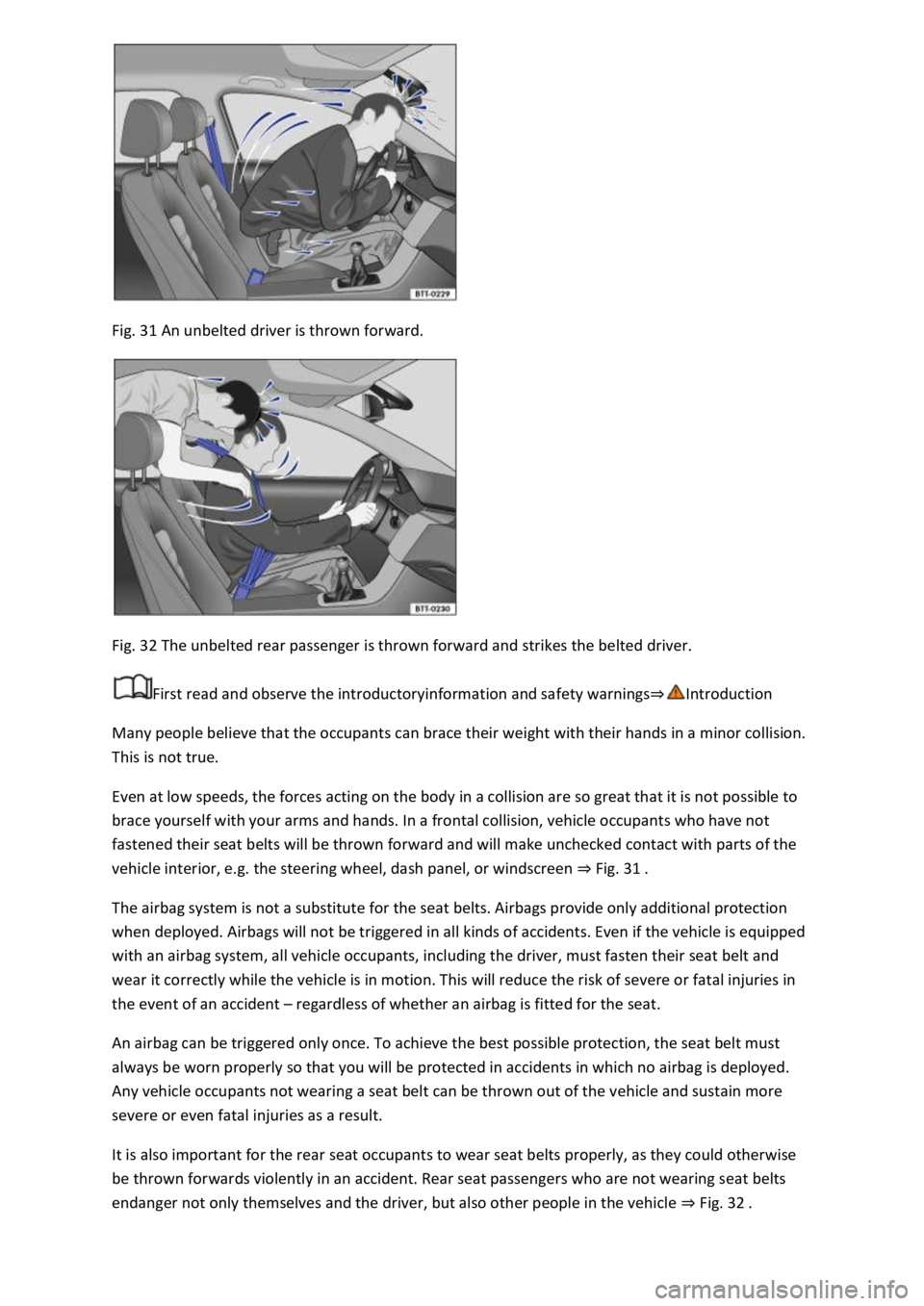
Fig. 31 An unbelted driver is thrown forward.
Fig. 32 The unbelted rear passenger is thrown forward and strikes the belted driver.
First read and observe the introductoryinformation and safety warnings⇒Introduction
Many people believe that the occupants can brace their weight with their hands in a minor collision.
This is not true.
Even at low speeds, the forces acting on the body in a collision are so great that it is not possible to
brace yourself with your arms and hands. In a frontal collision, vehicle occupants who have not
fastened their seat belts will be thrown forward and will make unchecked contact with parts of the
vehicle interior, e.g. the steering wheel, dash panel, or windscreen ⇒ Fig. 31 .
The airbag system is not a substitute for the seat belts. Airbags provide only additional protection
when deployed. Airbags will not be triggered in all kinds of accidents. Even if the vehicle is equipped
with an airbag system, all vehicle occupants, including the driver, must fasten their seat belt and
wear it correctly while the vehicle is in motion. This will reduce the risk of severe or fatal injuries in
the event of an accident – regardless of whether an airbag is fitted for the seat.
An airbag can be triggered only once. To achieve the best possible protection, the seat belt must
always be worn properly so that you will be protected in accidents in which no airbag is deployed.
Any vehicle occupants not wearing a seat belt can be thrown out of the vehicle and sustain more
severe or even fatal injuries as a result.
It is also important for the rear seat occupants to wear seat belts properly, as they could otherwise
be thrown forwards violently in an accident. Rear seat passengers who are not wearing seat belts
endanger not only themselves and the driver, but also other people in the vehicle ⇒ Fig. 32 .
Page 67 of 502

Reflective objects such as safety barriers, tunnel entrances, heavy rain and ice can impair the
performance of the proactive occupant protection system and thus prevent it from detecting a
collision risk.
Incorrect system activation can occur.
WARNING
Accidents and injuries can occur if the driver is distracted.
Never change settings in the Infotainment system when the vehicle is in motion.
WARNING
Failure to observe illuminated warning lamps and text messages can lead to your vehicle breaking
down in traffic, and can cause accidents and serious injury.
Never ignore any illuminated warning lamps or text messages.
Stop the vehicle as soon as possible and when safe to do so.
NOTICE
Failure to observe illuminated indicator lamps and text messages can lead to your vehicle being
damaged.
Airbag system
Introduction
This chapter contains information on the followingsubjects:
⇒ Types of front passenger front airbag system
⇒ Indicator lamp
⇒ Description and function of the airbags
⇒ Front airbags
⇒ Switching the front passenger front airbag on and off
The vehicle is equipped with a front airbag for the driver and front passenger. The front airbags can
provide front seat occupants with additional chest and head protection if the seat, seat belts, head
restraints and, in the case of the driver, steering wheel are adjusted and used correctly. Airbags are
designed only for additional protection. The airbag system is not a substitute for the seat belts. Seats
belts must always be worn, even when the front seats are equipped with airbags.
Page 72 of 502
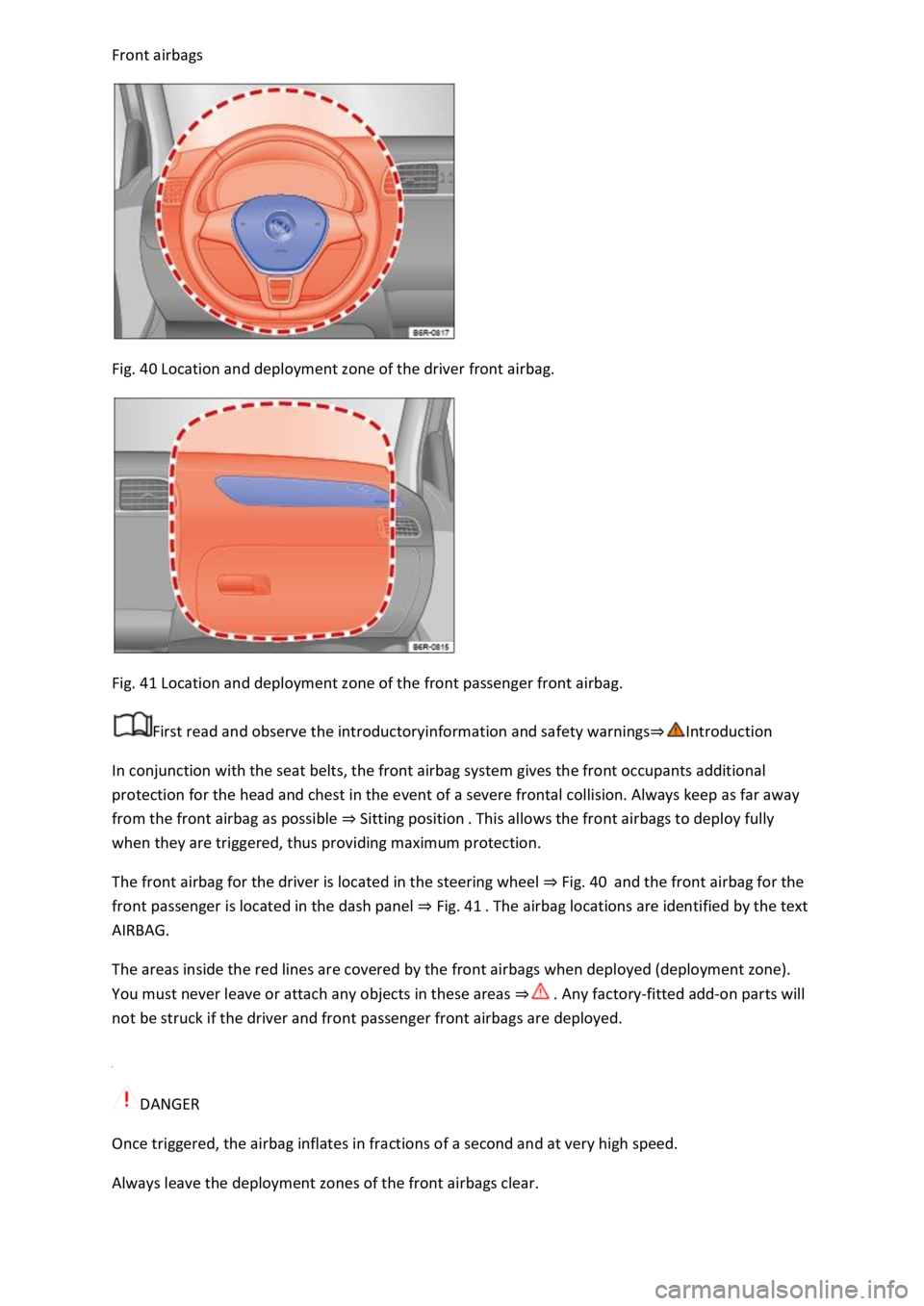
Front airbags
Fig. 40 Location and deployment zone of the driver front airbag.
Fig. 41 Location and deployment zone of the front passenger front airbag.
First read and observe the introductoryinformation and safety warnings⇒Introduction
In conjunction with the seat belts, the front airbag system gives the front occupants additional
protection for the head and chest in the event of a severe frontal collision. Always keep as far away
from the front airbag as possible ⇒ Sitting position . This allows the front airbags to deploy fully
when they are triggered, thus providing maximum protection.
The front airbag for the driver is located in the steering wheel ⇒ Fig. 40 and the front airbag for the
front passenger is located in the dash panel ⇒ Fig. 41 . The airbag locations are identified by the text
AIRBAG.
The areas inside the red lines are covered by the front airbags when deployed (deployment zone).
You must never leave or attach any objects in these areas ⇒ . Any factory-fitted add-on parts will
not be struck if the driver and front passenger front airbags are deployed.
DANGER
Once triggered, the airbag inflates in fractions of a second and at very high speed.
Always leave the deployment zones of the front airbags clear.