steering wheel VOLKSWAGEN T-ROC 2021 Owner´s Manual
[x] Cancel search | Manufacturer: VOLKSWAGEN, Model Year: 2021, Model line: T-ROC, Model: VOLKSWAGEN T-ROC 2021Pages: 502, PDF Size: 9.42 MB
Page 200 of 502
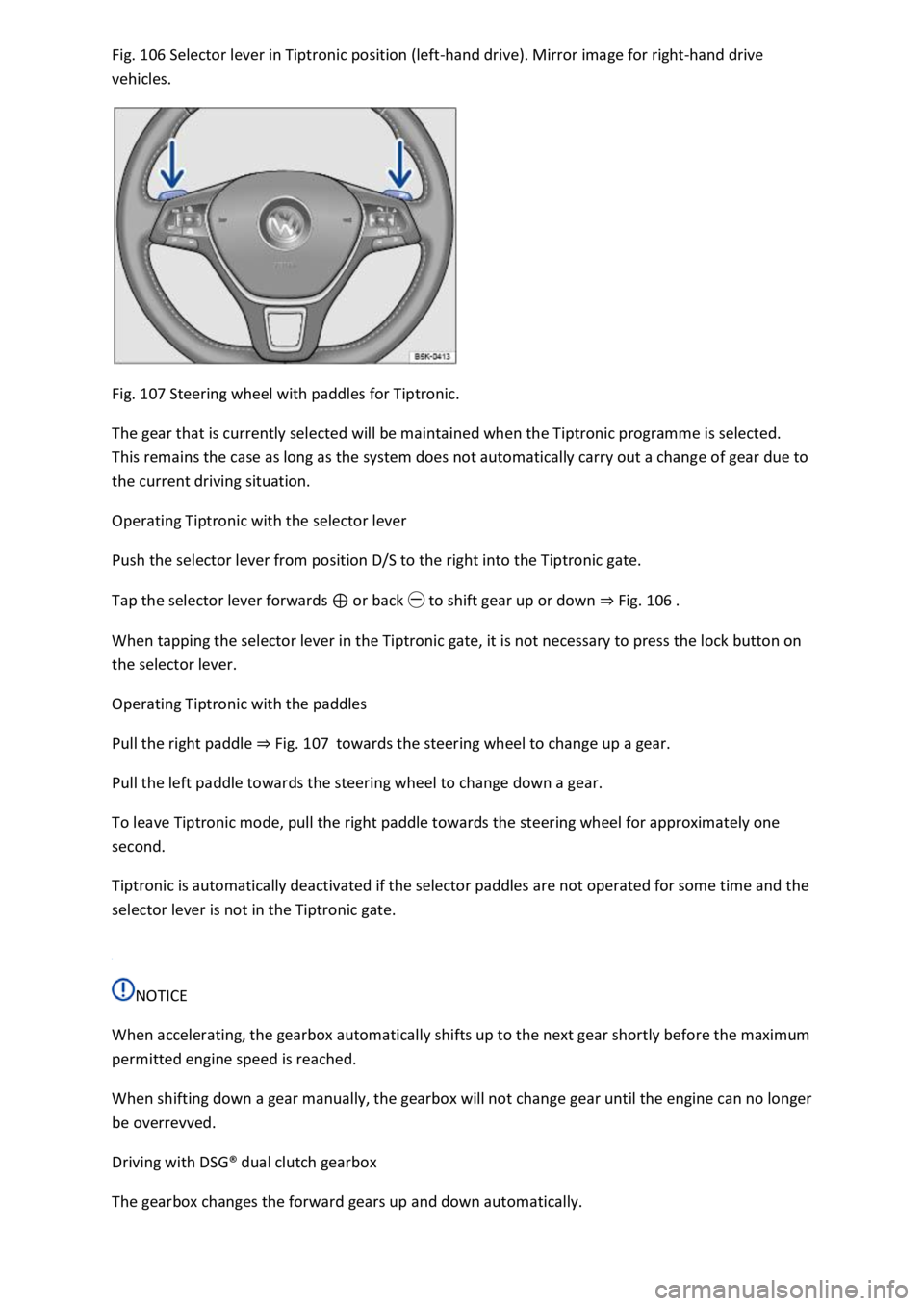
Fig. 106 Selector lever in Tiptronic position (left-hand drive). Mirror image for right-hand drive
vehicles.
Fig. 107 Steering wheel with paddles for Tiptronic.
The gear that is currently selected will be maintained when the Tiptronic programme is selected.
This remains the case as long as the system does not automatically carry out a change of gear due to
the current driving situation.
Operating Tiptronic with the selector lever
Push the selector lever from position D/S to the right into the Tiptronic gate.
Tap the selector lever forwards ⊕ or back ㊀ to shift gear up or down ⇒ Fig. 106 .
When tapping the selector lever in the Tiptronic gate, it is not necessary to press the lock button on
the selector lever.
Operating Tiptronic with the paddles
Pull the right paddle ⇒ Fig. 107 towards the steering wheel to change up a gear.
Pull the left paddle towards the steering wheel to change down a gear.
To leave Tiptronic mode, pull the right paddle towards the steering wheel for approximately one
second.
Tiptronic is automatically deactivated if the selector paddles are not operated for some time and the
selector lever is not in the Tiptronic gate.
NOTICE
When accelerating, the gearbox automatically shifts up to the next gear shortly before the maximum
permitted engine speed is reached.
When shifting down a gear manually, the gearbox will not change gear until the engine can no longer
be overrevved.
Driving with DSG® dual clutch gearbox
The gearbox changes the forward gears up and down automatically.
Page 201 of 502

Driving down hills
The steeper the gradient, the lower the gear you will need. Lower gears increase the braking effect
of the engine. Never allow the vehicle to roll down mountains or hills in the neutral position N.
Reduce your speed.
Push the selector lever from position D/S to the right into the Tiptronic gate ⇒ Changing gear using
Tiptronic .
Tap the selector lever to the rear to change down gear.
OR: shift down a gear using the paddles on the steering wheel ⇒ Changing gear using Tiptronic .
Stopping and pulling away on an uphill gradient
The steeper the uphill gradient, the lower the gear you will need.
If you wish to stop the vehicle or pull away when driving uphill, you should use the Auto Hold
function ⇒ Electronic parking brake .
When you stop the vehicle on an uphill gradient with a selected position, the vehicle must always be
prevented from rolling by depressing the brake pedal or by applying the electronic parking brake. Do
not release the brake pedal or switch off the electronic parking brake until you are about to pull
away.
Coasting with DSG® dual clutch gearbox
In coasting mode, the momentum of the vehicle can be used to save fuel in conjunction with an
anticipatory driving style. The engine no longer brakes the vehicle – the vehicle can roll for a longer
distance. The function is available only in the selector lever position D and at speeds of
approximately 40 – 130 km/h (25 mph – 80 mph).
Initiating coasting
Select the Eco driving profile in the driving profile selection menu ⇒ Driving profile selection and
4MOTION Active Control .
Take your foot off the accelerator. The engine will be disengaged and run at idling speed. The vehicle
rolls without the braking effect of the engine.
If the speed falls below 130 km/h (80 mph).
Depress the accelerator briefly.
Cancelling coasting mode
Depress the brake pedal forcefully.
OR: depress the accelerator or brake pedal briefly.
OR: pull a paddle towards the steering wheel.
OR: press the selector lever to the Tiptronic position.
OR: change the driving profile from Eco.
Page 207 of 502

The downhill speed control cannot hold the vehicle on the gradient in all situations or brake it
sufficiently on all slopes going downhill (e.g. if the ground is slippery or icy).
WARNING
Always be prepared to brake the vehicle. Accidents and injuries could occur if you are not prepared
to brake.
The downhill speed control is only a support function and may not be able to brake the vehicle
sufficiently in all situations when driving downhill.
The vehicle may become faster despite the downhill speed control being in operation.
Steering
Information on steering
The steering should be locked every time you leave the vehicle to make it more difficult for the
vehicle to be stolen.
The steering
The power steering is not hydraulic, but is an electromechanical system. The advantage of this
steering system is that no hydraulic hoses, hydraulic oil, pumps, filter or other parts are required.
The electromechanical system reduces fuel consumption. A hydraulic system requires constant oil
pressure in the system, whereas an electromechanical steering system only needs an energy supply
while steering.
In vehicles with driving profile selection, the selected driving profile can affect the behaviour of the
power steering ⇒ Driving profile selection and 4MOTION Active Control .
Electronic steering column lock in vehicles with a starter button
The steering column will be locked if the driver door is opened when the ignition is switched off. For
this, the vehicle should be stationary and, if necessary, the gear selector lever should be in position
P.
If the ignition is not switched off until after the driver door is opened, the electronic steering column
will only be locked when the vehicle is locked using the sensor in the door handle or the vehicle key.
Mechanical steering column lock (steering lock) in vehicles with an ignition lock
The steering column is locked if the vehicle key is removed from the ignition lock when the vehicle is
stationary. Turn the steering wheel slightly until the steering lock audibly engages.
Insert the vehicle key into the ignition lock to unlock the steering lock. Turn the steering wheel
slightly to relieve the load on the steering lock mechanism. Hold the steering wheel in this position
and turn the ignition on.
Electromechanical steering
Page 208 of 502

The steering assistance provided by the electromechanical steering system automatically adjusts to
the vehicle speed, steering wheel torque and steering wheel angle. The electromechanical steering
functions only when the engine is running.
You will need considerably more strength than normal to steer the vehicle if the power steering is
reduced or has failed completely.
Counter steering assistance
Counter steering assistance provides the driver with steering assistance in critical driving situations.
Additional steering forces assist the driver when counter steering ⇒ .
Progressive steering
Depending on the vehicle equipment level, progressive steering can adjust the steering response in a
driving situation. Progressive steering functions only when the engine is running.
In urban traffic, less steering input is required when parking, manoeuvring, or turning sharply.
When driving on country roads or on the motorway, the progressive steering provides a more
sporty, direct steering response, and a dynamic feel.
WARNING
If the power steering is not working, the steering wheel is difficult to turn, which makes it difficult to
steer the vehicle.
Depending on the vehicle equipment level, the power steering functions only when the engine is
running.
Never allow the vehicle to roll if the engine is switched off.
Never remove the vehicle key from the ignition if the vehicle is in motion. The steering column lock
may be activated and it will no longer be possible to steer the vehicle.
WARNING
In conjunction with the ESC, counter steering assistance provides the driver with assistance when
steering in critical driving situations. The driver must steer the vehicle at all times. Counter steering
assistance does not steer the vehicle.
NOTICE
When the vehicle is towed, the ignition must be switched on to prevent the steering wheel from
locking, and so that the turn signals, horn, wipers and window washer system can be used.
Troubleshooting
Steering requires increased force
Page 209 of 502

The indicator lamp lights up yellow.
The steering should be checked by a qualified workshop as soon as possible.
If the yellow warning lamp remains off after the engine has been restarted and you have driven a
short distance, you do not need to consult a qualified workshop.
Fault in steering
The indicator lamp lights up yellow.
The 12-volt vehicle battery was disconnected.
Drive a short distance at a speed of 15 – 20 km/h (9 – 12 mph).
If the yellow warning lamp is still lit after the engine has been restarted, have the steering checked
by a qualified workshop immediately.
Fault in steering
The indicator lamp flashes yellow.
Turn the steering wheel back and forth.
Switch the ignition off and then on again.
Observe the messages on the instrument cluster display.
Do not continue your journey if the indicator lamp still flashes when the ignition is switched on.
Seek expert assistance.
Steering column is not unlocked or locked
The indicator lamp flashes yellow.
Follow any messages that are on the instrument cluster display.
Switch the ignition off and then on again.
Do not continue your journey if the steering column remains locked when the ignition is switched
on.
Seek expert assistance.
Steering requires increased force
The warning lamp lights up red.
The electromechanical steering has failed.
Do not drive on!
Seek expert assistance.
Driving profile selection and 4MOTION Active Control
Page 215 of 502

Coolant temperature display: the display corresponds to the temperature display on the instrument
cluster ⇒ Coolant temperature display .
Oil temperature display: the display corresponds with the oil temperature display on the instrument
cluster ⇒ Engine oil .
Adapting the display areas to the driving situation
The displayed instruments can be selected according to the driving situation, the ambient conditions
and the offroad conditions:
Sandy terrain: oil, steering angle and coolant temperature display
Inclines: steering angle and coolant temperature display, altimeter
Alpine terrain: steering angle display, altimeter, compass
Offroad driving situations
Introduction
This chapter contains information on the followingsubjects:
⇒ Safety instructions for offroad driving
⇒ Explanation of some technical terms
⇒ Checklist
⇒ General rules and driving tips
⇒ Useful accessories for offroad driving
⇒ Changing gear correctly
⇒ Driving on rough terrain
⇒ Driving through water
⇒ Offroad driving in snow
⇒ Driving on sand and mud
⇒ Driving on steep terrain
⇒ Traversing a slope
⇒ Driving through ditches
⇒ Stuck vehicle
⇒ After offroad driving
You can also drive vehicles with all-wheel drive offroad in addition to on normal roads. It is very
important to read the contents of this section before driving offroad.
The vehicle is not built for expedition-type journeys.
Page 216 of 502

The examples given in this chapter are an aid for safe offroad driving. However, we cannot predict
whether these guidelines will be valid for all situations that could occur.
The many different types of terrain and the associated risks and dangers make it impossible to
describe all possible driving situations. The examples are only general guidelines which are intended
to help you to drive offroad safely. It is crucial that you know what to expect when you drive into
offroad terrain you are unfamiliar with. This will enable you to assess potential dangers in advance.
The driver can use 4MOTION Active Control to activate a variety of vehicle settings in an all-wheel
drive vehicle as required ⇒ Setting a driving profile .
Checklist
Before driving offroad for the first time, take the following steps so you can operate and drive the
vehicle safely offroad:
Observe the basic safety notes Safety instructions for offroad driving.
Familiarise yourself with the vehicle controls.
Check and adjust the seat position Sitting position and fasten the seat belts Seat belts.
Check distance to steering wheel and adjust Steering wheel.
Always wear suitable, well-fitting shoes that provide good grip for your feet when operating the
pedals.
Safety instructions for offroad driving
First read and observe the introductoryinformation and safety warnings⇒Introduction
WARNING
The intelligent vehicle technology cannot overcome the laws of physics, and functions only within
the limits of the system. Despite ABS, instability through locked wheels can occur on adverse terrain
– e.g. if you brake hard when driving on a loose gravel road. The Electronic Stability Control will be
able to stabilise the vehicle only to a limited extent in these circumstances.
WARNING
Driving offroad can be dangerous and could cause accidents, serious injury, damage to the vehicle
and also a vehicle breakdown far from any assistance.
Never select a dangerous route and never take risks that could endanger you and your passengers. If
you cannot drive on or if you are in any doubt about the safety of the route, turn round and choose
another route.
Even terrain that looks harmless can be difficult and dangerous, and could get you and your
passengers into difficulties. We recommend inspecting the terrain on foot beforehand.
Page 225 of 502

Always adjust your speed and driving to match vehicle load levels and visibility, terrain and weather
conditions.
Driving on sand and mud
First read and observe the introductoryinformation and safety warnings⇒Introduction
Always drive at a steady speed through sand or mud and, do not carry out any manual gear changes
or stop the vehicle.
Check whether ESC is active. The indicator lamp or in the instrument cluster display must not
light up ⇒ Brake support systems .
Keep the vehicle moving constantly.
Use the Offroad driving profile ⇒ Setting a driving profile .
Select a suitable gear and remain in this gear until you have reached more solid ground ⇒ Changing
gear correctly .
If the tyres have lost their grip, turn the steering wheel to and fro quickly. This can briefly give the
tyres on the front wheels better grip for these ground conditions.
Driving through sand
Do not under any circumstances reduce the tyre pressure to drive through sand ⇒ . If the tyre
pressure has been reduced for driving through sand, the correct tyre pressure must always be
restored before driving on. Driving with reduced tyre pressure can lead to a loss of control over the
vehicle and increase the risk of serious and fatal injuries.
Driving through mud
Do not change speed or direction. The tyres can lose their traction when driving through mud. If the
vehicle slides, steer in the direction needed to get the vehicle under control.
WARNING
Driving through mud and sand can be dangerous. The vehicle can slide uncontrollably. This increases
the risk of injury. Always drive carefully through sand and mud.
Never choose an unsafe route or take a risk which could endanger you or your passengers. If you are
in any doubt about the safety of the route, turn round and choose another way.
WARNING
Incorrect tyre pressure can cause severe or even fatal accidents.
Incorrect tyre pressures will increase the levels of wear on the tyres and will negatively affect the
vehicle's handling.
Page 226 of 502

An incorrect tyre pressure can cause overheating, sudden tyre damage including tyre bursts and
ripping of the tread surface and thus to a loss of control over the vehicle.
Driving on steep terrain
First read and observe the introductoryinformation and safety warnings⇒Introduction
Driving uphill or downhill
Get out of the vehicle and assess the situation before you attempt to drive up or down a hill:
Walk along the section and check the firmness of the ground. Look out for obstacles and other
hidden dangers ⇒ .
Check the section beyond the hill.
You should not follow the route if it is too steep, uneven or if the ground surface is too loose. Select
another route.
Drive slowly and at constant speed straight up or down a slope.
Accelerate only to the speed you need to climb the slope. Too much acceleration can cause the
wheels to spin and lead to a loss of control of the vehicle. Insufficient throttle increases the
probability of stalling the engine.
Never attempt to stop or turn on a slope.
Avoid allowing the engine to stall.
Do not change gear or engage the clutch when climbing a slope.
Use the offroad display ⇒ Offroad display .
If you cannot continue to drive up a hill
Never turn the vehicle around on an uphill gradient.
If the engine has stalled, depress the footbrake and start the engine again.
Select reverse gear and reverse back slowly in a straight line.
Use the foot brake to keep a constant speed until you have reached a safe place.
Driving downhill
Never exceed the tilt angle of the vehicle! If, in an emergency, you have to traverse the slope when
driving down it and the vehicle threatens to tip over, steer into the fall line immediately.
There is an increased risk of rolling over when driving downhill. Concentrate on steering the vehicle
when driving downhill in particular.
Use the offroad display on steep downhill stretches ⇒ Offroad display .
Drive down steep inclines in first gear.
Use the foot brake sparingly in order not to lose control of the vehicle.
Page 230 of 502

If you make a mistake when rocking free the vehicle, it can sink deeper and you will need assistance
to free the vehicle.
When you cannot move forwards
Carefully dig out all the wheels and check that no other parts of the vehicle are stuck in the sand.
Select reverse gear.
Reverse in your own tracks with gentle use of the accelerator.
If this does not help, place brushwood, foot mats or sacking directly in front of the wheels to
increase grip ⇒ .
Rocking the vehicle free
Never allow the wheels to spin for long periods as this will cause the vehicle to sink deeper ⇒ .
Switch off TCS ⇒ Brake support systems .
Position the steering wheel so that it is facing straight ahead.
Reverse until the point where the wheels just start to spin.
Immediately select first gear and drive forwards until the wheels start to spin again.
Repeat driving back and forth until you have enough momentum to free yourself.
Switch the TCS on after the rocking free procedure is completed ⇒ Brake support systems .
Use the Offroad driving profile.
WARNING
No one must stand either in front or behind the vehicle, particularly if you are attempting to free a
stuck vehicle.
Spinning wheels can propel stones, brushwood, pieces of wood or other objects that are in front or
behind the wheels at enormous speed and cause potentially fatal injury.
People standing in front of or behind the vehicle could be run over if the stuck vehicle starts to move
suddenly.
After offroad driving
First read and observe the introductoryinformation and safety warnings⇒Introduction
Checklist
Clean the turn signals, lighting system, the number plate and all windows.