warning VOLKSWAGEN T-ROC 2021 Owner´s Manual
[x] Cancel search | Manufacturer: VOLKSWAGEN, Model Year: 2021, Model line: T-ROC, Model: VOLKSWAGEN T-ROC 2021Pages: 502, PDF Size: 9.42 MB
Page 272 of 502
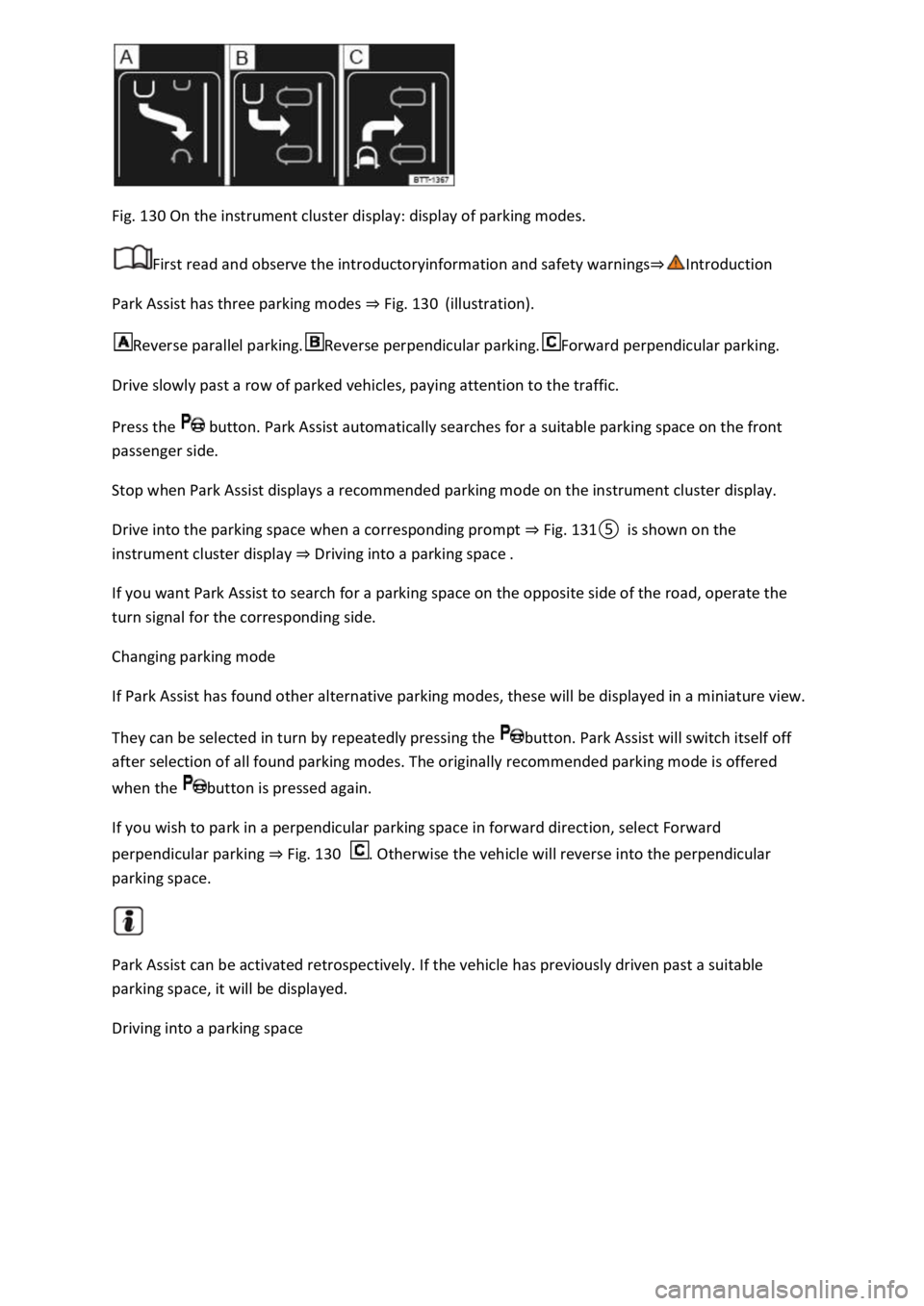
Fig. 130 On the instrument cluster display: display of parking modes.
First read and observe the introductoryinformation and safety warnings⇒Introduction
Park Assist has three parking modes ⇒ Fig. 130 (illustration).
Reverse parallel parking.Reverse perpendicular parking.Forward perpendicular parking.
Drive slowly past a row of parked vehicles, paying attention to the traffic.
Press the button. Park Assist automatically searches for a suitable parking space on the front
passenger side.
Stop when Park Assist displays a recommended parking mode on the instrument cluster display.
Drive into the parking space when a corresponding prompt ⇒ Fig. 131⑤ is shown on the
instrument cluster display ⇒ Driving into a parking space .
If you want Park Assist to search for a parking space on the opposite side of the road, operate the
turn signal for the corresponding side.
Changing parking mode
If Park Assist has found other alternative parking modes, these will be displayed in a miniature view.
They can be selected in turn by repeatedly pressing the button. Park Assist will switch itself off
after selection of all found parking modes. The originally recommended parking mode is offered
when the button is pressed again.
If you wish to park in a perpendicular parking space in forward direction, select Forward
perpendicular parking ⇒ Fig. 130 . Otherwise the vehicle will reverse into the perpendicular
parking space.
Park Assist can be activated retrospectively. If the vehicle has previously driven past a suitable
parking space, it will be displayed.
Driving into a parking space
Page 273 of 502
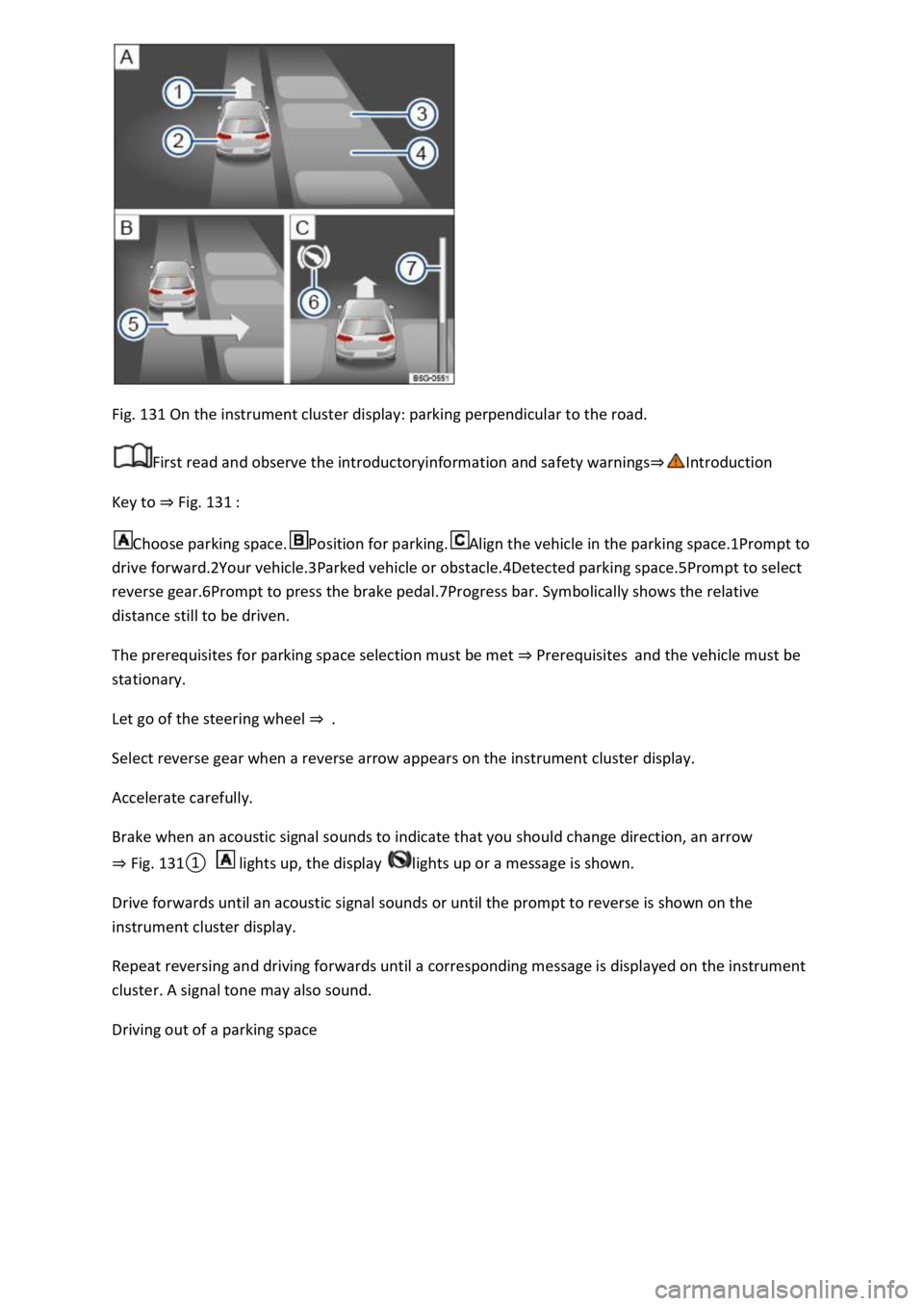
Fig. 131 On the instrument cluster display: parking perpendicular to the road.
First read and observe the introductoryinformation and safety warnings⇒Introduction
Key to ⇒ Fig. 131 :
Choose parking space.Position for parking.Align the vehicle in the parking space.1Prompt to
drive forward.2Your vehicle.3Parked vehicle or obstacle.4Detected parking space.5Prompt to select
reverse gear.6Prompt to press the brake pedal.7Progress bar. Symbolically shows the relative
distance still to be driven.
The prerequisites for parking space selection must be met ⇒ Prerequisites and the vehicle must be
stationary.
Let go of the steering wheel ⇒ .
Select reverse gear when a reverse arrow appears on the instrument cluster display.
Accelerate carefully.
Brake when an acoustic signal sounds to indicate that you should change direction, an arrow
⇒ Fig. 131① lights up, the display lights up or a message is shown.
Drive forwards until an acoustic signal sounds or until the prompt to reverse is shown on the
instrument cluster display.
Repeat reversing and driving forwards until a corresponding message is displayed on the instrument
cluster. A signal tone may also sound.
Driving out of a parking space
Page 274 of 502
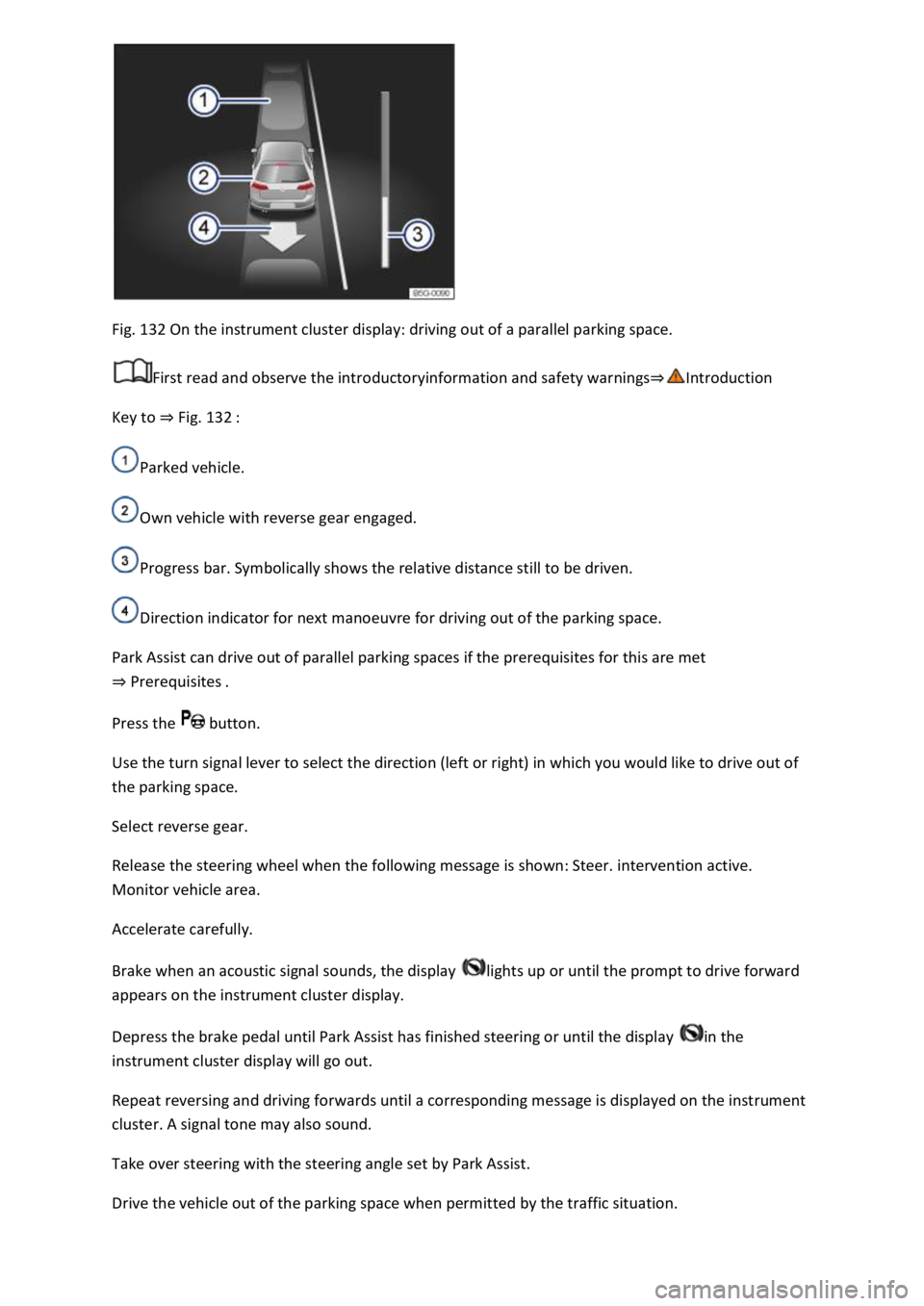
Fig. 132 On the instrument cluster display: driving out of a parallel parking space.
First read and observe the introductoryinformation and safety warnings⇒Introduction
Key to ⇒ Fig. 132 :
Parked vehicle.
Own vehicle with reverse gear engaged.
Progress bar. Symbolically shows the relative distance still to be driven.
Direction indicator for next manoeuvre for driving out of the parking space.
Park Assist can drive out of parallel parking spaces if the prerequisites for this are met
⇒ Prerequisites .
Press the button.
Use the turn signal lever to select the direction (left or right) in which you would like to drive out of
the parking space.
Select reverse gear.
Release the steering wheel when the following message is shown: Steer. intervention active.
Monitor vehicle area.
Accelerate carefully.
Brake when an acoustic signal sounds, the display lights up or until the prompt to drive forward
appears on the instrument cluster display.
Depress the brake pedal until Park Assist has finished steering or until the display in the
instrument cluster display will go out.
Repeat reversing and driving forwards until a corresponding message is displayed on the instrument
cluster. A signal tone may also sound.
Take over steering with the steering angle set by Park Assist.
Drive the vehicle out of the parking space when permitted by the traffic situation.
Page 275 of 502

Troubleshooting
First read and observe the introductoryinformation and safety warnings⇒Introduction
The system is not responding as expected
The sensors are dirty ⇒ Caring for and cleaning the vehicle exterior . The sensor visibility may be
impaired by dirt and snow or also residue from cleaning agents or coatings.
The system requirements must be met ⇒ Prerequisites .
The sensors are covered by water.
The vehicle is damaged in the area of the sensors, e.g. caused by parking collisions.
The detection ranges of the sensors are blocked by add-on parts, e.g. bicycle carriers.
Changes have been made to the paintwork in the area of the sensors or structural modifications
have been made, e.g. on the vehicle front end or the running gear.
The ultrasound signal is subject to interference from external noise sources, e.g. rough tarmac
surface or cobblestones.
No sensor visibility, error message, system switches itself off
Park Assist is switched off if a sensor fails.
Clean the sensors or remove stickers or accessories from the sensors and cameras ⇒ Caring for and
cleaning the vehicle exterior .
Check whether any damage is visible.
Possible solution
Switch off the system temporarily.
Check whether any of the causes described apply.
You can switch the system back on again once you have rectified the cause of the problem.
If the system still fails to respond as expected, have the system checked by a qualified workshop.
Automatic cancellation of driving in/out of a parking space
Park Assist cancels parking or driving out of a parking space in the following situations:
The button is pressed.
The driver intervenes using the steering wheel.
The driver door is opened.
The parking operation is not completed within around six minutes.
There is a system fault.
TCS is switched off or is taking corrective action.
Page 277 of 502

Rear Traffic Alert monitors the traffic crossing behind the vehicle when reversing out of a parking
space or manoeuvring. Rear Traffic Alert functions using radar sensors in the rear bumper.
Key to ⇒ Fig. 134 :
Critical situation. Do not drive on!Possible critical situation.
Detection of a critical situation can also take place acoustically:
A warning signal will sound and a text message will be displayed in the instrument cluster for
vehicles without Park Distance Control.
In vehicles with Park Distance Control, an acoustic signal will sound with the continuous tone of Park
Distance Control. If the Park Distance Control is deactivated, no warning can be given to the driver
and the Rear Traffic Alert system will also be switched off temporarily.
If there is a system fault in the scanned area, the indicator lamp will light up yellow on the
instrument cluster display.
Automatic braking intervention to minimise damage
If Rear Traffic Alert detects an approaching road user and the driver has not pressed the brake, the
system can brake automatically.
Automatic braking intervention is activated when reversing at speeds of between 1–12 km/h (1–
7 mph). The vehicle is held stationary for up to two seconds after vehicle standstill has been
detected.
After automatic braking intervention is activated to prevent damage to the vehicle, the system
requires approximately ten seconds before it can activate another automatic braking intervention.
Automatic braking intervention can be interrupted by pressing the accelerator or brake pedal
sharply and taking control of the vehicle.
Automatic deactivation
Rear Traffic Alert is deactivated automatically and cannot be switched on if the factory-fitted towing
bracket is electrically connected to a trailer or similar ⇒ Notes on towing a trailer . Once a trailer is
electrically connected to the vehicle and the driver pulls away, a text message appears in the
instrument cluster display to inform the driver that Rear Traffic Alert has been deactivated. Rear
Traffic Alert will be automatically activated again when the trailer has been unhitched from the
vehicle. This applies if the functions were previously activated. Rear Traffic Alert must be switched
off manually for trailer towing if a non-factory-fitted towing bracket is used.
WARNING
The intelligent Rear Traffic Alert technology cannot overcome the laws of physics, and functions only
within the limits of the system. Do not let the assistance function of Rear Traffic Alert tempt you to
take any safety risks while driving. The system is not a substitute for the full concentration of the
driver.
Page 279 of 502

Electronic differential lock (EDL and XDS)
EDL brakes a spinning wheel automatically and distributes the drive force to the other drive wheels.
The EDL switches off automatically under unusually heavy loads to prevent the brake from
overheating. The EDL switches back on again automatically as soon as the brake has cooled down.
XDS improves traction in order to keep the vehicle on its intended course.
Automatic Post-Collision Braking System
In the event of a collision, the Automatic Post-Collision Braking System can help the driver to reduce
the risk of skidding, and the danger of secondary collisions, through automatic braking.
The Automatic Post-Collision Braking System functions only for collisions that are detected as a
collision by the airbag control unit.
The vehicle is braked automatically if the required systems have not been damaged in the collision
and have remained functional.
The following actions override automatic braking in the event of a collision:
When the driver depresses the accelerator.
When the brake pressure transmitted through the depressed brake pedal is greater than the brake
pressure provided by the system.
WARNING
The intelligent technology used in brake support systems cannot overcome the laws of physics, and
functions only within the limits of the systems. Driving fast on icy, slippery or wet roads can lead to a
loss of control of the vehicle and could cause serious injury to the driver and passengers.
Always adapt your speed and driving style to suit visibility, weather, road and traffic conditions. Do
not let the extra safety afforded by the brake support systems ABS, BAS, EDL, TCS and ESC tempt you
into taking any risks when driving.
The brake support systems cannot overcome the laws of physics. Slippery and wet roads will remain
dangerous, even when the ESC and other systems are active.
Driving too fast on wet roads can cause the wheels to lose contact with the road surface and
aquaplane. The vehicle cannot be braked, steered or controlled once it has lost contact with the
road surface.
Brake support systems cannot prevent an accident if, for example, you are driving too close to the
vehicle in front or are driving too fast for the individual situation.
Although the brake support systems are very effective and can help to control the vehicle in difficult
driving situations, please always remember that the driving stability of the vehicle depends on the
tyre grip.
Page 280 of 502

When accelerating on a slippery surface, for example on ice and snow, accelerate carefully. The
wheels can spin even when brake support systems are active, and this can lead to a loss of control of
the vehicle.
WARNING
The effectiveness of ESC can be reduced considerably if other components and systems which affect
driving dynamics are not serviced properly or are not functioning properly. This also applies, but not
exclusively, to the brakes, tyres and other named systems.
Please always bear in mind that modifications and changes to the vehicle can affect the way brake
support systems operate.
Alterations to the suspension or the use of non-approved wheel and tyre combinations can affect
the function of brake support systems and reduce their effectiveness.
Suitable tyres support the effectiveness of ESC.
WARNING
Driving without the brake servo can considerably increase the braking distance and thus cause
accidents and serious injuries.
Never switch the engine or ignition off while the vehicle is in motion.
If the brake servo does not function or the vehicle is being towed, the brake pedal will have to be
depressed more forcefully as the braking distance will be increased due to the lack of assistance for
the brake system.
Switching the TCS on and off
Switch off the traction control system (TCS) if the vehicle does not have sufficient traction:
When driving in deep snow or on loose surfaces.
When rocking the vehicle free if it is stuck.
Then switch on TCS again.
Switching TCS on and off
TCS can be switched off and on in the Infotainment system ⇒ Infotainment system controls and
displays .
When the TCS is switched off, the yellow indicator lamp lights up on the instrument cluster
display.
As soon as the TCS starts regulating, the indicator lamp flashes yellow.
Troubleshooting
Page 281 of 502
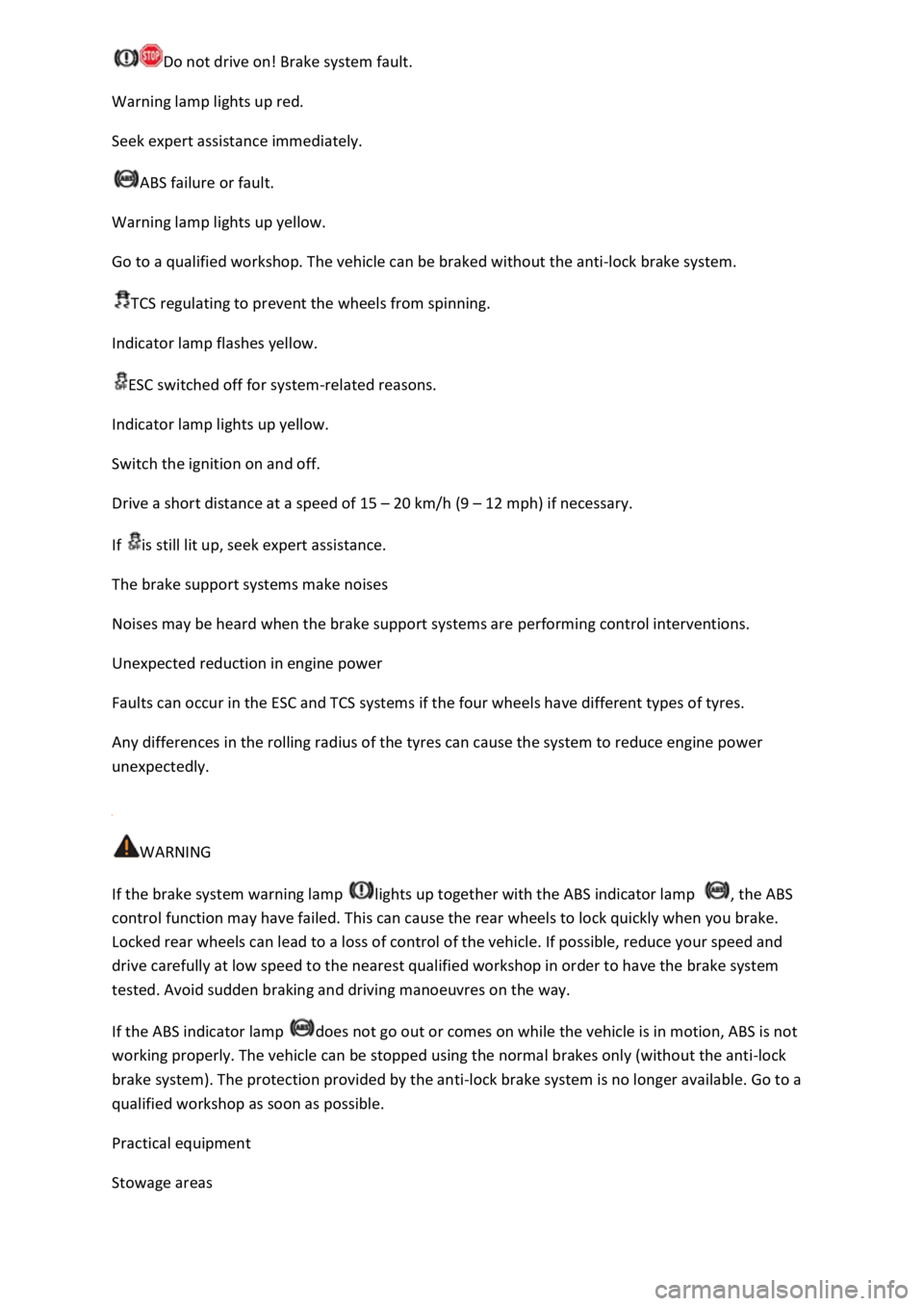
Do not drive on! Brake system fault.
Warning lamp lights up red.
Seek expert assistance immediately.
ABS failure or fault.
Warning lamp lights up yellow.
Go to a qualified workshop. The vehicle can be braked without the anti-lock brake system.
TCS regulating to prevent the wheels from spinning.
Indicator lamp flashes yellow.
ESC switched off for system-related reasons.
Indicator lamp lights up yellow.
Switch the ignition on and off.
Drive a short distance at a speed of 15 – 20 km/h (9 – 12 mph) if necessary.
If is still lit up, seek expert assistance.
The brake support systems make noises
Noises may be heard when the brake support systems are performing control interventions.
Unexpected reduction in engine power
Faults can occur in the ESC and TCS systems if the four wheels have different types of tyres.
Any differences in the rolling radius of the tyres can cause the system to reduce engine power
unexpectedly.
WARNING
If the brake system warning lamp lights up together with the ABS indicator lamp , the ABS
control function may have failed. This can cause the rear wheels to lock quickly when you brake.
Locked rear wheels can lead to a loss of control of the vehicle. If possible, reduce your speed and
drive carefully at low speed to the nearest qualified workshop in order to have the brake system
tested. Avoid sudden braking and driving manoeuvres on the way.
If the ABS indicator lamp does not go out or comes on while the vehicle is in motion, ABS is not
working properly. The vehicle can be stopped using the normal brakes only (without the anti-lock
brake system). The protection provided by the anti-lock brake system is no longer available. Go to a
qualified workshop as soon as possible.
Practical equipment
Stowage areas
Page 282 of 502

Introduction
This chapter contains information on the followingsubjects:
⇒ Stowage compartment on the front passenger side
⇒ Stowage compartment in the front centre armrest
⇒ Drawers
⇒ Coat and bag hooks
Stow only light and small objects in the stowage areas.
There is a stowage compartment for the vehicle wallet under the left front seat. Always keep the
vehicle wallet in this stowage compartment.
The USB socket and the function for wireless charging in accordance with the QI standard
⇒BookletInfotainment system, may be located in the stowage compartment in the lower part of the
centre console.
WARNING
Loose objects may be flung through the vehicle interior in the event of a sudden driving or braking
manoeuvre. This can cause serious injury and can also lead to loss of control of the vehicle.
Do not stow any pets or any hard, heavy or sharp objects in the vehicle's open stowage
compartments, on the dash panel, on the luggage compartment cover or in items of clothing and
bags in the vehicle interior.
Always keep stowage compartments closed while the vehicle is in motion.
WARNING
Objects in the driver footwell can interfere with pedal operation. This can lead to loss of control of
the vehicle and increase the risk of serious injury.
Ensure that all pedals can always be operated without any hindrance.
The floor mats must always be properly secured in the footwell.
No additional foot mats or other floor coverings should be placed over the fitted foot mat.
Ensure that no objects can enter the driver footwell while the vehicle is in motion.
WARNING
Cigarette lighters left in the vehicle can become damaged or may ignite unnoticed. This can cause
serious burns and vehicle damage.
Page 283 of 502
Before adjusting the seats, always ensure that there is no cigarette lighter on or near the moveable
parts of the seat.
Before closing stowage areas or compartments always ensure that there is no lighter in the way.
Never stow lighters in stowage areas or compartments or on other surfaces in the vehicle. Cigarette
lighters may self-ignite as a result of high surface temperatures, particularly in summer.
NOTICE
The heating elements in the rear window can be destroyed by objects rubbing against them.
Do not stow any temperature-sensitive objects, food or medicines inside the vehicle. Hot and cold
temperatures could damage them or render them unusable.
Objects stored in the vehicle that are made from transparent materials, such as glasses, magnifying
glasses or transparent suction cups on the windows, can concentrate the sun's rays and thus cause
damage to the vehicle.
Always ensure that the ventilation openings between the rear window and the stowage area are
uncovered to allow stale air to escape from the vehicle.
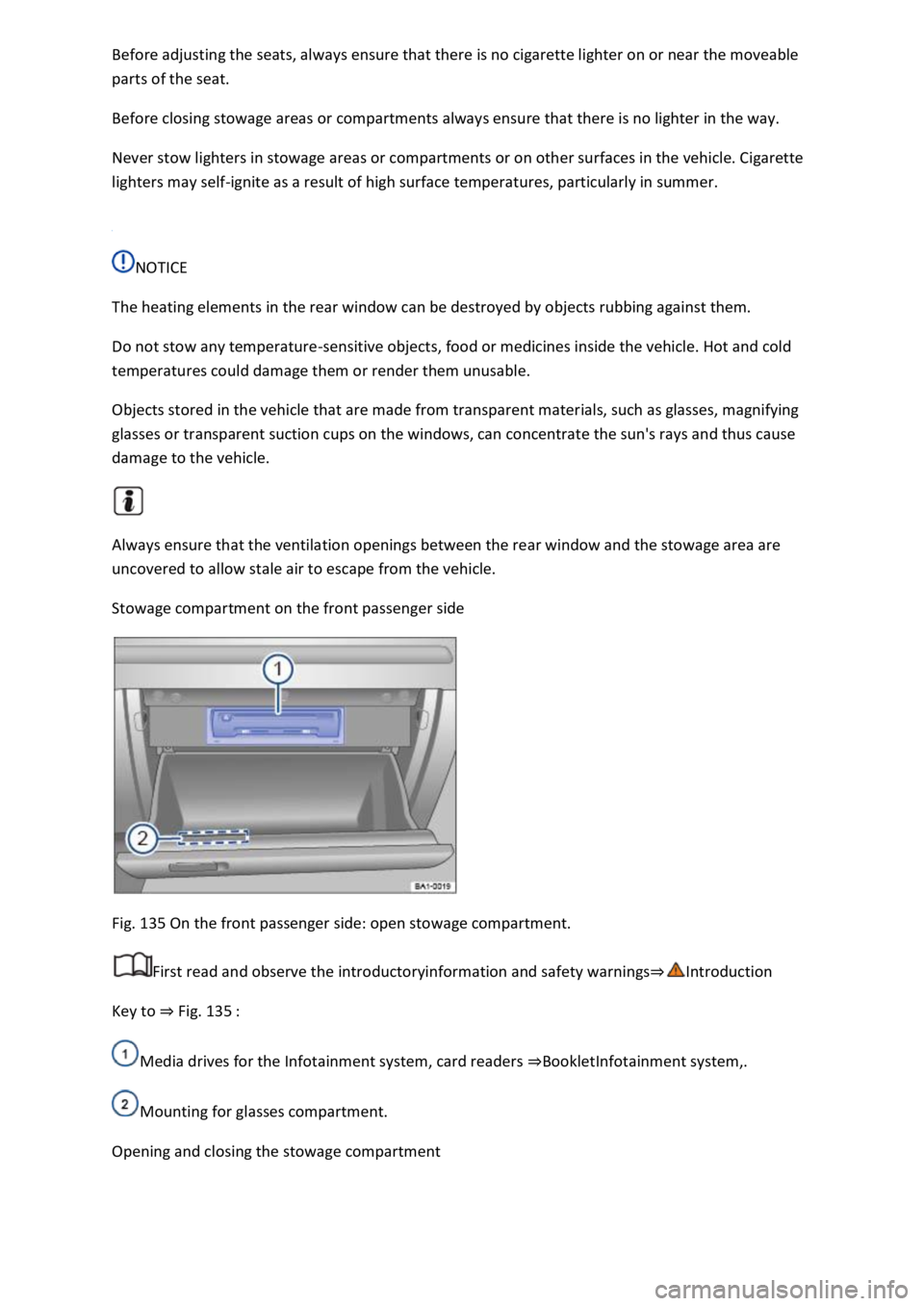
Stowage compartment on the front passenger side
Fig. 135 On the front passenger side: open stowage compartment.
First read and observe the introductoryinformation and safety warnings⇒Introduction
Key to ⇒ Fig. 135 :
Media drives for the Infotainment system, card readers ⇒BookletInfotainment system,.
Mounting for glasses compartment.
Opening and closing the stowage compartment