auto lock VOLKSWAGEN T-ROC 2021 Owner´s Manual
[x] Cancel search | Manufacturer: VOLKSWAGEN, Model Year: 2021, Model line: T-ROC, Model: VOLKSWAGEN T-ROC 2021Pages: 502, PDF Size: 9.42 MB
Page 145 of 502

Fault in wipers
The wipers do not wipe.
The indicator lamp lights up yellow.
Switch the ignition off and on.
If the problem persists, go to a qualified workshop.
Changes in the activation behaviour of the rain/light sensor
Possible causes for faults and misinterpretations relating to the sensitive surface of the rain/light
sensor ⇒ Vehicle overviews include:
Damaged wiper blades: a film of water or smears caused by damaged wiper blades can increase the
time the wipers are switched on, can shorten the length of the intervals between wipes or cause the
wipers to run quickly and continuously.
Insects: insects hitting the windscreen can cause the wipers to be activated.
Salt deposits: in winter, salt deposits can cause the wipers to continue to wipe the windscreen when
it is almost dry.
Dirt: dry dust, wax, windscreen coatings (lotus effect), or detergent deposits (from an automatic car
wash) can cause the rain/light sensor to become less sensitive and react too slowly, or prevent it
from reacting at all. Clean the sensitive surface of the rain/light sensor ⇒ Caring for and cleaning the
vehicle exterior at regular intervals and inspect the wiper blades for damage.
Crack in the windscreen: a wipe cycle will be triggered if the rain/light sensor is on when the
windscreen is impacted by a stone. The rain/light sensor will then register the impairment of the
sensitive surfaces and adjust accordingly. Depending on the size of the stone impact, the activation
behaviour of the rain/light sensor may be changed.
We recommend that you use an alcohol-based glass cleaner to remove wax and polish.
The wipers will try to wipe away any obstacles that are on the window. The wiper will stop moving if
the obstacle continues to block its path. Remove the obstacle and switch the wiper back on again.
Mirrors
Introduction
This chapter contains information on the followingsubjects:
⇒ Interior mirror
⇒ Exterior mirrors
You can use the exterior mirrors and the interior mirror to observe traffic behind you and adjust
your driving style accordingly.
Page 149 of 502

Swivel the rotary knob forwards, backwards, right or left in the direction of the arrow in order to
adjust the exterior mirror.
Electrically fold in the exterior mirrors ⇒ .Switch on the exterior mirror heating. The
exterior mirror heating heats only at ambient temperatures below +20°C (+68°F) and initially with
the highest setting. Heating takes place dependent on the ambient temperature after around
two minutes.Adjust the left-hand exterior mirror.Adjust the right-hand exterior mirror.Zero
position. The exterior mirror cannot be adjusted and all functions are switched off.
Activating the exterior mirror functions
The following exterior mirror functions must be activated once in the Infotainment system in
the Vehicle settings menu ⇒ Infotainment system controls and displays :
Synchronous mirror adjustment
Synchronous mirror adjustment means that the right-hand exterior mirror is also adjusted at the
same time when you adjust the left-hand exterior mirror.
Turn the rotary knob to position .
Adjust the left-hand exterior mirror. The right-hand exterior mirror will be adjusted at the same time
(synchronously).
Correct the settings for the right-hand exterior mirror if necessary: swivel the rotary knob to
position and adjust the right-hand exterior mirror.
Folding in the exterior mirrors while parking
When the vehicle is locked or unlocked from the outside, the exterior mirrors fold in or out
automatically. For this, the rotary knob must be in position , , or .
If the rotary knob for the electrically adjustable exterior mirrors is in position , the exterior
mirrors stay folded in.
Saving and recalling the front passenger exterior mirror settings for reversing
Unlock the vehicle with the vehicle key to which the settings should be assigned.
Switch on the electronic parking brake.
Switch on the ignition.
Put the gearbox into neutral.
Select reverse gear.
Adjust the front passenger exterior mirror so that you have a good view of the kerb area, for
example.
The set mirror position will be saved and assigned to the vehicle key.
Turn the rotary knob for the exterior mirrors to position .
Page 154 of 502
Switch off the air recirculation mode when it is no longer required.
WARNING
Stale air can quickly make the driver tired and affect their concentration, which in turn can cause
collisions, accidents and serious injuries.
Never switch off the blower or switch on the air recirculation mode for an extended period as this
prevents fresh air from entering the vehicle interior.
NOTICE
Food, medicine and other items that are sensitive to heat or cold could be either damaged or
rendered useless by the air flowing out of the vents.
Never leave food, medicines or other temperature-sensitive objects in front of the vents.
NOTICE
If the air conditioning system is not working, switch the air conditioning system off immediately and
have it checked by a qualified workshop. This can help to prevent secondary damage.
Some settings can be stored in the user accounts of the personalisation function and therefore
change automatically when the user account changes ⇒ Personalisation .
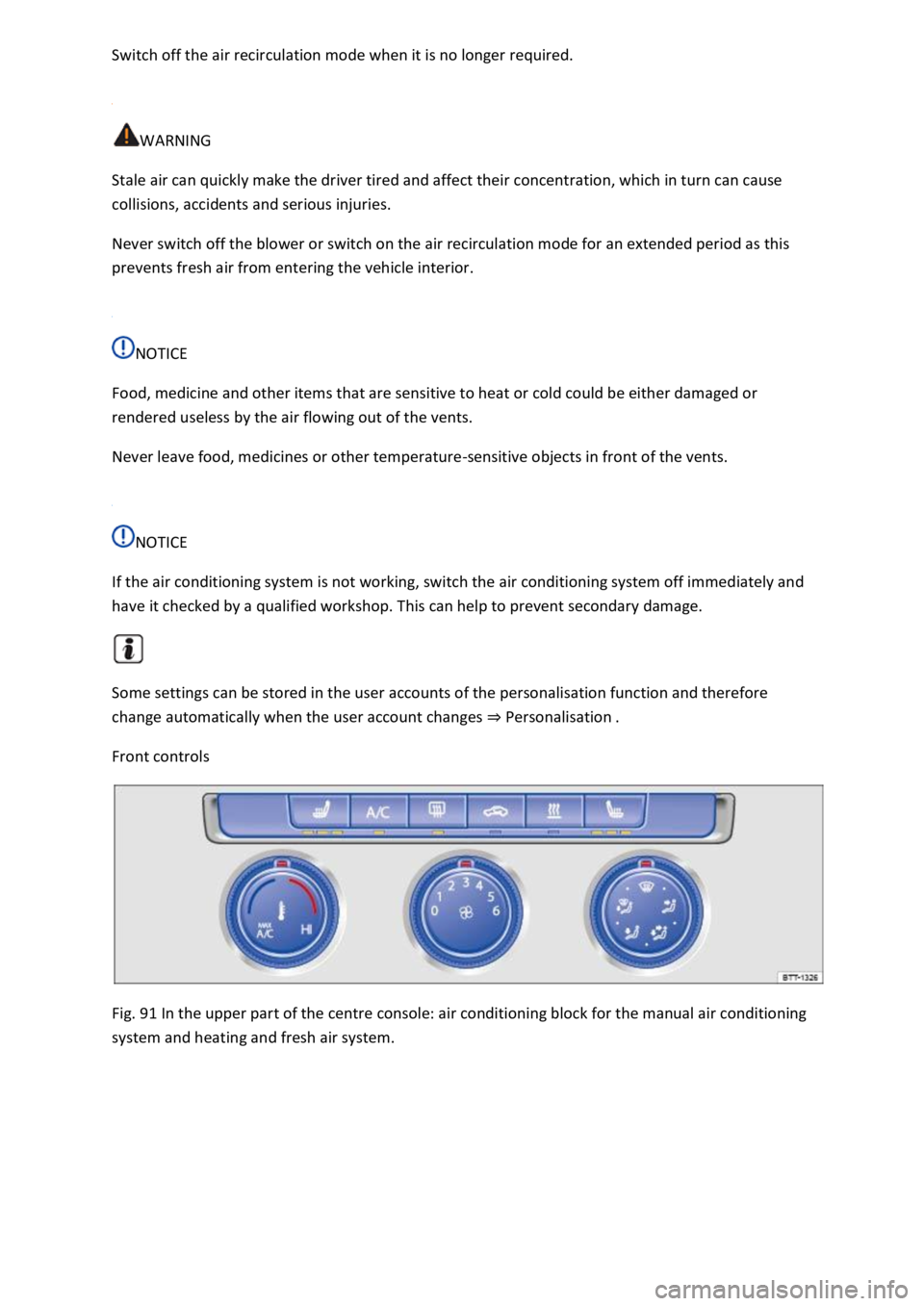
Front controls
Fig. 91 In the upper part of the centre console: air conditioning block for the manual air conditioning
system and heating and fresh air system.
Page 155 of 502
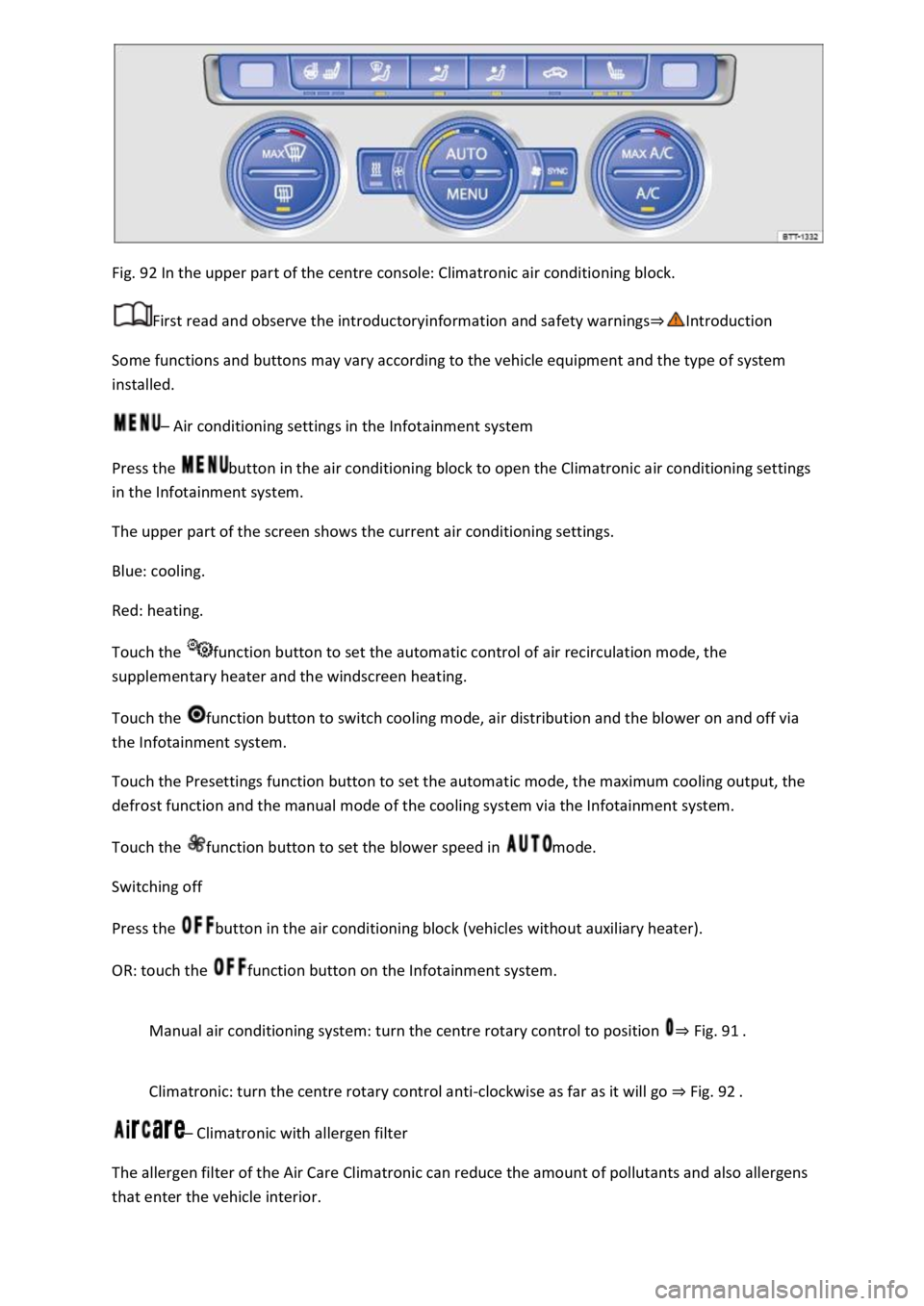
Fig. 92 In the upper part of the centre console: Climatronic air conditioning block.
First read and observe the introductoryinformation and safety warnings⇒Introduction
Some functions and buttons may vary according to the vehicle equipment and the type of system
installed.
– Air conditioning settings in the Infotainment system
Press the button in the air conditioning block to open the Climatronic air conditioning settings
in the Infotainment system.
The upper part of the screen shows the current air conditioning settings.
Blue: cooling.
Red: heating.
Touch the function button to set the automatic control of air recirculation mode, the
supplementary heater and the windscreen heating.
Touch the function button to switch cooling mode, air distribution and the blower on and off via
the Infotainment system.
Touch the Presettings function button to set the automatic mode, the maximum cooling output, the
defrost function and the manual mode of the cooling system via the Infotainment system.
Touch the function button to set the blower speed in mode.
Switching off
Press the button in the air conditioning block (vehicles without auxiliary heater).
OR: touch the function button on the Infotainment system.
Manual air conditioning system: turn the centre rotary control to position ⇒ Fig. 91 .
Climatronic: turn the centre rotary control anti-clockwise as far as it will go ⇒ Fig. 92 .
– Climatronic with allergen filter
The allergen filter of the Air Care Climatronic can reduce the amount of pollutants and also allergens
that enter the vehicle interior.
Page 156 of 502

Press the button in the air conditioning block.
Touch the Air Care function button.
Touch the Active function button to switch the Air Care function on or off.
– Synchronising the temperature settings
Press the button to adopt the temperature settings of the driver side for the front passenger
side.
– Automatic mode
The automatic mode ensures constant temperatures in the vehicle interior. The air temperature, air
quantity and air distribution are regulated automatically. Automatic mode switches off if ventilation
is adjusted manually.
– Cooling mode
Press the button in the air conditioning block to switch cooling mode on or off.
In cooling mode, the air is dehumidified.
– Maximum cooling
Manual air conditioning system: turn the left rotary control to position . Air
recirculation mode is switched on automatically.
Climatronic: press the button. Air recirculation mode is switched on automatically
and the air distribution is set to the position.
/ – Temperature
Manual air conditioning system: turn the left rotary control ⇒ Fig. 91 .
Climatronic: turn the outer rotary controls ⇒ Fig. 92 to adjust the temperatures for the driver
and front passenger sides.
The set temperatures are displayed above the rotary controls for Climatronic.
– Seat and steering wheel heating
Press the buttons or to switch the seat heating on and off ⇒ Seat heating .
To operate the seat heating and steering wheel heating at the same time with the button, link
the two functions via the air conditioning settings in the Infotainment system ⇒ Switching the
steering wheel heating on or off together with the seat heating (only for Climatronic) .
/ – Auxiliary heater
Page 157 of 502

Press the button in the air conditioning block to switch the auxiliary heater on and off when the
ignition is switched off ⇒ .
Touch the function button in the Infotainment system air conditioning settings to access the
Auxiliary heater menu ⇒ Auxiliary heater and ventilation .
The auxiliary heater provides additional heating when the ignition is switched on.
– Blower
Turn the middle rotary control.
When Climatronic is in automatic mode, no blower speed is displayed in the rotary control.
– Air recirculation mode
Press the button.
Air distribution
– air distribution to the upper body via the vents in the dash panel.
– air distribution to footwell.
– air distribution to the upper body and the footwell.
– air distribution to the windscreen and the footwell.
– air distribution to the windscreen.
| – Defrost function
Manual air conditioning system: turn the right rotary knob to position ⇒ Fig. 91 .
Climatronic: press the button ⇒ Fig. 92 .
Manual air conditioning system: in the defrost function, the air recirculation mode switches off
and the air conditioning compressor for the cooling system switches on in order to dehumidify the
air. When the defrost function is switched on, it is not possible to switch the air recirculation mode
on or the air conditioning compressor off1).
– Rear window heating
Press to switch the rear window heating on or off while the engine is running.
The rear window heating will switch off after 10 minutes at the latest.
Recommended settings for manual air conditioning system
Switch off air recirculation mode.
Set blower to setting or .
Page 158 of 502
Set the temperature selector to the middle position.
Open and position all vents on the dash panel.
Turn the air distribution regulator to the desired position.
Press the button in the air conditioning block to switch the cooling system on.
Recommended settings for Climatronic
Press the button.
Set the temperature to +22°C (+72°F).
Open and position vents on the dash panel.
NOTICE
To prevent damage to the rear window heating, do not put stickers over the heating elements on
the inside of the window.
1) The air conditioning compressor can be switched off in some countries.
Air recirculation mode
First read and observe the introductoryinformation and safety warnings⇒Introduction
In air recirculation mode, no fresh air enters the vehicle interior.
Manual air recirculation mode
Press the button in the air conditioning block to switch manual air recirculation mode on or
off.
OR: touch the function button in the air conditioning settings in the Infotainment system.
Automatic air recirculation mode of Climatronic
In the automatic air recirculation mode, fresh air will enter the vehicle interior. The air recirculation
mode will switch on automatically if the system detects an increase in the concentration of noxious
substances in the outside air. The air recirculation mode will switch off as soon as the level of
noxious substances has returned to normal. The system cannot detect unpleasant odours.
Open the air conditioning settings in the Infotainment system.
Touch the function button.
Touch the Automatic air recirculation function button.
When is air recirculation mode deactivated?
Air recirculation mode is deactivated in the following situations ⇒ :
If the button or function button is pressed.
Page 164 of 502

NOTICE
Food, medicine and other items that are sensitive to heat or cold could be either damaged or
rendered useless by the air flowing out of the vents.
Never leave food, medicines or other temperature-sensitive objects in front of the vents.
Switching the auxiliary heater and ventilation on and off
First read and observe the introductoryinformation and safety warnings⇒Introduction
The auxiliary heater can be operated only when the ignition is switched off. If the ignition is switched
on while the auxiliary heater is working, the auxiliary heater continues to run to provide additional
heat.
Switching on the auxiliary heater
Press the immediate heat button in the air conditioning block ⇒ Front controls .
OR: press the button on the remote control ⇒ Remote control .
OR: program the departure time ⇒ Programming the auxiliary heater and ventilation .
The auxiliary heater heats the vehicle interior to at least 22 ℃.
The auxiliary heater will not switch on if the 12-volt vehicle battery is low or the fuel tank is empty.
Switching off the auxiliary heater manually
Press the immediate heat button in the air conditioning block ⇒ Front controls .
OR: press the button on the remote control ⇒ Remote control .
OR: touch the function button on the Infotainment system ⇒ Programming the auxiliary heater
and ventilation .
Auxiliary heater switches off automatically
When the programmed departure time is reached, or after the programmed operating period has
elapsed ⇒ Programming the auxiliary heater and ventilation .
When the indicator lamp lights up (fuel gauge) ⇒ Fuel gauge .
If the charge level of the 12-volt vehicle battery is too low ⇒ 12-volt vehicle battery .
The auxiliary heater runs on for a short time after it has been switched off manually or automatically
so that the remaining fuel in the system can be burnt off.
When the vehicle is at a standstill, the auxiliary heater can be activated up to three times in
succession for the maximum operating duration.
Page 182 of 502
The key bit in the vehicle key must be folded out fully and locked in position.
Only attach light objects weighing less than 100 g to the vehicle key.
NOTICE
The 12-volt battery may be discharged unintentionally and prevent the engine from restarting if the
ignition is switched on while the engine is switched off.
Always switch off the ignition before you leave the vehicle.
For vehicles with DSG dual clutch gearbox in some markets: if the vehicle key cannot be
removed from the ignition lock when the vehicle is stopped, move the selector lever to P. If
necessary, press the lock button in the selector lever and then release it.
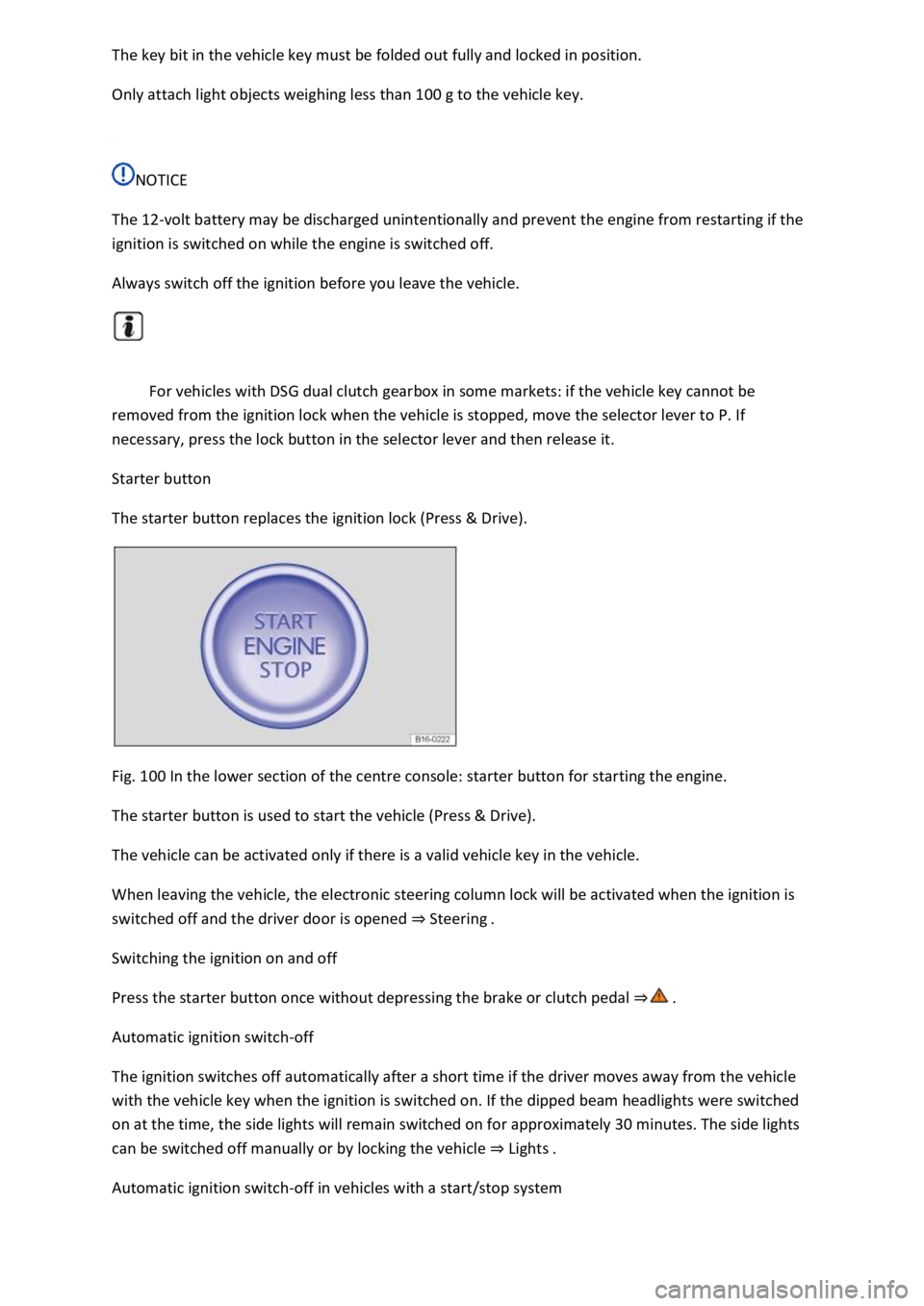
Starter button
The starter button replaces the ignition lock (Press & Drive).
Fig. 100 In the lower section of the centre console: starter button for starting the engine.
The starter button is used to start the vehicle (Press & Drive).
The vehicle can be activated only if there is a valid vehicle key in the vehicle.
When leaving the vehicle, the electronic steering column lock will be activated when the ignition is
switched off and the driver door is opened ⇒ Steering .
Switching the ignition on and off
Press the starter button once without depressing the brake or clutch pedal ⇒ .
Automatic ignition switch-off
The ignition switches off automatically after a short time if the driver moves away from the vehicle
with the vehicle key when the ignition is switched on. If the dipped beam headlights were switched
on at the time, the side lights will remain switched on for approximately 30 minutes. The side lights
can be switched off manually or by locking the vehicle ⇒ Lights .
Automatic ignition switch-off in vehicles with a start/stop system
Page 183 of 502

When all the following conditions are fulfilled at the same time, the vehicle ignition will be switched
off automatically when engine stop is active when the vehicle is stationary:
The driver seat belt has been unfastened.
No pedals are depressed.
The driver door is opened.
If the ignition is deactivated automatically while the dipped beam headlights are switched on,
the side lights remain switched on and lit for approximately 30 minutes.
The side lights can be switched off manually or will go off when the vehicle is locked.
Engine restart function
If no valid vehicle key is detected in the vehicle interior once the engine has been switched off, the
engine can be restarted within approximately five seconds. A corresponding message appears on the
instrument cluster display.
After this time, the engine cannot be re-started without a valid vehicle key in the vehicle interior.
WARNING
Unintentional vehicle movements can cause serious injury.
Do not depress the brake or clutch pedal when the ignition is switched on as the engine will start
immediately.
WARNING
Improper or unsupervised use of the vehicle keys can cause accidents or serious injuries.
Always take all vehicle keys with you every time you leave the vehicle. Children or unauthorised
persons could lock the vehicle, start the engine, switch on the ignition or operate electrical
equipment such as the electric windows.
Before leaving the vehicle, always switch off the ignition manually and observe any information
shown on the instrument cluster display.
Leaving the vehicle stationary for long periods with the ignition switched on can discharge the 12-
volt vehicle battery so that the engine can no longer be started.
Starting the engine