auto lock VOLKSWAGEN T-ROC 2021 Owner´s Manual
[x] Cancel search | Manufacturer: VOLKSWAGEN, Model Year: 2021, Model line: T-ROC, Model: VOLKSWAGEN T-ROC 2021Pages: 502, PDF Size: 9.42 MB
Page 187 of 502

The airbags and belt tensioners will not work if the ignition is switched off.
The brake servo will not work when the engine is switched off. More force is required on the brake
pedal to stop the vehicle.
If the vehicle key is removed from the ignition, the steering lock may activate and you will no longer
be able to steer the vehicle.
WARNING
The components of the exhaust system become very hot. This can cause fires and serious injuries.
Never park the vehicle so that parts of the exhaust system can come into contact with any
inflammable material underneath the vehicle, e.g. undergrowth, leaves, dry grass, spilt fuel etc.
Never apply additional underseal or anti-corrosion coatings to the exhaust pipes, catalytic
converters, heat shields or particulate filter.
NOTICE
If the vehicle has been driven at high load for a long period, the engine can overheat when it is
switched off. In order to avoid damage to the engine, allow the engine to run in neutral position for
approximately 2 minutes before switching it off.
After the engine is switched off, the radiator fan in the engine compartment may run on for some
minutes, even if the ignition is switched off or the vehicle key has been removed. The radiator fan
will switch itself off automatically.
Electronic immobiliser
The immobiliser helps to prevent the engine from being started and driven with an unauthorised
vehicle key.
There is a chip in the vehicle key. The immobiliser is automatically deactivated by this when a valid
vehicle key is inserted in the ignition lock.
The electronic immobiliser is automatically activated when the vehicle key is removed from the
ignition lock. In vehicles with Keyless Access, the vehicle key must be outside the vehicle.
The engine can be started only using a Volkswagen Genuine vehicle key with the correct code.
Coded vehicle keys are available from a Volkswagen dealership.
Problem-free operation of the vehicle is guaranteed only with Volkswagen Genuine vehicle keys.
Troubleshooting
Page 189 of 502

The indicator lamp flashes yellow.
There is a fault in the engine management system.
The engine should be checked by a qualified workshop as soon as possible.
Vehicle key cannot be removed from the ignition lock
An unauthorised vehicle key has been inserted in the ignition lock.
Remove the vehicle key as follows:
Vehicles with DSG dual clutch gearbox
Press the lock button in the selector lever and release.
Remove the vehicle key from the ignition lock.
Vehicles with a manual gearbox
Remove the vehicle key from the ignition lock.
No valid vehicle key recognised
A corresponding display will appear in the instrument cluster.
If the button cell in the vehicle key is weak or discharged, it is possible that the vehicle key will not
be recognised.
In this case, you will need to perform an emergency start:
Depress and hold the brake pedal.
Hold the vehicle key to the right of the steering column trim directly after pressing the starter button
⇒ Fig. 101 .
The ignition is switched on automatically, and in some cases the engine is started.
Engine cannot be switched off
The engine cannot be switched off by briefly pressing the starter button.
In this case it is necessary to perform an emergency switch-off procedure:
Press the starter button twice within a few seconds or press and hold once.
The engine will switch off automatically ⇒ .
Engine cannot be started
A corresponding message will be displayed in the instrument cluster if an unauthorised vehicle key is
used or there is a system fault.
Use an authorised vehicle key.
If the problem persists, seek expert assistance.
Page 198 of 502

– Reverse gear
Reverse gear is selected. May be selected only when the vehicle is stationary.
– Neutral
The gearbox is in the neutral position. No force is transmitted to the wheels and the braking effect of
the engine is not available.
– Standard forward driving position
Position : Normal programme.
All forward gears are shifted up and down automatically. The timing of the gear shift is determined
by the engine load, your individual driving style and the speed of the vehicle.
Position : Sport programme.
The forward gears are automatically changed up later and down earlier than in selector lever
position D. This exploits the engine’s full power reserves. The timing of the gear shift is determined
by the engine load, your individual driving style and the speed of the vehicle.
To change between positions D and S, move the selector lever to the rear ⇒ Fig. 105 .
The selector lever will always return to selector lever position D/S. That also works in the Tiptronic
gate ⇒ Changing gear using Tiptronic .
Selector lever lock
P
N
To release the selector lever lock, switch on the ignition and depress the brake pedal. Then press the
lock button in the selector lever handle in the direction of the arrow ⇒ Fig. 105 .
The selector lever lock is not engaged if the selector lever is moved quickly through position N, e.g.
when shifting from reverse to D/S. This makes it possible, for instance, to rock the vehicle backwards
and forwards if it is stuck in snow or mud. The selector lever lock engages automatically if the lever is
in position N for more than approximately one second without the brake being pressed and when
the vehicle is travelling no faster than approximately 5 km/h (3 mph).
WARNING
Selecting the wrong position can cause you to lose control of the vehicle, which can lead to accidents
and serious injuries.
Never depress the accelerator when selecting a position.
When the engine is running and a position is engaged, the vehicle will start moving as soon as the
brake pedal is released.
Never shift to reverse or selector lever position P while the vehicle is moving.
Page 200 of 502
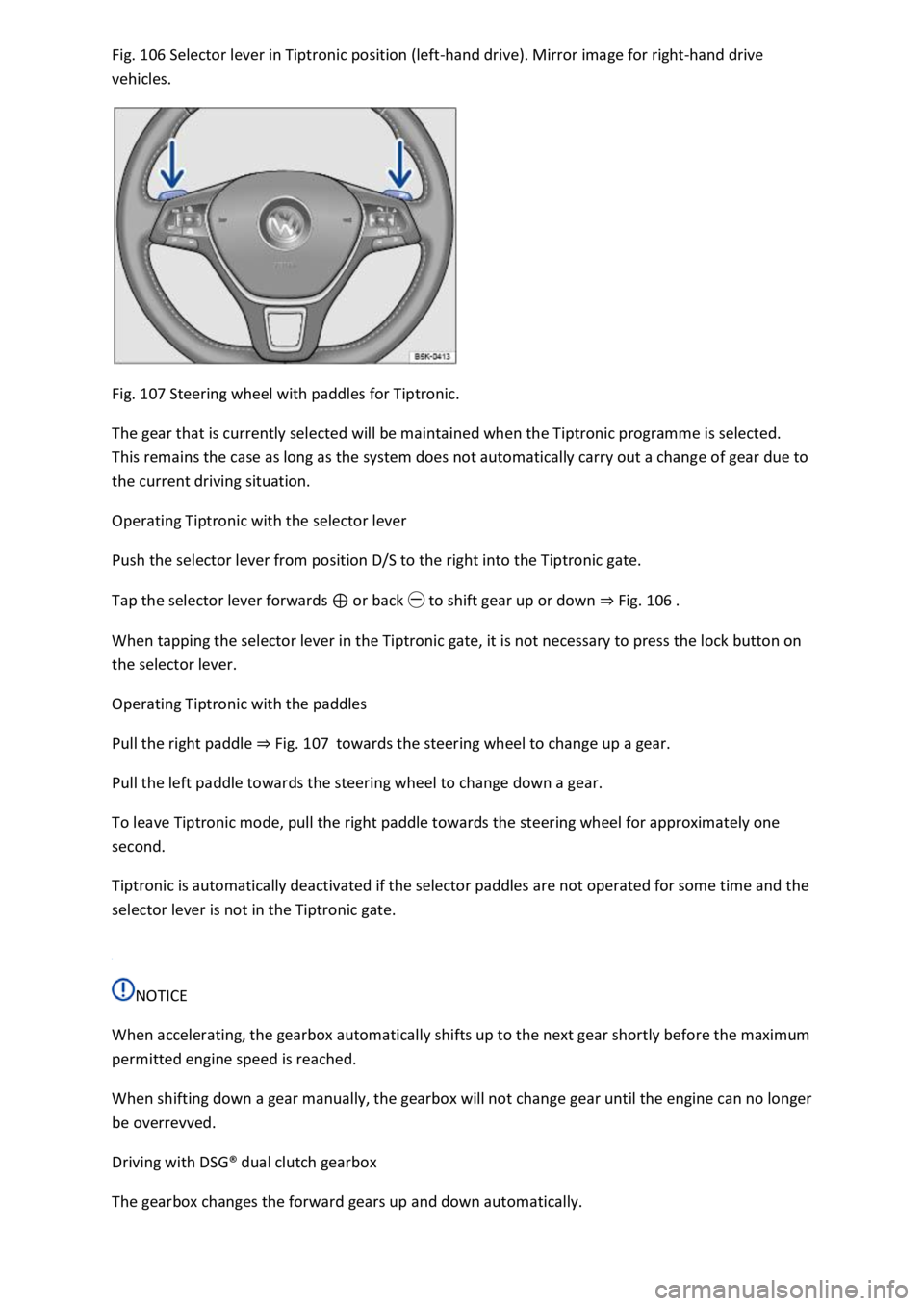
Fig. 106 Selector lever in Tiptronic position (left-hand drive). Mirror image for right-hand drive
vehicles.
Fig. 107 Steering wheel with paddles for Tiptronic.
The gear that is currently selected will be maintained when the Tiptronic programme is selected.
This remains the case as long as the system does not automatically carry out a change of gear due to
the current driving situation.
Operating Tiptronic with the selector lever
Push the selector lever from position D/S to the right into the Tiptronic gate.
Tap the selector lever forwards ⊕ or back ㊀ to shift gear up or down ⇒ Fig. 106 .
When tapping the selector lever in the Tiptronic gate, it is not necessary to press the lock button on
the selector lever.
Operating Tiptronic with the paddles
Pull the right paddle ⇒ Fig. 107 towards the steering wheel to change up a gear.
Pull the left paddle towards the steering wheel to change down a gear.
To leave Tiptronic mode, pull the right paddle towards the steering wheel for approximately one
second.
Tiptronic is automatically deactivated if the selector paddles are not operated for some time and the
selector lever is not in the Tiptronic gate.
NOTICE
When accelerating, the gearbox automatically shifts up to the next gear shortly before the maximum
permitted engine speed is reached.
When shifting down a gear manually, the gearbox will not change gear until the engine can no longer
be overrevved.
Driving with DSG® dual clutch gearbox
The gearbox changes the forward gears up and down automatically.
Page 208 of 502

The steering assistance provided by the electromechanical steering system automatically adjusts to
the vehicle speed, steering wheel torque and steering wheel angle. The electromechanical steering
functions only when the engine is running.
You will need considerably more strength than normal to steer the vehicle if the power steering is
reduced or has failed completely.
Counter steering assistance
Counter steering assistance provides the driver with steering assistance in critical driving situations.
Additional steering forces assist the driver when counter steering ⇒ .
Progressive steering
Depending on the vehicle equipment level, progressive steering can adjust the steering response in a
driving situation. Progressive steering functions only when the engine is running.
In urban traffic, less steering input is required when parking, manoeuvring, or turning sharply.
When driving on country roads or on the motorway, the progressive steering provides a more
sporty, direct steering response, and a dynamic feel.
WARNING
If the power steering is not working, the steering wheel is difficult to turn, which makes it difficult to
steer the vehicle.
Depending on the vehicle equipment level, the power steering functions only when the engine is
running.
Never allow the vehicle to roll if the engine is switched off.
Never remove the vehicle key from the ignition if the vehicle is in motion. The steering column lock
may be activated and it will no longer be possible to steer the vehicle.
WARNING
In conjunction with the ESC, counter steering assistance provides the driver with assistance when
steering in critical driving situations. The driver must steer the vehicle at all times. Counter steering
assistance does not steer the vehicle.
NOTICE
When the vehicle is towed, the ignition must be switched on to prevent the steering wheel from
locking, and so that the turn signals, horn, wipers and window washer system can be used.
Troubleshooting
Steering requires increased force
Page 257 of 502

System fault
Clean the radar sensors or remove stickers or accessories from the radar sensors, mirrors and
bumper ⇒ Caring for and cleaning the vehicle exterior .
Check whether any damage is visible.
The system is not responding as expected
The radar sensors are dirty. The sensor visibility may be impaired by dirt and snow or also residue
from cleaning agents or coatings ⇒ Caring for and cleaning the vehicle exterior .
The prerequisites for system operation must be met ⇒ System limits .
The radar sensors are covered by water.
The vehicle is damaged in the area of the radar sensors, e.g. caused by parking collisions.
The detection ranges of the radar sensors are blocked by add-on parts, e.g. bicycle carriers.
Changes have been made to the paintwork in the area of the radar sensors or structural
modifications have been made, e.g. on the vehicle front end or the running gear.
Only Volkswagen-approved vehicle paints may be used on the rear bumper. Other vehicle paints can
restrict the function of the system or cause faults.
Tinting foils have been retrofitted on the side windows.
Parking and manoeuvring
Parking
Stopping and parking the vehicle
The actions should be carried out only in the given order:
Stop the vehicle on a suitable surface ⇒ .
Depress and hold the brake pedal until the engine has stopped.
Switch on the electronic parking brake ⇒ Electronic parking brake . The electronic parking brake is
switched on when the indicator lamp in the button ⇒ Fig. 125 lights up yellow and the indicator
lamp in the instrument cluster display lights up red.
On vehicles with a manual gearbox, either fully depress or disengage the clutch.
With an automatic gearbox, move the selector lever to position P.
Switch off the engine and take your foot off the brake pedal.
Turn the steering wheel slightly if necessary to engage the steering lock mechanism.
With a manual gearbox, select first gear for flat ground and uphill gradients, or reverse gear for
downhill gradients, and then release the clutch.
Please ensure that all occupants, in particular children, leave the vehicle.
Page 266 of 502
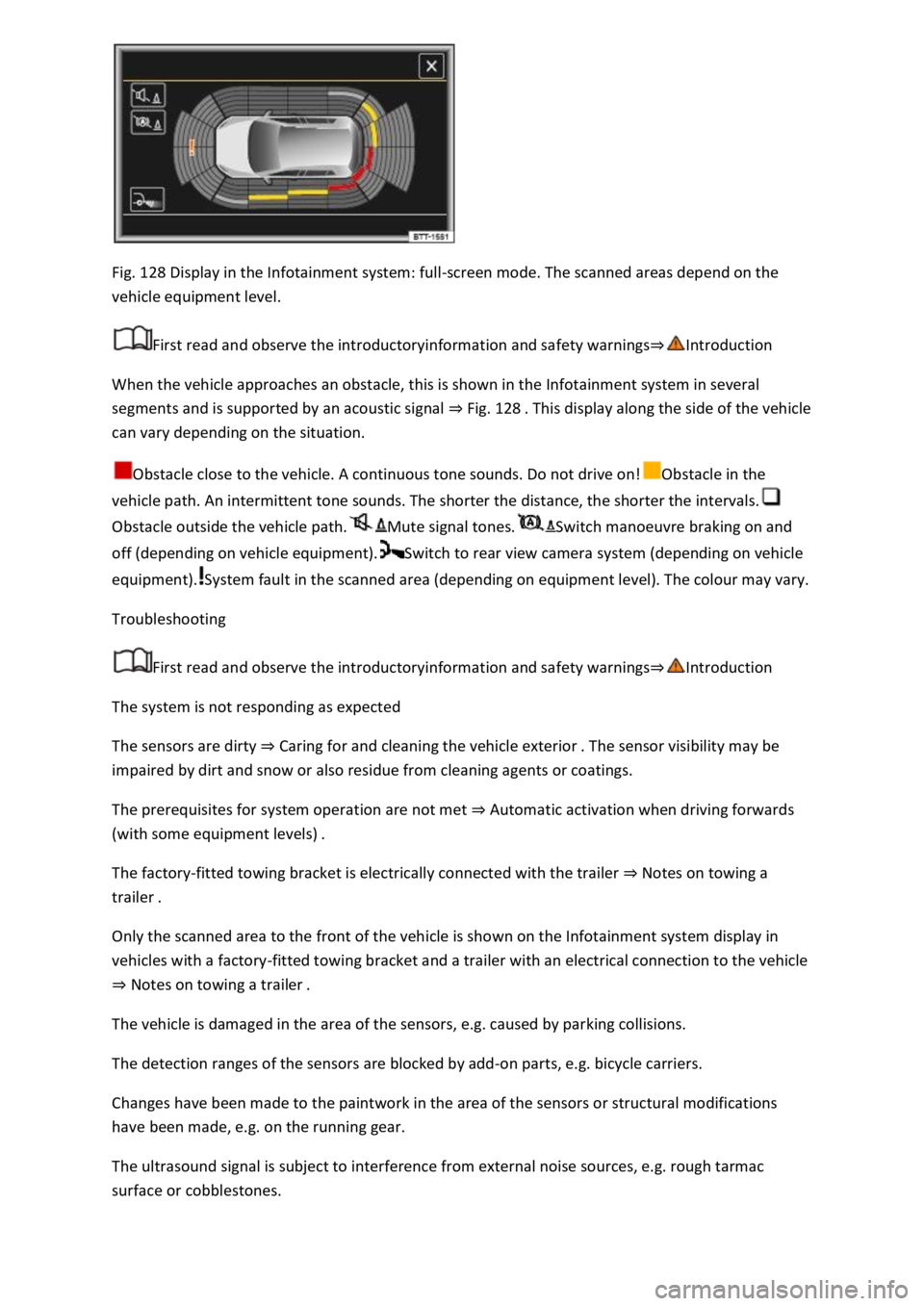
Fig. 128 Display in the Infotainment system: full-screen mode. The scanned areas depend on the
vehicle equipment level.
First read and observe the introductoryinformation and safety warnings⇒Introduction
When the vehicle approaches an obstacle, this is shown in the Infotainment system in several
segments and is supported by an acoustic signal ⇒ Fig. 128 . This display along the side of the vehicle
can vary depending on the situation.
Obstacle close to the vehicle. A continuous tone sounds. Do not drive on!Obstacle in the
vehicle path. An intermittent tone sounds. The shorter the distance, the shorter the intervals.
Obstacle outside the vehicle path.Mute signal tones.Switch manoeuvre braking on and
off (depending on vehicle equipment).Switch to rear view camera system (depending on vehicle
equipment).System fault in the scanned area (depending on equipment level). The colour may vary.
Troubleshooting
First read and observe the introductoryinformation and safety warnings⇒Introduction
The system is not responding as expected
The sensors are dirty ⇒ Caring for and cleaning the vehicle exterior . The sensor visibility may be
impaired by dirt and snow or also residue from cleaning agents or coatings.
The prerequisites for system operation are not met ⇒ Automatic activation when driving forwards
(with some equipment levels) .
The factory-fitted towing bracket is electrically connected with the trailer ⇒ Notes on towing a
trailer .
Only the scanned area to the front of the vehicle is shown on the Infotainment system display in
vehicles with a factory-fitted towing bracket and a trailer with an electrical connection to the vehicle
⇒ Notes on towing a trailer .
The vehicle is damaged in the area of the sensors, e.g. caused by parking collisions.
The detection ranges of the sensors are blocked by add-on parts, e.g. bicycle carriers.
Changes have been made to the paintwork in the area of the sensors or structural modifications
have been made, e.g. on the running gear.
The ultrasound signal is subject to interference from external noise sources, e.g. rough tarmac
surface or cobblestones.
Page 270 of 502

The detection range of the camera is blocked by add-on parts, e.g. bicycle carriers.
Changes have been made to the paintwork in the area of the camera or structural modifications
have been made, e.g. on the running gear.
No camera visibility, error message, system switches itself off
Clean the camera or remove stickers or accessories from the camera ⇒ Caring for and cleaning the
vehicle exterior .
Check whether any damage is visible.
Possible solution
Switch off the system temporarily.
Check whether any of the causes described apply.
You can switch the system back on again once you have rectified the cause of the problem.
If the system still fails to respond as expected, have the system checked by a qualified workshop.
Park Assist
Introduction
This chapter contains information on the followingsubjects:
⇒ Prerequisites
⇒ Looking for a parking space
⇒ Driving into a parking space
⇒ Driving out of a parking space
⇒ Troubleshooting
Park Assist shows parking spaces which are suitable for parking and assists the driver when driving
into and out of parking spaces.
Park Assist is an extension of Park Distance Control ⇒ Park Distance Control .
Park Assist automatically steers the vehicle. The driver must control the accelerator, gear changes
and brake ⇒ Safety notes on the parking systems .
WARNING
Fast steering wheel movements can cause serious injury.
During the manoeuvring operation, do not reach for the steering wheel until prompted to do so by
the system.
Exception: if a dangerous situation occurs, intervene and take over the steering.
Page 275 of 502

Troubleshooting
First read and observe the introductoryinformation and safety warnings⇒Introduction
The system is not responding as expected
The sensors are dirty ⇒ Caring for and cleaning the vehicle exterior . The sensor visibility may be
impaired by dirt and snow or also residue from cleaning agents or coatings.
The system requirements must be met ⇒ Prerequisites .
The sensors are covered by water.
The vehicle is damaged in the area of the sensors, e.g. caused by parking collisions.
The detection ranges of the sensors are blocked by add-on parts, e.g. bicycle carriers.
Changes have been made to the paintwork in the area of the sensors or structural modifications
have been made, e.g. on the vehicle front end or the running gear.
The ultrasound signal is subject to interference from external noise sources, e.g. rough tarmac
surface or cobblestones.
No sensor visibility, error message, system switches itself off
Park Assist is switched off if a sensor fails.
Clean the sensors or remove stickers or accessories from the sensors and cameras ⇒ Caring for and
cleaning the vehicle exterior .
Check whether any damage is visible.
Possible solution
Switch off the system temporarily.
Check whether any of the causes described apply.
You can switch the system back on again once you have rectified the cause of the problem.
If the system still fails to respond as expected, have the system checked by a qualified workshop.
Automatic cancellation of driving in/out of a parking space
Park Assist cancels parking or driving out of a parking space in the following situations:
The button is pressed.
The driver intervenes using the steering wheel.
The driver door is opened.
The parking operation is not completed within around six minutes.
There is a system fault.
TCS is switched off or is taking corrective action.
Page 279 of 502

Electronic differential lock (EDL and XDS)
EDL brakes a spinning wheel automatically and distributes the drive force to the other drive wheels.
The EDL switches off automatically under unusually heavy loads to prevent the brake from
overheating. The EDL switches back on again automatically as soon as the brake has cooled down.
XDS improves traction in order to keep the vehicle on its intended course.
Automatic Post-Collision Braking System
In the event of a collision, the Automatic Post-Collision Braking System can help the driver to reduce
the risk of skidding, and the danger of secondary collisions, through automatic braking.
The Automatic Post-Collision Braking System functions only for collisions that are detected as a
collision by the airbag control unit.
The vehicle is braked automatically if the required systems have not been damaged in the collision
and have remained functional.
The following actions override automatic braking in the event of a collision:
When the driver depresses the accelerator.
When the brake pressure transmitted through the depressed brake pedal is greater than the brake
pressure provided by the system.
WARNING
The intelligent technology used in brake support systems cannot overcome the laws of physics, and
functions only within the limits of the systems. Driving fast on icy, slippery or wet roads can lead to a
loss of control of the vehicle and could cause serious injury to the driver and passengers.
Always adapt your speed and driving style to suit visibility, weather, road and traffic conditions. Do
not let the extra safety afforded by the brake support systems ABS, BAS, EDL, TCS and ESC tempt you
into taking any risks when driving.
The brake support systems cannot overcome the laws of physics. Slippery and wet roads will remain
dangerous, even when the ESC and other systems are active.
Driving too fast on wet roads can cause the wheels to lose contact with the road surface and
aquaplane. The vehicle cannot be braked, steered or controlled once it has lost contact with the
road surface.
Brake support systems cannot prevent an accident if, for example, you are driving too close to the
vehicle in front or are driving too fast for the individual situation.
Although the brake support systems are very effective and can help to control the vehicle in difficult
driving situations, please always remember that the driving stability of the vehicle depends on the
tyre grip.