change time VOLKSWAGEN T-ROC 2021 Owner´s Manual
[x] Cancel search | Manufacturer: VOLKSWAGEN, Model Year: 2021, Model line: T-ROC, Model: VOLKSWAGEN T-ROC 2021Pages: 502, PDF Size: 9.42 MB
Page 170 of 502

NOTICE
Free access to the pedals must be ensured at all times. For example, a larger brake pedal travel will
be necessary in order to stop the vehicle if a brake circuit fails. The brake pedal will have to be
depressed further and harder than normal.
Gear-change indicator
Fig. 96 On the instrument cluster display: gear-change indicator.
Key to ⇒ Fig. 96 :
Currently selected gear.
Recommended gear.
Depending on the vehicle's equipment level, the instrument cluster display may indicate a gear
which should be selected to reduce fuel consumption while the vehicle is in motion.
Vehicles with DSG dual clutch gearbox: the selector lever must be in the Tiptronic position for
this ⇒ Changing gear using Tiptronic .
No recommended gear is indicated if the most suitable gear is already selected. The currently
selected gear is displayed.
Information on cleaning the particulate filter
The engine management system recognises when the particulate filter is becoming saturated and
supports regeneration of the filter by recommending the most suitable gear when driving. Compared
with normal driving, this may mean driving with an increased engine speed ⇒ Particulate filter .
CAUTION
The gear-change indicator is designed only to assist the driver and cannot replace the driver's own
judgement.
The driver has full responsibility for selecting the correct gear in all situations, e.g. when overtaking
or when driving up and down hills.
Driving in the correct gear can help to reduce fuel consumption.
Page 176 of 502

WARNING
New brake pads will not have the optimal braking effect when first fitted.
New brake pads cannot generate the full braking effect during the first 300 km and must first be run
in. A reduced braking effect can be increased by applying more pressure to the brake pedal.
In order to reduce the risk of accidents, serious injuries and the loss of control over the vehicle, you
must drive particularly carefully when driving with new brake pads.
Never drive too close to other vehicles during the run-in time for the new brake pads and never
create a driving situation that will place a heavy load on the brakes.
WARNING
Overheated brakes reduce the braking effect and considerably increase the braking distance.
When driving downhill, the brakes are placed under particular strain and become hot very quickly.
Before driving down a long, steep gradient, reduce speed and change to a lower gear (with manual
gearboxes or in Tiptronic mode with the automatic gearbox). This will make use of the engine
braking effect and relieve the load on the brakes.
Non-standard or damaged front spoilers could restrict the airflow to the brakes and cause them to
overheat.
WARNING
Wet brakes or brakes coated with ice or road salt react more slowly and require longer braking
distances.
Carefully apply the brakes to test them.
Always dry brakes and clean off any coating of ice and salt with a few cautious applications of the
brake when visibility, weather, road and traffic conditions permit.
WARNING
Driving without the brake servo can considerably increase the braking distance and thus cause
accidents and serious injuries.
Never switch the engine or ignition off while the vehicle is in motion.
If the brake servo does not function or the vehicle is being towed, the brake pedal will have to be
depressed more forcefully as the braking distance will be increased due to the lack of assistance for
the brake system.
Page 196 of 502

The indicator lamp lights up yellow.
Clutch is not transmitting the full engine torque.
If necessary, remove foot from the clutch pedal.
Clutch overheated
The indicator lamp lights up yellow.
An acoustic warning may also be given ⇒ .
The clutch can overheat, for example if the vehicle pulls off frequently, travels at a crawl for long
periods, or in stop and go traffic.
Overheating is indicated by the warning lamp and in some cases by additional warning lamps and a
text message in the instrument cluster display.
You can continue to drive.
Clutch faulty
The indicator lamp lights up yellow.
The clutch is faulty.
Drive on carefully!
Seek expert assistance. Failure to do so can cause considerable clutch damage.
DSG® dual clutch gearbox
Function of the DSG® dual clutch gearbox
Description
The vehicle is equipped with a DSG® dual clutch gearbox.
The DSG® dual clutch gearbox is a gearbox which uses dual-clutch technology to change gear
automatically. It uses a dual clutch and two gear train halves to enable very fast gear changes with
no loss of torque. The DSG® dual clutch gearbox thus combines the performance and economy of a
manual gearbox with the comfort and convenience of a conventional automatic gearbox.
Function
Engine power is transferred to the drive shaft via the gearbox. In order to change gears, the power
transmission between the engine and the gearbox has to be interrupted. This is what the clutch is
for.
With the DSG® dual clutch system with its two gear train halves, the engine power is always
connected to one gear train half when driving. Before a gear shift, the next-higher or lower gear is
already preselected in the load-free second gear train half. The clutch on the non-driven gear is then
closed, and the other is opened at the same time. This makes very fast gear changes possible.
Thanks to its design, the DSG® dual clutch gearbox is more efficient than an automatic gearbox.
Whereas in an automatic gearbox the torque converter is constantly in use, in the DSG® dual clutch
Page 200 of 502
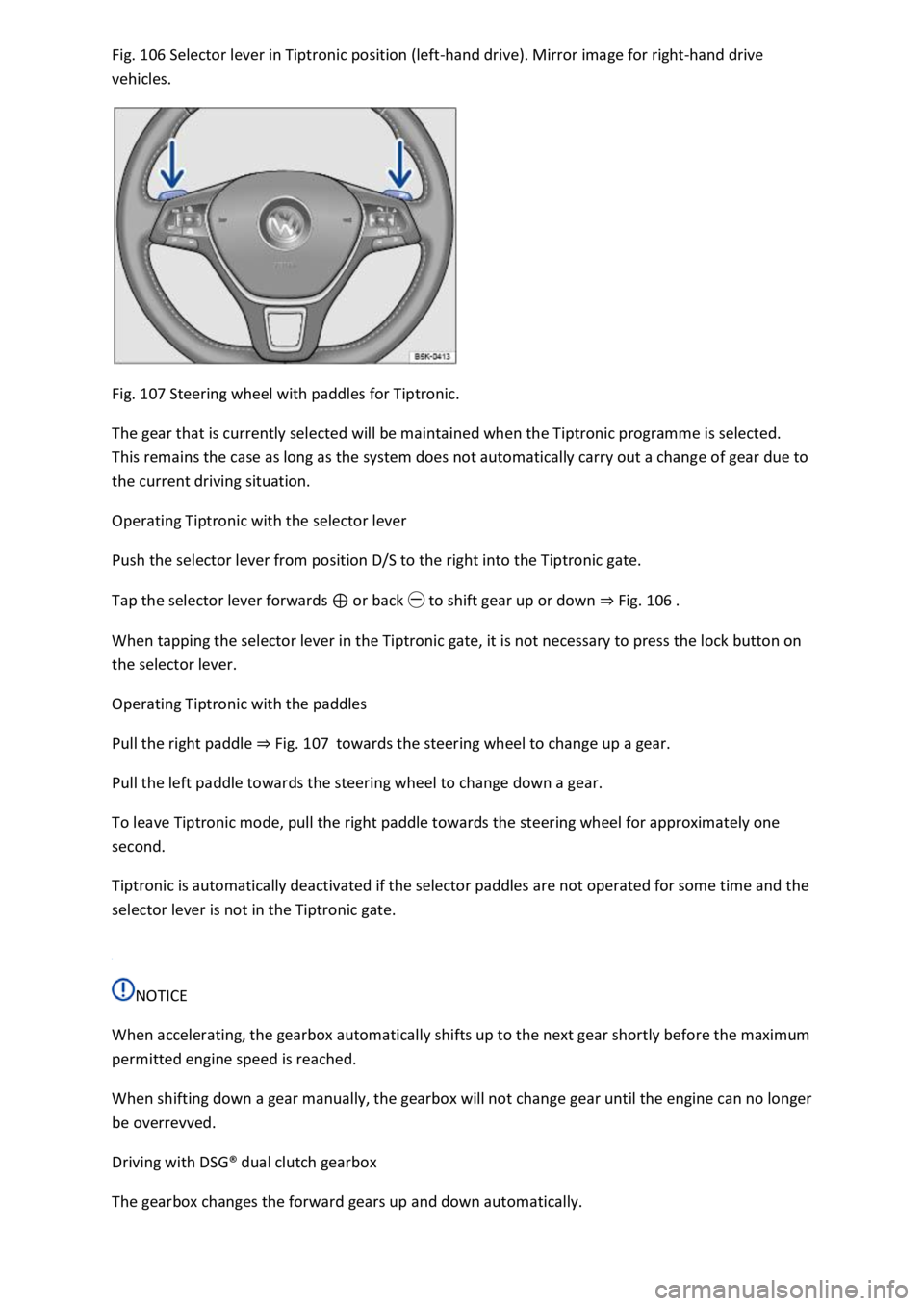
Fig. 106 Selector lever in Tiptronic position (left-hand drive). Mirror image for right-hand drive
vehicles.
Fig. 107 Steering wheel with paddles for Tiptronic.
The gear that is currently selected will be maintained when the Tiptronic programme is selected.
This remains the case as long as the system does not automatically carry out a change of gear due to
the current driving situation.
Operating Tiptronic with the selector lever
Push the selector lever from position D/S to the right into the Tiptronic gate.
Tap the selector lever forwards ⊕ or back ㊀ to shift gear up or down ⇒ Fig. 106 .
When tapping the selector lever in the Tiptronic gate, it is not necessary to press the lock button on
the selector lever.
Operating Tiptronic with the paddles
Pull the right paddle ⇒ Fig. 107 towards the steering wheel to change up a gear.
Pull the left paddle towards the steering wheel to change down a gear.
To leave Tiptronic mode, pull the right paddle towards the steering wheel for approximately one
second.
Tiptronic is automatically deactivated if the selector paddles are not operated for some time and the
selector lever is not in the Tiptronic gate.
NOTICE
When accelerating, the gearbox automatically shifts up to the next gear shortly before the maximum
permitted engine speed is reached.
When shifting down a gear manually, the gearbox will not change gear until the engine can no longer
be overrevved.
Driving with DSG® dual clutch gearbox
The gearbox changes the forward gears up and down automatically.
Page 214 of 502
The indicator lamp lights up yellow.
Go to a qualified workshop and have the system checked.
Fault in Hill Start Assist
Go to a qualified workshop and have the system checked.
Offroad display
The offroad display contains digital instruments that show additional information about the vehicle
and its surroundings. This makes it possible to assess the current driving situation more precisely.
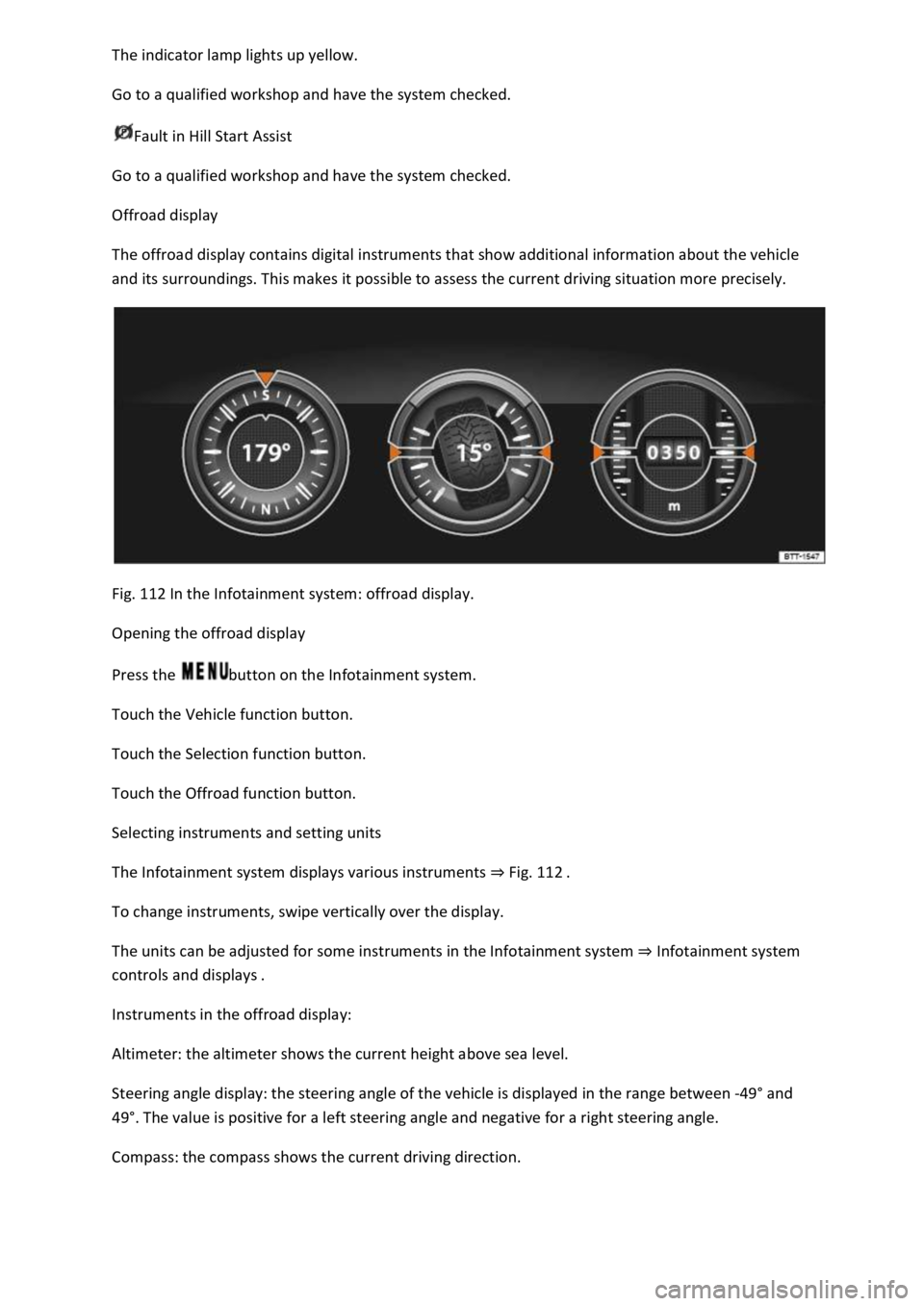
Fig. 112 In the Infotainment system: offroad display.
Opening the offroad display
Press the button on the Infotainment system.
Touch the Vehicle function button.
Touch the Selection function button.
Touch the Offroad function button.
Selecting instruments and setting units
The Infotainment system displays various instruments ⇒ Fig. 112 .
To change instruments, swipe vertically over the display.
The units can be adjusted for some instruments in the Infotainment system ⇒ Infotainment system
controls and displays .
Instruments in the offroad display:
Altimeter: the altimeter shows the current height above sea level.
Steering angle display: the steering angle of the vehicle is displayed in the range between -49° and
49°. The value is positive for a left steering angle and negative for a right steering angle.
Compass: the compass shows the current driving direction.
Page 232 of 502

⇒ Operating the speed limiter with the multifunction steering wheel
⇒ Troubleshooting
The speed limiter helps you to stop exceeding a stored speed.
Speed range
The speed limiter is available when driving forwards at speeds from approx. 30 km/h (20 mph).
Driving with the speed limiter
You can interrupt the speed limiter at any time by depressing the accelerator all the way down past
the point of resistance. As soon as the stored speed is exceeded, the green indicator lamp will
flash and an acoustic warning may sound. The speed remains stored in the memory.
The speed limiter function switches back on automatically as soon as the speed drops back below
the stored speed.
Displays
When the speed limiter is switched on, the instrument cluster display shows the stored speed and
the status of the speed limiter:
Shown small or grey: speed limiter not active.Shown large or white: speed limiter active.
Driving downhill
Driving downhill may cause the set speed to be exceeded.
Apply the foot brake to slow the vehicle down, and change down a gear as required.
WARNING
Always switch off the speed limiter after use to avoid unintentional speed control.
The speed limiter does not relieve the driver of their responsibility for the speed of the vehicle. Do
not drive at full throttle if this is not required.
Use of the speed limiter in adverse weather conditions is dangerous and can cause serious injury,
e.g. through aquaplaning, snow, ice, or leaves. Use the speed limiter only when the road and
weather conditions allow it to be used safely.
The speed limiter cannot limit the vehicle speed when travelling downhill. The vehicle speed can
increase under its own weight. Select a lower gear or use the foot brake to slow the vehicle down.
Operating the speed limiter with the multifunction steering wheel
Page 236 of 502

First read and observe the introductoryinformation and safety warnings⇒Introduction
Overtaking
If you indicate left (left-hand traffic: indicate right) to overtake, ACC will accelerate the vehicle and
reduce the distance from the vehicle in front. Your set speed will not be exceeded.
If ACC does not detect any vehicle in front after you have changed lane, ACC will accelerate the
vehicle up to the set speed.
Stop-and-go traffic
ACC can brake vehicles with DSG® dual clutch gearbox to a standstill and hold them stationary. ACC
remains active and the instrument cluster display shows ACC ready for a few seconds. During this
time the vehicle will move off again automatically as soon as the vehicle in front moves off
(depending on the vehicle equipment level and not available in all countries).
Press the button.
Press the button or briefly press the accelerator.
The vehicle is stationary for longer than approximately three minutes.
A vehicle door is opened.
The ignition is switched off.
Avoiding overtaking on the right (left-hand traffic: overtaking on the left)
If ACC detects a slower vehicle in the left-hand lane (left-hand traffic: in the right-hand lane), ACC
will brake the vehicle gently within the system limits and therefore prevent a prohibited overtaking
manoeuvre ⇒ Fig. 118 . The function is active from speeds of around 80 km/h (50 mph), but is not
available in all countries.
WARNING
If the message ACC ready is shown on the instrument cluster display and the vehicle in front moves
off, your vehicle will move off automatically. In some cases the radar sensor may be unable to detect
obstacles that are located in the vehicle's path. This can result in serious injury and accidents.
Always check the road ahead before moving off and brake the vehicle if necessary.
Limits of ACC
Page 238 of 502
If the radar sensor is exposed to environmental conditions that impair sensor functioning, the
system may detect this only after a certain time. For this reason, possible functional restrictions may
be displayed only after a delay at the start of the journey and when driving ⇒ .
Objects that cannot be detected
Persons.
Animals.
Stationary vehicles.
Crossing or oncoming vehicles.
Other stationary obstacles.
If a stationary vehicle is hidden behind a vehicle that has been detected by the adaptive cruise
control and this vehicle turns off the road or changes lane, the ACC will not react to the stationary
vehicle ⇒ Fig. 120 .
Bends
The radar sensor always measures straight ahead. For this reason, vehicles may be incorrectly
detected or vehicles driving ahead not detected in tight bends ⇒ Fig. 119 .
Vehicles outside the sensor range
Vehicles that are driving outside the sensor range in close proximity to your vehicle, e.g. motorbikes
⇒ Fig. 119 .
Vehicles that change into your lane directly in front of your vehicle ⇒ Fig. 120 .
Vehicles with bodies or attachments that project beyond the vehicle.
WARNING
If you use ACC in the above situations, this can result in accidents and serious injuries as well as
violation of legal regulations.
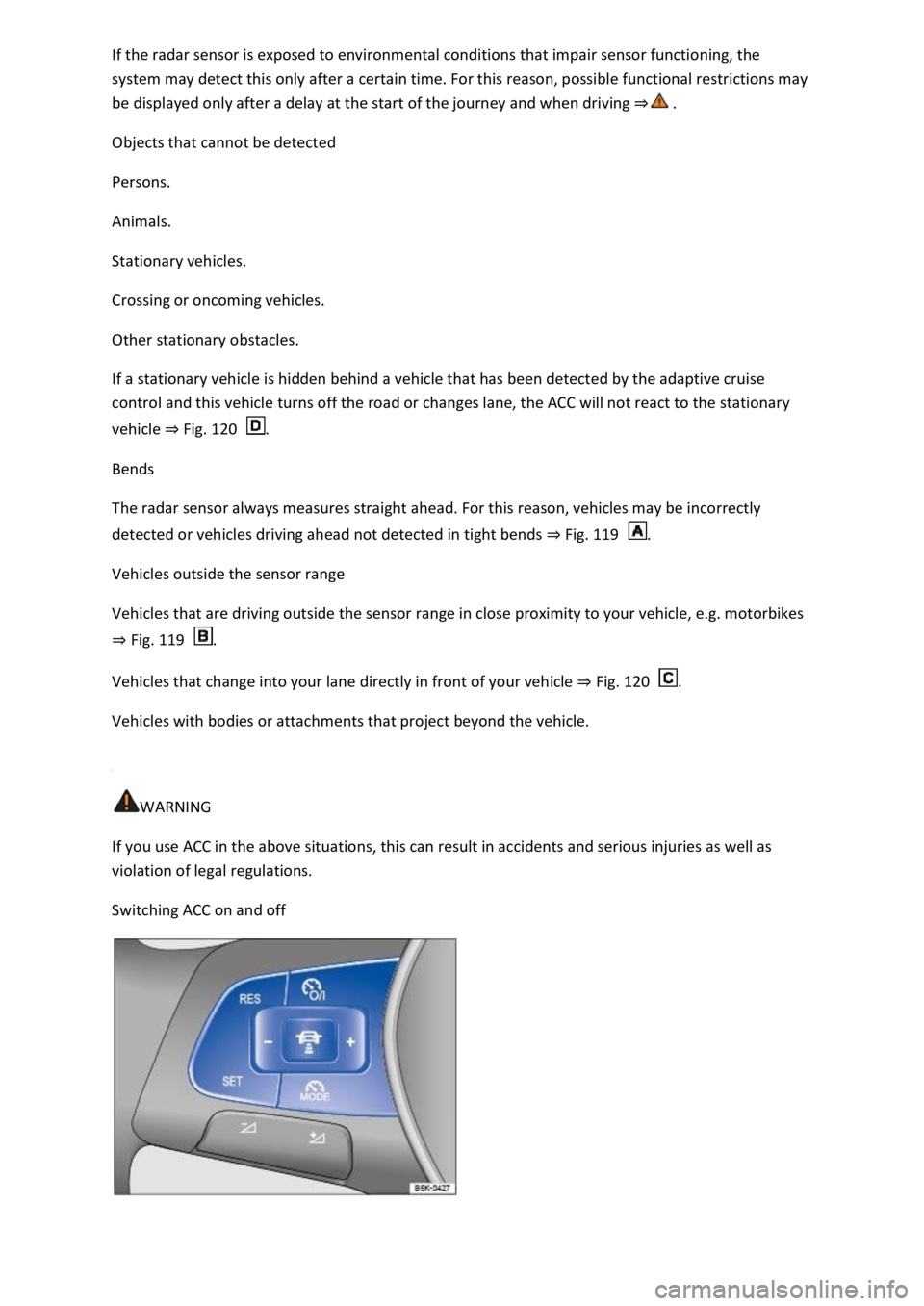
Switching ACC on and off
Page 243 of 502

The brake pedal will feel harder during an automatic braking operation.
Radar sensor
Front Assist detects driving situations by means of the radar sensor at the front of the vehicle
⇒ Front view . The radar sensor has a range of up to approximately 120 m.
Functions included in the system
The City Emergency Braking System and Pedestrian Monitoring (depending on vehicle equipment)
are part of Front Assist and are automatically active when Front Assist is switched on.
WARNING
The intelligent technology used in Front Assist cannot overcome the laws of physics, and functions
only within the limits of the system. Never let the extra convenience afforded by Front Assist tempt
you into taking safety risks when driving. The driver is always responsible for braking in time.
If Front Assist issues a warning, brake your vehicle immediately depending on the traffic situation or
avoid the obstacle.
Adapt your speed and distance from the vehicles ahead to suit visibility, weather, road and traffic
conditions.
Front Assist cannot prevent accidents and serious injuries on its own.
Front Assist can issue unnecessary warnings and carry out unwanted braking interventions in certain
complex driving situations, e.g. at traffic islands.
Front Assist can issue unnecessary warnings and carry out unwanted braking interventions when its
function is impaired, e.g. if the radar sensor is dirty or its position has been changed.
Front Assist without Pedestrian Monitoring does not react to persons. In addition, the system does
not react to animals or to vehicles that are crossing or approaching in the same lane.
If you are unsure whether your vehicle possesses Pedestrian Monitoring, please enquire about this
at a qualified workshop before starting your journey.
Be prepared to take over control of the vehicle yourself at all times.
Warning levels and braking intervention
First read and observe the introductoryinformation and safety warnings⇒Introduction
Distance warning
The system detects when safety is endangered by driving too close to the vehicle in front. The
warning lamp lights up. Increase the distance.
Speed range: around 65 km/h (40 mph) to 250 km/h (155 mph).
Advance warning
Page 246 of 502
WARNING
Failure to switch off Front Assist in the situations mentioned can result in accidents and serious
injuries.
Pedestrian Monitoring
First read and observe the introductoryinformation and safety warnings⇒Introduction
Pedestrian Monitoring can help to avoid accidents with pedestrians crossing the vehicle's path or to
mitigate the consequences of an accident.
The system gives a warning when there is a risk of collision, prepares the vehicle for emergency
braking, helps to brake the vehicle or performs an automatic brake intervention. In the event of an
advance warning, the warning lamp lights up in the instrument cluster
When Front Assist is switched on, Pedestrian Monitoring is active as part of Front Assist in a vehicle
speed range from approx. 5 km/h (3 mph) to 65 km/h (40 mph).
Pedestrian Monitoring is not available in all countries, depending on the vehicle equipment level.
WARNING
The intelligent Pedestrian Monitoring technology cannot overcome the laws of physics, and
functions only within the limits of the system. Never let the extra convenience afforded by the
Pedestrian Monitoring system tempt you into taking any safety risks when driving. The driver is
always responsible for braking in time.
If Pedestrian Monitoring issues a warning, brake your vehicle immediately depending on the traffic
situation or avoid the pedestrian.
Pedestrian Monitoring cannot prevent accidents and serious injuries on its own.
Pedestrian Monitoring can issue unnecessary warnings and carry out unwanted braking
interventions in complex driving situations, e.g. on a main road that turns sharply.
Pedestrian Monitoring can issue unnecessary warnings and carry out unwanted braking
interventions when its function is impaired, e.g. if the radar sensor is covered or its position has
been changed.
Be prepared to take over control of the vehicle yourself at all times.
Operating the area monitoring system (Front Assist)
First read and observe the introductoryinformation and safety warnings⇒Introduction
Front Assist and the advance warning (in some countries) are automatically switched on when you
switch on the ignition.
However, the system is not available or its functions are restricted for a period of around 30 seconds
(also longer, depending on the driving situation).