change wheel VOLKSWAGEN T-ROC 2021 Owner´s Manual
[x] Cancel search | Manufacturer: VOLKSWAGEN, Model Year: 2021, Model line: T-ROC, Model: VOLKSWAGEN T-ROC 2021Pages: 502, PDF Size: 9.42 MB
Page 255 of 502
Spot Monitor tempt you into taking any safety risks when driving. Careless or unintentional use of
the Blind Spot Monitor can cause accidents and serious injuries. The system is not a substitute for
the full concentration of the driver.
Adapt your speed and distance from the vehicles ahead to suit visibility, weather, road and traffic
conditions.
Your hands should always be on the steering wheel so that you can steer at any time.
Pay attention to the indicator lamps in the exterior mirrors and in the instrument cluster display and
respond according to the commands.
Always pay close attention to the surroundings of the vehicle.
Never use the Blind Spot Monitor if the radar sensors are dirty, covered or damaged. These
conditions can impair the proper functioning of the system.
It may be hard to see the indicator lamp in the exterior mirror in direct sunlight.
Some settings can be saved in the user accounts of the personalisation function and can therefore
change automatically when the user account is changed ⇒ Personalisation .
Driving with the Blind Spot Monitor
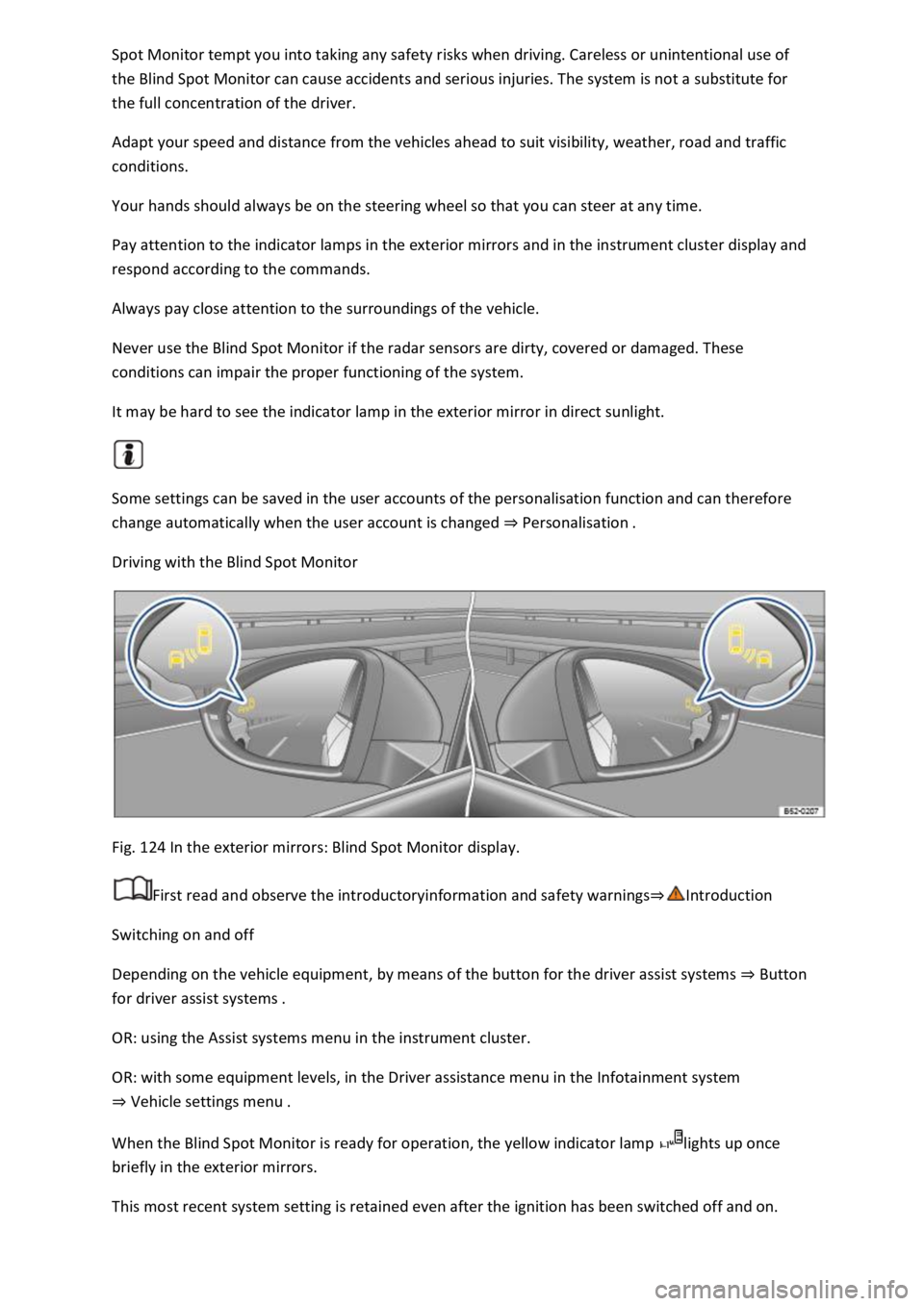
Fig. 124 In the exterior mirrors: Blind Spot Monitor display.
First read and observe the introductoryinformation and safety warnings⇒Introduction
Switching on and off
Depending on the vehicle equipment, by means of the button for the driver assist systems ⇒ Button
for driver assist systems .
OR: using the Assist systems menu in the instrument cluster.
OR: with some equipment levels, in the Driver assistance menu in the Infotainment system
⇒ Vehicle settings menu .
When the Blind Spot Monitor is ready for operation, the yellow indicator lamp lights up once
briefly in the exterior mirrors.
This most recent system setting is retained even after the ignition has been switched off and on.
Page 257 of 502

System fault
Clean the radar sensors or remove stickers or accessories from the radar sensors, mirrors and
bumper ⇒ Caring for and cleaning the vehicle exterior .
Check whether any damage is visible.
The system is not responding as expected
The radar sensors are dirty. The sensor visibility may be impaired by dirt and snow or also residue
from cleaning agents or coatings ⇒ Caring for and cleaning the vehicle exterior .
The prerequisites for system operation must be met ⇒ System limits .
The radar sensors are covered by water.
The vehicle is damaged in the area of the radar sensors, e.g. caused by parking collisions.
The detection ranges of the radar sensors are blocked by add-on parts, e.g. bicycle carriers.
Changes have been made to the paintwork in the area of the radar sensors or structural
modifications have been made, e.g. on the vehicle front end or the running gear.
Only Volkswagen-approved vehicle paints may be used on the rear bumper. Other vehicle paints can
restrict the function of the system or cause faults.
Tinting foils have been retrofitted on the side windows.
Parking and manoeuvring
Parking
Stopping and parking the vehicle
The actions should be carried out only in the given order:
Stop the vehicle on a suitable surface ⇒ .
Depress and hold the brake pedal until the engine has stopped.
Switch on the electronic parking brake ⇒ Electronic parking brake . The electronic parking brake is
switched on when the indicator lamp in the button ⇒ Fig. 125 lights up yellow and the indicator
lamp in the instrument cluster display lights up red.
On vehicles with a manual gearbox, either fully depress or disengage the clutch.
With an automatic gearbox, move the selector lever to position P.
Switch off the engine and take your foot off the brake pedal.
Turn the steering wheel slightly if necessary to engage the steering lock mechanism.
With a manual gearbox, select first gear for flat ground and uphill gradients, or reverse gear for
downhill gradients, and then release the clutch.
Please ensure that all occupants, in particular children, leave the vehicle.
Page 270 of 502

The detection range of the camera is blocked by add-on parts, e.g. bicycle carriers.
Changes have been made to the paintwork in the area of the camera or structural modifications
have been made, e.g. on the running gear.
No camera visibility, error message, system switches itself off
Clean the camera or remove stickers or accessories from the camera ⇒ Caring for and cleaning the
vehicle exterior .
Check whether any damage is visible.
Possible solution
Switch off the system temporarily.
Check whether any of the causes described apply.
You can switch the system back on again once you have rectified the cause of the problem.
If the system still fails to respond as expected, have the system checked by a qualified workshop.
Park Assist
Introduction
This chapter contains information on the followingsubjects:
⇒ Prerequisites
⇒ Looking for a parking space
⇒ Driving into a parking space
⇒ Driving out of a parking space
⇒ Troubleshooting
Park Assist shows parking spaces which are suitable for parking and assists the driver when driving
into and out of parking spaces.
Park Assist is an extension of Park Distance Control ⇒ Park Distance Control .
Park Assist automatically steers the vehicle. The driver must control the accelerator, gear changes
and brake ⇒ Safety notes on the parking systems .
WARNING
Fast steering wheel movements can cause serious injury.
During the manoeuvring operation, do not reach for the steering wheel until prompted to do so by
the system.
Exception: if a dangerous situation occurs, intervene and take over the steering.
Page 273 of 502
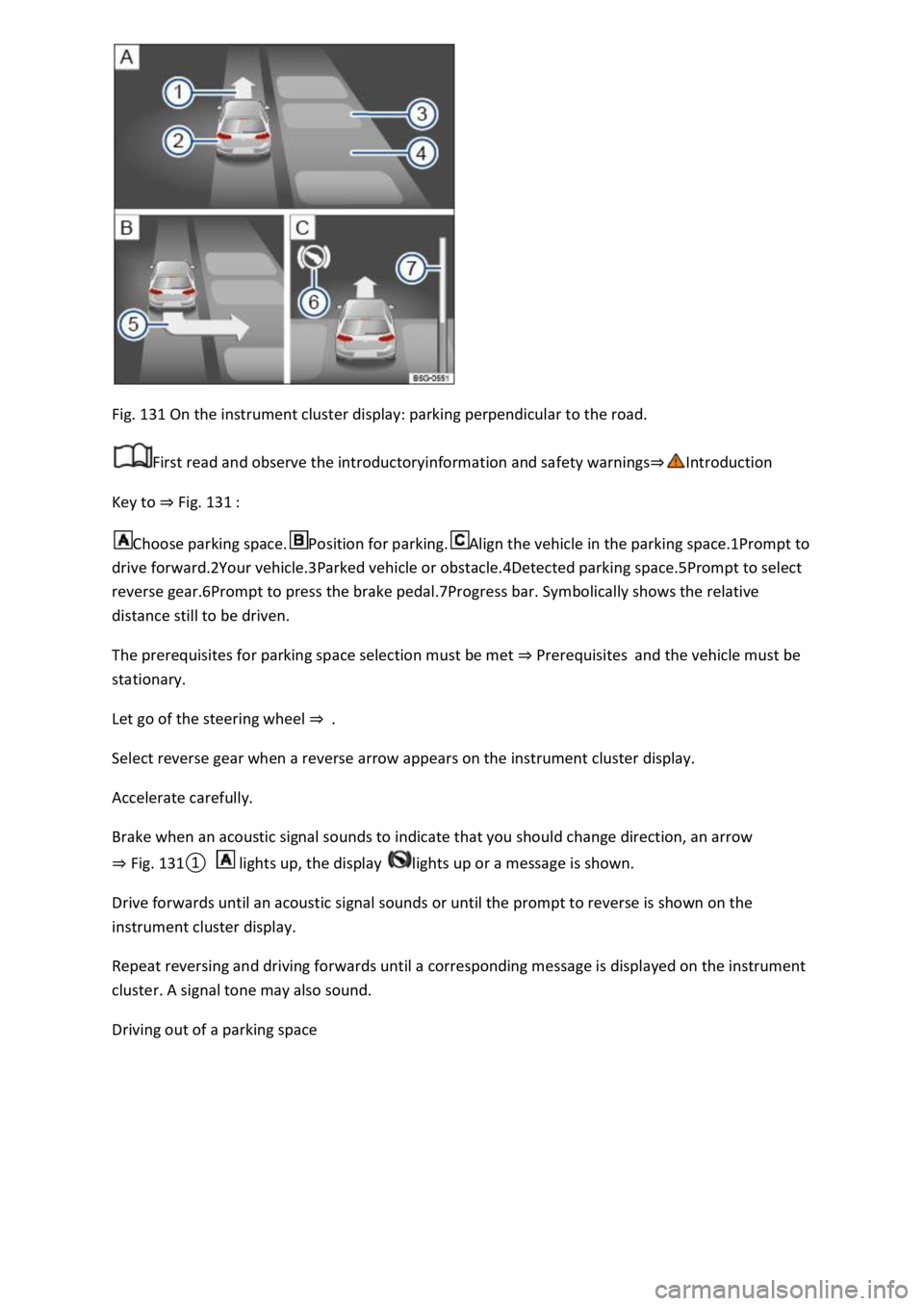
Fig. 131 On the instrument cluster display: parking perpendicular to the road.
First read and observe the introductoryinformation and safety warnings⇒Introduction
Key to ⇒ Fig. 131 :
Choose parking space.Position for parking.Align the vehicle in the parking space.1Prompt to
drive forward.2Your vehicle.3Parked vehicle or obstacle.4Detected parking space.5Prompt to select
reverse gear.6Prompt to press the brake pedal.7Progress bar. Symbolically shows the relative
distance still to be driven.
The prerequisites for parking space selection must be met ⇒ Prerequisites and the vehicle must be
stationary.
Let go of the steering wheel ⇒ .
Select reverse gear when a reverse arrow appears on the instrument cluster display.
Accelerate carefully.
Brake when an acoustic signal sounds to indicate that you should change direction, an arrow
⇒ Fig. 131① lights up, the display lights up or a message is shown.
Drive forwards until an acoustic signal sounds or until the prompt to reverse is shown on the
instrument cluster display.
Repeat reversing and driving forwards until a corresponding message is displayed on the instrument
cluster. A signal tone may also sound.
Driving out of a parking space
Page 275 of 502

Troubleshooting
First read and observe the introductoryinformation and safety warnings⇒Introduction
The system is not responding as expected
The sensors are dirty ⇒ Caring for and cleaning the vehicle exterior . The sensor visibility may be
impaired by dirt and snow or also residue from cleaning agents or coatings.
The system requirements must be met ⇒ Prerequisites .
The sensors are covered by water.
The vehicle is damaged in the area of the sensors, e.g. caused by parking collisions.
The detection ranges of the sensors are blocked by add-on parts, e.g. bicycle carriers.
Changes have been made to the paintwork in the area of the sensors or structural modifications
have been made, e.g. on the vehicle front end or the running gear.
The ultrasound signal is subject to interference from external noise sources, e.g. rough tarmac
surface or cobblestones.
No sensor visibility, error message, system switches itself off
Park Assist is switched off if a sensor fails.
Clean the sensors or remove stickers or accessories from the sensors and cameras ⇒ Caring for and
cleaning the vehicle exterior .
Check whether any damage is visible.
Possible solution
Switch off the system temporarily.
Check whether any of the causes described apply.
You can switch the system back on again once you have rectified the cause of the problem.
If the system still fails to respond as expected, have the system checked by a qualified workshop.
Automatic cancellation of driving in/out of a parking space
Park Assist cancels parking or driving out of a parking space in the following situations:
The button is pressed.
The driver intervenes using the steering wheel.
The driver door is opened.
The parking operation is not completed within around six minutes.
There is a system fault.
TCS is switched off or is taking corrective action.
Page 280 of 502

When accelerating on a slippery surface, for example on ice and snow, accelerate carefully. The
wheels can spin even when brake support systems are active, and this can lead to a loss of control of
the vehicle.
WARNING
The effectiveness of ESC can be reduced considerably if other components and systems which affect
driving dynamics are not serviced properly or are not functioning properly. This also applies, but not
exclusively, to the brakes, tyres and other named systems.
Please always bear in mind that modifications and changes to the vehicle can affect the way brake
support systems operate.
Alterations to the suspension or the use of non-approved wheel and tyre combinations can affect
the function of brake support systems and reduce their effectiveness.
Suitable tyres support the effectiveness of ESC.
WARNING
Driving without the brake servo can considerably increase the braking distance and thus cause
accidents and serious injuries.
Never switch the engine or ignition off while the vehicle is in motion.
If the brake servo does not function or the vehicle is being towed, the brake pedal will have to be
depressed more forcefully as the braking distance will be increased due to the lack of assistance for
the brake system.
Switching the TCS on and off
Switch off the traction control system (TCS) if the vehicle does not have sufficient traction:
When driving in deep snow or on loose surfaces.
When rocking the vehicle free if it is stuck.
Then switch on TCS again.
Switching TCS on and off
TCS can be switched off and on in the Infotainment system ⇒ Infotainment system controls and
displays .
When the TCS is switched off, the yellow indicator lamp lights up on the instrument cluster
display.
As soon as the TCS starts regulating, the indicator lamp flashes yellow.
Troubleshooting
Page 292 of 502

Installing the subwoofer (type 1)
Place the subwoofer carefully in the rim base. The tip of the arrow symbol FRONT on the subwoofer
must face forwards.
Plug in connector ⇒ Fig. 142② until it audibly engages.
Screw the handwheel ⇒ Fig. 142③ onto the threaded pin in the opposite direction to the arrow
until the subwoofer is properly secured.
Place the variable luggage compartment floor on the floor covering.
Installing the subwoofer (type 2)
Place the subwoofer carefully in the rim base. The tip of the arrow symbol FRONT ⇒ Fig. 143③ on
the subwoofer must face forwards.
Plug in connector ⇒ Fig. 143② until the catch audibly engages.
Screw the handwheel ⇒ Fig. 143① onto the threaded pin in the opposite direction to the arrow
until the subwoofer is properly secured.
Place the variable luggage compartment floor on the floor covering.
Mobile online services
Volkswagen Car-Net
Introduction
This chapter contains information on the followingsubjects:
⇒ Legal requirements
⇒ Deactivating Car-Net services
⇒ Service impairment or interruption
⇒ Apps
Volkswagen Car-Net is not available in all countries and is subject to country-specific limitations on
duration of use.
Volkswagen Car-Net allows you to communicate with your vehicle in order to exchange data,
request information or control functions.
In order to be able to use Volkswagen Car-Net, the vehicle has to be ordered with Car-Net and
factory-fitted with the system. Depending on the service or service portfolio, Volkswagen Car-Net
can be operated via the factory-fitted Infotainment system, via a Car-Net portal on the Internet or
using a mobile device.
Information about the Volkswagen Car-Net services, applications, availability, compatible mobile
devices and service portfolio, as well as service descriptions, are available on the Volkswagen
website:
In Europe and Japan: www.volkswagen.com/car-net
Page 317 of 502

If you park the trailer using the support wheel or other trailer supports, the trailer must be
unhitched from the vehicle. The vehicle could move up and down if the load changes or if there is
damage to the tyres, for example. If this happens, a great deal of force will be exerted on the towing
bracket and trailer, which could lead to damage to the vehicle and trailer.
If there is a fault in the vehicle or trailer electrical systems or in the anti-theft alarm, have the vehicle
checked by a qualified workshop.
If the 12-volt vehicle battery charge level is low, the electrical connection to the trailer will be
interrupted automatically.
Loading the trailer
First read and observe the introductoryinformation and safety warnings⇒Introduction
Trailer weight and drawbar load
The trailer weight is the weight that the vehicle can pull ⇒ .
The drawbar load is the load that is exerted vertically from above onto the ball head of the towing
bracket.
The figures for trailer weights and drawbar weights that are given on the data plate of the towing
bracket are for certification purposes only. The correct values for your specific model, which may be
lower than these figures, are given in the vehicle registration documents. All data in the official
vehicle documents take precedence over these data.
The maximum permitted drawbar load exerted by the trailer drawbar on the ball head of the towing
bracket must not exceed 80 kg.
In the interest of driving safety, Volkswagen recommends that you always use the maximum
drawbar load. The handling of the vehicle combination will be impaired if the drawbar load is too
low.
The drawbar load increases the weight on the rear axle and reduces the maximum payload of the
vehicle as a result.
Gross combination weight
The gross combination weight is made up of the actual weight of the loaded vehicle and of the
loaded trailer.
In some countries, trailers are divided into different classes. Volkswagen recommends that you
contact a qualified workshop to find out about suitable trailers.
Loading the trailer
The weight of the load should be distributed evenly. The maximum permitted drawbar load should
be utilised. Do not place the load only at the front or the rear of the trailer:
Page 356 of 502

⇒ Tow-starting
⇒ Towing
⇒ Fitting the rear towing eye
⇒ Fitting the front towing eye
Towing requires some experience, especially when using a tow rope. Both drivers should be familiar
with the technique required for towing. Inexperienced drivers should not attempt to tow.
Ensure that no excessive pulling forces occur and take care to avoid jerking movements. When
towing offroad, there is always a risk of overloading the anchorage points.
Observe any legal requirements when towing or tow-starting.
Tow-starting
Tow-starting describes the procedure for starting the vehicle by moving it using another towing
vehicle.
The vehicle can be tow-started with a tow-bar or a tow-rope.
Towing
Towing is where a vehicle that cannot be driven is pulled with the aid of another vehicle.
The vehicle can be towed with a tow-bar or a tow-rope. When the engine is stopped, the gearbox is
not lubricated sufficiently at higher speeds and over long distances:
km/h (30 mph).
km.
Tow rope, tow bar
It is easier and safer to tow a vehicle with a tow bar. Use a tow rope only if you do not have a tow
bar.
The tow rope should be slightly elastic to reduce the strain on both vehicles. It is advisable to use a
tow rope made of synthetic fibre or similarly elastic material.
Towing with a tow truck
If your vehicle is to be raised on one axle for towing, this may only be done using the following axles
according to the gearbox/drive combination:
Front-wheel drive
Manual gearboxFront or rear axleAutomatic gearboxFront axle
WARNING
If a vehicle is being towed, the vehicle handling and braking efficiency will change significantly.
Page 392 of 502

⇒ Tyre
pressure . If the tyre pressure is too low, it is possible that the tyre temperature will increase to such
an extent that the tread peels off and the tyre bursts.
⇒ Tyre pressure .
eck the tyre pressure regularly when the tyres are cold. If necessary, adjust the tyre pressure in
the cold tyre to the recommended tyre pressure for the tyres installed on your vehicle ⇒ Tyre
pressure .
amage.
If the tyre pressure is too low, this will increase fuel consumption and tyre wear.
When new tyres are driven at high speeds for the first time, they can expand slightly and trigger a
one-off pressure warning.
Old tyres should be replaced only by tyres that have been approved by Volkswagen for the vehicle
type.
Do not rely solely on the tyre monitoring system. Check your tyres regularly to ensure that they are
properly inflated and have no signs of damage, such as punctures, cuts, cracks, and blisters. Remove
any objects that become embedded in the tyre tread but have not penetrated into the body of the
tyre itself.
Tyre Pressure Loss Indicator
First read and observe the introductoryinformation and safety warnings⇒Introduction
Functional description
The Tyre Pressure Loss Indicator uses data from the ABS sensors and other functions to compare the
speed of rotation and the rolling circumference of the individual wheels.
The rolling circumference can change: