emergency VOLKSWAGEN T-ROC 2021 Owner´s Manual
[x] Cancel search | Manufacturer: VOLKSWAGEN, Model Year: 2021, Model line: T-ROC, Model: VOLKSWAGEN T-ROC 2021Pages: 502, PDF Size: 9.42 MB
Page 254 of 502
If the radar sensor for the Adaptive Cruise Control (ACC) or the camera for the lane keeping system
is covered or moved, Emergency Assist may make unwanted braking or steering manoeuvres.
Emergency Assist does not react to persons, animals or vehicles crossing or approaching in the same
lane.
WARNING
If Emergency Assist is triggered unnecessarily, this can result in accidents and serious injuries.
If there is a malfunction in the Emergency Assist system, switch off the lane keeping system (Lane
Assist) ⇒ Driving with the lane keeping system . This will also switch off Emergency Assist.
Go to a qualified workshop and have the system checked. Volkswagen recommends using a
Volkswagen dealership for this purpose.
Blind Spot Monitor
Introduction
This chapter contains information on the followingsubjects:
⇒ Driving with the Blind Spot Monitor
⇒ Troubleshooting
Radar sensors monitor the area behind the vehicle. The system measures the distance and
difference in speed in relation to other vehicles and uses visual signals in the exterior mirrors to
inform the driver.
System limits
Use the Blind Spot Monitor only on surfaced roads.
The Blind Spot Monitor may not always interpret the traffic correctly in the following situations:
In tight bends.
When driving in the middle of two lanes.
When road lanes are of varying width.
At road crests.
In poor weather conditions.
Where there are special roadside structures, e.g. high or offset crash barriers.
WARNING
The intelligent technology used in the Blind Spot Monitor cannot overcome the laws of physics, and
functions only within the limits of the system. Never let the extra convenience afforded by the Blind
Page 258 of 502

Take all vehicle keys with you when you leave the vehicle.
Lock the vehicle.
Additional points to note on uphill and downhill gradients
Before switching off the engine, turn the steering wheel so that the front wheels will roll against the
kerb if the parked vehicle starts to move.
When facing downhill, turn the wheels so that they face the kerb.
When facing uphill, turn the wheels so that they face the centre of the road.
WARNING
The components of the exhaust system become very hot. This can cause fires and serious injuries.
Never park the vehicle where parts of the exhaust system can come into contact with inflammable
material underneath the vehicle, e.g. undergrowth, leaves, dry grass, spilt fuel, oil etc.
WARNING
The vehicle may roll away if you leave and park the vehicle incorrectly. This can cause accidents and
serious injuries.
Ensure that the electronic parking brake is switched on before you leave the vehicle and the
indicator lamp in the instrument cluster lights up red after you switch off the ignition.
Never remove the vehicle key from the ignition if the vehicle is in motion. The steering lock may be
activated and you will no longer be able to steer or control the vehicle.
Never leave children or people requiring assistance alone in the vehicle. They could switch off the
electronic parking brake, or move the selector lever or gearshift lever, and thus set the vehicle in
motion.
Always take all vehicle keys with you every time you leave the vehicle. The engine can be started and
electrical equipment such as the window controls can be operated. This can cause serious injury.
Never leave children or people requiring assistance alone in the vehicle. They could become trapped
in the vehicle in an emergency and may not be able to get themselves to safety. For example, locked
vehicles may be subjected to very high or very low temperatures depending on the season. This can
cause serious injuries and illness or fatalities, especially in the case of small children.
NOTICE
Objects that protrude from the ground can damage the bumper and other components when
parking the vehicle or driving out of a parking space. Always take care when driving into parking
spaces with high kerbs or fixed boundaries. Stop before the wheels touch the fixed boundaries or
kerbs.
Page 259 of 502
Low-lying vehicle components such as the bumper, spoiler and parts of the running gear, engine or
exhaust system could be damaged. Drive carefully through dips in the road and over drive entrances,
ramps, kerbstones and other objects.
Please adhere to relevant legislation when stopping and parking your vehicle.
Electronic parking brake
Operating the electronic parking brake
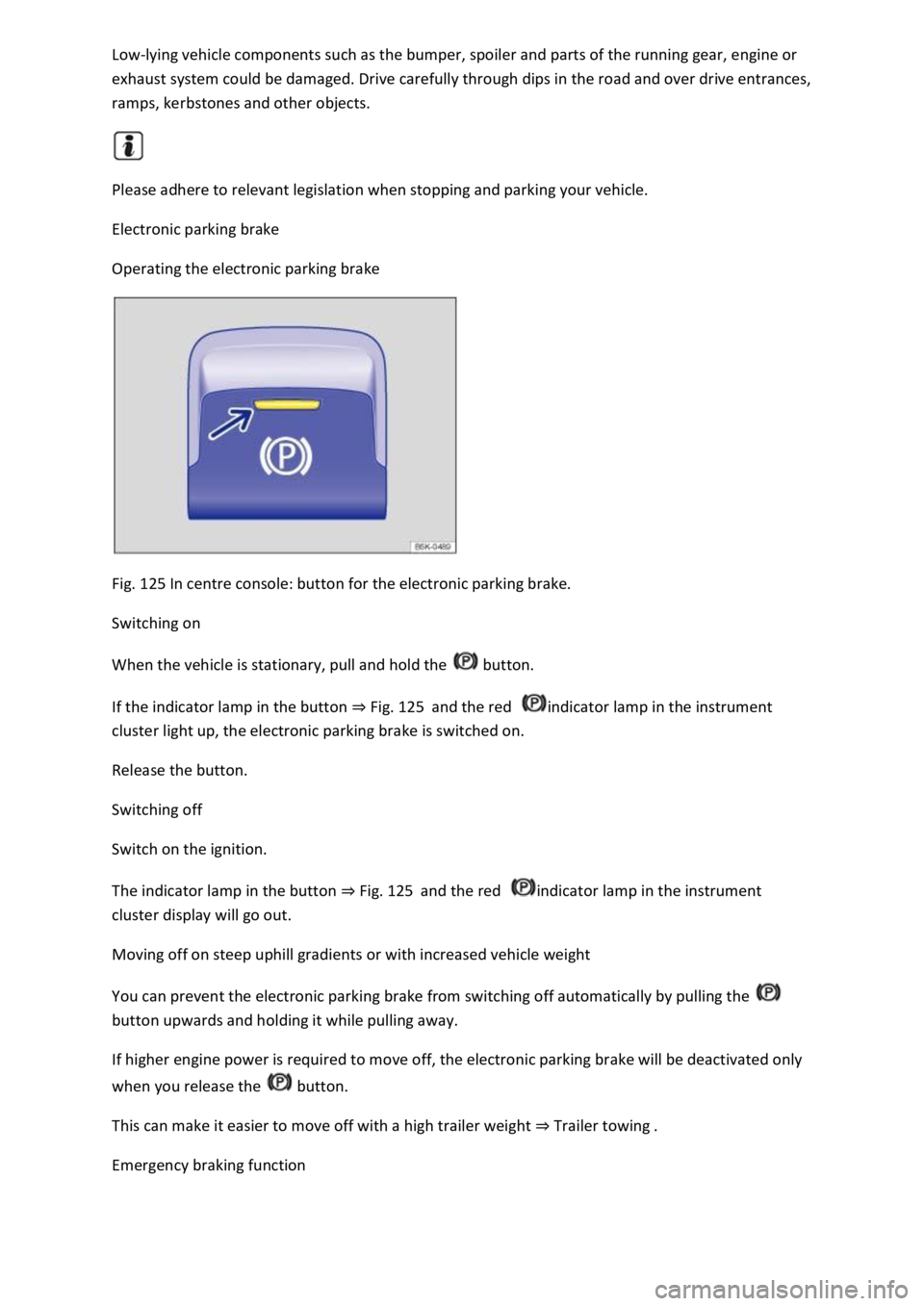
Fig. 125 In centre console: button for the electronic parking brake.
Switching on
When the vehicle is stationary, pull and hold the button.
If the indicator lamp in the button ⇒ Fig. 125 and the red indicator lamp in the instrument
cluster light up, the electronic parking brake is switched on.
Release the button.
Switching off
Switch on the ignition.
The indicator lamp in the button ⇒ Fig. 125 and the red indicator lamp in the instrument
cluster display will go out.
Moving off on steep uphill gradients or with increased vehicle weight
You can prevent the electronic parking brake from switching off automatically by pulling the
button upwards and holding it while pulling away.
If higher engine power is required to move off, the electronic parking brake will be deactivated only
when you release the button.
This can make it easier to move off with a high trailer weight ⇒ Trailer towing .
Emergency braking function
Page 260 of 502

The emergency braking function should be used only in those situations where the vehicle cannot be
stopped using the foot brake ⇒ !
Pull the button. The vehicle brakes hard. A signal tone can be heard at the same time.
WARNING
Incorrect use of the electronic parking brake can cause accidents and serious injuries.
Never use the electronic parking brake to brake the vehicle, except in emergencies. The braking
distance is considerably longer as only the rear wheels are braked. Always use the foot brake.
WARNING
Failing to park the vehicle properly before leaving it may result in the vehicle rolling away. This can
cause accidents, serious injuries and damage to property.
Always park the vehicle in the specified order ⇒ Parking .
Ensure that the electronic parking brake is switched on before you leave the vehicle and the
indicator lamp in the instrument cluster lights up red after you switch off the ignition.
Troubleshooting
Fault in electronic parking brake
The indicator lamp lights up yellow. Go to a qualified workshop or a Volkswagen dealership.
Electronic parking brake does not switch off
The prerequisites for switch off are not met.
OR: the 12-volt vehicle battery is discharged.
Check whether all requirements for switching off the electronic parking brake are met ⇒ Switching
off .
Use jump leads ⇒ Jump starting the vehicle .
Noises from the electronic parking brake
You may hear noises when the electronic parking brake is switched on and off.
If the electronic parking brake has not been used for a long period, the system will carry out
occasional automatic and audible checks when the vehicle is parked.
Auto Hold function
Page 265 of 502

Park Distance Control is switched on automatically when reverse gear is engaged or if the vehicle
rolls backwards.
With some equipment levels, Park Distance Control can also be activated automatically when driving
forwards ⇒ Automatic activation when driving forwards (with some equipment levels) .
Switching off Park Distance Control
Press the button.
Park Distance Control is switched off automatically when the vehicle is driven forwards at a speed of
more than 10–15 km/h (6–9 mph.
OR: the selector lever is moved to P position.
Automatic activation when driving forwards (with some equipment levels)
Park Distance Control also switches itself on automatically if the vehicle approaches an obstacle in
the front area of the vehicle when driving forwards at a speed of less than 15 km/h (9 mph).
Automatic activation can be switched on in the Infotainment system.
Automatic activation takes place only once. Renewed automatic activation is possible under the
following conditions:
Press the button.
Switch the ignition off and then back on again.
Manoeuvre braking
If the vehicle is equipped with manoeuvre braking, the manoeuvre braking function triggers
emergency braking as soon as an obstacle is detected while reversing.
Depending on the vehicle equipment, the manoeuvre braking function can also trigger emergency
braking when driving forwards.
The manoeuvre braking function helps to prevent collisions. The vehicle speed must not be higher
than 10 km/h (6 mph). The manoeuvre braking function is activated or deactivated when Park
Distance Control is switched on or off. The manoeuvre braking function is inactive for five metres
after a braking operation in the same direction of travel. The manoeuvre braking function is ready
for braking again after changing gear or position. The same restrictions apply as to Park Distance
Control.
Manoeuvre braking is not active if Park Distance Control was activated automatically.
Touch the function button in the Infotainment system to switch manoeuvre braking on and off.
Display representation
Page 278 of 502

Never use the system where visibility is restricted or in unclear traffic situations, e.g. on extremely
busy roads or across several lanes.
Always pay attention to the area around the vehicle, since cyclists and pedestrians are often not
reliably detected, for example.
The Rear Traffic Alert will not always independently bring the vehicle to a complete stop.
Brake support systems
Information on brake support systems
The vehicle is fitted with brake support systems. The systems can support the driver in critical driving
or braking situations. Brake support systems cannot overcome the limits of physics and cannot
always keep the vehicle under control in every single critical driving or braking situation. The driver is
responsible for driving safety ⇒ .
Driving with brake support systems
The brake support systems work when the engine is running. They do not need to be operated
separately.
The brake pedal may pulsate or noises may occur while the brake support systems are regulating.
Continue to apply the necessary amount of brake pressure. Apply the necessary pressure to the
brake pedal consistently. If necessary, steer the vehicle while the brake pedal is depressed.
Electronic Stability Control (ESC)
ESC helps to reduce the risk of skidding and to improve driving stability in certain driving situations
⇒ .
ESC is always switched on.
Traction control system (TCS)
The TCS reduces the drive output if wheelspin occurs and adapts the drive output to suit road
surface conditions ⇒ Troubleshooting . The TCS makes it easier to pull away, accelerate and drive up
hills.
With some equipment levels, the TCS can be switched off in exceptional circumstances ⇒ Switching
the TCS on and off .
Anti-lock brake system (ABS)
The anti-lock brake system can prevent the wheels from locking when the brakes are applied up until
the point where the vehicle is nearly stationary and assists the driver in steering the vehicle and
keeping it under control ⇒ Troubleshooting .
Brake assist system
The brake assist system can help to reduce the stopping distance. The brake assist system reinforces
the braking force when the driver depresses the brake pedal quickly in an emergency situation.
If you reduce the pressure on the brake pedal, the brake assist system will switch off the brake
servo.
Page 295 of 502
absence of the ⇒ Fig. 144 symbol in the vehicle does not mean that the control unit is not
transmitting the current position or speed of the vehicle.
Personal data
Volkswagen collects, processes and uses the user's personal data in accordance with statutory
requirements. You can access the current data protection policy on the Volkswagen homepage.
Deactivating Car-Net services
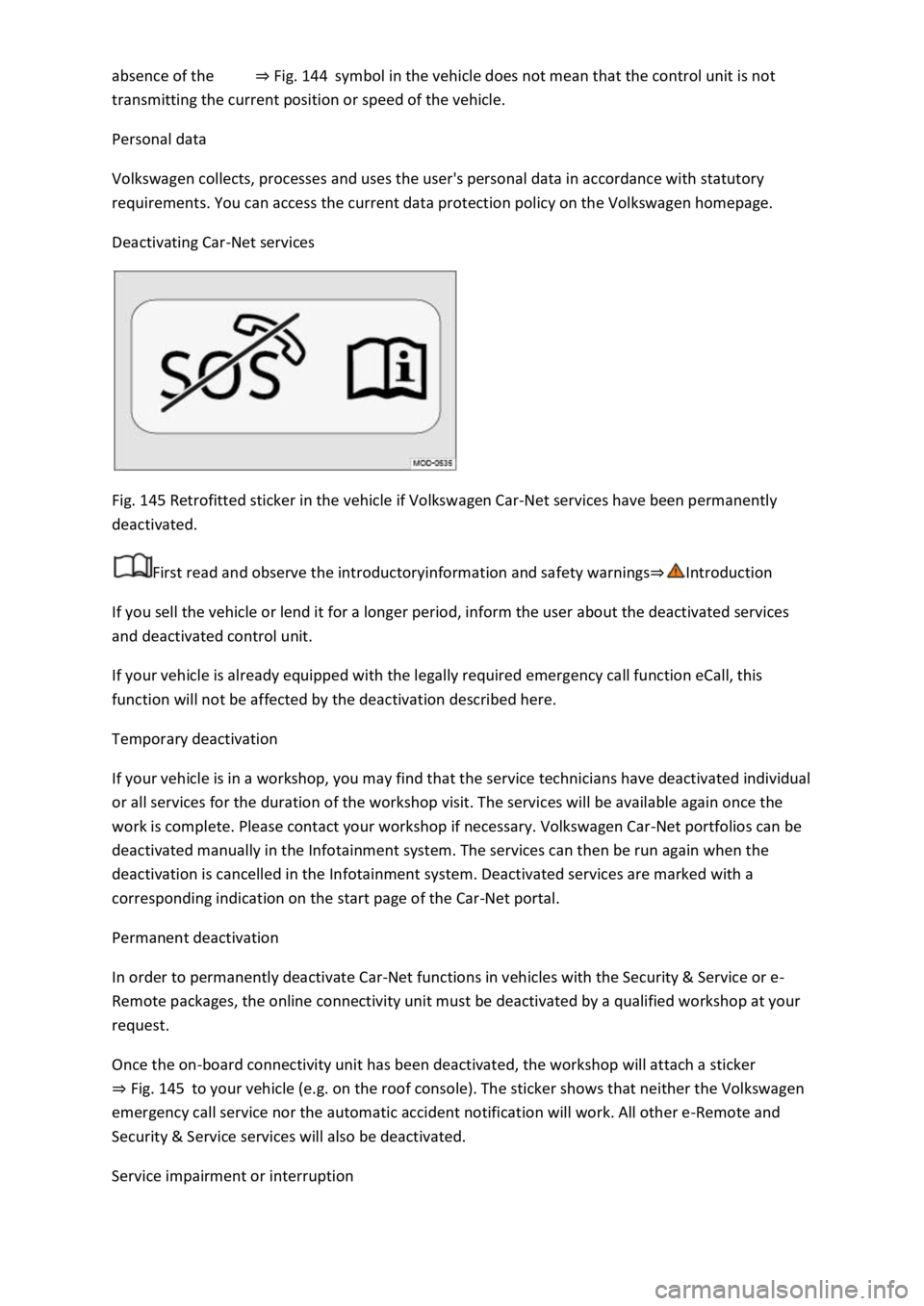
Fig. 145 Retrofitted sticker in the vehicle if Volkswagen Car-Net services have been permanently
deactivated.
First read and observe the introductoryinformation and safety warnings⇒Introduction
If you sell the vehicle or lend it for a longer period, inform the user about the deactivated services
and deactivated control unit.
If your vehicle is already equipped with the legally required emergency call function eCall, this
function will not be affected by the deactivation described here.
Temporary deactivation
If your vehicle is in a workshop, you may find that the service technicians have deactivated individual
or all services for the duration of the workshop visit. The services will be available again once the
work is complete. Please contact your workshop if necessary. Volkswagen Car-Net portfolios can be
deactivated manually in the Infotainment system. The services can then be run again when the
deactivation is cancelled in the Infotainment system. Deactivated services are marked with a
corresponding indication on the start page of the Car-Net portal.
Permanent deactivation
In order to permanently deactivate Car-Net functions in vehicles with the Security & Service or e-
Remote packages, the online connectivity unit must be deactivated by a qualified workshop at your
request.
Once the on-board connectivity unit has been deactivated, the workshop will attach a sticker
⇒ Fig. 145 to your vehicle (e.g. on the roof console). The sticker shows that neither the Volkswagen
emergency call service nor the automatic accident notification will work. All other e-Remote and
Security & Service services will also be deactivated.
Service impairment or interruption
Page 323 of 502

efuelling.
WARNING
Filling the tank with the wrong fuel can damage the vehicle.
uels that have been approved for the vehicle.
-approved service additives in the
approved quantity.
CAUTION
Fuel may run out of a fuel canister. This could cause fire and injuries.
Fuels can pollute the environment. Collect any service fluids that escape or are spilled and dispose of
them correctly.
The tank flap cannot be opened manually. Seek expert assistance in an emergency.
Fuel types and refuelling
Introduction
This chapter contains information on the followingsubjects:
⇒ Fuel standards
⇒ Petrol
⇒ Diesel
⇒ Refuelling
The tank flap is located at the rear right-hand side of the vehicle.
Different engines require different fuels. There is a factory-fitted sticker in the tank flap that
indicates the required fuel type for the vehicle.
Page 325 of 502

pecified on the pump meets the vehicle's
requirements.
-approved service additives in the approved quantity.
emergency, you have to use petrol with an octane number lower than the recommended number,
drive at medium engine speeds and avoid high engine loading. Avoid high engine speeds and heavy
engine loads. Refuel with petrol with the correct octane number as soon as possible.
Diesel
First read and observe the introductoryinformation and safety warnings⇒Introduction
Fill vehicles with a diesel engine only with diesel or diesel with a maximum RME fuel content of 7 %
⇒ .
If you use diesel with a high sulphur content, the service intervals are shorter. Information on
countries where the diesel has a high sulphur content is available from your Volkswagen dealership
or a qualified workshop.
The fuel quality affects the running properties, performance and service life of the engine. Refuel
with fuel that already contains suitable service additives ⇒ .
Information on the fuel standards can be found in the chapter on fuel standards ⇒ Fuel standards .
Winter-grade diesel fuel and filter preheater system
Winter-grade diesel fuel, which can be used at temperatures below -20°C (-4°F), is available during
the cold months. In countries with different climates, diesel with a different temperature behaviour
is offered. Information is available from your Volkswagen dealership, qualified workshops and filling
stations in the respective country.
Diesel vehicles are equipped with a filter preheater system. When using winter-grade diesel fuel, the
fuel system is safe for operation at temperatures down to around -24°C (-11°F). In order to ensure
that the vehicle can also be started at low outside temperatures, Volkswagen recommends parking
the vehicle in a location that is protected from the whether, e.g. in a garage ⇒ Troubleshooting .
Misfuelling prevention device
The tank filler neck in diesel vehicles may be fitted with a misfuelling prevention device. This is
intended to help ensure that the vehicle is refuelled only using diesel filler nozzles.
If the nozzle cannot be inserted correctly into the tank filler neck, first check whether you are using a
diesel filler nozzle. When you have made sure that you are using the correct filler nozzle, move the
diesel filler nozzle to and fro slightly with light pressure. This can open the misfuelling prevention
device and make it possible to refuel the vehicle. If the misfuelling prevention device still remains
closed, go to a qualified workshop and have the system checked.
If it is necessary to refuel the vehicle using a fuel canister in the event of an emergency, the
misfuelling prevention device will not open. In order to nevertheless fill the tank with fuel, pour the
diesel into the tank extremely slowly in very small quantities.
Page 333 of 502

Fault in exhaust system
The yellow catalytic converter lamp lights up or flashes.
Faults in the exhaust system caused by misfiring, which can damage the catalytic converter.
to the nearest qualified workshop immediately.
There may be engine faults and fuel consumption may be higher if the indicator lamps are lit up or
flashing.
If and when
Vehicle toolkit
Introduction
This chapter contains information on the followingsubjects:
⇒ Stowage
⇒ Vehicle toolkit contents
Observe any country-specific legislation when securing your vehicle in the event of a breakdown.
Vehicle toolkit in the vehicle
In vehicles that are factory-fitted with a spare wheel, emergency spare wheel or winter wheels,
additional vehicle tools may be located in the luggage compartment.
WARNING
In the event of a sudden driving or braking manoeuvre or accident, a loose vehicle toolkit,
breakdown set and spare wheel or temporary spare wheel could be flung though the vehicle and
cause severe injuries.
always secured in the luggage compartment.
WARNING
Unsuitable or damaged tools in the vehicle toolkit can lead to accidents and injuries.
Stowage