ESP VOLKSWAGEN T-ROC 2021 Owner´s Manual
[x] Cancel search | Manufacturer: VOLKSWAGEN, Model Year: 2021, Model line: T-ROC, Model: VOLKSWAGEN T-ROC 2021Pages: 502, PDF Size: 9.42 MB
Page 216 of 502

The examples given in this chapter are an aid for safe offroad driving. However, we cannot predict
whether these guidelines will be valid for all situations that could occur.
The many different types of terrain and the associated risks and dangers make it impossible to
describe all possible driving situations. The examples are only general guidelines which are intended
to help you to drive offroad safely. It is crucial that you know what to expect when you drive into
offroad terrain you are unfamiliar with. This will enable you to assess potential dangers in advance.
The driver can use 4MOTION Active Control to activate a variety of vehicle settings in an all-wheel
drive vehicle as required ⇒ Setting a driving profile .
Checklist
Before driving offroad for the first time, take the following steps so you can operate and drive the
vehicle safely offroad:
Observe the basic safety notes Safety instructions for offroad driving.
Familiarise yourself with the vehicle controls.
Check and adjust the seat position Sitting position and fasten the seat belts Seat belts.
Check distance to steering wheel and adjust Steering wheel.
Always wear suitable, well-fitting shoes that provide good grip for your feet when operating the
pedals.
Safety instructions for offroad driving
First read and observe the introductoryinformation and safety warnings⇒Introduction
WARNING
The intelligent vehicle technology cannot overcome the laws of physics, and functions only within
the limits of the system. Despite ABS, instability through locked wheels can occur on adverse terrain
– e.g. if you brake hard when driving on a loose gravel road. The Electronic Stability Control will be
able to stabilise the vehicle only to a limited extent in these circumstances.
WARNING
Driving offroad can be dangerous and could cause accidents, serious injury, damage to the vehicle
and also a vehicle breakdown far from any assistance.
Never select a dangerous route and never take risks that could endanger you and your passengers. If
you cannot drive on or if you are in any doubt about the safety of the route, turn round and choose
another route.
Even terrain that looks harmless can be difficult and dangerous, and could get you and your
passengers into difficulties. We recommend inspecting the terrain on foot beforehand.
Page 217 of 502

You should drive particularly carefully and think ahead when driving offroad. If you drive too fast or
if a driving manoeuvre is unsuccessful, this could result in serious injuries and vehicle damage.
Never drive faster than the current terrain, road conditions, traffic and weather allow.
Never drive too fast over embankments, ramps or slopes. This could cause the vehicle to lose
contact with the ground. If this happens, you will be unable to steer and will lose control of the
vehicle.
If the vehicle does lose contact with the ground, always point the front wheels straight ahead. If the
wheels are not pointing straight ahead when the vehicle lands, it could roll over.
Terrain might look harmless, but there could be hidden dangers. Potholes, hollows, ditches,
precipices, obstacles, shallows, soft and boggy surfaces are often not recognisable as such and can
be covered either fully or partly by water or grass or branches lying on the ground. Inspect terrain on
foot if necessary.
WARNING
Sporty multipurpose vehicles are subject to a considerably higher risk of rolling over than normal
road passenger vehicles ⇒ Explanation of some technical terms .
In the event of an accident, vehicle occupants not wearing seat belts are subjected to a considerably
higher risk of fatal injury than those wearing seat belts.
The vehicle has a higher centre of gravity and is more prone to rolling over than a normal passenger
car which is unsuited for offroad driving.
Never drive too fast, especially when driving through bends, or carry out any extreme driving
manoeuvres.
Always adjust your speed and driving style to the terrain.
Luggage and other items transported on the roof of the vehicle raise the centre of gravity and will
make the vehicle more likely to roll over.
WARNING
The terrain might look harmless, but there could be hidden dangers. Potholes, hollows, ditches,
precipices, obstacles, shallows, soft and boggy surfaces are often not recognisable as such and can
be covered either fully or partly by water or grass or branches lying on the ground. Driving offroad
over such terrain could cause accidents, serious injury and also a vehicle breakdown.
Carefully inspect any unknown sections of the terrain on foot before driving through them.
Never choose an unsafe route or take a risk which could endanger you or your passengers. If you are
in any doubt about the safety of the route, turn round and choose another way.
Always adjust your speed and driving to match vehicle load levels and visibility, terrain and weather
conditions.
Page 218 of 502

WARNING
Always avoid traversing a slope ⇒ Traversing a slope .
Vehicle occupants should never leave the vehicle via the doors facing down the hill when stopped
sideways on a steep hill. The combined centre of gravity of the vehicle and its payload (vehicle
occupants and payload) can shift and cause the vehicle to roll over and roll down the incline. Always
leave the vehicle slowly via the doors which open up the incline ⇒ Traversing a slope .
WARNING
The cruise control system has been designed for use on surfaced roads only. The cruise control
system is not suitable for use offroad and may even be hazardous. If you use the cruise control
system while driving offroad, you may lose control over the vehicle and sustain serious injuries.
Never use the cruise control system when driving offroad.
WARNING
The area monitoring system (Front Assist) was developed for use on surfaced roads only. The area
monitoring system is not suitable for use offroad and may even be hazardous. If you use the area
monitoring system while driving offroad, you may lose control over the vehicle and sustain serious
injuries.
Never use the area monitoring system when driving offroad.
WARNING
Driving the vehicle when the fuel level is too low could lead to your vehicle breaking down offroad,
accidents and serious injuries.
When the fuel level is too low, the fuel supply to the engine could be irregular, especially when
driving up or down hills and inclines.
The steering, all driver assist systems and brake support systems will not function if the engine
sputters or stops completely due to a lack of fuel or irregular fuel supply.
Always fill the tank when it is still 1/4 full. This reduces the risk of running out of fuel and breaking
down.
NOTICE
Page 221 of 502

A good driving course will teach you how to handle the vehicle in a variety of offroad situations and
how to drive safely in difficult terrain. Driving offroad demands different skills and driving styles in
comparison to driving on roads. The safety of the driver and the vehicle occupants depends on the
driver.
General rules and driving tips
First read and observe the introductoryinformation and safety warnings⇒Introduction
Code of conduct for offroad driving
A responsible driver should respect the environment when driving offroad. Remember that driving
through undergrowth and on meadows can destroy animal and plant habitats.
Always stay on designated routes and paths.
Do not create any unnecessary noise or dust.
Leave nature as you found it.
Avoid sensitive natural habitats.
Give way to drivers coming uphill or who are overtaking.
Driving tips
Special rules apply when driving offroad:
Never drive offroad alone. Always drive offroad in a team of at least two offroad vehicles.
Unexpected situations can always occur. We recommend that you carry equipment you can use for
calling for help.
Stop your vehicle when you reach difficult sections, and walk along the route ahead to inspect it.
Drive slowly over the crests of hills so the vehicle does not lose contact with the ground. This could
cause damage, leaving you unable to manoeuvre.
Drive slowly when the route is difficult. Shift up a gear when on slippery ground and always keep the
vehicle in motion.
Always look for flat and firm surfaces. The ground is predominantly soft when driving offroad,
meaning the tyres could sink into the ground. This will reduce ground clearance and the fording
depth.
Even when driving at low speeds, always keep your distance from other vehicles. If the first vehicle
suddenly gets stuck, the following vehicle then can stop without getting stuck itself.
NOTICE
Always ensure that there is enough ground clearance underneath the vehicle. Serious damage to the
underbody could occur if the vehicle bottoms on the ground. This damage could cause the vehicle to
break down and thus make it impossible to drive on.
Page 223 of 502

With the correct gear selected, the vehicle will normally not have to be braked so much using the
foot brake when driving downhill as the engine braking effect will normally be sufficient.
You should only depress the accelerator as much as is required. If you accelerate too hard, the
wheels could lose traction and you could lose control of the vehicle.
DSG® dual clutch gearbox
Select position D when driving in normal, flat offroad terrain.
Adjust your speed when driving on soft or slippery ground, and select the highest suitable position
for the Tiptronic.
If driving through mud, sand, water or hilly terrain, drive with Tiptronic in the positions 3 or
2⇒ DSG® dual clutch gearbox .
Use the offroad display ⇒ Offroad display .
Driving on rough terrain
First read and observe the introductoryinformation and safety warnings⇒Introduction
Use the offroad driving profile ⇒ Setting a driving profile .
You should drive through rocky terrain at no faster than walking pace.
If you are not able to drive around a rock, drive carefully onto the rock with one front wheel and
drive over it slowly ⇒ .
NOTICE
You should never drive straight over large obstacles, e.g. boulders or tree stumps, or drive over such
obstacles with one side of the vehicle. Obstacles which require more ground clearance than is
available could damage vehicle components when you drive over them and thus cause the vehicle to
break down.
Even obstacles that are smaller than the available ground clearance could come into contact with
the vehicle underbody and thus cause damage which could lead to a vehicle breakdown. This applies
in particular if there is a hollow or soft ground either in front of or behind the obstacle. This also
applies in cases when you drive too quickly over the obstacle causing the vehicle to bounce.
Escaping engine oil and brake fluid can pollute the environment. Spilt service fluids must be
collected and then disposed of properly and in an environmentally responsible way.
Driving through water
First read and observe the introductoryinformation and safety warnings⇒Introduction
Driving through flooded terrain could damage the vehicle ⇒ Checklist before driving offroad .
Page 229 of 502

The vehicle can lose its grip when traversing a slope and slide away sideways, tip over or roll over
and roll down the hill.
The wheels on the lower side of the vehicle must never enter dips or hollows. The wheels on the
higher side of the vehicle must never drive over bumps, for example stones, tree trunks or other
obstacles.
Before traversing a slope, make sure that it is possible to steer into the fall line. Choose another
route if this is not guaranteed. If the vehicle threatens to tip over, steer immediately into the fall line
and depress the accelerator slightly ⇒ Fig. 115 .
If the vehicle is stopped at a large tilt angle when traversing a slope, avoid sudden and uncontrolled
movements in the vehicle. The vehicle can lose its grip and slide away sideways, tip over or roll over
and roll down the hill.
Vehicle occupants should never leave the vehicle via the doors facing down the hill when the vehicle
is stopped sideways on a slope with a large tilt angle to one side. This could cause the centre of
gravity to move to the side. The vehicle could then tip over or roll over and roll down the hill. To
avoid this, always leave the vehicle carefully on the side that is facing uphill ⇒ Fig. 116 .
When getting out the vehicle, make sure that the vehicle door which opens uphill does not close
with its own weight or through carelessness, thus potentially causing injury.
Driving through ditches
First read and observe the introductoryinformation and safety warnings⇒Introduction
Check whether the ramp and tilt angles are small enough to drive through the ditch with the vehicle
⇒ .
If possible, drive through the ditch at an acute angle ⇒ .
The tilt angle must not become too large when driving through the ditch.
WARNING
Never drive through a ditch if the ramp and tilt angles are too steep for the vehicle and the ditch is
too deep. The vehicle could slide away, tip over or roll.
NOTICE
If you drive into the ditch at a right angle, the front wheels will fall in. The underbody of your vehicle
could bottom, get stuck and be damaged. It is then almost impossible to get out of the ditch despite
having all-wheel drive.
Stuck vehicle
First read and observe the introductoryinformation and safety warnings⇒Introduction
Rocking free a vehicle requires training and feeling for the vehicle.
Page 232 of 502

⇒ Operating the speed limiter with the multifunction steering wheel
⇒ Troubleshooting
The speed limiter helps you to stop exceeding a stored speed.
Speed range
The speed limiter is available when driving forwards at speeds from approx. 30 km/h (20 mph).
Driving with the speed limiter
You can interrupt the speed limiter at any time by depressing the accelerator all the way down past
the point of resistance. As soon as the stored speed is exceeded, the green indicator lamp will
flash and an acoustic warning may sound. The speed remains stored in the memory.
The speed limiter function switches back on automatically as soon as the speed drops back below
the stored speed.
Displays
When the speed limiter is switched on, the instrument cluster display shows the stored speed and
the status of the speed limiter:
Shown small or grey: speed limiter not active.Shown large or white: speed limiter active.
Driving downhill
Driving downhill may cause the set speed to be exceeded.
Apply the foot brake to slow the vehicle down, and change down a gear as required.
WARNING
Always switch off the speed limiter after use to avoid unintentional speed control.
The speed limiter does not relieve the driver of their responsibility for the speed of the vehicle. Do
not drive at full throttle if this is not required.
Use of the speed limiter in adverse weather conditions is dangerous and can cause serious injury,
e.g. through aquaplaning, snow, ice, or leaves. Use the speed limiter only when the road and
weather conditions allow it to be used safely.
The speed limiter cannot limit the vehicle speed when travelling downhill. The vehicle speed can
increase under its own weight. Select a lower gear or use the foot brake to slow the vehicle down.
Operating the speed limiter with the multifunction steering wheel
Page 235 of 502
If automatic deceleration by ACC is not sufficient, ACC will request you to brake additionally by a
corresponding message on the instrument cluster. In addition, the red warning lamp lights up
and an acoustic warning is given. Brake immediately!
Radar sensor
ACC detects driving situations by means of the radar sensor at the front of the vehicle ⇒ Front view .
The radar sensor has a range of up to approximately 120 m.
WARNING
The intelligent technology used in the ACC cannot overcome the laws of physics, and functions only
within the limits of the system. Never let the extra convenience tempt you into taking safety risks
when driving. Careless or unintentional use of the Adaptive Cruise Control (ACC) can cause accidents
and lead to serious injury. The system is not a substitute for the full concentration of the driver.
Adapt your speed and distance from the vehicles ahead to suit visibility, weather, road and traffic
conditions.
Never use the ACC in poor visibility, on steep or winding roads, or on slippery road surfaces e.g. due
to snow, ice, wet roads, loose chippings, or on flooded roads.
Never use the ACC offroad or on non-surfaced roads. The ACC is designed for use on surfaced roads
only.
The ACC will not react to stationary vehicles.
The ACC will not react to persons, animals or vehicles crossing or approaching in the same lane.
Brake immediately if speed reduction by ACC is not sufficient.
Brake immediately if a request to brake appears on the instrument cluster display.
Brake if the vehicle starts rolling unintentionally after a request to brake.
Be prepared to control the speed yourself at all times.
Special driving situations
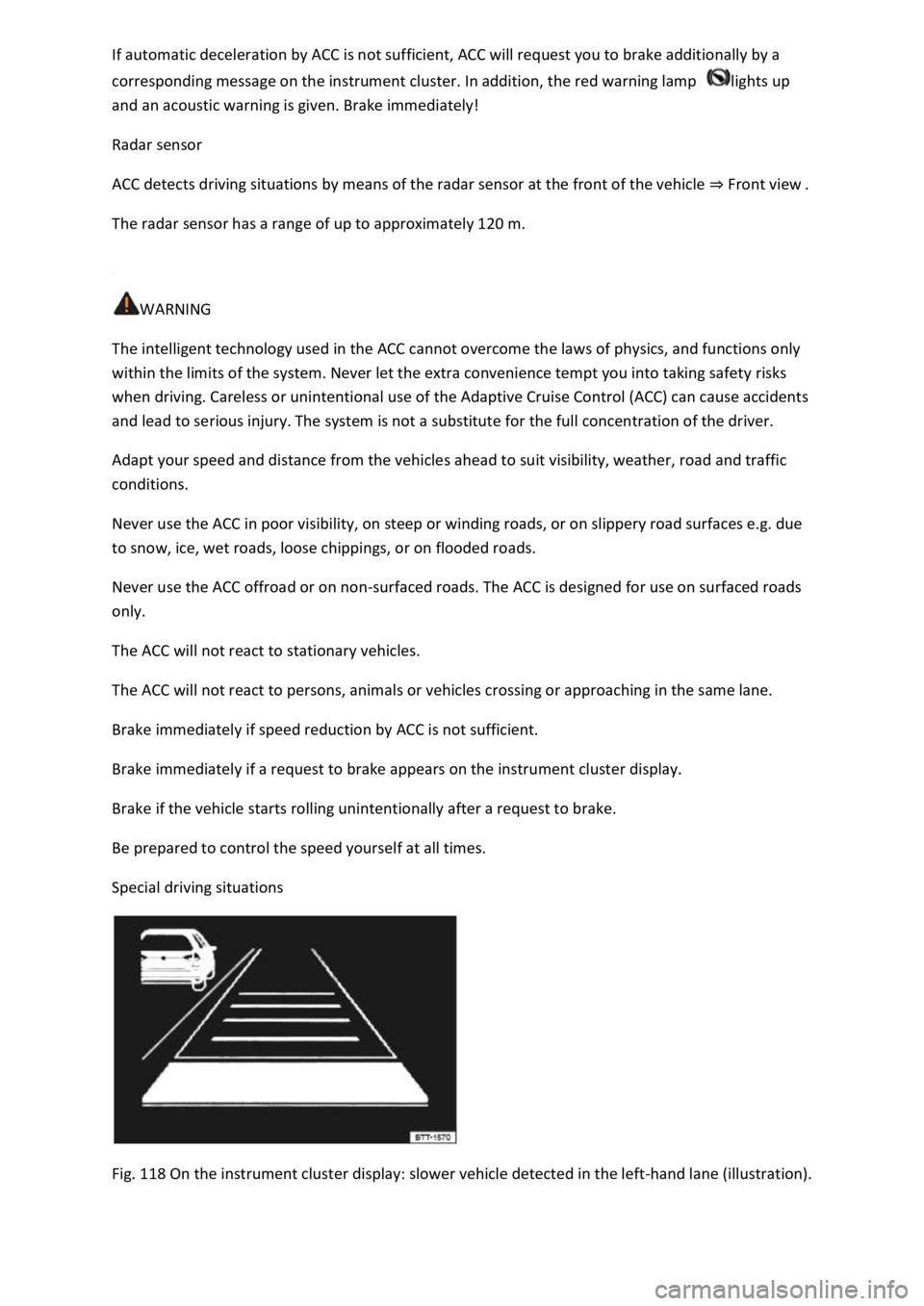
Fig. 118 On the instrument cluster display: slower vehicle detected in the left-hand lane (illustration).
Page 237 of 502
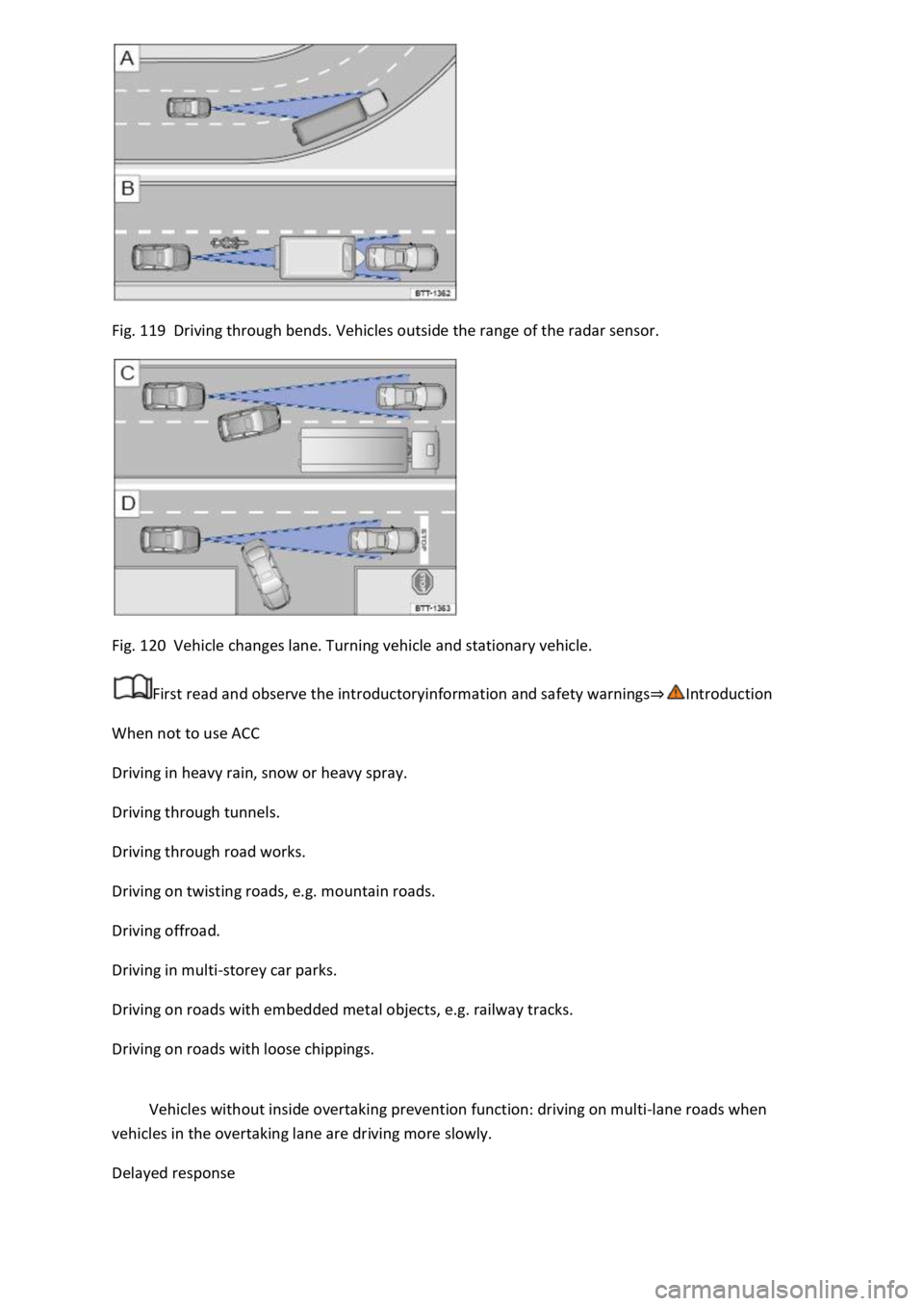
Fig. 119 Driving through bends. Vehicles outside the range of the radar sensor.
Fig. 120 Vehicle changes lane. Turning vehicle and stationary vehicle.
First read and observe the introductoryinformation and safety warnings⇒Introduction
When not to use ACC
Driving in heavy rain, snow or heavy spray.
Driving through tunnels.
Driving through road works.
Driving on twisting roads, e.g. mountain roads.
Driving offroad.
Driving in multi-storey car parks.
Driving on roads with embedded metal objects, e.g. railway tracks.
Driving on roads with loose chippings.
Vehicles without inside overtaking prevention function: driving on multi-lane roads when
vehicles in the overtaking lane are driving more slowly.
Delayed response
Page 240 of 502

Fig. 122 On the instrument cluster display: setting the distance (illustration, ACC regulating).
First read and observe the introductoryinformation and safety warnings⇒Introduction
Setting the distance
You can set the distance in five steps from very small to very large:
Press the button and then the or button.
Alternatively, press the button as often as necessary until the desired distance is set.
The instrument cluster display shows the chosen distance setting ⇒ Fig. 122① . Please observe any
country-specific requirements for the minimum distance.
You can set the distance which should be set at the start of control operation in the vehicle settings
of the Infotainment system ⇒ Vehicle settings menu .
If ACC is not regulating, the set distance and vehicle are not highlighted on the instrument cluster
display.
Setting the speed
You can adjust the stored speed within the defined speed range by means of the buttons on the
multifunction steering wheel:
+ 1 km/h (1 mph)- 1 km/h (1 mph)+ 10 km/h (5 mph)- 10 km/h (5 mph)
Press and hold the corresponding button to continuously change the stored speed.
Setting the control behaviour
Vehicles with driving profile selection: set the desired driving profile ⇒ Driving profile selection
and 4MOTION Active Control .
Vehicles without driving profile selection: set the desired gearbox programme in the vehicle
settings of the Infotainment system ⇒ Vehicle settings menu .