display VOLKSWAGEN T-ROC 2021 Owner´s Manual
[x] Cancel search | Manufacturer: VOLKSWAGEN, Model Year: 2021, Model line: T-ROC, Model: VOLKSWAGEN T-ROC 2021Pages: 502, PDF Size: 9.42 MB
Page 148 of 502
Automatic anti-dazzle interior mirror
When the ignition is switched on, the sensors measure the incident light from the rear ⇒ Fig. 86 ①
and from the front ②.
Depending on the values measured, the interior mirror dips automatically.
If the incident light on the sensors is hindered or interrupted, e.g. by a sun blind or other hanging
objects, the automatic anti-dazzle interior mirror will not function or will not function correctly.
Mobile navigation systems fitted to the windscreen or near the interior automatic anti-dazzle
interior mirror can also affect the sensors ⇒ .
The automatic anti-dazzle function will be deactivated in some situations, e.g. when reverse gear is
engaged.
Manual anti-dazzle interior mirror
Basic position: the lever on the lower part of the mirror is pointing towards the windscreen.
Pull the lever to the back to use the anti-dazzle function ⇒ Fig. 87 .
WARNING
The illuminated display from a mobile navigation device can lead to malfunctions of the interior
automatic anti-dazzle mirror and cause accidents or serious injuries.
You may not be able to precisely determine the distance from vehicles travelling behind you or from
other objects if the automatic anti-dazzle function malfunctions.
Exterior mirrors
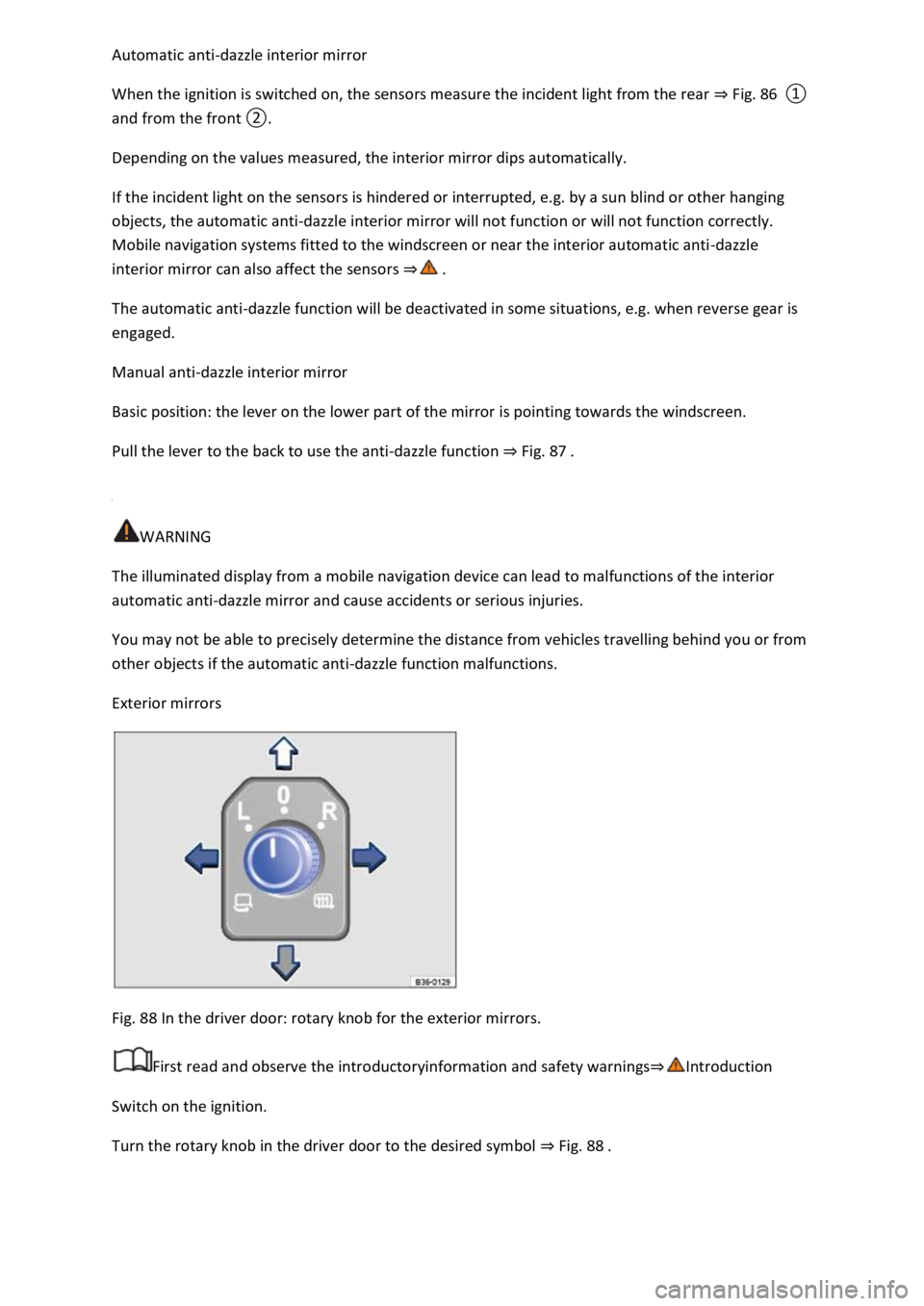
Fig. 88 In the driver door: rotary knob for the exterior mirrors.
First read and observe the introductoryinformation and safety warnings⇒Introduction
Switch on the ignition.
Turn the rotary knob in the driver door to the desired symbol ⇒ Fig. 88 .
Page 149 of 502

Swivel the rotary knob forwards, backwards, right or left in the direction of the arrow in order to
adjust the exterior mirror.
Electrically fold in the exterior mirrors ⇒ .Switch on the exterior mirror heating. The
exterior mirror heating heats only at ambient temperatures below +20°C (+68°F) and initially with
the highest setting. Heating takes place dependent on the ambient temperature after around
two minutes.Adjust the left-hand exterior mirror.Adjust the right-hand exterior mirror.Zero
position. The exterior mirror cannot be adjusted and all functions are switched off.
Activating the exterior mirror functions
The following exterior mirror functions must be activated once in the Infotainment system in
the Vehicle settings menu ⇒ Infotainment system controls and displays :
Synchronous mirror adjustment
Synchronous mirror adjustment means that the right-hand exterior mirror is also adjusted at the
same time when you adjust the left-hand exterior mirror.
Turn the rotary knob to position .
Adjust the left-hand exterior mirror. The right-hand exterior mirror will be adjusted at the same time
(synchronously).
Correct the settings for the right-hand exterior mirror if necessary: swivel the rotary knob to
position and adjust the right-hand exterior mirror.
Folding in the exterior mirrors while parking
When the vehicle is locked or unlocked from the outside, the exterior mirrors fold in or out
automatically. For this, the rotary knob must be in position , , or .
If the rotary knob for the electrically adjustable exterior mirrors is in position , the exterior
mirrors stay folded in.
Saving and recalling the front passenger exterior mirror settings for reversing
Unlock the vehicle with the vehicle key to which the settings should be assigned.
Switch on the electronic parking brake.
Switch on the ignition.
Put the gearbox into neutral.
Select reverse gear.
Adjust the front passenger exterior mirror so that you have a good view of the kerb area, for
example.
The set mirror position will be saved and assigned to the vehicle key.
Turn the rotary knob for the exterior mirrors to position .
Page 153 of 502

Ensure that there is no one in the path of the sun blind, especially if it is closed when the roll-back
function is not active.
The roll-back function does not prevent fingers or other body parts from being pressed against the
roof frame and being injured.
When the glass roof is open, the electric sun blind can be closed only up to the front edge of the
glass roof.
Heating and air conditioning system
Heating, ventilating, cooling
Introduction
This chapter contains information on the followingsubjects:
⇒ Front controls
⇒ Air recirculation mode
⇒ Seat heating
⇒ Steering wheel heating
⇒ Troubleshooting
The following systems may be installed in the vehicle
Both the manual air conditioning system and Climatronic heat, cool and dehumidify the air. It works
most effectively when the windows and the glass roof are closed. If heat has built up in the vehicle
interior, ventilating the vehicle can speed up the cooling process.
Display of activated functions
Lit up LEDs on rotary knobs and buttons indicate that the function is switched on.
WARNING
Poor visibility through the windows increases the risk of collisions and accidents, which can cause
serious injuries.
Keep all windows free from ice, snow and condensation to maintain good visibility.
Adjust the heating, air conditioning system and rear window heating so that condensation does not
form on the windows.
Only set off once all windows are clear.
Use air recirculation mode for a short period only. If the cooling system is switched off, condensation
can form on the windows very quickly in air recirculation mode and reduce visibility considerably.
Page 156 of 502

Press the button in the air conditioning block.
Touch the Air Care function button.
Touch the Active function button to switch the Air Care function on or off.
– Synchronising the temperature settings
Press the button to adopt the temperature settings of the driver side for the front passenger
side.
– Automatic mode
The automatic mode ensures constant temperatures in the vehicle interior. The air temperature, air
quantity and air distribution are regulated automatically. Automatic mode switches off if ventilation
is adjusted manually.
– Cooling mode
Press the button in the air conditioning block to switch cooling mode on or off.
In cooling mode, the air is dehumidified.
– Maximum cooling
Manual air conditioning system: turn the left rotary control to position . Air
recirculation mode is switched on automatically.
Climatronic: press the button. Air recirculation mode is switched on automatically
and the air distribution is set to the position.
/ – Temperature
Manual air conditioning system: turn the left rotary control ⇒ Fig. 91 .
Climatronic: turn the outer rotary controls ⇒ Fig. 92 to adjust the temperatures for the driver
and front passenger sides.
The set temperatures are displayed above the rotary controls for Climatronic.
– Seat and steering wheel heating
Press the buttons or to switch the seat heating on and off ⇒ Seat heating .
To operate the seat heating and steering wheel heating at the same time with the button, link
the two functions via the air conditioning settings in the Infotainment system ⇒ Switching the
steering wheel heating on or off together with the seat heating (only for Climatronic) .
/ – Auxiliary heater
Page 157 of 502

Press the button in the air conditioning block to switch the auxiliary heater on and off when the
ignition is switched off ⇒ .
Touch the function button in the Infotainment system air conditioning settings to access the
Auxiliary heater menu ⇒ Auxiliary heater and ventilation .
The auxiliary heater provides additional heating when the ignition is switched on.
– Blower
Turn the middle rotary control.
When Climatronic is in automatic mode, no blower speed is displayed in the rotary control.
– Air recirculation mode
Press the button.
Air distribution
– air distribution to the upper body via the vents in the dash panel.
– air distribution to footwell.
– air distribution to the upper body and the footwell.
– air distribution to the windscreen and the footwell.
– air distribution to the windscreen.
| – Defrost function
Manual air conditioning system: turn the right rotary knob to position ⇒ Fig. 91 .
Climatronic: press the button ⇒ Fig. 92 .
Manual air conditioning system: in the defrost function, the air recirculation mode switches off
and the air conditioning compressor for the cooling system switches on in order to dehumidify the
air. When the defrost function is switched on, it is not possible to switch the air recirculation mode
on or the air conditioning compressor off1).
– Rear window heating
Press to switch the rear window heating on or off while the engine is running.
The rear window heating will switch off after 10 minutes at the latest.
Recommended settings for manual air conditioning system
Switch off air recirculation mode.
Set blower to setting or .
Page 162 of 502

The cooling system cannot be switched on or its function is restricted
The cooling system functions only when the engine is running and at ambient temperatures above
+3°C (+38°F).
The cooling system is switched off when the engine is very warm.
Switch on the blower.
Check the fuse of the air conditioning system ⇒ Fuses in the dash panel .
Change the dust and pollen filter ⇒ Service .
If the fault persists, seek expert assistance.
The heating and fresh air system cannot be switched on or its function is restricted
The heating and defrost function are more effective when the engine is warm.
If the fault persists, seek expert assistance.
Condensation on the windows
Keep the air intake in front of the windscreen free of ice, snow or leaves in order to improve heating
and cooling performance ⇒ Vehicle care .
Do not cover the air vents in the rear of the luggage compartment to allow air to flow through the
vehicle from the front to the rear.
Press the button or turn the rotary knob to position in order to switch on the defrost
function ⇒ .
The wrong unit of temperature is set
Change the unit of temperature for all temperature displays in the vehicle using the Infotainment
system ⇒ Infotainment system controls and displays .
Change the unit of temperature in the instrument cluster menu ⇒ Instrument cluster .
Water under the vehicle
If the humidity and temperature outside the vehicle are high, condensation can drip off the
evaporator of the cooling system and form a pool underneath the vehicle. This is normal and does
not indicate a leak!
If the outside humidity is high and the outside temperature low, condensation may evaporate when
the auxiliary heater is running ⇒ Auxiliary heater and ventilation . If this is the case, steam may
appear underneath the vehicle. This is not a sign that the vehicle is damaged.
WARNING
Poor visibility through all windows increases the risk of collisions and accidents, which can cause
serious injuries.
Page 170 of 502

NOTICE
Free access to the pedals must be ensured at all times. For example, a larger brake pedal travel will
be necessary in order to stop the vehicle if a brake circuit fails. The brake pedal will have to be
depressed further and harder than normal.
Gear-change indicator
Fig. 96 On the instrument cluster display: gear-change indicator.
Key to ⇒ Fig. 96 :
Currently selected gear.
Recommended gear.
Depending on the vehicle's equipment level, the instrument cluster display may indicate a gear
which should be selected to reduce fuel consumption while the vehicle is in motion.
Vehicles with DSG dual clutch gearbox: the selector lever must be in the Tiptronic position for
this ⇒ Changing gear using Tiptronic .
No recommended gear is indicated if the most suitable gear is already selected. The currently
selected gear is displayed.
Information on cleaning the particulate filter
The engine management system recognises when the particulate filter is becoming saturated and
supports regeneration of the filter by recommending the most suitable gear when driving. Compared
with normal driving, this may mean driving with an increased engine speed ⇒ Particulate filter .
CAUTION
The gear-change indicator is designed only to assist the driver and cannot replace the driver's own
judgement.
The driver has full responsibility for selecting the correct gear in all situations, e.g. when overtaking
or when driving up and down hills.
Driving in the correct gear can help to reduce fuel consumption.
Page 171 of 502
The gear-change indicator display goes out when the clutch is depressed in vehicles with a manual
gearbox or when Tiptronic position is deselected in vehicles with a DSG® dual clutch gearbox.
Driving economically
Fuel consumption, environmental impact and wear of the engine, brakes and tyres can be reduced
by adopting the correct driving style. A few tips are provided below which will help you protect the
environment and also save money.
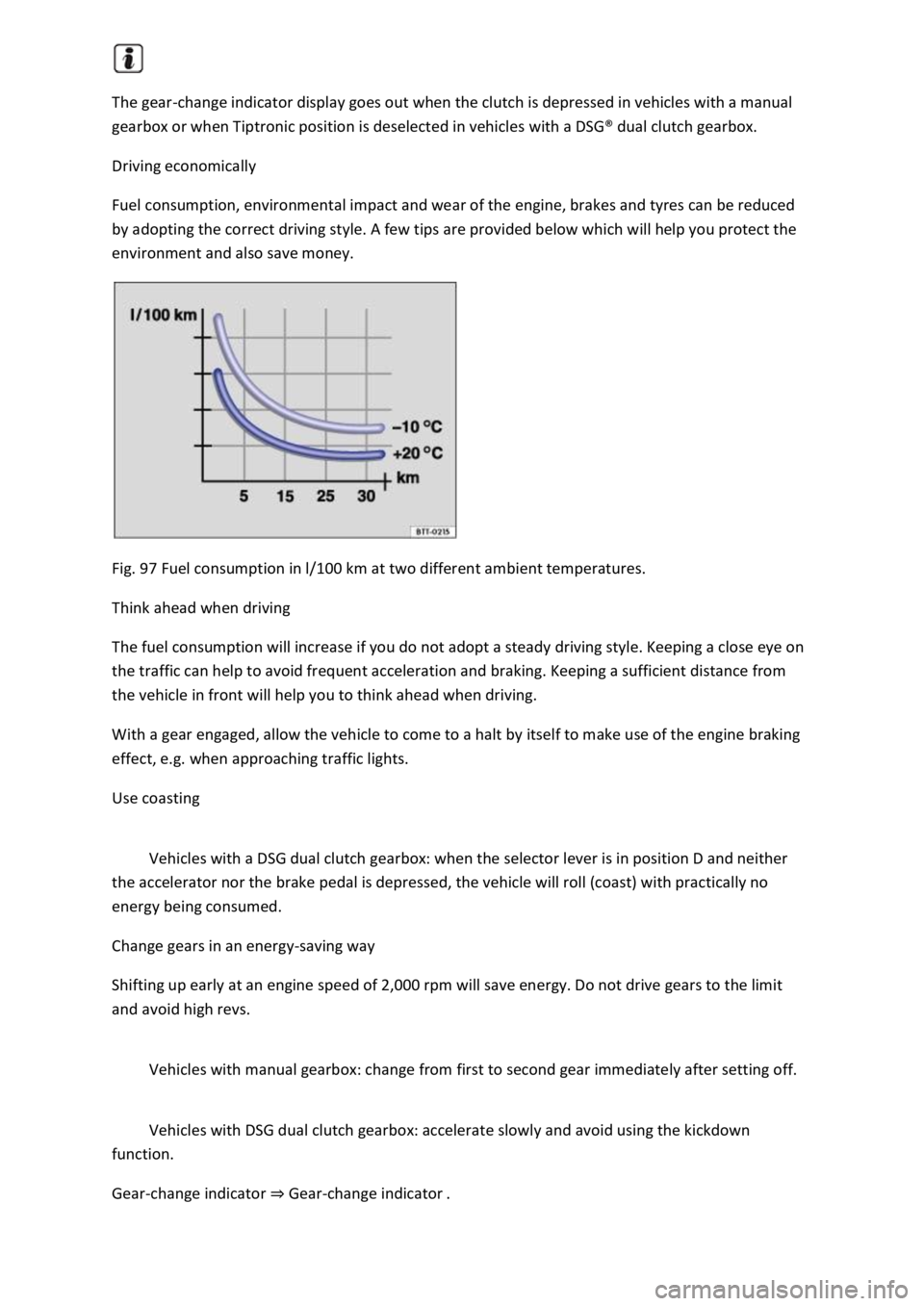
Fig. 97 Fuel consumption in l/100 km at two different ambient temperatures.
Think ahead when driving
The fuel consumption will increase if you do not adopt a steady driving style. Keeping a close eye on
the traffic can help to avoid frequent acceleration and braking. Keeping a sufficient distance from
the vehicle in front will help you to think ahead when driving.
With a gear engaged, allow the vehicle to come to a halt by itself to make use of the engine braking
effect, e.g. when approaching traffic lights.
Use coasting
Vehicles with a DSG dual clutch gearbox: when the selector lever is in position D and neither
the accelerator nor the brake pedal is depressed, the vehicle will roll (coast) with practically no
energy being consumed.
Change gears in an energy-saving way
Shifting up early at an engine speed of 2,000 rpm will save energy. Do not drive gears to the limit
and avoid high revs.
Vehicles with manual gearbox: change from first to second gear immediately after setting off.
Vehicles with DSG dual clutch gearbox: accelerate slowly and avoid using the kickdown
function.
Gear-change indicator ⇒ Gear-change indicator .
Page 173 of 502
The alternator is driven by the engine and generates electrical power for convenience consumers
such as the air conditioning system, windscreen heating and ventilation. Saving electrical energy is
easy, e.g.:
Open the windows and doors before driving at high outside temperatures and drive for a short
distance with a window open. Only then switch the air conditioning system on.
Switch the convenience consumers off as soon as they have served their purpose.
WARNING
Adapt your speed and distance from the vehicles ahead to suit visibility, weather, road and traffic
conditions.
Inform yourself about other ways of protecting the environment. Think Blue. is the global
Volkswagen trademark for sustainability and environmental compatibility.
Your Volkswagen dealership can provide you with further information on maintenance and energy-
efficient replacement parts, e.g. new tyres.
Think Blue. Trainer.
The Think Blue. Trainer analyses and visualises your driving style and helps you to drive more
economically.
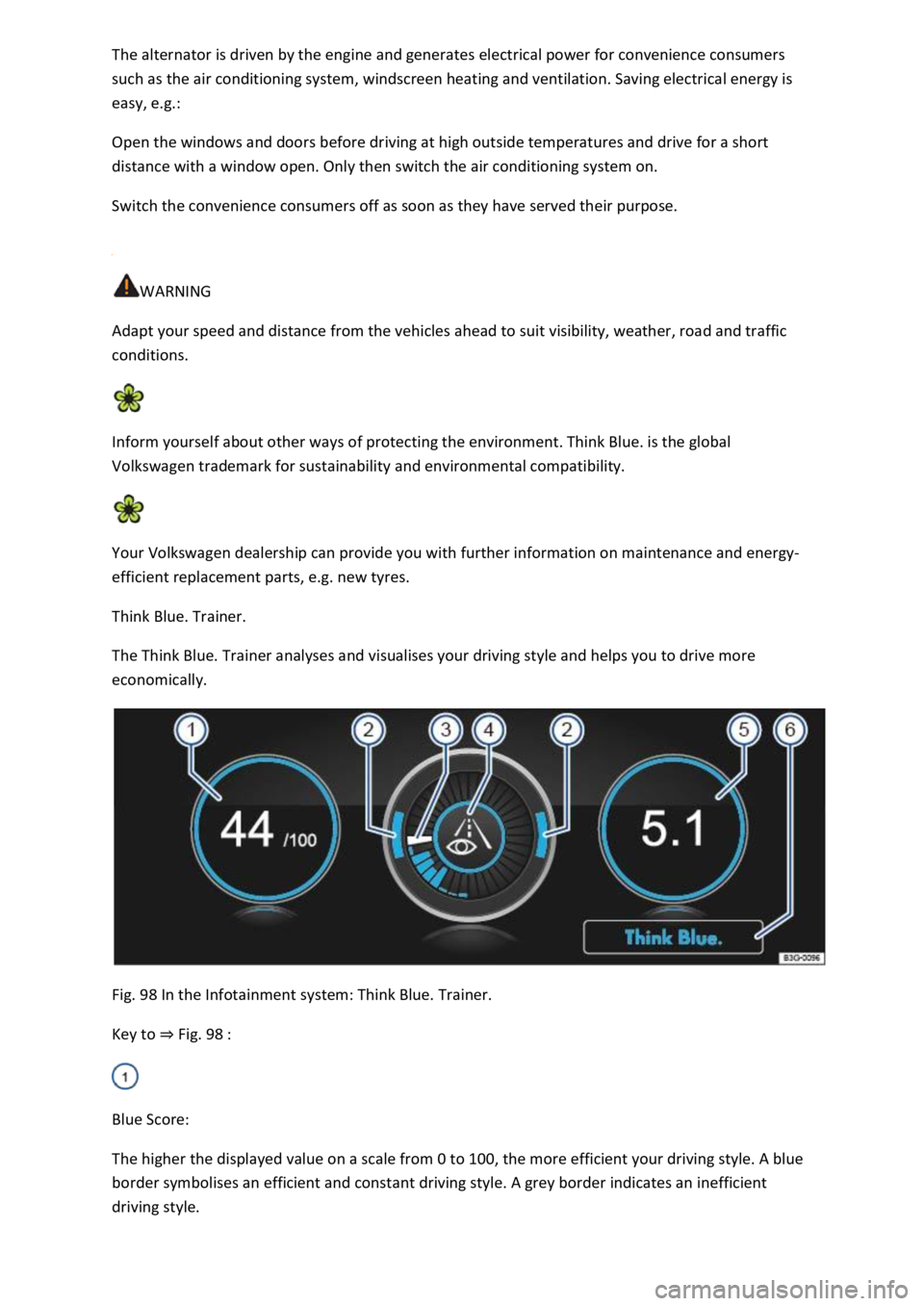
Fig. 98 In the Infotainment system: Think Blue. Trainer.
Key to ⇒ Fig. 98 :
Blue Score:
The higher the displayed value on a scale from 0 to 100, the more efficient your driving style. A blue
border symbolises an efficient and constant driving style. A grey border indicates an inefficient
driving style.
Page 174 of 502

Touch the display to open the statistics of the last 30 driving minutes Since start.
Acceleration and braking:
At a constant speed, two arcs appear in the central area. The arcs move up and down during
acceleration and braking.
Progress display:
The efficiency of the driving style is indicated by the blue bars. The white bar stores a blue bar
approximately every five seconds.
The larger the bar, the more efficient the driving style has been.
Driving tips:
Think ahead when driving.
Gear-change indicator.
Adapt your speed.
Economical driving style.
Fuel consumption:
The display shows the average fuel consumption Since start in l/100 km. A blue border symbolises an
efficient and constant driving style. A grey border indicates an inefficient driving style.
Touch the display to open the statistics of the last 30 driving minutes Since start.
Tips for saving energy:
Touch the Think Blue. function button to access additional tips.
Opening the Think Blue. Trainer.
Press the button or function button on the Infotainment system according to the equipment
level.
Touch the function buttons Vehicle, Selection, Think Blue. Trainer..
WARNING