steering VOLKSWAGEN T-ROC 2021 Owner´s Manual
[x] Cancel search | Manufacturer: VOLKSWAGEN, Model Year: 2021, Model line: T-ROC, Model: VOLKSWAGEN T-ROC 2021Pages: 502, PDF Size: 9.42 MB
Page 256 of 502

Function
When switched on, the Blind Spot Monitor is active from a speed of approx. 15 km/h (9 mph).
In the following driving situations, the yellow indicator lamp will light up in the corresponding
exterior mirror: ⇒ Fig. 124
If your vehicle is being overtaken.
When overtaking another vehicle with a speed difference of up to approximately 10 km/h (6 mph).
No display will be shown if the takeover manoeuvre is much faster.
If a vehicle is detected in the blind spot and the turn signal is additionally activated in the direction
of the detected vehicle ⇒ , the yellow indicator lamp will flash.
In vehicles with the lane keeping system, the yellow indicator lamp will flash even if you do not
activate the turn signal when leaving your lane, provided that the lane keeping system is switched on
(Blind Spot Monitor Plus). The driver is warned by a corrective steering intervention when changing
lanes during a possible critical situation (information level, warning level). This also occurs when the
turn signal is activated for the corresponding direction. If the steering intervention is overridden by
the driver, the steering wheel vibrates to give an additional warning.
The quicker another vehicle approaches, the earlier there is a corresponding display in the exterior
mirror.
Automatic deactivation
The radar sensors for the Blind Spot Monitor will switch off automatically if, for example, the system
detects that a radar sensor is continuously covered. This can be caused by a layer of ice or snow in
front of the radar sensor, for example.
A text message will be shown on the instrument cluster display.
If the Blind Spot Monitor has been automatically deactivated, the system cannot be activated until
the ignition has been switched off and back on again.
The Blind Spot Monitor is automatically deactivated and cannot be activated when the factory-fitted
towing bracket is electrically connected to a trailer or similar ⇒ Trailer towing . Once a trailer is
electrically connected to the vehicle and the driver pulls away, a text message appears in the
instrument cluster display to inform the driver that the Blind Spot Monitor has been deactivated.
The Blind Spot Monitor will be automatically activated again when the trailer has been unhitched
from the vehicle. This applies if the function was previously activated. The Blind Spot Monitor must
be deactivated manually if you tow a trailer using a towing bracket that was not fitted at the factory.
Troubleshooting
First read and observe the introductoryinformation and safety warnings⇒Introduction
Blind Spot Monitor is not working
The indicator lamp lights up yellow.
Go to a qualified workshop.
Page 257 of 502

System fault
Clean the radar sensors or remove stickers or accessories from the radar sensors, mirrors and
bumper ⇒ Caring for and cleaning the vehicle exterior .
Check whether any damage is visible.
The system is not responding as expected
The radar sensors are dirty. The sensor visibility may be impaired by dirt and snow or also residue
from cleaning agents or coatings ⇒ Caring for and cleaning the vehicle exterior .
The prerequisites for system operation must be met ⇒ System limits .
The radar sensors are covered by water.
The vehicle is damaged in the area of the radar sensors, e.g. caused by parking collisions.
The detection ranges of the radar sensors are blocked by add-on parts, e.g. bicycle carriers.
Changes have been made to the paintwork in the area of the radar sensors or structural
modifications have been made, e.g. on the vehicle front end or the running gear.
Only Volkswagen-approved vehicle paints may be used on the rear bumper. Other vehicle paints can
restrict the function of the system or cause faults.
Tinting foils have been retrofitted on the side windows.
Parking and manoeuvring
Parking
Stopping and parking the vehicle
The actions should be carried out only in the given order:
Stop the vehicle on a suitable surface ⇒ .
Depress and hold the brake pedal until the engine has stopped.
Switch on the electronic parking brake ⇒ Electronic parking brake . The electronic parking brake is
switched on when the indicator lamp in the button ⇒ Fig. 125 lights up yellow and the indicator
lamp in the instrument cluster display lights up red.
On vehicles with a manual gearbox, either fully depress or disengage the clutch.
With an automatic gearbox, move the selector lever to position P.
Switch off the engine and take your foot off the brake pedal.
Turn the steering wheel slightly if necessary to engage the steering lock mechanism.
With a manual gearbox, select first gear for flat ground and uphill gradients, or reverse gear for
downhill gradients, and then release the clutch.
Please ensure that all occupants, in particular children, leave the vehicle.
Page 258 of 502

Take all vehicle keys with you when you leave the vehicle.
Lock the vehicle.
Additional points to note on uphill and downhill gradients
Before switching off the engine, turn the steering wheel so that the front wheels will roll against the
kerb if the parked vehicle starts to move.
When facing downhill, turn the wheels so that they face the kerb.
When facing uphill, turn the wheels so that they face the centre of the road.
WARNING
The components of the exhaust system become very hot. This can cause fires and serious injuries.
Never park the vehicle where parts of the exhaust system can come into contact with inflammable
material underneath the vehicle, e.g. undergrowth, leaves, dry grass, spilt fuel, oil etc.
WARNING
The vehicle may roll away if you leave and park the vehicle incorrectly. This can cause accidents and
serious injuries.
Ensure that the electronic parking brake is switched on before you leave the vehicle and the
indicator lamp in the instrument cluster lights up red after you switch off the ignition.
Never remove the vehicle key from the ignition if the vehicle is in motion. The steering lock may be
activated and you will no longer be able to steer or control the vehicle.
Never leave children or people requiring assistance alone in the vehicle. They could switch off the
electronic parking brake, or move the selector lever or gearshift lever, and thus set the vehicle in
motion.
Always take all vehicle keys with you every time you leave the vehicle. The engine can be started and
electrical equipment such as the window controls can be operated. This can cause serious injury.
Never leave children or people requiring assistance alone in the vehicle. They could become trapped
in the vehicle in an emergency and may not be able to get themselves to safety. For example, locked
vehicles may be subjected to very high or very low temperatures depending on the season. This can
cause serious injuries and illness or fatalities, especially in the case of small children.
NOTICE
Objects that protrude from the ground can damage the bumper and other components when
parking the vehicle or driving out of a parking space. Always take care when driving into parking
spaces with high kerbs or fixed boundaries. Stop before the wheels touch the fixed boundaries or
kerbs.
Page 270 of 502

The detection range of the camera is blocked by add-on parts, e.g. bicycle carriers.
Changes have been made to the paintwork in the area of the camera or structural modifications
have been made, e.g. on the running gear.
No camera visibility, error message, system switches itself off
Clean the camera or remove stickers or accessories from the camera ⇒ Caring for and cleaning the
vehicle exterior .
Check whether any damage is visible.
Possible solution
Switch off the system temporarily.
Check whether any of the causes described apply.
You can switch the system back on again once you have rectified the cause of the problem.
If the system still fails to respond as expected, have the system checked by a qualified workshop.
Park Assist
Introduction
This chapter contains information on the followingsubjects:
⇒ Prerequisites
⇒ Looking for a parking space
⇒ Driving into a parking space
⇒ Driving out of a parking space
⇒ Troubleshooting
Park Assist shows parking spaces which are suitable for parking and assists the driver when driving
into and out of parking spaces.
Park Assist is an extension of Park Distance Control ⇒ Park Distance Control .
Park Assist automatically steers the vehicle. The driver must control the accelerator, gear changes
and brake ⇒ Safety notes on the parking systems .
WARNING
Fast steering wheel movements can cause serious injury.
During the manoeuvring operation, do not reach for the steering wheel until prompted to do so by
the system.
Exception: if a dangerous situation occurs, intervene and take over the steering.
Page 273 of 502
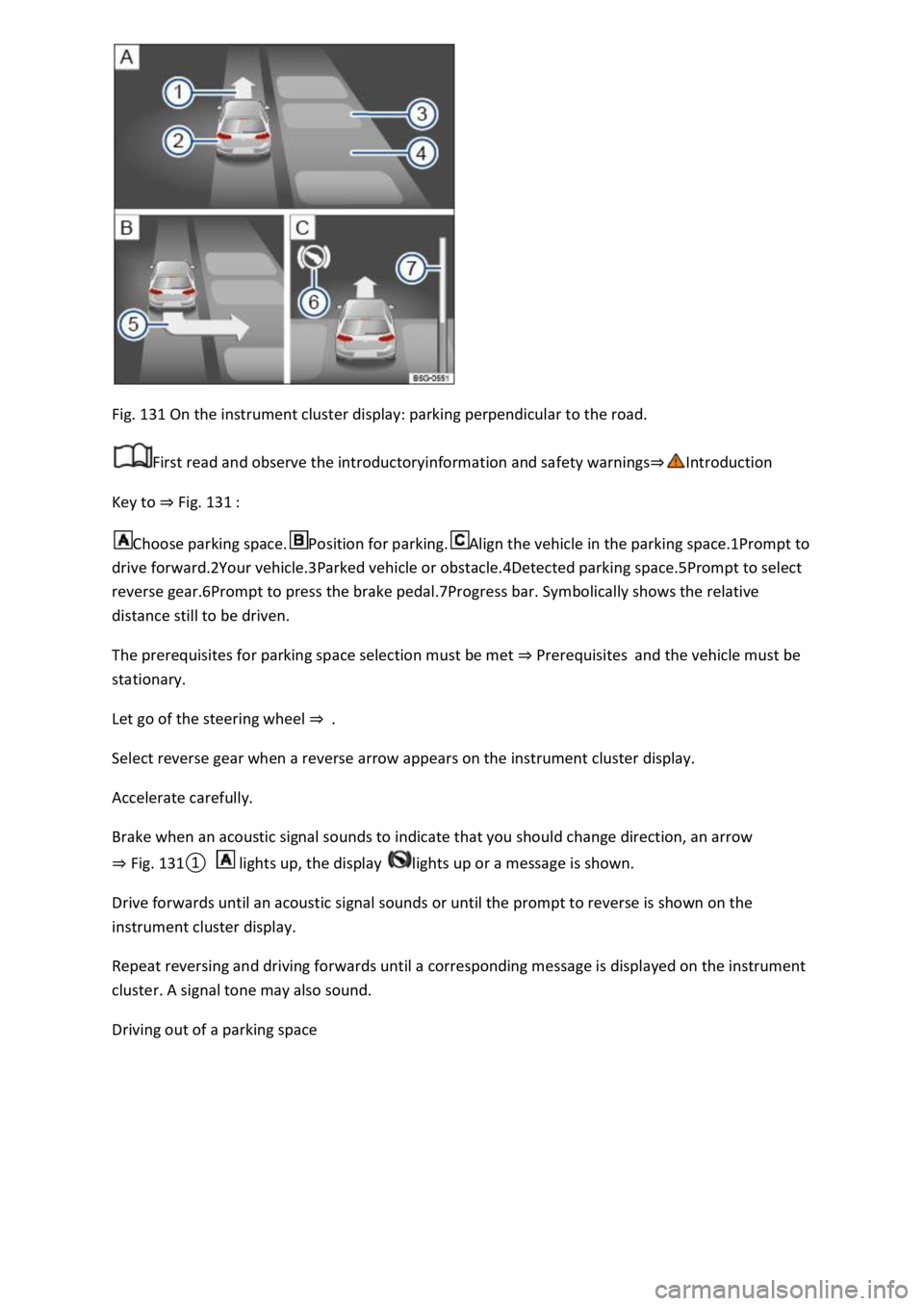
Fig. 131 On the instrument cluster display: parking perpendicular to the road.
First read and observe the introductoryinformation and safety warnings⇒Introduction
Key to ⇒ Fig. 131 :
Choose parking space.Position for parking.Align the vehicle in the parking space.1Prompt to
drive forward.2Your vehicle.3Parked vehicle or obstacle.4Detected parking space.5Prompt to select
reverse gear.6Prompt to press the brake pedal.7Progress bar. Symbolically shows the relative
distance still to be driven.
The prerequisites for parking space selection must be met ⇒ Prerequisites and the vehicle must be
stationary.
Let go of the steering wheel ⇒ .
Select reverse gear when a reverse arrow appears on the instrument cluster display.
Accelerate carefully.
Brake when an acoustic signal sounds to indicate that you should change direction, an arrow
⇒ Fig. 131① lights up, the display lights up or a message is shown.
Drive forwards until an acoustic signal sounds or until the prompt to reverse is shown on the
instrument cluster display.
Repeat reversing and driving forwards until a corresponding message is displayed on the instrument
cluster. A signal tone may also sound.
Driving out of a parking space
Page 274 of 502
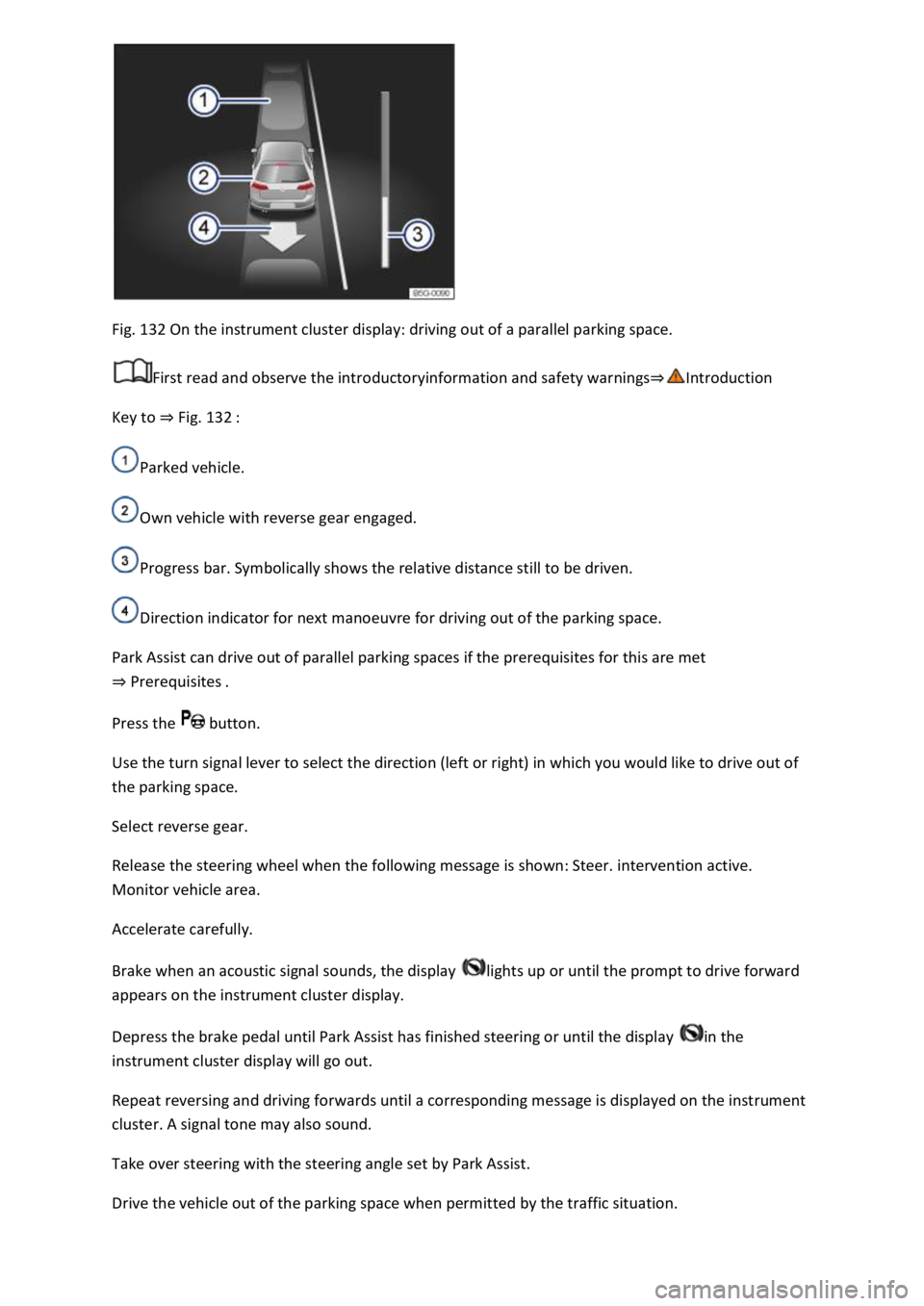
Fig. 132 On the instrument cluster display: driving out of a parallel parking space.
First read and observe the introductoryinformation and safety warnings⇒Introduction
Key to ⇒ Fig. 132 :
Parked vehicle.
Own vehicle with reverse gear engaged.
Progress bar. Symbolically shows the relative distance still to be driven.
Direction indicator for next manoeuvre for driving out of the parking space.
Park Assist can drive out of parallel parking spaces if the prerequisites for this are met
⇒ Prerequisites .
Press the button.
Use the turn signal lever to select the direction (left or right) in which you would like to drive out of
the parking space.
Select reverse gear.
Release the steering wheel when the following message is shown: Steer. intervention active.
Monitor vehicle area.
Accelerate carefully.
Brake when an acoustic signal sounds, the display lights up or until the prompt to drive forward
appears on the instrument cluster display.
Depress the brake pedal until Park Assist has finished steering or until the display in the
instrument cluster display will go out.
Repeat reversing and driving forwards until a corresponding message is displayed on the instrument
cluster. A signal tone may also sound.
Take over steering with the steering angle set by Park Assist.
Drive the vehicle out of the parking space when permitted by the traffic situation.
Page 275 of 502

Troubleshooting
First read and observe the introductoryinformation and safety warnings⇒Introduction
The system is not responding as expected
The sensors are dirty ⇒ Caring for and cleaning the vehicle exterior . The sensor visibility may be
impaired by dirt and snow or also residue from cleaning agents or coatings.
The system requirements must be met ⇒ Prerequisites .
The sensors are covered by water.
The vehicle is damaged in the area of the sensors, e.g. caused by parking collisions.
The detection ranges of the sensors are blocked by add-on parts, e.g. bicycle carriers.
Changes have been made to the paintwork in the area of the sensors or structural modifications
have been made, e.g. on the vehicle front end or the running gear.
The ultrasound signal is subject to interference from external noise sources, e.g. rough tarmac
surface or cobblestones.
No sensor visibility, error message, system switches itself off
Park Assist is switched off if a sensor fails.
Clean the sensors or remove stickers or accessories from the sensors and cameras ⇒ Caring for and
cleaning the vehicle exterior .
Check whether any damage is visible.
Possible solution
Switch off the system temporarily.
Check whether any of the causes described apply.
You can switch the system back on again once you have rectified the cause of the problem.
If the system still fails to respond as expected, have the system checked by a qualified workshop.
Automatic cancellation of driving in/out of a parking space
Park Assist cancels parking or driving out of a parking space in the following situations:
The button is pressed.
The driver intervenes using the steering wheel.
The driver door is opened.
The parking operation is not completed within around six minutes.
There is a system fault.
TCS is switched off or is taking corrective action.
Page 278 of 502

Never use the system where visibility is restricted or in unclear traffic situations, e.g. on extremely
busy roads or across several lanes.
Always pay attention to the area around the vehicle, since cyclists and pedestrians are often not
reliably detected, for example.
The Rear Traffic Alert will not always independently bring the vehicle to a complete stop.
Brake support systems
Information on brake support systems
The vehicle is fitted with brake support systems. The systems can support the driver in critical driving
or braking situations. Brake support systems cannot overcome the limits of physics and cannot
always keep the vehicle under control in every single critical driving or braking situation. The driver is
responsible for driving safety ⇒ .
Driving with brake support systems
The brake support systems work when the engine is running. They do not need to be operated
separately.
The brake pedal may pulsate or noises may occur while the brake support systems are regulating.
Continue to apply the necessary amount of brake pressure. Apply the necessary pressure to the
brake pedal consistently. If necessary, steer the vehicle while the brake pedal is depressed.
Electronic Stability Control (ESC)
ESC helps to reduce the risk of skidding and to improve driving stability in certain driving situations
⇒ .
ESC is always switched on.
Traction control system (TCS)
The TCS reduces the drive output if wheelspin occurs and adapts the drive output to suit road
surface conditions ⇒ Troubleshooting . The TCS makes it easier to pull away, accelerate and drive up
hills.
With some equipment levels, the TCS can be switched off in exceptional circumstances ⇒ Switching
the TCS on and off .
Anti-lock brake system (ABS)
The anti-lock brake system can prevent the wheels from locking when the brakes are applied up until
the point where the vehicle is nearly stationary and assists the driver in steering the vehicle and
keeping it under control ⇒ Troubleshooting .
Brake assist system
The brake assist system can help to reduce the stopping distance. The brake assist system reinforces
the braking force when the driver depresses the brake pedal quickly in an emergency situation.
If you reduce the pressure on the brake pedal, the brake assist system will switch off the brake
servo.
Page 320 of 502

trailers than for vehicles
without trailers.
Trailer stabilisation
First read and observe the introductoryinformation and safety warnings⇒Introduction
The trailer stabilisation function can detect if an attached trailer is starting to snake and can
countersteer.
Trailer stabilisation is an extension of the Electronic Stability Control (ESC).
If trailer snaking is detected, the trailer stabilisation function automatically helps to reduce the
snaking motion of the trailer using counter steering assistance.
Requirements for trailer stabilisation
-fitted or a compatible towing bracket has been retrofitted.
or in the instrument cluster is not lit up.
trailer is electrically connected to the towing vehicle via the trailer socket.
mph).
have a mechanical overrun system.
WARNING
Do not let the extra safety afforded by the trailer stabilisation function tempt you into taking any
risks when driving.
conditions.
WARNING
The trailer stabilisation function may not be able to detect all driving situations correctly.
Trailer stabilisation is switched off when ESC is deactivated.
stabilised accordingly in all cases.
Page 343 of 502
Attach the rubber cover or hard plastic cover and turn it clockwise as far as it will go.
Close the bonnet ⇒ In the engine compartment .
Changing the bulbs in the headlights (lights with LED technology)
First read and observe the introductoryinformation and safety warnings⇒Introduction
These lamps use LED technology. The LEDs cannot be replaced by customers. If some LEDs fail, this
may be an indication that more elements are on the point of failure. In this case, have the lights
checked and renewed if necessary at a qualified workshop.
Changing the front turn signal bulbs
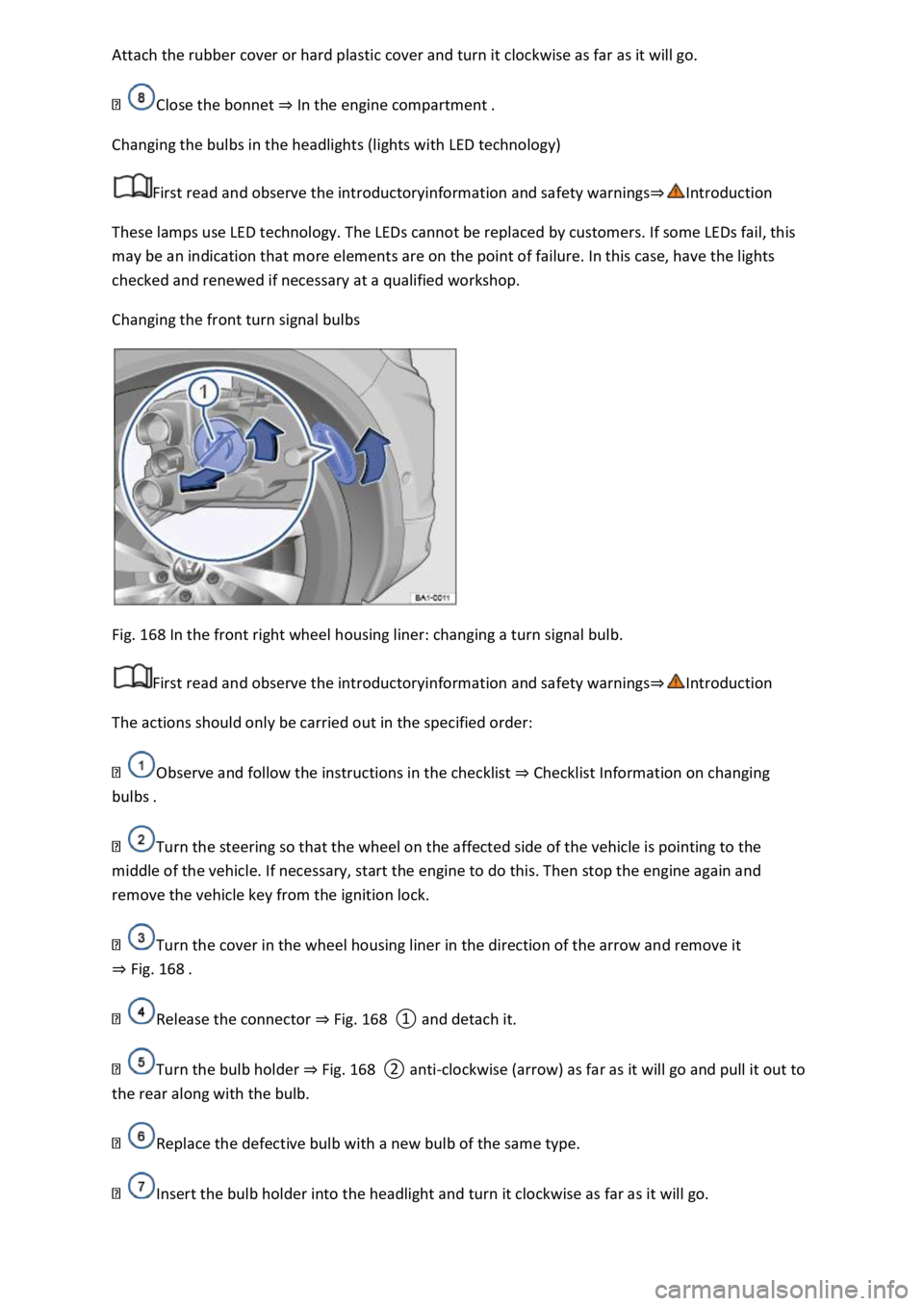
Fig. 168 In the front right wheel housing liner: changing a turn signal bulb.
First read and observe the introductoryinformation and safety warnings⇒Introduction
The actions should only be carried out in the specified order:
Observe and follow the instructions in the checklist ⇒ Checklist Information on changing
bulbs .
Turn the steering so that the wheel on the affected side of the vehicle is pointing to the
middle of the vehicle. If necessary, start the engine to do this. Then stop the engine again and
remove the vehicle key from the ignition lock.
Turn the cover in the wheel housing liner in the direction of the arrow and remove it
⇒ Fig. 168 .
Release the connector ⇒ Fig. 168 ① and detach it.
Turn the bulb holder ⇒ Fig. 168 ② anti-clockwise (arrow) as far as it will go and pull it out to
the rear along with the bulb.
Replace the defective bulb with a new bulb of the same type.
Insert the bulb holder into the headlight and turn it clockwise as far as it will go.