steer VOLKSWAGEN T-ROC 2021 Owner´s Manual
[x] Cancel search | Manufacturer: VOLKSWAGEN, Model Year: 2021, Model line: T-ROC, Model: VOLKSWAGEN T-ROC 2021Pages: 502, PDF Size: 9.42 MB
Page 274 of 502
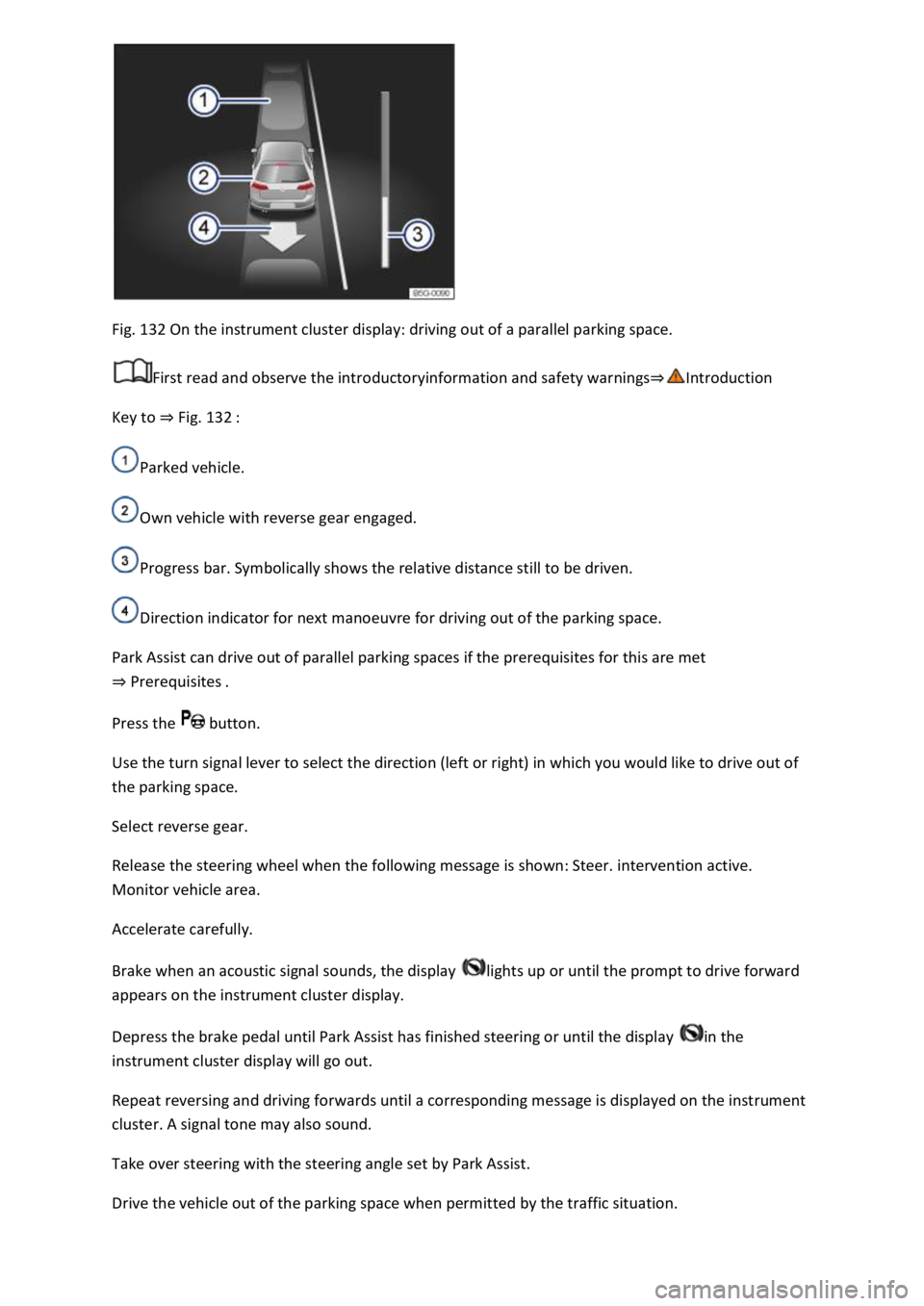
Fig. 132 On the instrument cluster display: driving out of a parallel parking space.
First read and observe the introductoryinformation and safety warnings⇒Introduction
Key to ⇒ Fig. 132 :
Parked vehicle.
Own vehicle with reverse gear engaged.
Progress bar. Symbolically shows the relative distance still to be driven.
Direction indicator for next manoeuvre for driving out of the parking space.
Park Assist can drive out of parallel parking spaces if the prerequisites for this are met
⇒ Prerequisites .
Press the button.
Use the turn signal lever to select the direction (left or right) in which you would like to drive out of
the parking space.
Select reverse gear.
Release the steering wheel when the following message is shown: Steer. intervention active.
Monitor vehicle area.
Accelerate carefully.
Brake when an acoustic signal sounds, the display lights up or until the prompt to drive forward
appears on the instrument cluster display.
Depress the brake pedal until Park Assist has finished steering or until the display in the
instrument cluster display will go out.
Repeat reversing and driving forwards until a corresponding message is displayed on the instrument
cluster. A signal tone may also sound.
Take over steering with the steering angle set by Park Assist.
Drive the vehicle out of the parking space when permitted by the traffic situation.
Page 275 of 502

Troubleshooting
First read and observe the introductoryinformation and safety warnings⇒Introduction
The system is not responding as expected
The sensors are dirty ⇒ Caring for and cleaning the vehicle exterior . The sensor visibility may be
impaired by dirt and snow or also residue from cleaning agents or coatings.
The system requirements must be met ⇒ Prerequisites .
The sensors are covered by water.
The vehicle is damaged in the area of the sensors, e.g. caused by parking collisions.
The detection ranges of the sensors are blocked by add-on parts, e.g. bicycle carriers.
Changes have been made to the paintwork in the area of the sensors or structural modifications
have been made, e.g. on the vehicle front end or the running gear.
The ultrasound signal is subject to interference from external noise sources, e.g. rough tarmac
surface or cobblestones.
No sensor visibility, error message, system switches itself off
Park Assist is switched off if a sensor fails.
Clean the sensors or remove stickers or accessories from the sensors and cameras ⇒ Caring for and
cleaning the vehicle exterior .
Check whether any damage is visible.
Possible solution
Switch off the system temporarily.
Check whether any of the causes described apply.
You can switch the system back on again once you have rectified the cause of the problem.
If the system still fails to respond as expected, have the system checked by a qualified workshop.
Automatic cancellation of driving in/out of a parking space
Park Assist cancels parking or driving out of a parking space in the following situations:
The button is pressed.
The driver intervenes using the steering wheel.
The driver door is opened.
The parking operation is not completed within around six minutes.
There is a system fault.
TCS is switched off or is taking corrective action.
Page 278 of 502

Never use the system where visibility is restricted or in unclear traffic situations, e.g. on extremely
busy roads or across several lanes.
Always pay attention to the area around the vehicle, since cyclists and pedestrians are often not
reliably detected, for example.
The Rear Traffic Alert will not always independently bring the vehicle to a complete stop.
Brake support systems
Information on brake support systems
The vehicle is fitted with brake support systems. The systems can support the driver in critical driving
or braking situations. Brake support systems cannot overcome the limits of physics and cannot
always keep the vehicle under control in every single critical driving or braking situation. The driver is
responsible for driving safety ⇒ .
Driving with brake support systems
The brake support systems work when the engine is running. They do not need to be operated
separately.
The brake pedal may pulsate or noises may occur while the brake support systems are regulating.
Continue to apply the necessary amount of brake pressure. Apply the necessary pressure to the
brake pedal consistently. If necessary, steer the vehicle while the brake pedal is depressed.
Electronic Stability Control (ESC)
ESC helps to reduce the risk of skidding and to improve driving stability in certain driving situations
⇒ .
ESC is always switched on.
Traction control system (TCS)
The TCS reduces the drive output if wheelspin occurs and adapts the drive output to suit road
surface conditions ⇒ Troubleshooting . The TCS makes it easier to pull away, accelerate and drive up
hills.
With some equipment levels, the TCS can be switched off in exceptional circumstances ⇒ Switching
the TCS on and off .
Anti-lock brake system (ABS)
The anti-lock brake system can prevent the wheels from locking when the brakes are applied up until
the point where the vehicle is nearly stationary and assists the driver in steering the vehicle and
keeping it under control ⇒ Troubleshooting .
Brake assist system
The brake assist system can help to reduce the stopping distance. The brake assist system reinforces
the braking force when the driver depresses the brake pedal quickly in an emergency situation.
If you reduce the pressure on the brake pedal, the brake assist system will switch off the brake
servo.
Page 279 of 502

Electronic differential lock (EDL and XDS)
EDL brakes a spinning wheel automatically and distributes the drive force to the other drive wheels.
The EDL switches off automatically under unusually heavy loads to prevent the brake from
overheating. The EDL switches back on again automatically as soon as the brake has cooled down.
XDS improves traction in order to keep the vehicle on its intended course.
Automatic Post-Collision Braking System
In the event of a collision, the Automatic Post-Collision Braking System can help the driver to reduce
the risk of skidding, and the danger of secondary collisions, through automatic braking.
The Automatic Post-Collision Braking System functions only for collisions that are detected as a
collision by the airbag control unit.
The vehicle is braked automatically if the required systems have not been damaged in the collision
and have remained functional.
The following actions override automatic braking in the event of a collision:
When the driver depresses the accelerator.
When the brake pressure transmitted through the depressed brake pedal is greater than the brake
pressure provided by the system.
WARNING
The intelligent technology used in brake support systems cannot overcome the laws of physics, and
functions only within the limits of the systems. Driving fast on icy, slippery or wet roads can lead to a
loss of control of the vehicle and could cause serious injury to the driver and passengers.
Always adapt your speed and driving style to suit visibility, weather, road and traffic conditions. Do
not let the extra safety afforded by the brake support systems ABS, BAS, EDL, TCS and ESC tempt you
into taking any risks when driving.
The brake support systems cannot overcome the laws of physics. Slippery and wet roads will remain
dangerous, even when the ESC and other systems are active.
Driving too fast on wet roads can cause the wheels to lose contact with the road surface and
aquaplane. The vehicle cannot be braked, steered or controlled once it has lost contact with the
road surface.
Brake support systems cannot prevent an accident if, for example, you are driving too close to the
vehicle in front or are driving too fast for the individual situation.
Although the brake support systems are very effective and can help to control the vehicle in difficult
driving situations, please always remember that the driving stability of the vehicle depends on the
tyre grip.
Page 320 of 502

trailers than for vehicles
without trailers.
Trailer stabilisation
First read and observe the introductoryinformation and safety warnings⇒Introduction
The trailer stabilisation function can detect if an attached trailer is starting to snake and can
countersteer.
Trailer stabilisation is an extension of the Electronic Stability Control (ESC).
If trailer snaking is detected, the trailer stabilisation function automatically helps to reduce the
snaking motion of the trailer using counter steering assistance.
Requirements for trailer stabilisation
-fitted or a compatible towing bracket has been retrofitted.
or in the instrument cluster is not lit up.
trailer is electrically connected to the towing vehicle via the trailer socket.
mph).
have a mechanical overrun system.
WARNING
Do not let the extra safety afforded by the trailer stabilisation function tempt you into taking any
risks when driving.
conditions.
WARNING
The trailer stabilisation function may not be able to detect all driving situations correctly.
Trailer stabilisation is switched off when ESC is deactivated.
stabilised accordingly in all cases.
Page 343 of 502
Attach the rubber cover or hard plastic cover and turn it clockwise as far as it will go.
Close the bonnet ⇒ In the engine compartment .
Changing the bulbs in the headlights (lights with LED technology)
First read and observe the introductoryinformation and safety warnings⇒Introduction
These lamps use LED technology. The LEDs cannot be replaced by customers. If some LEDs fail, this
may be an indication that more elements are on the point of failure. In this case, have the lights
checked and renewed if necessary at a qualified workshop.
Changing the front turn signal bulbs
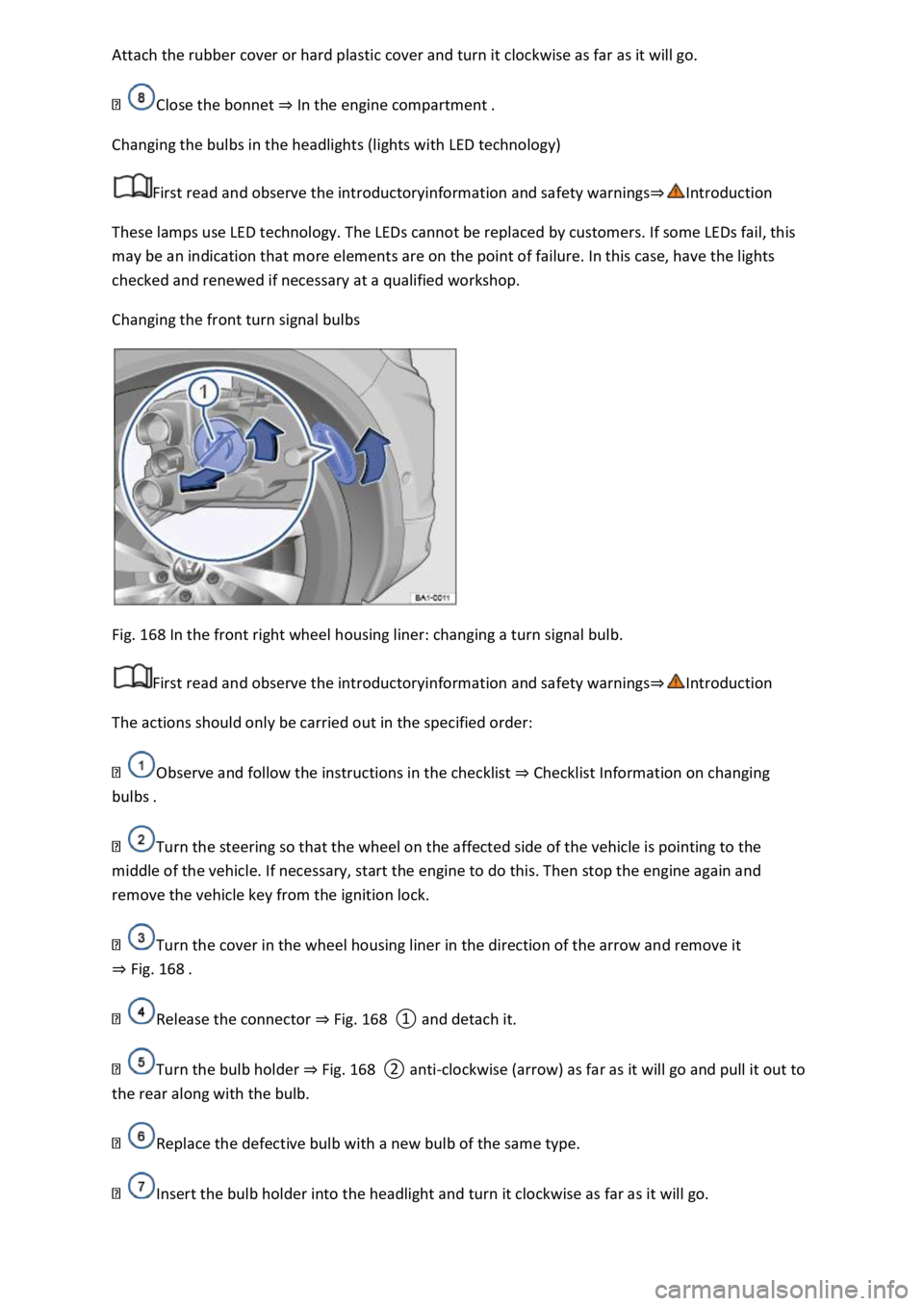
Fig. 168 In the front right wheel housing liner: changing a turn signal bulb.
First read and observe the introductoryinformation and safety warnings⇒Introduction
The actions should only be carried out in the specified order:
Observe and follow the instructions in the checklist ⇒ Checklist Information on changing
bulbs .
Turn the steering so that the wheel on the affected side of the vehicle is pointing to the
middle of the vehicle. If necessary, start the engine to do this. Then stop the engine again and
remove the vehicle key from the ignition lock.
Turn the cover in the wheel housing liner in the direction of the arrow and remove it
⇒ Fig. 168 .
Release the connector ⇒ Fig. 168 ① and detach it.
Turn the bulb holder ⇒ Fig. 168 ② anti-clockwise (arrow) as far as it will go and pull it out to
the rear along with the bulb.
Replace the defective bulb with a new bulb of the same type.
Insert the bulb holder into the headlight and turn it clockwise as far as it will go.
Page 359 of 502
Vehicles with a manual gearbox:
Pulled vehicle (rear)
Ensure that the ignition is switched on so that the steering wheel is not locked and so that you can
indicate, sound the horn and operate the wipers if necessary.
the
ignition is switched on and the vehicle is rolling. Otherwise you must press the brake pedal with
significantly more force and also use more effort for steering.
-rope is always taut.
ox in neutral or select the selector lever position N.
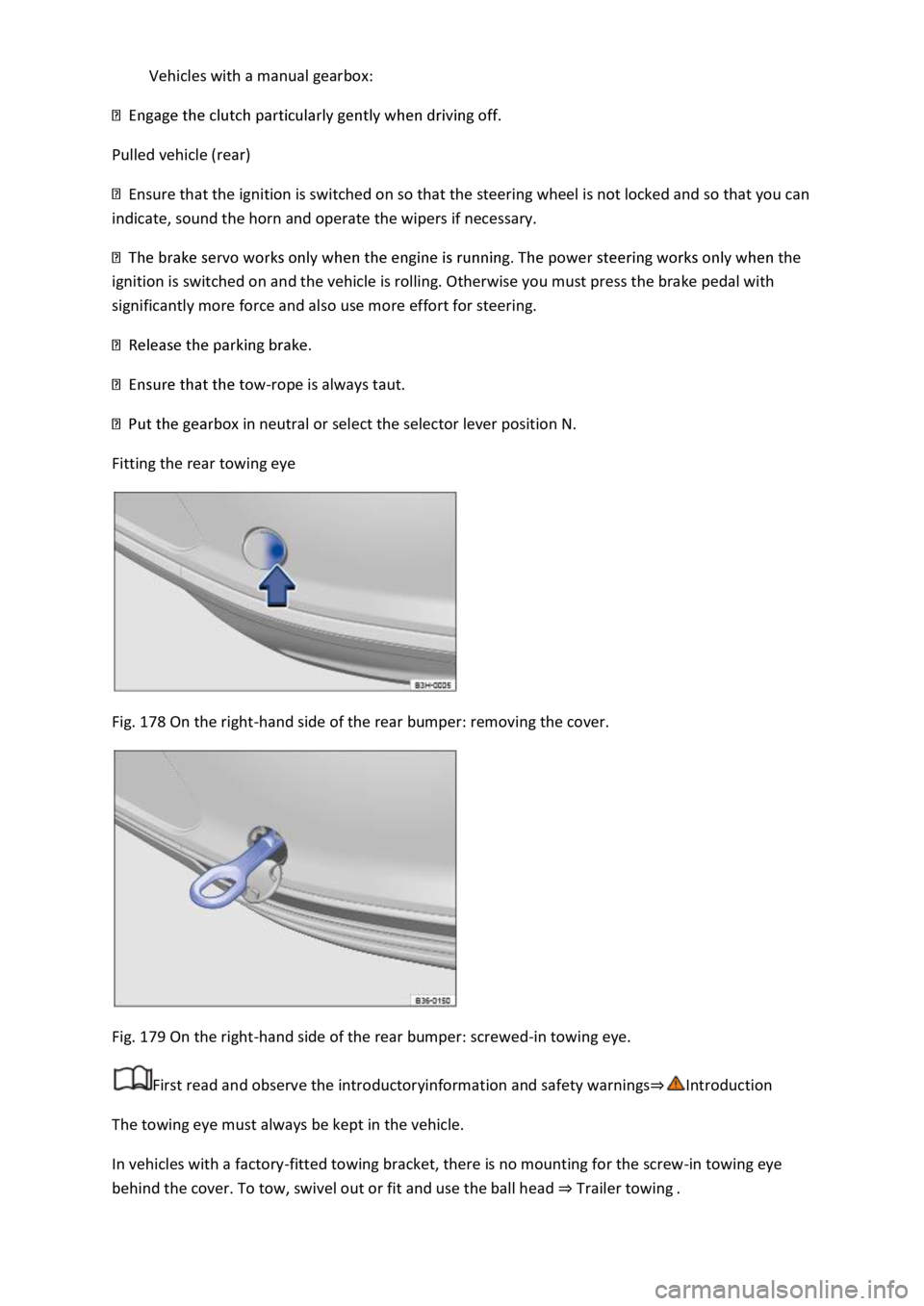
Fitting the rear towing eye
Fig. 178 On the right-hand side of the rear bumper: removing the cover.
Fig. 179 On the right-hand side of the rear bumper: screwed-in towing eye.
First read and observe the introductoryinformation and safety warnings⇒Introduction
The towing eye must always be kept in the vehicle.
In vehicles with a factory-fitted towing bracket, there is no mounting for the screw-in towing eye
behind the cover. To tow, swivel out or fit and use the ball head ⇒ Trailer towing .
Page 404 of 502
Wheel imbalance may develop when the vehicle is driven; you will notice this by nervous steering
response. Unbalanced wheels will affect the level of tyre wear. In this case, the wheels should be
balanced again.
Incorrect wheel alignment impairs driving safety and increases tyre wear. The running gear should
be checked by a qualified workshop if tyres show excessive wear.
WARNING
If you notice unusual vibration or the car pulling to one side while the vehicle is in motion, this may
indicate that one of the tyres is damaged.
Check the tyres and wheel rims for damage.
have the vehicle checked.
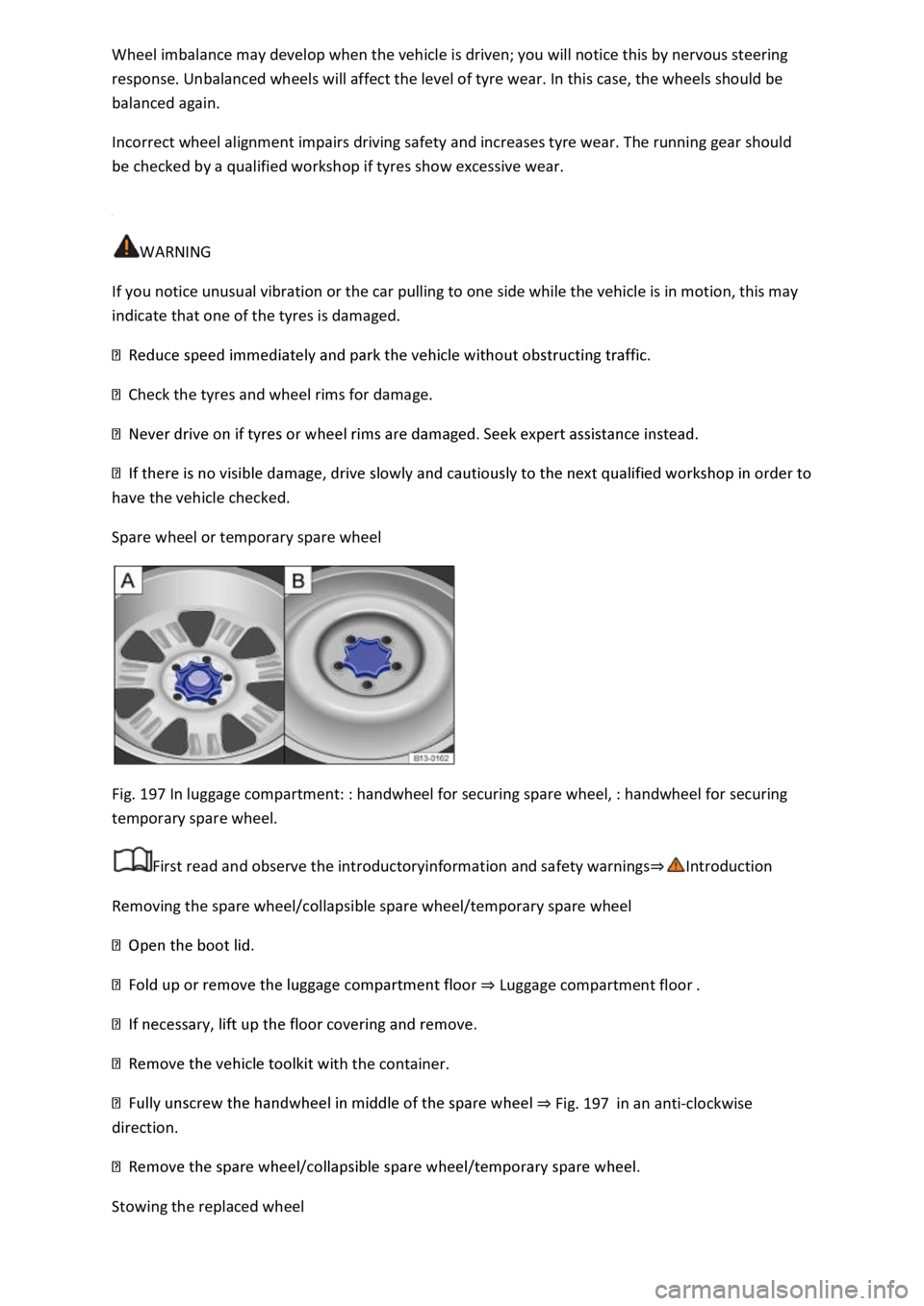
Spare wheel or temporary spare wheel
Fig. 197 In luggage compartment: : handwheel for securing spare wheel, : handwheel for securing
temporary spare wheel.
First read and observe the introductoryinformation and safety warnings⇒Introduction
Removing the spare wheel/collapsible spare wheel/temporary spare wheel
⇒ Luggage compartment floor .
th the container.
⇒ Fig. 197 in an anti-clockwise
direction.
Stowing the replaced wheel
Page 438 of 502

WARNING
Care products may be toxic and hazardous. Unsuitable care products and incorrect application of
care products can cause accidents, severe injuries, burns or poisoning.
facturer's instructions.
-ventilated rooms so that you do not breathe in any toxic
vapours.
e fluids for vehicle care.
These substances are toxic and highly inflammable.
NOTICE
Soiling with aggressive and solvent-based ingredients can cause irreparable damage to the vehicle
equipment, even if left for only a short time, e.g. on seat padding or trim parts.
1) Suitable accessories are available from your Volkswagen dealership. Follow the application
instructions on the packaging.
Washing the vehicle
Thoroughly wash the underside of the vehicle on a regular basis to remove road salt or sea water
residue.
Automatic car washes
Always observe all the car wash operator's specifications, particularly if your vehicle has add-on
parts ⇒ .
ar washes without brushes.
⇒ Information on
steering .
⇒ Operating the wiper lever and the rain/light sensor before using
the car wash.
High-pressure cleaner
Page 453 of 502

e.g. temperature, rain.
As well as performing the actual control functions, these data are also used to detect and rectify
faults and help Volkswagen to improve vehicle functions. The majority of these data are temporary
and are only processed within the vehicle itself. Only a very small amount of data is stored in the
event memories or possibly on the vehicle key.
Reading out the vehicle's event memory
There is a diagnostic interface in the vehicle interior for reading out the event memories (on-board
diagnosis) ⇒ .
If you have service work performed on your vehicle, the technical data can be read out of the vehicle
together with the vehicle identification number by service employees, e.g. workshops, or third
parties such as breakdown services. Service work includes, for example, repairs, maintenance,
warranty work or quality assurance measures. The service workshop or third party collects,
processes and uses the data. The data document the vehicle's technical status, help in
troubleshooting and in improving quality and may be sent to Volkswagen in some cases.
Furthermore, the manufacturer is subject to legal product safety requirements. To make sure it
complies with these requirements, the manufacturer requires technical data from the vehicles.
Event memories in the vehicle can be reset by a service workshop as part of repair or service work.
The event memory should be read out and reset only by a qualified workshop. Additional
information on the stored data is available from the qualified workshop.
After a fault has been rectified, the information in the memory relating to the fault is deleted. Other
memory content is overwritten on an ongoing basis.
Event data recorder
This vehicle is equipped with an event data recorder. The main task of an event data recorder is to
record data in particular accident scenarios or accident-like situations, e.g. in the event of airbags
being triggered or a collision with an obstacle on the road. These data help in analysis of how a
vehicle system behaved in these situations. The event data recorder records data relating to driving
dynamics and the restraint system for a short period of 10 seconds or less. This information includes,
for example:
of the driver and front passenger were fastened.
These data help to obtain a better understanding of the circumstances in the situations where
accidents and injuries have occurred.
Data from driver assist systems are also recorded. In addition to information about whether the
systems were switched on or off, available only to a restricted extent or inactive, it is also possible to
determine whether these functions steered, accelerated or braked the vehicle in the above-
described situations. Depending on the vehicle equipment, these systems include the following: