driving mode VOLKSWAGEN T-ROC 2021 Owner´s Manual
[x] Cancel search | Manufacturer: VOLKSWAGEN, Model Year: 2021, Model line: T-ROC, Model: VOLKSWAGEN T-ROC 2021Pages: 502, PDF Size: 9.42 MB
Page 12 of 502
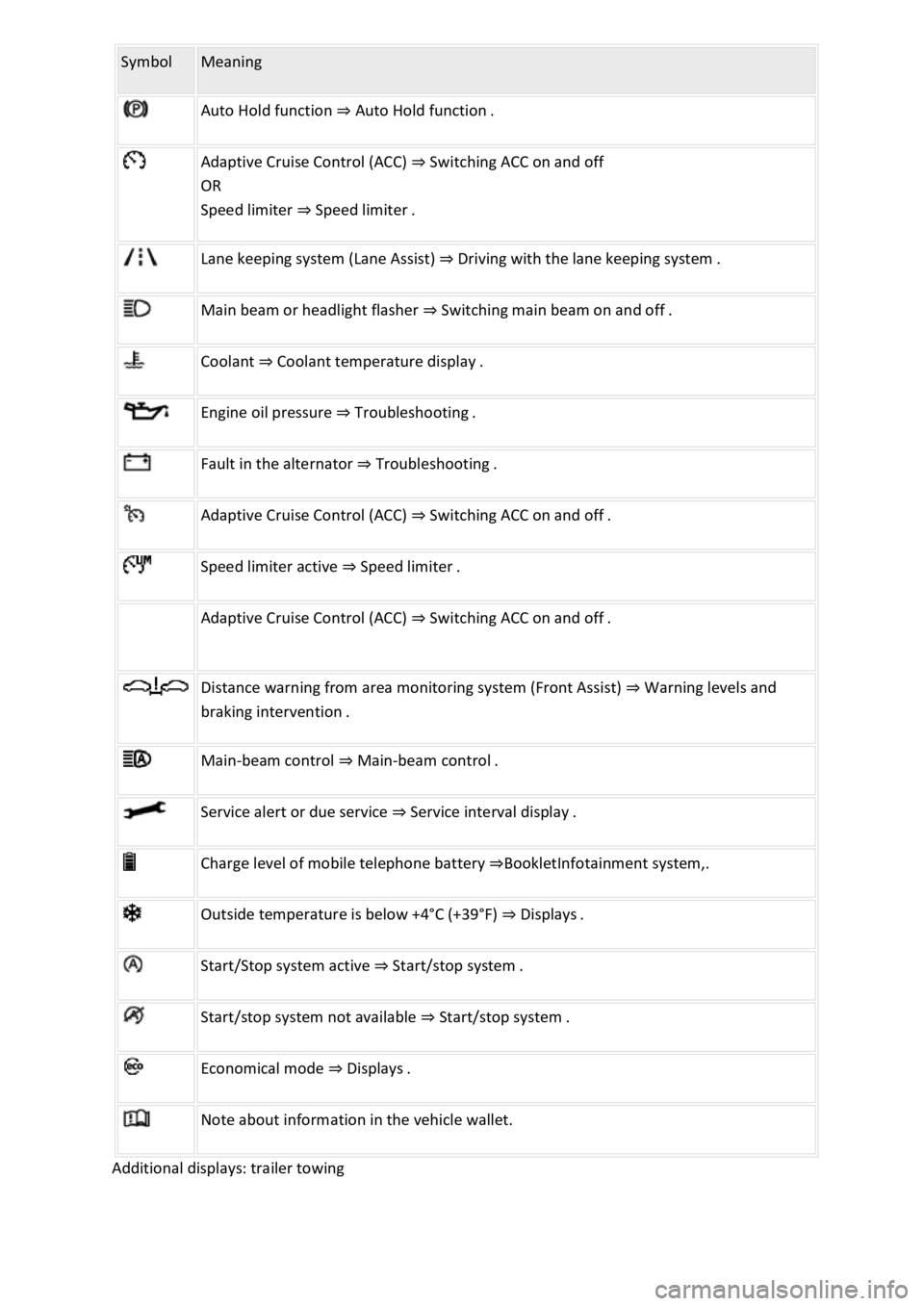
Symbol Meaning
Auto Hold function ⇒ Auto Hold function .
Adaptive Cruise Control (ACC) ⇒ Switching ACC on and off
OR
Speed limiter ⇒ Speed limiter .
Lane keeping system (Lane Assist) ⇒ Driving with the lane keeping system .
Main beam or headlight flasher ⇒ Switching main beam on and off .
Coolant ⇒ Coolant temperature display .
Engine oil pressure ⇒ Troubleshooting .
Fault in the alternator ⇒ Troubleshooting .
Adaptive Cruise Control (ACC) ⇒ Switching ACC on and off .
Speed limiter active ⇒ Speed limiter .
Adaptive Cruise Control (ACC) ⇒ Switching ACC on and off .
Distance warning from area monitoring system (Front Assist) ⇒ Warning levels and
braking intervention .
Main-beam control ⇒ Main-beam control .
Service alert or due service ⇒ Service interval display .
Charge level of mobile telephone battery ⇒BookletInfotainment system,.
Outside temperature is below +4°C (+39°F) ⇒ Displays .
Start/Stop system active ⇒ Start/stop system .
Start/stop system not available ⇒ Start/stop system .
Economical mode ⇒ Displays .
Note about information in the vehicle wallet.
Additional displays: trailer towing
Page 13 of 502
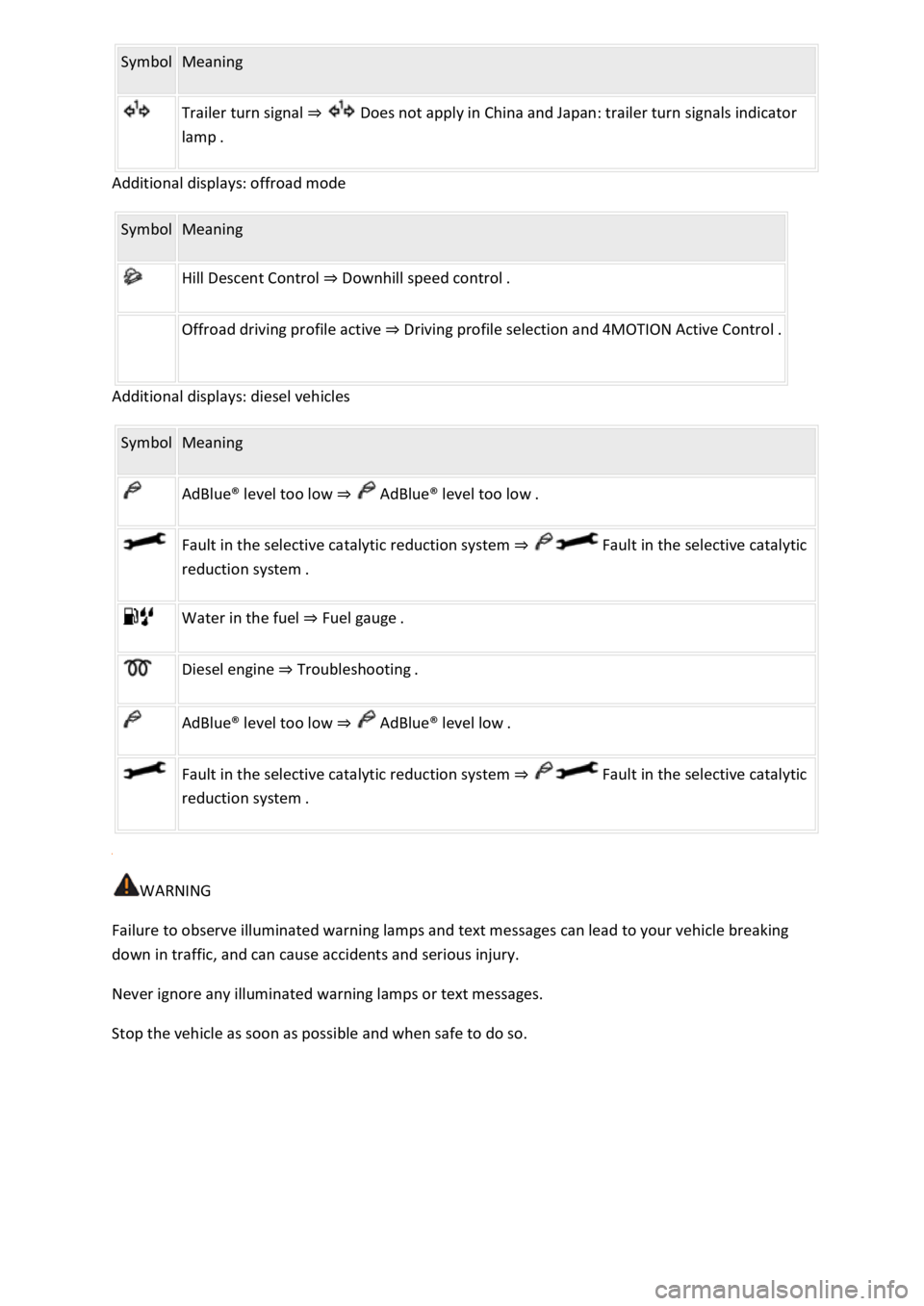
Symbol Meaning
Trailer turn signal ⇒ Does not apply in China and Japan: trailer turn signals indicator
lamp .
Additional displays: offroad mode
Symbol Meaning
Hill Descent Control ⇒ Downhill speed control .
Offroad driving profile active ⇒ Driving profile selection and 4MOTION Active Control .
Additional displays: diesel vehicles
Symbol Meaning
AdBlue
Page 18 of 502

OR: press the or arrow button on the multifunction steering wheel to select the required
map size. A frame appears around the selected option.
Press the button on the multifunction steering wheel to confirm your selection.
With some equipment levels, navigation is shown on two screens or only one. The navigation map
can be displayed on the Active Info Display and Infotainment system or only on the Infotainment
system display. In the latter case, only navigation arrows are shown on the Active Info Display.
Displays
First read and observe the introductoryinformation and safety warnings⇒Introduction
Possible instrument cluster displays
Open doors, bonnet and boot lid.
Warning and information messages.
Mileage displays.
Time ⇒ Time .
Radio and navigation information ⇒BookletInfotainment system,.
Telephone information ⇒BookletInfotainment system,.
Outside temperature.
Compass display.
Selector lever positions.
Gear-change indicator ⇒ Gear-change indicator .
Driving data display (multifunction display) and menus for various settings ⇒ Instrument cluster
menus .
Service interval display ⇒ Service interval display .
Speed warning ⇒ Instrument cluster menus .
Speed warning for winter tyres.
Start/stop system status display ⇒ Start/stop system .
Road signs detected by the Dynamic Road Sign Display system ⇒ Dynamic Road Sign Display (Sign
Assist) .
Status display for Active Cylinder Management (ACT®) ⇒ Driving economically .
Economical mode .
Engine code.
Display of driver assist systems ⇒ Driver assist systems .
Page 19 of 502

Personalisation: welcome and user selection ⇒ Personalisation .
Open doors, bonnet and boot lid
The instrument cluster display indicates if any doors, the engine compartment or boot lid are open
once the vehicle has been unlocked, and while the vehicle is in motion. In some cases, a signal tone
is also given. Different instrument cluster designs may have different displays.
Selector lever positions (DSG® dual clutch gearbox)
The gear selected is displayed on the side of the selector lever and on the display in the instrument
cluster. The instrument cluster display may show which gear has been selected if the selector lever is
in D/S position or in Tiptronic mode ⇒ DSG® dual clutch gearbox .
Outside temperature display
If the outside temperature falls below approximately +4°C (+39°F), the temperature display also
shows a snowflake symbol . This symbol remains lit up until the outside temperature rises
above +6°C (+43°F) ⇒ .
Heat radiated from the engine may cause the temperature display to show a slightly higher value
than the actual outside temperature if the vehicle is stationary, the auxiliary heater ⇒ Auxiliary
heater and ventilation is switched on or the vehicle is travelling at a very low vehicle speed.
The measured range is -45°C (-49°F) to +76°C (+169°F).
Gear-change indicator
While the vehicle is in motion, the instrument cluster may show which gear should be selected to
reduce fuel consumption ⇒ Gear-change indicator .
Mileage displays
The odometer registers the total distance travelled by the vehicle.
The trip recorder (trip) shows the distance travelled since the trip recorder was last reset.
Vehicles with analogue instrument cluster: press the button in the instrument cluster
briefly to reset the trip recorder to 0 ⇒ Analogue instrument cluster .
Vehicles with digital instrument cluster: reset the trip recorder via the Infotainment system or
via the multifunction display ⇒ Infotainment system controls and displays or ⇒ Driving data display
(multifunction display) .
Speed warning for winter tyres
A display in the instrument cluster indicates when the set maximum speed has been exceeded
⇒ Instrument cluster menus .
Speed warning settings can be made in the vehicle settings in the Infotainment system ⇒ Vehicle
settings menu .
Compass display
Page 28 of 502

Display of road signs
After validation and evaluation of the information from the camera, the Infotainment system and
the current vehicle data, the activated Dynamic Road Sign Display shows up to three valid road signs
⇒ Fig. 14 with the accompanying additional signs:
1st position:The road sign that currently applies for the driver is shown on the left-hand side of the
display, e.g. a speed limit of 130 km/h (80 mph) ⇒ Fig. 14 .2nd position:Road signs that do not
always apply (e.g. 100 km/h (60 mph) in wet) are shown in second place.Additional sign:if the
windscreen wiper is active while the vehicle is in motion, the now valid road sign with the additional
In wet sign, for example, will be moved left to the first position.3rd position:Further road signs that
do not always apply will be displayed in the third position, e.g. overtaking not permitted at certain
times ⇒ Fig. 14 .
Speed warning
If the Dynamic Road Sign Display detects that an applicable speed limit has been exceeded, it can
issue an acoustic warning signal and display a message on the instrument cluster display.
The speed warning can be set or completely deactivated in the vehicle settings in the Infotainment
system ⇒ Vehicle settings menu . The settings can be adjusted in increments of 5 km/h (3 mph)
within a range between 0 km/h (mph) and 15 km/h (9 mph) above the permitted maximum speed.
Trailer mode
In vehicles with a factory-fitted towing bracket and a trailer with an electrical connection to the
vehicle, the display of road signs that may apply to the vehicle when towing a trailer, e.g. applicable
speed limits and no-overtaking signs, can be activated or deactivated in the vehicle settings in the
Infotainment system ⇒ Vehicle settings menu .
In trailer mode, the speed warning function display can be adjusted to the type of trailer or to legal
requirements. The settings can be adjusted in increments of 10 km/h (5 mph) within a range
between 60 km/h (40 mph) and 130 km/h (80 mph). If a higher speed is set than is permitted for
driving with a trailer in the country in which you are currently travelling, Dynamic Road Sign Display
automatically issues a warning at the usual speed limit, e.g. at 80 km/h (50 mph) in Germany.
If the speed warning for the trailer is deactivated, Dynamic Road Sign Display issues warnings as if
the vehicle was being driven without a trailer.
Function limitations
Dynamic Road Sign Display is subject to system-related limitations. The following conditions can
restrict the function of Dynamic Road Sign Display, or prevent it from working altogether:
Poor visibility, e.g. snow, rain, fog or heavy spray.
Glare, e.g. due to oncoming traffic or sunlight.
High speeds.
Covered or dirty camera.
Road signs that are located outside of the camera's field of view.
Page 29 of 502

Partially or fully hidden traffic signs, e.g. by trees, snow, dirt or other vehicles.
Road signs that do not correspond to the standard design.
Damaged or bent traffic signs.
Variable road signs on gantries (changeable road sign display using LEDs or other light sources).
Out-of-date map material in the Infotainment system.
Stickers on vehicles that show road signs, e.g. speed restrictions on trucks.
WARNING
The intelligent technology used by the Dynamic Road Sign Display cannot overcome the laws of
physics, and functions only within the limits of the system. Do not let the extra convenience afforded
by the Dynamic Road Sign Display system tempt you into taking any risks when driving. The system is
not a substitute for the full concentration of the driver.
Always adapt your speed and driving style to suit visibility, weather, road and traffic conditions.
Poor visibility, darkness, snow, rain and fog can cause road signs not to be displayed or to be
incorrectly displayed by the system.
If the camera's field of view is dirty, covered or damaged, the function of the Dynamic Road Sign
Display system may be impaired.
WARNING
Driving recommendations and traffic symbols displayed by the Dynamic Road Sign Display system
may differ from the current traffic situation.
Not all road signs can be recognised by the system and displayed correctly.
Road signs on the road and traffic regulations have priority over the recommendations and displays
provided by the Dynamic Road Sign Display system.
NOTICE
Availability of the Dynamic Road Sign Display function is limited in waypoint mode (waypoint
navigation) of the Infotainment system.
Some settings can be saved in the user accounts of the personalisation function and can therefore
change automatically when the user account is changed ⇒ Personalisation .
Page 140 of 502

Switching over headlights for driving abroad (travel mode)
If you have to drive a right-hand drive vehicle in a left-hand drive country, or vice versa, the
asymmetric dipped beam headlights may dazzle oncoming traffic. The headlights must therefore be
switched over when you travel to these countries.
With some equipment levels, the headlight alignment can be adjusted in the Infotainment system in
the Vehicle settings menu ⇒ Infotainment system controls and displays .
In vehicles in which the headlights cannot be switched over in the menu, masking stickers should be
applied to certain parts of the headlight lenses, or the headlights should be adjusted by a qualified
workshop. A qualified workshop can provide you with further information. Volkswagen recommends
using a Volkswagen dealership for this purpose.
Travel mode may be used only for a short period. Please contact a qualified workshop for a
permanent conversion. Volkswagen recommends using a Volkswagen dealership for this purpose.
Interior lighting
Instrument and switch lighting
The brightness of the instrument and switch lighting can be adjusted in the Infotainment system in
the Vehicle settings menu ⇒ Infotainment system controls and displays .
The brightness setting is automatically adjusted to the changing light conditions in the vehicle.
When the light switch is in position , a sensor will switch the dipped beam and the lighting in
the instruments and switches on and off automatically depending on the ambient brightness level.
When the light is switched off and the ignition switched on, the instrument and switch lighting
(needles and scales) is switched on. As the ambient light becomes lower, the illumination of the
scales is automatically reduced and may be switched off entirely. This function is intended to remind
the driver to switch on the dipped beam in good time, i.e. when driving through tunnels.
Interior and reading lights
Press the appropriate button or move the switch to the appropriate position:
Switch off the interior light.Switch on the interior lights.The interior lights are switched on
automatically when the vehicle is unlocked, a door is opened or the vehicle key is removed from the
ignition.Switch the reading light on or off.
Stowage compartment and luggage compartment lights
A light will be switched on and off when the stowage compartment on the front passenger side or
the boot lid is opened or closed.
Background lighting
Page 172 of 502

Eco driving profile ⇒ Driving profile selection and 4MOTION Active Control .
Avoid driving at full throttle
Never drive the vehicle at its top speed. The drag coefficient increases at excessively high speeds.
This in turn increases the force needed to move the vehicle.
Reduce idling
Pull away immediately with low engine speeds. If you are stopped for a long period, do not allow the
engine to idle but switch it off, e.g. when in a traffic jam or at a railway crossing.
In vehicles with an activated start/stop system, the engine can switch off automatically when the
vehicle is stopping and when the vehicle is stationary ⇒ Start/stop system .
Refuel moderately
A full fuel tank increases the weight of the vehicle. A fuel tank that is half or two thirds of the way
full is sufficient for journeys in urban traffic in particular.
Avoid short journeys
A cold engine has very high fuel consumption. The optimum operating temperature is reached only
after driving a few kilometres. The fuel consumption is above average at very low ambient
temperatures, e.g. in winter ⇒ Fig. 97 . Plan journeys economically and combine short journeys.
Carry out regular maintenance
Regular maintenance is an essential prerequisite for economical driving and increases the service life
of the vehicle.
Observe the tyre pressures
Low tyre pressures does not just mean greater wear, but also increase the rolling resistance of the
tyres and thus the fuel consumption. Use optimised rolling resistance tyres.
Adjust the tyre pressure according to the load. Observe the information on the tyre pressure sticker
⇒ Useful information about wheels and tyres
Tyre Pressure Loss Indicator or Tyre Pressure Monitoring System ⇒ Tyre monitoring system .
Use low viscosity engine oils
Fully synthetic engine oils with a low viscosity decrease frictional resistance in the engine and are
distributed better and more quickly, especially during cold starts.
Do not drive with unnecessary loads in the vehicle
You can reduce fuel consumption by clearing out the luggage compartment before setting off, for
example by removing empty drink crates or unused child seats.
To keep the vehicle's air resistance as low as possible, remove any add-on parts and equipment such
as ski racks, bicycle racks and roof carriers once you have finished using them.
Save electrical energy
Page 176 of 502

WARNING
New brake pads will not have the optimal braking effect when first fitted.
New brake pads cannot generate the full braking effect during the first 300 km and must first be run
in. A reduced braking effect can be increased by applying more pressure to the brake pedal.
In order to reduce the risk of accidents, serious injuries and the loss of control over the vehicle, you
must drive particularly carefully when driving with new brake pads.
Never drive too close to other vehicles during the run-in time for the new brake pads and never
create a driving situation that will place a heavy load on the brakes.
WARNING
Overheated brakes reduce the braking effect and considerably increase the braking distance.
When driving downhill, the brakes are placed under particular strain and become hot very quickly.
Before driving down a long, steep gradient, reduce speed and change to a lower gear (with manual
gearboxes or in Tiptronic mode with the automatic gearbox). This will make use of the engine
braking effect and relieve the load on the brakes.
Non-standard or damaged front spoilers could restrict the airflow to the brakes and cause them to
overheat.
WARNING
Wet brakes or brakes coated with ice or road salt react more slowly and require longer braking
distances.
Carefully apply the brakes to test them.
Always dry brakes and clean off any coating of ice and salt with a few cautious applications of the
brake when visibility, weather, road and traffic conditions permit.
WARNING
Driving without the brake servo can considerably increase the braking distance and thus cause
accidents and serious injuries.
Never switch the engine or ignition off while the vehicle is in motion.
If the brake servo does not function or the vehicle is being towed, the brake pedal will have to be
depressed more forcefully as the braking distance will be increased due to the lack of assistance for
the brake system.
Page 178 of 502

Avoid any abrupt or sudden driving and braking manoeuvres as this could cause the open boot lid to
move unpredictably.
Any objects protruding from the luggage compartment must be marked to ensure that they are
visible to other road users. Comply with legal regulations.
If items protrude out of the luggage compartment, never use the boot lid to wedge them into place
or hold them in position.
If you have to drive with the boot lid open, you must remove any carriers and the loads attached to
them from the boot lid.
WARNING
Poisonous exhaust fumes could enter the vehicle interior when the boot lid is open. This could result
in loss of consciousness, carbon monoxide poisoning, serious injury and accidents.
You should always drive with the boot lid closed in order to prevent poisonous exhaust fumes from
entering the vehicle.
If exceptional circumstances require you to drive with an open boot lid, you must do the following to
reduce the amount of poisonous exhaust fumes that could enter into the vehicle:
Close all windows and the glass roof.
Switch off the air recirculation mode of the heating and fresh air system or air conditioning system.
Open all vents in the dash panel.
Switch the blower for the heating and fresh air system or for the air conditioning system to the
highest setting.
NOTICE
The vehicle height, and possibly the length, are different when the boot lid is open.
Driving through water
Please follow these points in order to prevent damage to your vehicle when driving through water,
for example on flooded streets:
Check how deep the water is before driving through it. The water may be no higher than the lower
edge of the body ⇒ .
Do not drive faster than walking speed.
Never stop the vehicle, reverse or switch off the engine while in water.
Oncoming vehicles will create waves that could increase the water level for your vehicle to such an
extent that it is not safe to drive through the water.
Always deactivate the start/stop system manually when driving through water ⇒ Start/stop system .